Remotion vs HyperFrames: we timed renders and priced both
By Nihar Ranjan Das · Sat Oct 17 2026 · 8 min read · 0 views
View as a Web StorySoftware#claude code#remotion#ai video#hyperframes#video rendering#licensing
Remotion vs HyperFrames: we timed renders and priced both
Which is faster, Remotion or HyperFrames?
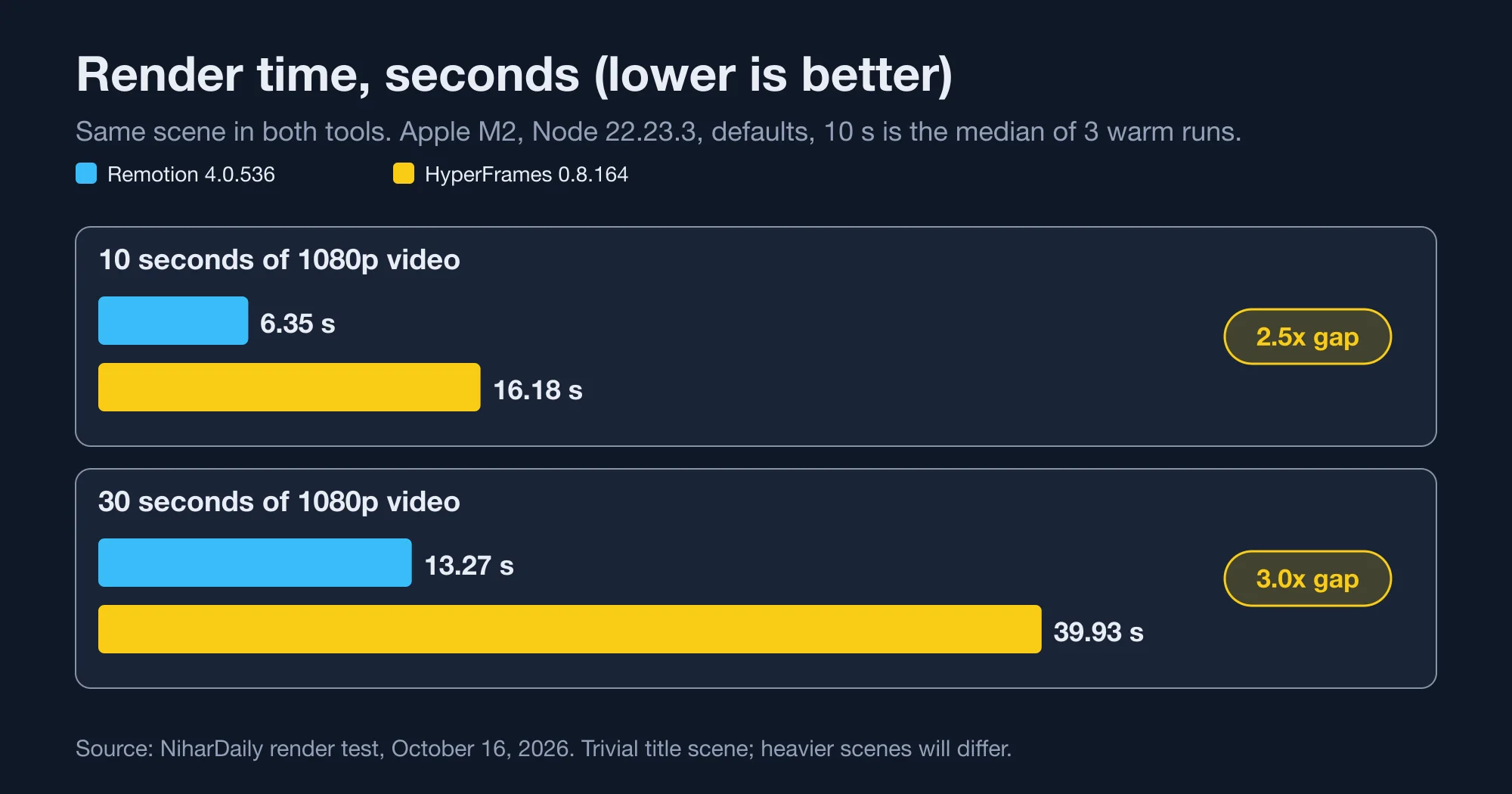
Remotion is faster in our test. Remotion rendered a 10-second 1080p video in a median 6.35 seconds, and HyperFrames took a median 16.18 seconds for the same scene. At 30 seconds the gap widened to 13.27 seconds against 39.93 seconds.
Remotion is a framework that turns React components into video. You write a component, a bundler packages it, and a headless browser captures each frame. HyperFrames is HeyGen's open-source framework that turns plain HTML into video. It seeks each frame in headless Chrome and encodes the result with FFmpeg, according to the HyperFrames README.
Both tools look similar from the outside. Under the hood they differ in how they capture frames, and that shows in the numbers.
Test setup
We built one scene twice: a black 1920x1080 frame with a 72-pixel white title that fades in over 18 frames. Each version ran at 30 frames per second. We rendered the 10-second version three times per tool and the 30-second version once. The machine was an Apple M2 with 8 cores. Node was 22.23.3.
| Run | Remotion 4.0.536 | HyperFrames 0.8.164 | Gap |
|---|---|---|---|
| 10 s, run 1 | 6.23 s | 16.71 s | 2.7x |
| 10 s, run 2 | 6.35 s | 16.11 s | 2.5x |
| 10 s, run 3 | 6.66 s | 16.18 s | 2.4x |
| 10 s, median | 6.35 s | 16.18 s | 2.5x |
| 30 s, one run | 13.27 s | 39.93 s | 3.0x |
| First ever render | 57.7 s | 72.9 s | 1.3x |
Source: NiharDaily render test, October 16, 2026. Wall-clock time from the shell, output discarded.
The first render of each tool was slow because both download and cache a browser. Remotion needed 57.7 seconds, and HyperFrames needed 72.9 seconds including its npm download. Every later run was warm.
Why is HyperFrames slower here?
HyperFrames reported screenshot capture with workerCount 1 in its own render log. That means it captured frames one at a time through a single worker. Remotion rendered frames in parallel across the machine's cores.
We did not tune either tool. Remotion has a --concurrency flag and HyperFrames exposes worker settings in hyperframes render --help. A tuned run may close some of the gap. We report defaults because defaults are what a team gets on day one.
Per frame, Remotion ran at about 68 frames per second on the 30-second job and HyperFrames at about 22.
Advertisement
What this test does not show
This scene is trivial. A video full of clips, WebGL or large images changes the balance, and we did not test it. We also did not test distributed rendering. Remotion Lambda and HyperFrames on AWS Lambda both exist, and the HyperFrames README itself describes Remotion Lambda as a mature cloud renderer.
Treat the 2.5x to 3x gap as the cost of defaults on a light scene, not a universal constant.
How much do Remotion and HyperFrames cost?
HyperFrames costs nothing in licence fees. Remotion is free for teams of up to three people, and paid beyond that. The pricing comes from Remotion's licence page, read on October 16, 2026.
| Plan | Who it is for | Price |
|---|---|---|
| Free licence | Individuals and companies of up to 3 people | $0, commercial use allowed |
| Remotion for Creators | Companies of 4 or more, one seat per user | $25 per seat per month |
| Remotion for Automators | Companies of 4 or more, automated renders | $0.01 per render, $100 per month minimum |
| Enterprise | Custom terms and support | From $500 per month |
| HyperFrames | Anyone | $0, Apache 2.0 |
Remotion's page says Automators developers do not need a seat. It also says a $100 monthly Automators spend makes a team eligible for the Enterprise licence.
The HyperFrames README says there are "no per-render fees or commercial-use thresholds". It labels Remotion's licence "source-available". Check Remotion's terms yourself before you sign anything, because they are the vendor's, not ours.
What does a month cost at different volumes?
For a team of five, Remotion Creators costs a flat $125 a month. Remotion Automators costs $100 until you pass 10,000 renders, then $0.01 for each. HyperFrames costs $0 in licence fees at any volume.
| Renders per month | Remotion Creators (5 seats) | Remotion Automators | HyperFrames |
|---|---|---|---|
| 1,000 | $125 | $100 | $0 |
| 10,000 | $125 | $100 | $0 |
| 25,000 | $125 | $250 | $0 |
| 50,000 | $125 | $500 | $0 |
Source: Remotion licence page, October 16, 2026. Team of five. Compute not included.
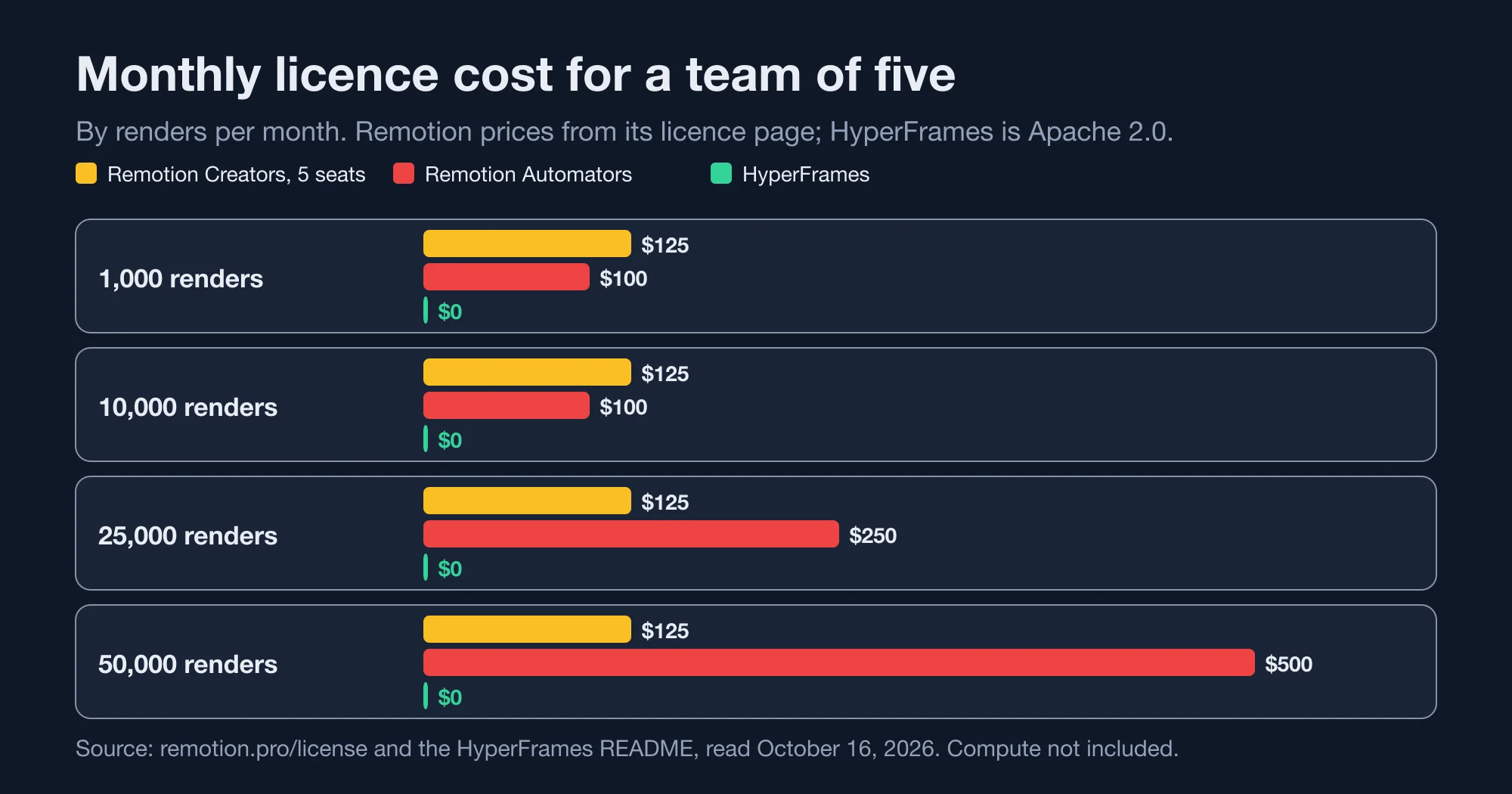
Two crossover points matter. Automators beats Creators below 12,500 renders a month for five seats, because $0.01 times 12,500 is $125. Past that, five Creator seats win.
Does the faster renderer save money?
No, not at small volume. A faster renderer saves compute, and compute is cheap next to a licence. Our measurements make the sums easy.
Remotion spent about 0.44 seconds of wall time per second of video. HyperFrames spent about 1.33. For 10,000 one-minute videos a month, Remotion needs about 73.9 machine-hours and HyperFrames about 221.7.
Price a machine-hour at $0.10, which is our assumption and not a quote from any provider. Remotion's compute would then be $7.39 and HyperFrames' $22.17. The difference is $14.78 a month.
The Automators minimum alone is $100. So at 10,000 renders a month, HyperFrames saves roughly $85 even after paying for its slower renders. For example, a scene-heavy video that takes ten times longer to render changes the maths, which is why you should time your own scene.
Here is the bottom line on cost. Licence fees decide the winner for light scenes. Render speed decides the winner for heavy scenes at high volume.
How do they work with Claude Code?
Both ship instructions for coding agents, and both install in one command. HyperFrames scaffolds a project with an AGENTS.md and a CLAUDE.md already in it. Remotion installs a bundle of skills into .claude/skills.
For HyperFrames, npx hyperframes init demo --non-interactive created six files: AGENTS.md, CLAUDE.md, hyperframes.json, index.html, meta.json and package.json. The generated CLAUDE.md tells the agent to invoke the /hyperframes skill before it writes any composition. It also lists a /remotion-to-hyperframes skill that translates a Remotion composition into HTML.
For Remotion, npx skills add remotion-dev/skills -a claude-code -y copied 12 skills totalling 2.9 MB. They include remotion-create, remotion-render and remotion-upgrade. Our post on Claude Code ignoring AGENTS.md covers what to do when an agent skips such files.
The authoring model differs, and it matters to an agent.
| Question | Remotion | HyperFrames |
|---|---|---|
| Language | React and TypeScript | HTML, CSS and JavaScript |
| Build step | Bundler required | None, index.html plays as is |
| Animation | React hooks such as interpolate() |
Seekable timelines such as GSAP |
| Project size after scaffold | 866 MB node_modules |
Six small files, run through npx |
| Node requirement | Node 22.23.3 in our test | Node 22 or newer plus FFmpeg |
| Licence | Source-available | Apache 2.0 |
Source: NiharDaily scaffold test, October 16, 2026, and the HyperFrames README for requirements.
GSAP is a JavaScript animation library, and HyperFrames uses a paused GSAP timeline that the renderer seeks frame by frame. FFmpeg is the open-source tool that encodes the captured frames into an MP4.
HyperFrames needs Node 22 or newer. If you are still on an older runtime, our guide on which Node.js version to run in 2026 lays out the support dates.
Which one should your team pick?
Pick by team size first, then by volume. The licence boundary at three people is the single biggest factor.
- One to three people: use Remotion. It is free, renders faster in our test and has the mature cloud renderer.
- Four or more, under about 12,500 renders a month: use HyperFrames, or pay for Automators if you need React components and Remotion Lambda.
- Four or more, heavy and complex scenes at high volume: time your own scene on both tools before choosing. Render time can outweigh the fee.
- You want the agent to hand off plain files: use HyperFrames, because plain HTML needs no bundler.
- You already have a React design system: use Remotion and reuse the components.
Migration is possible in one direction at least. HyperFrames ships a Remotion-to-HyperFrames skill, so a team can start free on Remotion, grow past three people and move without rewriting by hand. We did not test that skill.
How can you repeat this test on your own scene?
Time both tools with the same scene and the same machine, and discard the first run. The commands below are the ones we used, and they work on Node 22.
For Remotion, scaffold with npx create-video@latest --yes --blank demo, define a 1920x1080 composition, then run npx remotion render MyComp out.mp4. For HyperFrames, run npx hyperframes init demo --non-interactive, edit index.html, then run npx hyperframes render -o out.mp4 --quiet.
Wrap each render in /usr/bin/time -p and record the real line. Run it three times and take the median. Then multiply by your monthly volume. That one number, set beside the licence table above, answers the question for your team.
What we did not check
We did not test audio, captions, video inputs, GPU rendering or Lambda. We did not run HyperFrames with more workers. We measured one scene on one machine. We also did not verify the vendors' claims about star counts or adoption.
The numbers here are a starting point. Copy the two scenes, run them on your hardware and replace our timings with yours.
Advertisement
FAQ
Is Remotion free for commercial use?
Yes, for individuals and companies of up to three people, according to Remotion's licence page. Commercial use is allowed on the free licence. A company of four or more needs Creators at $25 per seat per month, Automators at $0.01 per render with a $100 monthly minimum, or Enterprise from $500 a month.
Is HyperFrames really free?
HyperFrames is Apache 2.0 licensed, and its README states there are no per-render fees or commercial-use thresholds. You still pay for the machines that render and for any cloud rendering you choose. The framework itself has no licence cost.
Is HyperFrames faster than Remotion?
Not in our test. On a 1080p title scene at 30 frames per second, Remotion 4.0.536 rendered 10 seconds of video in a median 6.35 seconds and HyperFrames 0.8.164 took 16.18 seconds. Results vary with scene complexity, worker settings and hardware.
Can Claude Code write HyperFrames and Remotion videos?
Yes. HyperFrames scaffolds a project with `AGENTS.md` and `CLAUDE.md` files that point to its skills. Remotion installs 12 skills with `npx skills add remotion-dev/skills`. Both let Claude Code write a composition and run the render command.
Can I move a Remotion project to HyperFrames?
HyperFrames lists a `/remotion-to-hyperframes` skill in the `CLAUDE.md` it generates. It translates a React composition into HTML. We did not run it, so test it on a small composition before relying on it for a large project.
Comments
Loading…
Sign in to join the conversation.
Related posts
Go 1.27 refuses to build with removed GODEBUG settings
Go 1.27 fails with 'removed GODEBUG set to old value'. We tested every removed setting on Go 1.26.9 and 1.27.2: where it fails, the fix, and one silent timer change.
Sat Oct 17 2026 · 10 min read · 0 views
Does Go 1.27's json v2 break your LLM parsing? We tested
Go 1.27 runs encoding/json on the v2 engine. We tested 11 LLM-style payloads on Go 1.26.9 and 1.27.2: v1 behaved the same, v2 is stricter, Unmarshal is 2.3x faster.
Sat Oct 17 2026 · 10 min read · 0 views
Go 1.27 now drains HTTP bodies on Close: what we measured
Go 1.27 drains unread HTTP/1 response bodies on Close, up to 256 KiB or 50 ms. We measured connection reuse on Go 1.26.9 and 1.27.2 and found a hard cliff at 257 KiB.
Sat Oct 17 2026 · 9 min read · 0 views