Which AI code review tool should you trust with your PRs?
By Nihar Ranjan Das · Fri Oct 09 2026 · 11 min read · 0 views
View as a Web StoryAI#github copilot#Laravel#AI code review#code review tools#CodeRabbit#Greptile

No AI code review tool wins every benchmark, and each vendor publishes the one it wins. Greptile reports an 82% catch rate on its own test (Greptile benchmark, July 2025). CodeRabbit reports the top F1 score on an independent leaderboard. Both can be true at once, because the tests measure different things.
The answer for your team is a one-hour experiment on your own repository. This post gives you the published numbers, a cost model that shows why the winner changes, a starter pack of eight seeded bugs, and a scoring script you can run today.
What is AI code review?
AI code review is the use of a language model to read a pull request and leave comments on bugs, risks, and style. The tool runs when a PR opens, reads the diff and some surrounding code, and posts line-level comments. A person then decides which comments to act on.
Academic work on automating review is older than the current tools. Microsoft researchers introduced CodeReviewer at ESEC/FSE 2022, a model trained on real review data in nine programming languages and evaluated on quality estimation, comment generation, and code refinement, per the CodeReviewer paper on arXiv.
Four tools come up most often in 2026 comparisons.
CodeRabbit is an AI pull request reviewer that works on GitHub, GitLab, Azure DevOps, and Bitbucket, according to its documentation. Greptile is an AI reviewer built around whole-repository context, so it can follow code across files. Cursor Bugbot is the review feature from the Cursor editor team. GitHub Copilot code review is GitHub's built-in reviewer, and it works on GitHub.com, the CLI, mobile, and several IDEs.
What do the published benchmarks say?
On the most detailed public test, catch rates ran from 6% to 82%. Greptile ran that test in July 2025 and published the method. It used 50 real bugs from 10 bug-fix pull requests in each of 5 open-source repositories: Sentry, Cal.com, Grafana, Keycloak, and Discourse.
Each bug was reintroduced in a PR on a clean fork, one fork per tool. A bug counted as caught only when the tool left a line-level comment that pointed to the faulty code and explained the impact. Every tool ran with default settings and no custom rules, per the Greptile benchmark page.
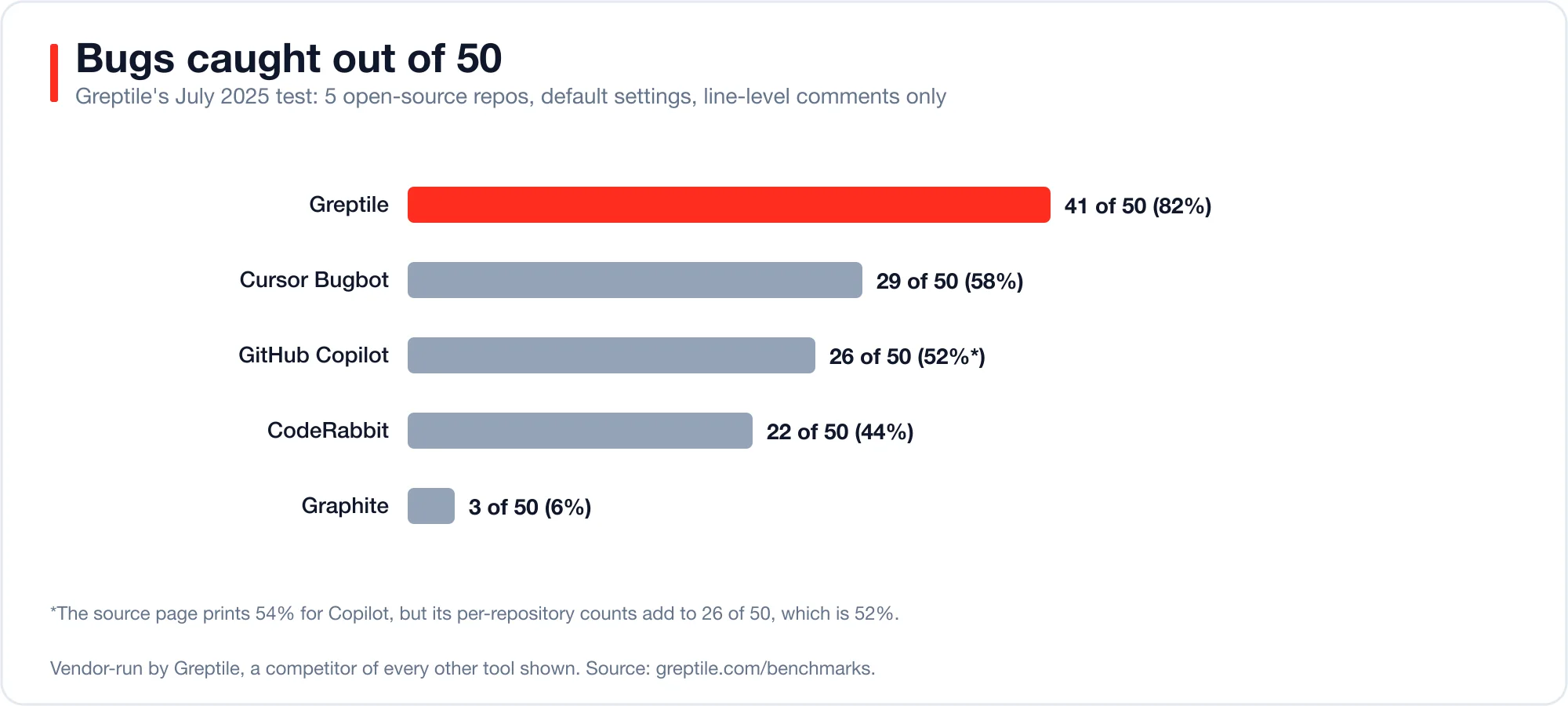
Read the chart with three cautions.
Advertisement
- The test was run by Greptile, a competitor of every other tool in it.
- The page lists Copilot at 54% (July 2025), but its own per-repository totals add to 26 of 50, which is 52%.
- The page itself says these tools evolve quickly and results may change.
Catch rate also ignores noise. A tool that comments on everything catches more bugs and wastes more of your time. That is why a second kind of benchmark exists.
Why does the leaderboard winner keep changing?
The leaderboards measure precision and recall, and both depend on how you define a correct comment. Precision is the share of a tool's comments that point at real problems. Recall is the share of real problems the tool found. F1 is a single score that balances the two.
Martian, an independent lab, runs a public Code Review Bench. It treats comments that developers acted on as a proxy for correct ones, according to a summary of its method. At launch, CodeRabbit reported the top F1 score at 51.2% (CodeRabbit blog, 2026). A Greptile post dated July 30, 2026 later reported Greptile first at 60.8% F1, with 76.2% precision and 50.6% recall (Greptile post, July 30, 2026).
Both announcements come from vendors. Both can be accurate for their snapshot date. The lesson is practical: a leaderboard rank is a month-old fact, and a proxy for your codebase at best.
Copilot's documentation adds a third data point. GitHub states that Copilot "is not guaranteed to spot all problems or issues in a pull request." It also says to supplement Copilot's feedback with a human review, per the Copilot code review concepts page.
What does a noisy reviewer cost you?
Every false comment costs triage time, and every missed bug costs rework. The tool that wins depends on which cost is larger for your team. A small model shows why.
Let a team merge 100 pull requests. Assume one in ten holds a defect that review could catch. Assume a bug caught in review saves a set number of minutes, and each false comment costs 4 minutes to read and dismiss. Compare three reviewer styles. The recall and noise figures are assumptions for illustration, not measurements of any product.
| Style | Recall | False comments per PR |
|---|---|---|
| Loud and thorough | 0.82 | 1.5 |
| Balanced | 0.55 | 0.3 |
| Quiet and selective | 0.44 | 0.15 |
When a missed bug costs 120 minutes of rework, the balanced reviewer wins. It nets 540 minutes per 100 PRs, against 384 for the loud one and 468 for the quiet one. When a missed bug costs 240 minutes, the loud reviewer wins with 1,368 minutes, against 1,200 and 996.
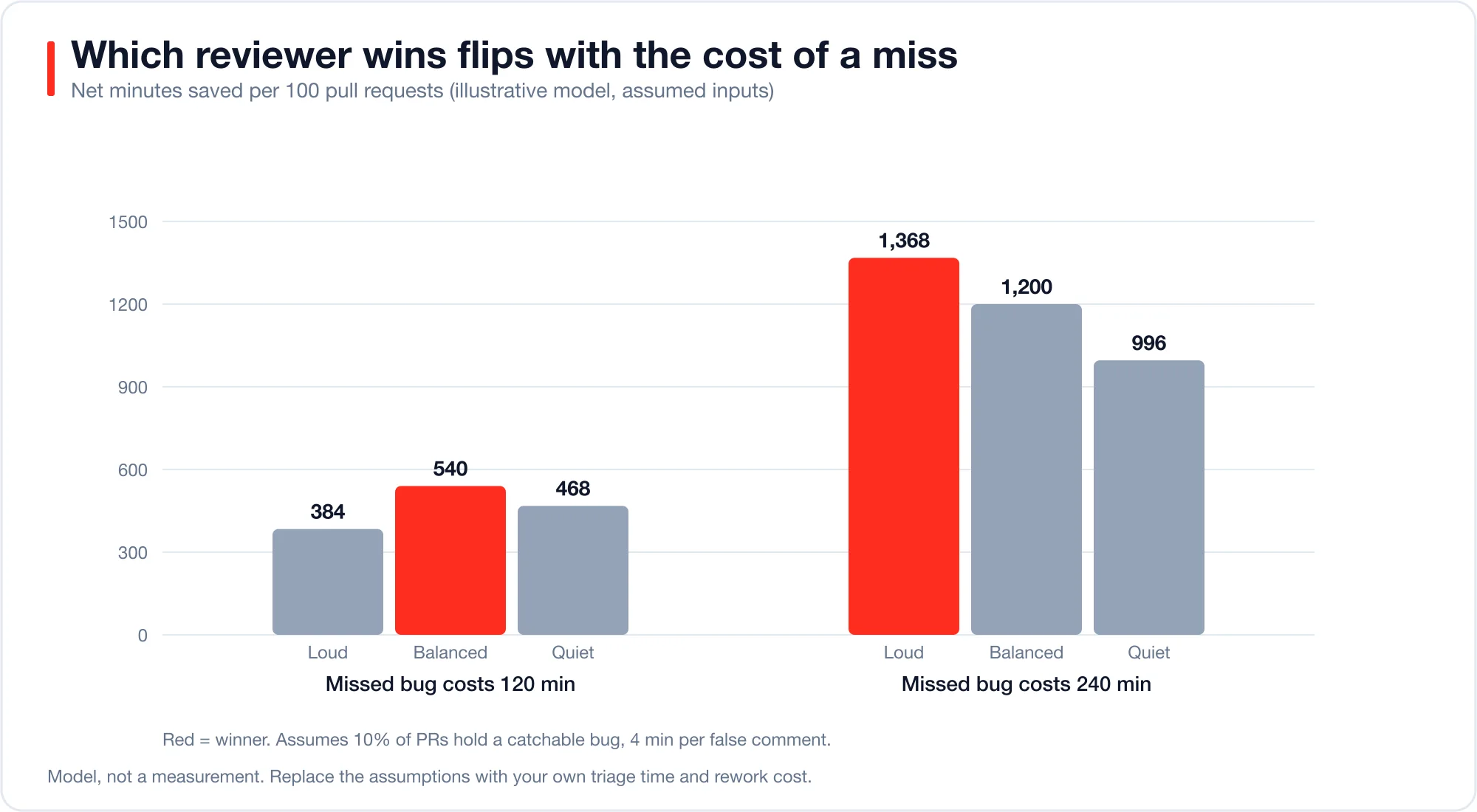
The takeaway is the flip. Teams that ship payments, auth, or medical code should lean toward recall. Teams that ship internal tools with fast rollbacks should lean toward precision. Nobody can pick for you from a leaderboard.
How do you test tools on your own code?
Plant known bugs in a copy of your repository and let each tool review them. This is a seeded-bug test. It takes about an hour for 10 bugs, and it measures what matters: how many of your kinds of bugs each tool catches, and how many comments you must dismiss.
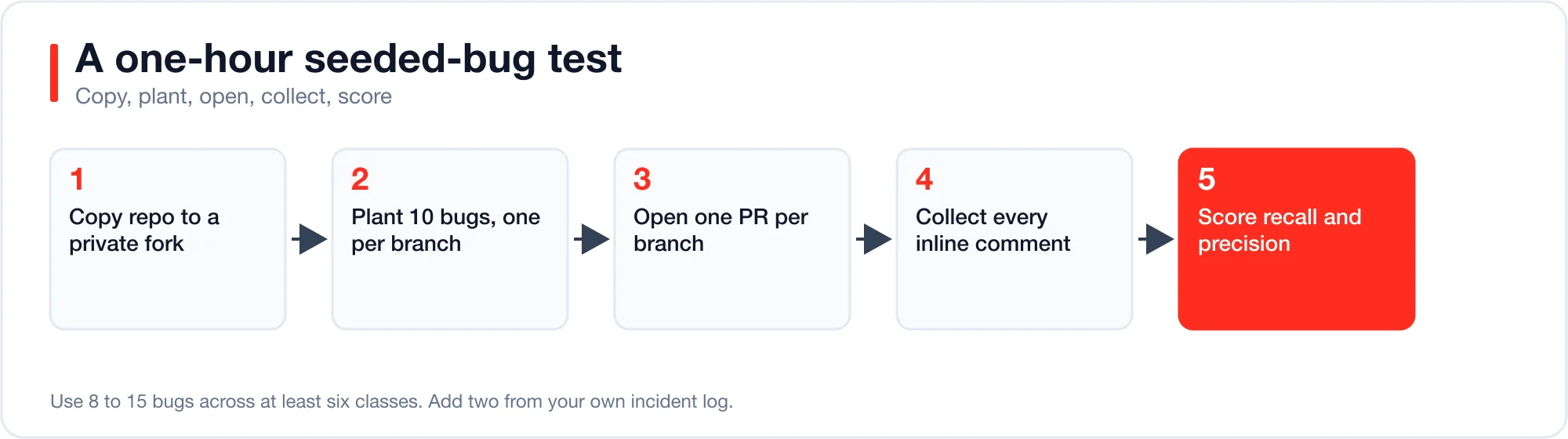
Follow these steps.
- Copy a mature, well-tested repository. Use a private fork so nothing leaks.
- Plant 8 to 15 bugs, one per branch. Use the starter pack below.
- Open one pull request per branch against the same base.
- Install each tool on the fork, with default settings first.
- Record every inline comment with its file and line.
- Score the results with the script below.
Run each tool on the same PRs. Repeat once with your own rules turned on, because default and tuned results can differ.
Which bugs should you plant?
Plant bugs that look like the ones your team really ships. This starter pack covers eight classes, and four of them are common in Laravel apps. Each is a one-line change.
| # | Class | Example change |
|---|---|---|
| 1 | Off-by-one | $page * $perPage becomes ($page + 1) * $perPage |
| 2 | Missing authorization | Delete the $this->authorize('update', $post) call |
| 3 | Mass assignment | Replace $fillable = [...] with $guarded = [] |
| 4 | Tenant leak | Change where('team_id', $id) to orWhere(...) |
| 5 | N+1 query | Remove with('author') from a list query |
| 6 | Missing transaction | Drop DB::transaction around a two-table write |
| 7 | Hardcoded secret | Paste a live-looking API key into a config file |
| 8 | Unsafe comparison | Replace hash_equals() with == for a token |
Add two bugs from your own incident log. They are the most honest test of all. Record the severity of each bug so you can see whether a tool misses critical issues while catching trivial ones.
How do you score the results?
Compare each tool's comments against your list of planted bugs. A comment within two lines of a planted bug counts as a catch. Any other comment counts as a false positive, until you check it by hand.
Save your planted bugs as seeded.json and one tool's comments as comments.json. Then run this script with Node.js 20 or newer.
// score.mjs — usage: node score.mjs seeded.json comments.json
import { readFileSync } from "node:fs";
const [seededPath, commentsPath, slackArg] = process.argv.slice(2);
const slack = Number(slackArg ?? 2); // comment within +-2 lines counts
const seeded = JSON.parse(readFileSync(seededPath, "utf8"));
const comments = JSON.parse(readFileSync(commentsPath, "utf8"));
const hits = (c, b) => c.file === b.file && Math.abs(c.line - b.line) <= slack;
const caught = seeded.filter((b) => comments.some((c) => hits(c, b)));
const useful = comments.filter((c) => seeded.some((b) => hits(c, b)));
const recall = caught.length / seeded.length;
const precision = comments.length ? useful.length / comments.length : 0;
const f1 = precision + recall ? (2 * precision * recall) / (precision + recall) : 0;
console.log(JSON.stringify({
  seeded: seeded.length, comments: comments.length, caught: caught.length,
  falsePositives: comments.length - useful.length,
  recall: +recall.toFixed(2), precision: +precision.toFixed(2), f1: +f1.toFixed(2),
  missed: seeded.filter((b) => !caught.includes(b)).map((b) => b.id),
}, null, 2));
I ran it on a sample of five planted bugs and six comments. It reported 3 caught, 3 false positives, recall 0.60, precision 0.50, and F1 0.55, and it listed the two missed bugs by id. That fixture was invented to check the math, not a real tool result.
Review the false positives by hand. Some will be real issues you did not plant, and they should count in the tool's favor.
What does each tool cost to run?
Pricing changes often, so confirm it before you commit. GitHub documents one useful range. Copilot code review estimates cost at about $0.05 to $1 per review at Lite effort, and $0.25 to $5 per review at Balanced effort, per the GitHub Docs. Those estimates exclude GitHub Actions minutes.
Copilot code review also has limits. Dependency files, logs, and SVG files are excluded. Model switching is not supported. A pull request is reviewed once unless you configure review on each push.
Multiply the cost by your volume. A team with 400 PRs a month at $1 per review spends $400 a month on reviews. That is cheap beside one escaped production bug, but it is not free.
Which tool should you start with?
Start with the tool that already lives where your code does, then test one challenger. This is the decision most teams can make in a week.
| Your situation | Start here | Why |
|---|---|---|
| Already on GitHub Copilot | Copilot code review | No new vendor, and it comes with paid Copilot plans |
| GitLab, Bitbucket, or Azure DevOps | CodeRabbit | Documented support for all four hosts |
| Large monorepo with cross-file bugs | Greptile | Whole-repository indexing is its design goal |
| Team already on Cursor | Cursor Bugbot | Same vendor and workflow |
| Regulated or high-risk code | Two tools plus humans | Recall matters more than noise |
Whatever you pick, set a review rule: the AI comment never replaces the approval. Treat it as a first pass that saves the human reviewer's time.
How do you roll a reviewer out without annoying your team?
Roll out in stages, and measure the acted-on rate. The acted-on rate is the share of tool comments that a developer fixes or accepts. Martian's benchmark uses a similar proxy for precision. You can track it by hand for a month.
Use this four-week plan.
- Week 1: shadow mode. Install the tool on two active repositories. Tell the team the comments are advisory. Do not block merges.
- Week 2: tally. Each reviewer marks every bot comment as fixed, dismissed, or wrong. A shared spreadsheet is enough.
- Week 3: tune. Mute the comment types that people dismissed most. Add repository rules for conventions the tool keeps flagging wrongly.
- Week 4: decide. Compute the acted-on rate and the bugs caught. Keep the tool only if both numbers justify its fee.
A healthy acted-on rate depends on your team, so set your own bar before you start. Write it down in week 1. A team that wants fewer interruptions might need half or more. A team guarding payment code may accept one in four if the tool catches real defects.
Watch for review fatigue as well. If developers start approving without reading the bot's comments, the tool has become noise. Cut its scope or switch it off for low-risk paths such as docs and generated files.
What should a human reviewer still own?
Humans should own design, intent, and risk. A model reads the diff and nearby code. It does not know why your team chose a pattern, what a customer promised, or which module is about to be rewritten.
Split the work like this.
| Task | Owner |
|---|---|
| Null checks, typos, unused variables | The bot |
| Obvious security slips, such as secrets in code | The bot, then a human confirms |
| Does this change match the ticket? | A human |
| Is this the right abstraction? | A human |
| Migration safety and rollback plan | A human |
| Performance in a hot path | A human, with a profiler |
Keep the final approval human. This matches GitHub's own guidance to supplement Copilot with human review.
Treat the reviewer as a reader of untrusted text, too. A pull request description or a code comment can carry hidden instructions meant for the model. Read about ai agent prompt injection before you give any review bot write access or secrets. The model behind the bot also matters, and our ai coding model comparison explains how to price it.
What are the limits of this advice?
The benchmarks cited here are vendor-run or vendor-reported, and they age fast. The cost model uses assumed numbers, so replace them with your own triage time and rework cost. The seeded-bug test measures planted bugs, which can differ from the subtle ones your team writes.
Even so, the method beats a leaderboard. It uses your language, your framework, and your false-positive tolerance. Run it once a quarter, because every tool in this post will change. Pair it with a check on your tests, such as the mutation score covered in our guide to ai testing tools, so both sides of the review are measured.
Advertisement
FAQ
What is the most accurate AI code review tool?
No single tool leads every test. Greptile reported the highest catch rate on its own 50-bug test, while CodeRabbit and Greptile each reported a top F1 on Martian's leaderboard at different dates. Run a seeded-bug test on your repository to see which one fits.
Is GitHub Copilot code review good enough on its own?
It is a solid first pass, but GitHub says it is not guaranteed to spot all problems. The company advises supplementing it with human review. It also skips some files, such as dependency manifests, logs, and SVGs.
How many bugs should I plant for a fair test?
Plant 8 to 15 bugs across at least six classes. Fewer than eight gives noisy scores. More than fifteen takes longer than an hour to open and review, with little extra signal.
Do AI reviewers replace human code review?
No. They reduce the time humans spend on routine issues. Every vendor and GitHub's own documentation recommend keeping a human approval step, especially for security-sensitive code.
How often should I re-test my AI code review tool?
Re-test every quarter, or after a major model change from the vendor. Benchmarks in this space moved within months, and the tools update continuously.
Comments
Loading…
Sign in to join the conversation.
Related posts

Agentic AI architecture: five patterns and what each costs
Five agent architecture patterns, when each one fits, and a token-cost model using current Claude prices. Includes a Laravel sub-agent example.
Fri Oct 09 2026 · 10 min read · 0 views
Which AI model should write your code? Price per task
Coding benchmarks now agree within a few points while prices differ 40 times. See cost per task for ten models and a script to find your own cost per passing task.
Fri Oct 09 2026 · 11 min read · 0 views
Claude Sonnet 5.5 migration: which changes return a 400
Claude Sonnet 5.5 launched on September 28, 2026 at the same price as Claude Sonnet 5, $2 per million input tokens and $10 per million output tokens. Moving to it is not a model-ID swap. Several
Tue Sep 29 2026 · 6 min read · 2 views