Claude Code and Remotion: install the skill, render a video
By Nihar Ranjan Das · Sat Oct 17 2026 · 8 min read · 0 views
View as a Web StoryAI#claude code#react#remotion#agent skills#ai video#programmatic video

Claude Code and Remotion: install the skill, render a video
How do you install the Remotion skill in Claude Code?
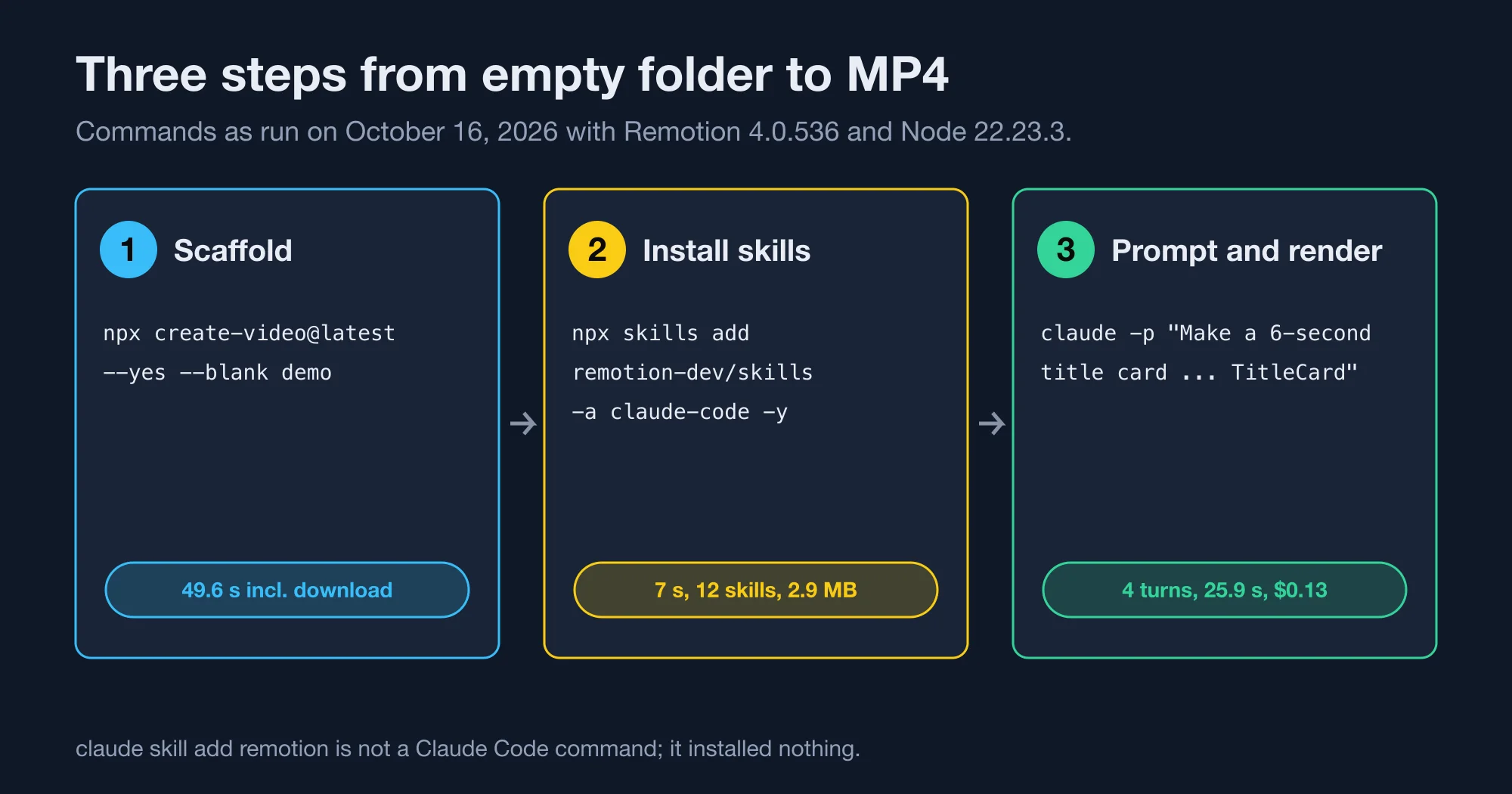
Run npx skills add remotion-dev/skills -a claude-code -y inside your Remotion project. It copies 12 skills into ./.claude/skills and takes about 7 seconds. Claude Code then loads them in the next session.
Remotion is a framework that renders video from React components. Agent skills are folders of instructions that a coding agent reads before it works on a task, and the skills command is a small installer for them.
Guides disagree on the install step. One Turkish-language guide from Apidog gives the npx skills add form. Other write-ups, such as the Mejba walkthrough of Claude Code and Remotion, describe the same idea, and some give claude skill add remotion instead. We tested the commands instead of guessing.
| Command | Result in our test |
|---|---|
npx skills add remotion-dev/skills -a claude-code -y |
Works. Copied 12 skills to .claude/skills |
claude skill add remotion |
Does nothing useful. Claude Code treated the text as a prompt and asked what we wanted |
npx create-video@latest --yes --blank demo |
Works. Scaffolds the project, 49.6 seconds including download |
Source: NiharDaily test, October 16, 2026.
The twelve skills are remotion-best-practices, remotion-captions, remotion-create, remotion-docs, remotion-interactivity, remotion-maps, remotion-markup, remotion-multimedia, remotion-render, remotion-saas, remotion-studio and remotion-upgrade. The two we opened, remotion-create and remotion-render, carry the version tag 4.0.536 in their headers, which matched the Remotion release we scaffolded.
What does a first project need?
You need Node.js and a scaffolded Remotion project. We used Node 22.23.3. The blank template installed Remotion 4.0.536 and React 19.2.3.
Here is the full setup, start to finish.
- Create the project with
npx create-video@latest --yes --blank demo. - Move into it with
cd demo. - Install the skills with
npx skills add remotion-dev/skills -a claude-code -y. - Start Claude Code in that folder with
claude. - Describe the video and let the agent register and render it.
The blank template creates src/Root.tsx, src/Composition.tsx, src/index.ts and a remotion.config.ts. Its package.json has four scripts: dev runs Remotion Studio, build bundles, upgrade updates, and lint runs ESLint and the TypeScript compiler. There is no render script, so you call the CLI directly.
The scaffold printed a licence reminder: "Remotion is free for teams of up to 3." The details are on Remotion's licence page, and we compare the paid tiers in our Remotion versus HyperFrames test.
Advertisement
What is in the config file?
remotion.config.ts turned on four settings in our scaffold: Config.setRspack(true), Config.setVideoImageFormat("jpeg"), Config.setOverwriteOutput(true) and Config.setDefaultPremountInSeconds(2). The JPEG frame format keeps renders fast. The overwrite flag means a second render replaces the first file without asking.
What does a real prompt-to-video run look like?
A single prompt in headless mode produced a finished video. Claude Code took 4 turns and 25.9 seconds of model time, and the run reported a cost of $0.13. The output was a 6-second, 1920x1080, 30 frames-per-second MP4 of 33.9 kB.
Here is the exact prompt we gave it, run with claude -p:
Make a 6-second 1920x1080 30fps title card video in this Remotion project:
black background, the text 'NiharDaily test' in white fading in over the
first second, then a yellow underline growing beneath it. Register the
composition with id TitleCard in src/Root.tsx, render it to out/title.mp4
and tell me the command you ran and the file size. Keep it minimal.
The agent created src/TitleCard.tsx, registered the composition at 180 frames, and ran:
npx remotion render src/index.ts TitleCard out/title.mp4Its component used interpolate() twice. One call faded opacity from 0 to 1 over frames 0 to 30. The other grew the underline width from 0 to 100 over frames 30 to 75. That is the animation we asked for.
We checked the file ourselves. ffprobe reported 1920x1080 at 30 frames per second and 6.000 seconds. We pulled the frame at 4 seconds with FFmpeg and looked at it. The white title and full-width yellow underline were there.
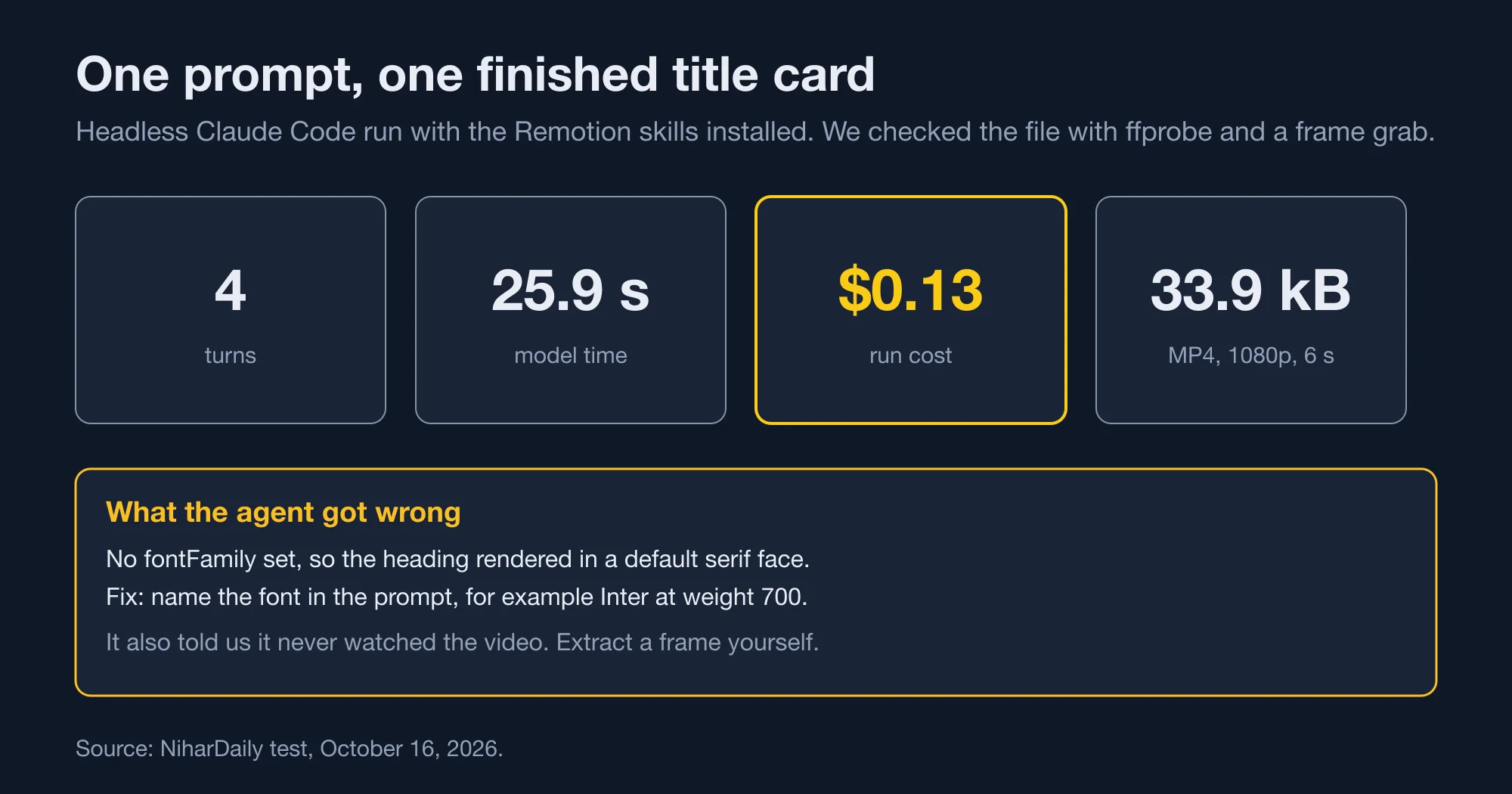
The agent also told us it had only confirmed the render finished and checked the file size, and had not watched the video. That honesty is useful, and it is a reminder to open the file.
What did the agent get wrong?
It never set a font. The heading rendered in a default serif face, which looks like a newspaper masthead rather than a product video. Our prompt did not mention type, so the agent made no choice.
The fix is one line. Set fontFamily on the heading, or load a web font with @remotion/google-fonts. Name the font in your prompt, such as "use Inter, bold". For example, adding "sans-serif, 700 weight" to the prompt is enough to avoid the serif fallback.
What errors will you hit, and how do you fix them?
The most common failure is a wrong composition ID. Remotion throws Could not find composition with ID Nope. Available compositions: MyComp and lists the IDs it can see. Copy one from that list.
| Symptom | Cause | Fix |
|---|---|---|
Could not find composition with ID Nope. Available compositions: MyComp |
The ID in the render command does not match <Composition id> |
Run npx remotion compositions and copy the ID |
| Render produces a blank or tiny video | The blank template's composition renders null at 1280x720 and 60 frames |
Replace the component and set width, height and durationInFrames |
| First render takes about a minute | In our test the first run took 57.7 seconds, and we believe a browser download is part of it | Expect it once. Warm renders took about 6 seconds |
| Output file is overwritten | Config.setOverwriteOutput(true) is on |
Render to a new filename if you want to keep both |
Source: NiharDaily test, October 16, 2026. Blank template defaults read from src/Composition.tsx.
The compositions command prints a table. In our project it read MyComp 30 1920x1080 900 (30.00 sec). That one line tells you the ID, the frame rate, the size and the length.
How fast is a render?
The first render took 57.7 seconds, probably because Remotion bundled the project and fetched a browser. Warm renders of a 10-second 1080p scene took a median 6.35 seconds across three runs, and a 30-second scene took 13.27 seconds. Those figures come from our speed test of the same scene.
Rendering with a different codec worked as well. npx remotion render MyComp x.mp4 --codec=h265 produced a 127.9 kB file from the 30-second scene. Pick H.265 when file size matters and your viewers' devices decode it.
How should you write prompts for Remotion?
Name the size, the frame rate, the length, the composition ID and the output path. Name the font and colours. Ask the agent to report the render command and file size.
The agent follows what you state and guesses the rest. Our prompt named five things and the video matched all five. It named no font, and the font was wrong.
Use this checklist, drawn from the run above.
- State resolution and frame rate, such as 1920x1080 at 30 fps.
- State the duration in seconds and let the agent convert to frames.
- Give the composition an ID so the render command is predictable.
- Specify fonts and hex colours instead of words like "modern".
- Ask for the render command back, so you can repeat it.
- Ask it to extract one frame and describe it, which catches a blank render.
Brand colours matter here. We used yellow #ffd400 in the underline the agent chose, and it picked that without being told a hex value. Give exact values when a client's brand is involved.
How do you check the video the agent made?
Extract a frame and read the file's metadata, because the agent will not watch the video for you. Two commands are enough, and both use FFmpeg, such as the build we had installed.
First, run ffprobe -v error -show_entries stream=width,height,r_frame_rate,duration -of csv=p=0 out/title.mp4. Ours printed 1920,1080,30/1,6.000000, which matched the prompt. Second, run ffmpeg -ss 4 -i out/title.mp4 -frames:v 1 frame.png and open the image. A blank frame means the composition rendered nothing, and a wrong colour or font shows up at once.
Do this for every new composition. It takes seconds, and it caught the serif font in our run.
What does it cost to make videos this way?
The run cost $0.13 for a 6-second card. That is a model cost, separate from the render machine. A longer or more complex scene needs more turns, and cost grows with them.
Licensing is the other line. Remotion is free for individuals and companies of up to three people, according to its licence page. A team of four or more pays $25 per seat each month or $0.01 per render with a $100 monthly minimum.
For a solo developer making a handful of clips, the whole stack costs a few cents per video in model fees. That is a different price shape from hosted video generators, which charge per second of output. Our look at the Veo and Gemini Omni Flash price per second shows how those bills build up.
Should you use this approach?
Yes, if your videos are made of text, shapes, charts and layouts. Programmatic video is repeatable, versioned in Git and cheap. No, if you need photographic footage or people, because a React renderer cannot create them.
The bottom line is simple. The skill install works in seconds, the agent writes correct animation code from a plain prompt, and the weak spots are fonts and verification. Fix both in your prompt.
What we did not test
We ran one prompt on one scene. We did not test captions, audio, maps or the remotion-saas skill. We did not compare the skill's output with and without the skills installed. We did not test Remotion Lambda or Remotion Studio's browser editor.
Advertisement
FAQ
What is the command to install the Remotion skill for Claude Code?
Run `npx skills add remotion-dev/skills -a claude-code -y` in your project folder. It copies 12 skills into `.claude/skills`. Start a new Claude Code session afterwards so the skills load. The command `claude skill add remotion` did not install anything in our test.
How much does it cost to make a video with Claude Code and Remotion?
Our 6-second 1080p title card cost $0.13 in model usage over 4 turns, and the render took seconds on an Apple M2. Remotion itself is free for teams of up to three people. Larger teams pay $25 per seat per month or $0.01 per render.
Why does my Remotion render say Could not find composition with ID?
The ID in your render command does not match any `id` in `src/Root.tsx`. Remotion lists the available IDs in the error text. Run `npx remotion compositions` to print them, then copy the exact ID into your `npx remotion render` command.
Why is the text in my Claude Code Remotion video in a serif font?
The agent did not set a `fontFamily`, so the browser used its default serif font. Name a font in your prompt, such as Inter at weight 700, or ask the agent to load one with `@remotion/google-fonts`.
Does Remotion need FFmpeg installed?
We did not test a machine without it, and FFmpeg 8.1 was already installed on ours. Remotion's own documentation is the source of truth here. We used FFmpeg only to check the finished file with `ffprobe` and to extract a frame.
Comments
Loading…
Sign in to join the conversation.
Related posts
Is your Go MCP server open to DNS rebinding? Check v1.4.0
CVE-2026-34742: Go MCP SDK before 1.4.0 accepts any Host header on localhost HTTP servers. We tested v1.3.1, v1.4.0 and v1.8.0, and show the fix and a proxy trap.
Sat Oct 17 2026 · 9 min read · 0 views
OpenAI shuts down GPT-4 and o1 on October 23: what to do
OpenAI retires gpt-4, gpt-4-turbo, o1, o3-mini, o4-mini and fine-tunes on October 23, 2026. A migration map with real costs: some replacements cost 4 to 5 times more.
Sat Oct 17 2026 · 9 min read · 0 views
Nano Banana Pro or 2.1: which image model to pay for
Nano Banana Pro costs 2 to 4 times more per image than Nano Banana 2.1. Google's own prices, cost per 1,000 images, and the break-even point where Pro pays for itself.
Sat Oct 17 2026 · 8 min read · 0 views