Does your GitHub Actions cache leak secrets? A Miri audit
By Nihar Ranjan Das · Thu Oct 15 2026 · 8 min read · 0 views
View as a Web StorySoftware#github actions#rust#miri#ci security#secrets#cache
Does your GitHub Actions cache leak secrets? A Miri audit
Is your workflow exposed to the Miri secrets leak?
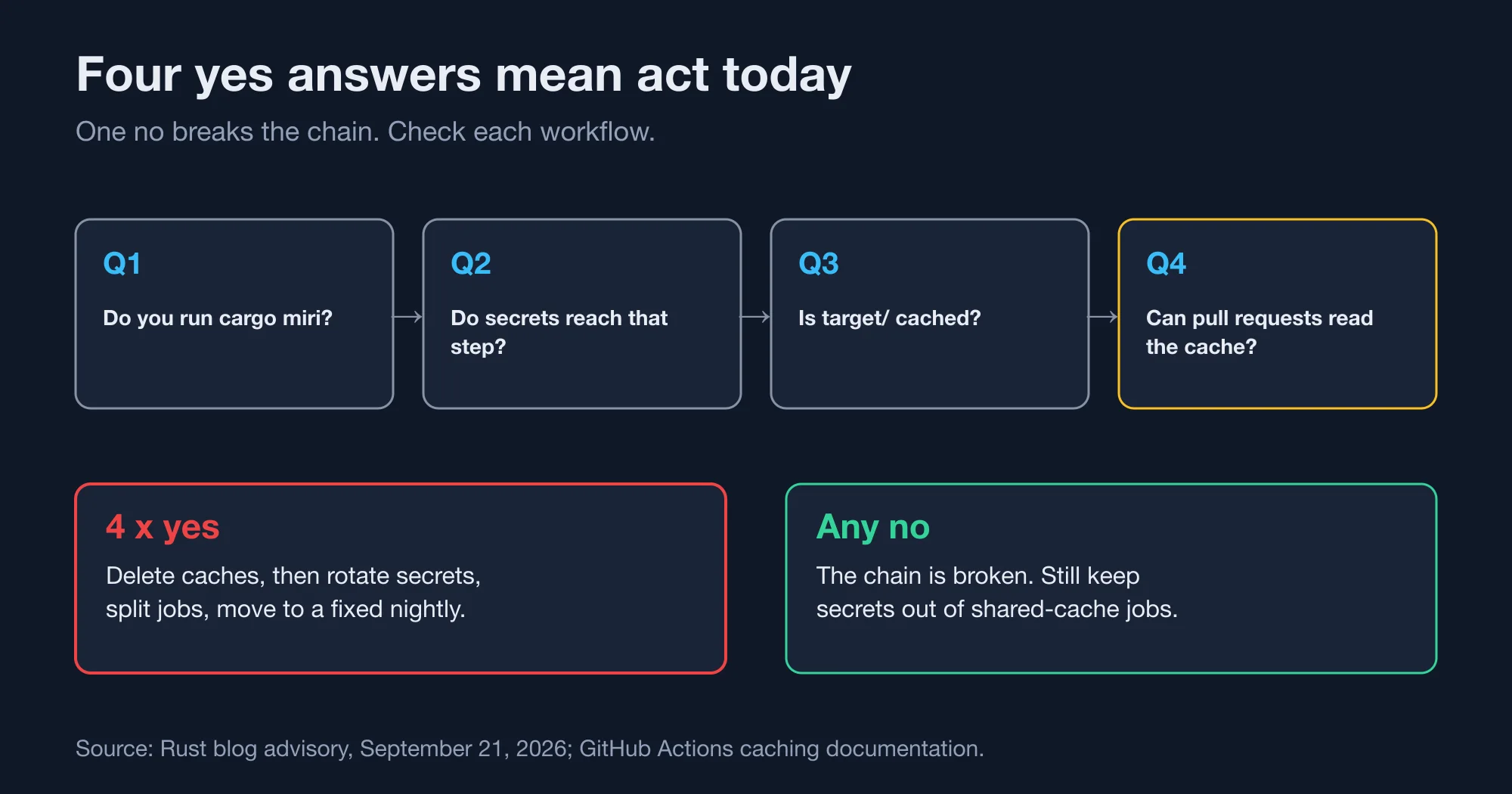
You are exposed only when four conditions hold together. The Rust project published the details on September 21, 2026, in its post on GitHub Actions leaking secrets when Miri output is cached. Answer these four questions for each workflow in your repository:
- Does any job run
cargo miri? - Can that job see a secret as an environment variable, set at the step, job or workflow level?
- Does the job cache
target/, for example withactions/cacheorswatinem/rust-cache? - Can pull requests read that cache?
Four "yes" answers mean you should act today. A single "no" breaks the chain. The Rust team adds a wider warning: a job that holds secrets and writes to a public cache is at risk even without Miri, because many tools assume they may write the whole environment to disk.
What actually leaked, and how?
Miri is a Rust interpreter that detects undefined behaviour in unsafe code. The cargo miri command runs it several times during one build. To stay consistent between runs, Miri saved the build-relevant environment variables into the target/ directory. The Rust team says the problem was not a vulnerability by itself, but it becomes exploitable once a cache is involved.
A GitHub Actions cache is a store that keeps files between workflow runs, usually the target/ folder, so the next run compiles less. GitHub's caching documentation says a pull request run can restore caches from its own branch and from its base branch. It also warns: "Anyone with read access can create a pull request on a repository and access the contents of a cache."
Put those together. A trusted run on main writes target/, with the secret inside. An attacker opens a pull request that changes the workflow to print the cache. The pull request restores the cache from the base branch and prints your secret in its job log.
According to a secondary write-up of the advisory, the Rust team scanned public repositories. It found one vulnerable repository and seven more that looked close enough to warrant a heads-up. That scan could only see public workflow files, so the true number is probably higher.
Which Miri version has the fix?
The first Miri nightly with the fix is dated September 22, 2026, per the Rust blog. The patch, Miri pull request 5337, saves only CARGO_* variables, excludes CARGO_*_TOKEN, and adds OUT_DIR. A nightly pinned before that date still has the problem. Check your rust-toolchain.toml and any toolchain: nightly-2026-... line.
What did we find when we tried to reproduce it?
We could not reproduce the leak with a plain run, and you should treat that as a warning about the limits of a quick check. Our test setup was Rust nightly-2026-09-20, which predates the fix, on an Apple Silicon Mac. We exported two fake secrets, ran cargo miri run and then cargo miri test on a new project, and searched the whole target/ folder for both values with grep -a. We found nothing.
Two readings fit that result. The first is that Miri stores environment data in a form that a plain-text search does not match. The second is that exposure depends on the workflow, such as MIRIFLAGS or a particular sequence of commands. We cannot tell which from outside. The consequence is clear: a clean grep does not prove your cache is clean. It can only prove the opposite.
Advertisement
That is why the audit above asks about conditions, not about file contents. Use the scanner below as a canary for plain-text leaks, which includes anything a build.rs script writes. Do not use it as a clean bill of health.
How do you scan a cache for leaked secrets?
Run a script that searches a folder for the values of your secret-looking environment variables, and fails if any appears. Call it as scan-cache.sh <dir> [VAR ...]; it exits with code 1 when a value is found. We wrote one in plain bash. It prints the variable name and the file, never the value. It skips values shorter than eight characters, because short strings match too much.
#!/usr/bin/env bash
dir=${1:?usage: scan-cache.sh <dir> [VAR ...]}; shift
names="$*"
[ -z "$names" ] && names=$(compgen -e | grep -E 'TOKEN|SECRET|KEY|PASS|CREDENTIAL')
hits=0
for n in $names; do
  v=${!n}
  [ ${#v} -ge 8 ] || continue
  case $v in *$'\n'*) continue;; esac
  files=$(grep -rlaF -- "$v" "$dir" 2>/dev/null)
  if [ -n "$files" ]; then
    echo "LEAK: \$$n found in:"; echo "$files" | sed 's/^/  /'; hits=1
  fi
done
[ $hits -eq 0 ] && echo "clean: no secret values found in $dir"
exit $hits
We tested it with a planted canary on 2 folders. A file in a fake cache folder held a made-up token, and the script returned LEAK: $MY_API_TOKEN found in: plus the path, with exit code 1. A second folder without the token returned clean and exit code 0. It also runs on macOS bash 3.2, which has no mapfile.
How long does the scan take?
About 15 seconds for 236 MB. We measured 3 runs of the script on a 236 MB folder. We built a synthetic Rust crate with incremental compilation on, which produced a 236 MB target/ folder. Three runs with three secrets took 15.4, 16.0 and 15.3 seconds. The time grows with the number of secrets and the folder size, so scan on a schedule, not on every commit.
Run it as a step at the end of a job that holds secrets:
- name: Scan target for secret values
  run: bash scripts/scan-cache.sh target API_TOKEN DEPLOY_KEY
  env:
    API_TOKEN: ${{ secrets.API_TOKEN }}
    DEPLOY_KEY: ${{ secrets.DEPLOY_KEY }}
Name the variables on the command line so the script does not depend on guessing. Notice that this step itself holds the secrets. Run it after the cache save, and never let its job write to a shared cache.
How do you fix a workflow that fails the audit?
Apply four fixes, in this order. The first three stop the exposure. The fourth cleans up the past.
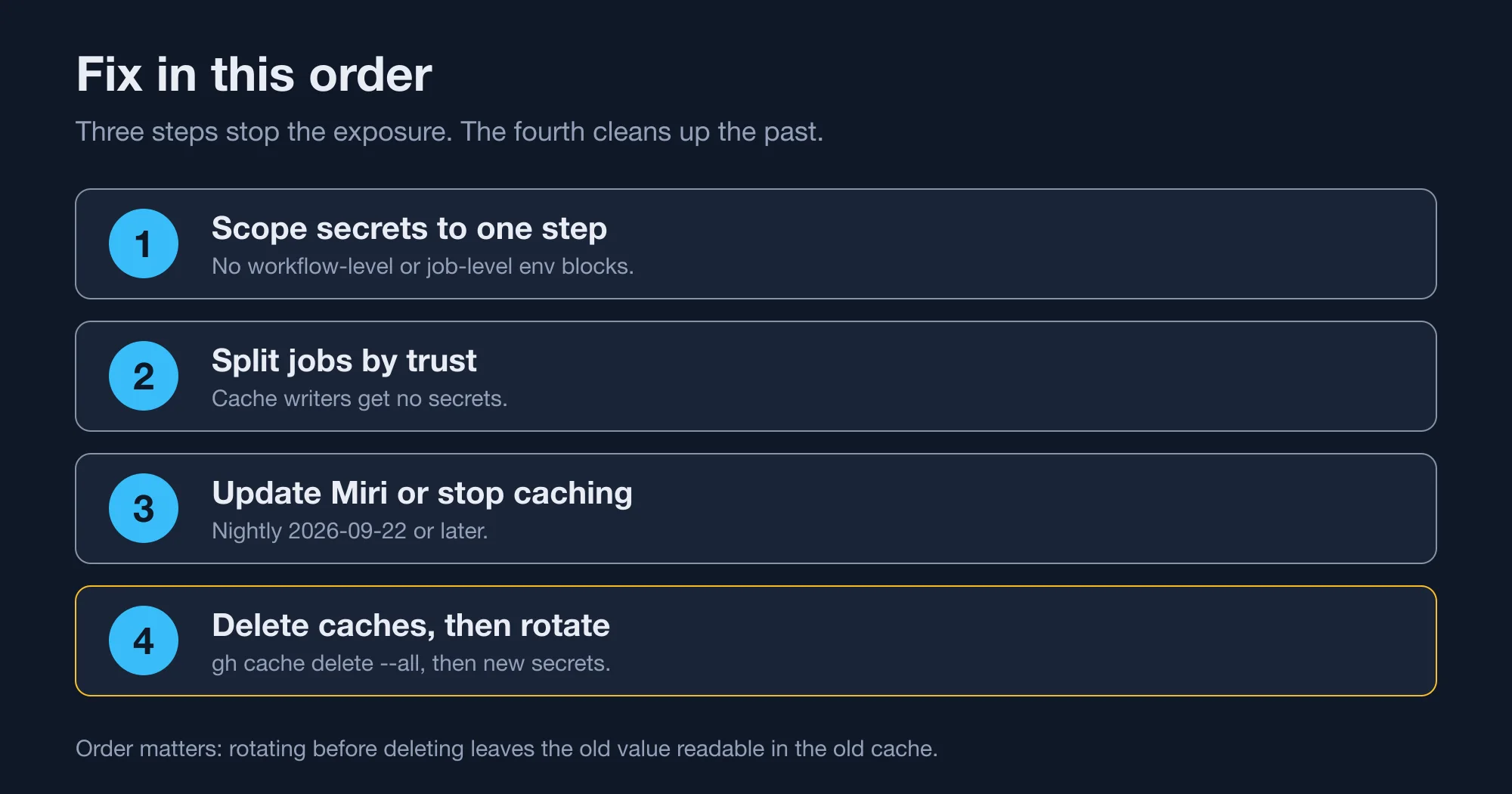
- Scope each secret to one step. Remove secrets from workflow-level and job-level
env:blocks. Pass a secret only to the step that needs it. - Split jobs by trust. A job that writes a shared cache gets no secrets. A release or deploy job runs on
main, restores no shared cache, and holds the secrets. - Update Miri or stop caching. Use a nightly dated 2026-09-22 or later, or switch off caching for any job that runs Miri while you wait.
- Delete caches, then rotate. Delete the old cache entries first, because rotating a secret while the old cache still exists leaves the old value readable. Then rotate every secret the job could see.
Here is a hardened workflow. The test job has no secrets and can use the cache. The release job has the secret in one step and does not touch the cache:
jobs:
  test:
    runs-on: ubuntu-latest
    steps:
      - uses: actions/checkout@v4
      - uses: swatinem/rust-cache@v2
      - run: cargo +nightly miri test
  release:
    needs: test
    if: github.ref == 'refs/heads/main'
    runs-on: ubuntu-latest
    steps:
      - uses: actions/checkout@v4
      - run: cargo publish
        env:
          CARGO_REGISTRY_TOKEN: ${{ secrets.CARGO_REGISTRY_TOKEN }}
The hardened workflow uses ubuntu-latest, which moves to Ubuntu 26.04 on October 19, as our note on the ubuntu-latest move to Ubuntu 26.04 explains, so retest it after the switch. Delete every cache from the command line with GitHub's CLI:
gh cache delete --allCheck that your own history is clean, too. A step earlier in a job can write a secret into GITHUB_ENV, and every later step then inherits it. Search your workflows for the patterns that matter:
grep -rnE 'secrets\.|GITHUB_ENV|rust-cache|actions/cache' .github/workflowsHow do you see what your caches hold right now?
Use gh cache list, which shows each cache entry's key, size and last access time without downloading anything. The command takes flags that matter for this audit, and we checked each one against the GitHub CLI help on version 2.98.0:
gh cache list --sort size_in_bytes --limit 10
gh cache list --ref refs/heads/main --key Linux
gh cache list --json key,ref,sizeInBytes --jq '.[] | select(.ref != "refs/heads/main")'
The first line lists your ten largest entries, and the second narrows the list to entries on main whose key starts with Linux. The third prints entries written by any other ref, such as refs/pull/12/merge. Entries on main are the ones a pull request can restore from its base branch, so they are the ones to worry about.
Look at the last-accessed time too. A cache that nobody has read for a week is about to expire, according to GitHub's seven-day rule. A cache that a pull request read recently is one that you should treat as exposed. The list shows metadata only, so it cannot tell you whether a secret sits inside an entry. For that, restore the cache into a scratch job and run the scanner above.
Do low-trust triggers change the risk?
Yes, they reduce it for forks, but not for your own contributors. GitHub's documentation says events such as pull_request_target, issue_comment and workflow_run get read-only access to default-branch caches by default. Only trusted triggers like push and schedule can write them.
The risk therefore sits with people who can already push a branch or open a pull request that runs your workflow. In a small open-source project, that is anyone who has ever had a pull request merged. In a company repository, it is every developer, including a compromised laptop.
The cache size limits matter for cleanup, too. GitHub gives each repository 10 GB of cache by default and removes entries not accessed for seven days, so an old poisoned entry can expire on its own. Do not wait for that. A busy repository touches its cache daily, and the entry never ages out.
What is the rule to take away?
The rule is simple: never let a job that holds a secret write to a cache that another job reads. Miri is only the example. Any tool can write its environment to disk, and a build.rs script runs arbitrary code. The same pattern caught a Gradle action in 2023, as the advisory for CVE-2023-30853 records, and its fix was the same: update and delete the cache.
If you only have time for one change, move your secrets out of workflow-level env: blocks. It takes minutes and works for every tool, not only Miri.
Advertisement
FAQ
Does Miri leak secrets in GitHub Actions?
It did, in nightlies before September 22, 2026. Miri saved every environment variable into `target/`. If CI cached that folder and pull requests could read the cache, a secret in the job environment could be read from it. A newer nightly saves only `CARGO_*` variables.
How do I know if my GitHub Actions cache has secrets in it?
You cannot be certain, but you can look. Search the restored cache folder for your secret values with a plain-text scan, and check whether the job ran Miri with secrets in its environment. A clean scan is not proof, because the data may be stored in a different form.
Is swatinem/rust-cache vulnerable?
The cache action itself is not the flaw. The Rust advisory names it as a common way to cache `target/`, and the exposure comes from what ends up inside that folder. Remove secrets from the job that writes the cache, and the cache action is safe to keep.
Do I need to rotate secrets after a cache leak?
Yes, if a job with those secrets ran Miri on a cached `target/` that pull requests could read. Delete the cache entries first with `gh cache delete --all`, then rotate every secret the job could see. Old logs may have expired, so you cannot prove nobody read them.
Which GitHub Actions events can write the cache?
Trusted events such as `push` and `schedule`. GitHub's documentation says low-trust events like `pull_request_target`, `issue_comment` and `workflow_run` get read-only access to default-branch caches by default. A pull request's own run can only create caches scoped to its merge ref.
Comments
Loading…
Sign in to join the conversation.
Related posts
Rust 1.99 breaks one thing and quietly changes your CI
Rust 1.99.0 breaking changes, tested against 1.98.1: one new hard error, three new warnings, and a CI default that cuts the cache by 62%.
Thu Oct 15 2026 · 9 min read · 0 views
Rust is dropping 32-bit Windows hosts. Your i686 builds can stay
Rust 1.100 stops installing toolchains on 32-bit Windows, but i686 binaries keep building. Check if you are affected and cross-compile in three ways.
Thu Oct 15 2026 · 9 min read · 0 views
Rust 2024 migration: cargo fix keeps your deadlock alive
Rust 2024 edition migration, tested on 1.99.0: cargo fix rewrites if let into match, which still deadlocks. Fix the if let and drop-order traps by hand.
Thu Oct 15 2026 · 9 min read · 0 views