Rust is dropping 32-bit Windows hosts. Your i686 builds can stay
By Nihar Ranjan Das · Thu Oct 15 2026 · 9 min read · 0 views
View as a Web StorySoftware#windows#rust#ci#32-bit#i686#cross-compilation
Rust is dropping 32-bit Windows hosts. Your i686 builds can stay
Is your project affected by Rust dropping 32-bit Windows hosts?
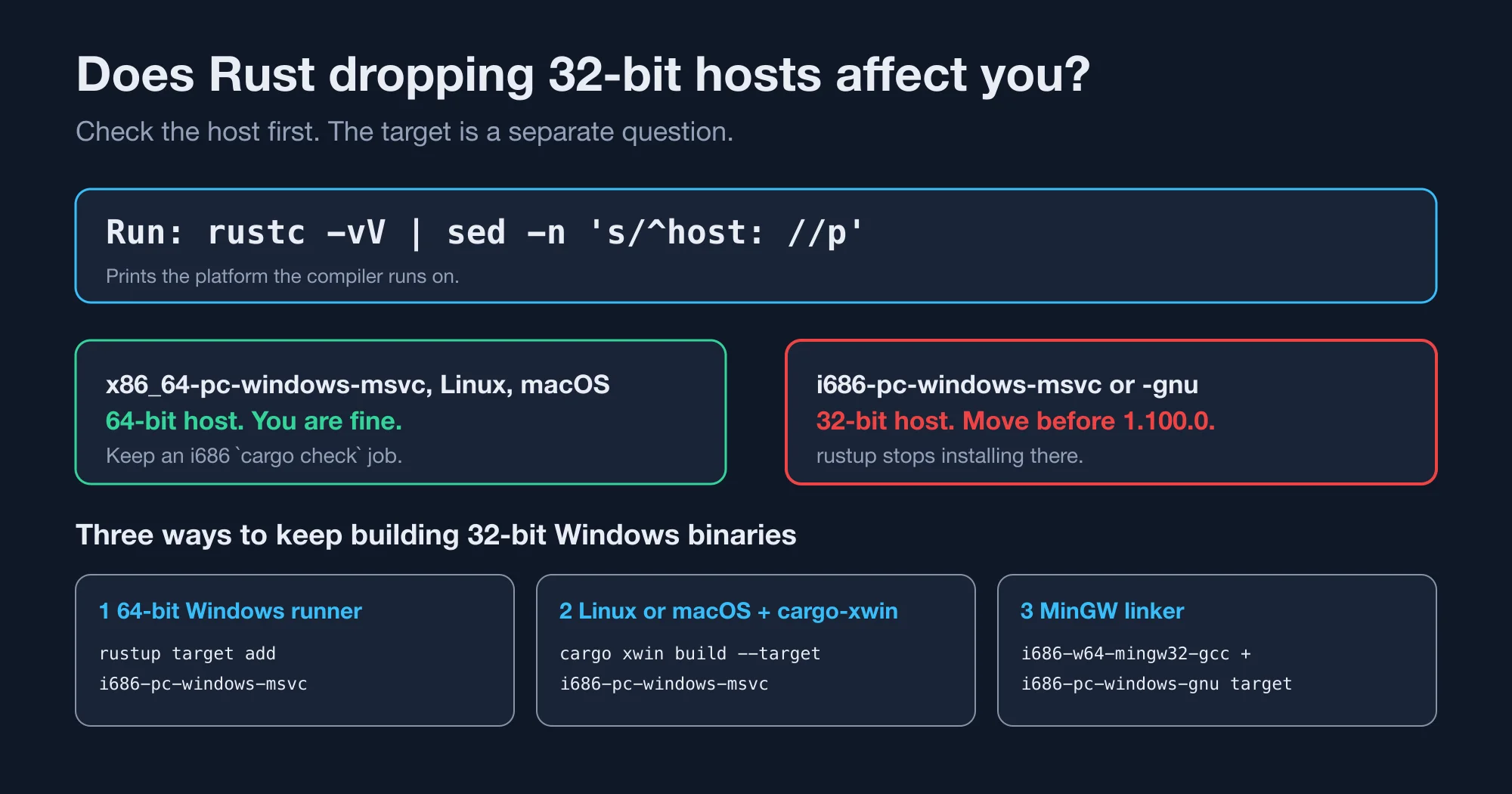
You are affected only if a 32-bit Windows computer runs the Rust compiler. If your 32-bit programs are built on a 64-bit machine or in CI, nothing breaks. The Rust project announced the change on October 2, 2026 in its post on demoting i686 Windows targets.
Run this on every machine that builds your Rust code. It prints the host triple, which is the platform the compiler itself runs on:
rustc -vV | sed -n 's/^host: //p'On Windows PowerShell, use rustc -vV | Select-String '^host'. If the answer is i686-pc-windows-msvc or i686-pc-windows-gnu, you have a 32-bit host and need to move. Any other answer, such as x86_64-pc-windows-msvc, means you are fine. On our Apple Silicon test Mac, the output was aarch64-apple-darwin.
Then search your CI files for the 32-bit target name, because a build target and a host are different things:
grep -rnE 'i686-pc-windows' .github .gitlab-ci.yml azure-pipelines.yml 2>/dev/nullA match in a target: field is harmless. A match in a runs-on image or an installer that runs on a 32-bit agent is not.
What exactly is Rust changing for 32-bit Windows?
Rust is moving two 32-bit Windows targets down one support level, and the change lands with Rust 1.100.0. A target is the kind of machine your program is built to run on. A host is the machine that runs the compiler. Rust support tiers apply to each separately, which is why a platform can remain fully supported as a destination while the compiler itself stops being distributed for it.
According to the Rust blog, the two changes are:
| Target | Before | After |
|---|---|---|
i686-pc-windows-msvc |
Tier 1 with host tools | Tier 1 without host tools |
i686-pc-windows-gnu |
Tier 2 with host tools | Tier 2 without host tools |
The platform support page defines the tiers. Tier 1 without host tools means the standard library is built and tested on every change, but rustc and cargo are not shipped for that platform. Tier 2 without host tools means the standard library is only guaranteed to build.
After 1.100.0, rustup can no longer install a toolchain on 32-bit Windows. Prebuilt standard libraries for both targets keep shipping. The blog says i686-pc-windows-msvc stays tested in CI. No other 32-bit platform is affected.
Advertisement
When does Rust 1.100.0 arrive?
The blog does not give a date. Rust releases a stable version every six weeks, and 1.99.0 shipped on October 1, 2026. By our count, 1.100.0 is due around November 12, 2026. Treat that as an estimate and check the release calendar.
Why is Rust making this change?
The compiler team found 32-bit hosts hard to keep working. The announcement says compiler binaries crashed when built with the i686 MSVC target. It also says the GNU C++ toolchain ran out of memory while building LLVM. RFC 3999 adds a hard limit: rustc usually stays under 1 GiB, but link-time optimization can need more than 4 GiB, which a 32-bit address space cannot hold.
The RFC also lists eight open issues and several ignored tests. It notes that Microsoft ended general Windows 10 support in October 2025, and Windows 10 was the last Windows release sold in a 32-bit edition.
How many people actually compile Rust on 32-bit Windows?
Very few. RFC 3999 gives download counts for each target's compiler and standard library. We divided one by the other to see how much of a target's use is compiling on it. Here is the table from the RFC, with our ratio added.
| Target | rustc downloads |
std downloads |
rustc per 100 std |
|---|---|---|---|
i686-pc-windows-msvc |
432k | 6.75M | 6 |
i686-unknown-linux-gnu |
303k | 4.18M | 7 |
x86_64-pc-windows-msvc |
34.33M | 20.85M | 165 |
x86_64-unknown-linux-gnu |
632.61M | 283.03M | 224 |
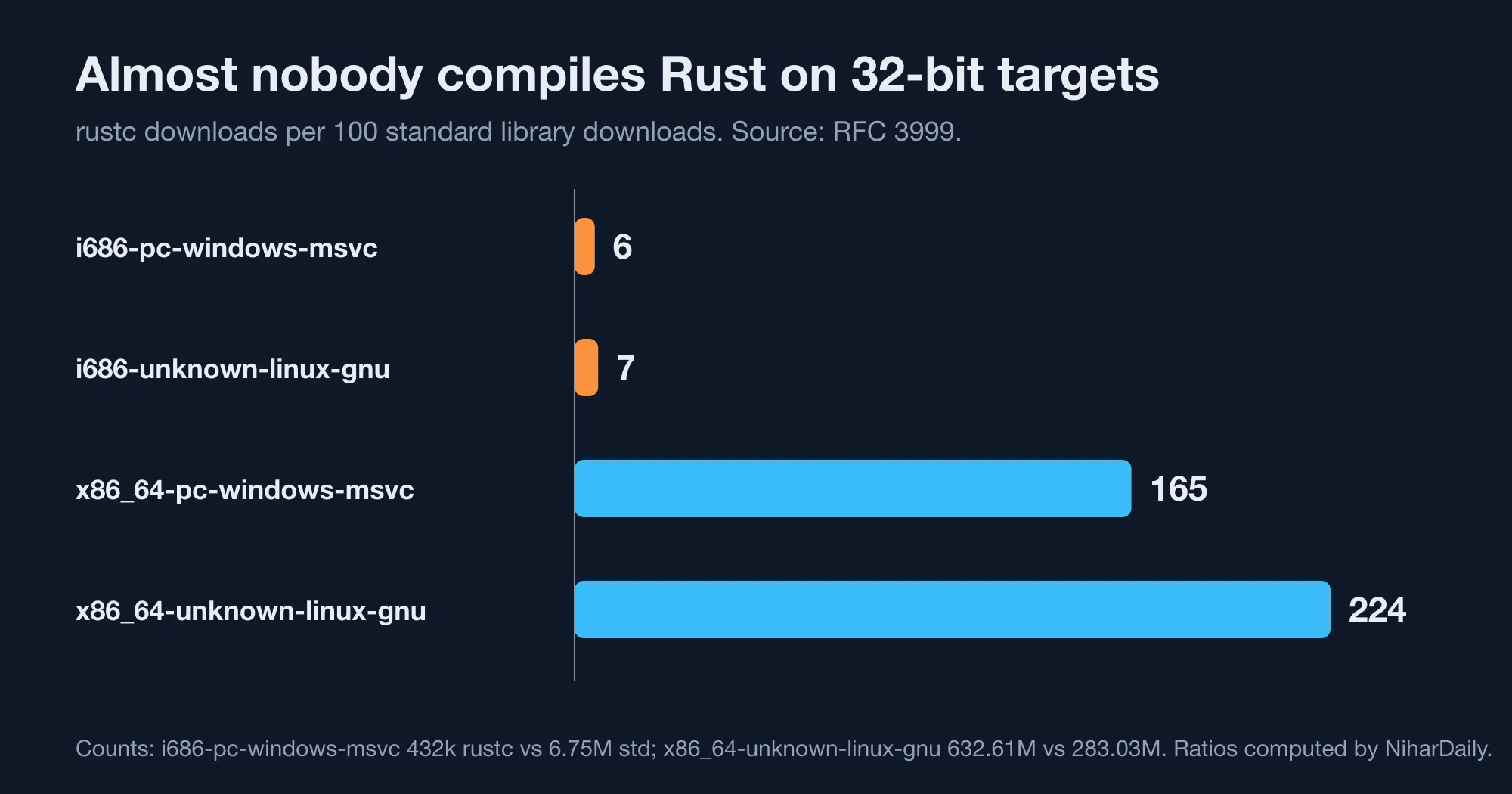
Read the last column like this. A mainstream 64-bit target downloads the compiler more than once for every library. An i686 target downloads it about once for every sixteen libraries. People add i686 as a destination from a bigger machine. They rarely install the compiler on it.
That is the whole case for the change. That is why the standard library stays at Tier 1 while the compiler does not.
Does this affect 32-bit Linux or other 32-bit targets?
No. The Rust blog says other 32-bit platforms are not affected, and the change names only the two Windows targets. The RFC table shows why the question comes up: i686-unknown-linux-gnu has a similar usage pattern, with 303k compiler downloads against 4.18M standard library downloads. That target keeps its current tier today. Watch the Rust blog for a similar proposal, because the same maintenance argument could apply later.
How do you keep building 32-bit Windows programs?
You cross-compile from a 64-bit host. There are three common setups, and which one fits depends on the machine you already have. Rust ships the 32-bit standard library either way, so the compiler needs only a linker for the target.
Option 1: build on a 64-bit Windows machine or runner
This is the lowest-effort path and the one the Rust project's own tools use. The rustfmt repository's Windows workflow runs on windows-latest and adds the 32-bit target with rustup target add, as shown in its Windows CI file. Here is the same pattern for your project:
jobs:
  windows-32:
    runs-on: windows-latest
    steps:
      - uses: actions/checkout@v4
      - run: rustup target add i686-pc-windows-msvc
      - run: cargo build --release --target i686-pc-windows-msvc
      - run: cargo test --target i686-pc-windows-msvc
The output lands in target/i686-pc-windows-msvc/release/. A 64-bit Windows machine can run the 32-bit test binary, so cargo test works here. Install the x86 build tools from Visual Studio Build Tools if the link step cannot find link.exe.
Option 2: cross-compile from Linux or macOS with cargo-xwin
cargo-xwin is a Cargo plugin that downloads the Microsoft C runtime and Windows SDK, so you can link MSVC targets without a Windows machine. Its README shows the install and build steps:
cargo install --locked cargo-xwin
rustup target add i686-pc-windows-msvc
cargo xwin build --target i686-pc-windows-msvc
The README says XWIN_ARCH defaults to x86_64,aarch64, so add x86 to that variable for a 32-bit build. It also asks you to install clang, with brew install llvm on macOS. Using it means you accept Microsoft's SDK license. We did not run this link step, so test it once before you rely on it.
Option 3: use the GNU target with MinGW
The i686-pc-windows-gnu target links with MinGW, a free Windows toolchain. On Linux or macOS, install a 32-bit MinGW-w64 compiler and Cargo finds it by name. We tried the build on our Mac without one and got this exact line:
error: linker `i686-w64-mingw32-gcc` not foundInstall the package that provides i686-w64-mingw32-gcc, then build again. The GNU route needs no Microsoft license, but the binaries can use a different C runtime than MSVC builds. Pick it only if your dependencies already work with MinGW.
What did we test on a machine that is not Windows?
Our test setup was Rust 1.99.0 on an Apple Silicon Mac running macOS, with both 32-bit Windows targets installed through rustup. We tried every build mode, and the purpose was to show which step needs a Windows-style linker and which step does not, because the difference determines how cheaply you can guard your code against 32-bit regressions on machines that are not running Windows at all.
| Command on macOS | Result |
|---|---|
rustup target add i686-pc-windows-msvc |
Installed, 116 MB on disk |
rustup target add i686-pc-windows-gnu |
Installed, 135 MB on disk |
cargo check --target i686-pc-windows-msvc |
Passed in 0.18 seconds |
cargo check --target i686-pc-windows-gnu |
Passed in 0.38 seconds |
cargo build --target i686-pc-windows-msvc |
Failed: "linker link.exe not found" |
cargo build --target i686-pc-windows-gnu |
Failed: "linker i686-w64-mingw32-gcc not found" |
The useful finding is the two cargo check rows. cargo check needs no linker, so it is a free way to catch 32-bit type errors on any machine. A quick check job for the i686 target costs seconds and needs no Windows runner. Real linking still needs one of the three options above.
Add that job even if you plan to keep a full Windows build, since it catches code that assumes a 64-bit usize, which is the most common 32-bit bug and the one that usually surfaces only after a customer on an old machine reports a crash. Typical offenders include casts from u64 to usize and array sizes above 4 GiB.
Which 32-bit bugs does a Rust check not catch?
Two documented 32-bit quirks can bite code that compiles cleanly, such as financial or file-format code. Both come from the footnotes in the i686 platform table, under the i686-pc-windows-msvc entry.
- x87 floating-point returns. On 32-bit x86, a floating-point value can come back from a function through an x87 register, so NaN payload bits can be lost. Functions that use the default Rust ABI are not affected. Foreign functions that return a float or a double are the risk, so test any NaN-sensitive math across that boundary.
- MSVC alignment. Native C code can place types with alignment above 4 bytes, such as
u64andi64, on a 4-byte boundary. Rust mitigates this. Unsafe code that assumes proper alignment can still be unsound, according to the tracking issue the page links (issue 112480).
Neither bug shows up in cargo check. Run your test suite on the i686 target at least once per release, using the Option 1 job above. A passing 64-bit run says little about a 32-bit memory layout.
What should you do now?
If you are not on a 32-bit host, do nothing but keep an i686 check in CI. If you are, move before Rust 1.100.0 lands. Here is the order we would follow:
- Run the host check on developer laptops, build agents and installer machines.
- Search CI for
i686-pc-windowsand read each match. - Move any 32-bit agent to a 64-bit Windows image or a Linux runner.
- Add
rustup target add i686-pc-windows-msvcto the build step. - Pin your toolchain with a
rust-toolchain.tomlfile so a surprise upgrade cannot break the 32-bit agent. Pin it to the newest release that still installs on your oldest machine.
The one real risk is a machine you forgot, because a build agent that runs unattended on an old 32-bit image will keep working happily until somebody or some script runs rustup update on it, and from that moment the failure arrives without any message that explains why. Search for such agents now, write down which Rust release last worked on each of them, and decide whether to retire the machine or to move its job to a 64-bit runner before the new release reaches it.
Advertisement
FAQ
Is Rust dropping 32-bit Windows support?
No. Rust is dropping only the compiler on 32-bit Windows machines, starting with 1.100.0. Programs for 32-bit Windows can still be built, because the standard library for `i686-pc-windows-msvc` and `i686-pc-windows-gnu` keeps shipping. You compile them from a 64-bit host.
Can I still build for i686-pc-windows-msvc after Rust 1.100?
Yes. Run `rustup target add i686-pc-windows-msvc` on a 64-bit Windows host, then build with `--target i686-pc-windows-msvc`. The Rust blog says the target stays tested in CI and its prebuilt standard library keeps shipping.
How do I know if I have a 32-bit Rust host?
Run `rustc -vV` and read the line that starts with `host:`. If it ends in `i686-pc-windows-msvc` or `i686-pc-windows-gnu`, the compiler is running on 32-bit Windows. A value like `x86_64-pc-windows-msvc` means you are not affected.
What does Tier 1 without host tools mean?
It means Rust builds and tests the standard library for the target on every change, but does not ship `rustc` or `cargo` for it. The platform support page defines it. You can compile for the target, but you cannot run the compiler on it.
Can I cross-compile 32-bit Windows binaries from Linux?
Yes, with `cargo-xwin` for the MSVC target, or with a MinGW compiler for the GNU target. Our macOS test showed that `cargo check` works with no linker and `cargo build` needs one. Test the link step once before you depend on it.
Comments
Loading…
Sign in to join the conversation.
Related posts
Rust 1.99 breaks one thing and quietly changes your CI
Rust 1.99.0 breaking changes, tested against 1.98.1: one new hard error, three new warnings, and a CI default that cuts the cache by 62%.
Thu Oct 15 2026 · 9 min read · 0 views

Does your GitHub Actions cache leak secrets? A Miri audit
Rust's Miri saved CI environment variables into target/, which GitHub Actions caches. Run this four-question audit and a cache scanner to check your repo.
Thu Oct 15 2026 · 8 min read · 0 views

Rust 2024 migration: cargo fix keeps your deadlock alive
Rust 2024 edition migration, tested on 1.99.0: cargo fix rewrites if let into match, which still deadlocks. Fix the if let and drop-order traps by hand.
Thu Oct 15 2026 · 9 min read · 0 views