Is your PHP vulnerable to CVE-2026-109618? A setup check
By Nihar Ranjan Das · Thu Oct 22 2026 · 10 min read · 0 views
View as a Web StorySoftware#security#devops#CVE#php#wordpress
Yes, if you run PHP 8.5 below 8.5.12, 8.4 below 8.4.27, 8.3 below 8.3.36 or 8.2 below 8.2.35, and you serve web requests. PHP released those fixed versions on October 21, 2026 to close two critical remote code execution flaws, CVE-2026-109618 and CVE-2026-109619. The PHP team says updating is the only safe choice. Your exact exposure depends on your SAPI, your version and a few default settings.
This post gives a setup-by-setup exposure table, shows which temporary settings reduce risk and which do nothing, and lists the commands to check a patched package that still reports an old version number.
What are CVE-2026-109618 and CVE-2026-109619?
CVE-2026-109618 and CVE-2026-109619 are two critical remote code execution flaws in the PHP language runtime. The php.net announcement names them "RCE via OOM corruption" and "RCE via stale global state". PHP's own CNA scored both CVSS v4.0 9.2, which is the critical band.
PHP is a server-side scripting language that powers WordPress, Drupal, Joomla and Laravel. A SAPI, short for Server API, is the layer that connects PHP to a web server. Common ones are mod_php for Apache, PHP-FPM, php-cgi, FrankenPHP and LiteSpeed.
In plain terms, the first flaw involves PHP running out of memory while handling a request, which can leave internal data half-built. The second involves request data that survives after its memory is freed, so a later request on the same worker can use it. The advisories give more detail, and we leave out anything that would help an attacker.
The fixed releases came out on October 21, 2026:
| Branch | Fixed version | Support status |
|---|---|---|
| PHP 8.5 | 8.5.12 | Supported |
| PHP 8.4 | 8.4.27 | Supported |
| PHP 8.3 | 8.3.36 | Supported |
| PHP 8.2 | 8.2.35 | Security fixes until December 31, 2026 |
| PHP 8.1 and older | No official release | End of life |
For PHP 8.1 and older, php.net says source backports exist on GitHub for 7.4, 8.0 and 8.1. Linux vendors and long-term support providers may ship their own fixes.
Which setups are exposed?
php.net says the flaws affect all PHP installations serving web requests, including PHP-FPM, Apache with mod_php, php-cgi, FrankenPHP and LiteSpeed. The proven risk differs by SAPI. The table below summarises what the advisories state, and where they only state a suspicion.
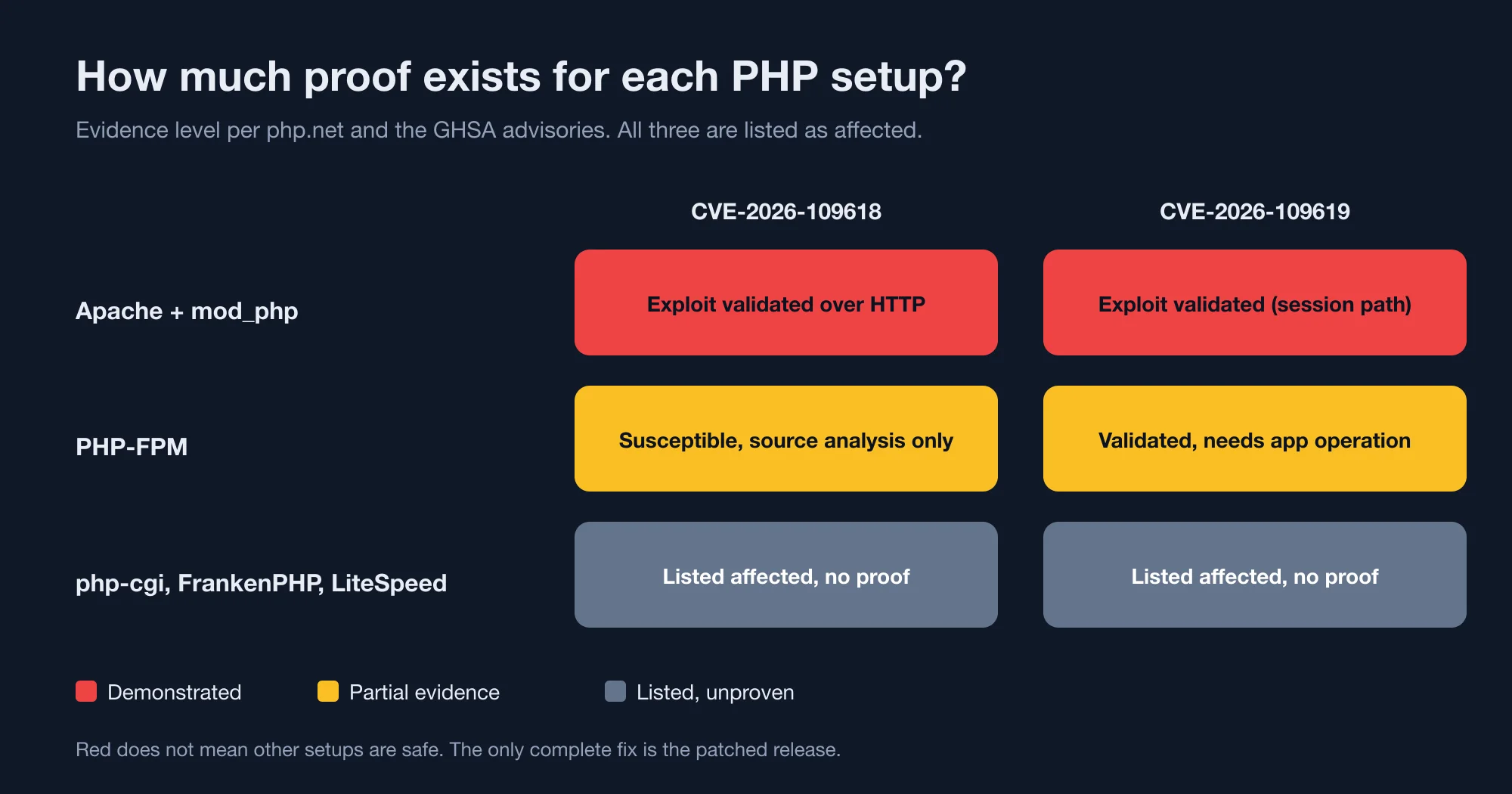
| Setup | CVE-2026-109618 | CVE-2026-109619 |
|---|---|---|
| Apache with mod_php | Full remote code execution validated over HTTP with default limits | Session-based remote code execution validated |
| PHP-FPM | Susceptible by source analysis; no complete exploit demonstrated | Validated, but the path depends on a suitable application operation |
| FrankenPHP and LiteSpeed (LSAPI) | FrankenPHP likely susceptible by source analysis; LSAPI likely but unvalidated | LSAPI a conditional candidate; no equivalent trigger established for FrankenPHP's default configuration |
| php-cgi | Listed as affected by php.net; not discussed in the advisory | Listed as affected by php.net; not discussed in the advisory |
| PHP CLI scripts that never serve web requests | Outside the scope php.net describes (web-serving installations) | Outside the scope php.net describes (web-serving installations) |
The mod_php row is the one to act on first. Per php.net, an unauthenticated request can trigger the attack before any application code runs. That means a hardened WordPress login page or a strict firewall rule inside the app offers no protection.
Advertisement
The quotable takeaway: the risk is in the PHP runtime, so application hardening does not cover it.
Researchers cited by the security firm Rescana say pre-authentication remote code execution was demonstrated against WordPress, Drupal and Joomla for one of the flaws. We could not verify that claim on a primary page, so treat it as a secondhand report. The practical point does not change: a CMS adds no safety on top of an unpatched runtime.
What does an exploitation attempt look like today?
Reports conflict, so the honest answer is that attempts are likely, and successful compromise is unconfirmed. Plan as if scanning is under way.
Here is what each source says:
- PHP's advisories say nothing about attacks in the wild. The October 20 advance notice said PHP would release early if evidence of active exploitation appeared.
- PHP Foundation, quoted by Rescana: no functional exploits were identified at the time of release and disclosure.
- CISA, October 21: no observed exploitation, and neither CVE is in the Known Exploited Vulnerabilities catalog.
- Canadian Centre for Cyber Security: a proof of concept is available, with no active exploitation identified.
- Wordify, a hosting platform: attack requests from a public proof of concept reached its network on October 21, and its firewall blocked them.
- Rescana, on October 22: Cloudflare reports attack traffic against its customers, and Amazon reports an attempt dated October 17, four days before the release. Patchstack describes probing attacks with no hard evidence of breaches.
The October 17 date, if accurate, means someone knew before the public fix. We could not confirm it on a first-party page, so we mark it as a report.
The decision does not hinge on who is right. A public proof of concept plus scanning means unpatched mod_php servers are in the line of fire this week.
How do you tell which SAPI your server runs?
Check the web server process, not the PHP command line. Running php -r 'echo php_sapi_name();' always prints cli, which tells you nothing about how web requests are served.
Use these checks instead:
- Apache with mod_php. Run
apachectl -M | grep php. A line such asphp_modulemeans mod_php is loaded. - PHP-FPM. Run
ps aux | grep php-fpm. A running master process, usually with pool workers namedwww, means FPM handles PHP requests. - Any setup. Create a file that calls
phpinfo()on a private test host, never a public one, and read the "Server API" row. Delete the file straight afterwards. - Managed hosting. The control panel usually names the handler, such as "FPM" or "LiteSpeed". If it does not, ask the host.
Many hosts moved from mod_php to FPM years ago, so your answer may be better than you expect. Still, php.net lists both as affected, and it names only mod_php as having a demonstrated exploit. Do not skip the patch because you run FPM.
How do you check your PHP version, including backports?
Run php -v, but know that a patched Linux package may keep an older number. Debian, Ubuntu and Red Hat often apply a fix to a package without raising the upstream version string.
Run these on the server that handles web traffic. A command on your laptop tells you nothing about production.
- Check the version PHP reports:
php -v. For FPM,php-fpm -vshows the FPM binary, which may differ from the CLI. - If it reads below the fixed version, search the package changelog for the CVE. On Debian or Ubuntu:
apt changelog php8.3-fpm | grep -i CVE-2026-109618. On Red Hat family systems:rpm -q --changelog php | grep CVE-2026-109618. - If the changelog names the CVE, the package carries the fix even with an older version string. If it does not, update the package.
- Restart the service afterwards. A patched binary on disk does not help while an old process still runs. Restart PHP-FPM, or reload Apache for mod_php.
A web page that prints phpinfo() shows only the version string, so it will not tell you about a backport. Check the changelog.
Our own machine shows why the version string matters. The PHP builds we use for local development read 8.3.21, 8.4.7 and 8.5.2. All three are below the fixed versions, so all three are in the affected range (our lab, 2026).
Which default settings matter?
Two defaults called out in the advisory are on out of the box. We read the built-in values with php -n, which ignores any php.ini file, so these are the stock defaults.
| Setting | PHP 8.3.21 | PHP 8.4.7 | PHP 8.5.2 |
|---|---|---|---|
session.upload_progress.enabled |
1 | 1 | 1 |
fatal_error_backtraces |
not defined | not defined | 1 |
memory_limit |
128M | 128M | 128M |
post_max_size |
8M | 8M | 8M |
upload_max_filesize |
2M | 2M | 2M |
The table is the quotable finding (our lab, 2026). Two points stand out.
First, session.upload_progress.enabled is on by default in every version we tried. php.net names session upload progress as a confirmed trigger for CVE-2026-109619, so a default install includes it.
Second, fatal_error_backtraces exists only in PHP 8.5, where it defaults to on. php.net lists PHP 8.5 with that setting enabled as a confirmed case for the same flaw. PHP 8.3 and 8.4 do not have the setting, so the advice to turn it off applies to 8.5 only.
Which temporary measures help, and which do not?
The PHP team says these measures reduce exposure to specific attack paths, but do not make an installation safe. The GHSA advisory text says there is no complete generic configuration mitigation. Use them only to buy time until you patch.
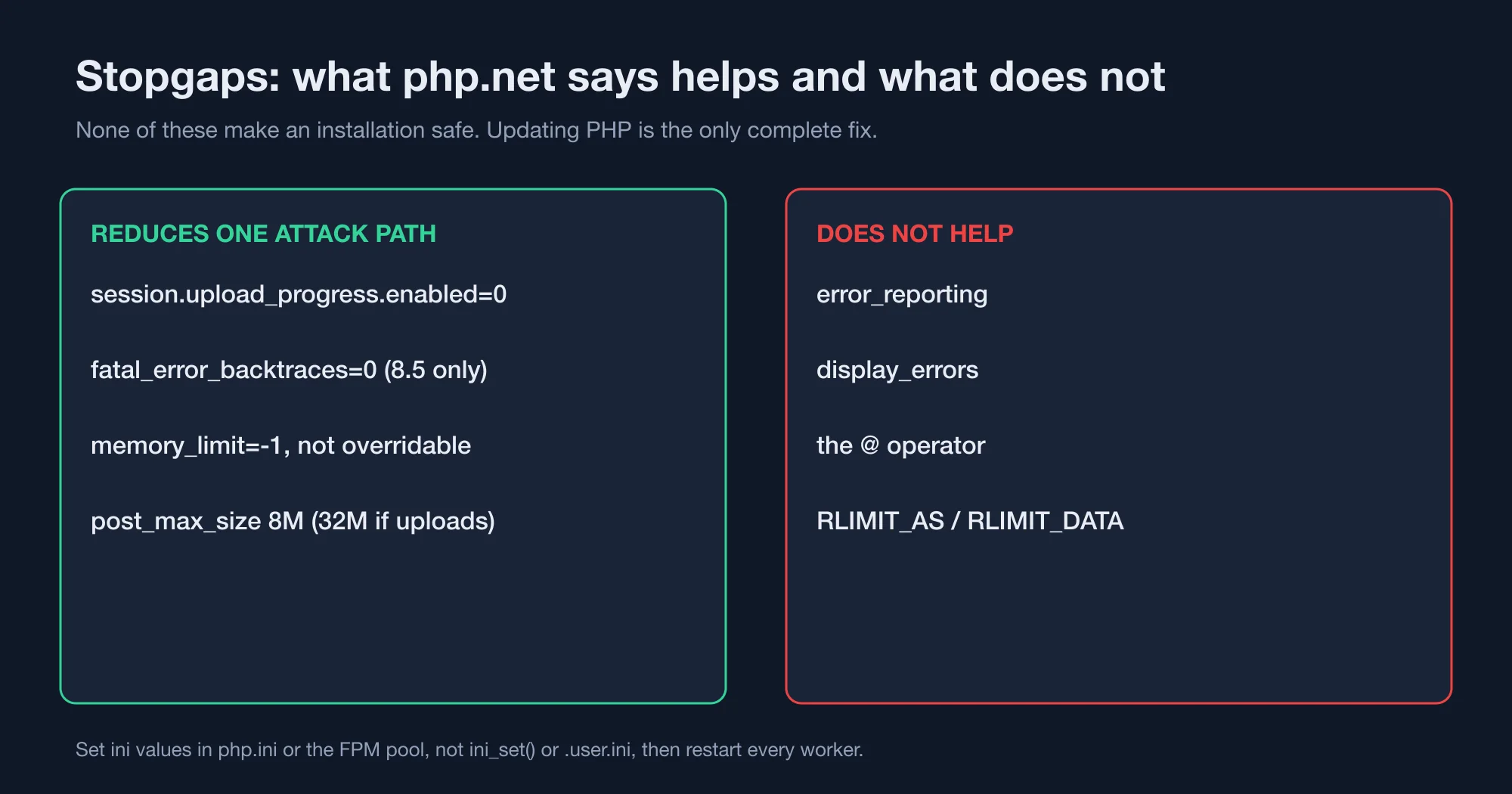
| Measure | Helps? | Notes |
|---|---|---|
session.upload_progress.enabled=0 |
Yes, one path | Set it in php.ini or the FPM pool, not with ini_set() or .user.ini. Restart every worker. |
fatal_error_backtraces=0 |
Yes, one path | PHP 8.5 only. |
memory_limit=-1 |
Yes, one path | Set in a way applications cannot override. |
post_max_size = 8M, or 32M if you need uploads |
Yes, one path | Keep upload_max_filesize below it. |
pm.max_requests=1 on PHP-FPM |
Possibly | The advisory suggests it if performance allows, so each worker serves one request. |
error_reporting, display_errors, or the @ operator |
No | Hiding diagnostics does not help, per the advisory. |
RLIMIT_AS or RLIMIT_DATA |
No | php.net says not to substitute these for the memory settings. |
Setting memory_limit=-1 looks backwards, because it removes the cap on memory use. The advisory lists it because the first flaw involves hitting the memory limit. Removing the limit takes that path away, at the price of letting a runaway script use all available RAM. That trade-off is why this is a stopgap and not a fix.
Do not treat the list as protection. php.net states that there are no complete mitigations and that updating is the only safe choice.
Should you patch now or wait for your host?
Patch now if you control the server. If a host controls it, contact your hosting provider and ask for the PHP build number and the patch date in writing. Do not wait for a status page to change.
Use this order:
- Self-managed server with mod_php. Patch today. This is the setup with the demonstrated exploit.
- Self-managed server with PHP-FPM. Patch within days. Apply the stopgaps above until then.
- Managed WordPress or shared hosting. Ask the host which fixed build they run. Also check whether your site uses PHP 8.1 or older, because that branch has no official release.
- Containers. Rebuild the image from a fixed base, such as
php:8.4-fpmat 8.4.27, and redeploy. Pulling a newer tag is not enough if your registry caches the old one. - PHP 8.2. Patch to 8.2.35, then plan the move to 8.3 or newer. Security support ends December 31, 2026.
For PHP 7.4, 8.0 and 8.1, the vendor or LTS provider is your only route, besides the source backports on GitHub. If you run those versions on a public site, treat the upgrade as a project, not a patch. Our post on upgrading Laravel 12 to 13 covers the breaking changes that tend to appear when a team jumps several versions in one go.
What should you do after patching?
Confirm the new version, restart workers, and check your logs for the week before the patch. A patch closes the hole but does not remove anything an attacker already planted.
- Search web server access logs for unusual multipart POST requests to endpoints that do not take uploads.
- Look for new or modified PHP files in upload and cache directories since October 17.
- Rotate secrets that PHP could read, such as database passwords and API keys, if you find signs of compromise.
- Keep any restored backups from before October 17 isolated until you verify them.
We cannot give a full incident-response playbook here. If your logs show anything suspicious, treat the server as compromised and bring in your security team.
Advertisement
FAQ
Which PHP versions fix CVE-2026-109618?
PHP 8.5.12, 8.4.27, 8.3.36 and 8.2.35, all released October 21, 2026, fix both CVE-2026-109618 and CVE-2026-109619. PHP 8.1 and older receive no official release. Linux distributions and long-term support vendors may backport the fix, so check the package changelog.
Is PHP-FPM affected by CVE-2026-109618?
Yes, it is listed as affected. The advisory's source analysis says PHP-FPM is susceptible, but no complete FPM exploit has been demonstrated. Apache with mod_php carries the highest risk, because php.net describes a validated exploit that works before any application code runs.
Does WordPress need an update for this PHP vulnerability?
Updating WordPress alone does not fix it. The flaws sit in the PHP runtime, so you must update PHP itself to a fixed version. On managed hosting, contact your host and ask which PHP build runs and when it was patched.
Is there a workaround if I cannot patch PHP today?
Only partial ones. php.net suggests disabling session.upload_progress.enabled, setting fatal_error_backtraces=0 on PHP 8.5, and tuning memory and POST limits. It states these do not make an installation safe, and that updating is the only safe choice.
Does php -v show whether my server is patched?
Not always. Debian, Ubuntu and Red Hat often patch a package without changing the upstream version number. Search the package changelog for the CVE ID, then restart PHP-FPM or Apache so the patched binary is the one running.
Comments
Loading…
Sign in to join the conversation.
Related posts
Node.js October 2026 security release: all 10 CVEs ranked
Upgrade to Node.js 26.12.1, 24.22.1 or 22.23.4 this week, and rebuild any snapshot or single executable binaries afterwards. The October 21, 2026 release fixed ten CVEs. Four are rated high, three
Thu Oct 22 2026 · 10 min read · 0 views

Node.js Brotli CVE-2026-111497: is your app exposed?
Upgrade to Node.js 26.12.1, 24.22.1 or 22.23.4, then check whether your code decodes Brotli data it did not produce. CVE-2026-111497 is a Brotli decoder flaw that Node.js rates high and says permits
Thu Oct 22 2026 · 10 min read · 1 views
Autocomplete in Node: a 1.4 GB trie loses to a 0.8 MB table
A trie with precomputed results answers autocomplete in 0.04 microseconds, and it used 1.4 GB of memory for 300,000 phrases. A 0.8 MB lookup table for prefixes of up to three characters matched that
Thu Oct 22 2026 · 10 min read · 0 views