Autocomplete in Node: a 1.4 GB trie loses to a 0.8 MB table
By Nihar Ranjan Das · Thu Oct 22 2026 · 10 min read · 0 views
View as a Web StorySoftware#node.js#data-structures#algorithms#autocomplete#trie
A trie with precomputed results answers autocomplete in 0.04 microseconds, and it used 1.4 GB of memory for 300,000 phrases. A 0.8 MB lookup table for prefixes of up to three characters matched that speed on short prefixes, then handed longer prefixes to a plain sorted array. For most Node.js apps, that hybrid is the better design.
This post compares a linear scan, a sorted array, a trie and the hybrid on two data sets. It shows why ranking by popularity changes the winner, and it ends with 30 lines of code you can paste.
What is autocomplete, and why does the data structure matter?
Autocomplete is a feature that suggests completions of what a user has typed so far. It runs on every keystroke, so each lookup must finish in well under a millisecond on the server, or the box feels slow.
Two questions decide the design. How do you find all entries that start with a prefix? And how do you pick the best 10, in alphabetical order or by popularity?
A trie, also called a prefix tree, is a tree where each node stands for one character and each path from the root spells a prefix. Every entry that starts with "nod" lives under the same three-node path. A sorted array with binary search is a flat list of strings in alphabetical order, where you jump to the first entry at or above the prefix and read forward while entries still match.
Published guidance is split. An article on tries for frontend applications says a trie initializes slower than an array and reports 90 milliseconds to add 10,000 items in its test. A post on trie-based autocomplete targets a 10 ms 99th-percentile response on 100,000 entries. Neither compares memory and speed against the alternatives at the same size, with ranking turned on. We did.
How we measured it
The test setup and methodology are listed below.
The test setup was Node.js 22 on an Apple M2 laptop with 8 GB of RAM. We used two data sets:
- Words. 234,454 distinct lowercase words from the macOS dictionary file, 2.1 MB of raw characters.
- Phrases. 300,000 distinct two-word phrases made by pairing random words, 5.8 MB of raw characters.
Each entry got a popularity score, skewed so that a few entries score high, like real search logs. We timed 3,000 random prefixes at each length of 1, 2, 3 and 5 characters, taken from real entries, and report the median and 99th percentile in microseconds. Memory is the growth in V8 heap after a forced garbage collection.
The four designs were:
Advertisement
- Linear scan. Loop over every entry and test
startsWith. The baseline. - Sorted array. Binary search to the first match, then read up to 10 entries. For popularity, scan the whole matching range and keep the best 10.
- Trie with top-10 per node. Every node stores the ids of the 10 best entries below it, so a lookup walks the prefix and returns the list.
- Hybrid. A
Mapfrom every prefix of up to three characters to its precomputed top 10, with the sorted array handling longer prefixes.
We checked correctness too. The trie and the sorted-array scan returned identical top-10 scores for 500 prefixes on both data sets, with zero mismatches.
Results: alphabetical suggestions are easy
If you only need the first 10 matches in alphabetical order, a sorted array is both the simplest and the fastest option. Binary search plus a short forward read took between 0.21 and 0.83 microseconds in our lab.
| Design | Words, 1 char | Phrases, 1 char | Phrases, 5 chars |
|---|---|---|---|
| Linear scan | 536 µs | 1,537 µs | 2,884 µs |
| Sorted array, alphabetical | 0.58 µs | 0.21 µs | 0.83 µs |
The linear scan is roughly 900 to 7,000 times slower at the median. It is fine for 500 entries and a mistake for 300,000. At 1.5 to 2.9 milliseconds per keystroke, one server core handles about 350 to 650 lookups per second, which a busy site passes quickly.
For example, a search box over a list of cities, product names or tags that sorts alphabetically needs nothing more than a sorted array and a 10-line lowerBound function. There is no memory cost beyond the strings you already hold.
Results: ranking by popularity changes everything
When suggestions must come back ranked by popularity, the sorted array slows down a lot on short prefixes, because it has to look at every entry that matches before it can know the best 10.
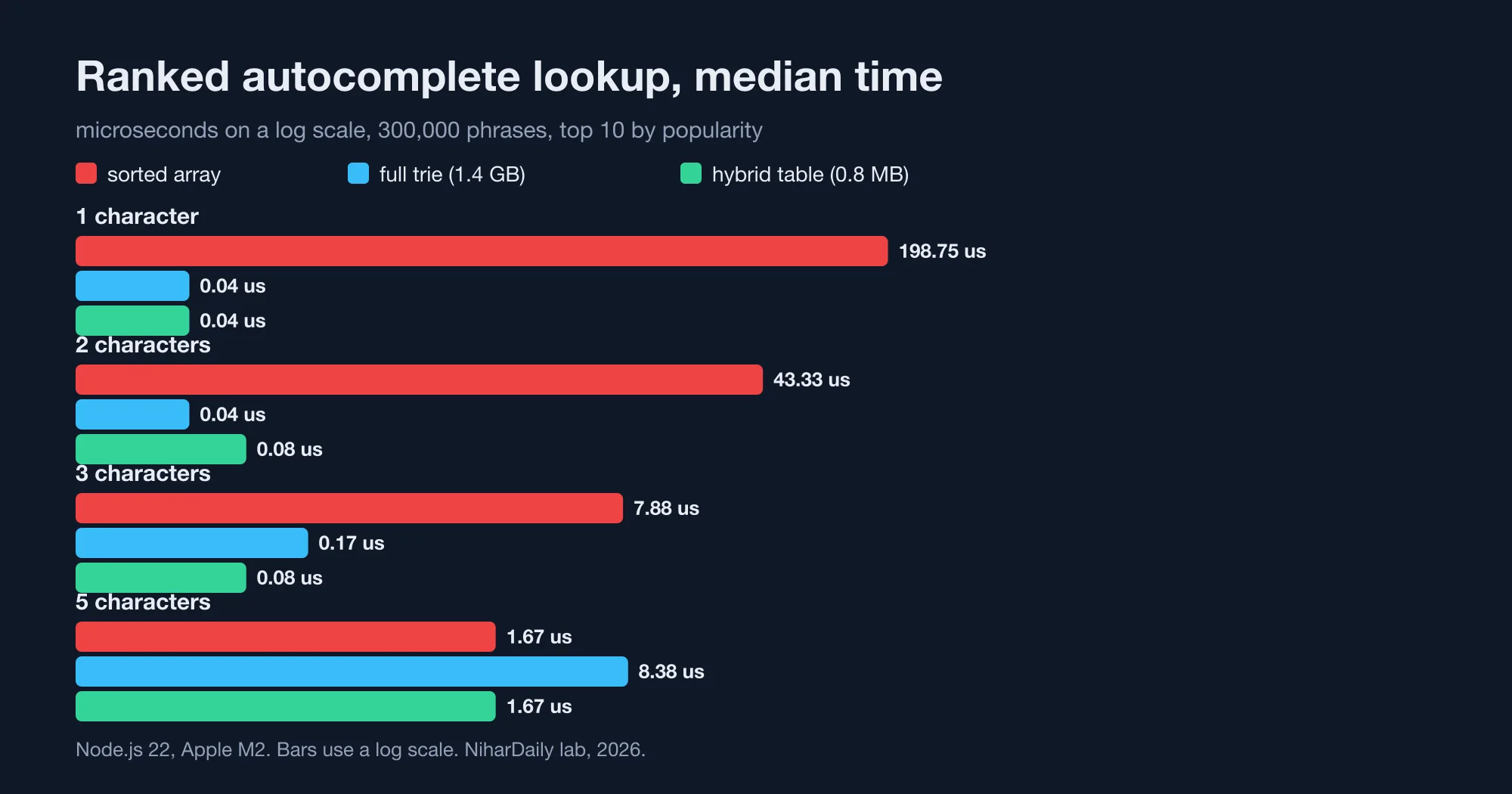
| Prefix length | Sorted array (ranked) | Trie | Hybrid |
|---|---|---|---|
| 1 character | 198.8 µs | 0.04 µs | 0.04 µs |
| 2 characters | 43.3 µs | 0.04 µs | 0.08 µs |
| 3 characters | 7.9 µs | 0.17 µs | 0.08 µs |
| 5 characters | 1.67 µs | 8.38 µs | 1.67 µs |
Numbers are the median on 300,000 phrases (our lab, 2026). The sorted array's cost is the size of the range it must scan. One letter matches on the order of 10,000 of the 300,000 phrases, so the array reads all of them. At five characters the range is tiny, so the array is fast again.
The 99th percentile tells the same story more sharply. On phrases at one character, the ranked sorted array took 499 microseconds at the 99th percentile, against 0.08 for the trie. A slow lookup on the first keystroke is the one users feel.
This is why advice to "just use a sorted array" and advice to "use a trie" both look right. They answer different questions. Alphabetical order favors the array. Ranked order on short prefixes favors precomputation.
What does a trie cost in memory?
A trie with top-10 lists at each node used 141 times the raw text on words and 244 times on phrases. That is the price of constant-time lookups.
| Data set | Raw text | Trie memory | Trie nodes | Build time |
|---|---|---|---|---|
| 234,454 words | 2.1 MB | 297 MB | 758,880 | 224 ms |
| 300,000 phrases | 5.8 MB | 1,414 MB | 3,628,758 | 1,076 ms |
The phrases trie needed 1.4 GB of the 8 GB machine, and it took a second to build. Each node is a JavaScript object with a Map of children and an array of 10 ids, so most of the memory is object overhead, not characters. A process that holds this trie also pays garbage-collection time for it.
The trie also lost at longer prefixes on the large data set. At five characters on phrases, its median was 8.38 microseconds and its 99th percentile was 98 microseconds, while the sorted array took 1.67 and 34.6. By that depth, the trie's nodes are scattered across a 1.4 GB heap, so each step is a cache miss. The sorted array's strings sit in a compact block and its range is short.
You can shrink a trie. Common fixes are compressing single-child chains into one node, a radix tree, and storing children in typed arrays. Those cut memory and complicate the code, and they were beyond what this test measured. For most teams the question is whether to build that at all.
The hybrid: precompute only what is slow
The slow part of the sorted array is short prefixes, so precompute those and nothing else. A Map from every prefix of up to three characters to its top 10 held only 4,278 prefixes on words and 4,254 on phrases, and used 0.7 to 0.8 MB.
Build time was 35 ms for words and 155 ms for phrases. It scans each short prefix's range once at startup. Lookup time on phrases was 0.04 to 0.08 microseconds for one to three characters, and the same as the sorted array beyond that (our lab, 2026).
Here is the code. It works for any list of { text, score } records, once the records are sorted by text:
const K = 10;

function lowerBound(a, p) {
  let lo = 0, hi = a.length;
  while (lo < hi) {
    const mid = (lo + hi) >> 1;
    if (a[mid].text < p) lo = mid + 1; else hi = mid;
  }
  return lo;
}

// Best K by score among entries starting with p (scans the whole range)
function topK(a, p) {
  const best = [];
  for (let i = lowerBound(a, p); i < a.length && a[i].text.startsWith(p); i++) {
    const r = a[i];
    if (best.length < K || r.score > best[best.length - 1].score) {
      best.push(r);
      best.sort((x, y) => y.score - x.score);
      if (best.length > K) best.pop();
    }
  }
  return best;
}

export function buildIndex(records) {
  const a = [...records].sort((x, y) => (x.text < y.text ? -1 : x.text > y.text ? 1 : 0));
  const short = new Map();
  for (const r of a) {
    for (let n = 1; n <= 3 && n <= r.text.length; n++) {
      const p = r.text.slice(0, n);
      if (!short.has(p)) short.set(p, topK(a, p));
    }
  }
  return (prefix) => (prefix.length <= 3 ? short.get(prefix) ?? [] : topK(a, prefix));
}
Normalize the text before you index it. Lowercase it, and strip accents if your users type without them, with normalize("NFKD"). Apply the same function to the query. Otherwise "Node" and "node" sort in different places and the binary search silently misses entries.
Two limits are worth stating. First, the table is a snapshot, so rebuild it when scores change, for example every few minutes for trending searches. Second, the long-prefix path scans a range, so a hostile query of four characters that matches many entries is slower than a typical one. If your data has a few huge prefixes, raise the cutoff from three to four characters. The table grows with the number of distinct prefixes, so measure it.
Which design should you use?
Choose by whether you rank, how many entries you have, and how much memory you can spend. The table below summarizes our measurements.
| Situation | Use | Why |
|---|---|---|
| Under about 5,000 entries | Linear scan | Fast enough, no code to maintain |
| Alphabetical order, any size | Sorted array | 0.2 to 0.8 µs, no extra memory |
| Ranked by popularity, under 1 million entries | Hybrid | 0.8 MB table, trie speed on short prefixes |
| Ranked, huge key space, memory is cheap | Compressed trie | Constant work per keystroke, but build it with care |
| Typo tolerance or full-text | A search engine | Different problem from prefix lookup |
The first row has a limit you can test. A linear scan over 234,454 words took 536 microseconds at the median in our run, and about 1/50 of that at 5,000 entries, so it stays under 15 microseconds there. If your list is the size of a country dropdown, ignore everything above.
Move the work to the client only for small lists. A 5,000-entry list ships in a few kilobytes, and then every keystroke costs zero network time. For 300,000 entries, keep the index on the server and call it with a short debounce.
Two related pieces help. Cache hot prefixes with the LRU patterns in Node LRU cache: the Map trick is 25x slower than lru-cache, since the top 100 prefixes carry most of the traffic. And protect the endpoint, because autocomplete fires on every keystroke. The limiter designs in Rate limiter algorithms compared: the 2x burst most miss apply directly. If you serve this from Postgres instead, a prefix query with a text_pattern_ops index behaves like the sorted array, and the keyset guidance in Postgres OFFSET vs keyset: page 100,000 is 6,000x slower applies to paging through results.
If your own numbers differ from ours, contact the NiharDaily editor with your data size and Node version, and we will compare them with the lab.
The bottom line: precompute the slow part only
A full trie answered in 0.04 microseconds and consumed 1.4 GB for 300,000 phrases. A 0.8 MB table matched it for short prefixes, and a sorted array covered the rest at 1.67 microseconds (our lab, 2026).
Use a sorted array for alphabetical suggestions. Add a small precomputed table when you rank by popularity. Reach for a trie only when your memory budget is large and you have measured the sorted array and found it too slow.
Advertisement
FAQ
Is a trie better than a sorted array for autocomplete?
Not always. For alphabetical suggestions, a sorted array with binary search took 0.2 to 0.8 microseconds and no extra memory in our lab. A trie with top-10 lists at each node was faster for ranked results, but used 1.4 GB for 300,000 phrases and lost at five-character prefixes.
How much memory does a trie use in JavaScript?
A lot. Our trie used 297 MB for 234,454 words that were 2.1 MB of raw text, and 1,414 MB for 300,000 phrases of 5.8 MB. Each node is an object with a Map of children, so overhead dominates. Compressed tries and typed arrays reduce it.
How do I rank autocomplete suggestions by popularity?
Store a score per entry and return the best 10 for the prefix. A sorted array has to scan every matching entry, which took 198.8 microseconds for a one-character prefix over 300,000 phrases. Precompute the top 10 for prefixes up to three characters and the cost drops to 0.04 microseconds.
How fast should an autocomplete lookup be?
Fast enough that the network and rendering dominate, so well under a millisecond on the server. All three indexed designs in our test met that, at 0.04 to 8.4 microseconds. The linear scan did not: 536 to 2,884 microseconds per lookup at 234,454 to 300,000 entries.
Should autocomplete run in the browser or on the server?
Run it in the browser for small lists, up to a few thousand entries, because each keystroke then costs no network time. For hundreds of thousands of entries, keep the index on the server, debounce the requests, and cache the most common prefixes.
Comments
Loading…
Sign in to join the conversation.
Related posts
Node.js October 2026 security release: all 10 CVEs ranked
Upgrade to Node.js 26.12.1, 24.22.1 or 22.23.4 this week, and rebuild any snapshot or single executable binaries afterwards. The October 21, 2026 release fixed ten CVEs. Four are rated high, three
Thu Oct 22 2026 · 10 min read · 0 views
Is your PHP vulnerable to CVE-2026-109618? A setup check
Yes, if you run PHP 8.5 below 8.5.12, 8.4 below 8.4.27, 8.3 below 8.3.36 or 8.2 below 8.2.35, and you serve web requests. PHP released those fixed versions on October 21, 2026 to close two critical
Thu Oct 22 2026 · 10 min read · 0 views

Node.js Brotli CVE-2026-111497: is your app exposed?
Upgrade to Node.js 26.12.1, 24.22.1 or 22.23.4, then check whether your code decodes Brotli data it did not produce. CVE-2026-111497 is a Brotli decoder flaw that Node.js rates high and says permits
Thu Oct 22 2026 · 10 min read · 1 views