Postgres OFFSET vs keyset: page 100,000 is 6,000x slower
By Nihar Ranjan Das · Wed Oct 21 2026 · 11 min read · 0 views
View as a Web StorySoftware#performance#postgresql#database#sql#pagination
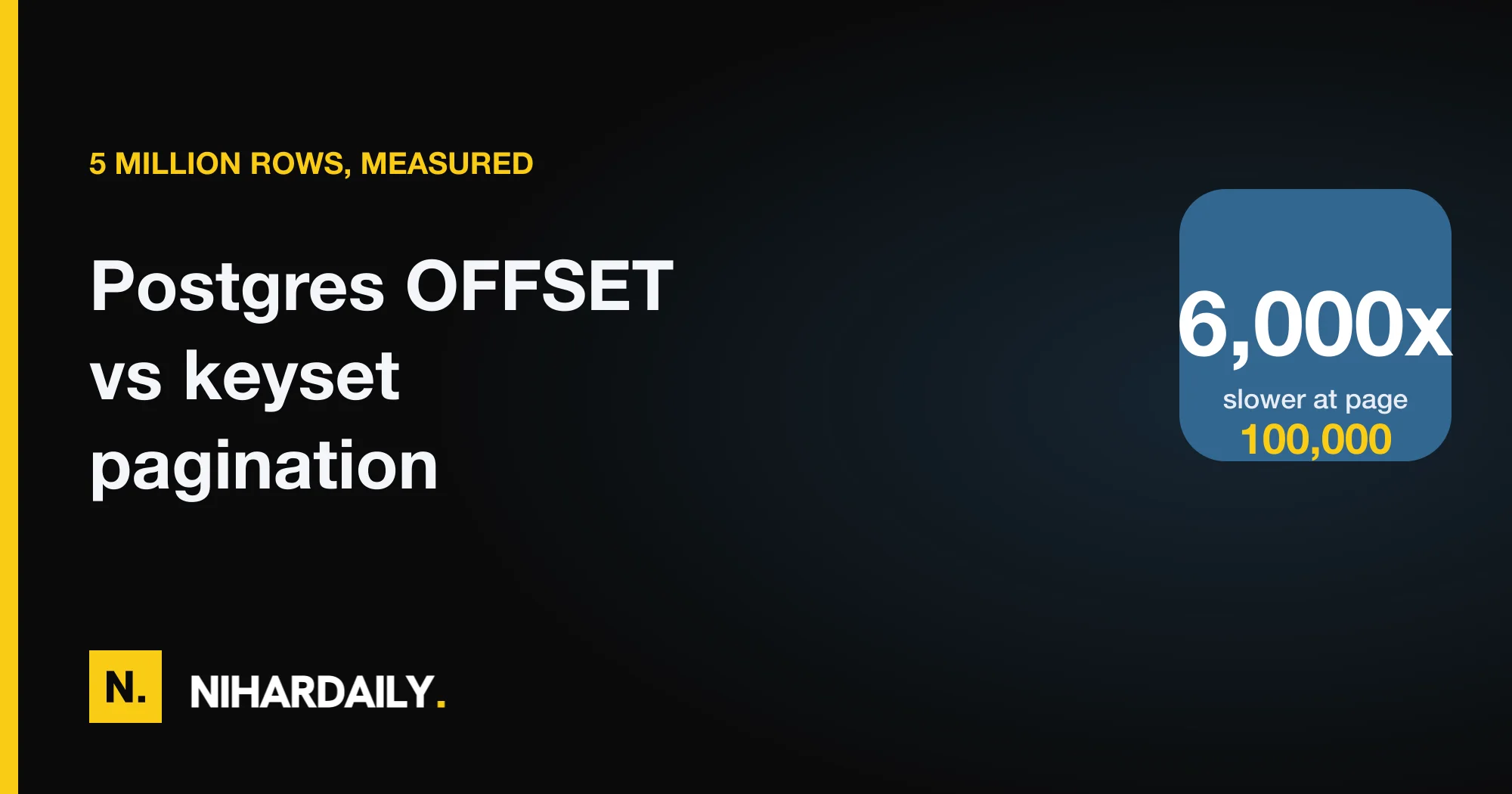
Keyset pagination is 6,000x faster than OFFSET at page 100,000 of a 5-million-row Postgres table. In our lab, LIMIT 20 OFFSET 1999980 took 182 ms, while the keyset query for the same page took 0.03 ms. The gap is not the only problem. OFFSET also returned duplicate rows whenever new data arrived between page loads, and it skipped rows when old data was deleted.
This post shows the measurements, the exact queries, a trap that makes the common keyset query almost as slow as OFFSET, and a rule for when OFFSET is still fine.
What is OFFSET pagination, and why does it slow down?
OFFSET pagination is a method where the client asks for page n by skipping (n − 1) × page_size rows with LIMIT and OFFSET. PostgreSQL still produces every skipped row before it discards it. The PostgreSQL documentation on LIMIT and OFFSET says the OFFSET rows are skipped before the server starts counting the LIMIT rows, so the work is done first.
That makes the cost linear in the page number. Page 2 skips 20 rows. Page 100,000 skips 1,999,980 rows, and each skipped row is an index entry read plus a heap fetch.
Keyset pagination, also called seek pagination, is a method where the client sends the sort key of the last row it saw, and the database continues from there. The query never produces the skipped rows. It jumps into the index at the cursor and reads 20 entries.
StackSync's keyset guide and the CYBERTEC article on the pagination problem describe the same trade-off. Both warn that exact totals are expensive. What they do not show is a measured curve on one table, with the query plans and the failure cases side by side. That is what we built.
How we measured it
The test setup and methodology are below, so you can repeat the run on your own schema.
We used PostgreSQL 18 on an Apple M2 laptop with 8 GB of RAM. The table held 5 million rows of about 150 bytes each.
create table events(
  id bigint generated always as identity primary key,
  created_at timestamptz not null,
  user_id int not null,
  payload text
);
create index events_created_id on events(created_at desc, id desc);
create index events_user on events(user_id, created_at desc, id desc);
The heap was 751 MB and the main index was 150 MB. Each query used EXPLAIN (ANALYZE, BUFFERS), and we report the median of seven runs. We set shared_buffers to 512 MB, so the deepest pages did not fit in cache. Timestamps repeat in real data, so we generated rows with clustered timestamps and used id as the tie-breaker, which is the common production shape.
The OFFSET query for page n of 20 rows was:
Advertisement
select id, created_at, user_id, payload
from events
order by created_at desc, id desc
limit 20 offset 1999980;
The keyset query for the same page used the last row of the previous page as its cursor:
select id, created_at, user_id, payload
from events
where (created_at, id) < ('2026-01-19 21:42:14.480462+06', 4900001)
order by created_at desc, id desc
limit 20;
Results: how much slower is OFFSET at depth?
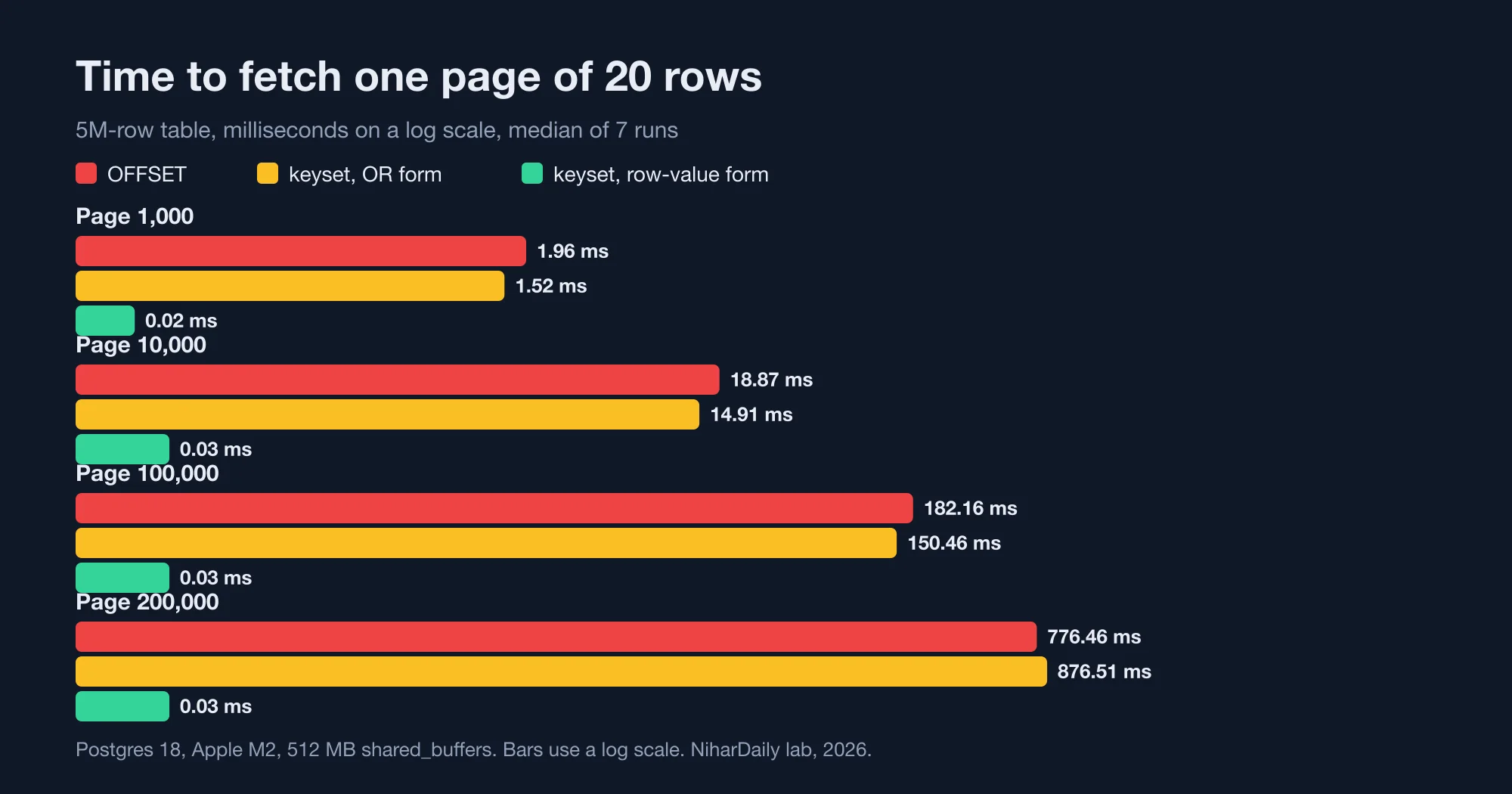
OFFSET cost rose in a straight line with the page number, and keyset cost stayed flat. At page 100,000 the OFFSET query read 103,007 buffers. The keyset query read 4.
| Page | OFFSET | Keyset | Buffers read (OFFSET / keyset) |
|---|---|---|---|
| 1 | 0.02 ms | 0.02 ms | 4 / 4 |
| 100 | 0.19 ms | 0.02 ms | 97 / 4 |
| 1,000 | 1.96 ms | 0.02 ms | 1,014 / 4 |
| 10,000 | 18.9 ms | 0.03 ms | 10,236 / 7 |
| 50,000 | 93 ms | 0.03 ms | 51,323 / 4 |
| 100,000 | 182 ms | 0.03 ms | 103,007 / 4 |
| 200,000 | 776 ms | 0.03 ms | 206,736 / 9 |
Below page 100, OFFSET is as good as keyset. A user rarely goes deeper than page 10 by hand, so a human-facing list with 20 rows per page never feels the cost.
The pain starts with machines. A crawler, an export script, a sync job or a mobile client that scrolls forever walks the whole table. Each request is slower than the last, so the full walk grows with the square of the row count.
Page 200,000 jumped to 776 ms, more than the straight line predicts. The OFFSET query touched about 1.6 GB of pages, which is more than our 512 MB of shared buffers, so the extra time is disk reads. A production server with a large cache would sit on the line, but a cold cache pushes it up.
For example, an export job that reads 5 million rows at 20 per page makes 250,000 requests. The OFFSET version spends its time re-reading rows it has already seen, while the keyset version reads each row once.
The trap: the OR form of keyset pagination
The most common keyset query in tutorials is slow in Postgres. Developers write the cursor as two conditions joined by OR:
where created_at < '2026-01-19 21:42:14.480462+06'
   or (created_at = '2026-01-19 21:42:14.480462+06' and id < 4900001)
This is logically correct, and we measured it at 150 ms for page 100,000, against 0.03 ms for the row-value form. At page 200,000 it took 877 ms, which is slightly worse than OFFSET (776 ms). The planner cannot turn the OR into a single boundary in the index, so it scans from the start of the index and filters.
The fix is a row-value comparison, which is a SQL comparison of two tuples, like (created_at, id) < (x, y). The PostgreSQL documentation on row-wise comparison defines it as comparing the fields left to right, stopping at the first difference. Postgres can use a matching composite index to start exactly at that tuple.
Three rules keep the fast form fast:
- The index must list the same columns in the same order. Ours is
(created_at desc, id desc). - Every column in the
ORDER BYmust run the same direction. Both aredeschere. - The last column must be unique. The
idtie-breaker makes the order total, so no row sits on a boundary twice.
The second rule has a nasty failure. If you write order by created_at desc, id asc with a (created_at, id) < cursor, the query still runs, and still takes 0.05 ms in our lab. But a row-value comparison assumes one direction for all columns, so the results are wrong for rows that share a timestamp. The planner adds an incremental sort and gives you no warning. If you need mixed directions, store a negated or reversed column and index that instead.
Duplicates and skips: the correctness bug OFFSET hides
OFFSET pagination returns duplicates when rows are added at the top of the sort order, and it skips rows when earlier rows are removed. The reason is that "page 3" means "rows 41 to 60 right now", and "right now" changes between requests.
We tested it by crawling 50 pages of 20 rows. After every page we inserted new rows at the top of the list, like a busy feed would.
| New rows inserted per page | OFFSET duplicates | Keyset duplicates |
|---|---|---|
| 0 | 0 | 0 |
| 1 | 49 | 0 |
| 5 | 245 | 0 |
| 20 | 980 | 0 |
Even one new row per page produced 49 duplicates, which is 4.9% of the rows returned (our lab, 2026). At 20 inserts per page, the crawl kept re-reading the same page and found only 20 unique rows out of 1,000.
Deletes cause the opposite fault. We marked 2 already-served rows per page as removed and then collected the first 1,000 stable rows. OFFSET missed 90 of them, which is 9% of the expected rows (our lab, 2026). Keyset missed none, because its cursor is a value, not a position.
This is the behavior behind many "I saw the same item twice" bug reports on infinite-scroll feeds. If your feed accepts new content while people scroll, OFFSET is wrong by design, not only slow.
Keyset has its own edge case: a row that changes its sort value after a client passed it will appear out of order or be missed. If you sort by updated_at and rows are edited, sort by an immutable column such as created_at and id instead.
Filtered lists and counts
Keyset also works for filtered lists, as long as the index starts with the filter column. We tested one user's events with the (user_id, created_at desc, id desc) index. The keyset page took 0.07 ms.
OFFSET was fast here too, because that user had only 51 rows: 4.6 ms. A filter that cuts the list to hundreds of rows removes the depth problem. This is the first cheap fix to try. Add a filter the user already chose, such as a project or an account, and the deep-page cost disappears for most lists.
The total count is the next trap. A UI that says "Page 3 of 250,000" needs count(*). We measured an exact count over the 5 million rows at 112 ms, using an index-only scan over 13,678 buffers (our lab, 2026). That is more than 5,000 times the cost of one keyset page.
Three alternatives are cheaper:
- Show "next" and "previous" only. This is what keyset naturally supports.
- Show an estimate.
pg_class.reltuplesgives an approximate count for the whole table at no cost. - Cap the count. Count at most 10,000 rows with a subquery limit, and show "10,000+".
If you use a stable sort key with the PostgreSQL 19 defaults changes covered in PostgreSQL 19 changes five defaults, not zero, re-check your index choices after the upgrade, because planner and statistics defaults changed there.
What about jumping to an arbitrary page?
Keyset pagination cannot jump to page 5,000 directly. The cursor comes from the previous page, so the client can only move forward or backward. That is the true cost of the technique.
There are four workable answers:
- Keep OFFSET for shallow pages only. Allow page numbers up to 100 and use keyset beyond that, or refuse to go deeper. Our lab shows 0.19 ms at page 100.
- Search instead of page. A user who wants page 5,000 usually wants a date or a name. Give them a date picker that produces a cursor.
- Precompute landmarks. Store the cursor of every 1,000th row, and let users jump to a landmark and then step.
- Return opaque cursors. Encode
(created_at, id)as a base64 string in the response, so clients never build the cursor themselves.
The fourth option matters for APIs. If the cursor is opaque, you can change the sort columns later without breaking clients. Sign or validate the cursor on the server, so a client cannot craft one that scans the whole table.
A working implementation
This route handler implements keyset pagination with an opaque cursor in a TypeScript server using pg. It fetches one extra row to learn whether a next page exists, so it never needs a count.
type Cursor = { t: string; id: number };

const enc = (c: Cursor) => Buffer.from(JSON.stringify(c)).toString("base64url");
const dec = (s: string): Cursor => JSON.parse(Buffer.from(s, "base64url").toString());

export async function listEvents(pool: Pool, cursor?: string, size = 20) {
  const c = cursor ? dec(cursor) : null;
  const { rows } = await pool.query(
    `select id, created_at, payload from events
     ${c ? "where (created_at, id) < ($1, $2)" : ""}
     order by created_at desc, id desc
     limit ${size + 1}`,
    c ? [c.t, c.id] : []
  );
  const page = rows.slice(0, size);
  const last = page[page.length - 1];
  return {
    items: page,
    next: rows.length > size ? enc({ t: last.created_at.toISOString(), id: last.id }) : null,
  };
}
Two details matter. created_at.toISOString() keeps millisecond precision, but Postgres stores microseconds. If your timestamps carry microseconds, send the raw text value from the database, or the cursor can land a few microseconds off and repeat a row. And the size + 1 trick replaces the count query for "has more".
To confirm the index is used, run this once in staging:
explain (analyze, buffers)
select id from events
where (created_at, id) < ('2026-01-19 21:42:14.480462+06', 4900001)
order by created_at desc, id desc limit 20;
You should see Index Scan using events_created_id and a buffer count in single digits. If you see a Sort or a Filter removing thousands of rows, one of the three rules above is broken.
When OFFSET is still the right choice
OFFSET is fine for small tables and shallow pages, and the simpler code is worth more than the speed. Use it when all of these hold:
- The table has under about 100,000 rows in the list.
- Users cannot reach deep pages, or a cap stops them at page 100.
- Rows rarely change while someone browses, such as an admin table.
- You need numbered page links in the UI.
Use keyset when any of these are true: infinite scroll, a public API with a next cursor, an export or sync job, a feed that takes writes while users read, or a table likely to pass a million rows. These are the cases where the page 100,000 problem is not rare, it is the whole workload.
If you are choosing primary keys for such a table, key order affects this design too. We measured that in UUIDv7 or UUIDv4 keys in Postgres: 11M rows, 22x slower, where a random key makes id useless as a tiebreaker for insertion order. For public endpoints, pair a cursor with the limits from Rate limiter algorithms compared: the 2x burst most miss, since a keyset API makes it cheap for one client to read everything quickly.
The bottom line: stop paying for rows you throw away
OFFSET pays for every row it skips, and at 5 million rows that bill reached 776 ms for one page. Keyset paid 0.03 ms on every page we tried, and it returned no duplicates under inserts (our lab, 2026).
Switch lists that crawlers, exports or infinite scroll touch. Use the row-value form with a matching composite index, never the OR form. Keep OFFSET for small admin tables. If your own numbers differ from ours, contact the NiharDaily editor with your row count and index definition, and we will compare them with the lab.
Advertisement
FAQ
Why is OFFSET slow in PostgreSQL?
PostgreSQL has to produce every skipped row before it discards it, so the cost grows with the offset. In our 5-million-row lab, page 100,000 took 182 ms and read 103,007 buffers, while page 1 took 0.02 ms. The work is wasted on rows the client never sees.
What is keyset pagination?
Keyset pagination is a method that continues from the last row the client saw, using a sort-key value instead of a page number. The query uses a composite index to jump straight to that value. In our lab it took 0.03 ms at page 100,000, the same as page 1.
Why is my keyset pagination query still slow?
Most often the cursor is written with OR, such as created_at < x OR (created_at = x AND id < y). That took 150 ms at page 100,000 in our lab. Rewrite it as the row-value comparison (created_at, id) < (x, y) and make sure a composite index matches the order.
Can keyset pagination jump to page 50?
No. A keyset cursor comes from the previous page, so a client can only move forward or back. For numbered pages, keep OFFSET for the first 100 pages or so, or give users a date or search filter that produces a cursor for them.
Does OFFSET return duplicate rows?
Yes, when rows are inserted at the top of the sort order between page loads. In our 50-page crawl, one new row per page produced 49 duplicates, and five per page produced 245. Keyset pagination returned zero duplicates, because its cursor is a value rather than a row position.
Comments
Loading…
Sign in to join the conversation.
Related posts

Node LRU cache: the Map trick is 25x slower than lru-cache
The popular "Map delete-and-set" LRU cache is about 25x slower than the lru-cache package once the cache holds 10,000 keys. In our Node.js benchmark it managed 0.59 million operations per second,
Wed Oct 21 2026 · 10 min read · 0 views
Consistent hashing: 100 virtual nodes still run 18% hot
A hash ring with 100 virtual nodes per server still leaves the busiest of 10 servers about 18% above the average load. In our lab it took 1,000 virtual nodes to bring that down to 5%. Rendezvous
Wed Oct 21 2026 · 11 min read · 0 views

Bloom filter for username checks: 2.4 MB, but is it worth it?
A Bloom filter can answer "is this username taken?" for 2 million users in 2.4 MB of memory, but it only pays off when the exact check is expensive. In our lab the same 2 million names took 218 MB in
Wed Oct 21 2026 · 10 min read · 0 views