Consistent hashing: 100 virtual nodes still run 18% hot
By Nihar Ranjan Das · Wed Oct 21 2026 · 11 min read · 0 views
View as a Web StorySoftware#caching#system-design#algorithms#consistent-hashing#distributed-systems
A hash ring with 100 virtual nodes per server still leaves the busiest of 10 servers about 18% above the average load. In our lab it took 1,000 virtual nodes to bring that down to 5%. Rendezvous hashing and jump hash got to 1% with no virtual nodes at all, and both moved the ideal share of keys when a node joined.
This post gives the numbers for five ways to place keys on servers: plain modulo, a hash ring with several virtual-node counts, rendezvous hashing and jump hash. It shows what each does when a server is added or removed, what each costs per lookup, and which one to pick.
What is consistent hashing, and why not just use modulo?
Consistent hashing is a method of assigning keys to servers so that adding or removing a server moves only a small share of the keys. The ideal share is 1/N for a cluster of N servers. A cache cluster uses it so that a deploy or a failure does not empty the whole cache.
The simple alternative is modulo: server number equals hash(key) % N. It balances well and it is one instruction. But when N changes, almost every key changes server. A cache that does this suffers a stampede on the database each time a node joins or leaves.
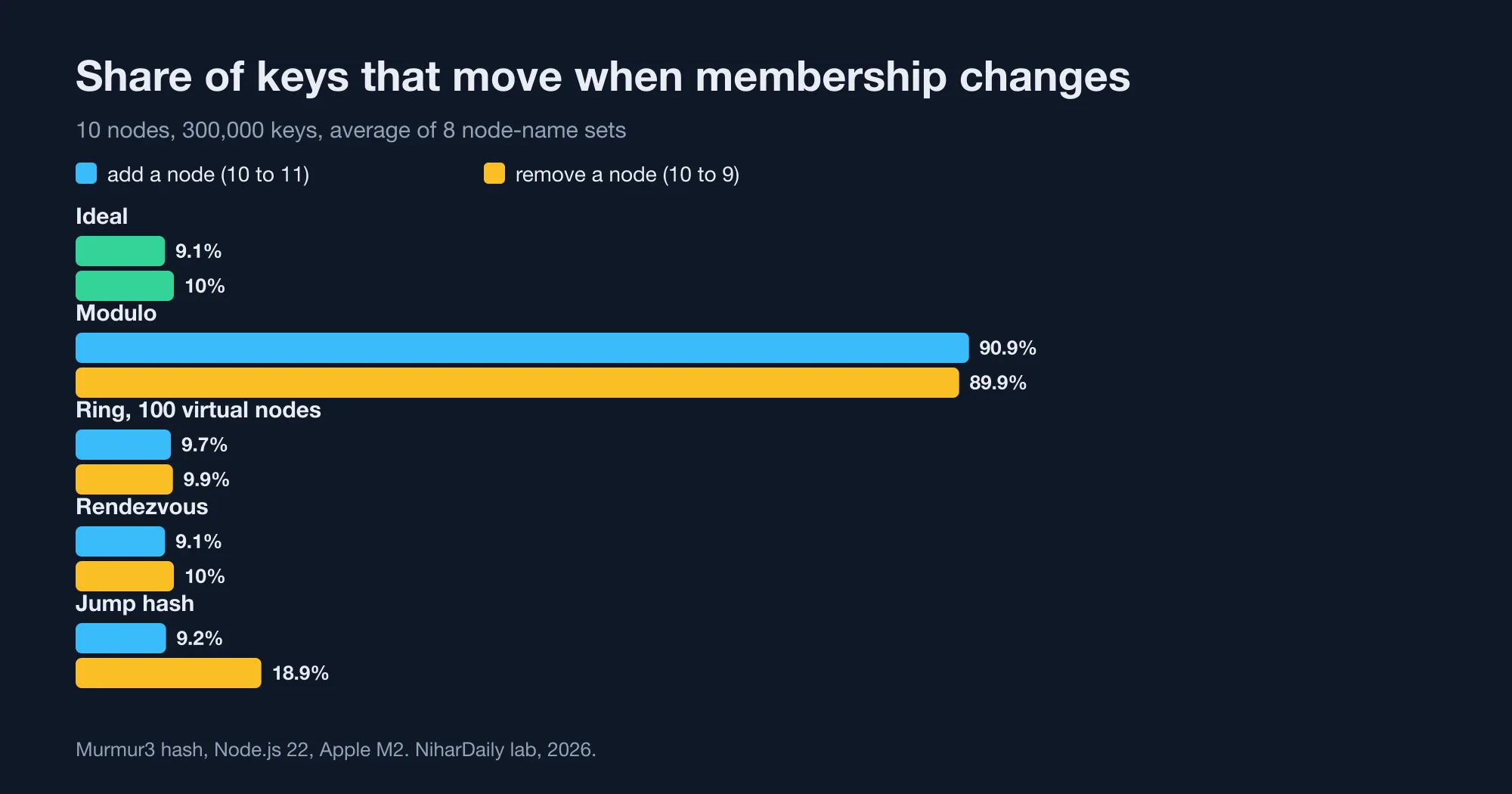
We measured it. With 10 servers and 300,000 keys, adding an 11th server remapped 90.9% of keys under modulo (our lab, 2026). The ideal was 9.1%, which is 1/11. Removing one server remapped 89.9%, against an ideal of 10%.
Three families dominate in practice: the hash ring, rendezvous hashing and jump hash. Explanations of them rarely show a measured comparison on one key set, with the imbalance and the churn side by side. That is what the rest of this post does.
How we measured it
The test setup was Node.js 22 on an Apple M2 laptop with 8 GB of RAM. We used 300,000 keys named user:0 to user:299999 and a 32-bit murmur3 hash.
For each algorithm we built a 10-node cluster, then measured three things:
- Churn on add. The share of keys that changed server when an 11th node joined.
- Churn on remove. The share that moved when one node left.
- Imbalance. The load on the busiest node divided by the average, and the coefficient of variation, which is the standard deviation as a share of the mean.
Ring placement depends on the node names, so a single run can be lucky. We repeated every test with eight different node-name prefixes, such as node, srv and cache, and report the average. Lookup speed is the best of three runs in a single thread after a warm-up.
The five placements were:
Advertisement
- Modulo.
hash % N. - Hash ring. A hash ring is a sorted circle of hash positions where each key belongs to the first server position at or after the key's hash. Each server can own several positions, called virtual nodes.
- Rendezvous hashing. Rendezvous hashing, also called highest random weight, is a method that scores every server against the key and picks the highest score. It has no ring and no state.
- Jump hash. Jump hash is an algorithm from Google that maps a key to a bucket number from 0 to
N−1using no memory. The Lamping and Veach paper describes it in a few lines of code.
Results: how many keys move when a node joins or leaves?
Every consistent method moved close to the ideal share of keys, and modulo moved nine times too many. The table shows the average of eight runs.
| Method | Keys moved, 10 to 11 nodes | Keys moved, 10 to 9 nodes |
|---|---|---|
| Ideal | 9.1% | 10.0% |
| Modulo | 90.9% | 89.9% |
| Ring, 1 virtual node | 8.4% | 10.2% |
| Ring, 10 virtual nodes | 7.2% | 8.9% |
| Ring, 100 virtual nodes | 9.7% | 9.9% |
| Ring, 1,000 virtual nodes | 9.0% | 10.0% |
| Rendezvous | 9.1% | 10.0% |
| Jump hash | 9.2% | 18.9% |
The ring with few virtual nodes shows a lower churn on add, such as 7.2% at 10 virtual nodes. That is not a win. A node with a small slice of the ring takes few keys because it owns little, and the next section shows the cost of that.
Jump hash matched the ideal on add but not on remove. Jump hash only knows buckets numbered 0 to N−1. To remove a node from the middle, you must renumber, for example by moving the last node into the empty slot. We removed node 4 that way, and 18.9% of keys moved (our lab, 2026). Removing the last node costs the ideal share, but you rarely get to choose which node fails.
Results: how uneven is the load?
Churn is only half the story. A scheme that moves the right number of keys can still put too many of them on one server.
| Method | Busiest node vs average | Worst of 8 runs | Coefficient of variation |
|---|---|---|---|
| Modulo | 1.01x | 1.01x | 0.4% |
| Ring, 1 virtual node | 2.79x | 4.21x | 86.9% |
| Ring, 10 virtual nodes | 1.47x | 1.65x | 28.3% |
| Ring, 100 virtual nodes | 1.18x | 1.30x | 10.5% |
| Ring, 200 virtual nodes | 1.12x | 1.20x | 6.3% |
| Ring, 1,000 virtual nodes | 1.05x | 1.08x | 3.0% |
| Rendezvous | 1.01x | 1.01x | 0.6% |
| Jump hash | 1.01x | 1.01x | 0.6% |
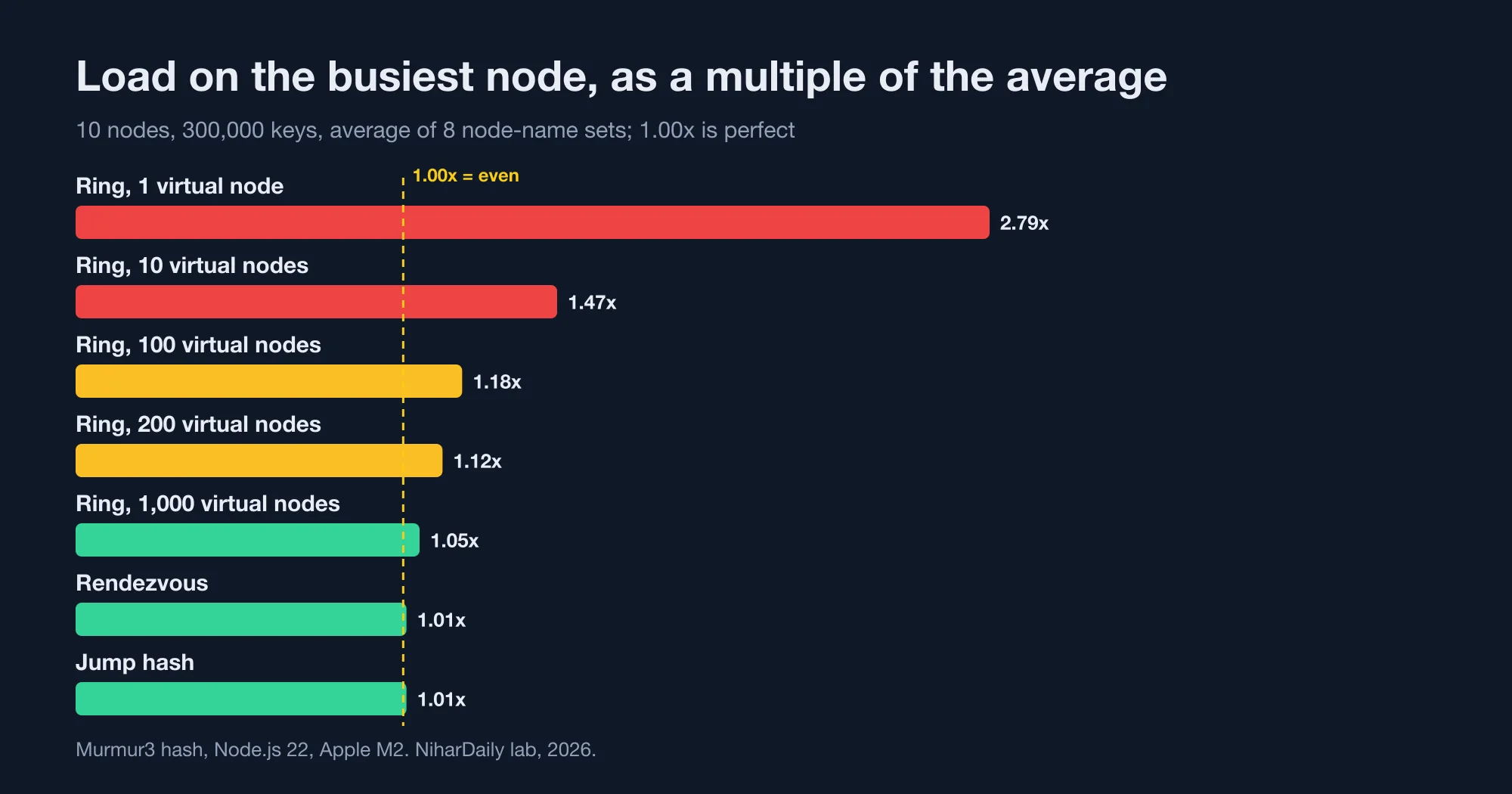
A ring with one point per server is unusable. The busiest server carried 2.79x its fair share on average and 4.21x in the worst run, and the least loaded server held 11% of its share.
The error shrinks roughly with the square root of the virtual node count. Going from 10 to 100 virtual nodes cut the coefficient of variation from 28.3% to 10.5%. Going from 100 to 1,000 cut it to 3.0%. To halve the imbalance you need about four times the virtual nodes.
That is the reason the common advice of "use 100 virtual nodes" deserves a footnote. With 100 per server, the hottest of 10 servers ran 18% above average, and in one run 30% above (our lab, 2026). If your servers are sized with 20% headroom, the hottest one is already near its limit.
For example, take a cache cluster of 10 servers where the average server needs 64 GB. With a ring of 100 virtual nodes, the busiest server needs about 75 GB for its share. That server evicts first, and its hit rate drops before the others notice.
The Cassandra configuration reference for num_tokens describes the same mechanism. It says the number of tokens is randomly assigned to each node on the ring, and that more tokens, relative to other nodes, give a node a larger share. Tokens are virtual nodes under another name.
What do the extra virtual nodes cost?
A ring with V virtual nodes per server holds N × V entries, and every lookup is a binary search over them. The memory is small. The cost that matters is the rebuild and the cache footprint.
At 100 virtual nodes the ring held 1,000 entries for 10 servers, 10,000 for 100 and 100,000 for 1,000. Stored as a sorted Uint32Array of hashes, 100,000 entries take 400 KB, plus a parallel array of server references. That is small for one process, but it is rebuilt on every membership change, and it must fit in the CPU cache to stay fast.
Lookup time rose slowly with the ring size:
| Nodes | Ring (100 virtual nodes) | Rendezvous | Jump hash (BigInt) |
|---|---|---|---|
| 10 | 87 ns | 65 ns | 251 ns |
| 100 | 127 ns | 222 ns | 446 ns |
| 1,000 | 168 ns | 1,252 ns | 600 ns |
These are single-thread times in JavaScript including call overhead, so the absolute values are specific to our machine. The shape is the point. Ring lookup grows with the logarithm of the entries. Rendezvous grows linearly, because it scores every node. At 1,000 nodes it was 7.5 times slower than the ring.
The jump hash numbers are inflated. Jump hash needs a 64-bit multiply, and our JavaScript version uses BigInt, which is slow. In C, Go or Rust it is the fastest of the group. Treat our jump column as an upper bound, not a ranking.
A 2025 paper, Local Rendezvous Hashing, tackles the linear cost by scoring only a small window of candidate nodes. We did not test it. It is a sign that rendezvous at large scale needs care.
How to choose
The right choice depends on three facts: how many nodes, whether you can number them, and how often membership changes.
- Under about 50 nodes, and nodes come and go: use rendezvous hashing. It is a few lines, has no state to rebuild, balanced within 1.4% in our runs, and moves the ideal share on both add and remove.
- Hundreds of nodes, or a lookup on a hot path: use a ring with 200 to 1,000 virtual nodes. Lookup stays under 200 ns, and the imbalance falls to 12% or less.
- Numbered shards that only grow: use jump hash. Storage buckets such as
shard-0toshard-63, which you add at the end and never delete from the middle, are its best case. - A fixed cluster that never changes: modulo is fine, and it is the fastest. Check this assumption before relying on it, because autoscaling and failures change membership.
A working rendezvous implementation
This is the whole of rendezvous hashing in TypeScript. It hashes the key together with each node's identity and returns the node with the largest score.
function fnv1a(str: string): number {
  let h = 0x811c9dc5;
  for (let i = 0; i < str.length; i++) { h ^= str.charCodeAt(i); h = Math.imul(h, 0x01000193); }
  return h >>> 0;
}
const mix = (a: number, b: number) => {
  let h = (a ^ Math.imul(b, 0x9e3779b1)) >>> 0;
  h ^= h >>> 16; h = Math.imul(h, 0x85ebca6b);
  h ^= h >>> 13; h = Math.imul(h, 0xc2b2ae35);
  h ^= h >>> 16; return h >>> 0;
};

export function pick(key: string, nodes: string[]): string {
  const kh = fnv1a(key);
  let best = -1, winner = nodes[0];
  for (const n of nodes) {
    const score = mix(kh, fnv1a(n));
    if (score > best) { best = score; winner = n; }
  }
  return winner;
}
FNV-1a is enough for a demo, while our benchmark used murmur3. Precompute fnv1a(n) for each node once, as our benchmark did, or the loop will hash every node name on every call.
For weighted nodes, scale the score. A common form uses -weight / ln(score) with the score mapped to a number between 0 and 1. That lets a server with twice the memory take about twice the keys.
To confirm your own implementation, run a self-check like ours: assign 100,000 keys with 10 nodes, add an 11th, and assert that between 8% and 10% of keys moved, and that every moved key landed on the new node.
const keys = Array.from({ length: 100_000 }, (_, i) => `user:${i}`);
const a = keys.map(k => pick(k, nodes10));
const b = keys.map(k => pick(k, nodes11)); // nodes11 = nodes10 plus "node-10"
const moved = keys.map((_, i) => i).filter(i => a[i] !== b[i]);
console.assert(moved.length / keys.length < 0.10);
console.assert(moved.every(i => b[i] === "node-10"));
A correct implementation never moves a key between two old nodes when a new node joins. If you see that, the hash mixes the node identity badly.
Mistakes that show up in production
Four mistakes cause most of the real incidents with consistent hashing.
- Hashing node names that are too alike. Names like
node-1andnode-2differ by one character. A weak hash can place them in clumps. Use a well-mixed 32-bit or 64-bit hash, and test the busiest-node ratio. - Different hashes on different clients. If two services use different hash functions or ring sizes, the same key goes to different servers. Pin the algorithm and version in shared code.
- Forgetting replicas. The first node is the primary. For a copy, walk to the next distinct physical node on the ring. Walking to the next virtual node can pick the same server twice.
- Treating a failure as a removal. A brief network blip that removes a node and adds it back moves keys twice. Wait a grace period before rebalancing.
We applied the same lens to rate limits in Rate limiter algorithms compared: the 2x burst most miss, where a limiter's shared counters also need a stable key-to-server mapping. And if the cluster is a cache, the sizing logic of Node LRU cache: the Map trick is 25x slower than lru-cache decides how much memory each node needs, so the hot-node factor from this post applies there too.
If your own imbalance numbers differ from ours, contact the NiharDaily editor with your node count and hash function, and we will compare them with the lab.
The bottom line: pick for your scale
Modulo remapped 90.9% of keys when one node joined, so it is only safe for a cluster that never changes. A ring is the default for large clusters, but 100 virtual nodes left one server 18% hot, and 1,000 were needed for 5% (our lab, 2026).
Rendezvous hashing balanced best and had the simplest code, and it is the right choice up to a few dozen nodes. Jump hash is excellent for append-only shards. Whatever you choose, measure the busiest node, not the average.
Advertisement
FAQ
How many virtual nodes should a consistent hash ring have?
At least 200 for a 10-node cluster if you want the busiest node within about 12 percent of average. In our lab, 100 virtual nodes left the hottest node 18 percent above average and 1,000 left it 5 percent above. The error shrinks with the square root of the count.
Is rendezvous hashing better than consistent hashing?
For small clusters, usually yes. Rendezvous hashing balanced within 1.4 percent of average load with no tuning and moved the ideal share of keys on add and remove. Its lookup cost grows with the node count, 1,252 ns at 1,000 nodes in our test, so large clusters prefer a ring.
How many keys move when I add a server with modulo hashing?
About N/(N+1) of them. In our test, going from 10 to 11 servers with hash modulo N remapped 90.9 percent of 300,000 keys. A consistent method moves only about 1/(N+1), which was 9.1 percent at that size.
Can jump hash handle removing a node from the middle?
Not cleanly. Jump hash only supports buckets numbered 0 to N-1, so removing a middle node means renumbering. In our lab, removing node 4 of 10 that way moved 18.9 percent of keys, against an ideal of 10 percent. It suits shards you only add to.
Does consistent hashing balance load evenly?
Not by itself. A ring with one point per server gave the busiest node 2.79 times the average load in our lab. Virtual nodes, rendezvous hashing or jump hash are what improve balance, so check the busiest-node ratio for your configuration.
Comments
Loading…
Sign in to join the conversation.
Related posts

Node LRU cache: the Map trick is 25x slower than lru-cache
The popular "Map delete-and-set" LRU cache is about 25x slower than the lru-cache package once the cache holds 10,000 keys. In our Node.js benchmark it managed 0.59 million operations per second,
Wed Oct 21 2026 · 10 min read · 0 views
Postgres OFFSET vs keyset: page 100,000 is 6,000x slower
Keyset pagination is 6,000x faster than OFFSET at page 100,000 of a 5-million-row Postgres table. In our lab, LIMIT 20 OFFSET 1999980 took 182 ms, while the keyset query for the same page took 0.03
Wed Oct 21 2026 · 11 min read · 0 views

Bloom filter for username checks: 2.4 MB, but is it worth it?
A Bloom filter can answer "is this username taken?" for 2 million users in 2.4 MB of memory, but it only pays off when the exact check is expensive. In our lab the same 2 million names took 218 MB in
Wed Oct 21 2026 · 10 min read · 0 views