Rate limiter algorithms compared: the 2x burst most miss
By Nihar Ranjan Das · Wed Oct 21 2026 · 10 min read · 0 views
View as a Web StorySoftware#api#Redis#rate-limiting#system-design#lua

A fixed window limiter and a token bucket limiter can both let a client send nearly double the configured limit inside one minute. In our Redis lab, a "100 requests per minute" rule let 200 requests through in 60 seconds with a fixed window and 199 with a token bucket. Only the sliding window log held the line at exactly 100, and the sliding window counter landed in between at 128.
Most guides draw the boundary problem for fixed windows and stop there. They do not mention that the token bucket, the algorithm many teams pick to fix it, has the same 2x ceiling by design. This post shows the measurements, the Lua scripts that produced them, the memory and speed cost of each choice, and a decision rule for your API.
What is the best rate limiting algorithm?
There is no single best algorithm. The best choice depends on whether you care most about exact limits, low memory or permitted bursts. For most public HTTP APIs, the sliding window counter gives the best balance, and for traffic that is naturally bursty, the token bucket does.
Rate limiting is a control that caps how many requests a client may send in a period of time. A limiter is the code that counts requests and decides to allow or reject each one. When a request is rejected, the server should answer with HTTP 429 and a Retry-After header, as RFC 6585 and RFC 9110 describe.
The four common algorithms are:
- Fixed window counter: one counter per client per clock window, such as one minute.
- Sliding window log: a list of timestamps, one per accepted request.
- Sliding window counter: two counters, the current window and the previous one, blended by position in the window.
- Token bucket: a bucket that refills at a steady rate and spends one token per request.
Redis's own rate limiting guide and Redisson's algorithm glossary describe the same four. Neither publishes a worst-case comparison, which is the gap this lab fills.
Test setup: how we measured each limiter
The test setup was Redis 8.4 on an Apple M2 laptop, with each limiter written as a Lua script so the check and the update run atomically. The methodology passes the timestamp into the script, so a five-minute test runs in seconds. In production you would read the time inside Redis instead, with the TIME command.
Every limiter used the same rule: 100 requests per 60 seconds. We ran four scenarios:
- Greedy client: one client sends 10 requests per second for 300 seconds, starting mid-window.
- Boundary attack: 150 requests just before a window edge and 150 just after.
- Memory: 3,000 clients with 60 requests each, then
MEMORY USAGEon every key. - Throughput: 200,000 pipelined script calls over 1,000 keys on one connection.
For the first two scenarios we recorded the largest number of accepted requests in any 60-second window and in any one-second window. That figure is the real guarantee your backend gets.
Results: how many requests slip through
The greedy client shows the true ceiling of each algorithm. A limiter that promises 100 per minute should never accept more than 100 in any minute.
Advertisement
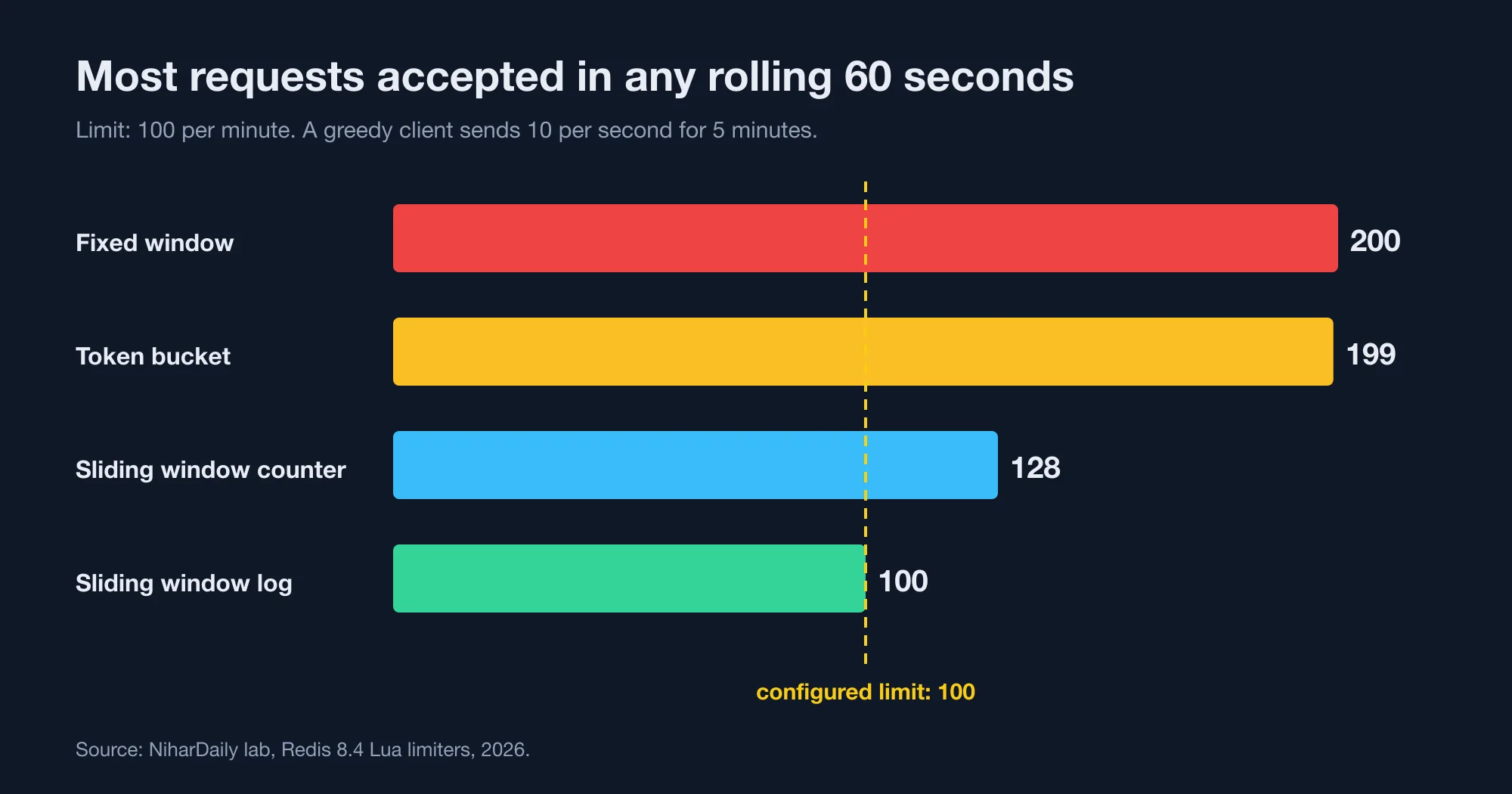
| Algorithm | Max in any 60 s | Max in any 1 s (boundary attack) |
|---|---|---|
| Fixed window | 200 | 200 |
| Token bucket | 199 | 100 |
| Sliding window counter | 128 | 100 |
| Sliding window log | 100 | 100 |
The fixed window failed the boundary attack completely. All 200 requests passed within one-tenth of a second, because the counter reset at the window edge.
The token bucket stopped the boundary attack but still allowed 199 requests in a minute. A full bucket holds 100 tokens, and it refills at 100 per minute. A client that has been idle can spend the bucket and then keep draining the refill, for roughly twice the nominal limit.
The sliding window counter allowed 128. It estimates the previous window as if its requests were spread evenly. A greedy client that sent its previous requests early in the window gets some of that capacity back too soon.
The fixed window: cheap and leaky
A fixed window counter is a limiter that increments one counter per client per clock-aligned window. It is the cheapest option and the least accurate. This Lua script is all it takes:
-- KEYS[1] = client id, ARGV = now (seconds), window, limit
local w = math.floor(tonumber(ARGV[1]) / tonumber(ARGV[2]))
local k = KEYS[1] .. ':' .. w
local c = redis.call('INCR', k)
if c == 1 then redis.call('EXPIRE', k, ARGV[2] * 2) end
if c <= tonumber(ARGV[3]) then return 1 else return 0 end
It used 34.6 bytes per client and ran at 97,414 calls per second, the fastest of the four. For internal tools, login throttles or free-tier abuse control, that may be enough.
The problem is the edge. A client that sends 100 requests at 12:00:59 and 100 more at 12:01:01 gets 200 requests in two seconds. If your backend sizes its capacity for 100 per minute per client, a coordinated burst across many clients can exceed it by 2x at every minute boundary.
The sliding window log: exact but heavy
A sliding window log is a limiter that stores a timestamp for every accepted request and counts the ones inside the last window. It is the only algorithm in our test that held exactly 100 in every window.
local now, w, lim = tonumber(ARGV[1]), tonumber(ARGV[2]), tonumber(ARGV[3])
redis.call('ZREMRANGEBYSCORE', KEYS[1], 0, now - w)
if redis.call('ZCARD', KEYS[1]) < lim then
  redis.call('ZADD', KEYS[1], now, ARGV[4])
  redis.call('EXPIRE', KEYS[1], math.ceil(w))
  return 1
end
return 0
The price is memory. Each client with 60 accepted requests used 2,488 bytes in a sorted set, which is 72 times more than the counter. At 100 requests per minute, a client costs roughly 4 KB.
Scale that to one million active clients and the log needs about 2.5 GB of Redis memory against 35 MB for a counter. It was also the slowest, at 77,167 calls per second, because each call trims and measures a sorted set.
Use the log when the limit protects something expensive and the client count is small. For example, a payment provider call with 5,000 merchants fits easily.
The sliding window counter: the practical middle
A sliding window counter is a limiter that keeps two fixed-window counters and weights the previous one by how much of it still overlaps the sliding window. It keeps the memory of the fixed window and removes most of the boundary spike.
local now, w, lim = tonumber(ARGV[1]), tonumber(ARGV[2]), tonumber(ARGV[3])
local cw = math.floor(now / w)
local cur, prev = KEYS[1]..':'..cw, KEYS[1]..':'..(cw - 1)
local pc = tonumber(redis.call('GET', prev) or '0')
local cc = tonumber(redis.call('GET', cur) or '0')
local frac = (now - cw * w) / w
if pc * (1 - frac) + cc + 1 <= lim then
  redis.call('INCR', cur); redis.call('EXPIRE', cur, w * 2)
  return 1
end
return 0
It used 34.6 bytes per client in our run, where all requests fell in one window. A client that straddles two windows holds two keys, so expect about 70 bytes. Speed was 93,983 calls per second.
The boundary attack failed against it: only 100 of 300 requests passed. The greedy test showed its weakness, with 128 accepted in a rolling minute. That is a 28% overshoot (measured, 2026), which is much better than 100% for the fixed window.
This is why Redis's guide recommends it as a general-purpose choice. If you need one default for a public API, start here.
The token bucket: bursts as a feature
A token bucket is a limiter that holds up to a fixed number of tokens, refills them at a steady rate and spends one per request. It separates the sustained rate from the permitted burst, which no window algorithm can do.
local now, cap, rate = tonumber(ARGV[1]), tonumber(ARGV[2]), tonumber(ARGV[3])
local d = redis.call('HMGET', KEYS[1], 't', 'ts')
local t, ts = tonumber(d[1]), tonumber(d[2])
if t == nil then t = cap; ts = now end
t = math.min(cap, t + (now - ts) * rate)
local ok = 0
if t >= 1 then t = t - 1; ok = 1 end
redis.call('HSET', KEYS[1], 't', t, 'ts', now)
redis.call('EXPIRE', KEYS[1], math.ceil(cap / rate) * 2)
return ok
It used 83.4 bytes per client, because the hash stores a float and a timestamp. Speed was 88,059 calls per second.
The ceiling is the point. With capacity 100 and a refill of 100 per minute, a client can send 100 immediately and 99 more over the next minute. That is correct behavior for an upload API or a webhook receiver, where a client may need to send a batch.
It is wrong when the number is a hard limit, such as a vendor quota you pay for. If the vendor allows 100 per minute and your bucket allows 199, the vendor will reject the rest.
To make the bucket behave like a strict limit, set the capacity much lower than the per-minute rate. A capacity of 10 with a refill of 100 per minute allows a 10-request burst and about 110 requests in a rolling minute.
Memory and speed side by side
All four limiters were fast enough. Memory differed by up to 72 times, and that is the main cost driver at scale.
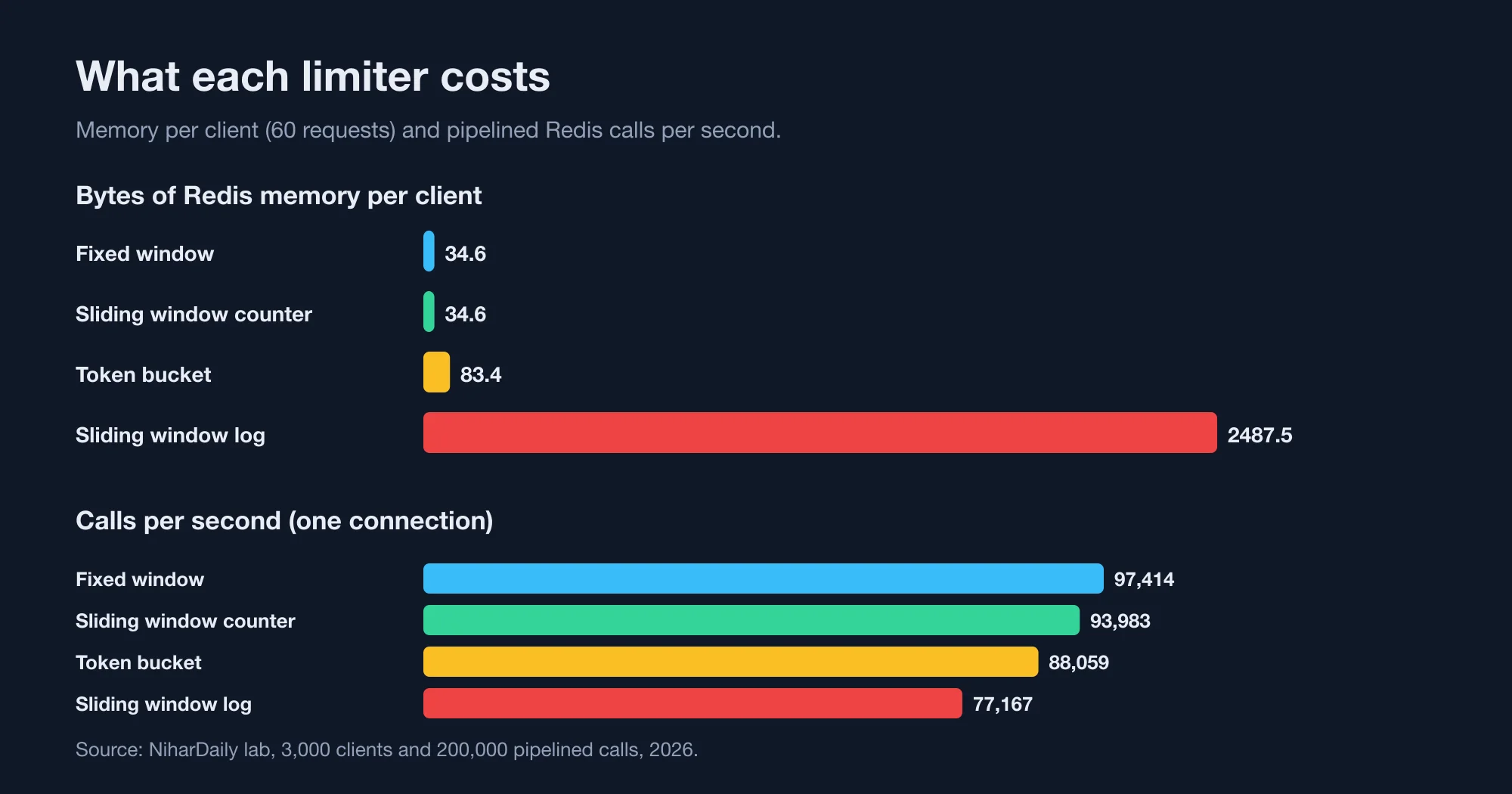
| Algorithm | Bytes per client | Calls per second |
|---|---|---|
| Fixed window | 34.6 | 97,414 |
| Sliding window counter | 34.6 | 93,983 |
| Token bucket | 83.4 | 88,059 |
| Sliding window log | 2,487.5 | 77,167 |
Throughput was measured over a pipelined connection, so a real API will see lower numbers once network round trips dominate. A single Redis call takes roughly 0.07 ms on localhost in redis-benchmark, and more once the request crosses availability zones. At that point the network, not the algorithm, sets your limiter's latency.
One call per request is also the right budget. Do not make two round trips, for example a GET and then an INCR. Those race against each other. A script keeps the read and write atomic, as the Redis EVAL documentation explains.
Four mistakes that make any limiter weaker
The algorithm is only part of the design. These mistakes weaken all four.
- Using the application server clock. Servers drift. Two app instances that disagree by two seconds create gaps in the window. Read
TIMEinside the script, or use a single source. - Keying on IP address only. Offices and mobile carriers put thousands of users behind one address. Key on the API token when you have one, and fall back to the IP.
- Failing closed when Redis is down. If the limiter cannot reach Redis and rejects everything, a cache outage becomes a full outage. Decide in advance, and for most APIs, fail open and alert.
- Forgetting to return the retry time. A 429 with no
Retry-Afterheader makes clients retry immediately, which multiplies the load you are trying to shed.
How to choose
Match the algorithm to what the limit protects. A rule on a vendor quota needs different behavior from a rule against scrapers.
- Hard quota you pay for: sliding window log if clients are few, otherwise a sliding window counter with a limit set 20% below the quota.
- Public API abuse protection: sliding window counter.
- Bursty clients, such as batch uploads: token bucket with a small capacity.
- Login and password reset throttles: fixed window is fine, because an attacker gains little from a 2x edge on 5 attempts.
If you run several services behind a gateway, apply the limit once at the edge and again, with a looser rule, inside the service. Two layers catch mistakes in either one. Our lab on Socket.IO at scale: which Redis adapter survives a Redis restart is a reminder that Redis outages happen, so test the failure mode before you need it.
If your numbers differ, contact the NiharDaily editor with your Redis version and script. We will check the lab against your setup.
The bottom line: the number to test is the worst case
Do not ask "how many requests per minute does my limiter allow?" Ask "what is the most it allows in any minute?" The answers differ by 2x for two of the four common algorithms.
Run the greedy-client test against your own limiter before launch. It takes ten lines of code. If the worst case is higher than what your backend can survive, change the algorithm or lower the limit.
Advertisement
FAQ
What is the difference between a token bucket and a sliding window rate limiter?
A token bucket allows bursts up to its capacity and then refills at a steady rate. A sliding window limits the count in every rolling period. In our test, the token bucket accepted 199 requests in a rolling minute under a 100 per minute rule, while a sliding window log accepted exactly 100.
Why does a fixed window rate limiter allow double the limit?
The counter resets at each clock boundary. A client can send the full limit just before the reset and the full limit again just after it. In our test, 200 requests passed within 0.1 seconds under a 100 per minute rule. Sliding windows avoid this by looking back from the current moment.
Which rate limiting algorithm uses the least memory in Redis?
The fixed window counter and the sliding window counter used the least, at 34.6 bytes per client in our test. The token bucket used 83.4 bytes. The sliding window log used 2,487.5 bytes per client, about 72 times more, because it stores one timestamp per accepted request.
Should a rate limiter use Lua scripts in Redis?
Yes, when the limiter reads and then writes. A Lua script runs atomically, so two concurrent requests cannot both pass a check that only one should. Our four scripts ran at 77,000 to 97,000 calls per second on one connection, so the scripting cost is small.
What should an API return when a request is rate limited?
Return HTTP status 429 Too Many Requests with a Retry-After header that tells the client how many seconds to wait. RFC 6585 defines the 429 status. Without Retry-After, many clients retry at once and increase the load.
Comments
Loading…
Sign in to join the conversation.
Related posts

Node LRU cache: the Map trick is 25x slower than lru-cache
The popular "Map delete-and-set" LRU cache is about 25x slower than the lru-cache package once the cache holds 10,000 keys. In our Node.js benchmark it managed 0.59 million operations per second,
Wed Oct 21 2026 · 10 min read · 0 views
Consistent hashing: 100 virtual nodes still run 18% hot
A hash ring with 100 virtual nodes per server still leaves the busiest of 10 servers about 18% above the average load. In our lab it took 1,000 virtual nodes to bring that down to 5%. Rendezvous
Wed Oct 21 2026 · 11 min read · 0 views

Postgres OFFSET vs keyset: page 100,000 is 6,000x slower
Keyset pagination is 6,000x faster than OFFSET at page 100,000 of a 5-million-row Postgres table. In our lab, LIMIT 20 OFFSET 1999980 took 182 ms, while the keyset query for the same page took 0.03
Wed Oct 21 2026 · 11 min read · 0 views