Bloom filter for username checks: 2.4 MB, but is it worth it?
By Nihar Ranjan Das · Wed Oct 21 2026 · 10 min read · 0 views
View as a Web StorySoftware#postgresql#Redis#bloom-filter#data-structures#algorithms
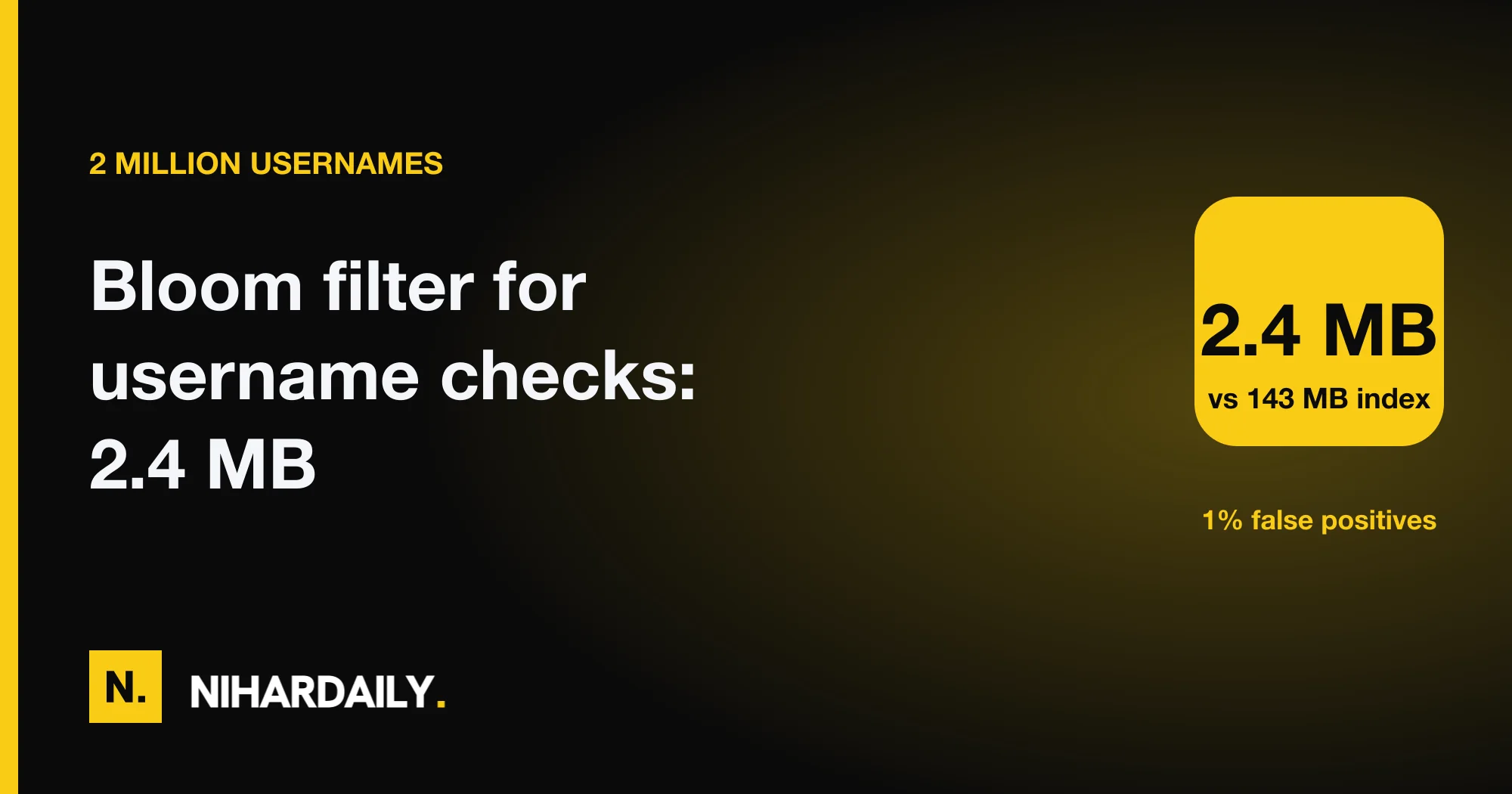
A Bloom filter can answer "is this username taken?" for 2 million users in 2.4 MB of memory, but it only pays off when the exact check is expensive. In our lab the same 2 million names took 218 MB in a JavaScript Set and 143 MB in a PostgreSQL unique index. The filter was about 60 times smaller than the index. Yet a local Postgres lookup took only 26 microseconds, so on a fast database the filter saves memory more than time.
This post gives the measurements, the sizing formula, the failure mode that surprises teams when the user count grows, and a rule for deciding whether your sign-up form needs one.
What is a Bloom filter?
A Bloom filter is a probabilistic data structure that tests whether an item is in a set, using a fixed array of bits and several hash functions. It can say "definitely not present" or "possibly present". It never says "definitely present", and it never forgets an item that was added.
Adding a name sets k bits chosen by k hash functions. Checking a name reads the same k bits. If any bit is zero, the name was never added. If all are one, the name was probably added, but other names may have set those bits by chance.
The false positive rate is the chance that the filter reports an item as present when it was never added. For a username form, a false positive means the filter says "maybe taken" for a name that is actually free. The code then asks the database, which gives the exact answer. The filter never rejects a free name without a second look.
Redisson's Bloom filter glossary and Redis's Bloom filter documentation describe the same behavior and the same size formula.
Test setup: what we measured
The test setup used Node.js 22 on an Apple M2 laptop with 8 GB of RAM. We generated 2 million usernames and measured four things: memory, lookup time for names that are not in the set, observed false positive rate, and false negatives.
The methodology for the exact structures was two-fold. For memory, we compared the heap before and after building a Set of 2 million strings, with garbage collection forced. For the database, we loaded the same names into a PostgreSQL 18 table with a unique index and measured the index size and an absent-name probe with pgbench.
We also took a Redis GET round trip with redis-benchmark on one connection. Our local Redis build did not include the Bloom module (BF.ADD, BF.EXISTS), so we wrote the filter in plain JavaScript. The algorithm is the same.
Here is the filter, 18 lines in total:
Advertisement
function h32(s, seed) {            // FNV-1a with a final mix
  let h = seed ^ 0x811c9dc5;
  for (let i = 0; i < s.length; i++) { h ^= s.charCodeAt(i); h = Math.imul(h, 0x01000193); }
  h ^= h >>> 15; h = Math.imul(h, 0x2c1b3c6d); h ^= h >>> 12;
  return h >>> 0;
}
class Bloom {
  constructor(n, p) {
    this.m = Math.ceil(-n * Math.log(p) / Math.LN2 ** 2);   // bits
    this.k = Math.round(this.m / n * Math.LN2);             // hash count
    this.bits = new Uint8Array((this.m + 7) >> 3);
  }
  pos(s, i) { const a = h32(s, 1), b = h32(s, 0x9e3779b1) | 1; return ((a + Math.imul(i, b)) >>> 0) % this.m; }
  add(s) { for (let i = 0; i < this.k; i++) { const x = this.pos(s, i); this.bits[x >> 3] |= 1 << (x & 7); } }
  has(s) { for (let i = 0; i < this.k; i++) { const x = this.pos(s, i); if (!(this.bits[x >> 3] & (1 << (x & 7)))) return false; } return true; }
}
Double hashing is a technique that derives all k bit positions from two base hash values, so the filter needs only two real hash computations per name. For example, position i is a + i × b modulo the array size.
Results: memory and false positives
At a 1% error rate, the filter used 1.2 bytes per name. The Set used 109 bytes per name, and the PostgreSQL unique index about 71.
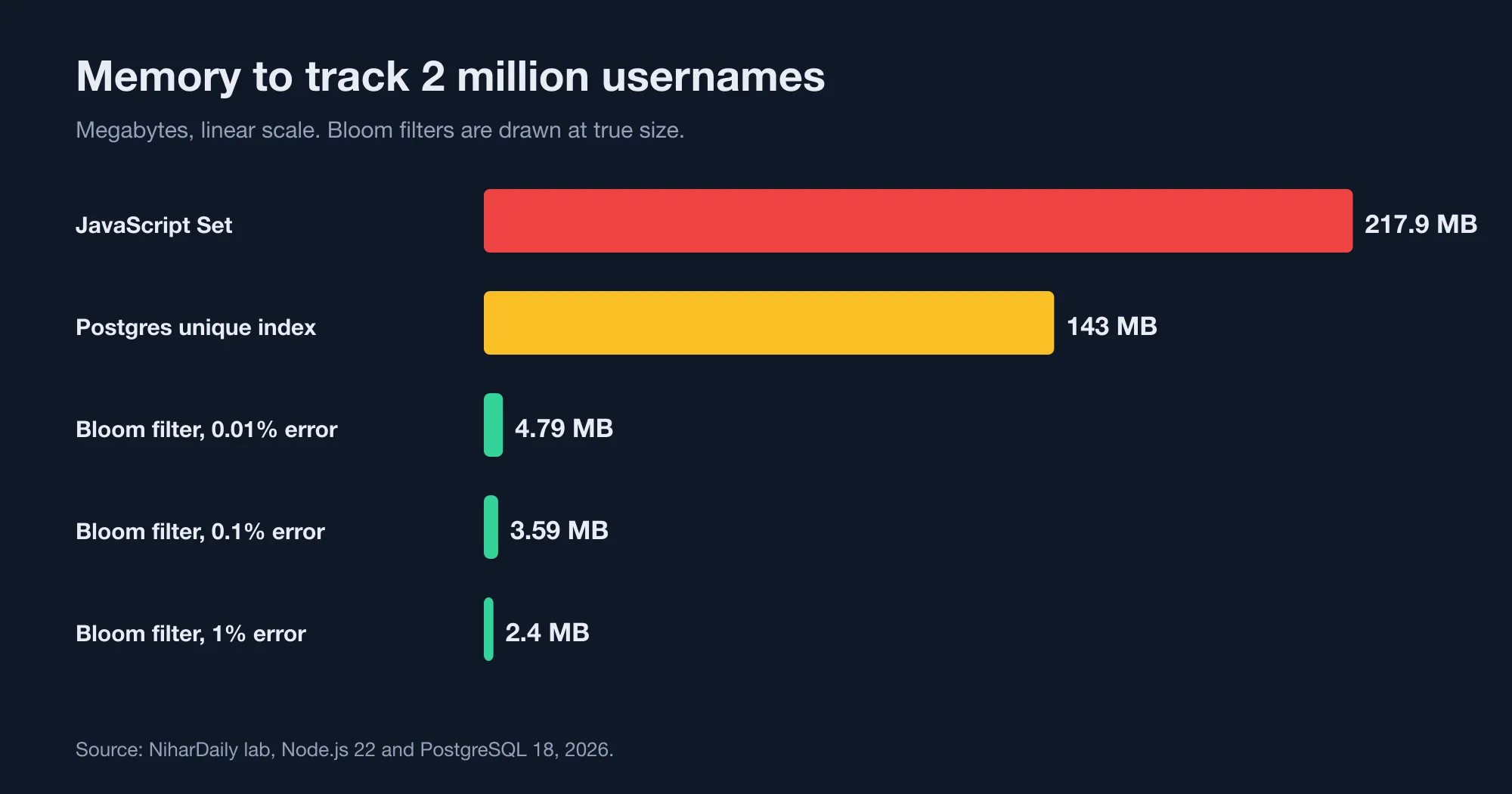
| Structure | Memory for 2M names | Bytes per name | Lookup of a free name |
|---|---|---|---|
| JavaScript Set | 217.9 MB | 108.9 | 427 ns |
| PostgreSQL unique index | 143 MB | 71.3 | 26 µs |
| Bloom filter, 1% error | 2.40 MB | 1.2 | 287 ns |
| Bloom filter, 0.1% error | 3.59 MB | 1.8 | 216 ns |
| Bloom filter, 0.01% error | 4.79 MB | 2.4 | 296 ns |
The observed false positive rates matched the targets: 1.01%, 0.099% and 0.01% (our lab, 2026). False negatives were zero in every run, as the theory requires. Consider a sign-up form with 100,000 checks a day: at 1%, about 1,000 of them would need a database query for a free name.
Each tenfold drop in error rate costs only 1.2 MB more here. The formula is m = -n × ln(p) / (ln 2)² bits, so memory grows with the logarithm of the error rate, not linearly. Going from 1% to 0.01% error doubles the memory but cuts false positives by 100 times.
The speed column needs context. The Set and the filter both ran in process, in 200 to 430 nanoseconds. Neither is limited by the algorithm. The Postgres figure is a network round trip to a database on the same machine, so it is a floor.
When does a Bloom filter save database queries?
It saves queries only for names that are free, and the saving depends on how many names are already taken. The share of lookups that still reach the database is taken + (1 − taken) × p, where p is the false positive rate.
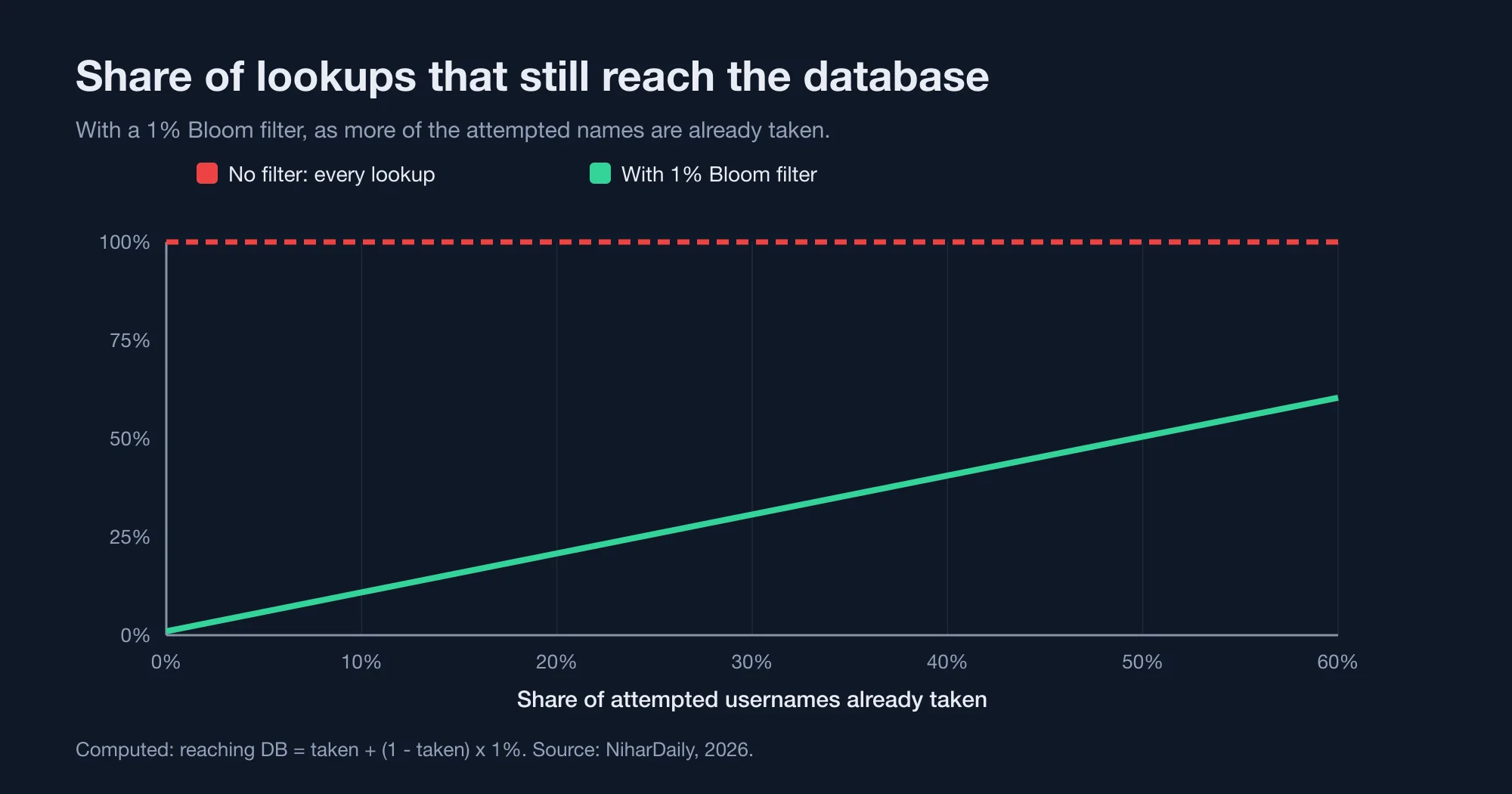
Take a 1% filter. If 5% of attempted names are taken, 5.95% of lookups reach the database, so the filter avoids about 94% of them (computed, 2026). If half of the names are taken, 50.5% still reach the database, and the filter avoids only about 50% (computed, 2026).
This matters because real username forms see a mix, such as a launch week with few collisions followed by a mature year with many. A new product has few users and few collisions, so the filter removes nearly all queries. A mature product with short, popular names sees collisions on most attempts, and the gain shrinks.
The filter helps most in three cases:
- Bots probing for names. Scripted checks hit mostly free names, and each probe is a database query you can skip.
- Typeahead availability checks. A user typing a name triggers a query per keystroke or per pause.
- Remote or slow databases. A cross-region database adds a full network round trip to every probe.
If your database is local, lightly loaded and has an index that fits in memory, a unique index probe is already cheap. In that case a Bloom filter adds code without removing real cost.
The failure mode: what happens when you outgrow the size
A Bloom filter has a fixed size, and its error rate climbs quickly when it holds more items than it was built for. We sized one for 2 million names at 1% and kept adding.
| Names inserted | Observed false positive rate |
|---|---|
| 2 million (design size) | 1.01% |
| 3 million | 5.78% |
| 4 million | 15.76% |
At twice its design size the filter was wrong on about one free name in six. Every one of those costs a database query, so the filter slowly turns into the cost it was meant to avoid. Nothing fails loudly. The graphs look the same, apart from a database query rate that creeps up.
The cause is simple. Each added name sets more bits, and the chance that all k bits of a free name are already set rises with the fraction of ones in the array. Redis's own documentation warns that an undersized filter fills up and must be stacked with a new one, which slows lookups.
Two defenses work:
- Size for growth. Build the filter for 2 to 3 times your current user count. At 1%, that costs about 7 MB for 6 million names.
- Rebuild on a schedule. Reload the filter from the database each night, sized to the current count plus headroom. Alert when the item count passes 80% of the design size.
What a Bloom filter cannot do: deletes and shared state
A standard Bloom filter cannot remove an item. If your product lets users delete accounts and free their usernames, the filter will keep saying "maybe taken" for names that are available again.
That is safe, because the database check then finds the name free. But it wastes queries and it hides the freed name from the fast path. A nightly rebuild fixes both.
If you need real deletes, use a counting Bloom filter or a cuckoo filter. A counting Bloom filter is a variant that stores a small counter in each slot instead of one bit, and a cuckoo filter is a hash-table-based structure that stores short fingerprints and supports removal. OneUptime's comparison of Bloom and cuckoo filters in Redis covers that choice. Both cost more memory per item.
The second limit is shared state. An in-process filter lives in one server. If you run eight instances, each holds its own copy, and a name registered on instance one is unknown to the other seven until they rebuild. That is again safe, because the filter only skips the check for names it has never seen, and the unique constraint catches the race. But it means a "free" answer can be stale for minutes.
A shared filter in Redis removes the copies, at the price of a network round trip. We measured 74 microseconds per GET on localhost (about 12,900 requests per second on one connection). That is three times slower than our local Postgres probe, so a Redis-hosted filter only wins when Postgres is remote or contended.
The correct flow for a sign-up form
The filter is an optimization, never the source of truth. The unique constraint in the database is the only check that cannot be wrong, as the PostgreSQL documentation on unique indexes describes.
Use this order:
- Normalize the name (lowercase, trim, strip confusable characters).
- Ask the filter. If it says "not present", return "available" without a query.
- If it says "possibly present", query the database for an exact answer.
- On submit, insert the row and let the unique index reject duplicates.
- After a successful insert, add the name to the filter.
Step 4 is not optional. Two users can both see "available" for the same name within the same second. Only the insert settles it, and your code must handle the unique violation with a friendly message.
Rate limiting the availability endpoint still matters. A filter makes probing cheaper for you, but it does not stop an attacker from listing which usernames exist. We tested limiter designs in a separate lab, covered in Rate limiter algorithms compared: the 2x burst most miss.
A decision rule
Use a Bloom filter for username checks only when at least one of these is true: the database is remote, the endpoint takes bot traffic, or the unique index no longer fits in memory.
Skip it when you have fewer than about 100,000 users, a local database, and under 50 availability checks per second. The index is already cheap, and the extra code needs a rebuild job, a sizing rule and a test for the overload case.
If you do build it, set three alerts: the item count against the design size, the share of lookups that reach the database, and the age of the last rebuild. If your own numbers differ from ours, contact the NiharDaily editor with your set size and hash settings, and we will compare them with the lab.
The bottom line: a small win with a sharp edge
A Bloom filter turns 143 MB of index into 2.4 MB of bits, and it answers a free name in under 300 nanoseconds. It is a good tool for bot-heavy sign-up forms and remote databases.
It is a poor tool when sized once and forgotten. The same filter that removes 94% of your queries at its design size can fall to a 15.8% false positive rate at double that size (our lab, 2026). Size for growth, rebuild on a schedule, and keep the unique constraint as the final judge.
Advertisement
FAQ
How much memory does a Bloom filter need for 1 million items?
About 1.2 MB at a 1% false positive rate and 1.8 MB at 0.1%, based on our measurements of 1.2 and 1.8 bytes per item. The formula is m = -n × ln(p) / (ln 2)² bits, so memory grows with the logarithm of the error rate rather than linearly.
Can a Bloom filter give a false negative?
No. A properly built Bloom filter never says an item is absent when it was added. Our test found zero false negatives across 200,000 checks of known names. Only false positives happen, where the filter says an item might be present but it is not.
What happens when a Bloom filter gets too full?
The false positive rate rises quickly. A filter sized for 2 million names at 1% error showed 5.78% at 3 million names and 15.76% at 4 million. Every extra false positive costs a database query. Rebuild the filter on a schedule and size it for expected growth.
Is a Bloom filter faster than a database index lookup?
In process, yes: about 300 nanoseconds versus 26 microseconds for a local PostgreSQL probe in our test. Against a remote database the gap is far larger. But a filter hosted in Redis took a 74 microsecond round trip, which is slower than a local Postgres probe.
Should I use a Bloom filter instead of a unique constraint?
No. A Bloom filter is a fast pre-check, never the source of truth. It can say a free name is possibly taken, and two users can still race for the same name. Keep the database unique constraint as the final check and handle its violation in the sign-up code.
Comments
Loading…
Sign in to join the conversation.
Related posts

Node LRU cache: the Map trick is 25x slower than lru-cache
The popular "Map delete-and-set" LRU cache is about 25x slower than the lru-cache package once the cache holds 10,000 keys. In our Node.js benchmark it managed 0.59 million operations per second,
Wed Oct 21 2026 · 10 min read · 0 views
Consistent hashing: 100 virtual nodes still run 18% hot
A hash ring with 100 virtual nodes per server still leaves the busiest of 10 servers about 18% above the average load. In our lab it took 1,000 virtual nodes to bring that down to 5%. Rendezvous
Wed Oct 21 2026 · 11 min read · 0 views
Postgres OFFSET vs keyset: page 100,000 is 6,000x slower
Keyset pagination is 6,000x faster than OFFSET at page 100,000 of a 5-million-row Postgres table. In our lab, LIMIT 20 OFFSET 1999980 took 182 ms, while the keyset query for the same page took 0.03
Wed Oct 21 2026 · 11 min read · 0 views