NVIDIA CUDA Rust: cuda-oxide or cutile-rs, which one first?
By Nihar Ranjan Das · Thu Oct 15 2026 · 9 min read · 0 views
View as a Web StoryAI#nvidia#gpu#rust#cuda#cuda-oxide#cutile-rs
NVIDIA CUDA Rust: cuda-oxide or cutile-rs, which one first?
Which NVIDIA CUDA Rust track should you try first?
Try cutile-rs first, unless you need control over individual GPU threads. NVIDIA's own announcement recommends the tile track as the starting point. It runs on stable Rust and needs fewer setup steps. Pick cuda-oxide only when you already write thread-level kernels in CUDA C++ or numba-cuda.
CUDA Rust is NVIDIA's name for two open-source projects that let you write GPU kernels in Rust. NVIDIA introduced the pair on September 8, 2026, in its technical blog post Introducing CUDA Rust. Both live in one repository, NVIDIA/cuda-rust, which holds the runtime crates, the SIMT track and the tile track.
A GPU kernel is a small program that runs on thousands of GPU threads at once. Until now, you wrote kernels in CUDA C++. CUDA Rust asks whether Rust's ownership rules can catch the memory bugs that C++ kernels hide.
How do cuda-oxide and cutile-rs differ?
The two tracks differ in programming model, toolchain and maturity. The table below puts NVIDIA's published numbers side by side. Read the "Toolchain" row first, because it decides how painful the install is.
| cuda-oxide (SIMT) | cutile-rs (Tile) | |
|---|---|---|
| You describe | What one thread does | What one tile of data does |
| Toolchain | Pinned nightly Rust | Stable Rust 1.89+ |
| Compiles | Ahead of time, Rust to PTX | Just in time at first launch, Rust to Tile IR to cubin |
| CUDA version | Toolkit 13.0+ | 13.3 recommended |
| GPU | Compute capability 8.0+ | Compute capability 8.0+ |
| Other tools | LLVM 21+ and clang 21+ | None beyond the CUDA toolkit |
| Maturity | Early alpha | On crates.io, used by Hugging Face's Grout and mistral.rs |
| Shared memory | Needs unsafe today |
Not exposed |
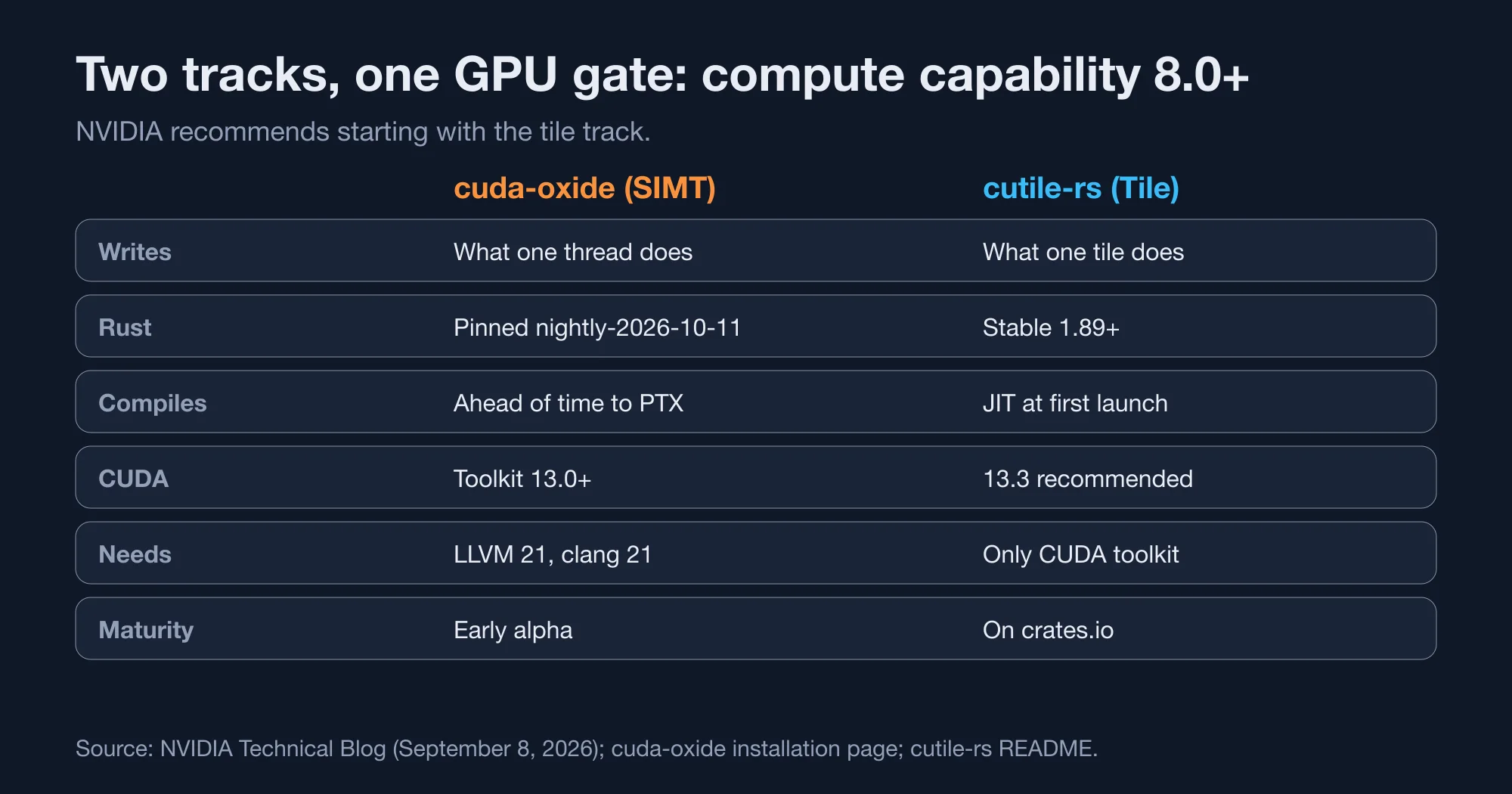
cuda-oxide is a custom rustc codegen backend that turns Rust into PTX, NVIDIA's GPU assembly language. You write a function with #[kernel], and each thread finds its position with thread::index_1d(). Safety comes from a type called DisjointSlice, which stops two threads from writing the same element, according to the cuda-oxide book.
cutile-rs is a proc-macro system. You write a #[cutile::entry()] function over Tensor types, and the compiler maps tiles to threads for each GPU generation. In the project's sample, the output is split into 128-element chunks, so 1,024 elements launch 8 tiles. The cutile-rs repository README lists the crate as cutile.
Which track is safer to learn?
cutile-rs is safer to learn, because ownership and tensor partitioning do the checking. You never write unsafe for shared memory, because the compiler manages it. In cuda-oxide, shared memory still needs unsafe today, so the Rust guarantee has a gap exactly where GPU bugs live.
Has the repository moved?
Yes. The older NVlabs/cutile-rs repository is now archived and read-only, and its notice points to NVIDIA/cuda-rust. Update any bookmarks and git remotes. The cuda-oxide install command in the docs still references the NVlabs address, so follow the current book for each step.
Will your GPU run CUDA Rust?
Your GPU needs compute capability 8.0 or higher, which means the Ampere generation or newer. Compute capability is NVIDIA's version number for a GPU's feature set. The cutile-rs README says plainly that sm_70 and sm_75 are unsupported, and the cuda-oxide prerequisites list Ampere or newer (sm_80+).
Advertisement
We looked up common GPUs on NVIDIA's CUDA GPU compute capability list and compared each to the 8.0 gate:
| GPU | Compute capability | Runs CUDA Rust? |
|---|---|---|
| RTX 5090, RTX 5070 | 12.0 | Yes |
| H100 | 9.0 | Yes |
| RTX 4090, L4 | 8.9 | Yes |
| Jetson Orin | 8.7 | Yes |
| RTX 3090, RTX 3060, A10 | 8.6 | Yes |
| A100 | 8.0 | Yes |
| T4, RTX 2080 | 7.5 | No |
| V100 | 7.0 | No |
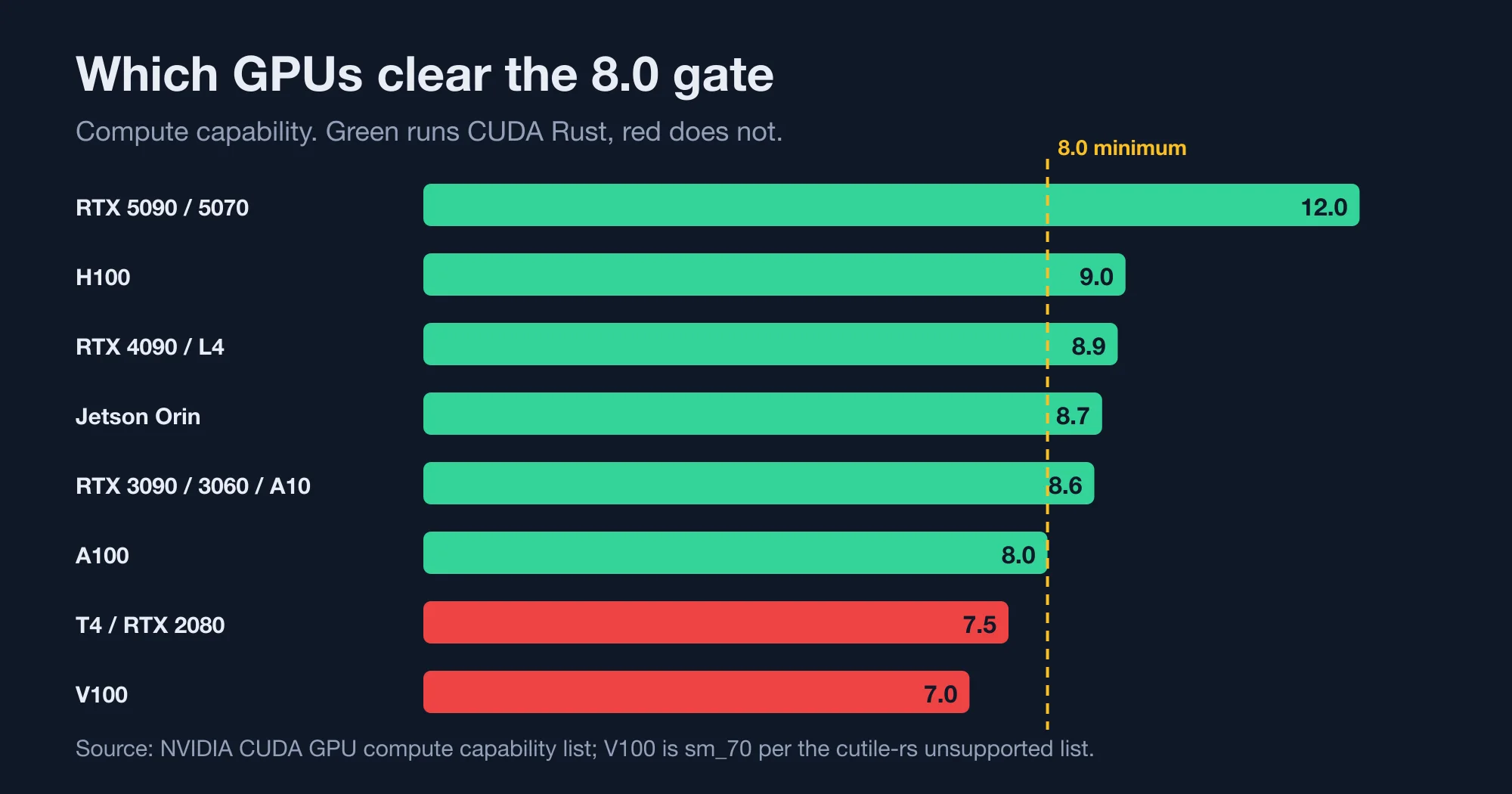
The practical finding is the cut line. A consumer RTX 3060 clears it, while a data-centre T4 does not. Older cloud GPU instances can still be T4-class, so check the instance type before you rent one. An A10, L4 or A100 instance passes.
The cutile-rs README adds a second table of minimum Tile IR versions. Ampere and Ada cards (sm_80 to sm_89) need 13.2. Hopper (sm_90) needs 13.3. Blackwell cards need 13.2, with sm_107 at 13.4. A newer GPU is not automatically easier. If you are still deciding what to buy, our guide on whether to buy a GPU now or wait covers the price side.
What do you need to install, in order?
You need Linux, a recent driver, the CUDA 13 toolkit, and a Rust toolchain that matches the track. NVIDIA tests on Ubuntu 24.04 and does not support Windows for cuda-oxide. macOS has no NVIDIA driver, so neither track runs there.
For cuda-oxide, the installation page lists these requirements:
- NVIDIA driver 580 or newer.
- CUDA Toolkit 13.0 or newer, with
nvccon yourPATH. - Clang 21 or newer, plus the
libclangdevelopment headers. - LLVM 21 with the NVPTX backend, though the Rust
llvm-toolscomponent often suffices. - The pinned nightly,
nightly-2026-10-11, with therust-src,rustc-devandllvm-toolscomponents.
Install the pinned toolchain and the helper like this:
rustup toolchain install nightly-2026-10-11
rustup component add rust-src rustc-dev llvm-tools --toolchain nightly-2026-10-11
cargo +nightly-2026-10-11 install --git https://github.com/NVlabs/cuda-oxide.git cargo-oxide
Then run cargo oxide doctor to check the setup and cargo oxide run vecadd to build and launch the sample. For cutile-rs, the README asks for stable Rust, CUDA 13.3 and a CUDA_TOOLKIT_PATH variable, and the check is cargo run -p cutile-examples --example hello_world.
How do you pin the nightly in your own project?
Put the pin in a rust-toolchain.toml file at the project root, so every developer and CI job gets the same compiler. The format below is standard rustup syntax. We checked it by pinning a stable release with a component on our test machine, and rustc --version reported the pinned version at once.
[toolchain]
channel = "nightly-2026-10-11"
components = ["rust-src", "rustc-dev", "llvm-tools"]
When NVIDIA moves the pin, update the date and rebuild. A moving nightly is the most common cause of an unexplained build break in a project like this, because the compiler internals that cuda-oxide hooks into can change from one nightly to the next.
How do you check your machine before installing?
Run a preflight script. We wrote one that tests the hard requirements in about a second and exits with a clear pass or fail line for each. It uses only bash, sort -V and the tools it checks, so it needs no install.
#!/usr/bin/env bash
fail=0
ok()  { echo "PASS  $1"; }
bad() { echo "FAIL  $1"; fail=1; }
ver_ge() { [ "$(printf '%s\n%s\n' "$2" "$1" | sort -V | head -n1)" = "$2" ]; }

[ "$(uname -s)" = Linux ] && ok "Linux host" || bad "host is $(uname -s); both tracks need Linux"

if command -v nvidia-smi >/dev/null 2>&1; then
  drv=$(nvidia-smi --query-gpu=driver_version --format=csv,noheader | head -n1)
  cc=$(nvidia-smi --query-gpu=compute_cap --format=csv,noheader | head -n1)
  ver_ge "$drv" 580 && ok "driver $drv" || bad "driver $drv is older than 580"
  ver_ge "$cc" 8.0 && ok "compute capability $cc" || bad "compute capability $cc is below 8.0"
else
  bad "nvidia-smi not found: no NVIDIA driver"
fi

if command -v nvcc >/dev/null 2>&1; then
  cu=$(nvcc --version | sed -n 's/.*release \([0-9.]*\),.*/\1/p')
  ver_ge "$cu" 13.0 && ok "CUDA toolkit $cu" || bad "CUDA toolkit $cu is older than 13.0"
else
  bad "nvcc not found: install the CUDA 13 toolkit"
fi

cl=$(clang --version 2>/dev/null | sed -n 's/.*version \([0-9]*\).*/\1/p' | head -n1)
[ -n "$cl" ] && [ "$cl" -ge 21 ] && ok "clang $cl" || bad "clang 21+ not found (found: ${cl:-none})"

rc=$(rustc --version 2>/dev/null | awk '{print $2}')
[ -n "$rc" ] && ver_ge "$rc" 1.89.0 && ok "rustc $rc" || bad "rustc 1.89+ not found"

rustup toolchain list 2>/dev/null | grep -q nightly-2026-10-11 && ok "pinned nightly" || bad "nightly-2026-10-11 missing"
[ $fail -eq 0 ] && echo "READY" || echo "NOT READY"
exit $fail
Our test setup had no NVIDIA GPU, so we ran it two ways. On a Mac, it printed FAIL host is Darwin; both tracks need Linux, found clang 17, and ended with NOT READY. With stubbed nvidia-smi and nvcc output, a Turing-class box (driver 575, compute capability 7.5, CUDA 12.8) failed all three checks, and an Ampere box (driver 580, 8.6, CUDA 13.0) passed them. We have not run it on a real GPU server, so treat the thresholds as copied from NVIDIA's pages, not proven on hardware.
Which errors will you hit, and how do you fix them?
Most first-run failures come from the driver, the toolkit or LLVM. The cuda-oxide installation page lists the known ones. Here they are with the fix NVIDIA gives:
| Error or symptom | Cause | Fix |
|---|---|---|
CUDA_ERROR_NOT_INITIALIZED |
No driver is loaded | Install or load the NVIDIA driver |
| "driver too old" | A 12.x driver with a 13.x build | Update to driver 580 or newer |
Error 222, CUDA_ERROR_UNSUPPORTED_PTX_VERSION |
CUDA 13.3 emits PTX 9.3, which a 580 driver rejects | Upgrade the driver to 610.43.02 or newer, or set CUDA_TOOLKIT_PATH=/usr/local/cuda-13.0 and pass --arch sm_86 |
No working llc found |
LLVM lacks NVPTX | Add the llvm-tools component, install LLVM 21, or set CUDA_OXIDE_LLC |
'stddef.h' file not found |
Missing clang headers | Install the clang development packages |
cuda.h not found |
Toolkit path not set | Set CUDA_TOOLKIT_PATH or CUDA_HOME |
The error 222 row is the one to remember. A toolkit that is newer than your driver is a common trap, because the newest toolkit is not the safest one. If you hit it, pinning an older toolkit is faster than waiting for a driver upgrade on a shared server.
Should you use CUDA Rust now?
Use it for experiments, not for production. NVIDIA's own repository describes CUDA Rust as an "early-stage research project" and warns to expect bugs, incomplete features and API breakage. The cuda-oxide page calls the SIMT track an early alpha.
Here is how we would decide:
- Learning or prototyping on an Ampere or newer GPU: start with cutile-rs on stable Rust.
- Porting an existing CUDA C++ kernel that needs thread control: try cuda-oxide, and pin the nightly in
rust-toolchain.toml. - Production inference or training: keep CUDA C++ or your current framework, and revisit when NVIDIA publishes a stable release.
- A T4, V100 or Mac only: wait, or rent an Ampere or newer instance for the experiment.
The reason to watch it anyway is that two inference projects already use the tile track. Hugging Face's Grout and mistral.rs both use cutile-rs, according to NVIDIA's blog. That is a strong sign that real code will follow, even while the API is still moving.
Advertisement
FAQ
What is the difference between cuda-oxide and cutile-rs?
cuda-oxide is the SIMT track, where you write what one GPU thread does, on a pinned nightly Rust compiler. cutile-rs is the tile track, where you write what one tile of data does, on stable Rust 1.89 or newer. NVIDIA recommends starting with cutile-rs.
Which GPUs support NVIDIA CUDA Rust?
GPUs with compute capability 8.0 or higher, which means Ampere or newer. That includes the A100, RTX 3060 and RTX 3090, RTX 4090, L4, H100 and RTX 5090. The T4, RTX 2080 and V100 are below the line and are not supported.
Does CUDA Rust work on Windows or macOS?
No. NVIDIA tests on Ubuntu 24.04, and the cuda-oxide installation page says Windows is not supported. macOS has no NVIDIA driver, so neither track can run there. Use a Linux machine or a cloud GPU instance.
Which Rust version does cuda-oxide need?
A pinned nightly. The installation page names `nightly-2026-10-11`, which `cargo oxide` manages inside the repository. You also need the `rust-src`, `rustc-dev` and `llvm-tools` components. cutile-rs needs only stable Rust 1.89 or newer.
Is NVIDIA CUDA Rust ready for production?
No. NVIDIA calls it an early-stage research project and warns of bugs and breaking API changes. The cuda-oxide track is an early alpha. Use it to learn and prototype, and keep your production kernels on CUDA C++ until a stable release appears.
Comments
Loading…
Sign in to join the conversation.
Related posts

What Giving Every AI Agent Its Own Database Branch Costs
Methodology: every rate below comes from Neon's and Xata's own pricing pages, read directly rather than from a comparison site. The cost model that follows states its assumptions in each row, so you
Wed Oct 14 2026 · 7 min read · 0 views

Redis vs Postgres for AI Agent Memory, Actually Measured
Test setup and methodology: we seeded 2,000 fake agent sessions into a local PostgreSQL 18.1 table and a local Redis 8.4.0 instance. Each held a roughly 1.2KB JSON payload modeled on a real agent
Wed Oct 14 2026 · 6 min read · 0 views

Postgres MCP Read-Only Mode Can Be Bypassed
Methodology: every claim below traces to a named security advisory or vendor bulletin, cross-checked between at least two independent sources where both existed. No exploit code was built or run for
Wed Oct 14 2026 · 8 min read · 1 views