What a 30-second AI explainer video costs, line by line
By Nihar Ranjan Das · Sat Oct 17 2026 · 8 min read · 0 views
View as a Web StoryAI#claude code#veo 3.1#remotion#ai video#hyperframes#nano banana#cost model
What a 30-second AI explainer video costs, line by line
How much does a 30-second AI explainer video cost?
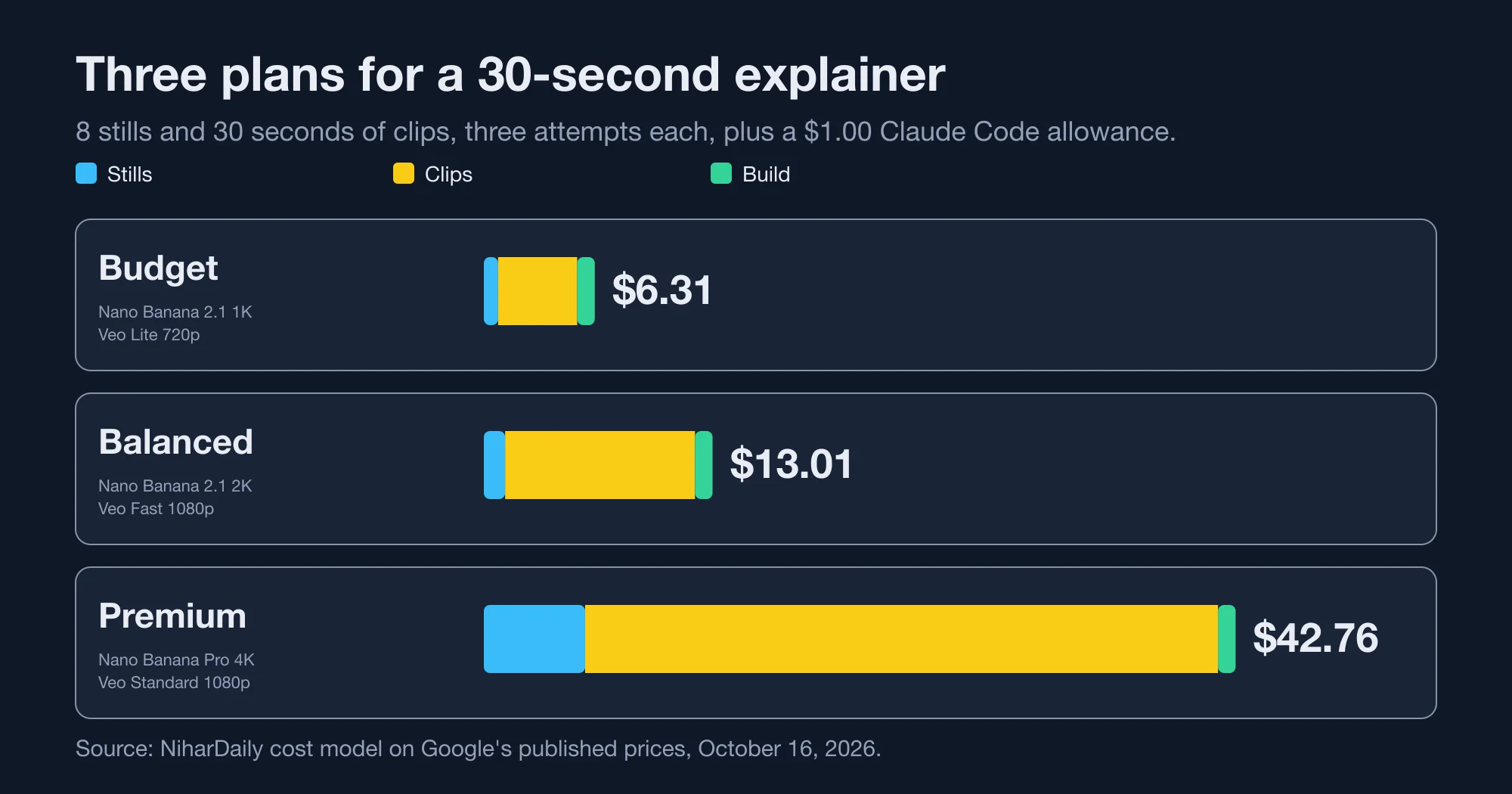
A 30-second explainer costs between $6.31 and $42.76 on our model, depending on the stack. The budget plan costs $6.31, the balanced plan $13.01 and the premium plan $42.76. Each figure assumes three attempts per generated image and clip, plus a $1.00 allowance for building the video with Claude Code.
This is a model, not a quote. The unit prices are published and verified. The recipe and the attempt counts are our assumptions, and you should replace them with your own.
An AI explainer video here means a short video made from generated still images and generated video clips, assembled by code into one file. We priced the recipe below.
| Item | Quantity | Source of the price |
|---|---|---|
| Still images | 8, for title and scene cards | Nano Banana models, per image |
| Video clips | 5 clips of 6 seconds, which is 30 seconds | Veo 3.1, per second |
| Assembly | One composition rendered a few times | Remotion or HyperFrames |
| Build work | A coding agent writes the composition | Claude Code model usage |
Third-party summaries put Veo clips at 4 to 8 seconds, so six seconds is within range, but we did not confirm the limit on Google's page. Verify it on your model before you plan around it.
What are the three plans?
The plans differ in model tier and resolution, not in structure. The budget plan uses Nano Banana 2.1 at 1K and Veo 3.1 Lite at 720p. The balanced plan uses 2.1 at 2K and Veo 3.1 Fast at 1080p. The premium plan uses Nano Banana Pro at 4K and Veo 3.1 Standard at 1080p.
| Plan | Still model and size | Still price | Clip model and size | Clip price per second |
|---|---|---|---|---|
| Budget | Nano Banana 2.1, 1K | $0.0336 | Veo 3.1 Lite, 720p | $0.05 |
| Balanced | Nano Banana 2.1, 2K | $0.0504 | Veo 3.1 Fast, 1080p | $0.12 |
| Premium | Nano Banana Pro, 4K | $0.24 | Veo 3.1 Standard, 1080p | $0.40 |
Source: Google Gemini API pricing page, paid tier, read October 16, 2026. Veo prices include native audio.
We explain the still-image rates in our guide to Nano Banana Pro versus Nano Banana 2.1, and the video rates in our comparison of Veo 3.1 and Gemini Omni Flash.
What does each plan cost line by line?
Each plan has four lines: stills, clips, assembly and build. Stills equal 8 images times 3 attempts times the image price. Clips equal 30 seconds times 3 attempts times the per-second price. Assembly is $0 in our base case. Build is a flat $1.00 allowance.
| Line | Budget | Balanced | Premium |
|---|---|---|---|
| Stills, 8 images x 3 attempts | $0.81 | $1.21 | $5.76 |
| Clips, 30 s x 3 attempts | $4.50 | $10.80 | $36.00 |
| Assembly, render | $0.00 | $0.00 | $0.00 |
| Build, Claude Code allowance | $1.00 | $1.00 | $1.00 |
| Total | $6.31 | $13.01 | $42.76 |
| Same plan, one attempt each, no build | $1.77 | $4.00 | $13.92 |
Source: NiharDaily cost model on Google's published rates, October 16, 2026. Attempt counts and the build allowance are assumptions.
Advertisement
The formula is easy to reuse. Total equals 8 times stills attempts times the image price, plus 30 times clip attempts times the per-second price, plus the build allowance. Put your own numbers into those four slots.
Where does the money go?
The clips dominate every plan. In the budget plan the clips cost $4.50 against $0.81 for stills, a ratio of 5.6. In the balanced plan the ratio is 8.9, and in the premium plan it is 6.2.
That distribution determines where additional spending is sensible. Moving the stills from the budget to the premium tier adds only $4.95. Moving the clips from budget to premium adds $31.50. If you have extra budget, invest it in clip quality or in fewer retries, not in the largest image model.
How much do retries change the bill?
Retries change it more than any model choice. Going from one clip attempt to five in the balanced plan moves the total from $5.81 to $20.21. The same change in the premium plan moves it from $18.76 to $66.76.
| Clip attempts per clip | Budget | Balanced | Premium |
|---|---|---|---|
| 1 | $3.31 | $5.81 | $18.76 |
| 2 | $4.81 | $9.41 | $30.76 |
| 3 | $6.31 | $13.01 | $42.76 |
| 5 | $9.31 | $20.21 | $66.76 |
Source: NiharDaily cost model, stills held at three attempts and a $1.00 build allowance, October 16, 2026.
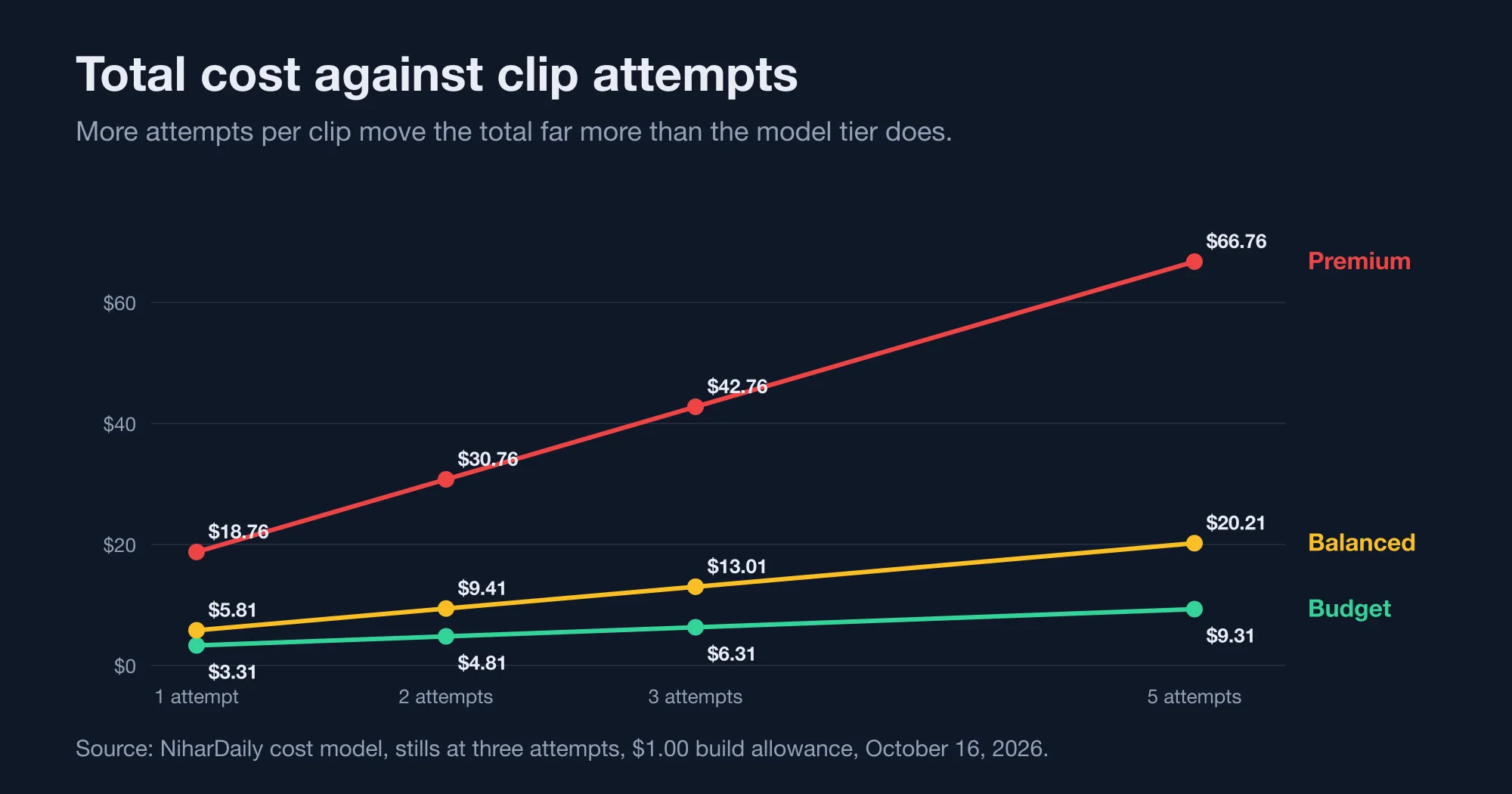
A premium plan with one attempt per clip costs $18.76, which is less than a balanced plan with five attempts at $20.21. That is the counterintuitive finding: a reliable prompt on an expensive tier can beat an unreliable prompt on a cheaper one.
Reduce the number of attempts through deliberate preparation. Write a storyboard first. Generate the stills before any clip, because stills are inexpensive and they establish the visual style. Google's video documentation says Veo 3.1 supports image-based direction, so a good still can seed a clip.
What does assembly cost?
Assembly costs nothing in Google fees, and between $0 and about $6 per video in software licences. The renderer is either Remotion or HyperFrames. Both run on your own machine.
Remotion is a React-based video framework that is free for teams of up to three people. HyperFrames is an Apache 2.0 licensed framework from HeyGen that renders HTML to video, as described in its GitHub README. We compared them in our test of Remotion against HyperFrames, and measured render times of 13.27 seconds and 39.93 seconds for a 30-second 1080p scene.
For a team of four or more, Remotion's licence page lists $25 per seat per month for Creators and $0.01 per render with a $100 monthly minimum for Automators. Spread over your video volume, that becomes a per-video cost.
| Videos per month | Remotion Creators, 5 seats | Remotion Automators | HyperFrames |
|---|---|---|---|
| 20 | $6.25 per video | $5.00 per video | $0 |
| 100 | $1.25 per video | $1.00 per video | $0 |
| 500 | $0.25 per video | $0.20 per video | $0 |
Source: NiharDaily arithmetic on Remotion's published tiers, October 16, 2026. Automators assumes 5 renders per video.
A solo creator or a team of three pays nothing. A larger team making 20 videos a month pays up to $6.25 per video, which equals nearly all of a budget plan's generation cost. Volume dilutes it quickly.
What does the build step cost?
The build is the Claude Code session that writes the composition. We measured one run: a 6-second title card took 4 turns and cost $0.13. A full 30-second explainer with eight scenes needs more work, so we budget $1.00. That figure is an assumption and not a measurement.
We describe the measured run in our guide to installing the Remotion skill in Claude Code. Re-use matters here. Once a composition template exists, a new video changes only the text, the stills and the clips, and the build cost falls.
Which plan should you choose?
Choose the plan according to the purpose the finished video must serve. Internal explainers and social drafts fit the budget plan. Customer-facing product videos fit the balanced plan. Paid campaigns and client deliverables fit the premium plan, if your measured hit rate justifies it.
- Budget, $6.31: use it for drafts, internal training and test content. Expect to retry more.
- Balanced, $13.01: use it for product explainers and landing pages. This is the default we would pick.
- Premium, $42.76: use it where 4K stills and Standard clips matter, such as ads and client work.
- Mix tiers: draft on Lite, finish on Fast or Standard. The saving depends on prompts carrying over, which we did not test.
For example, a marketing team making 40 balanced videos a month would spend $520.40 on generation and build, plus any licence. The same team on the premium plan would spend $1,710.40. The difference of $1,190 is the real price of the upgrade.
What does this model leave out?
It leaves out considerable costs, and you should add them to your own estimate. We did not price voiceover or music, because Veo's clips include native audio and we did not test a separate voice tool. We did not price storage, bandwidth, captions, review time or your own hours.
Quality also varies. A cheaper clip that needs editing may cost more once you count the editor. We generated no images or videos for this post, so we say nothing about visual quality. The unit prices come from vendor pages that can change without notice, and the Veo model IDs carry a preview suffix.
Two further costs deserve a mention. Review time is the first, because a person must watch every candidate clip and decide which one to keep. At even a modest hourly rate, five minutes of review per clip can exceed the generation fee on the budget plan. Rights and disclosure are the second. Google states that every image from its Gemini image models carries a SynthID watermark, and publishers in the United States and the European Union increasingly expect synthetic media to be labelled. Check the rules that apply to your channel and your customers before publishing at volume.
The bottom line is plain. Price the clips first, control retries second, and pick the image tier last. Replace our assumptions with your own measurements before you commit a budget.
Advertisement
FAQ
How much does a 30-second AI video cost?
On our model, a 30-second explainer costs $6.31 on a budget stack, $13.01 on a balanced stack and $42.76 on a premium stack. These assume three attempts per image and clip, a $1.00 Claude Code build allowance and free assembly. Without retries the totals are $1.77, $4.00 and $13.92.
Is Veo 3.1 or Nano Banana the bigger cost in an AI video?
Veo clips are the bigger cost. In our three plans the clips cost 5.6, 8.9 and 6.2 times as much as the stills. Upgrading the clip tier from Lite to Standard adds $31.50, while upgrading the stills from Nano Banana 2.1 to Pro adds $4.95.
Do I need to pay for Remotion to make AI videos?
Not if your team has three people or fewer. Remotion's licence is free for individuals and companies of up to three people. A team of four or more pays $25 per seat per month or $0.01 per render with a $100 monthly minimum. HyperFrames is Apache 2.0 with no per-render fee.
How many attempts does an AI video clip need?
It varies by prompt and model, and we did not measure it. We assumed three attempts per clip. Our sensitivity table shows the balanced plan costs $5.81 at one attempt and $20.21 at five. Measure your own hit rate on 20 prompts before you set a budget.
Does Claude Code cost much to build the video?
Our measured run, a 6-second title card, took 4 turns and cost $0.13. A longer explainer needs more turns, so we budgeted $1.00. That budget is an assumption. A reusable composition template lowers the cost for later videos.
Comments
Loading…
Sign in to join the conversation.
Related posts
Is your Go MCP server open to DNS rebinding? Check v1.4.0
CVE-2026-34742: Go MCP SDK before 1.4.0 accepts any Host header on localhost HTTP servers. We tested v1.3.1, v1.4.0 and v1.8.0, and show the fix and a proxy trap.
Sat Oct 17 2026 · 9 min read · 0 views
OpenAI shuts down GPT-4 and o1 on October 23: what to do
OpenAI retires gpt-4, gpt-4-turbo, o1, o3-mini, o4-mini and fine-tunes on October 23, 2026. A migration map with real costs: some replacements cost 4 to 5 times more.
Sat Oct 17 2026 · 9 min read · 0 views
Nano Banana Pro or 2.1: which image model to pay for
Nano Banana Pro costs 2 to 4 times more per image than Nano Banana 2.1. Google's own prices, cost per 1,000 images, and the break-even point where Pro pays for itself.
Sat Oct 17 2026 · 8 min read · 0 views