Windows 11 24H2 is unsupported. Move to 25H2 or 26H2?
By Nihar Ranjan Das · Sun Oct 18 2026 · 9 min read · 0 views
View as a Web StorySoftware#windows 11#end of support#24h2#25h2#26h2
Windows 11 version 24H2 Home and Pro stopped receiving security updates on October 13, 2026. If your PC still says 24H2, it has already missed its last protection. The good news is that the fix is small. Version 25H2 keeps you supported until October 2027, and version 26H2 extends that to October 2028, which is a full year longer for the same effort. This guide gives you the exact dates, a build-number decoder so you can check your own PC in thirty seconds, and a decision table for home users, small businesses and IT admins.
What exactly happened to Windows 11 24H2?
Windows 11 24H2 is the 2024 feature update of Windows 11, released on October 1, 2024. Its Home and Pro editions reached end of updates on October 13, 2026, the same day as Microsoft's October Patch Tuesday. The October 13 update, KB5127648, was the last one these editions will receive, according to IT-Connect's coverage.
Microsoft's own wording, quoted by Windows Central, is blunt. Devices on these editions "will no longer receive fixes for known issues, time zone updates, technical support, or monthly security and preview updates containing protections from the latest security threats."
Patch Tuesday is the second Tuesday of each month, when Microsoft releases its monthly security updates. October's release was unusually large. IT-Connect reports that it fixed 1,407 vulnerabilities, including three zero-days, which it describes as a record. Every PC that stays on 24H2 is now exposed to the fixes it will never receive.
Does my PC stop working?
No. A PC on 24H2 keeps booting, running apps and opening files. Pureinfotech states it plainly: a computer running 24H2 "won't suddenly stop working after the end-of-support date." What stops is protection. Each future vulnerability stays unpatched on your machine, and Microsoft will not fix newly found bugs.
The bottom line is that the risk grows over time, not on one day. A home PC that only browses with an updated browser is less exposed than a laptop that opens email attachments, but neither is safe indefinitely. Treat the move as routine maintenance, not an emergency, and finish it this month.
Which Windows 11 versions are supported right now?
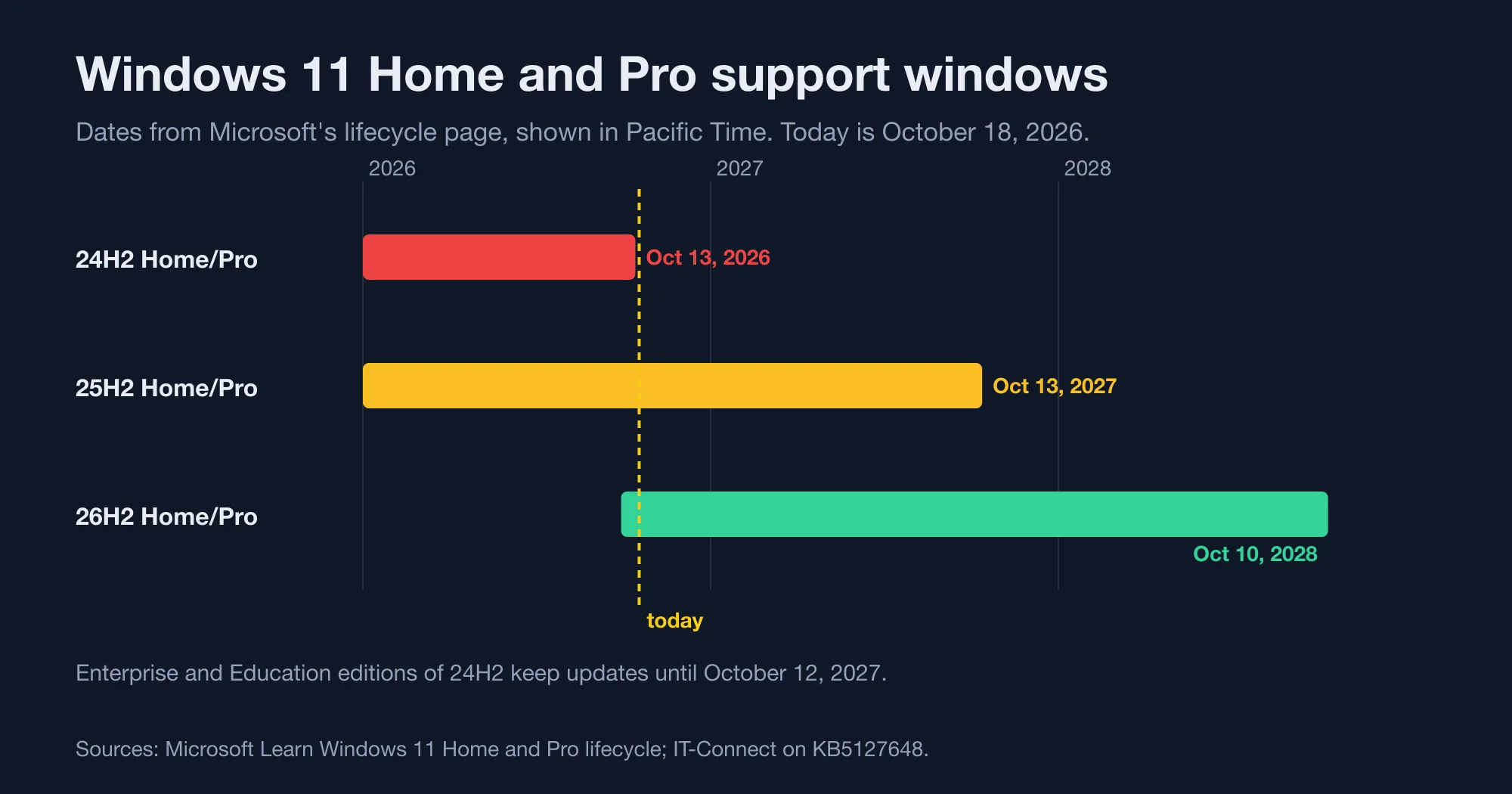
Three Home and Pro versions receive updates today, plus one narrow case. We took the dates from Microsoft's lifecycle page and checked them against three news reports. Our methodology was simple: if a date appeared on Microsoft Learn, we used it, and we used the news reports only to confirm context.
| Version | Start date | End of updates (Home and Pro) | Status on October 18, 2026 |
|---|---|---|---|
| 24H2 | October 1, 2024 | October 13, 2026 | unsupported |
| 25H2 | September 30, 2025 | October 13, 2027 | supported |
| 26H1 | February 10, 2026 | March 15, 2028 | supported, new devices only |
| 26H2 | September 29, 2026 | October 10, 2028 | supported |
| 23H2 | October 31, 2023 | November 12, 2025 | unsupported |
Microsoft Learn lists the 24H2 retirement as 6:59 AM on October 14, 2026 in its time zone column, which is why some reports say October 13 and others October 14. The practical answer is the same: the last update shipped October 13.
Version 26H1 appears in Microsoft's table, but it is tied to specific new hardware. Unless you bought a brand-new device with it preinstalled, 25H2 and 26H2 are the versions that matter for you.
Advertisement
How long does each Windows 11 version really last?
Every Home and Pro release has lasted about 24.4 months, so the newest version always gives you the longest runway. We calculated the length of each version's window from the start and end dates on Microsoft's lifecycle page. The pattern is almost perfectly regular.
| Version | Start | End | Length |
|---|---|---|---|
| 21H2 | October 4, 2021 | October 11, 2023 | 737 days (24.2 months) |
| 22H2 | September 20, 2022 | October 9, 2024 | 750 days (24.6 months) |
| 23H2 | October 31, 2023 | November 12, 2025 | 743 days (24.4 months) |
| 24H2 | October 1, 2024 | October 14, 2026 | 743 days (24.4 months) |
| 25H2 | September 30, 2025 | October 13, 2027 | 743 days (24.4 months) |
| 26H2 | September 29, 2026 | October 10, 2028 | 742 days (24.4 months) |
Counting from today, October 18, 2026, 25H2 has 360 days of support left and 26H2 has 723. That is the real gap between the two choices. Microsoft's lifecycle table treats each version as a 24-month promise, so the version you pick sets your next deadline.
The practical habit is simple. Each fall, when the new annual release arrives, move to it within a few weeks. You then always have close to two years of support ahead of you, and each move is the same small enablement-package style update. A PC that skips a year can end up in the position 24H2 owners are in today, unsupported and a little behind.
How do I check which version and edition I have?
Press the Windows key plus R, type winver and press Enter. The dialog shows your version and build, such as 24H2 with a build number starting 26100. We did not test these steps on a Windows machine for this article, so confirm against what your own screen shows.
For a precise answer, read the build number. IT-Connect's report on KB5127648 lists the build for each version, which gives us a decoder:
| Build number starts with | Windows 11 version |
|---|---|
| 26100 | 24H2 |
| 26200 | 25H2 |
| 26300 | 26H2 |
| 22621 | 23H2 |
If you prefer a command, open PowerShell and run the line below. It reads the registry values that Windows itself uses to describe the installed version.
Get-ItemProperty 'HKLM:\SOFTWARE\Microsoft\Windows NT\CurrentVersion' |
  Select-Object DisplayVersion, EditionID, CurrentBuild
EditionID is the value that decides your support date. Core is Home and Professional is Pro, and both stop on the Home and Pro schedule. Enterprise and Education follow the longer commercial schedule. Microsoft Learn says the Home and Pro lifecycle also covers Pro Education, Pro for Workstations and SE editions.
Should I pick 25H2 or 26H2?
Pick 26H2 whenever Windows Update offers it. It costs the same effort as 25H2 and buys 363 extra days of support. We counted the days between October 13, 2027 and October 10, 2028, which is the gap between the two Home and Pro end dates.
| Your situation | Move to | Why |
|---|---|---|
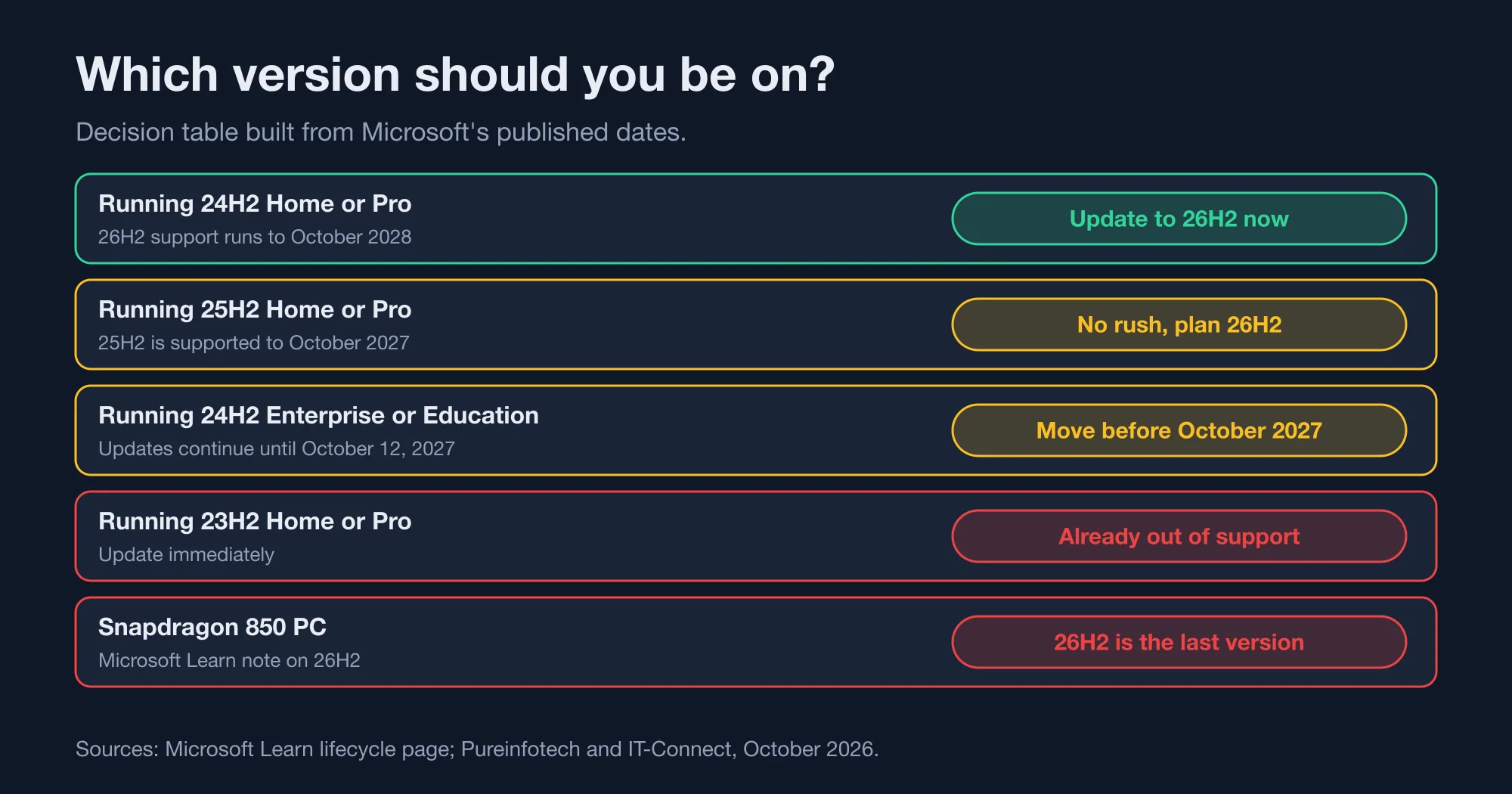
| 24H2 Home or Pro | 26H2 now, or 25H2 if that is what Windows Update offers | 24H2 is already unsupported |
| 25H2 Home or Pro | 26H2 when offered | 25H2 is safe until October 2027, so no rush |
| 24H2 Enterprise or Education | 25H2 or 26H2 before October 12, 2027 | commercial editions keep updates for a year |
| 23H2 Home or Pro | any supported version immediately | 23H2 ended November 12, 2025 |
| PC with a Snapdragon 850 chip | 26H2 | Microsoft says 26H2 is the last version that supports this chip |
The risk of moving is low by Microsoft's own design. Windows Central explains that 24H2, 25H2 and 26H2 are "based on the same platform release" codenamed Germanium. An enablement package is a small update that switches on features already present in the installed system files. Pureinfotech reports that the move from 25H2 to 26H2 uses one, so it is "considerably less disruptive than a traditional feature update."
Windows Central adds that the 25H2 upgrade "comes with no compatibility issues or complex update processes." That is a reporter's assessment, not a guarantee, so make a backup first. For example, copy your Documents and Desktop folders to an external drive or cloud storage before you start.
How do I update step by step?
The route is Windows Update, and it takes four steps. We did not run these on a test PC for this article, so treat them as the standard path described in Microsoft's documentation and the reports cited above.
- Back up your important files to an external drive or cloud storage.
- Open Settings, choose Windows Update, and select Check for updates.
- Install the feature update that appears, either 25H2 or 26H2, and restart when asked.
- Run
winveragain and confirm the version and a build starting 26200 or 26300.
If Windows Update shows no feature update, install the October cumulative update first. KB5127648 is the one to look for. It covers 26H2, 25H2 and 24H2, with builds 26300.9711, 26200.9711 and 26100.9711 respectively, as IT-Connect lists them.
Pureinfotech notes that Microsoft started regular 26H2 servicing with that October update, so 26H2 now receives monthly fixes just like 25H2.
What did the October update change besides ending 24H2?
KB5127648 also bundled the earlier optional update KB5124010, which IT-Connect says brought several visible changes. File Explorer shows previews again for PDFs downloaded from the internet, and the Copilot key can be remapped to the right Ctrl key or the context menu key. PC-to-PC migration was removed in favor of the Windows Backup app.
The update fixed some serious bugs too, according to the same report. In multi-user setups such as Azure Virtual Desktop, explorer.exe could crash after sign-in and leave a black screen. A Dolby Digital AC-3 audio crash in games and a bug in Always On VPN connections were also fixed. If you skipped September's updates because of those problems, October is the moment to catch up.
What should businesses and IT admins do?
Plan the move before October 12, 2027, and do not wait for the last month. Enterprise and Education editions of 24H2 keep monthly updates until October 12, 2027, per Microsoft's statement quoted by Windows Central. Commercial support windows are longer, 36 months against 24 for consumers.
IT-Connect adds one more date: for Windows 11 23H2, the Enterprise and Education editions get their last update on November 10, 2026. If you still run 23H2 in a managed fleet, that deadline is closer than the 24H2 one.
A sensible rollout uses the same enablement-package logic as home users. Test one pilot group on 26H2, watch for line-of-business app issues for a few weeks, then deploy broadly. Because the platform underneath is unchanged, most failures will come from drivers and security software, not from Windows itself.
Should I upgrade now?
Yes, if you are on 24H2 Home or Pro. You have no supported option other than updating, and the update is small. Choose 26H2 if it is offered, because it doubles your remaining support runway compared with 25H2.
If you run 25H2, you can wait. Your support runs to October 13, 2027, and 26H2 will still be there. If you run a managed fleet on 24H2 Enterprise, you have until October 12, 2027, but the pilot should start this quarter.
The mistake to avoid is staying on 24H2 because nothing looks broken. The next monthly security release will skip your PC, and nothing on screen will tell you.
Advertisement
FAQ
Is Windows 11 24H2 still safe to use?
Not for long. Microsoft ended updates for 24H2 Home and Pro on October 13, 2026, so new security vulnerabilities will stay unpatched on your PC. The system keeps running, but it gets no fixes, no time zone updates and no technical support from Microsoft.
How do I check if I have Windows 11 24H2?
Press the Windows key plus R, type winver and press Enter. A build number starting with 26100 means 24H2, 26200 means 25H2 and 26300 means 26H2. Home and Pro editions of 24H2 are the ones that are now out of support.
Should I upgrade to 25H2 or 26H2?
Choose 26H2 if Windows Update offers it. Microsoft supports 26H2 Home and Pro until October 10, 2028, while 25H2 ends October 13, 2027. That is 363 more days of updates for a similarly small update, because the versions share one platform.
Will upgrading from 24H2 delete my files?
The cited reports describe the move as a small enablement package on the same platform, not a reinstall. Still, back up your files first. A backup takes a few minutes and removes the risk entirely, whatever the update does.
When does Windows 11 24H2 Enterprise end?
Enterprise and Education editions of Windows 11 24H2 keep receiving updates until October 12, 2027, a year after Home and Pro. Commercial customers get a 36-month support window against 24 months for consumers.
Comments
Loading…
Sign in to join the conversation.
Related posts

Vite 8 upgrade: one build error and one silent console leak
Upgrading from Vite 7 to Vite 8 can end in a loud failure or a quiet one. The loud one is a build that stops with TypeError: manualChunks is not a function. The quiet one is worse: esbuild: { drop:
Sun Oct 18 2026 · 10 min read · 0 views

Python 3.15 makes UTF-8 the default. What breaks?
Python 3.15 changes one default that can quietly alter how your scripts read files. Calling open() without an encoding argument now means UTF-8 on every system. For most code that is a fix. For code
Sun Oct 18 2026 · 10 min read · 0 views
Go 1.27 refuses to build with removed GODEBUG settings
Go 1.27 fails with 'removed GODEBUG set to old value'. We tested every removed setting on Go 1.26.9 and 1.27.2: where it fails, the fix, and one silent timer change.
Sat Oct 17 2026 · 10 min read · 1 views