AI Pair Programming in Laravel: A One-Line Rule Beats Boost
By Nihar Ranjan Das · Sat Oct 10 2026 · 10 min read · 0 views
View as a Web StoryAISoftware#claude code#Laravel#laravel-boost#ai-pair-programming#coding-agents

In 16 Claude Code runs on the same Laravel task, every run built a correct query. Only the runs that were given an explicit rule paginated the result. The Laravel Boost guidelines, with no rule added, produced an unbounded list in 4 of 4 runs. One line of project rules produced a paginated list in 4 of 4.
That result changes how to think about AI pair programming. A pair programmer who knows Laravel in general still does not know what your project requires. This post shows the task, the hidden checks, the cost of each setup, and how to write a rule that an agent follows, with a test that enforces it when the agent does not.
What is AI pair programming?
AI pair programming is working with an AI assistant as a second set of hands, where you set the goal and review the result while the assistant writes and tests the code. A coding companion is another name for that assistant when it stays beside you in the editor or terminal, instead of running alone.
The pairing only works when the assistant knows your standards. A human colleague learns them in a week from code review. An AI starts every session with an empty head, so the standards must be written down where it will read them. This post tests the cheapest ways to do that in a Laravel project.
What was the test setup?
The test setup was one prompt, four setups and a hidden grader. I used a Laravel 13.35 app with 2,000 articles, 10,000 comments and one extra author with 320 articles, of which 300 were published. I gave Claude Code 2.1.296 this task each time.
Add a GET /authors/{author}/articles endpoint that returns that author's
published articles, newest first, each with its id, title and number of
comments. Add a Pest feature test for it and run the tests before you
finish. Reply with one line when done.
The prompt does not mention pagination or query counts. That was deliberate. I wanted to see which requirements each setup supplied on its own. After each run a script that the agent never saw called the endpoint and checked six things.
| Check | What it verifies |
|---|---|
| Route works | Status 200 and a non-empty JSON list |
| Comment counts correct | Every count matches the database |
| No unpublished | None of the 20 unpublished articles appear |
| Newest first | Order matches created_at descending |
| Four queries or fewer | Excludes session and cache queries |
| Paginated | Fewer than 100 items out of 300 |
The four setups were: the Laravel skeleton's own CLAUDE.md with nothing else, the same app with Laravel Boost installed, the skeleton plus one added rule line, and Boost plus a rule file in .ai/rules. Each had four runs, 16 in total.
What did each setup get right and wrong?
Every setup passed five of the six checks in every run, and only the setups with an explicit rule passed the sixth. All 16 runs added the route, counted comments in SQL and kept the query count low, with 2 to 3 queries each. Without a rule, all 8 returned all 300 articles in one response.
| Setup | Paginated | Other five checks |
|---|---|---|
Skeleton CLAUDE.md only |
0 of 4 | 4 of 4 |
| Laravel Boost installed | 0 of 4 | 4 of 4 |
| Skeleton plus one rule line | 4 of 4 | 4 of 4 |
Boost plus .ai/rules file |
4 of 4 | 4 of 4 |
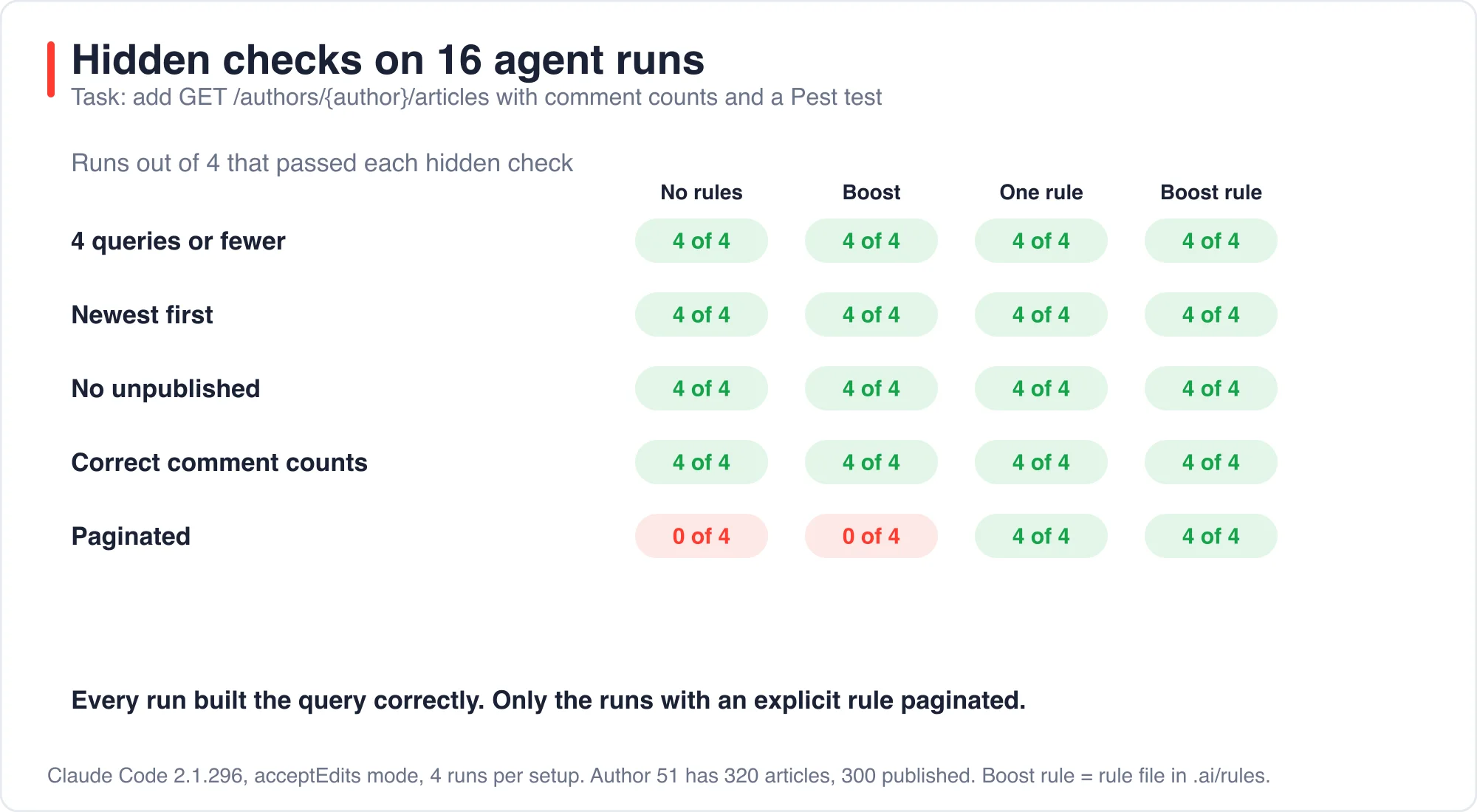
The strong result is the first five rows of the check list: the agent already writes sound Eloquent queries. The agent did not need Boost to avoid an N+1 problem. It needed to be told that a list endpoint in this project must be bounded.
Advertisement
Why didn't Boost add pagination?
Laravel Boost is an official Laravel package that installs guidelines, skills and an MCP server for AI agents. Its guidelines describe Laravel conventions in general, not the rules of your project. The Laravel Boost documentation separates the two. Guidelines are "loaded upfront" and cover core conventions for the framework and packages. The docs treat your own conventions as a different thing, called project rules.
Pagination is a product decision. Some teams want every list paginated at 25. Others want an unbounded list for an internal export. A generic guideline cannot know which you want, so it stays silent, and the agent picks the simplest reading of the prompt, which is to return everything.
This is the useful distinction. Boost gives the agent the framework's vocabulary. A rule gives it your decisions. For example, a billing app might require integer cents for money, a multi-tenant app might require a tenant scope on every query, and a public API might require a version prefix on every route. Such decisions are invisible to any generic guideline. I would install both, but only one of them changed this outcome.
What was the one-line rule?
The rule was a single bullet appended to CLAUDE.md.
## Project rules

- Every list endpoint must be paginated with paginate(25). Never return an unbounded collection.
All four runs used paginate(25) and returned 25 items. The queries per request were three: the author lookup, the page of articles with their comment counts, and the pagination count.
The Boost-native version of the same rule lives in .ai/rules. The Boost docs say rules are Markdown files with a paths list in their frontmatter, and that Boost keeps an .ai/rules/index.md mapping paths to rule files, which agents are told to consult before editing. I wrote exactly that, with the same sentence as the rule.
---
paths:
  - routes/**
  - app/Http/Controllers/**
---

# List endpoints

## Paginate every list endpoint

Every endpoint that returns a list must be paginated with paginate(25).
Four of four runs paginated with the Boost rule file as well. In earlier Boost runs the agents looked for .ai/rules/index.md before editing, which matches the behavior the docs describe. The Boost-native route is the better choice for a team, because rules are scoped by path and committed to source control. The one-line route is the better choice for a quick start.
What did each setup cost?
Boost cost about 22 percent more per run than the skeleton alone, and the Boost rule file cost about 40 percent more. The figures are the total_cost_usd values that Claude Code reports, averaged over four runs.
| Setup | Average cost | Average turns |
|---|---|---|
Skeleton CLAUDE.md only |
$0.131 | 9.75 |
| Laravel Boost installed | $0.160 | 14.5 |
| Skeleton plus one rule line | $0.143 | 12.25 |
Boost plus .ai/rules file |
$0.183 | 20.0 |
The extra cost is turns. Boost's guidelines and the rules index send the agent to read more before it writes, and each read is a model call. In this task the extra reading changed the outcome only when a rule existed.
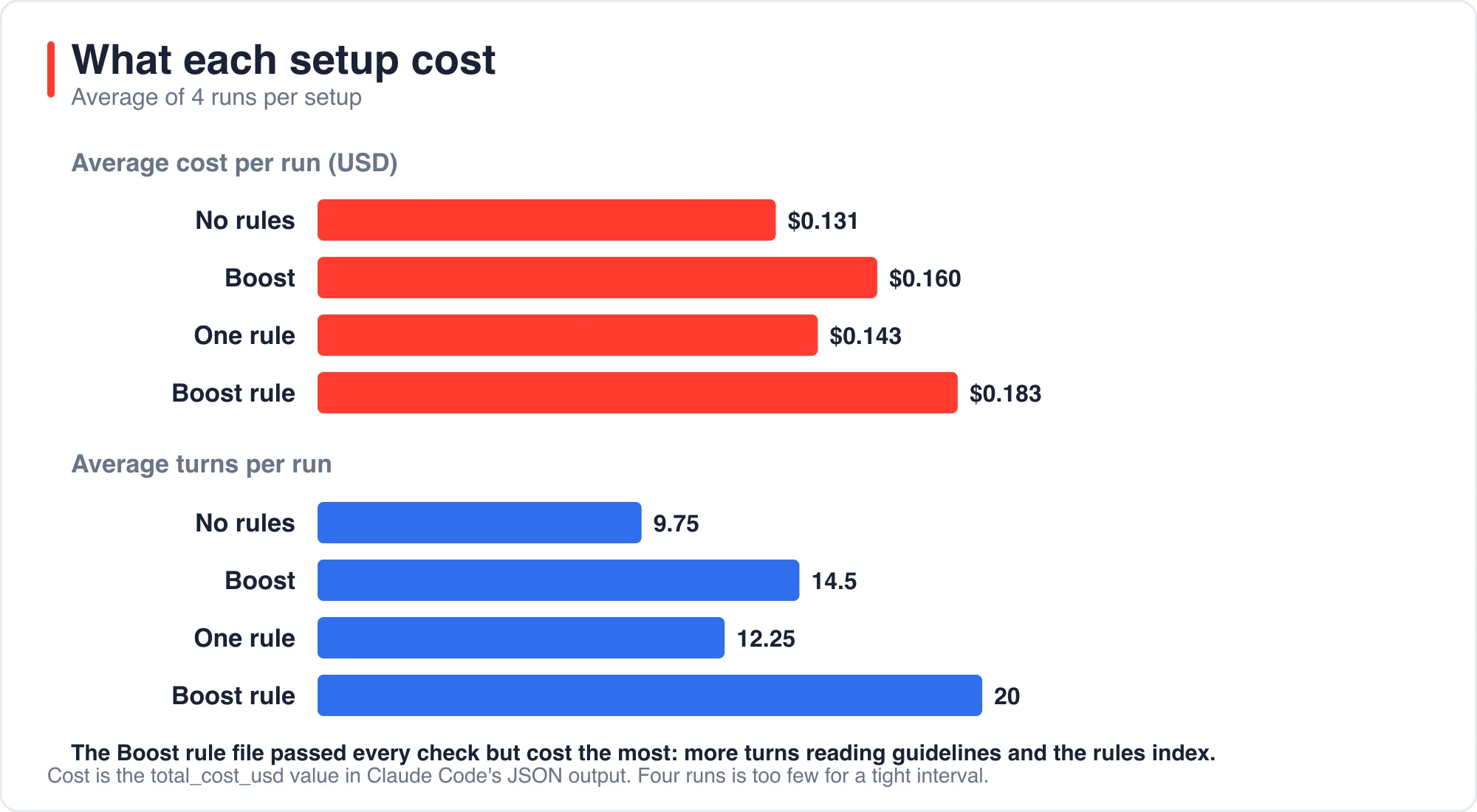
Absolute amounts are small, about 13 to 18 cents a task. Across a team running hundreds of tasks a month the gap becomes real money. It is still cheap next to the cost of an unbounded endpoint reaching production.
What side effects did the agents have?
Two behaviors differed between setups, and neither was about the task. First, the Laravel skeleton's CLAUDE.md tells the agent to run composer require laravel/boost --dev and php artisan boost:install before it changes anything. Without Boost installed, 1 of 4 runs did it. With my extra rule line, 3 of 4 did.
Second, all four Boost runs and all four Boost rule runs mentioned Pint in their final message, because the Boost guidelines tell the agent to format changed files. In most cases the agent reported that it could not run Pint, because my sandbox denied the command. That is the guidelines working as intended, and it shows that guidelines change behavior beyond what you asked for.
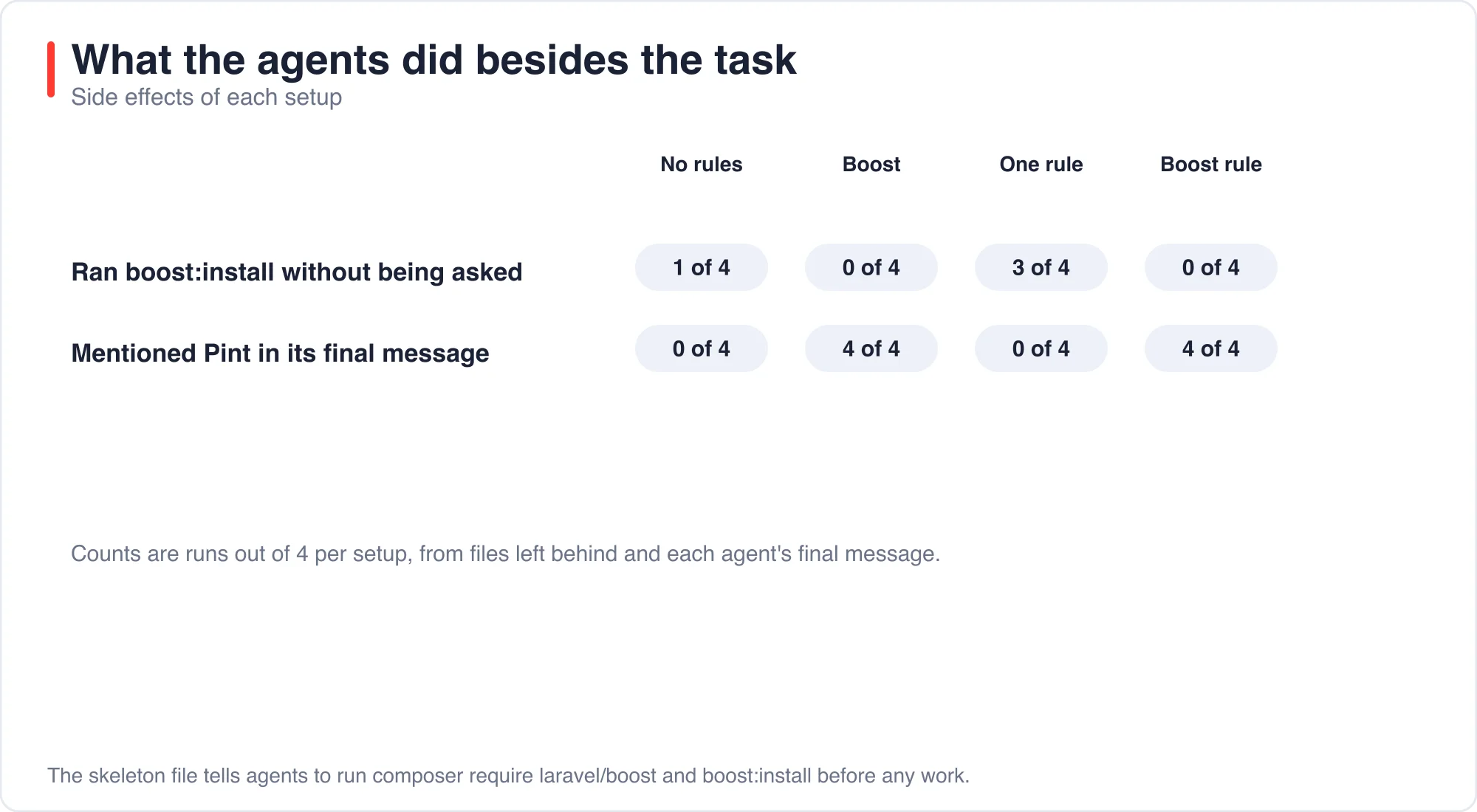
These side effects are neither good nor bad. They are a reminder that instruction files act on the agent, and that the skeleton file asks for an install. My lab copy already had Boost in composer.json, so the install step was a no-op there. In a fresh project it would change your dependencies.
How do you write a rule an agent will follow?
Write a rule that is specific, testable and short. These four patterns held up in my runs.
- Name the exact function or value.
paginate(25)worked. "Keep lists reasonable" would not. - State the failure to avoid. "Never return an unbounded collection" gave the agent a reason to check its own work.
- Keep the file short. The Claude Code memory documentation says specific and concise instructions are followed more consistently, and that the file is context, not enforced configuration.
- Write the rule after the first mistake you see twice. Rules that answer real failures stay useful. Rules written in advance tend to pile up.
A short list of candidate rules for a Laravel project follows. Only the first was measured here. The rest are suggestions that I have not tested.
| Rule | Why it matters |
|---|---|
Paginate every list endpoint with paginate(25) |
Measured: 0 of 4 became 4 of 4 |
Run tests only against :memory: or a *_test database |
Prevents a test run from wiping dev data |
| Store money as integer cents | Prevents float rounding bugs |
| Authorize every controller action with a policy | Prevents missing access checks |
Never edit .env or run migrate:fresh outside tests |
Limits destructive commands |
How do you enforce a rule when the agent forgets?
You enforce it with a test, because a rule is a request and a test is a check. I wrote a small Pest test that seeds 150 published articles and asserts that the endpoint never returns more than 100.
it('never returns more than 100 articles for an author', function () {
    $author = Author::create(['name' => 'A', 'email' => 'a@x.test']);
    foreach (range(1, 150) as $i) {
        Article::create(['author_id' => $author->id, 'title' => "T$i", 'body' => 'b', 'published' => true]);
    }

    $items = $this->getJson("/authors/{$author->id}/articles")->assertOk()->json('data');

    expect(count($items))->toBeLessThanOrEqual(100);
});
I ran it against the output of a paginated run, and it passed. I ran an adapted copy against an unpaginated run, which returns a plain list, and it failed. That is the behavior you want from a guard. It turns a missed rule into a red build instead of a production incident.
The post AI Coding Agents Wiped a Laravel Dev Database in 7 of 8 Runs shows the same idea for a more dangerous rule, with a guard in TestCase. The post Best AI IDE for Laravel: What Each One Costs in 2026 lists where each editor reads its instruction files.
What are the limits of this test?
The limits are those of a small experiment. I ran one agent, Claude Code, on one task, four times per setup. Four runs cannot give a tight interval, and a different agent or model could behave differently. The cost figures vary by a few cents from run to run.
The requirement I chose, pagination, is one that an agent plausibly omits. A task with a more obvious requirement would show less difference between setups. I also ran with permission prompts limited to file edits and a few commands, which is why Pint could not run.
Every number was fact-checked against the saved run output and grader results. About the author: I build Laravel applications and ran all 16 runs myself on a scratch project. If a result does not reproduce for you, use the contact page and tell me which one.
The bottom line
Install Boost if you want the agent to speak Laravel well, and expect it to cost a little more per task. Then write the rules that only you know, starting with the one you have corrected twice. In this test a single rule line beats the guidelines alone, because it states a decision that only you can make.
Back every important rule with a test. The agent followed the pagination rule in 8 of 8 runs where it existed, but a rule is still only a request.
Advertisement
FAQ
What is AI pair programming?
AI pair programming is working with an AI assistant as a second pair of hands: you set the goal and review the result while the assistant writes and tests code. It works best when your project's standards are written where the assistant reads them.
Does Laravel Boost make AI agents follow my project rules?
Not by itself. Boost gives general Laravel guidelines. In my runs it left an unbounded list endpoint in 4 of 4 runs. Project-specific rules, in CLAUDE.md or .ai/rules, fixed it in 8 of 8 runs.
How do I write a rule an AI coding agent will follow?
Name the exact function or value, state the failure to avoid, keep the file short, and add a rule after the first mistake you see twice. For example: every list endpoint must use paginate(25).
What does Laravel Boost cost in extra agent tokens?
In my four-run averages Boost raised cost per task from $0.131 to $0.160 and turns from 9.75 to 14.5. A Boost rule file raised it to $0.183 and 20 turns. Four runs is a small sample.
Comments
Loading…
Sign in to join the conversation.
Related posts
Laravel AI SDK Tool Approval: Edit Works, Fakes Skip It
The Laravel AI SDK can pause an agent before a sensitive tool runs and wait for a person to approve, reject or edit the call. I ran that human-in-the-loop tool approval API through 16 scenarios and
Sat Oct 10 2026 · 10 min read · 0 views
Code Optimizer for Laravel: 5,361 Queries Down to 5
A Laravel route that lists 1,800 articles made 5,361 database queries and took 2,326 ms in my test. Four changes cut it to 5 queries and 4 ms. Eager loading did the most for the query count. Three
Sat Oct 10 2026 · 11 min read · 1 views
PHPStan Found 3 of 11 Laravel Bugs. AI Found 9 to 11
PHPStan at level 9 found 3 of the 11 bugs I planted in a Laravel pull request. It took 1.1 seconds and cost nothing. An AI reviewer found 9, 11 and 9 in three separate runs, in about 15 seconds each,
Sat Oct 10 2026 · 10 min read · 0 views