Laravel AI SDK Tool Approval: Edit Works, Fakes Skip It
By Nihar Ranjan Das · Sat Oct 10 2026 · 10 min read · 0 views
View as a Web StoryAISoftware#ai agents#testing#Laravel AI SDK#Laravel#human-in-the-loop
The Laravel AI SDK can pause an agent before a sensitive tool runs and wait for a person to approve, reject or edit the call. I ran that human-in-the-loop tool approval API through 16 scenarios and found three things that the announcement posts do not mention. Editing arguments works even though the examples never show it, Agent::fake() silently skips approved tools on resume, and the SDK does not check who is approving.
This post gives you the working code, a table of what each decision does, and the guardrails I would add before shipping an agent that touches money.
What is human-in-the-loop tool approval in the Laravel AI SDK?
Human-in-the-loop tool approval is a feature of the Laravel AI SDK that stops an agent before it executes a gated tool, returns the pending call to your code, and resumes only when you pass back a decision. The Laravel AI SDK is the first-party package, laravel/ai, that gives Laravel one API for text, agents, tools and conversations across AI providers.
The feature first shipped in version 0.10.0 on July 21, according to Laravel News. Laravel announced the stable 1.0 release on September 23, listing tool approvals among its headline features in its AI SDK v1.0 announcement. My tests ran on 1.2.0.
The reason to care is simple. An agent that can call a refund tool, a delete tool or an email tool will eventually call it wrongly. An approval gate turns that mistake into a pending request that a person can read first. For teams in the EU, Regulation (EU) 2024/1689, the AI Act, asks for human oversight measures on high-risk systems in Article 14, and an approval gate is one practical way to build them. Ask your own counsel whether your system counts as high-risk.
What was the test setup?
The test setup avoided real model providers so every result is repeatable. I wrote a short Node server that speaks the OpenAI chat completions format and returns scripted replies, such as a tool call first and a final sentence second. Then I pointed the SDK's openai-compatible provider at it.
I built a RefundAgent with two tools. LookupOrder is an ordinary tool. IssueRefund implements Approvable and asks for approval only when the amount is over 2,000. Both tools write to static arrays, which lets me count exactly how many times each one really ran. Conversations used the SDK's own database store on SQLite.
That setup matters because my first attempt used RefundAgent::fake(), and it gave me wrong answers. I explain why below.
How do you gate a tool and resume the agent?
You gate a tool by implementing the Approvable contract and using the InteractsWithApprovals trait, then you resume by passing a Decisions object to prompt() on the same conversation. This is the whole tool, as I ran it.
class IssueRefund implements Approvable, Tool
{
    use InteractsWithApprovals;

    protected function needsApproval(Request $request): Approval|bool
    {
        return $request['amount'] > 2000
            ? Approval::required('Refunds over 2000 need review.')
            : false;
    }

    public function handle(Request $request): Stringable|string
    {
        // issue the refund
    }
}
Without needsApproval(), the trait's default returns true, so the tool always pauses. With it, small refunds went straight through. In my run a 150 refund executed immediately after two model requests, while a 5,000 refund stopped after one request and returned this pending item.
Advertisement
{"id":"c2","tool":"IssueRefund","arguments":{"order":"A1","amount":5000},"reason":"Refunds over 2000 need review."}To resume, continue the conversation as the same user and hand back decisions keyed by tool call ID.
$response = $agent->prompt('Refund order A1');

if ($response->hasPendingApprovals()) {
    $pending = $response->pendingApprovals; // id, tool, arguments, reason
}

(new RefundAgent)
    ->continue($conversationId, as: $user)
    ->prompt(Decisions::from(['c2' => Decision::approve()]));
Note that the tool name is the class name, IssueRefund, not a snake case name. That matters if you script a fake provider, as I did.
What does each decision actually do?
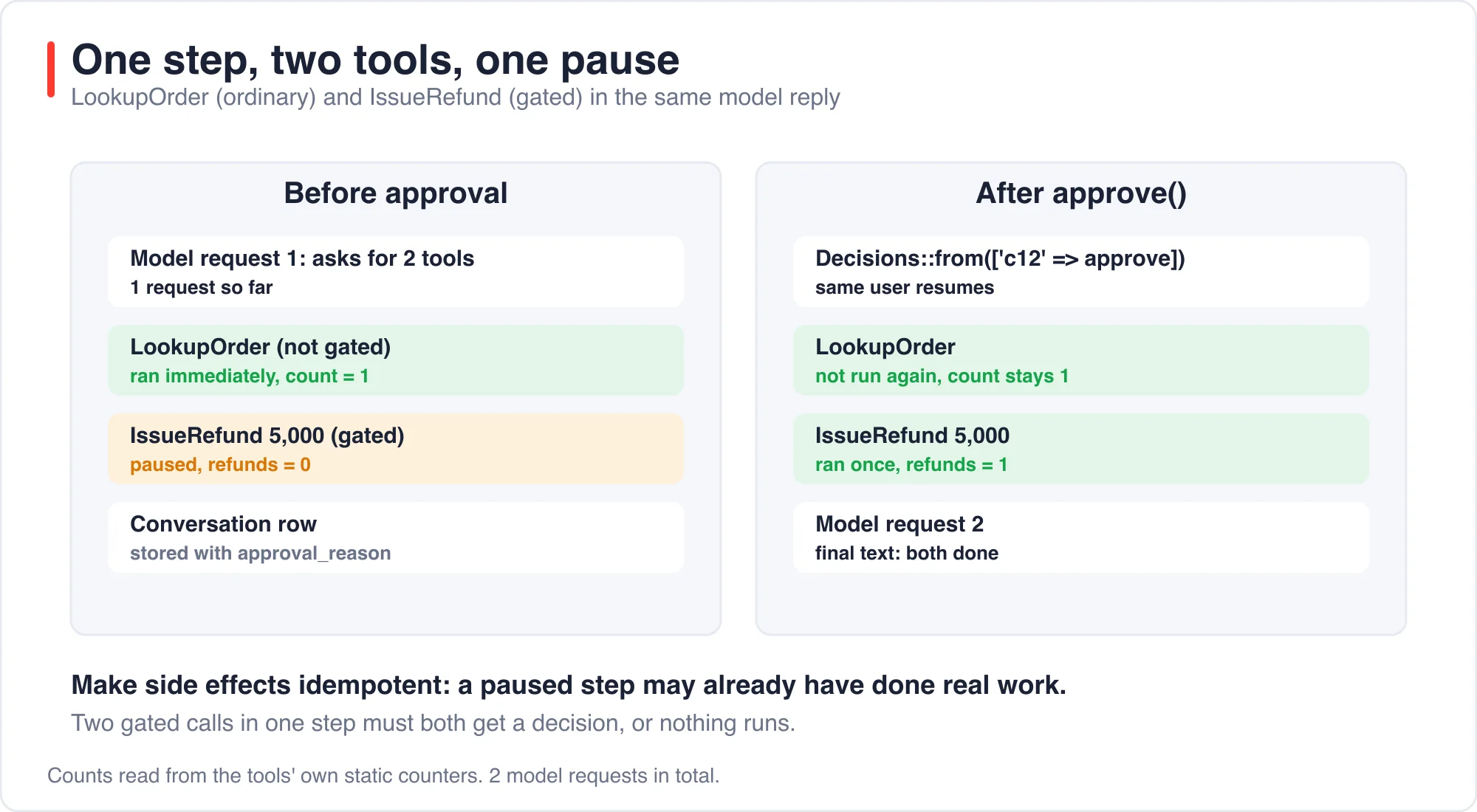
Each decision has a distinct effect on whether the tool runs and whether the model gets another turn. This table is the main result of the test, and every row is a real run with the tool ledger checked.
| Decision | Tool ran | Model called again | What I saw. |
|---|---|---|---|
| Approve | Once | Yes | Final text returned. |
| Reject with no reason | No | No | Run stopped, empty text. |
| Reject with a reason | No | Yes | Model wrote its own answer. |
| Edit to a new amount | Once, with new values | Yes | Ledger showed 1,800, not 5,000. |
| Approve all with a wildcard | Once | Yes | Same as approve. |
| Unknown call ID | No | No | Mismatch exception. |
| Approve the same call twice | Once total | No | Second call threw an exception. |
| Plain text prompt while paused | No | Yes | New prompt ran, pending call abandoned. |
| Empty decisions | No | No | Invalid argument exception. |
Two rows deserve a closer look.
A bare rejection ends the run. Decision::reject() with no result stopped generation after one model request, and the response text was empty. If you want the agent to explain the refusal to the user, pass a reason such as Decision::reject('Manager declined.'). The model then received that text as the tool result and wrote a sentence of its own.
Editing works. The launch coverage says reviewers can edit arguments but shows no method for it. The SDK source has Decision::edit(array $arguments), and in my run an edit of the amount from 5,000 to 1,800 made IssueRefund execute with 1,800. The wildcard decision cannot be an edit, and the source throws if you try.
What happens when a step has more than one tool call?
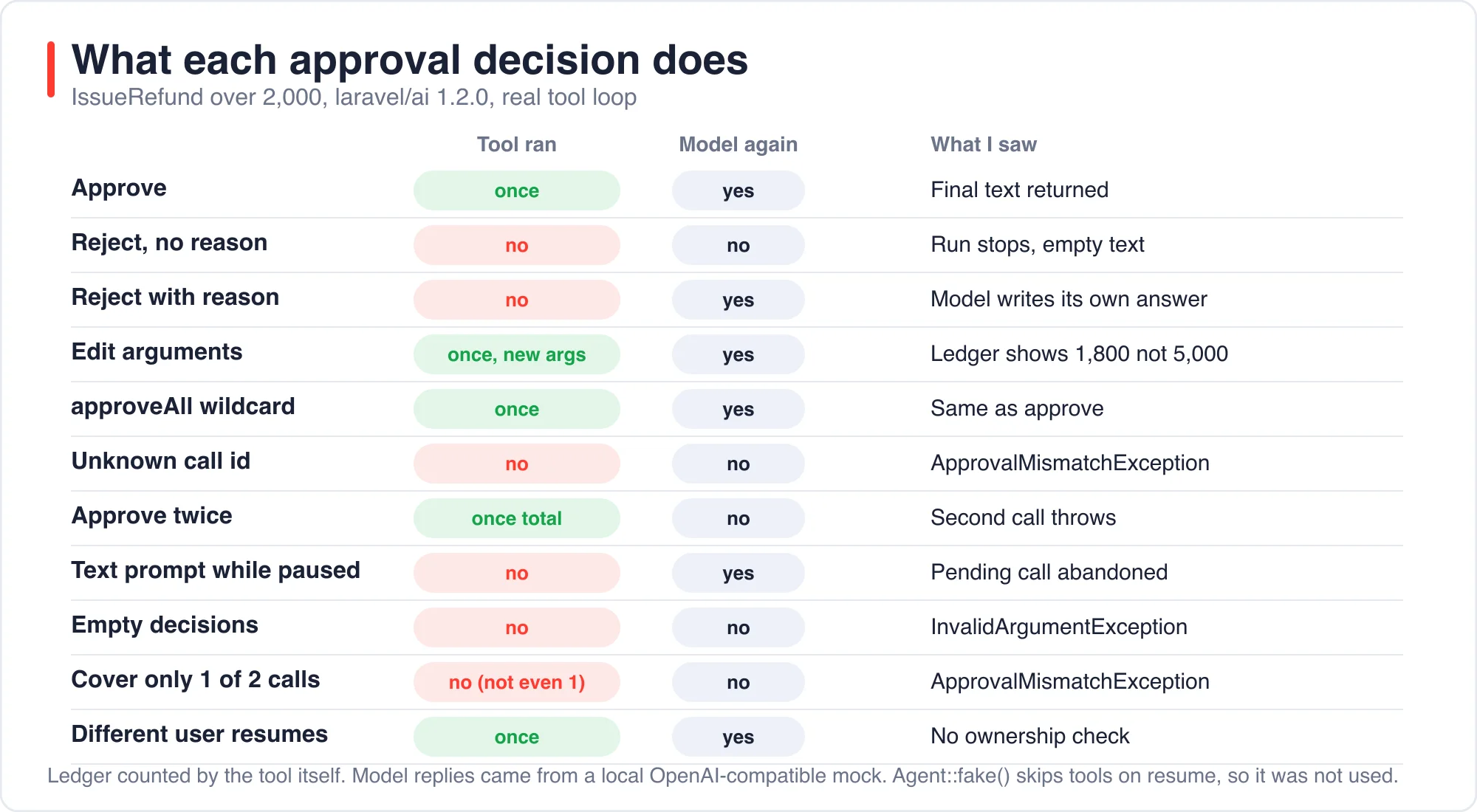
Non-gated tools in the same step run immediately, and gated ones wait. I scripted one step with a LookupOrder call and a 5,000 refund together. Before resume the lookup had run once and the refund zero times. After I approved, the refund ran once and the lookup did not run again.
If a step contains two gated calls, you must answer both. I approved only the first of two pending refunds and got a mismatch exception. Nothing ran, not even the approved call, so a partial answer is an all-or-nothing failure. The fix is to cover every ID, or finish with rejectRemaining().
Decisions::from(['r1' => Decision::approve()])
    ->rejectRemaining('Not reviewed.');
This is also why side effects need to be idempotent. A paused step can have already done real work, as the lookup did. The SDK's tool request carries a tool call ID, and Laravel News recommends using it as an idempotency key. I agree, and I would store it next to every refund row.
What happens when the approved tool fails?
The failure goes back to the model as text, and your code sees no exception. I made IssueRefund throw "payment gateway down" after approval. The resume call returned normally, the model received "The tool call failed: payment gateway down", and its reply reported the failure.
That is friendly for conversations and dangerous for money. Your controller will see a successful response even though no refund happened. Check your own ledger after the resume, not the agent's wording, and have the tool record a failed attempt you can alert on.
Why does Agent::fake() skip approved tools?
Agent::fake() skips approved tools on resume because the SDK deliberately does not run them when the agent's gateway is faked. The source of ResumesToolApprovals says the resumable approval comes back "unless the agent's gateway is faked", and resumesAgainstRealGateway() returns false whenever Ai::hasFakeGatewayFor() is true.
In my first attempt I faked the agent, resumed with Decision::approve(), and got the scripted final sentence back. The ledger was empty. The tool never ran, and an edit to 1,800 changed nothing. A test written that way would pass while proving nothing about your tool.
There are two practical ways around it.
- Fake the HTTP layer instead. Point the provider at a stub, or use
Http::fake()for the provider URL, so the real tool loop runs. - Test the tool itself in isolation, and test your controller's decision handling separately with
AgentResponse::fakeWithPendingApprovals().
Faking has a second quirk. The first prompt of a new conversation spends one scripted response generating the conversation title. If your fake list is [toolCall, finalText], the title will consume the final text after a pause. Add a filler response after the tool call.
Can someone else resume my paused conversation?
Yes, in my test the SDK let a different user resume it. I paused a refund for one user, then called continue($conversationId, as: $otherUser) with a fresh user and approved. The refund ran. I did not find an ownership check on the resume path.
I want to be careful here. This is the default database store on 1.2.0, and I tested only the resume call. A conversation ID is a UUID, so it is hard to guess. But your approval endpoint will usually take that ID from a request, and the person approving may not be the conversation owner at all. A refund queue reviewed by a support manager is the normal case.
So the SDK is not where you authorize this. Your controller is.
public function decide(Request $request, Conversation $conversation)
{
    Gate::authorize('approve-refunds');   // who may approve at all

    abort_unless(
        $conversation->participant_id === $request->user()->id
            || $request->user()->can('review-any-refund'),
        403,
    );

    // then resume with the owner as the conversation participant
}
Log who approved, which call, and what arguments they approved. If you used Decision::edit(), log both the original and edited values.
How should you design the approval queue around it?
Design the queue as ordinary application data that points at the SDK's paused conversation, because the SDK pauses a run but does not give you a review inbox. This part is my recommendation from the tests, not something I measured.
A pending approval needs five things stored in your own table: the conversation ID, the tool call ID, the tool name, the arguments as the model sent them, and the reason string. Add a status, the reviewer, and a timestamp for each change. The pending item the SDK returns already carries four of those fields, so copying it takes a few lines in the code that handles the response.
Decide up front what an expired request means. A paused conversation does not time out on its own in anything I tested, so a refund request from Monday will still be waiting on Friday. My default would be to reject anything older than a day with a clear reason, so the user gets an answer and the conversation does not hang. Fakes and mock servers will not show you this problem, because they never wait.
Finally, treat edits as a different kind of approval from a plain yes. A reviewer who changes 5,000 to 1,800 has made a decision the model did not, so store both numbers and show the user the edited value in the final message. That keeps the agent's wording from contradicting what actually happened.
Does the upgrade need a database migration?
It depends on the version you start from. Laravel News says 0.10.0 added a nullable approval_state column to the conversation messages table and that custom stores must implement storeApprovalResults(). In 1.2.0, the published migration in my lab had no such column. Pending approvals appear inside the stored steps JSON as a tool_calls entry with an approval_reason and no result until it is answered.
I cannot tell you which release moved from one design to the other. If you upgrade from 0.x, read the release notes for your exact version and diff the published migration against your table.
What are the limits of this test?
The model was a mock, so I tested the SDK's control flow and not real model behavior. A real model may call tools differently, may retry a rejected call, or may produce several approvable calls in one turn more often than my scripts did. I did not test streaming, queued agents or broadcast events, and I did not test custom conversation stores.
About the author: I build Laravel applications and ran every scenario on a scratch project in October 2026. The numbers and exception messages were fact-checked against saved output. If something does not reproduce on your version, send it through the contact page with your laravel/ai version.
For earlier agent work, see my posts Tool Calling in Laravel: Why Agents Quit After One Retry and AI Agents for Laravel Developers: Build One in 42 Lines. For what can go wrong without gates, see AI Coding Agents Wiped a Laravel Dev Database in 7 of 8 Runs.
The bottom line
Use the approval API for any tool that moves money, deletes data or sends messages. It works as advertised, and Decision::edit() is the feature the docs undersell. Then add three things yourself: an authorization check on whoever approves, an idempotency key from the tool call ID, and tests that run the real tool loop instead of Agent::fake().
If a result here does not match what you see, trust your own run, and tell me which version you used.
Advertisement
FAQ
How do I edit tool arguments in the Laravel AI SDK before approving?
Pass Decision::edit() with the new arguments inside a Decisions object keyed by tool call ID. In my test, editing an IssueRefund amount from 5,000 to 1,800 made the tool run once with 1,800. The wildcard decision cannot be an edit.
Why does my approval test pass but the tool never runs?
When an agent is faked with Agent::fake(), the SDK skips tool execution on a resume with decisions. The ledger in my test stayed empty. Test with a stubbed provider HTTP endpoint so the real tool loop runs, and test the tool separately.
What happens if I approve only one of two pending tool calls?
The SDK throws ApprovalMismatchException and nothing runs, not even the approved call. Answer every pending ID, or finish with rejectRemaining() or approveRemaining() so no call is left without a decision. Partial answers fail as a whole.
Does the Laravel AI SDK check who approves a tool call?
Not in my test on version 1.2.0. A different user resumed a paused conversation and the refund ran. Authorize the approver in your own controller with a gate or policy, and record who approved which call, including the original and edited arguments.
Comments
Loading…
Sign in to join the conversation.
Related posts
Code Optimizer for Laravel: 5,361 Queries Down to 5
A Laravel route that lists 1,800 articles made 5,361 database queries and took 2,326 ms in my test. Four changes cut it to 5 queries and 4 ms. Eager loading did the most for the query count. Three
Sat Oct 10 2026 · 11 min read · 1 views
PHPStan Found 3 of 11 Laravel Bugs. AI Found 9 to 11
PHPStan at level 9 found 3 of the 11 bugs I planted in a Laravel pull request. It took 1.1 seconds and cost nothing. An AI reviewer found 9, 11 and 9 in three separate runs, in about 15 seconds each,
Sat Oct 10 2026 · 10 min read · 0 views
AI QA Testing in Laravel: 3 Bugs Only a Browser Test Sees
Claude Code wrote a Pest browser test for a Laravel form, and it passed on the first run; then I broke the page seven ways. The browser test caught 3 of the 7 breaks; a plain HTTP test caught a
Sat Oct 10 2026 · 11 min read · 0 views