Tool Calling in Laravel: Why Agents Quit After One Retry
By Nihar Ranjan Das · Fri Oct 09 2026 · 13 min read · 0 views
View as a Web StoryAISoftware#ai agents#tool calling#Laravel#php
A Laravel agent with one tool gets two steps by default. The first step is the tool call. The second step is the answer. A model that sends a bad argument and needs to retry has no step left, so the user gets an empty reply.
I found this by scripting a fake model against the real Laravel AI SDK loop (laravel/ai v1.2.0 on Laravel 13.35 and PHP 8.4). I ran seven scenarios and counted what the SDK did in each. This post gives the numbers, the working code, and the three settings that fix most failures.
Tool calling is a protocol where a language model returns a structured request to run a named function instead of plain text, and your application runs it and sends the result back. The model never executes anything. Your code does, so your code decides what happens when the request is wrong. The provider guides describe the same exchange, such as OpenAI's function calling guide and Anthropic's tool use documentation.
How were these numbers measured?
Every number comes from a PHPUnit run against a fresh Laravel 13.35 project with laravel/ai v1.2.0 and PHP 8.4. The model is a scripted fake, so each run is deterministic and repeatable. For example, the budget table came from 10 agents with 1 to 30 tools, each facing 60 consecutive tool calls.
The method has a limit. A scripted model shows what the SDK does with a given model output. It does not show how often a real model produces that output. Consider the results below as a map of your code's branches, and measure your own model's error rate separately.
What does tool calling in Laravel actually do?
The Laravel AI SDK runs a loop. It sends your prompt and tool schemas to the model, runs any tool the model asks for, appends the result, and calls the model again. The loop stops when the model answers in text or the step budget runs out.
Laravel AI SDK is the first-party package (laravel/ai) that gives Laravel a single API for text, tools, structured output, embeddings and images across providers. The package source on GitHub and the Laravel AI SDK documentation describe the surface. The loop itself lives in TextGenerationLoop, and reading it explains every result below.
Each trip around the loop is a step. One step is one model call plus the tool executions that follow it. A one-tool question with no retries takes two steps: call, then answer.
How do you write a tool class that validates its input?
Implement the Tool contract, declare a schema, and validate inside handle(). The SDK catches a ValidationException and returns the messages to the model as the tool result, so the model can correct itself.
Generate the skeleton with Artisan:
Advertisement
composer require laravel/ai
php artisan make:tool OrderStatus
The command writes app/Ai/Tools/OrderStatus.php. Here is the tool I tested:
<?php

namespace App\Ai\Tools;

use Illuminate\Contracts\JsonSchema\JsonSchema;
use Laravel\Ai\Contracts\Tool;
use Laravel\Ai\Tools\Request;
use Stringable;

class OrderStatus implements Tool
{
    public function description(): Stringable|string
    {
        return 'Look up the status of a customer order by its numeric order id.';
    }

    public function schema(JsonSchema $schema): array
    {
        return [
            'order_id' => $schema->integer()->description('Numeric order id, e.g. 1042')->required(),
        ];
    }

    public function handle(Request $request): Stringable|string
    {
        $data = $request->validate([
            'order_id' => ['required', 'integer', 'min:1'],
        ]);

        return json_encode(['order_id' => $data['order_id'], 'status' => 'shipped']);
    }
}
The schema tells the model what to send. The validate() call is what you trust, because the provider's JSON schema support is a hint and not a guarantee. JSON Schema describes shape. It does not check that an id exists or belongs to the current user.
Attach the tool to an agent:
<?php

namespace App\Ai\Agents;

use App\Ai\Tools\OrderStatus;
use Laravel\Ai\Contracts\Agent;
use Laravel\Ai\Contracts\HasTools;
use Laravel\Ai\Promptable;
use Stringable;

class SupportAgent implements Agent, HasTools
{
    use Promptable;

    public function instructions(): Stringable|string
    {
        return 'You answer order questions. Use the OrderStatus tool.';
    }

    public function tools(): iterable
    {
        return [new OrderStatus];
    }
}
Call it with SupportAgent::make()->prompt('Where is order 1042?'). For tests, SupportAgent::fake([...]) replaces the provider with a scripted gateway, so a test costs no tokens and needs no API key.
What is the default step budget, and why does it bite?
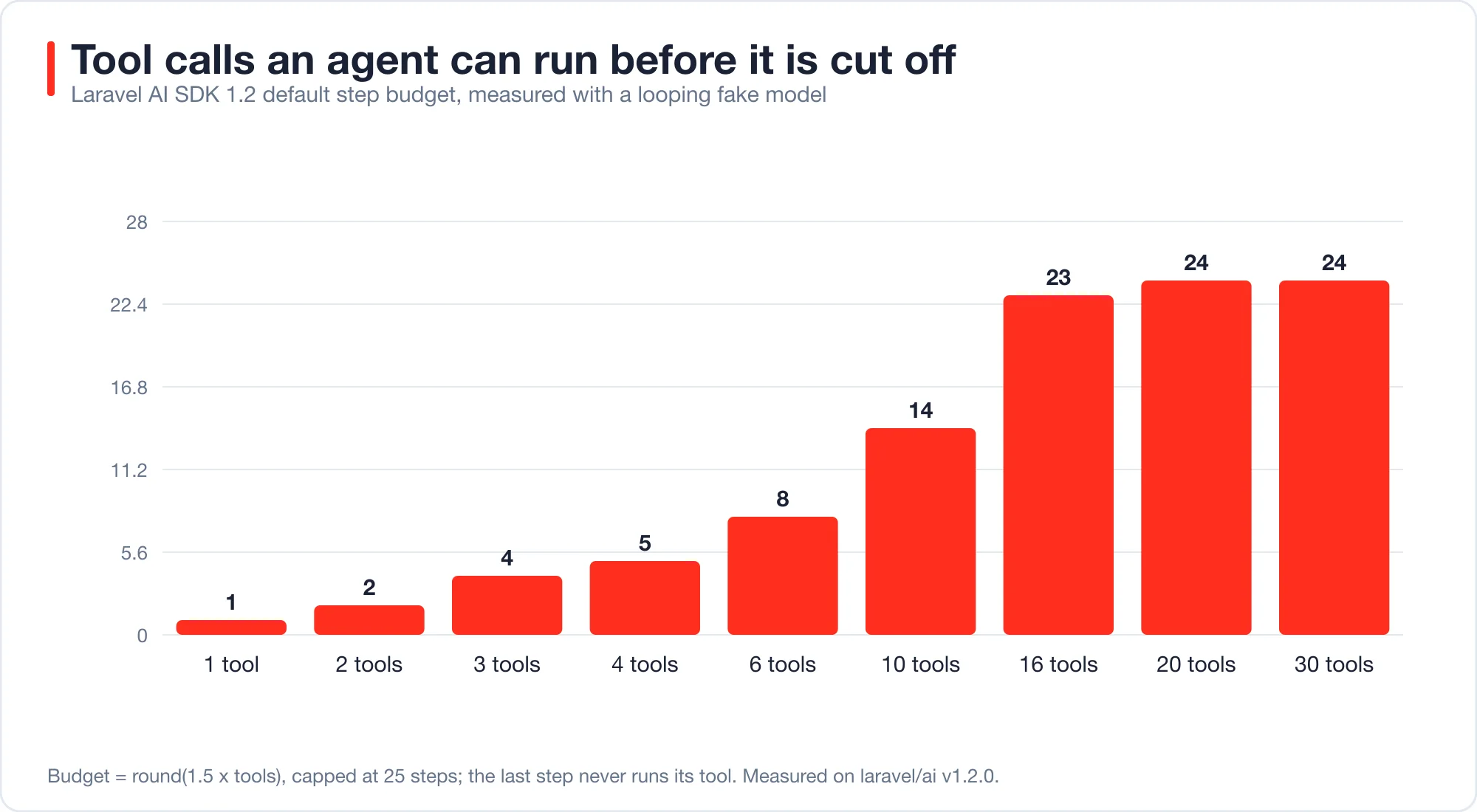
The default budget is round(1.5 x number of tools), capped at 25 steps, or 5 steps when the agent has no tools. The final step never runs its tool call. So an agent can execute at most one fewer tool call than its step count.
I measured this by giving a fake model an endless loop of tool calls and counting executions before the SDK cut it off.
| Tools on the agent | Step budget | Tool executions before cutoff |
|---|---|---|
| 1 | 2 | 1 |
| 2 | 3 | 2 |
| 3 | 5 | 4 |
| 4 | 6 | 5 |
| 6 | 9 | 8 |
| 10 | 15 | 14 |
| 16 | 24 | 23 |
| 20 or more | 25 | 24 |
The pattern matters for small agents. However, the cap hides it for large ones. With one tool, the budget leaves room for exactly one call and one answer. Anything that needs a second call, such as a retry after a validation error, hits the wall.
The budget formula comes from resolveMaxSteps() in the SDK source: an explicit maxSteps wins, else 1.5 times the tool count up to the ceiling, else 5. If you want a retry, you must ask for it.
Why does a bad argument give an empty reply?
A bad argument consumes the only spare step. The SDK returns the validation message to the model, which is correct. But the model's corrected call lands on the final step, and the SDK refuses to run tool calls there.
In my scenario B, the fake model sent order_id = "abc". The tool returned The order id field must be an integer. The model then sent order_id = 1042. The SDK answered that call with The agent reached its maximum number of steps without running this tool call. The final text was an empty string.
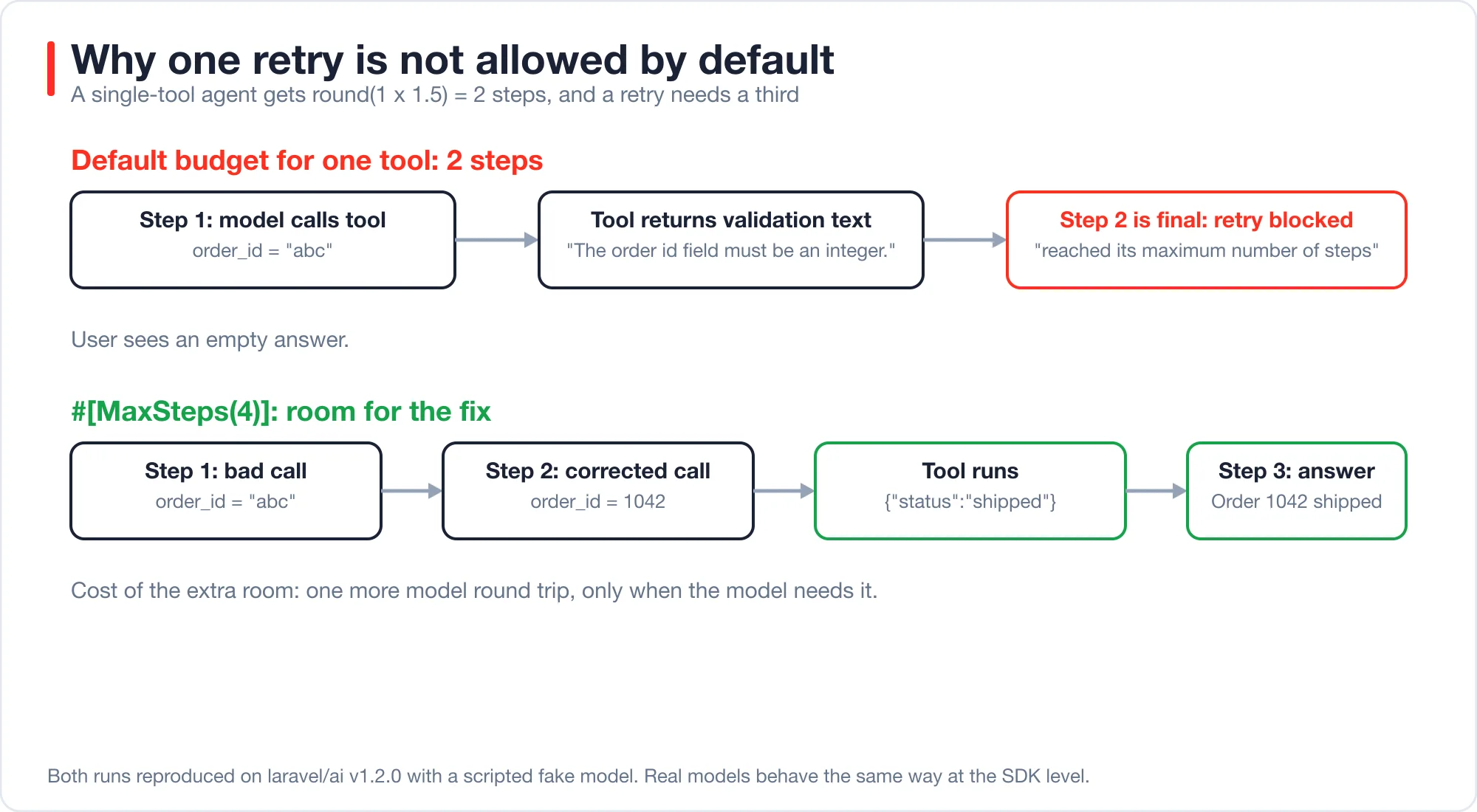
Therefore the fix is one attribute:
use Laravel\Ai\Attributes\MaxSteps;

#[MaxSteps(4)]
class SupportAgent implements Agent, HasTools
{
    // ...
}
With #[MaxSteps(4)], scenario B2 ran the same bad call, then the corrected call, then the answer. The tool executed twice and the user got Order 1042 has shipped. The cost is one extra model round trip, and only when the model needs it.
Pick the number from your worst realistic case, not your average. In practice, a support bot that chains a lookup and a refund needs more room than one that only reads. A rule I use: the number of tools a normal task chains, plus two for retries. Then watch for runs that hit the cap, because that is a signal and not noise.
Why does order_status throw NoSuchToolException?
The SDK names a tool after its class, not after snake_case. OrderStatus is advertised as OrderStatus. If your instructions, or the model's habit, say order_status, the SDK throws NoSuchToolException: Model tried to call unavailable tool 'order_status'.
This one is a trap because the exception escapes prompt() and fails the whole request. Two fixes exist, and they solve different problems. For example, one prevents the error and the other recovers from it.
The first fix is naming. Add a name() method to the tool, and the SDK uses it instead of the class basename:
public function name(): string
{
    return 'order_status';
}
I verified the resolver: it calls name() when the method exists and falls back to class_basename() otherwise. Choose names that match the style of your prompts, and keep them stable, because renaming a tool changes what the model has learned to call in your instructions.
The second fix is repair. Add #[RepairToolCalls] to the agent:
use Laravel\Ai\Attributes\RepairToolCalls;

#[RepairToolCalls]
class SupportAgent implements Agent, HasTools
{
    // ...
}
With this attribute, an unknown tool name no longer throws. The SDK returns Tool 'order_status' does not exist. Available tools: OrderStatus. to the model, and the model picks the right name. In scenario E, the run succeeded in three steps. The attribute also adds one step to the default budget, so the repair has room to happen.
Use both. A correct name() prevents the common case. RepairToolCalls handles the model that hallucinates a name anyway.
What happens when a tool throws?
The exception escapes the agent loop and fails the request. Only ValidationException is handled for you, as described in the Laravel validation documentation. Everything else, per PHP's exception handling rules, including a database timeout or an HTTP failure inside your tool, propagates out of prompt().
I confirmed this in scenario C. A tool threw RuntimeException: Orders database unreachable, and prompt() threw the same exception to the caller. The model never saw it and never got to apologize.
That is sometimes what you want. A queue job should fail and retry. A chat endpoint usually should not show a user a 500 error. For chat, catch the failure in the tool and return a string the model can act on:
public function handle(Request $request): Stringable|string
{
    try {
        $data = $request->validate(['order_id' => ['required', 'integer', 'min:1']]);

        return $this->orders->statusFor($data['order_id']);
    } catch (ValidationException $e) {
        throw $e; // the SDK already returns these to the model
    } catch (Throwable $e) {
        report($e); // the real cause goes to your logs
        return 'ERROR: order lookup is temporarily unavailable. Tell the user to try again later.';
    }
}
I ran this variant with an id that triggers the exception. The model received the ERROR: string and answered Sorry, order lookup is down. Please try again later. The request completed, and report() still logged the real cause for a human.
Keep two rules in this pattern. Never put the raw exception message in the string, because it may contain connection details or SQL. And always rethrow ValidationException, because swallowing it removes the model's only way to learn what it got wrong.
Which failure mode costs the most?
The silent one. A thrown exception shows up in your error tracker. An empty reply from a spent step budget does not. The request returns 200, the text is empty, and nothing is logged.
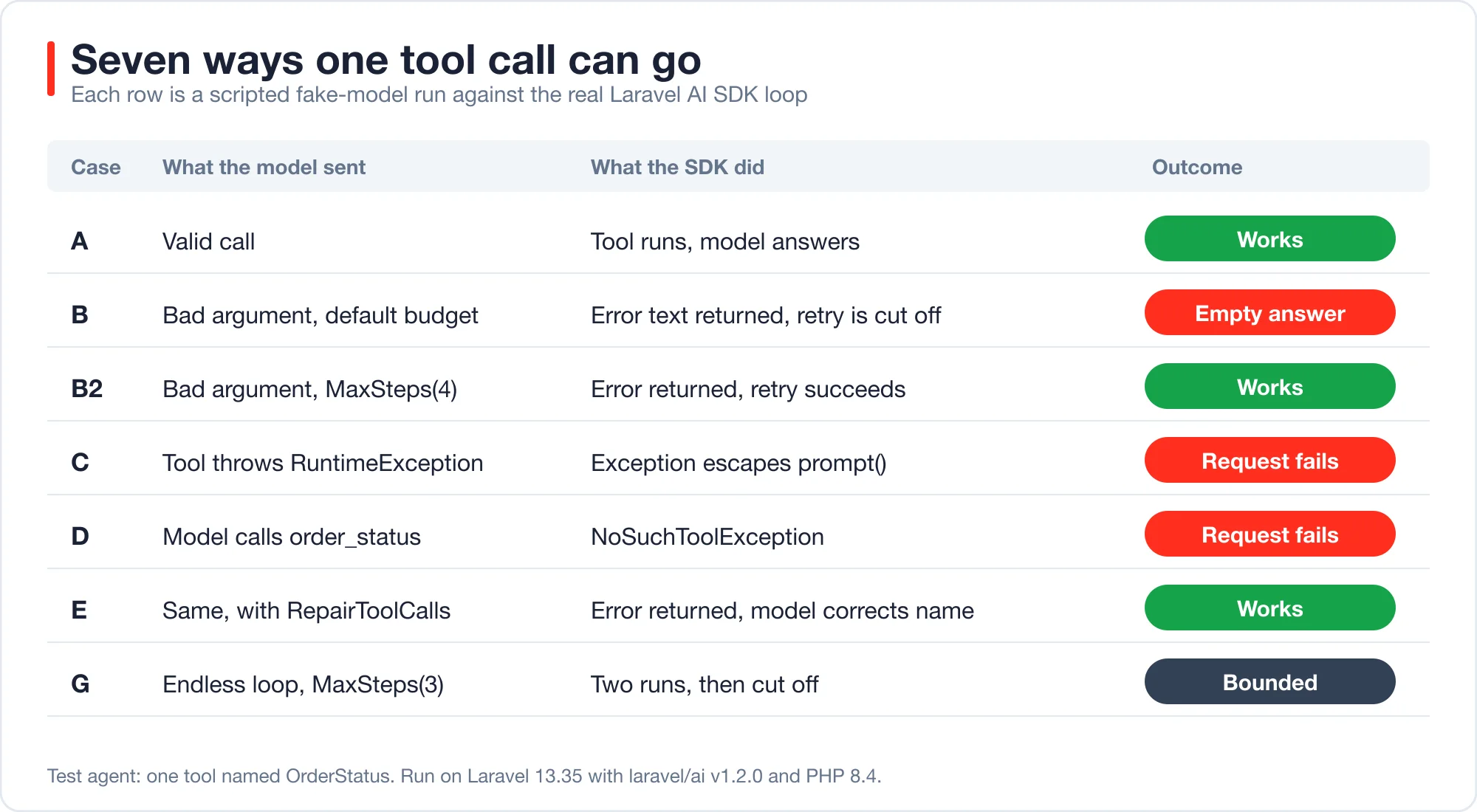
Here are all seven scenarios side by side.
| Case | Setup | What the SDK did | Outcome |
|---|---|---|---|
| A | Valid call | Ran tool, model answered | Works |
| B | Bad argument, default budget | Returned error text, blocked retry | Empty answer |
| B2 | Bad argument, MaxSteps(4) |
Returned error text, ran retry | Works |
| C | Tool throws | Exception escaped prompt() |
Request fails |
| D | Called order_status |
NoSuchToolException |
Request fails |
| E | Same, RepairToolCalls |
Returned error text, model corrected | Works |
| G | Endless loop, MaxSteps(3) |
Ran two calls, then cut off | Bounded |
Cases B and G share a property worth knowing. The SDK does not throw when it runs out of steps. It returns a response whose text may be empty. You must check for that yourself.
A small guard handles it:
$response = SupportAgent::make()->prompt($question);

if (trim($response->text) === '') {
    Log::warning('Agent hit its step budget', [
        'steps' => count($response->steps),
        'last_tool_results' => collect($response->toolResults)->map->text()->all(),
    ]);

    return 'I could not finish that. A person will follow up.';
}
I used $response->steps and $response->toolResults, which exist on the agent response and carry what the loop did. Log them, because they tell you whether the model looped, retried or called the wrong tool.
How do you stop a runaway tool loop?
Set #[MaxSteps] low enough that a loop is cheap, and make every tool idempotent. In scenario G, a model that called the same tool forever was stopped after two executions with #[MaxSteps(3)].
If you have already seen an agent loop forever, the cause is often the tool choice setting rather than the step budget. The post on why your agent loops forever and toolChoice covers that failure. The step budget is your second line of defense, and it is the one that always works.
Idempotency matters because the model can call a tool twice with the same arguments. The Request object carries toolCallId(), which the SDK documents as usable as an external idempotency key. A refund tool should store that id and refuse a repeat:
public function handle(Request $request): Stringable|string
{
    $key = $request->toolCallId();

    return Cache::lock("refund:{$key}", 30)->block(5, function () use ($request, $key) {
        return Cache::remember("refund-result:{$key}", 3600, fn () => $this->refund($request->validate([
            'order_id' => ['required', 'integer'],
        ])));
    });
}
A read-only lookup needs none of this. A tool that moves money, sends email or deletes rows needs all of it. Treat the tool set like a public API surface: assume it will be called twice.
Should the model see every error?
No. Return errors the model can fix, and hide errors only a human can fix. A validation message is fixable by the model. A connection failure is not.
I sort tool failures into three buckets:
| Failure | Model can fix it? | What to return |
|---|---|---|
| Wrong argument type or range | Yes | The validation message, via validate() |
| Record not found for that id | Sometimes | A plain sentence: No order with id 77. |
| Database, network or permission failure | No | A generic ERROR: string, and log the cause |
The middle bucket is where models waste steps. If a lookup returns nothing, say so in words. An empty string or null makes the model guess, and a guessing model calls the tool again with a different id.
Also keep results small. Every tool result is appended to the conversation and sent back on the next step, so a 5,000-token JSON blob is paid for again at each later step. Return the fields the model needs and nothing else.
How should you test tool calling without a live model?
Script the model. SupportAgent::fake([...]) accepts a list of responses, and a ToolCall object in that list makes the fake model request a tool. This runs the real loop, the real tool and the real validation. Only the provider is fake.
use Laravel\Ai\Responses\Data\ToolCall;

public function test_agent_recovers_from_a_bad_order_id(): void
{
    SupportAgent::fake([
        new ToolCall('c1', 'OrderStatus', ['order_id' => 'abc']),
        new ToolCall('c2', 'OrderStatus', ['order_id' => 1042]),
        'Order 1042 has shipped.',
    ]);

    $response = SupportAgent::make()->prompt('Where is order 1042?');

    $this->assertSame('Order 1042 has shipped.', $response->text);
}
This test would have failed on the default budget, which is the point. It encodes the retry behavior you depend on. Add one test per row of the table above and the whole failure matrix is under CI.
What the fake model cannot tell you is how a real model behaves. It does not tell you how often a given model sends a bad argument, or whether it respects your tool descriptions. Treat these tests as proof that your code handles every branch, and use a small set of live evaluations to learn how often each branch happens.
If you are new to agents, start with AI agents for Laravel developers, which builds a working one in 42 lines.
For queues, batches and sub-agents, the next step is AI agent orchestration in Laravel, which measures what runs in parallel and what does not.
What should you do before shipping a tool-calling feature?
Run through this list. Each item comes from a failure above.
- Set
#[MaxSteps]explicitly. Compute it as your normal tool chain length plus two. - Give every tool a
name()that matches your prompts, or add#[RepairToolCalls]. - Call
$request->validate()in every tool. Do not trust the schema alone. - Catch non-validation exceptions inside chat-facing tools, and return a generic string.
- Make side-effecting tools idempotent using
toolCallId(). - Check for an empty
texton the response, and logstepsandtoolResults. - Keep tool results small, because they are resent on every later step.
- Write one fake-model test per failure mode.
If you are choosing how many agents and tools to build in the first place, the architecture post on the five patterns and what each costs has a decision tree. Tool calling cost grows with every step, so the pattern you pick sets your bill before your tool code does.
Advertisement
FAQ
What is the default max steps in the Laravel AI SDK?
The default is `round(1.5 x tools)`, capped at 25, or 5 when the agent has no tools. A one-tool agent gets 2 steps. Set `#[MaxSteps(n)]` on the agent class to override it, and remember the last step never executes a tool call.
Why does my Laravel agent return an empty response?
Usually the step budget ran out. The SDK does not throw in that case. A retry or a second tool call lands on the final step, which refuses to run tools, and the text stays empty. Raise `#[MaxSteps]` and check `$response->text` before returning it.
How do I fix NoSuchToolException in the Laravel AI SDK?
The SDK names tools after the class basename, so `OrderStatus` is not `order_status`. Add a `name()` method to match your prompts. For models that still invent names, add `#[RepairToolCalls]`, which returns the list of valid tools to the model instead of throwing.
Does the Laravel AI SDK validate tool arguments?
It does not validate for you. You call `$request->validate()` inside `handle()`. A `ValidationException` is caught and its messages go back to the model as the tool result, so the model can retry. Other exceptions are not caught and fail the request.
Can I test Laravel AI tools without an API key?
Yes. `YourAgent::fake([...])` replaces the provider with a scripted gateway. Put `ToolCall` objects in the list to make the fake model request tools. The real loop, tools and validation run, so you can test retries, failures and budgets at no cost.
Comments
Loading…
Sign in to join the conversation.
Related posts
AI Agent Orchestration in Laravel: Queues Before Frameworks
AI agent orchestration in Laravel works with queues, batches and the Concurrency facade. Measured timings, failure behavior and when a framework is worth it.
Fri Oct 09 2026 · 11 min read · 0 views

shadcn Chat UI for Laravel: Streaming Setup That Works
Build a shadcn chat UI for Laravel with useChat streaming. Working route and React code, the real wire format, and four failure cases measured on laravel/ai.
Fri Oct 09 2026 · 11 min read · 0 views
AI Code Debugger for Laravel: Feed It 98% Less Stack Trace
An AI code debugger for Laravel needs the throw site, not 5,000 tokens of framework frames. Six real errors, a tested trimmer and verified fixes.
Fri Oct 09 2026 · 11 min read · 0 views