AI Code Debugger for Laravel: Feed It 98% Less Stack Trace
By Nihar Ranjan Das · Fri Oct 09 2026 · 11 min read · 0 views
View as a Web StoryAISoftware#debugging#Laravel#php#ai code debugger#stack trace
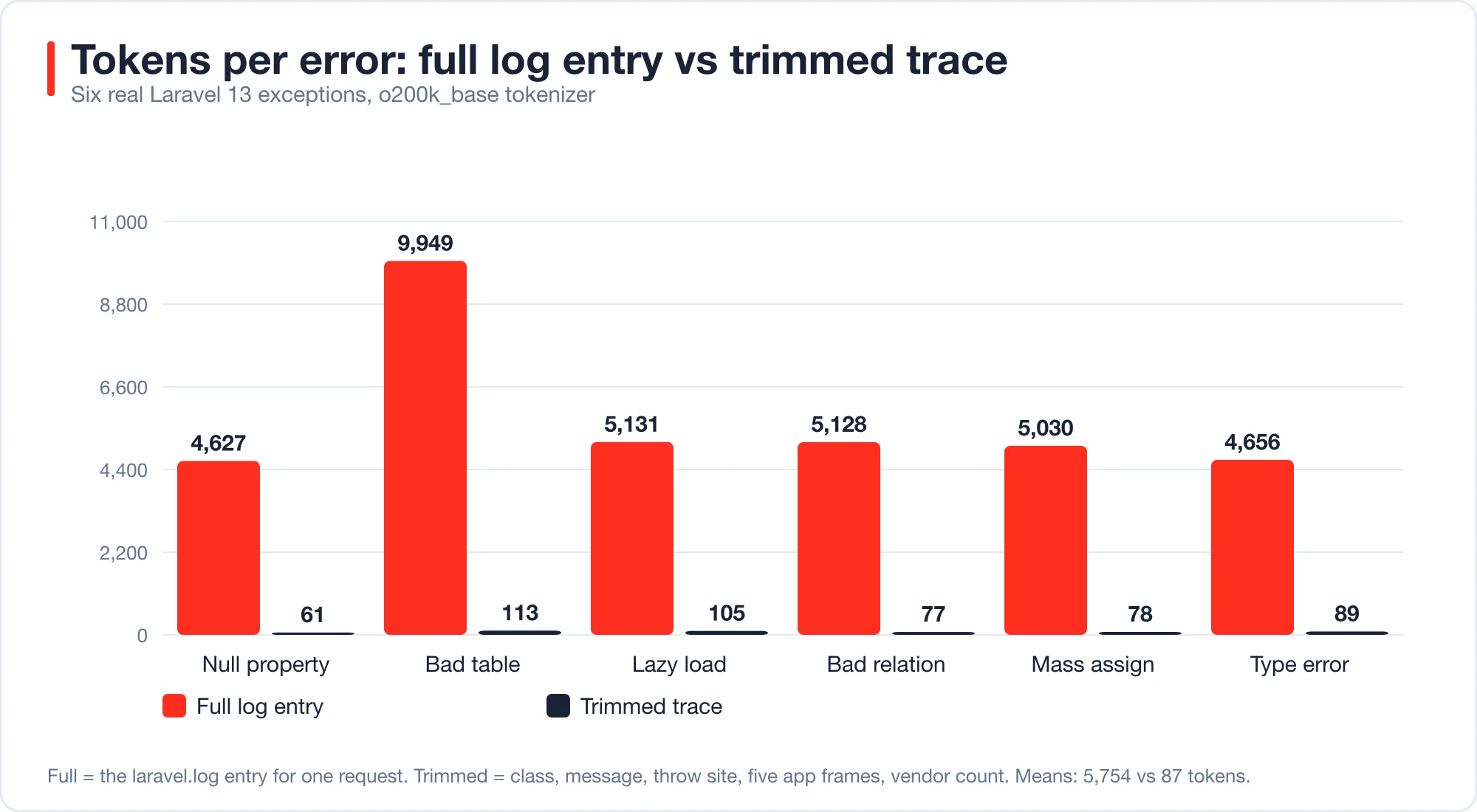
An AI code debugger does not need your whole Laravel log entry, because most of it is framework noise. It needs the exception, the line that threw it and a few frames of your own code. I measured six real Laravel errors. The full log entry averaged 5,754 tokens. A trimmed version averaged 87 tokens, and it kept the line of the bug every time. That is a cut of about 98 percent.
This post gives the six errors with verified fixes, the 40-line class that does the trimming, and a structured agent that consumes it. I tested everything on Laravel 13.35, PHP 8.4 and laravel/ai v1.2.0. I did not run a live model, so I make no claim about how often any model diagnoses these correctly. The goal here is the input, because that is the part you control.
A stack trace is the list of function calls active when an exception was thrown, newest first, as defined in the PHP manual on exceptions.
An AI code debugger is a program that sends an error, with its surrounding code or trace, to a language model and returns a proposed cause and fix. It can be a chat window, an editor feature or a queued job in your app.
Why does a stack trace cost so many tokens?
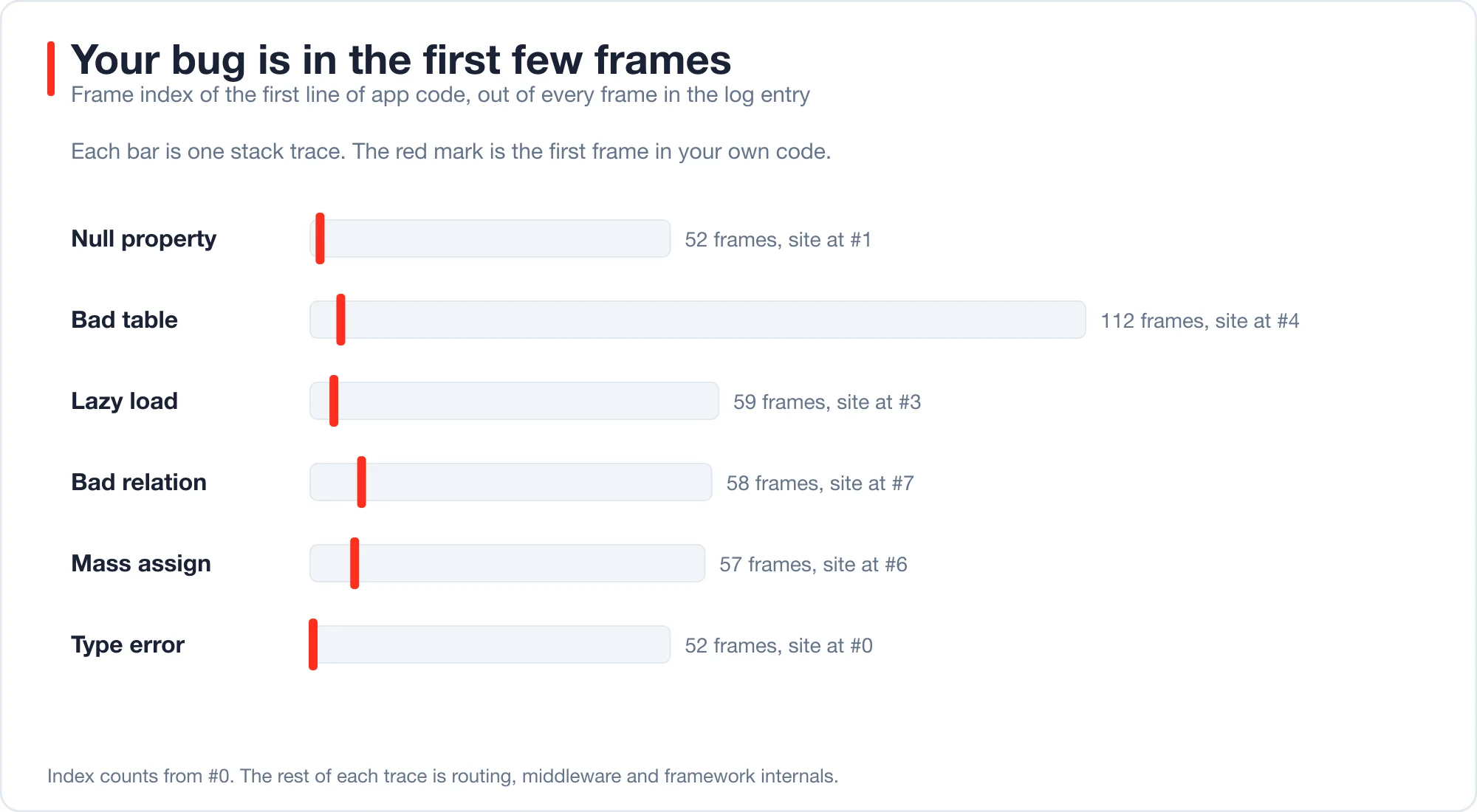
A Laravel trace carries every frame from your code up through the router, the middleware stack and the HTTP kernel. Most of them are framework internals. In my six traces, the log entry for one request held 52 to 112 frames.
The first line of my own code appeared at frame #0 to #7. Everything after that was routing and middleware, which does not help a model find a bug in a controller.
Tokens are the unit that models and their bills use. I counted them with the o200k_base encoding from OpenAI's tiktoken library. Other models count differently, but the ratio between a full trace and a trimmed one holds across tokenizers, because the difference is 50 times more text.
| Error | Frames in log entry | Full log tokens | Trimmed tokens | Smaller by |
|---|---|---|---|---|
| Null property | 52 | 4,627 | 61 | 76x |
| Bad table name | 112 | 9,949 | 113 | 88x |
| Lazy loading violation | 59 | 5,131 | 105 | 49x |
| Undefined relationship | 58 | 5,128 | 77 | 67x |
| Mass assignment | 57 | 5,030 | 78 | 64x |
| Type error | 52 | 4,656 | 89 | 52x |
Fewer tokens cost less, and they also help accuracy. A long trace buries the one useful line in noise, and models do worse as the useful part gets smaller relative to the rest. I did not measure accuracy here, so treat that as a design reason and not a result.
Advertisement
What are the six errors, and what fixes them?
Each error below came from a real route in a fresh Laravel project. I applied the fix and re-ran the route, and every fixed route returned a 2xx status.
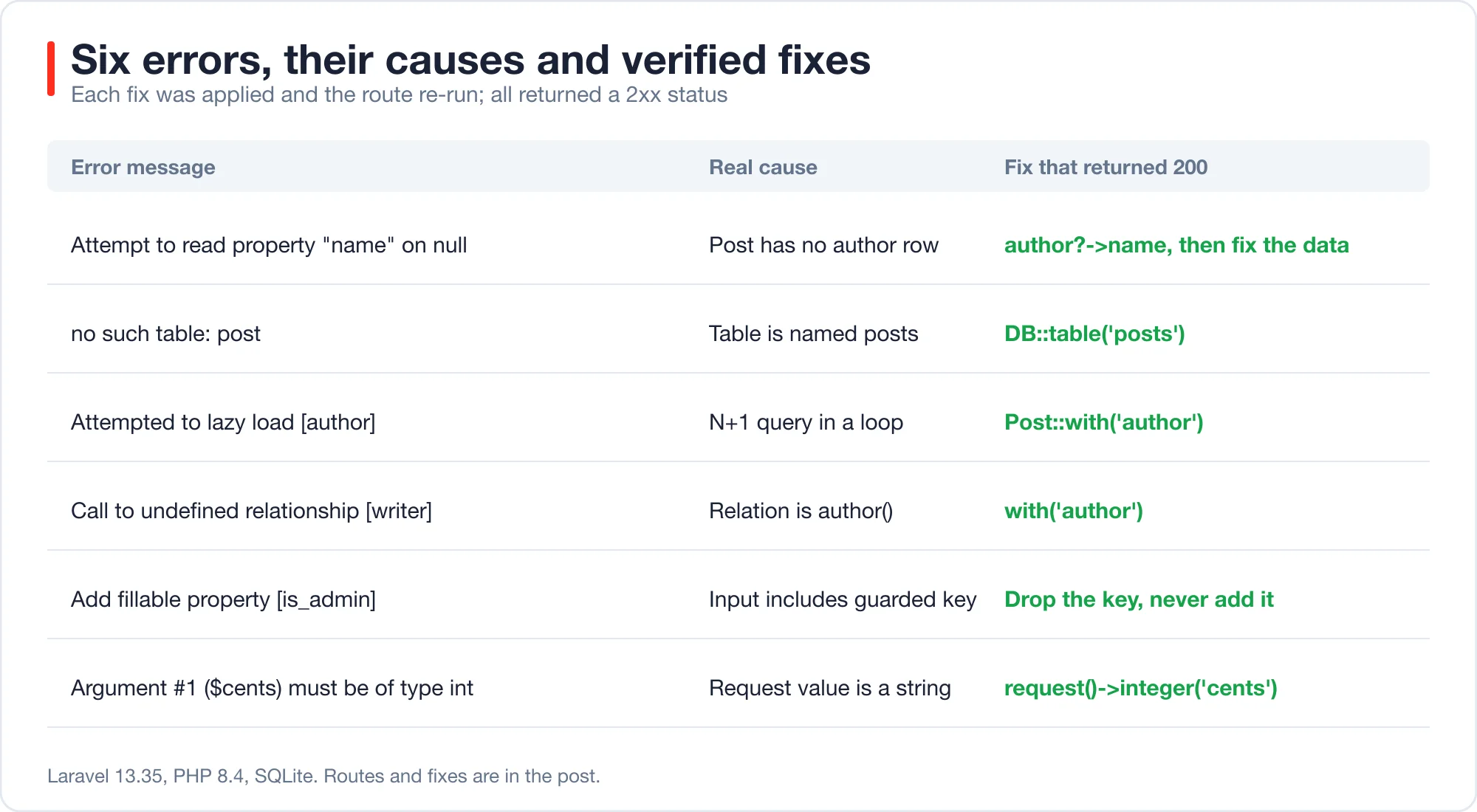
Null property. The message is Attempt to read property "name" on null. The code read $post->author->name, and the post had no author. The quick fix is $post->author?->name. The real fix is to find out why a post has no author, because the null-safe operator hides a data problem.
No such table. The message is no such table: post. The code called DB::table('post') but Laravel's default table is posts. The fix is DB::table('posts'). The QueryException here carries a PDOException as its previous exception.
Lazy loading violation. Laravel's documentation on preventing lazy loading explains the setting. The message is Attempted to lazy load [author] on model [App\Models\Post] but lazy loading is disabled. This exception only appears when you call Model::preventLazyLoading(), which I recommend outside production. The code read $p->author inside a loop, which runs one query per post. The fix is Post::with('author')->get().
Undefined relationship. The message is Call to undefined relationship [writer] on model [App\Models\Post]. The model has author(), not writer(). The fix is with('author').
Mass assignment is the practice of filling a model's attributes from an array in one call, and Laravel guards it with the $fillable list described in the Eloquent mass assignment docs. The message is Add fillable property [is_admin] to allow mass assignment on [App\Models\Post]. Laravel threw it because I enabled Model::preventSilentlyDiscardingAttributes(). The tempting fix is to add is_admin to $fillable. Do not. A guarded attribute reaching create() usually means user input is flowing into a model unchecked, and the fix is to drop the key.
Type error. PHP raises it under its type declaration rules. The message is Argument #1 ($cents) must be of type int, string given. The controller passed a raw request value to a typed method. The fix is request()->integer('cents'), which casts and defaults to zero.
Two of these shape how a debugger should behave. The first and fifth errors have a code fix that is wrong or incomplete. A debugger that offers ?-> for the first and $fillable for the fifth makes the app quieter and less safe. That is why my agent below must classify the fix as code or data.
How do you trim a trace?
Keep the exception class, the message, the throw site, the first five application frames and a count of the vendor frames you dropped. The class below does that, and it produced every "trimmed" number above.
<?php

namespace App\Support;

use Throwable;

class TraceTrimmer
{
    public static function summarize(Throwable $e, int $maxAppFrames = 5): string
    {
        $root = base_path().DIRECTORY_SEPARATOR;
        $rel = fn (?string $path) => $path === null ? '' : str_replace($root, '', $path);

        $lines = [get_class($e).': '.str_replace($root, '', $e->getMessage())];
        $lines[] = 'thrown at '.$rel($e->getFile()).':'.$e->getLine();

        $app = [];
        $vendor = 0;

        foreach ($e->getTrace() as $frame) {
            $file = $frame['file'] ?? null;

            if ($file === null
                || str_contains($file, DIRECTORY_SEPARATOR.'vendor'.DIRECTORY_SEPARATOR)
                || str_ends_with($file, 'public'.DIRECTORY_SEPARATOR.'index.php')) {
                $vendor++;
                continue;
            }

            $call = ($frame['class'] ?? '').($frame['type'] ?? '')
                .preg_replace('/\{closure:[^}]*\}/', '{closure}', $frame['function']).'()';
            $app[] = $rel($file).':'.($frame['line'] ?? '?').' '.$call;
        }

        $lines[] = 'application frames:';
        foreach (array_slice($app, 0, $maxAppFrames) as $i => $frame) {
            $lines[] = '  #'.$i.' '.$frame;
        }
        $lines[] = $vendor.' vendor frames omitted';

        if ($previous = $e->getPrevious()) {
            $lines[] = 'caused by: '.get_class($previous).': '.str_replace($root, '', $previous->getMessage());
        }

        return implode("\n", $lines);
    }
}
Here is the output for the type error. This is the whole thing a model receives:
TypeError: App\Services\Invoicer::total(): Argument #1 ($cents) must be of type int, string given, called in app/Http/Controllers/BugController.php on line 44
thrown at app/Services/Invoicer.php:7
application frames:
  #0 app/Http/Controllers/BugController.php:44 App\Services\Invoicer->total()
49 vendor frames omitted
It also strips the absolute path of your server, such as /var/www/app, which is information a model has no use for. Note one limit. For errors thrown inside vendor code, such as the QueryException, the "thrown at" line points into the framework. The application frame below it, BugController.php:24, is the line to read. That is why the class lists application frames separately.
Hook it into Laravel's exception reporting in bootstrap/app.php:
->withExceptions(function (Exceptions $exceptions): void {
    $exceptions->reportable(function (\Throwable $e) {
        // Queue a diagnosis here instead of writing to a file
        logger()->info(\App\Support\TraceTrimmer::summarize($e));
    });
})
A reportable callback runs alongside the default log entry, so you keep your normal logs. The Laravel error handling documentation describes the options.
What happens to secrets in the message?
They go to the model. Laravel puts the SQL text, and the bound values, into a QueryException message. I ran a query for sam@example.com against a missing table, and the message ended with SQL: select * from "nope" where "email" = sam@example.com limit 1.
Send that to a hosted model and the email address leaves your infrastructure. The same happens with tokens in URLs, names in lookups and any value a user typed. This is the main risk of an automatic debugger, and it is easy to miss because the leak sits in a message and not in a data field.
Redact before you send. At minimum, strip emails, long digit runs and anything that looks like a key:
$text = preg_replace('/[\w.+-]+@[\w-]+\.[\w.-]+/', '[email]', $text);
$text = preg_replace('/\b[A-Za-z0-9_\-]{32,}\b/', '[token]', $text);
Regexes miss names and free text, so they are a floor and not a fix. The post on generative AI data privacy in Laravel builds a redactor and measures what it catches and what it misses. Until then, keep automatic debugging to environments with test data.
How do you ask the model for a useful answer?
Ask for a structured answer that separates the cause, the kind of fix and a confidence level. A free-text reply invites a confident patch for a problem the model cannot see. The agent below uses the Laravel AI SDK's structured output:
<?php

namespace App\Ai\Agents;

use Illuminate\Contracts\JsonSchema\JsonSchema;
use Laravel\Ai\Contracts\Agent;
use Laravel\Ai\Contracts\HasStructuredOutput;
use Laravel\Ai\Promptable;
use Stringable;

class TraceDoctor implements Agent, HasStructuredOutput
{
    use Promptable;

    public function instructions(): Stringable|string
    {
        return 'You debug Laravel exceptions. You receive a trimmed trace. Name the cause, '
            .'say whether the fix changes data or code, and propose the smallest patch. '
            .'If the trace is not enough, ask for the file instead of guessing.';
    }

    public function schema(JsonSchema $schema): array
    {
        return [
            'cause' => $schema->string()->required(),
            'fix_kind' => $schema->string()->enum(['code', 'data', 'config', 'need_more_context'])->required(),
            'file' => $schema->string()->required(),
            'line' => $schema->integer()->required(),
            'patch' => $schema->string()->required(),
            'confidence' => $schema->string()->enum(['low', 'medium', 'high'])->required(),
        ];
    }
}
Call it with the trimmed trace and read fields like an array: $r = TraceDoctor::make()->prompt(TraceTrimmer::summarize($e)); $r['fix_kind']. I ran this with a scripted fake model, and the response exposed all six keys with the values I scripted. That proves the plumbing and the schema, not the quality of any real model's answers.
The need_more_context option matters. For the null property error, a trimmed trace cannot tell the model whether the author is missing by design. An agent that can say so is more useful than one that always patches.
What can an AI debugger not see?
It cannot see data, runtime state or intent. Four of the six errors above depend on one of those, and a trace alone does not show them.
| Error | What the trace shows | What it cannot show |
|---|---|---|
| Null property | The line that read null | Why the author row is missing |
| Mass assignment | The guarded key | Whether the request should have contained it |
| Type error | The wrong type | Which client sent abc |
| Lazy loading | The relation name | How many rows the loop runs over |
For these, add context rather than trace. Send the model the failing method's source and the model's $fillable, and include the route and a sanitized request shape. A cheap rule: when the first application frame is in a controller, attach the method body, not the file.
There is also a class of bug with no trace at all. On SQLite, a typo in a column name does not raise an error. I ran Post::where('titel', 'x')->get() and got HTTP 200 with an empty list. SQLite treats an unknown double-quoted name as a string literal, a behavior listed in the SQLite quirks page, so the query compares the text titel to x. MySQL and Postgres throw an error for the same query.
No debugger can diagnose an exception that never happens. The defense is to run your tests on the same database engine you run in production, and to assert on results, not only on status codes.
How do you run the debugger without a bill surprise?
Queue it, deduplicate it and cap it. An exception that fires 10,000 times an hour must not make 10,000 model calls.
- Fingerprint. Hash the exception class plus the throw site. Use
Cache::add($key, 1, 3600)and only diagnose when it returns true, so each distinct error is diagnosed once an hour. - Queue. Dispatch the diagnosis as a job. The SDK also has
->queue()on agents, which runs the prompt in a queued job. A request that is already failing should not wait on a model. - Cap. Set
#[MaxSteps]low. This agent has no tools, so it needs one step, but the attribute documents the intent. A daily call budget in the cache is the real guard. - Store. Save the diagnosis next to the error so a person reads it once, not once per occurrence.
With the numbers above, the saving is direct. If you sent full log entries for 1,000 distinct errors a month at about 5,754 tokens each, that is 5.75 million input tokens. The trimmed version is about 87,000. Multiply by your model's price per million input tokens to get your own figure.
For a way to choose the model by cost per solved task and not by list price, see the comparison of which AI model should write your code, price per task.
How should you evaluate a debugger on your own code?
Build a small replay set from your own history. Collect 20 past errors with the commit that fixed each one. Feed the trimmed trace to the debugger. Then check three things: did it name the right file and line, was the fix kind right, and did the proposed patch make the failing test pass.
Count results, not impressions. A debugger that is right 14 times out of 20 and says low confidence on the other six is useful. One that is right 14 times and says high on all 20 is dangerous. The confidence field in the schema exists so you can measure that gap.
Keep the replay set fixed. When you change the model, the prompt or the trimmer, re-run the same 20 and compare. This is the same discipline as testing tool-calling code with a scripted model, which the post on tool calling in Laravel covers.
If you are new to agents, start with AI agents for Laravel developers, which builds a working one in 42 lines.
What should you check before you ship an AI debugger?
Use this list. Each item comes from a result above.
- Trim traces to the throw site plus five application frames.
- Redact emails, tokens and long identifiers from the message.
- Classify fixes as code, data, config or needs more context.
- Fingerprint and cache so one error causes one call.
- Queue the diagnosis, and never block the failing request on it.
- Run tests on the production database engine.
- Keep a replay set of 20 or more real errors and re-run it on every change.
- Never let the debugger apply a patch on its own.
Advertisement
FAQ
What should I send to an AI debugger for a Laravel error?
Send the exception class, the message, the throw site and about five frames of your own code, with vendor frames removed. In my six tests that was 61 to 113 tokens, against 4,627 to 9,949 for the full log entry. Add the failing method's source when the data is the cause.
Is it safe to paste a Laravel stack trace into ChatGPT or Claude?
Not without checking. Exception messages can include SQL with bound values. In my test, a query for an email address put that address into the message. Strip emails, tokens and names first, and avoid sending production traces to a hosted model unless your policy allows it.
Why does my Laravel query not throw an error for a wrong column name?
On SQLite, an unknown double-quoted name falls back to a string literal. `Post::where('titel', 'x')->get()` returned HTTP 200 and an empty list in my test. MySQL and Postgres throw an error. Run tests on the same database engine as production to catch this.
Can an AI debugger fix a Laravel LazyLoadingViolationException?
Usually yes, because the fix is mechanical. Add eager loading, such as `Post::with('author')->get()`. I confirmed that this change removed the exception. The debugger needs the relation name from the message and the query that loads the models.
Should an AI debugger apply its fixes automatically?
No. Two of the six errors here have an easy fix that is wrong: a null-safe operator that hides missing data, and a `$fillable` entry that opens a security gap. Have it propose a patch and a confidence level, then let a person review and apply it.
Comments
Loading…
Sign in to join the conversation.
Related posts
Tool Calling in Laravel: Why Agents Quit After One Retry
Tool calling in Laravel fails in seven specific ways. Measured on the Laravel AI SDK 1.2 loop, with fixes for step budgets, bad arguments and tool names.
Fri Oct 09 2026 · 13 min read · 0 views
AI Agent Orchestration in Laravel: Queues Before Frameworks
AI agent orchestration in Laravel works with queues, batches and the Concurrency facade. Measured timings, failure behavior and when a framework is worth it.
Fri Oct 09 2026 · 11 min read · 0 views

shadcn Chat UI for Laravel: Streaming Setup That Works
Build a shadcn chat UI for Laravel with useChat streaming. Working route and React code, the real wire format, and four failure cases measured on laravel/ai.
Fri Oct 09 2026 · 11 min read · 0 views