AI Agent Orchestration in Laravel: Queues Before Frameworks
By Nihar Ranjan Das · Fri Oct 09 2026 · 11 min read · 0 views
View as a Web StoryAISoftware#multi-agent#Laravel#ai agent orchestration#queues
Laravel already ships the main parts of an agent orchestrator: queues, chains, batches, retries and a concurrency helper. For most products, the bottom line is simple: add the Laravel AI SDK on top and stop there. You reach for an external orchestration framework only when a run must survive for days or pause for people.
I tested this on a fresh Laravel 13.35 project with laravel/ai v1.2.0, a Redis queue and PHP 8.4. Six half-second steps took 3.26 seconds in a chain and 0.76 seconds in a batch with six workers. A failure in step 3 stopped a chain but not a batch. And three sub-agents called in one orchestrator step ran one after another, not at once.
AI agent orchestration is the code that decides which agent runs next, what it receives, how failures are handled and when the run ends. It is not the model call itself. It is the control flow around many model calls.
What do you actually need from an orchestrator?
You need five things: ordering, parallelism, failure handling, state and a spending limit. Laravel's queue system covers the first three directly; the AI SDK and your database cover the fourth. The fifth is on you.
Here is where each need lands:
| Need | Laravel answer | Verified in this post |
|---|---|---|
| Ordering | Bus::chain() |
Yes |
| Parallel fan-out | Bus::batch() with several workers |
Yes |
| Failure handling | failed() hooks, tries, cancelled() checks |
Yes |
| In-process fan-out | Concurrency::run() |
Yes |
| Human approval pause | Tool approvals in the AI SDK | Read in source, not run |
| Spending limit | #[MaxSteps] per agent, plus your own budget |
Arithmetic below |
If your task fits that table, you do not need a second system. If you are still choosing a shape for your agents, the guide to agentic AI architecture, five patterns and what each costs, comes first. Orchestration is how you run the pattern you picked.
How does a chain compare with a batch?
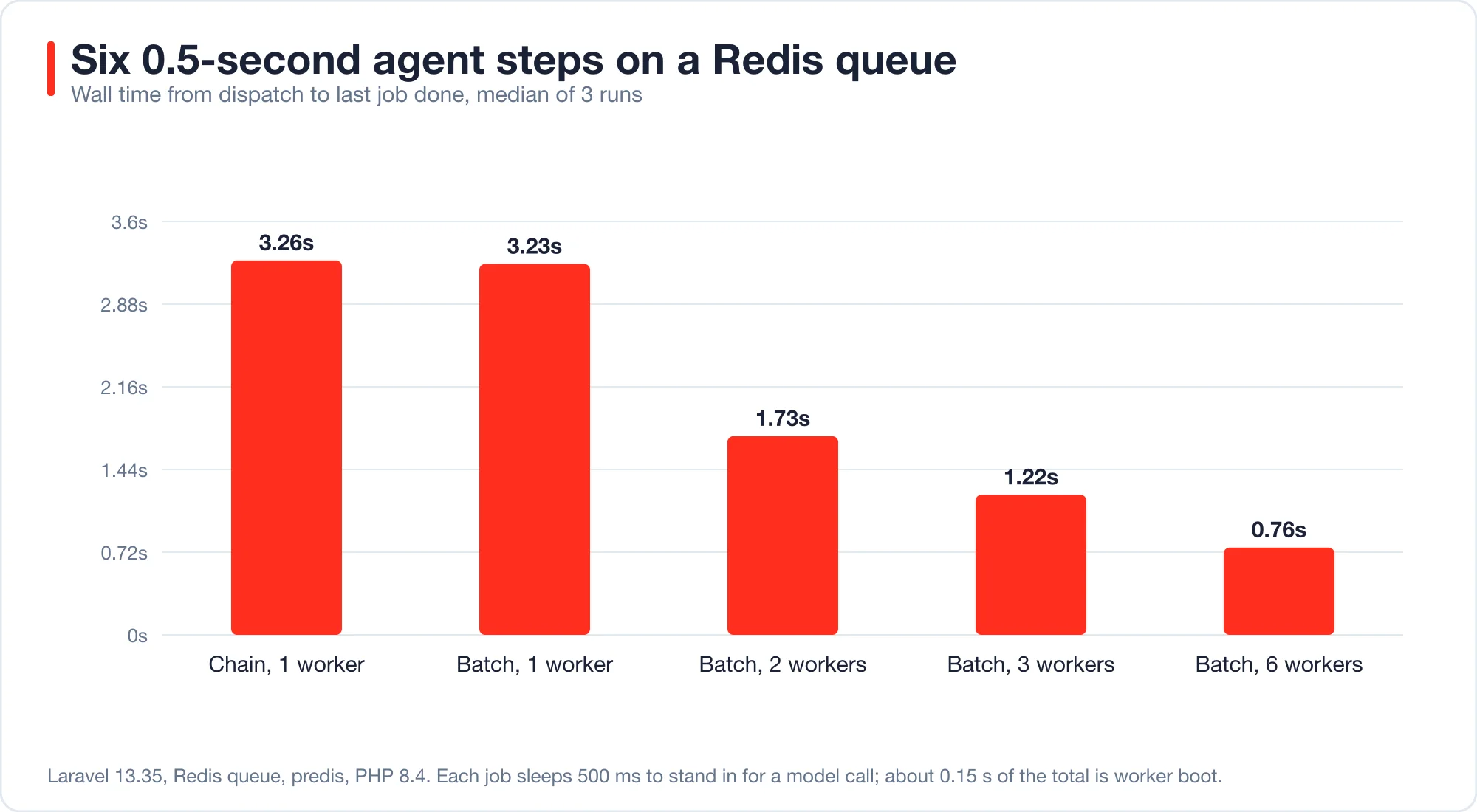
A chain runs steps in order on whatever worker is free. A batch runs steps in parallel and calls you back when all finish. With a six-step task and six workers, the batch finished in 0.76 seconds; the chain needed 3.26 seconds.
Bus::chain() is the Laravel queue feature that runs jobs strictly one after another and stops the sequence if one fails. Bus::batch() is the feature that dispatches many jobs at once, tracks them as a group and lets you attach then, catch and finally callbacks.
I gave each job a 500 ms sleep to stand in for a model call. Real calls take longer and vary more, but the shape holds.
Advertisement
| Setup | Median wall time (3 runs) | Speedup vs chain |
|---|---|---|
| Chain, 1 worker | 3.26 s | 1.0x |
| Batch, 1 worker | 3.23 s | 1.0x |
| Batch, 2 workers | 1.73 s | 1.9x |
| Batch, 3 workers | 1.22 s | 2.7x |
| Batch, 6 workers | 0.76 s | 4.3x |
Two lessons sit in that table. A batch with one worker is no faster than a chain, so parallelism comes from workers and not from the word "batch". And six workers gave 4.3x, not 6x, because each worker process needs about 0.15 seconds to boot. Short jobs lose a larger share to that cost than long ones.
Use a chain when step N needs the output of step N-1, as in plan, then research, then write. Use a batch when the steps are independent, as in summarising twelve documents. Use both when you need fan-out and then a merge.
How do you write the batch?
Dispatch independent steps as a batch and put the merge in a then callback. The job class below is the one I measured; it records its own result and honors a cancelled batch.
<?php

namespace App\Jobs;

use Illuminate\Bus\Batchable;
use Illuminate\Contracts\Queue\ShouldQueue;
use Illuminate\Foundation\Queue\Queueable;

class ResearchStep implements ShouldQueue
{
    use Batchable, Queueable;

    public $tries = 1;

    public function __construct(public int $n, public string $task) {}

    public function handle(): void
    {
        if ($this->batch()?->cancelled()) {
            return;
        }

        // Call your agent here, then store the result keyed by $this->n
    }
}
Dispatch it like this:
use Illuminate\Bus\Batch;
use Illuminate\Support\Facades\Bus;

$batch = Bus::batch(
    collect($tasks)->map(fn ($task, $i) => new ResearchStep($i, $task))->all()
)
    ->then(fn (Batch $batch) => MergeResults::dispatch($batch->id))
    ->catch(fn (Batch $batch, Throwable $e) => report($e))
    ->dispatch();
Start workers with php artisan queue:work. Laravel's queue documentation explains the options, and its Horizon documentation covers supervised Redis workers.
Laravel Horizon is a dashboard and supervisor for Redis queues that scales worker processes up and down by load. I did not measure Horizon. It manages the same Redis queue my workers used, so its main addition is process management and metrics, not different job behavior.
What happens when one agent step fails?
In a chain, the failure stops everything after it. In a batch, the failure marks the batch cancelled but does not stop jobs that already sit in the queue. Those jobs still run, and still cost money, unless each one checks $this->batch()->cancelled().
I threw an exception in step 3 of 6 and recorded which steps ran.
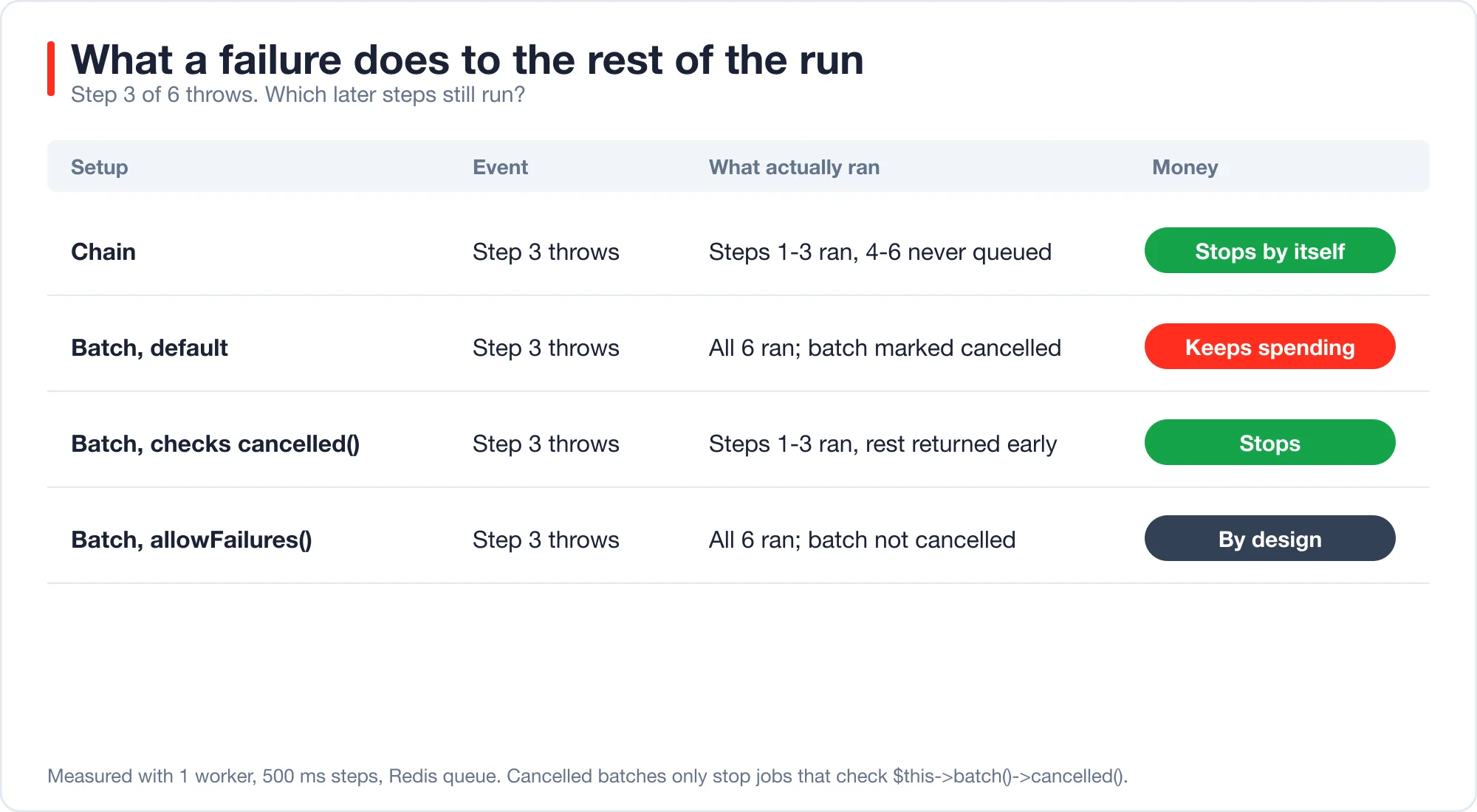
| Setup | What ran after step 3 threw | Batch state |
|---|---|---|
| Chain | Nothing. Steps 4 to 6 were never queued | Not applicable |
| Batch, default | Steps 4 to 6 all ran | Cancelled |
Batch, jobs check cancelled() |
Nothing. Steps 4 to 6 returned early | Cancelled |
Batch with allowFailures() |
Steps 4 to 6 all ran | Not cancelled |
The second row is the expensive surprise. A cancelled batch still reports cancelled, so a dashboard looks correct. But every remaining agent step already holds a place in the queue, and each runs its model call. For a batch of fifty agent steps, that is fifty calls you did not need.
Add the cancelled() check as the first line of handle(); it costs one line and saves the spend.
allowFailures() is the right choice when partial results are useful. Summarising twelve documents and getting eleven is better than getting none. Pair it with a finally callback that records which items failed, so the gap is visible.
Do sub-agents run in parallel inside the SDK?
No. In laravel/ai v1.2.0, tool calls from a single model step run one after another, and an agent used as a tool is a tool call. When an orchestrator asks three sub-agents for work in one step, they run in sequence.
The SDK lets you pass an agent inside another agent's tools() list. It wraps the sub-agent so the parent calls it with a task string. The sub-agent runs in isolation and does not see the parent conversation. If the sub-agent throws, the wrapper returns Agent failed: plus the message, so the parent run survives.
That design is clean, but the loop executes the step's tool calls with a plain array_map in TextGenerationLoop. To check, I scripted an orchestrator that requests three sub-agents in one step, where each sub-agent spends 0.5 seconds in a tool.
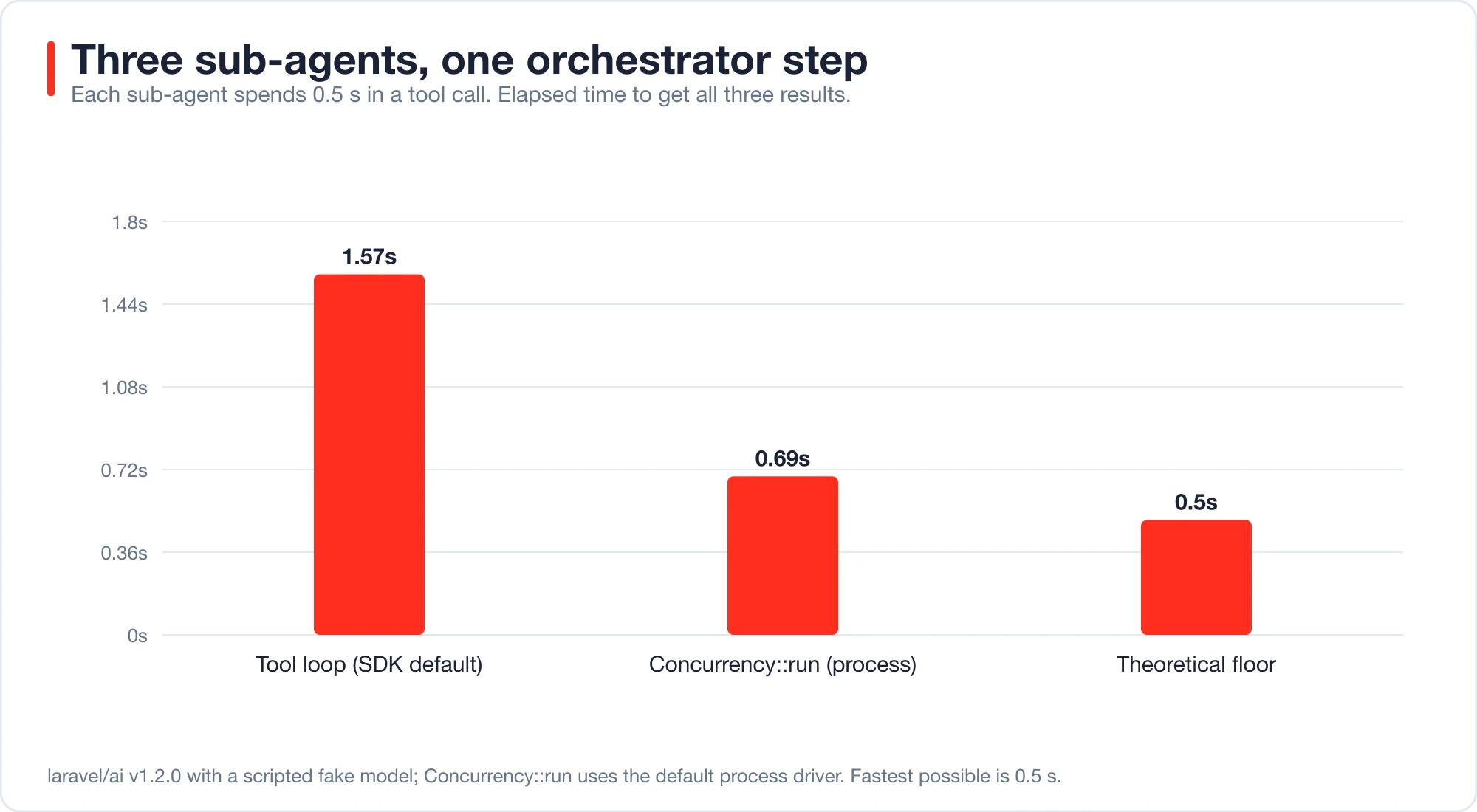
The run took 1.57 seconds, which is three times 0.5 plus overhead. The same three closures through Laravel's Concurrency::run() with the default process driver took 0.69 seconds.
The fix for latency-sensitive fan-out is to do the parallel work inside one tool. Write a ResearchAll tool that takes a list of tasks, runs them with Concurrency::run(), and returns the joined results:
use Illuminate\Support\Facades\Concurrency;

public function handle(Request $request): Stringable|string
{
    $tasks = $request->validate(['tasks' => ['required', 'array', 'max:5']])['tasks'];

    $results = Concurrency::run(
        collect($tasks)->map(fn ($task) => fn () => (new ResearchAgent)->prompt($task)->text)->all()
    );

    return json_encode($results);
}
Two cautions apply. Closures that run in separate processes must be serializable, so keep them small and pass plain data. And each process boots the framework again, so the gain only pays off when each task takes longer than about a second, which model calls do.
For work that can wait, skip this and queue the agents. A queued batch of agent jobs survives a web request timeout, which a Concurrency::run() call does not.
Which queue driver should you use for agents?
Use Redis, or any server-based queue, not SQLite. In my first attempt I used Laravel's default SQLite file for the queue. With three workers, a job failed with SQLSTATE[HY000]: General error: 5 database is locked, the batch was marked cancelled, and the run took 3.26 seconds, the same as one worker.
The cause is file locking. SQLite allows one writer at a time, and the stock configuration sets no busy timeout. Agent jobs are long, so workers collide on the queue table.
After I moved the queue to Redis, the same code scaled as the table above shows. Redis is also what Horizon uses. A MySQL or Postgres queue works too, since those servers handle concurrent writers.
This matters beyond tests. A local development setup on SQLite will pass with one worker and then fail in production with five. Run your queue on the same driver in staging that you use in production.
How do you pause for a human?
The AI SDK has a built-in approval mechanism. A tool can require approval before it runs, the agent run pauses, and you resume it later with the decision. This is the SDK feature that replaces a "human in the loop" node in a framework.
I read this in the source and did not run an approval flow, so treat the details as a pointer. The AgentTool class implements an Approvable contract, and TextGenerationLoop holds pending approvals and resumes from them. The Laravel AI SDK documentation is the place to confirm the current API before you build on it.
Use approvals for actions with real consequences, such as refunds, emails to customers or deletions. Do not use them for reads. Each pause adds human latency, which can be hours, so run such agents from a queued job and not from a web request.
How much can one orchestrated run cost?
Cap the worst case with arithmetic, not hope. If the orchestrator has a step limit of O, and each step can call W workers that each have a step limit of S, the upper bound on model calls is O + (O - 1) x W x S. The last orchestrator step cannot run tools, which is why the second term uses O - 1.
For example, take an orchestrator with #[MaxSteps(6)], one worker call per step, and workers with #[MaxSteps(3)]. The bound is 6 + 5 x 1 x 3 = 21 model calls. If the orchestrator can fan out to three workers per step, the bound is 6 + 5 x 3 x 3 = 51.
That bound is a ceiling and real runs sit far below it. But the ceiling is what a looping model hits when something goes wrong, and it is the number to multiply by your price per call.
Three habits keep the number honest:
- Set
#[MaxSteps]on every agent. Defaults scale with tool count, and the default is rarely what you want. The post on tool calling in Laravel covers why a single-tool agent gets only two steps. - Store a run budget in the database and decrement it in each job. A runaway batch then stops at the budget, not at the queue length.
- Log the step count of every agent response. A rising average is the first sign of a prompt regression.
Prompt caching changes the cost of repeated steps a lot. If your orchestrator resends a long history on each step, read the notes on agent memory that does not wreck your prompt cache before you tune anything else.
When is a framework worth adding?
Add one when you need durable state across days, replay of past runs, or approvals that outlive a deployment. Queues are good at "do this soon". They are weaker at "wait nine days for a signature, then continue exactly where you stopped".
Signs that you have outgrown queues:
| Sign | Why queues struggle |
|---|---|
| A run waits days for an external event | Job payloads and retries are built for minutes |
| You must replay or fork a past run | Queue jobs are not an event history |
| The graph has loops and conditional branches in many places | Chains and batches describe straight lines and fans |
| Several teams need the same orchestration outside PHP | The logic lives in one language and one deployment |
Options in that case include durable-workflow engines such as Temporal and agent graph libraries such as LangGraph, and the churn ranking in best AI agent framework 2026 shows how fast that field moves. I did not test any of them here, so I make no claim about their speed. The point is narrower: if you can describe your task as steps, fan-outs and a merge, the queue system you already run is enough.
A middle path is common. Keep orchestration in Laravel, and call a hosted agent or workflow service as one step. The step is a job like any other, with the same retry and budget rules.
If you are new to agents, start with AI agents for Laravel developers, which builds a working one in 42 lines.
What should you check before shipping an orchestrated agent?
Work through this list; each line comes from a result above.
- Use a chain for dependent steps and a batch for independent ones.
- Run more than one worker, or the batch is a slow chain.
- Check
$this->batch()?->cancelled()first in every job. - Decide on
allowFailures()per batch, and log what failed. - Do not rely on the SDK to run sub-agents in parallel. Fan out inside one tool or in a batch.
- Use Redis or another server-based queue in every environment.
- Set
#[MaxSteps]on every agent and compute the worst-case call count. - Put a spending budget in the database and check it in each job.
- Queue anything that can outlive a web request.
Advertisement
FAQ
Does Laravel have built-in AI agent orchestration?
Laravel has the pieces but no single orchestrator class. Queues, chains, batches and the Concurrency facade handle ordering, parallelism and failure handling. The Laravel AI SDK adds agents, tools and approvals. You write the control flow that connects them.
What is the difference between a chain and a batch in Laravel?
A chain runs jobs one after another and stops at the first failure. A batch runs jobs in parallel across workers and reports when all finish; use a chain when each step needs the previous output. Use a batch for independent work.
Can Laravel AI SDK sub-agents run at the same time?
Not within a single model step in `laravel/ai` v1.2.0. Tool calls in one step run in sequence, including agents used as tools. In my test, three half-second sub-agents took 1.57 seconds. Use a queued batch or `Concurrency::run()` for real parallelism.
Why did my cancelled batch keep running jobs?
A cancelled batch does not remove jobs already in the queue; each job runs unless it checks `$this->batch()->cancelled()` and returns. In my test, a default batch ran all six steps after a failure at step three. Add the check as the first line of `handle()`.
Do I need Horizon to run AI agents on queues?
No. Plain `queue:work` workers on Redis ran my batches. Horizon adds process supervision, auto-scaling and metrics for Redis queues. It is worth adding when you run many workers and want to see queue depth, but it does not change how jobs behave.
Comments
Loading…
Sign in to join the conversation.
Related posts
Tool Calling in Laravel: Why Agents Quit After One Retry
Tool calling in Laravel fails in seven specific ways. Measured on the Laravel AI SDK 1.2 loop, with fixes for step budgets, bad arguments and tool names.
Fri Oct 09 2026 · 13 min read · 0 views

shadcn Chat UI for Laravel: Streaming Setup That Works
Build a shadcn chat UI for Laravel with useChat streaming. Working route and React code, the real wire format, and four failure cases measured on laravel/ai.
Fri Oct 09 2026 · 11 min read · 0 views
AI Code Debugger for Laravel: Feed It 98% Less Stack Trace
An AI code debugger for Laravel needs the throw site, not 5,000 tokens of framework frames. Six real errors, a tested trimmer and verified fixes.
Fri Oct 09 2026 · 11 min read · 0 views