shadcn Chat UI for Laravel: Streaming Setup That Works
By Nihar Ranjan Das · Fri Oct 09 2026 · 11 min read · 0 views
View as a Web StoryAISoftware#react#Laravel#shadcn#ai chatbot#streaming
You can build a streaming chat UI on Laravel with one route, one React component and one request header. The Laravel AI SDK already writes the stream format that the AI SDK useChat hook reads, so you do not write a parser. The bottom line: most of the work is in four failure cases, not in the happy path.
I built this on Laravel 13.35 with laravel/ai v1.2.0, then checked the client against ai 7.0.137 and @ai-sdk/react 4.0.140. I captured the real stream with curl, forced four failures, and counted what the browser would see in each. This post gives the working code and those results.
shadcn/ui is a collection of copy-in React components, built on Radix UI and Tailwind CSS, that you add to your own codebase instead of installing as a dependency. It has no chat component of its own, so a shadcn chat UI means shadcn inputs and buttons around a chat hook.
useChat is the React hook from the AI SDK that sends messages to an endpoint, reads the streamed reply and keeps the message list, status and error in state. It does not care what language the endpoint is written in, only what format it speaks.
How do the pieces fit together?
The browser posts the message list to a Laravel route. The route hands it to an agent and returns a streaming response. The browser renders each part as it arrives.
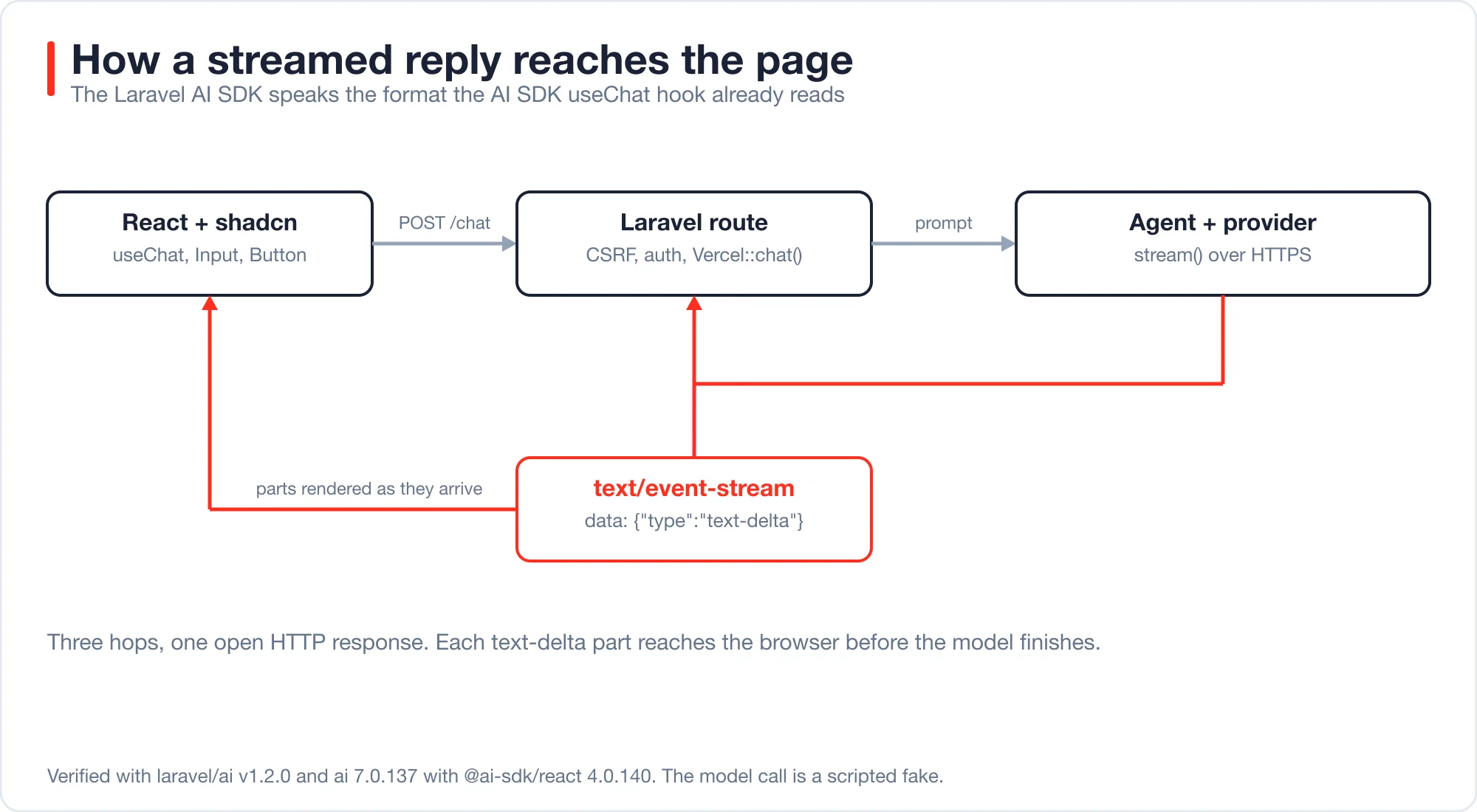
The streaming format is Server-Sent Events, a plain HTTP response with Content-Type: text/event-stream where the server keeps the connection open and writes data: lines. The MDN guide to server-sent events describes the browser side. Laravel needs nothing special for it.
The only glue is the protocol. The AI SDK documents it in its stream protocol reference, and the Laravel AI SDK implements the same wire format.
What does the Laravel side look like?
It is a route that builds a chat object from the request, streams an agent, and applies the protocol the chat object suggests. Here is the agent first:
<?php

namespace App\Ai\Agents;

use Laravel\Ai\Contracts\Agent;
use Laravel\Ai\Contracts\Conversational;
use Laravel\Ai\Messages\Message;
use Laravel\Ai\Promptable;
use Stringable;

class ChatAgent implements Agent, Conversational
{
    use Promptable;

    public function __construct(protected array $history = []) {}

    public function instructions(): Stringable|string
    {
        return 'You are a concise assistant.';
    }

    /** @return Message[] */
    public function messages(): iterable
    {
        return $this->history;
    }
}
And the route:
Advertisement
use App\Ai\Agents\ChatAgent;
use Illuminate\Http\Request;
use Illuminate\Support\Facades\Route;
use Laravel\Ai\Vercel\Vercel;

Route::post('/chat', function (Request $request) {
    $chat = Vercel::chat($request);

    return (new ChatAgent($chat->history()))
        ->stream($chat->message())
        ->usingProtocol($chat->protocol());
})->middleware(['auth', 'throttle:20,1']);
Vercel::chat($request) reads the messages array that useChat sends. history() converts every earlier turn into SDK messages. message() is the newest user message, and protocol() returns the stream format that matches it. The route returns the streamed response directly, because the SDK response knows how to turn itself into an HTTP response.
I ran this route with php artisan serve and a scripted fake model, so the result is deterministic and costs nothing. For a real model, install the package, set a provider key, and remove the fake. The Laravel AI SDK documentation covers configuration.
What does the React side look like?
Use useChat with a DefaultChatTransport that points at /chat and carries the CSRF token. Render message.parts, not a single content string. Add shadcn's Input and Button for the form.
import { useChat } from '@ai-sdk/react';
import { DefaultChatTransport } from 'ai';
import { useState } from 'react';
import { Button } from '@/components/ui/button';
import { Input } from '@/components/ui/input';

const csrf = document.querySelector<HTMLMetaElement>('meta[name="csrf-token"]')?.content ?? '';

export function Chat() {
  const { messages, sendMessage, status, stop, error } = useChat({
    transport: new DefaultChatTransport({
      api: '/chat',
      headers: { 'X-CSRF-TOKEN': csrf },
    }),
  });
  const [input, setInput] = useState('');
  const busy = status === 'submitted' || status === 'streaming';

  return (
    <div className="mx-auto flex max-w-2xl flex-col gap-4">
      {messages.map((m) => (
        <div key={m.id} className={m.role === 'user' ? 'self-end rounded-lg bg-primary px-3 py-2 text-primary-foreground' : 'self-start px-3 py-2'}>
          {m.parts.map((p, i) => (p.type === 'text' ? <span key={i}>{p.text}</span> : null))}
        </div>
      ))}
      {error && <p role="alert" className="text-destructive">Something went wrong. Try again.</p>}
      <form
        className="flex gap-2"
        onSubmit={(e) => {
          e.preventDefault();
          if (!input.trim() || busy) return;
          sendMessage({ text: input });
          setInput('');
        }}
      >
        <Input value={input} onChange={(e) => setInput(e.target.value)} placeholder="Ask something" />
        {busy ? <Button type="button" onClick={stop}>Stop</Button> : <Button type="submit">Send</Button>}
      </form>
    </div>
  );
}
I type-checked this component with TypeScript in strict mode against the versions above, using stand-ins for the two shadcn imports. It compiled with no errors in the AI SDK calls. Add the meta tag to your Blade layout so csrf is not empty: <meta name="csrf-token" content="{{ csrf_token() }}">.
Install the shadcn parts with npx shadcn@latest add button input. The shadcn/ui documentation lists the commands for your framework. If your Laravel app uses Inertia, this component drops into a page like any other.
What does the stream look like on the wire?
Each part is one data: line holding JSON, and a reply is a fixed sequence of part types. I captured a real response with curl and the SDK's own header, x-vercel-ai-ui-message-stream: v1, was present.
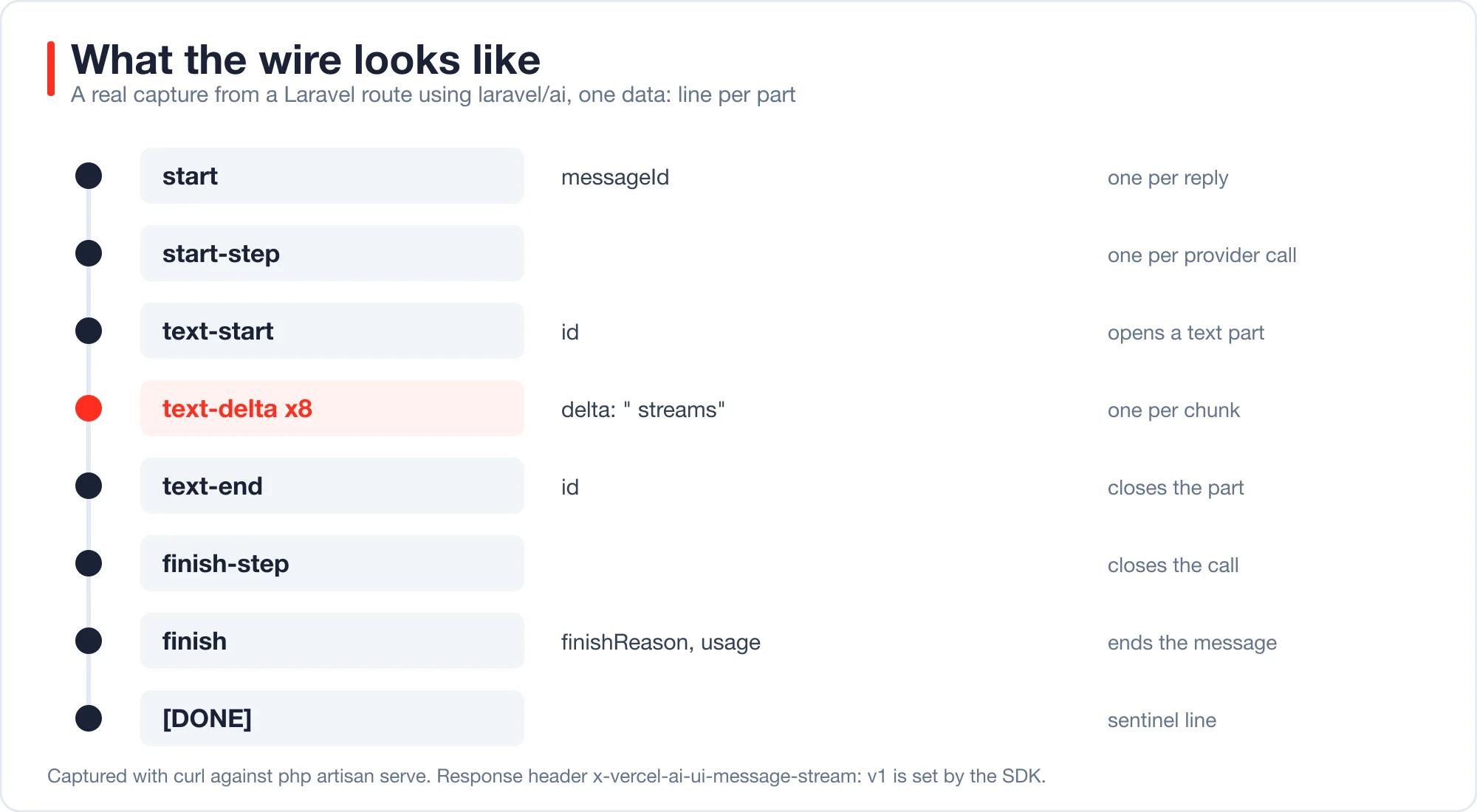
A shortened capture of the real output:
data: {"type":"start","messageId":"01m4h3m7g901hsk3071pj9wcr8"}

data: {"type":"start-step"}

data: {"type":"text-start","id":"01m4h3m7g8kf3pnz20h29n0hbe"}

data: {"type":"text-delta","id":"01m4h3m7g8kf3pnz20h29n0hbe","delta":"Laravel"}

data: {"type":"text-delta","id":"01m4h3m7g8kf3pnz20h29n0hbe","delta":" streams"}

data: {"type":"text-end","id":"01m4h3m7g8kf3pnz20h29n0hbe"}

data: {"type":"finish-step"}

data: {"type":"finish","finishReason":"stop", ...}
Two details help when you debug. First, a reply with tool calls adds another start-step and finish-step pair for each provider call, so the number of steps equals the number of model round trips. Second, the SDK also sets X-Accel-Buffering: no and Cache-Control: no-cache, no-transform so common proxies do not hold the stream back.
If a reply appears all at once instead of word by word, something between Laravel and the browser is buffering. I did not test a production proxy, so check your own Nginx, CDN or load balancer for response buffering.
Why do I get a 419 error when the chat sends a message?
Laravel rejects a POST that has no CSRF token, and useChat does not send one on its own. In my test, a plain POST to /chat returned 419 and no stream at all. The fix is the X-CSRF-TOKEN header from the meta tag, as in the component above.
The Laravel CSRF documentation describes the alternatives. If the chat endpoint sits behind token authentication instead of cookies, such as Sanctum personal access tokens, you can exclude the route from CSRF checks. Do not exclude a cookie-authenticated route, because that removes the protection for the people most exposed to it.
A 419 also surfaces in useChat through the error value, so the red message in the component shows it. Without that block the user sees nothing happen.
What happens when the provider fails mid-stream?
The HTTP status stays 200, the stream carries a single masked error part, and the exception goes to your log. I forced this by making the model call throw an exception containing a fake API key.
The body contained only these lines:
data: {"type":"start","messageId":"01a12249-c664-700b-a33a-a229fd4dbc0a"}

data: {"type":"start-step"}

data: {"type":"error","errorText":"An error occurred."}

data: [DONE]
The key never reached the browser, and the full exception with its stack trace landed in storage/logs/laravel.log through report(). That is the safe default. The cost is that an alert on 5xx responses never fires for these failures, because the response was a 200.
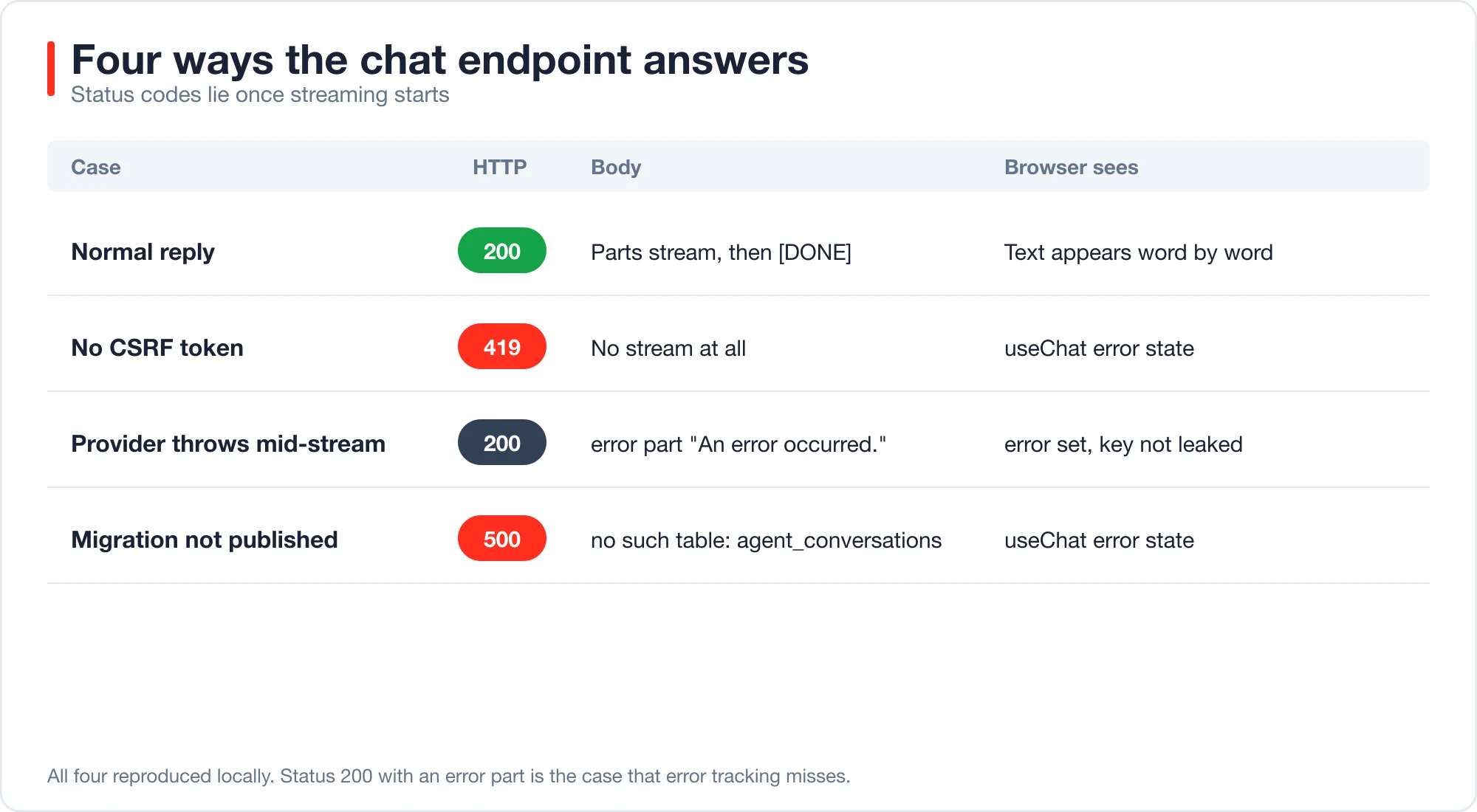
| Case | HTTP status | Body | What useChat shows |
|---|---|---|---|
| Normal reply | 200 | Parts, then [DONE] |
Text appears word by word |
| Missing CSRF token | 419 | No stream | error is set |
| Provider throws mid-stream | 200 | error part, "An error occurred." |
error is set, no secret leaked |
| Conversation migration not published | 500 | no such table: agent_conversations |
error is set |
Because status codes lie once streaming starts, alert on the log line instead. Search your logs for the exception class your provider throws, and count it per hour. A rise in that count is your real error rate.
How do you save the conversation?
Add the RemembersConversations trait to the agent, publish the package migration, and continue a conversation by its id. After two turns I counted one conversation row and four message rows, in the order user, assistant, user, assistant.
use Laravel\Ai\Concerns\RemembersConversations;

class MemoryChatAgent implements Agent, Conversational
{
    use Promptable, RemembersConversations;

    public function instructions(): Stringable|string
    {
        return 'You are a concise assistant.';
    }
}

$first = MemoryChatAgent::make()->forUser($user)->prompt('My name is Sam.');
$next  = MemoryChatAgent::make()->continue($first->conversationId, $user)->prompt('What is my name?');
The second call reused the same conversation id, so the agent loads the earlier turns from the database. The migration is not loaded automatically. My first run failed with no such table: agent_conversations until I published it:
php artisan vendor:publish --provider="Laravel\Ai\AiServiceProvider"
php artisan migrate
That command also copies the config file and the stubs, which is fine. Run it once per project and commit the migration.
Decide who owns history. With useChat, the browser sends the whole message list on every request, so the browser is the source of truth. With RemembersConversations, the database is. Pick one. If you mix them, you resend history twice and the model sees duplicate turns.
How do you test the chat endpoint without calling a model?
Fake the agent, post a message in the useChat format, and read the streamed body. The test below ran green on my lab project in about 130 milliseconds and cost nothing, because ChatAgent::fake() replaces the provider.
public function test_chat_streams_text_parts(): void
{
    ChatAgent::fake(['Hello there friend.']);

    $response = $this->postJson('/chat', [
        'messages' => [['id' => 'm1', 'role' => 'user', 'parts' => [['type' => 'text', 'text' => 'Hi']]]],
    ]);

    $response->assertOk()->assertHeader('x-vercel-ai-ui-message-stream', 'v1');

    $body = $response->streamedContent();
    $this->assertStringContainsString('"type":"text-delta"', $body);
    $this->assertStringContainsString('"delta":"Hello"', $body);
    ChatAgent::assertPrompted('Hi');
}
The test proves four things: the route accepts the message shape, the SDK parses the newest user message, the stream carries text-delta parts, and the response sets the protocol header. Add one more test per failure in the table above. A test for the 419 case posts without the token header, and a test for the failing provider fakes a closure that throws.
Remember that a test route in the lab skipped CSRF checks for brevity. In your app, keep the middleware on and send the token, or your test will pass while the browser fails.
How much does a long chat cost?
Cost grows with the square of the number of turns, because every request resends the full history. If each message is about 200 tokens, turn k sends 200 x (2k - 1) input tokens, and the total over n turns is 200 x n x n.
For a 10-turn chat, that is 200 x 100 = 20,000 input tokens across the session, against only 2,000 tokens of new text. The assumption is 200 tokens per message and equal-sized replies, so treat it as a shape and not a bill. The shape is what matters: doubling the turns quadruples the input.
Three controls keep it in check:
- Cap the history. Send the last N messages, or summarize older ones, before you call the agent.
- Cap the input. Validate message length on the route, because a user can paste a whole book.
- Rate limit. The
throttle:20,1middleware in the route allows 20 requests a minute per user or IP, as described in the Laravel rate limiting docs.
Provider-side prompt caching reduces the cost of resent history a lot, and it deserves its own tuning. The post on agent memory that does not wreck your prompt cache shows what breaks it.
Which provider should power the chat?
The agent code does not change when the provider does. The SDK config lists drivers for Anthropic, OpenAI, Gemini, Groq, Mistral, DeepSeek, xAI, OpenRouter, Ollama and a generic openai-compatible driver, among others. You switch with a provider name or an environment default.
I checked that list in the package's config/ai.php and did not run a live call to any of them. Free tiers and prices change often, so check each provider's current page before you build around one.
If you want a chat API with no per-token fee, the ollama driver talks to a local model server. You pay in hardware and speed instead of money, and small local models answer worse than hosted ones. Treat it as a good fit for development, internal tools and private data, and as a risky fit for a public product that needs consistent quality.
For picking a hosted model by cost per finished task, the comparison of which AI model should write your code, price per task, shows how to think about that tradeoff.
If your chat agent also calls tools, read tool calling in Laravel first, because the default step budget can leave a reply empty. Redact emails and keys before the call, as described in generative AI data privacy in Laravel.
If you are new to agents, start with AI agents for Laravel developers, which builds a working one in 42 lines.
What should you check before shipping?
Go through this list. Each line comes from a result above.
- Add the CSRF meta tag and send
X-CSRF-TOKEN, or exempt only token-authenticated routes. - Show
errorin the UI. Without it, failures look like a frozen page. - Log provider exceptions and alert on their count, not on HTTP 5xx.
- Publish and run the conversation migration if you use
RemembersConversations. - Choose one owner for history: the browser or the database.
- Cap history length and input length.
- Add
authandthrottlemiddleware to the route. - Test with a real proxy in front, because buffering breaks streaming silently.
Advertisement
FAQ
Does shadcn have a chat component?
No. shadcn/ui ships primitives such as `Input`, `Button` and `ScrollArea`, not a chat component. You combine them with a hook such as `useChat`, which holds the messages and streaming state. The component in this post is a complete minimal example.
How do I stream AI responses from Laravel to React?
Return the agent's `stream()` response from a route and apply the Vercel protocol with `usingProtocol($chat->protocol())`. On the client, point `useChat` at the route with `DefaultChatTransport`. The browser then renders each text part as it arrives.
Why does my Laravel chat endpoint return 419?
The request has no valid CSRF token. `useChat` does not add one automatically. Put `<meta name="csrf-token">` in your layout and pass its value in the `X-CSRF-TOKEN` header through the transport's `headers` option. In my test, the missing token gave 419 and no stream.
Why does the HTTP status stay 200 when the AI call fails?
Streaming starts before the provider call finishes, so the status and headers are already sent. The SDK then writes a masked `error` part into the stream and logs the real exception. Alert on your logs instead of status codes to catch these failures.
Can I use a free API for a Laravel AI chatbot?
Yes, with limits. The SDK supports local models through the `ollama` driver, which has no per-token fee but needs hardware, and several hosted providers publish free tiers that change often. Check each provider's current terms. I did not test free tiers for this post.
Comments
Loading…
Sign in to join the conversation.
Related posts
Tool Calling in Laravel: Why Agents Quit After One Retry
Tool calling in Laravel fails in seven specific ways. Measured on the Laravel AI SDK 1.2 loop, with fixes for step budgets, bad arguments and tool names.
Fri Oct 09 2026 · 13 min read · 0 views
AI Agent Orchestration in Laravel: Queues Before Frameworks
AI agent orchestration in Laravel works with queues, batches and the Concurrency facade. Measured timings, failure behavior and when a framework is worth it.
Fri Oct 09 2026 · 11 min read · 0 views
AI Code Debugger for Laravel: Feed It 98% Less Stack Trace
An AI code debugger for Laravel needs the throw site, not 5,000 tokens of framework frames. Six real errors, a tested trimmer and verified fixes.
Fri Oct 09 2026 · 11 min read · 0 views