AI QA Testing in Laravel: 3 Bugs Only a Browser Test Sees
By Nihar Ranjan Das · Sat Oct 10 2026 · 11 min read · 0 views
View as a Web StoryAISoftware#AI testing#Pest#Laravel#browser-testing#qa-testing
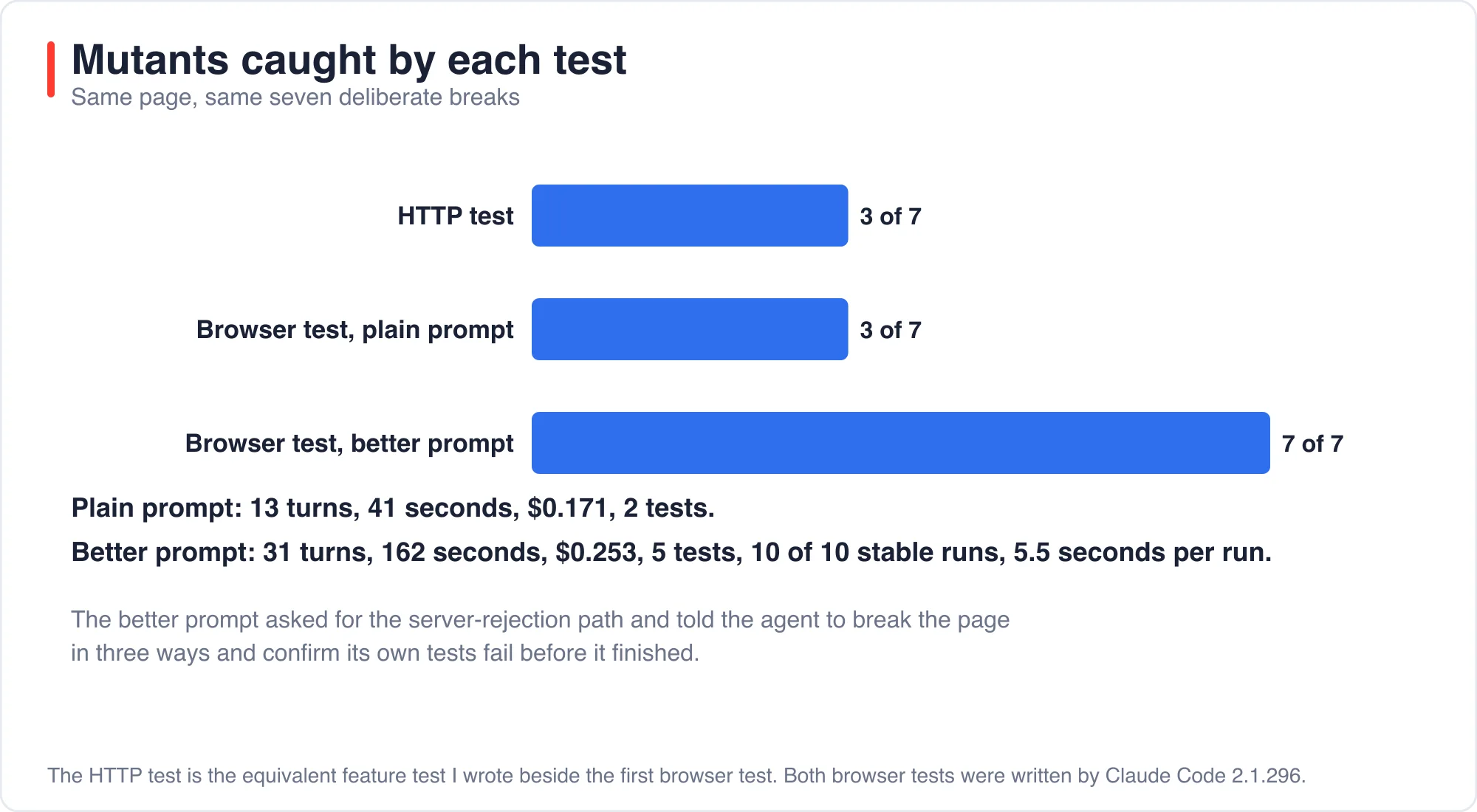
Claude Code wrote a Pest browser test for a Laravel form, and it passed on the first run; then I broke the page seven ways. The browser test caught 3 of the 7 breaks; a plain HTTP test caught a different 3; one break slipped past both.
A second prompt changed the result. When I asked for the server-rejection path and told the agent to break the page itself and confirm its tests fail, the new tests caught all 7. This post shows both runs, the numbers, and the exact prompt, so you can reuse it for AI QA testing on your own Laravel app.
What is AI QA testing in a Laravel app?
AI QA testing is the use of an AI assistant to write, run and repair the automated tests that check an application behaves correctly. In a Laravel project the tests are usually Pest or PHPUnit files, and the AI reads your code, writes the test, runs it and fixes failures.
Pest browser testing is a Pest 4 feature that drives a real browser from a test. The Pest browser testing documentation explains that it uses Playwright under the hood and that visit() opens Chrome by default. Playwright is a browser automation library that clicks, types and reads a page the way a user does. Its actionability checks wait for an element to be visible, stable and enabled before the test acts on it.
The question I wanted to answer was simple. If an AI writes your browser tests, how much of the real risk do they cover? A test that always passes is not QA, so I measured it with deliberate breaks.
What was the test setup?
The test setup was a Laravel 13.35 app with one page, GET /articles/create; the page has a title field, a body field and a Save button. A small script validates the title in the browser, waits a random 0.1 to 0.8 seconds to mimic a slow network, and posts to POST /articles. On success it shows an "Article saved" toast and adds the title to a list. On a server error it should show nothing.
The server route validates the title as required and at most 120 characters, then stores the article. I installed pestphp/pest-plugin-browser and Playwright's Chromium build.
I gave Claude Code one short prompt, with no hints about the page internals; it could read files, edit files and run pest and php.
Write a Pest browser test (pest-plugin-browser is installed, Playwright
chromium is installed) in tests/Browser/CreateArticleTest.php for the page
GET /articles/create. Cover: (1) submitting an empty title shows
'Title is required'. (2) submitting a valid title shows the 'Article saved'
confirmation and the title appears in the list. Run it with
vendor/bin/pest tests/Browser until it passes, then stop and reply with one line.
It finished in 13 turns and 41 seconds at a reported cost of $0.171. One detail is worth noting: the route hardcodes author_id 1, so its first run failed on a foreign key. The agent noticed and created an author in the test setup.
What did the AI-written browser test look like?
The AI wrote two short tests that follow the Pest browser style and assert on visible text. Here is the second one, which covers the happy path.
Advertisement
it('shows confirmation and lists the new article when the title is valid', function () {
    Author::create(['name' => 'Test Author', 'email' => 'author@example.com']);

    visit('/articles/create')
        ->fill('title', 'My Browser Test Article')
        ->press('Save article')
        ->assertSee('Article saved')
        ->assertSeeIn('#list', 'My Browser Test Article')
        ->assertDontSee('Title is required');
});
This is competent code; it sets up the data it needs, uses the right helpers and checks two visible outcomes. It does not use a fixed sleep, which is the most common cause of flaky browser tests. The Pest documentation says Pest waits 5 seconds by default before timing out, so assertions wait for the page.
Look at what it never checks; it never asserts that the article was saved in the database. It never asks what the page does when the server says no; those gaps matter in the next section.
How slow is a browser test next to an HTTP test?
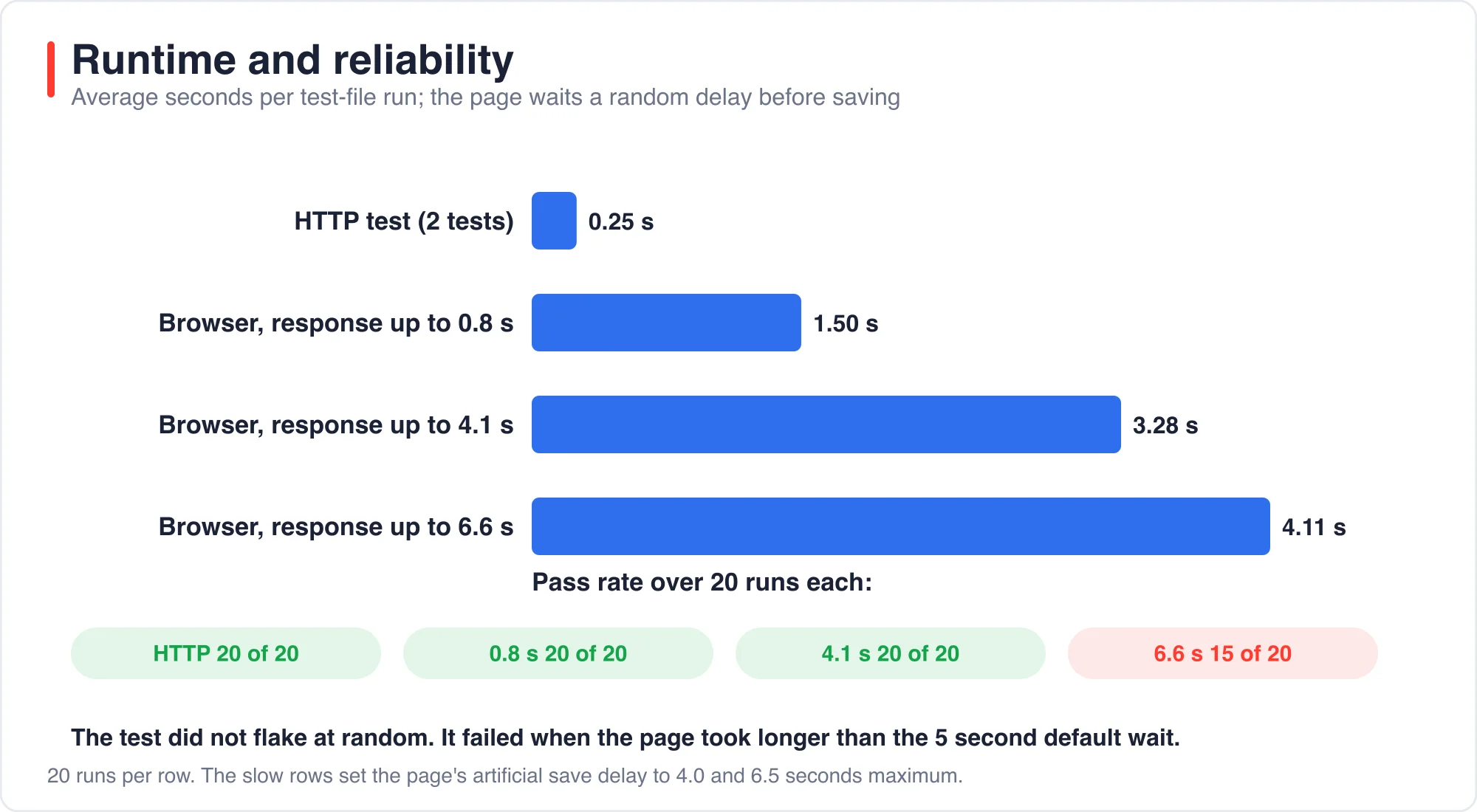
A browser test was about six times slower than an HTTP test in my runs. I wrote an equivalent Laravel HTTP feature test with two tests, one for an empty title and one for a valid save, and timed 20 runs of each file.
| Test file | Average run time | Passes in 20 runs |
|---|---|---|
| HTTP feature test, 2 tests | 0.25 s | 20 |
| Browser test, page delay up to 0.8 s | 1.50 s | 20 |
| Browser test, page delay up to 4.1 s | 3.28 s | 20 |
| Browser test, page delay up to 6.6 s | 4.11 s | 15 |
The browser cost is real but not extreme. A suite of 100 browser tests at 1.5 seconds each takes about two and a half minutes, which is fine for a pull request check and slow for every save in an editor.
Do AI-written browser tests flake?
They did not flake at random in my runs; they failed when the page took longer than the 5-second default wait. At a delay of up to 4.1 seconds all 20 runs passed. At a delay of up to 6.6 seconds, 5 of 20 failed, which is consistent with the 5-second default wait.
That is a useful distinction; a test that fails when the app is slower than the timeout is reporting something true. The fix is to raise the limit on purpose, or to find out why the page is slow. The Pest docs show how to set a longer timeout in tests/Pest.php.
pest()->browser()->timeout(10000);I tried a 10-second timeout at the 6.6-second delay. 14 of 15 runs passed. I did not diagnose the one failure. A browser test depends on a real browser, a real server and a clock, so treat a single failure as a signal to look, not a reason to delete the test.
Which breaks does each kind of test catch?
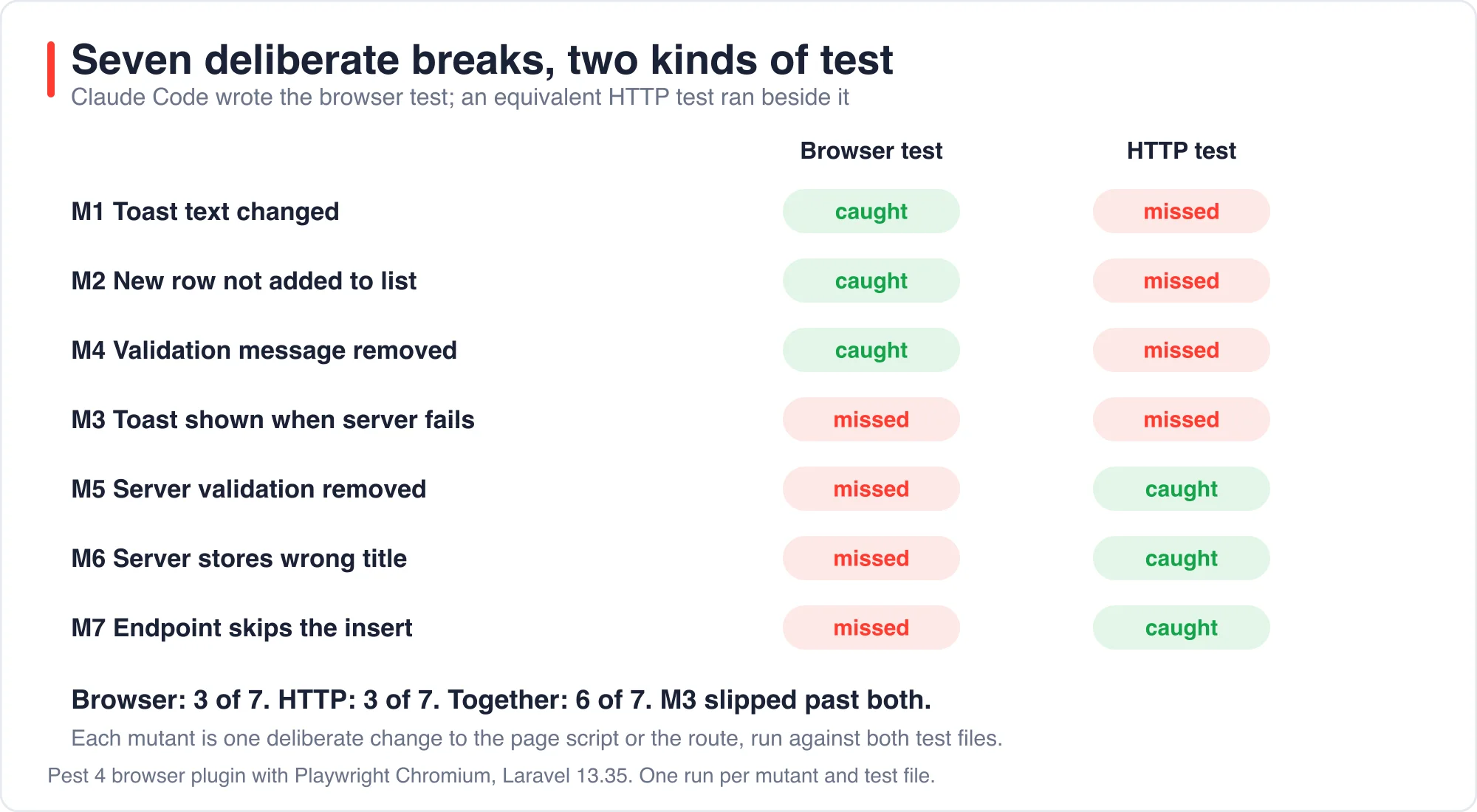
The browser test caught the three breaks that happen in the page; the HTTP test caught the three breaks that happen on the server. I made seven mutants, each one deliberate change to the page script or the route, and ran both test files against each.
Mutation testing is the practice of changing code on purpose to check that the tests notice. A mutant that the tests still pass on is a gap in the tests, not in the code. Pest also ships a built-in mutation testing command for PHP source, but it cannot mutate the JavaScript that runs in the page, so I made the browser-side mutants by hand.
| Mutant | Browser test | HTTP test |
|---|---|---|
| M1 Toast text changed | Caught | Missed |
| M2 New row not added to list | Caught | Missed |
| M4 Client validation message removed | Caught | Missed |
| M3 Toast shown when the server fails | Missed | Missed |
| M5 Server validation removed | Missed | Caught |
| M6 Server stores the wrong title | Missed | Caught |
| M7 Endpoint skips the insert | Missed | Caught |
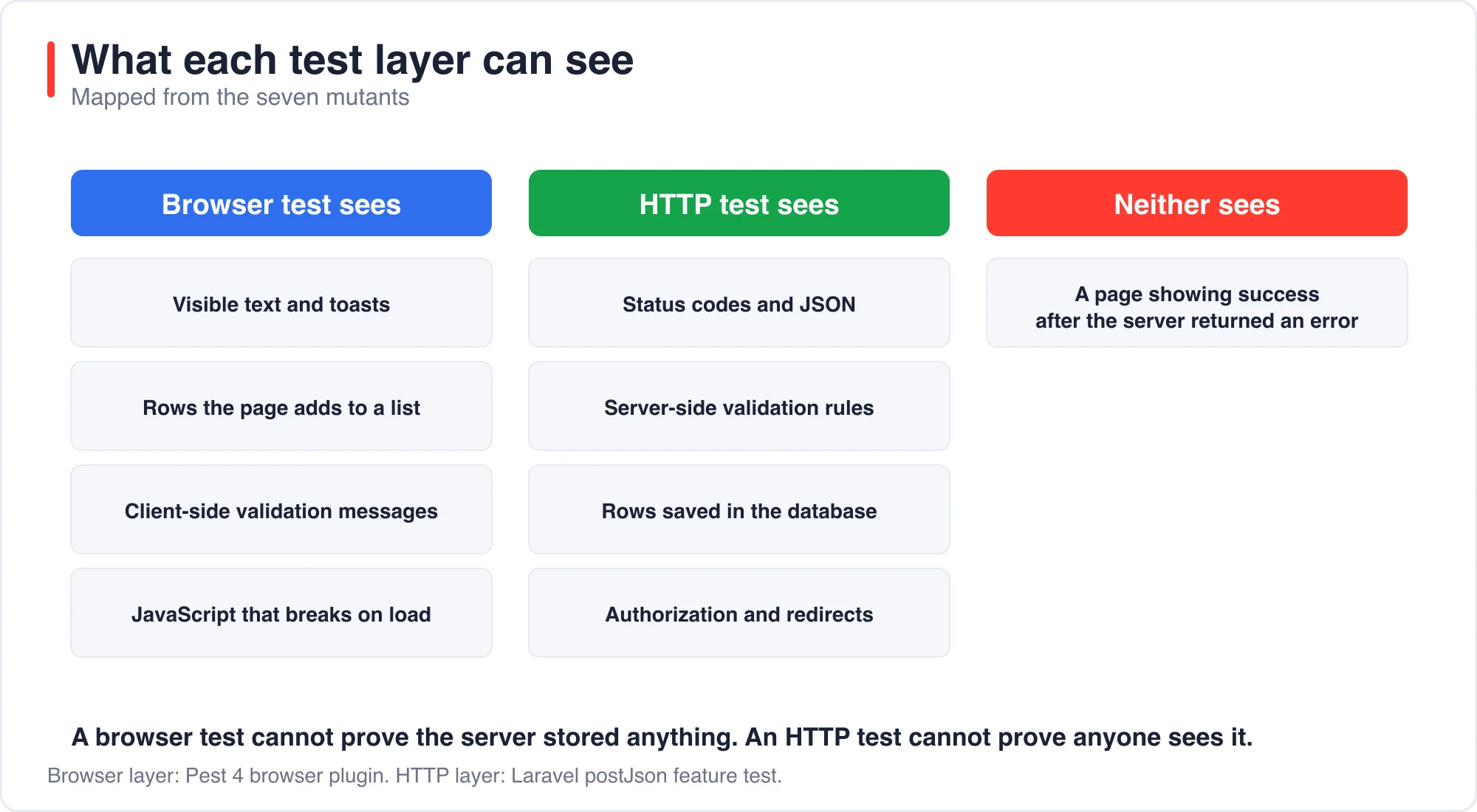
Read the table by column; the browser test cannot see M5, M6 or M7 because the page itself still looks right. The title appears in the list because the page script adds it, whatever the server stored. The HTTP test cannot see M1, M2 or M4 because it never loads the page; those are the three bugs only a browser test sees.
The underlying reason is architectural. A browser test exercises the presentation layer and implicitly trusts the persistence layer, whereas an HTTP test exercises the persistence layer and has no knowledge of the presentation layer. Each layer therefore has a blind spot that corresponds exactly to the other layer's responsibility.
M3 is the most instructive; the page showed a success toast even when the server rejected the save. Neither test exercised a rejected save, so neither noticed; a user who loses their work sees "Article saved" and believes it.
Why do negative assertions pass on a broken page?
A negative assertion passes on a broken page when the thing it looks for has already gone. I learned this while writing my own test for M3. My first version submitted a title of 121 characters, waited 2 seconds and asserted that the page did not show "Article saved".
That test passed on the original page, which is correct; it also passed on the M3 mutant, which is wrong. The mutant did show the toast, but the toast hides itself after 1.5 seconds, so by the time my assertion ran it had disappeared.
The fix was to assert on durable state, which is the list that the page never clears.
visit('/articles/create')
    ->fill('title', str_repeat('x', 121))
    ->press('Save article')
    ->wait(1.5)
    ->assertDontSeeIn('#list', str_repeat('x', 121));
This version passed on the original page in 3 of 3 runs and failed on the M3 mutant in 3 of 3 runs. The rule is general; prefer assertions on state that stays, such as a database row, a list item or a URL, over text that comes and goes.
What prompt made the AI write better QA tests?
A prompt that names the failure path and tells the agent to break its own page produced tests that caught all 7 mutants. I rewrote the instruction in three parts. It asked for the server-rejection case, it asked for tests that fail when the feature is broken, and it asked the agent to prove that by breaking the page.
Write Pest browser tests in tests/Browser/CreateArticleTest.php for the
page GET /articles/create. Cover the happy path, the empty-title client
validation, and what happens when the server rejects the save (a title
over 120 characters). A test that passes while the feature is broken is
worse than no test. So once your tests pass, break the page yourself in
at least three different ways (for example change the toast text, stop
adding the row to the list, show the toast when the server fails),
confirm your tests fail each time, then restore the page exactly.
Reply with one line.
The run took 31 turns and 162 seconds at a reported cost of $0.253; it wrote five tests. They assert on the toast, the list and the database, for example Article::sole() after a save and Article::count() after a rejection. It restored the page byte for byte, which I confirmed with a diff.
I ran my seven mutants against the new file; it caught M1 through M7, all seven. I then ran it 10 times with no failures; one run takes about 5.5 seconds for five tests.
| Test set | Mutants caught | Cost to write |
|---|---|---|
| HTTP feature test (mine) | 3 of 7 | Not measured |
| Browser test, plain prompt | 3 of 7 | $0.171, 13 turns |
| Browser test, better prompt | 7 of 7 | $0.253, 31 turns |
The extra cost was about eight cents; the extra coverage was four more breaks caught; that is a good trade for a form that handles user input.
When should you use a browser test instead of an HTTP test?
Use a browser test for behavior a user sees and an HTTP test for behavior the server guarantees. Most forms need both, and the better prompt effectively merged them by asserting on the database inside the browser test.
Use this short decision guide.
- Write HTTP tests first for validation rules, authorization, status codes and stored data. They are fast and precise.
- Add one or two browser tests per critical flow, such as sign-up, checkout or a form that loses work if it fails.
- Assert on durable state, not on text that disappears.
- Ask the AI for the failure path by name. It will not volunteer it.
- Make the AI prove its tests fail on a broken page, then check one break yourself.
If you are choosing which model should write these tests, the post Which AI model should write your code? Price per task shows how to compare cost per passing task. Coverage and pass rate say little on their own. Catching real breaks says a lot.
What are the limits of this test?
The limits are those of a small experiment; the page is a toy form with one script and one route. Seven mutants are a sample, and I chose them; a real application has authentication, redirects and third-party scripts that this page does not.
Each prompt ran once. The plain prompt and the better prompt differ in more than one way, so I cannot say which part of the longer prompt did the work. I suspect the instruction to break the page itself, but I did not isolate it.
I also used Claude Code with the model my account defaults to. Other assistants may do better or worse; every figure was fact-checked against the saved test output. About the author: I build Laravel applications and ran each step on a scratch project. If a result does not reproduce, use the contact page and tell me which one.
The bottom line
An AI will write a passing browser test quickly and cheaply, and the first version will probably miss the failure path. The two layers together found only six of the seven bugs. In my run it caught 3 of 7 deliberate breaks, the same as a plain HTTP test, but a different 3.
Ask for the rejected-save case, since neither test layer volunteered it, ask it to break its own page, and assert on database state as well as on visible text. That prompt cost about eight cents more and caught all 7.
Advertisement
FAQ
Can AI write good Laravel browser tests?
Yes, with a good prompt. Claude Code wrote a passing Pest browser test in 41 seconds, but it caught only 3 of 7 deliberate breaks. A prompt asking for the failure path and a self-break check produced tests that caught all 7.
Are Pest browser tests flaky?
Not at random in my runs. Pest waits 5 seconds by default, and tests failed only when my page took longer than that. Raise the timeout with pest()->browser()->timeout(10000) or fix the slow page.
Should I use browser tests or HTTP tests in Laravel?
Use both. HTTP tests are fast and check validation, authorization and stored data. Browser tests check what a user sees. In my test each caught three breaks the other missed.
What is a vacuous negative assertion?
It is an assertion that something is absent, which passes because the thing already disappeared. My assertDontSee check for a toast passed on a broken page because the toast hid itself after 1.5 seconds. Assert on durable state instead.
Comments
Loading…
Sign in to join the conversation.
Related posts
Laravel AI SDK Tool Approval: Edit Works, Fakes Skip It
The Laravel AI SDK can pause an agent before a sensitive tool runs and wait for a person to approve, reject or edit the call. I ran that human-in-the-loop tool approval API through 16 scenarios and
Sat Oct 10 2026 · 10 min read · 0 views
Code Optimizer for Laravel: 5,361 Queries Down to 5
A Laravel route that lists 1,800 articles made 5,361 database queries and took 2,326 ms in my test. Four changes cut it to 5 queries and 4 ms. Eager loading did the most for the query count. Three
Sat Oct 10 2026 · 11 min read · 1 views
PHPStan Found 3 of 11 Laravel Bugs. AI Found 9 to 11
PHPStan at level 9 found 3 of the 11 bugs I planted in a Laravel pull request. It took 1.1 seconds and cost nothing. An AI reviewer found 9, 11 and 9 in three separate runs, in about 15 seconds each,
Sat Oct 10 2026 · 10 min read · 0 views