AI Agents for Laravel Developers: Build One in 42 Lines
By Nihar Ranjan Das · Fri Oct 09 2026 · 13 min read · 0 views
View as a Web StoryAISoftware#ai agents#llm#Laravel#php#agent loop
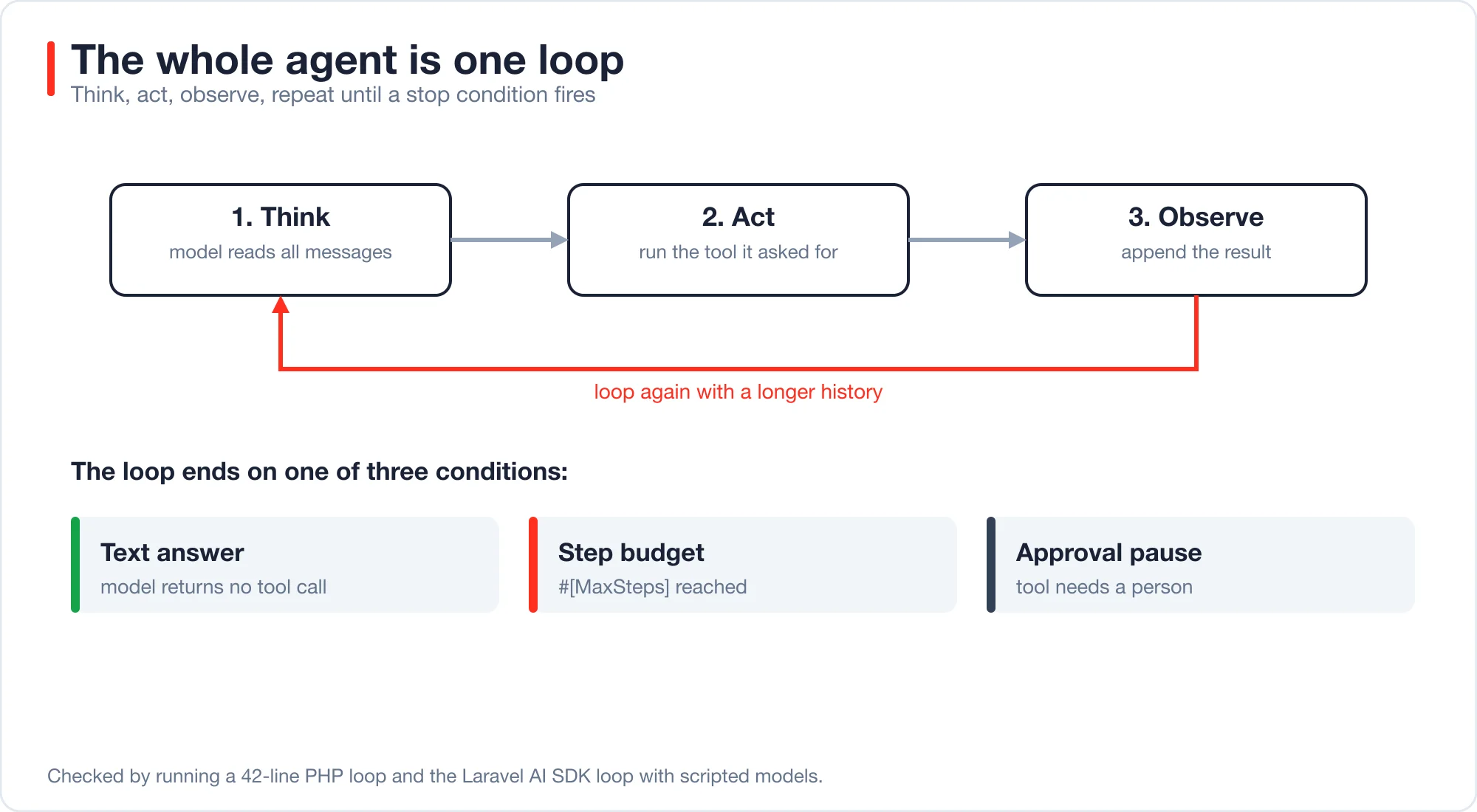
An AI agent is a loop. A model reads the conversation, asks to run a tool, your code runs it, and the result goes back to the model. The loop repeats until the model answers in plain text or a limit stops it. I built one in 42 lines of PHP, then compared it with the Laravel AI SDK loop and measured what grows on each pass.
The measurement is the useful part. Each step resends the full history, so an agent that takes six steps sent 13,182 characters to the model to carry 4,247 characters of actual content. This post explains the parts, shows the code, and links to the deeper posts on each part.
An AI agent is a program that uses a language model to decide which action to take next, runs that action through a tool, and feeds the result back to the model until a task is done. The model chooses the steps, and your code supplies the tools and the limits.
A general-purpose AI agent is an agent with a broad toolset and loose instructions, built to attempt many kinds of tasks. A narrow agent has a few tools and one job. Most production agents are narrow, for reasons the sections below measure.
How is an agent different from a chatbot or a workflow?
A chatbot answers once. A workflow runs steps you wrote in a fixed order. An agent decides its own next step at run time, which is why it can handle open tasks and why it can also go wrong in new ways.
| Type | Who picks the next step | Typical use | Main risk |
|---|---|---|---|
| Single prompt | Nobody, one call | Summarise, classify, rewrite | Wrong answer, no recovery |
| Workflow | Your code, fixed order | Extract, then validate, then save | Brittle when input varies |
| Agent | The model, at run time | Research, triage, multi-tool tasks | Loops, cost, wrong actions |
Anthropic's engineering guide, Building effective agents, draws the same line between fixed workflows and agents. The cheapest design that works is usually right. Consider a task such as tagging support tickets: one prompt with a fixed list of tags does it, and an agent would only add cost. If one prompt does the job, stop there. If you can write the steps in order, write a workflow. Reach for an agent when the number or order of steps depends on what the model finds along the way.
The architecture post on five agent patterns and what each costs goes deeper on that choice and includes a decision tree.
What does an agent look like in plain PHP?
A minimal agent is a for loop with four moves: think, stop if there is an answer, act, observe. The class below is the whole thing. It has no framework and no provider SDK, just a function that stands in for the model and an array of tools.
<?php

namespace App\Support;

use Closure;

class MiniAgent
{
    /**
     * @param  Closure(array): array  $model  takes messages, returns ['text' => ?string, 'tool' => ?array{name: string, args: array}]
     * @param  array<string, Closure(array): string>  $tools
     */
    public function __construct(
        protected Closure $model,
        protected array $tools,
        protected int $maxSteps = 5,
    ) {}

    public function run(string $task): array
    {
        $messages = [['role' => 'user', 'content' => $task]];

        for ($step = 1; $step <= $this->maxSteps; $step++) {
            $reply = ($this->model)($messages);            // 1. think

            if (($reply['tool'] ?? null) === null) {       // 2. stop: the model answered in text
                return ['answer' => $reply['text'], 'steps' => $step, 'stopped' => 'answer'];
            }

            ['name' => $name, 'args' => $args] = $reply['tool'];
            $messages[] = ['role' => 'assistant', 'tool' => $name, 'args' => $args];

            $result = isset($this->tools[$name])           // 3. act
                ? ($this->tools[$name])($args)
                : "Unknown tool {$name}";

            $messages[] = ['role' => 'tool', 'content' => $result];   // 4. observe, then loop
        }

        return ['answer' => null, 'steps' => $this->maxSteps, 'stopped' => 'budget'];
    }
}
The file is 42 lines with blank lines and comments. To connect a real model, replace the $model closure with a call to your provider that sends $messages and parses a tool request out of the reply.
Advertisement
I ran it with a scripted model under three scenarios. The scripted model replaces a real one, so the results show what the loop does, not how smart any model is.
| Scenario | What the model did | Result |
|---|---|---|
| Normal | Two lookups, then a text answer | Answered in 3 steps |
| Endless loop | Called the same tool every step | Stopped at the 5-step budget, no answer |
| Unknown tool | Asked for a tool that does not exist | Burned the budget in 2 steps, no answer |
The second and third rows are the point of $maxSteps. Without that limit, the loop in the second row runs until the provider or your wallet stops it. With it, you get a bounded failure.
What does the Laravel AI SDK add?
The Laravel AI SDK adds provider adapters, tool schemas, argument validation, streaming, events, queued runs and tool approvals. The loop is the same one. The SDK saves you from writing the parts around it.
Laravel AI SDK is the first-party package, laravel/ai, that gives a Laravel app one API for agents, tools, structured output and many model providers. Its documentation and source on GitHub show the full surface.
Here is the same idea as a Laravel agent. I used a tool that returns a customer record, and I ran this against a scripted model:
#[MaxSteps(8)]
class LookupAgent implements Agent, HasTools
{
    use Promptable;

    public function instructions(): Stringable|string
    {
        return 'You research customer records. Use Lookup for each id, then summarise.';
    }

    public function tools(): iterable
    {
        return [new Lookup];
    }
}
The Lookup class implements the SDK's Tool contract with a description, a schema and a handle() method. The mapping from loop to SDK is direct: instructions() is the system prompt, tools() is the $tools array, #[MaxSteps] is $maxSteps, and the SDK's internal loop is run().
Two behaviors differ from the toy and matter in production. The SDK validates tool arguments if you call $request->validate(), and a bad argument goes back to the model as text. And its default step budget is round(1.5 x tools), so a one-tool agent gets only two steps. The post on tool calling in Laravel covers both, with the numbers.
What grows with every step?
The request. Each step sends the instructions plus the entire history, so the size of every call is larger than the one before. I measured this inside the SDK with a scripted model that made five tool calls and then answered. The test setup was laravel/ai v1.2.0 on PHP 8.4, and the methodology counted the instructions plus every message sent at each step, with the tool definitions left out.
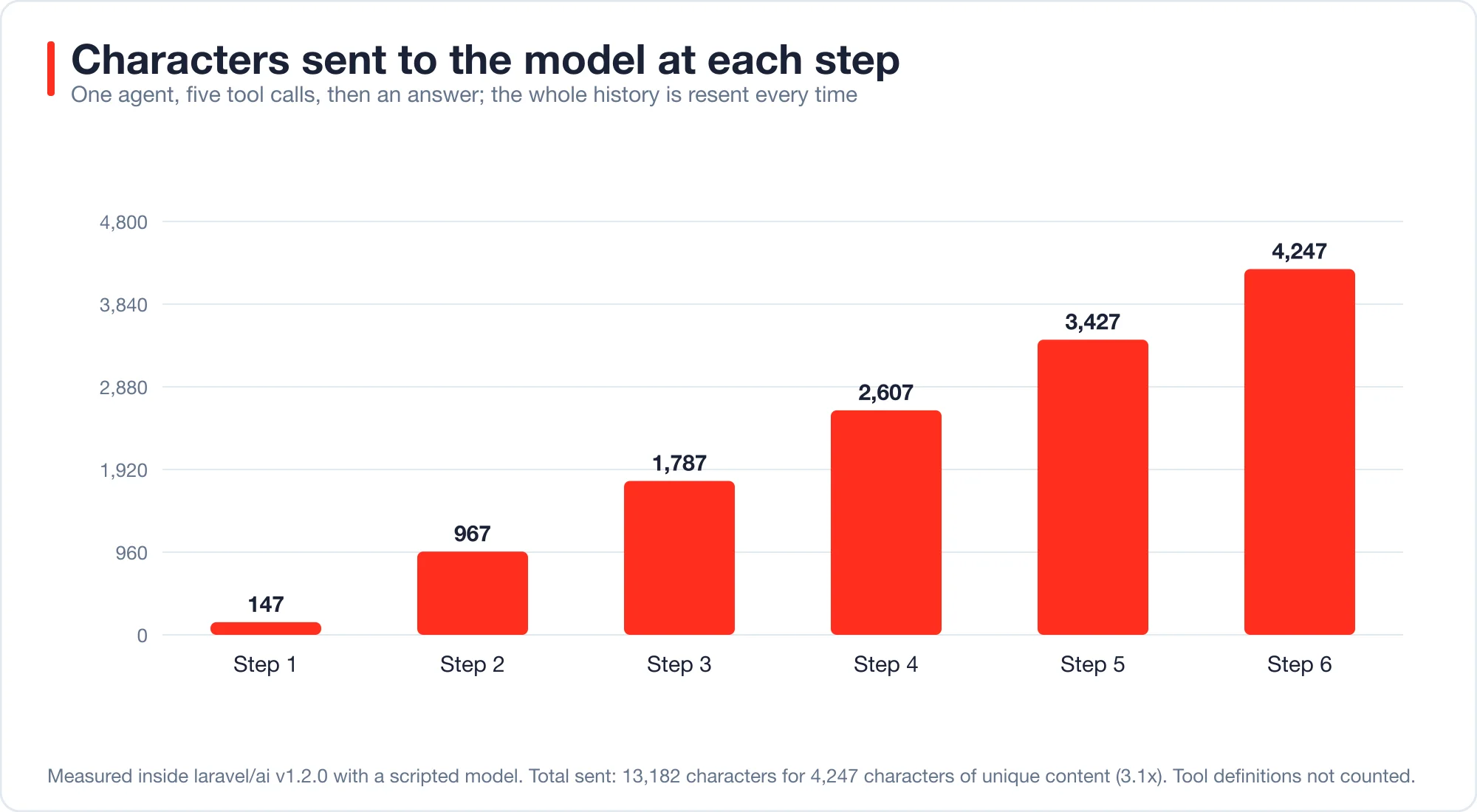
| Step | Messages sent | Characters sent |
|---|---|---|
| 1 | 1 | 147 |
| 2 | 3 | 967 |
| 3 | 5 | 1,787 |
| 4 | 7 | 2,607 |
| 5 | 9 | 3,427 |
| 6 | 11 | 4,247 |
Each tool call and its result added about 820 characters. The total sent across all six steps was 13,182 characters. The unique content at the end was 4,247 characters, so the agent paid for the same text about 3.1 times.
The shape is a triangle. With first-call size a and growth g per step, the characters sent over n steps equal n x a + g x n x (n - 1) / 2. For my numbers, 20 steps would send about 158,740 characters to carry 15,727, which is a factor of 10. These larger numbers come from the formula, not from a run.
A common rule of thumb is that one token is about four characters of English text, so 13,182 characters is roughly 3,300 tokens. Treat that as an estimate, since code and JSON tokenize less efficiently.
Three things follow:
- Short loops are cheap and long loops are not. Doubling the steps roughly quadruples the input.
- Big tool results hurt twice. For example, a 5,000-character result is resent on every later step, so a lookup that returns a whole record, such as a full customer history, should return only the fields the model needs.
- Prompt caching matters most for agents. Prompt caching is a provider feature that bills a repeated prompt prefix at a reduced rate, as described in Anthropic's prompt caching documentation, and it suits a growing history. The post on agent memory that does not wreck your prompt cache shows what breaks that discount.
What are the parts of an AI agent?
An agent has seven parts: instructions, tools, a step budget, orchestration, memory, guardrails and a way to debug it. Each one maps to something you already use in Laravel or to a class in the SDK.
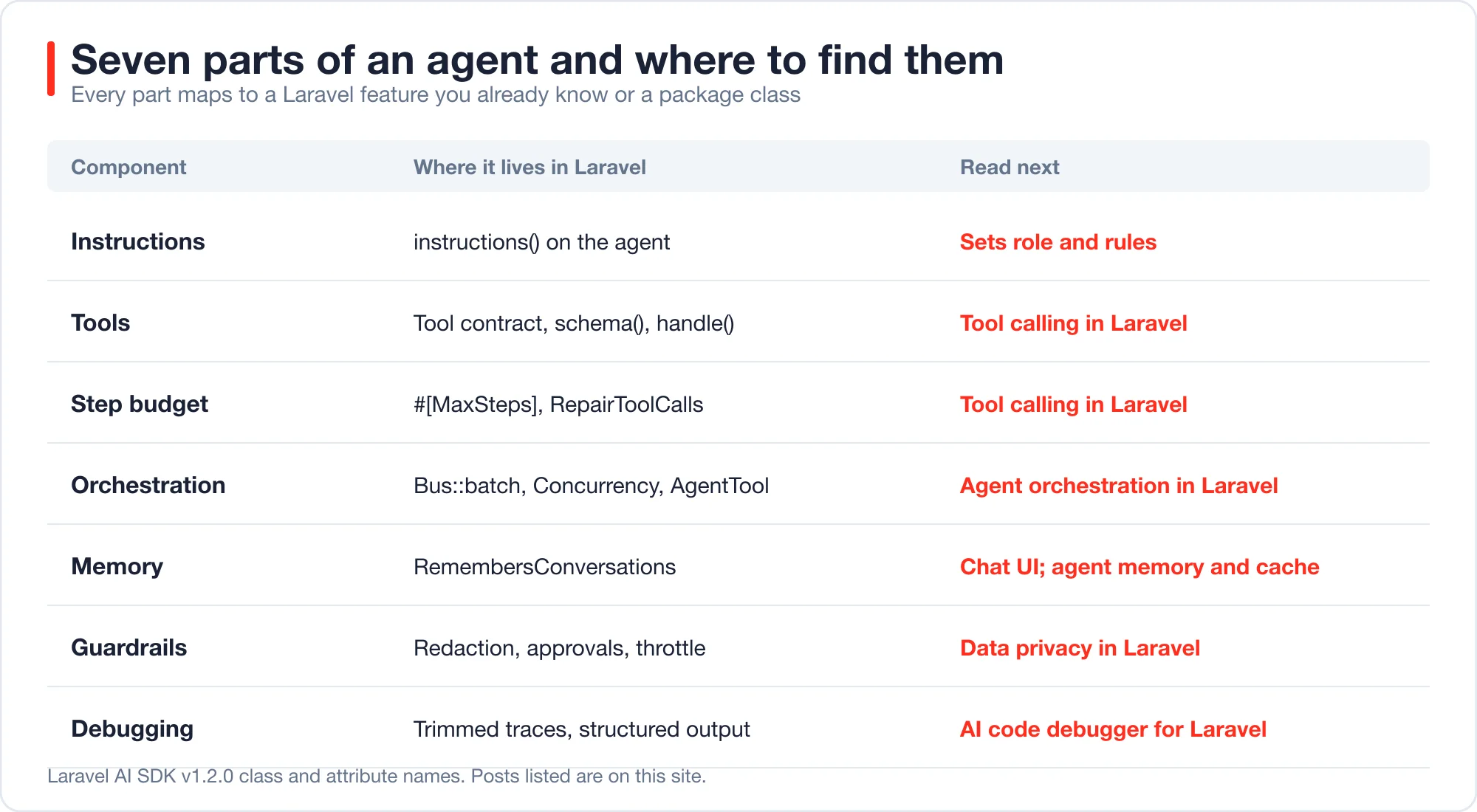
Instructions set the role and rules. Keep them short and specific, and put rules the model must never break there and also in code, because instructions are advice and code is enforcement.
Tools are how the agent acts. A tool is a class with a description, an input schema and a handler, the same shape as in OpenAI's function calling guide. The model reads the description to decide when to call it, so write descriptions the way you would write a function comment for a new teammate.
A step budget is the limit that bounds a bad run. Set it from your longest normal task plus a retry or two. The post on why agents quit after one retry explains how the default can cut a valid run short.
Orchestration is how several agents or jobs work together, and Laravel's queue documentation covers the job side. In my tests, a queue batch on Redis ran six half-second jobs in 0.76 seconds with six workers, against 3.26 seconds for a chain. The SDK's tool loop ran three sub-agents one after another. The post on agent orchestration in Laravel has the full results.
Memory is what the agent remembers across turns. In the SDK, RemembersConversations stores messages in the database, and I counted four rows after two turns. A chat UI on top of that is covered in the post on a shadcn chat UI for Laravel.
Guardrails are the controls around the model: redaction, approvals, rate limits and logging policy. The post on generative AI data privacy in Laravel measures what a regex redactor catches. It removed every pattern-shaped sample and none of the names.
Debugging is how you find out why a run failed. The post on an AI code debugger for Laravel shows how to cut a stack trace from thousands of tokens to under a hundred.
What does a general-purpose agent cost you?
A general-purpose agent costs you control. Every extra tool widens what the agent can do wrong, grows the step budget and adds tool descriptions that ride along in every request.
The budget effect is measurable. In the SDK, the default step budget is round(1.5 x tools) up to 25. Ten tools give 15 steps, so a confused model can make 14 tool calls before the SDK stops it. A one-tool agent can make one. A narrow agent has a smaller worst case by construction.
The failure surface is the larger problem. A general agent with a file tool, an email tool and a database tool can combine them in ways you did not test. A narrow agent with one read-only lookup cannot send an email, whatever a user types.
Use these rules to decide:
- Give each agent the fewest tools that finish its job.
- Make tools read-only unless the job needs a write.
- Put a person in the loop before any irreversible write.
- Split a broad task into several narrow agents with an orchestrator.
The same architecture post covers that last pattern, which is called orchestrator-workers, and what it costs in extra calls.
What are good first AI agents to build in a Laravel app?
Pick a task with a clear success test, a bounded set of tools and low harm if it is wrong. These examples fit that pattern. They are design suggestions, and I have not run each against a live model.
| Agent | Tools it needs | Why it is a good start |
|---|---|---|
| Support triage | Order lookup (read-only), ticket tagger | Easy to check against human tags |
| Error diagnosis | Trimmed trace, method source | Output is a suggestion a developer reviews |
| Docs question answering | Search tool over your content | Answers cite a source you can open |
| Report drafting | Query tools with fixed SQL | Humans edit before sending |
| Code review helper | Diff reader | Findings are comments, not changes |
| Ops runbook helper | Read-only status checks | Writes need approval |
For the docs agent, a vector database may help, and the post testing whether you need a vector database at one million vectors shows when plain search is enough. For code review, the comparison of which AI code review tool to trust with your PRs shows how to measure catch rates.
When should you not build an agent?
Skip the agent when a single prompt works, when the steps are known, or when a wrong action is costly and you cannot add approval. In those cases an agent adds cost and failure modes without adding value.
A simple test helps. Write the task as numbered steps. If you can write all the steps before seeing the input, you have a workflow, and a workflow is cheaper, faster and easier to test. If the steps depend on what a tool returns, you may need an agent.
Also skip it when you cannot measure success. An agent without a test set is a demo. Build a replay set of 20 real tasks with known good outcomes, run it on every change, and track pass rate and cost per task together. The post on which AI model should write your code, price per task, shows why cost per finished task is the number that matters.
What does an AI agent developer actually do?
Most of the work is not prompts. It is tools, limits, tests and cost control. The model call is one line, and the engineering is everything that keeps that line safe to run unattended.
A typical week involves these tasks:
- Writing tools with strict schemas and idempotent handlers
- Choosing step budgets and spending caps
- Building replay tests with scripted models, so changes run in CI at no cost
- Logging steps, tool results and token use, with redaction
- Handling failure: empty replies, unknown tools, provider errors
- Reviewing runs that went wrong and tightening instructions or tools
If you are new to it, the 42 lines above are a fair place to start. Run them with scripted models until the control flow is clear. Then connect a real provider, and add one guardrail at a time.
What should you check before shipping an agent?
Use this list. Each item links to a result in this series.
- Can a single prompt or a fixed workflow do the job instead?
- Is
#[MaxSteps]set explicitly, with room for one retry? - Does every tool validate its arguments and return model-readable errors?
- Is each tool read-only, or does a person approve its writes?
- Is there a cost estimate that includes the growing history?
- Is input redacted before it reaches the model, logs and database?
- Do you have a replay set and a scripted-model test for each failure mode?
- Do you alert on empty replies, budget hits and repeated errors?
Advertisement
FAQ
What is an AI agent in simple terms?
An AI agent is a program where a language model picks actions in a loop. The model asks to run a tool, your code runs it, and the result returns to the model. The loop ends when the model answers in text or a step limit is reached.
How do I build an AI agent in PHP?
Write a loop that sends the message history to a model, checks whether the reply asks for a tool, runs the tool, appends the result and repeats. A working version is 42 lines. In a Laravel app, the `laravel/ai` package supplies the provider calls and tool contracts.
What is the difference between an AI agent and a chatbot?
A chatbot replies once to each message. An agent can take several steps within one request, calling tools and reading results before it answers. That extra autonomy lets it handle open tasks, and it also adds cost, loops and new ways to fail.
Why do AI agents get more expensive with each step?
Each step resends the whole history. In my measurement, request size went from 147 characters on step one to 4,247 on step six, and the total sent was 3.1 times the unique content. Cost grows roughly with the square of the number of steps.
Should I build a general-purpose AI agent?
Usually no. A general agent has many tools, a larger step budget and more ways to take a wrong action. A narrow agent with a few read-only tools is easier to test, cheaper to run and safer. Combine narrow agents with an orchestrator when a task is broad.
Comments
Loading…
Sign in to join the conversation.
Related posts
Tool Calling in Laravel: Why Agents Quit After One Retry
Tool calling in Laravel fails in seven specific ways. Measured on the Laravel AI SDK 1.2 loop, with fixes for step budgets, bad arguments and tool names.
Fri Oct 09 2026 · 13 min read · 0 views
AI Agent Orchestration in Laravel: Queues Before Frameworks
AI agent orchestration in Laravel works with queues, batches and the Concurrency facade. Measured timings, failure behavior and when a framework is worth it.
Fri Oct 09 2026 · 11 min read · 0 views
shadcn Chat UI for Laravel: Streaming Setup That Works
Build a shadcn chat UI for Laravel with useChat streaming. Working route and React code, the real wire format, and four failure cases measured on laravel/ai.
Fri Oct 09 2026 · 11 min read · 0 views