Do you need a vector database? Tested at 1M vectors
By Nihar Ranjan Das · Fri Oct 09 2026 · 11 min read · 0 views
View as a Web StorySoftware#postgresql#Laravel#vector database#pgvector#RAG#embeddings
Most apps with fewer than 100,000 documents do not need a vector database. On an Apple M2 laptop, exact search over 100,000 vectors of 384 dimensions took about 4 milliseconds. Over 1,000,000 vectors it took about 35 milliseconds. That is fast enough for many products, and it needs no index and no new service.
The benchmark compares exact search with an approximate HNSW index at three sizes. The results show where an index starts to matter, how much recall you give up for speed, and why memory, not query time, is what drives cost. This post includes the numbers, the code, and a decision table for Laravel and plain Postgres teams.
What is a vector database?
A vector database is a data store that keeps embeddings and finds the ones closest to a query embedding. An embedding is a list of numbers, often hundreds or thousands long, that represents the meaning of a piece of text or an image. Two texts with similar meaning have embeddings that sit close together.
Laravel's documentation describes the workflow in two steps. You generate an embedding for each piece of content and store it with your data. At search time, you embed the user's query and find the stored vectors nearest to it, per the Laravel search documentation.
Retrieval-augmented generation, or RAG, is a pattern that feeds retrieved documents to a language model so it can answer from your data. The vector search step decides which documents the model sees; a weak retrieval step means a weak answer, whatever model you use. If you are new to the database underneath, start with our plain-English guide on what is postgresql.
What did I measure?
I compared two ways to find the 10 nearest vectors to a query. Exact search compares the query with every stored vector. HNSW search walks a graph index and compares the query with only a small fraction of them.
The setup was simple.
- Hardware: an Apple M2 laptop with 8 CPU cores and 8 GB of RAM.
- Data: synthetic unit vectors with 384 dimensions, the size of many small open embedding models. The vectors have a 24-dimensional latent structure with 200 topic clusters, projected up to 384 dimensions.
- Exact search: a NumPy matrix multiply followed by a top-10 selection, one query at a time.
- Approximate search: the hnswlib library, with
Mset to 16 andef_constructionset to 200. - Quality metric: recall at 10, which is the share of the true 10 nearest neighbors that the index returned. I scored 100 queries.
The data is synthetic, which is the main limit; real embeddings have their own structure, and recall will differ. Treat the recall numbers as a warning about tuning, not as a prediction for your data.
How fast is exact search?
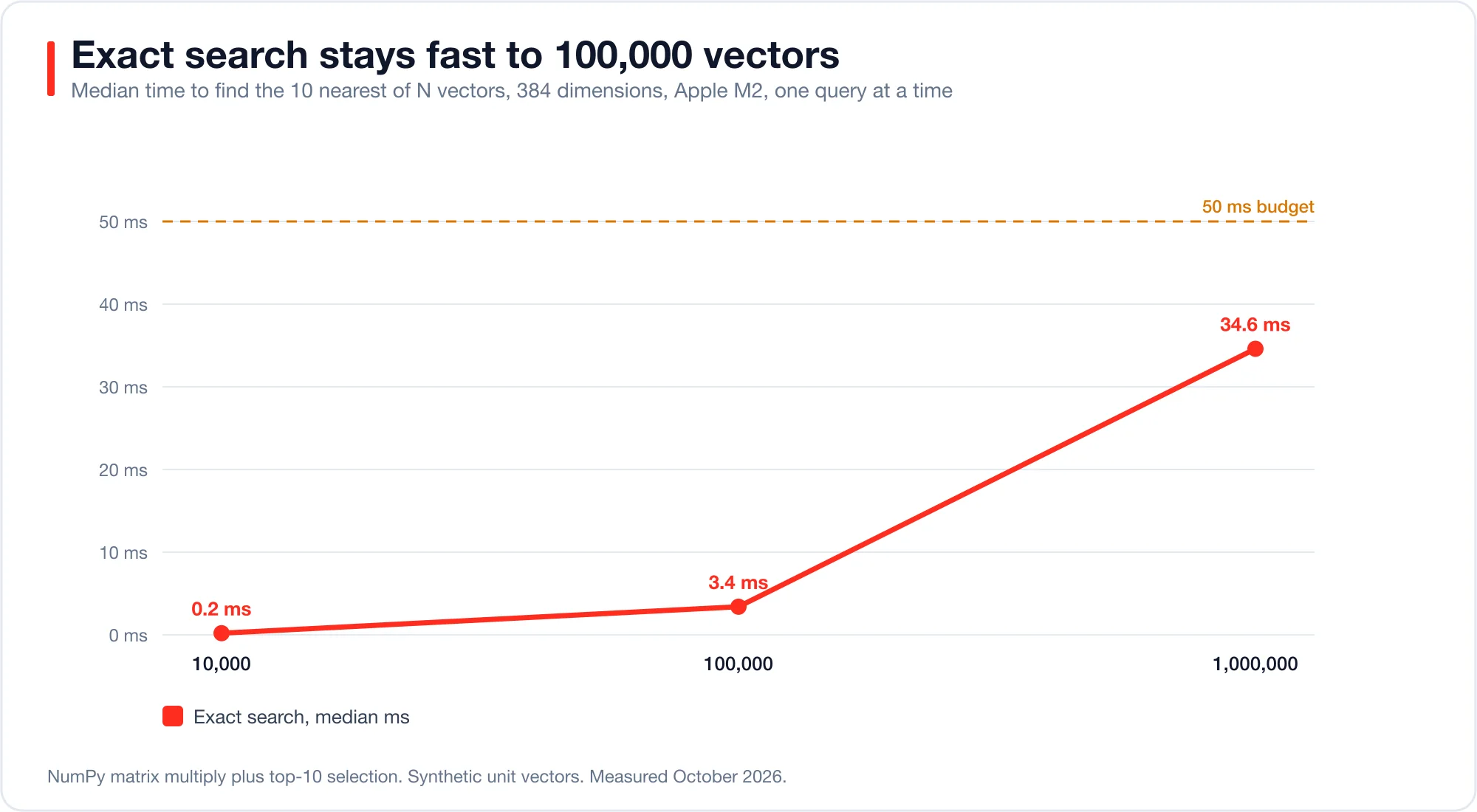
Exact search is fast enough up to about 100,000 vectors and still usable at a million, because latency grows in a straight line with the number of vectors, since each query has to touch every single one of them.
| Vectors | Memory (384 dims) | Exact search, median | Exact search, 95th percentile |
|---|---|---|---|
| 10,000 | 15 MB | 0.20 ms | 0.25 ms |
| 100,000 | 154 MB | 3.4 ms | 4.1 ms |
| 1,000,000 | 1,536 MB | 34.6 ms | 39.9 ms |
Advertisement
A latency of 35 ms feels instant in a search box, but it also limits throughput, because a single machine answering one query at a time manages only about 28 queries per second at one million vectors, which is still comfortable for a site that receives a few queries per second.
The pgvector extension works this way by default. Its README states that "by default, pgvector performs exact nearest neighbor search, which provides perfect recall." An index is optional, and it "trades some recall for speed."
What does an HNSW index buy you?
HNSW is a graph index that finds approximate nearest neighbors by walking links between similar vectors. Its authors, Malkov and Yashunin, reported logarithmic complexity scaling in the HNSW paper on arXiv. It answers a query by checking a small slice of the data. The speed gain grows with the data size, and so does the risk to recall.
The ef setting controls the trade; a higher value checks more candidates, which raises recall and latency. In pgvector the same setting is called hnsw.ef_search, and its default is 40.
At 100,000 vectors, a modest ef already works well.
ef |
Median latency | Recall at 10 |
|---|---|---|
| 16 | 0.13 ms | 0.63 |
| 32 | 0.20 ms | 0.74 |
| 64 | 0.31 ms | 0.87 |
| 128 | 0.49 ms | 0.93 |
| 256 | 0.83 ms | 0.97 |
At 1,000,000 vectors the picture changes.
ef |
Median latency | Recall at 10 |
|---|---|---|
| 16 | 0.84 ms | 0.32 |
| 32 | 0.74 ms | 0.42 |
| 64 | 0.76 ms | 0.50 |
| 128 | 2.1 ms | 0.61 |
| 256 | 2.5 ms | 0.70 |
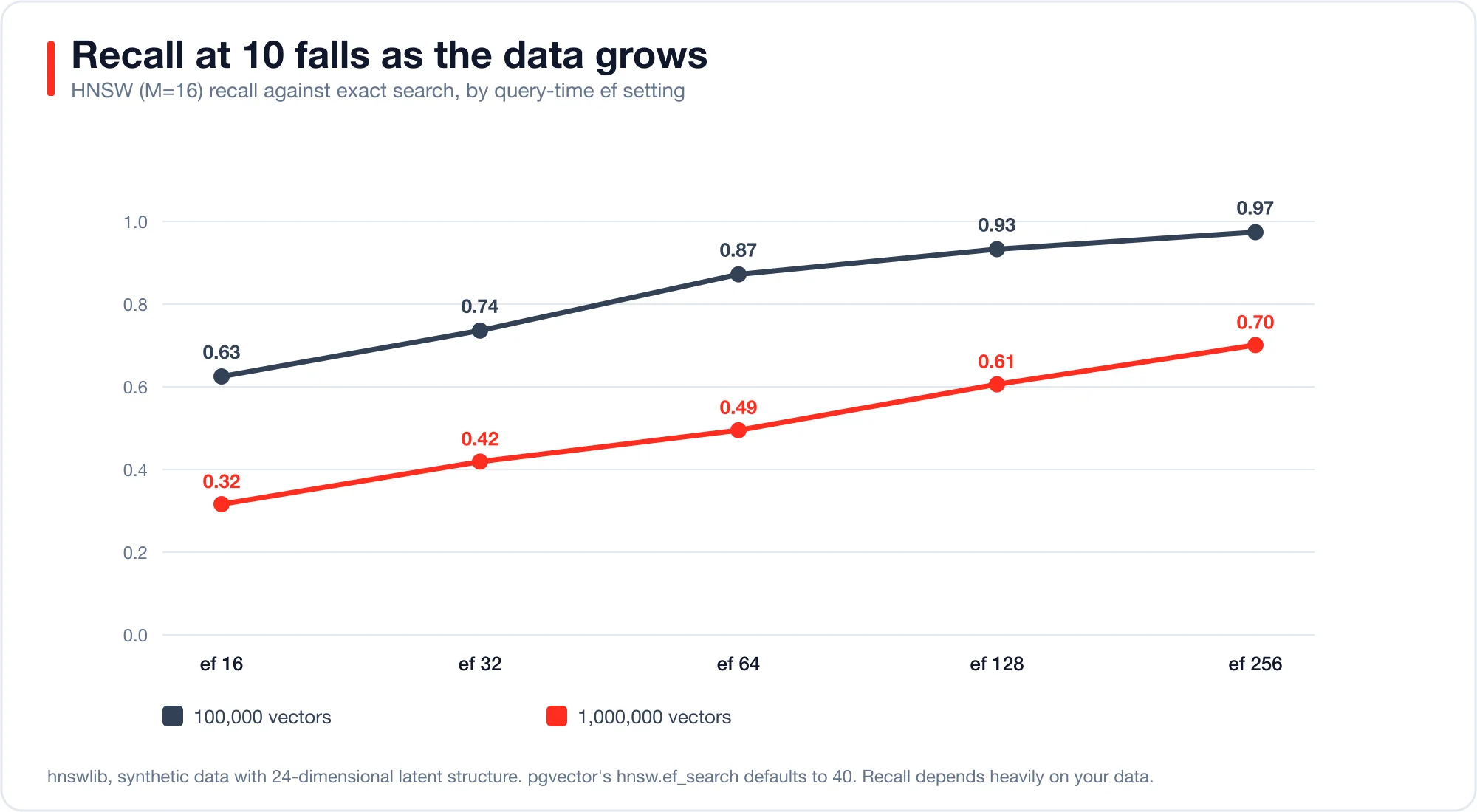
The index was 14 to 47 times faster than exact search at one million vectors, but it also missed between 30% and 68% of the true neighbors (benchmark, October 2026), depending on the ef setting. On an earlier run with noisier synthetic data, recall at ef 64 fell to 0.11.
Those numbers are the key lesson, because an approximate index is only as good as its configuration and the data that it indexes. The default ef_search of 40 sits between my 32 and 64 rows, so it would have returned roughly 40% to 50% of the true neighbors on this data (estimate, October 2026). Your embeddings may behave better, or worse; you will not know until you measure recall on your own data.
Building the index also costs considerable time, since the 100,000-vector index took 12 seconds to build, while the 1,000,000-vector index took 276 seconds on 8 threads. Plan for that during migrations and re-embedding jobs. Teams that rent Postgres by the hour should also compare neon pricing and the other options in our serverless database guide, because index builds keep compute busy.
Why does memory drive the cost?
Memory scales with the vector count multiplied by the number of dimensions, and it ultimately determines your server size. Each float32 number takes 4 bytes, so one million vectors of 1,536 dimensions take about 6.1 GB of raw storage before the index, which adds more.
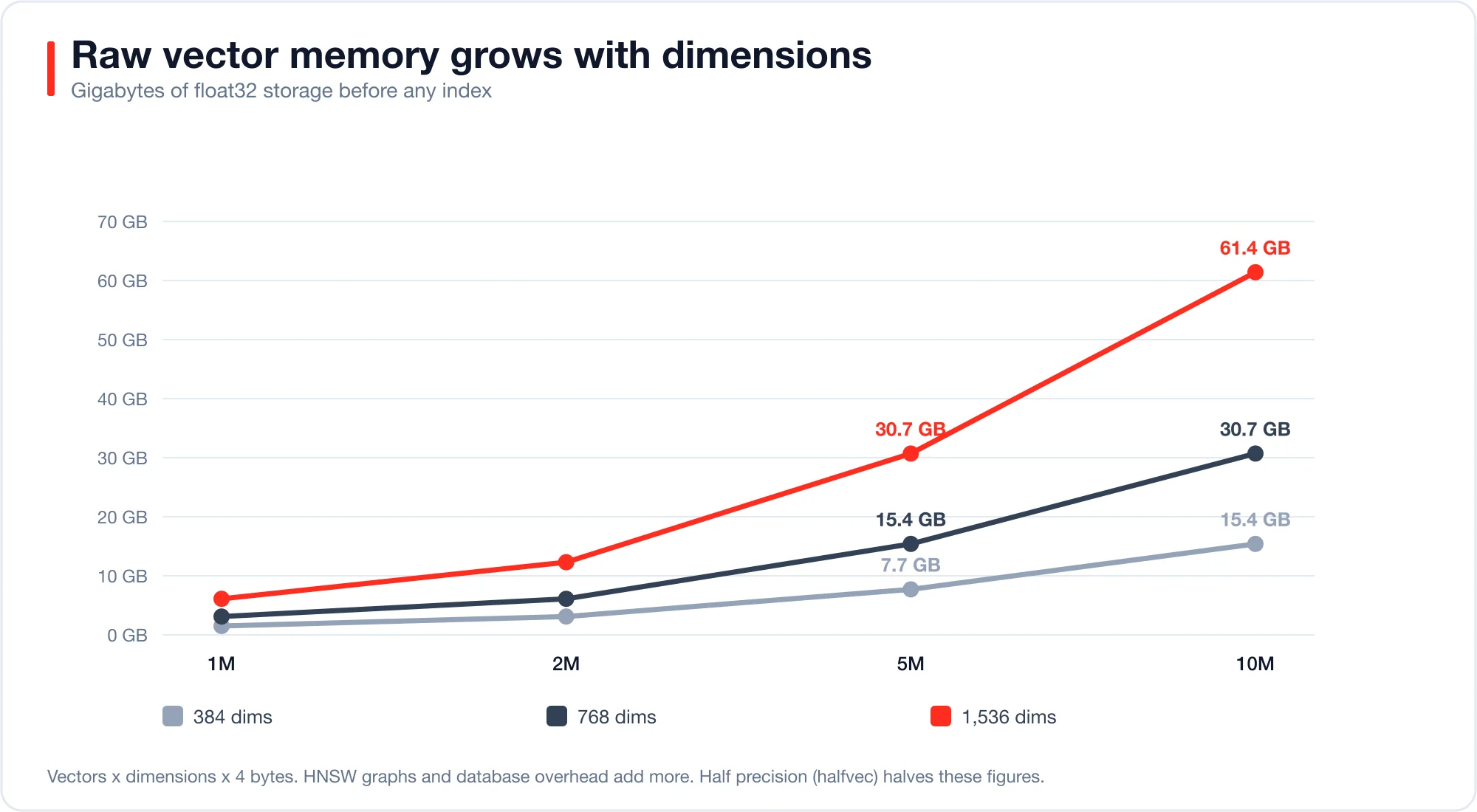
Dimensions matter as much as the count, and Laravel's documentation uses 1,536 dimensions in its example, which matches OpenAI's text-embedding-3-small model, whereas a 384-dimension model needs only one quarter of that memory for the same documents.
You can shrink memory in three ways.
- Use fewer dimensions. Some embedding models let you choose a smaller output size.
- Use half precision. pgvector offers a
halfvectype that stores 2 bytes per number, and it supports indexing up to 4,000 dimensions. - Index only what you search. Keep old or rarely used documents out of the vector table.
Note the index limit as well. The pgvector README says the vector type can index up to 2,000 dimensions, while storage allows up to 16,000.
What do the hosted services cost?
Hosted vector databases charge for storage, reads, and a monthly floor. Check each vendor's page before you plan, because prices change.
- Pinecone. The free Starter plan includes up to 2 GB of storage, 2 million write units, and 1 million read units a month. The Standard plan lists $0.33 per GB per month for storage, $4 to $4.50 per million write units, and $16 to $18 per million read units, with a $50 monthly minimum, per Pinecone's pricing page.
- Qdrant Cloud. The free tier is a single node with 0.5 vCPU, 1 GB of RAM, and 4 GB of disk. Paid usage is billed hourly on the resources you use, per Qdrant's pricing page.
- pgvector. The extension is free. You pay for the Postgres server you already run. Laravel notes that every Postgres database on Laravel Cloud already has pgvector installed.
Run the numbers for one million 1,536-dimension vectors. Raw storage is about 6.1 GB. At Pinecone's $0.33 per GB, storage costs about $2 a month. The $50 minimum and your read volume dominate the bill, not the storage. A team that already pays for Postgres adds almost nothing.
How do you decide?
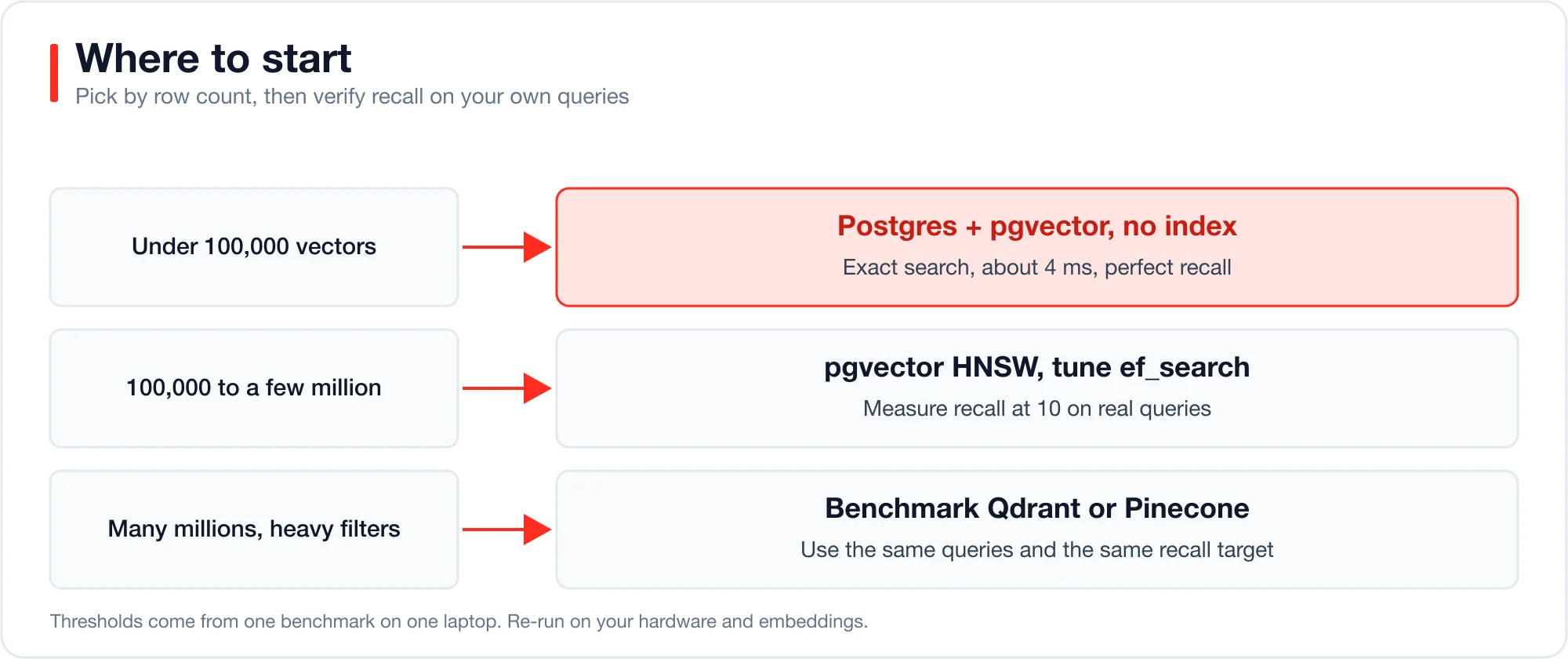
Match the tool to your row count and your query rate. This table sums up my results and the vendor documentation.
| Your situation | Choose | Why |
|---|---|---|
| Under 100,000 vectors, low traffic | pgvector with no index | Exact search is about 4 ms and has perfect recall |
| 100,000 to a few million, moderate traffic | pgvector with HNSW | Fast queries, and you must tune ef_search and check recall |
| Many millions of vectors or heavy filtering | Test Qdrant or Pinecone | Memory and filtering behavior start to dominate |
| A prototype that may be thrown away | Whatever is already in your stack | Do not add a service for a guess |
Filters complicate the choice, so consider a multi-tenant app, for example, where every query must stay inside one team's rows. Indexes find neighbors first and filter after, so a strict filter can return fewer results than you asked for. pgvector 0.8.0 added iterative index scans to address this, per its README. If your queries filter by tenant or category, test with the real filter.
How do you set it up in Laravel?
Laravel supports vector search through the AI SDK and a vector column type. The Laravel vector search docs says vector search works with PostgreSQL and pgvector, MariaDB 11.7 or later, and MongoDB. The migration below comes straight from those docs.
Schema::ensureVectorExtensionExists();

Schema::create('documents', function (Blueprint $table) {
    $table->id();
    $table->string('title');
    $table->text('content');
    $table->vector('embedding', dimensions: 1536)->index();
    $table->timestamps();
});
The ->index() call creates an HNSW index; my results suggest a small change. If your table will stay under about 100,000 rows, you can leave ->index() off and get exact search. Add it later when the table grows and you have measured the recall you can accept.
Query by similarity with whereVectorSimilarTo, and combine it with normal filters.
$documents = Document::query()
    ->where('team_id', $user->team_id)
    ->whereVectorSimilarTo('embedding', $request->input('query'))
    ->limit(10)
    ->get();
If you use the index, set the search width in SQL for the session that runs the query.
SET hnsw.ef_search = 100;Laravel also supports reranking as a second stage; you retrieve 50 candidates cheaply, then let a model reorder them. That lets you run a fast, lower-recall first pass and still return strong top results.
When do vectors miss, and what should you combine them with?
Vector search matches meaning, so it can miss exact strings such as product codes, error messages, and names. A query for an error code like SQLSTATE[23000] is better served by keyword search than by embeddings. Laravel's documentation recommends combining techniques for this reason.
Two combinations work well. Full-text retrieval followed by reranking narrows thousands of rows to a short candidate list, and then a model reorders it by relevance. Vector similarity combined with ordinary where clauses limits semantic search to one team, category, or owner. Both patterns appear in the Laravel search docs and need no extra service.
How do you test this on your own data?
Measure recall against exact search on a sample of your real queries. The test takes about an hour; follow these steps.
- Export 1,000 real queries, or generate them from your documents.
- Run each with exact search and save the top 10 ids. That is your ground truth.
- Build the index, then run the same queries at several
ef_searchvalues. - For each value, compute recall at 10 and median latency.
- Pick the smallest
ef_searchthat meets your recall target.
Here is the core of my benchmark in Python, trimmed to the essentials.
import numpy as np, hnswlib, time

x = np.load("vectors.npy")          # shape (n, 384), float32, unit length
q = np.load("queries.npy")          # shape (200, 384)

truth = [np.argsort(-(x @ qi))[:10] for qi in q[:100]]  # exact ground truth

index = hnswlib.Index(space="cosine", dim=x.shape[1])
index.init_index(max_elements=len(x), ef_construction=200, M=16)
index.add_items(x)

for ef in (16, 32, 64, 128, 256):
    index.set_ef(ef)
    hits, ms = 0, []
    for i, qi in enumerate(q):
        t = time.perf_counter()
        labels, _ = index.knn_query(qi, k=10)
        ms.append((time.perf_counter() - t) * 1000)
        if i < 100:
            hits += len(set(labels[0]) & set(truth[i]))
    print(ef, round(float(np.median(ms[5:])), 3), hits / 1000)
Replace the random arrays with your own embeddings. If recall at your chosen latency is below your target, raise ef_search, raise M, or consider a dedicated engine.
What are the limits of this test?
This test has four limits; the data is synthetic, so recall will differ on real text embeddings. The hnswlib library is not pgvector, though both implement HNSW. I ran one query at a time on one machine, so I did not measure throughput under load. Latency also ignores network time to a hosted service, which can add tens of milliseconds.
Even so, the shape of the results should hold. Exact search is cheap while the table is small. An index is a trade, and recall is the price; memory sets your bill. Measure all three on your own data before you buy anything.
Advertisement
FAQ
Do I need a vector database for RAG?
Not always. For fewer than about 100,000 chunks, exact search in Postgres with pgvector took about 4 ms in my test and returns perfect recall. A dedicated vector database makes sense when your own tests show you need more scale, filtering, or throughput.
What is the best vector database in 2026?
There is no single best option. pgvector is the cheapest if you already use Postgres. Qdrant and Pinecone offer managed scale. Choose by your row count, filters, and budget, and confirm with a recall test on your data.
How much memory does a vector database need?
Multiply vectors by dimensions by 4 bytes for raw float32 storage. One million 1,536-dimension vectors need about 6.1 GB, before index overhead. Half-precision storage cuts that in half.
What is a good ef_search value in pgvector?
The default is 40. In my synthetic test, recall at 1,000,000 vectors was only 0.42 at 32 and 0.50 at 64. Start at 100, measure recall on your own queries, and raise it until you hit your target.
Does Laravel need a separate vector database?
No. Laravel's AI SDK and `whereVectorSimilarTo` work with PostgreSQL and pgvector, MariaDB 11.7 or later, and MongoDB. Laravel's own documentation says most applications will find the built-in database options sufficient. If you are still choosing a primary store, our postgresql vs mongodb comparison covers that decision.
Comments
Loading…
Sign in to join the conversation.
Related posts

AI tests hit 100% coverage and missed 8 of 43 seeded bugs
An AI wrote 12 tests with 100% line coverage. Mutation testing found 8 of 43 seeded bugs still passed. Here is the fix, with code for JavaScript and PHP.
Fri Oct 09 2026 · 11 min read · 0 views
Relational Databases: Top 10 Ranked and How They Work
Oracle still leads the October 2026 DB-Engines list of relational databases, but PostgreSQL is the only top-four system that gained ground this year. PostgreSQL scored 688.75, up 45.56 points from
Fri Oct 09 2026 · 9 min read · 1 views
What Is PostgreSQL? A Plain-English Guide With Real Tests
PostgreSQL is a free, open-source relational database that stores data in tables and answers questions written in SQL. It began in 1986 as the POSTGRES project at the University of California,
Fri Oct 09 2026 · 8 min read · 0 views