What Is PostgreSQL? A Plain-English Guide With Real Tests
By Nihar Ranjan Das · Fri Oct 09 2026 · 8 min read · 0 views
View as a Web StorySoftware#postgresql#database#postgres#sql#open source
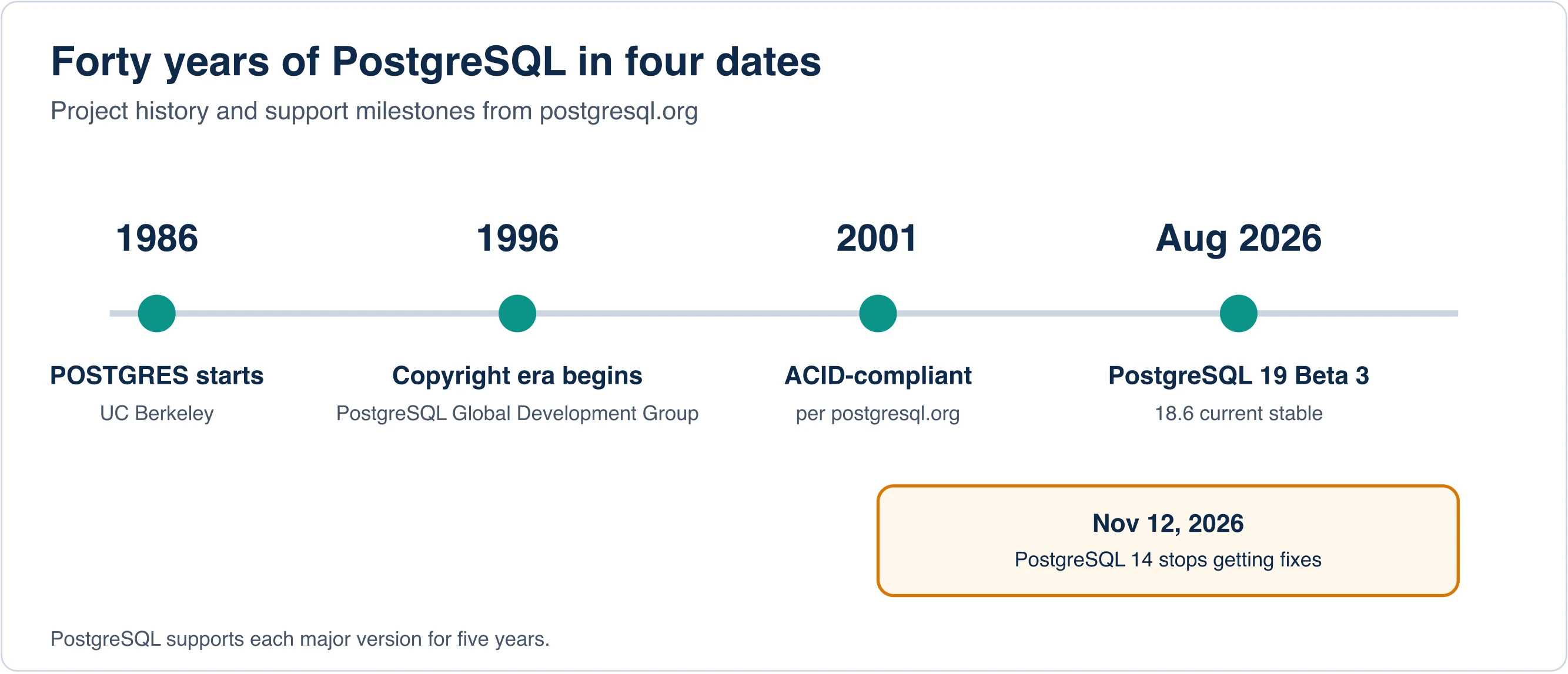
PostgreSQL is a free, open-source relational database that stores data in tables and answers questions written in SQL. It began in 1986 as the POSTGRES project at the University of California, Berkeley. Nearly 40 years later, it runs behind web apps, analytics tools and cloud platforms.
This guide answers the questions people actually search: what PostgreSQL is, who owns it, how to say and spell the name, what psql is, and when to pick it. To keep it honest, we also installed PostgreSQL 18.1, counted what ships in the box and ran a few queries.
Key takeaways
- PostgreSQL is a free, open-source relational database that began as the POSTGRES project at UC Berkeley in 1986.
- No single company owns it. The PostgreSQL Global Development Group holds the copyright, and a core team governs it.
- PostgreSQL is the official name, and Postgres is an accepted alias.
- A fresh 18.1 install we inspected had 3,413 functions, 70 base types and 62 bundled extensions.
What is PostgreSQL in simple terms?
PostgreSQL is a database server. You install it on a computer, and applications connect to it to save and fetch data. Think of a very strict, very fast spreadsheet engine that many programs can use at once, with rules that keep the data correct.
PostgreSQL is a relational database, so data lives in tables linked by keys. It speaks SQL, the standard language for querying such tables. The project's feature overview says it has been ACID-compliant since 2001, which means transactions either complete fully or not at all.
You use it through code, a command-line tool, or a graphical app. A shop might store customers, orders and payments in it. A mapping app might store places. The details differ, but the idea stays the same.
Where did PostgreSQL come from?
PostgreSQL grew out of the POSTGRES research project, which started at UC Berkeley in 1986. The official About page describes nearly 40 years of active development on the core platform. Berkeley's own POSTGRES project history documents the academic origin. Its copyright line runs from 1996 to the present and names the PostgreSQL Global Development Group.
That history explains the odd name. POSTGRES was a successor to an earlier Berkeley system called Ingres, so "Post-Ingres" became "Postgres". SQL support came later, and the project took the longer name PostgreSQL to reflect it.
Who owns PostgreSQL?
No single company owns PostgreSQL. Copyright belongs to the PostgreSQL Global Development Group, according to the footer on postgresql.org. A volunteer-led community and a set of companies fund and build it.
Governance has two layers. On its governance page, the project says the PostgreSQL Core Team is "the central arbiter of PostgreSQL project policy and governance." The committers are the people with access to push to the Git repository. Anyone can read the code, report bugs and propose patches.
Advertisement
The license matters more than the owner for most users. PostgreSQL ships under the PostgreSQL License, which the project calls a liberal open-source license similar to BSD or MIT. You may use, copy, modify and distribute it, including in commercial products.
Postgres or PostgreSQL: which name is correct?
PostgreSQL is the official name, and Postgres is an accepted alias. The project name policy states that Postgres "is an alias or nickname and is not the official name of the project". The core team settled the matter after a name-change debate failed to reach consensus.
For writing, use PostgreSQL in formal text and Postgres in casual text. Both are fine in code comments and chat. Do not write "PostGres" or "PostgresSQL". Those spellings appear in the wild, but neither is correct.
Say it as "post-gres-Q-L". Many people shorten it to "post-gres". The community accepts both.
What is psql?
psql is PostgreSQL's interactive command-line client. You type SQL or short backslash commands, and it prints results. Running psql --version on our test machine printed psql (PostgreSQL) 18.1.
Handy commands include \l to list databases, \dt to list tables and \q to quit. Beginners often confuse psql with the server. The server is the postgres program that stores data. The client is psql, which only talks to it.
If you only need to see the server's version from inside SQL, run SELECT version();. We got PostgreSQL 18.1 plus build details.
What ships inside a fresh PostgreSQL install?
A fresh PostgreSQL 18.1 cluster on our test Mac exposed 3,413 built-in functions, 397 tunable settings, 70 base data types and 62 installable extensions. We measured the catalog with plain SQL on 1 fresh cluster, as the queries below show.
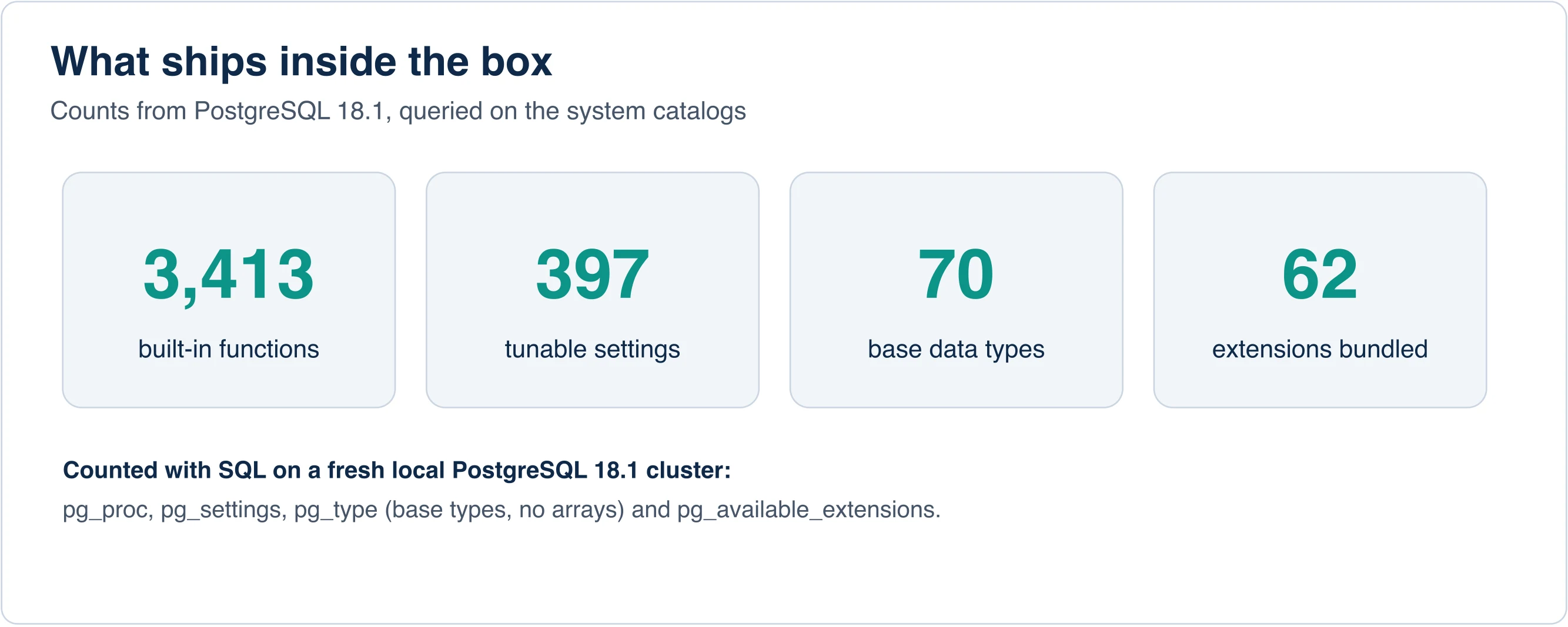
These are the queries behind the numbers:
SELECT count(*) FROM pg_proc;                       -- 3413 functions
SELECT count(*) FROM pg_settings;                   -- 397 settings
SELECT count(*) FROM pg_type
 WHERE typtype = 'b' AND typname !~ '^_';           -- 70 base types
SELECT count(*) FROM pg_available_extensions;       -- 62 extensions
The extension count comes from the installer we used, and other packages bundle different sets. Still, the number shows a design choice: PostgreSQL stays small at its core and grows through add-ons.
Features you can try in one minute
Two quick tests, such as a JSON search and a fuzzy match, show why developers like it. First, PostgreSQL stores and searches JSON natively. This query checks whether one JSON document contains another:
SELECT '{"a":[1,2,{"b":true}]}'::jsonb @> '{"a":[{"b":true}]}'; -- trueSecond, an extension adds fuzzy text matching. After CREATE EXTENSION pg_trgm;, the call similarity('postgres','postgresql') returned 0.67. That is how a search box forgives typos.
Other extensions we saw in the list include pgcrypto for hashing, citext for case-insensitive text, hstore for key-value pairs and pg_stat_statements for finding slow queries.
Is PostgreSQL a programming language?
No. PostgreSQL is a database, and SQL is a query language. SQL describes what data you want. It is not a general-purpose language for building apps.
PostgreSQL does include procedural languages for stored logic. PL/pgSQL is the best known. It lets you write functions that run inside the database. Most teams still keep business logic in application code and use PostgreSQL for storage.
Which PostgreSQL version should you use?
Use the newest supported major version your tools allow, which is PostgreSQL 18 today. The project announced on its homepage that it released PostgreSQL 19 Beta 3 together with minor updates 18.6, 17.11, 16.15, 15.19 and 14.24 on August 13, 2026. That release fixed 28 security vulnerabilities across the supported branches.
PostgreSQL's versioning policy supports each major version for five years. After that, a final minor release ships and the branch reaches end of life. The project site lists November 12, 2026 as the date PostgreSQL 14 stops receiving fixes.
If you run 14 today, plan the upgrade now. Test on a copy first, read the release notes for removed features, and run ANALYZE after the move. Beta versions such as 19 are for testing, not for production.
When is PostgreSQL the right choice?
PostgreSQL fits most server-side apps that need correctness, joins and growth room. It handles transactions, JSON, geospatial data and full-text search in one system. It also has a large pool of hosting options, from self-managed servers to cloud services.
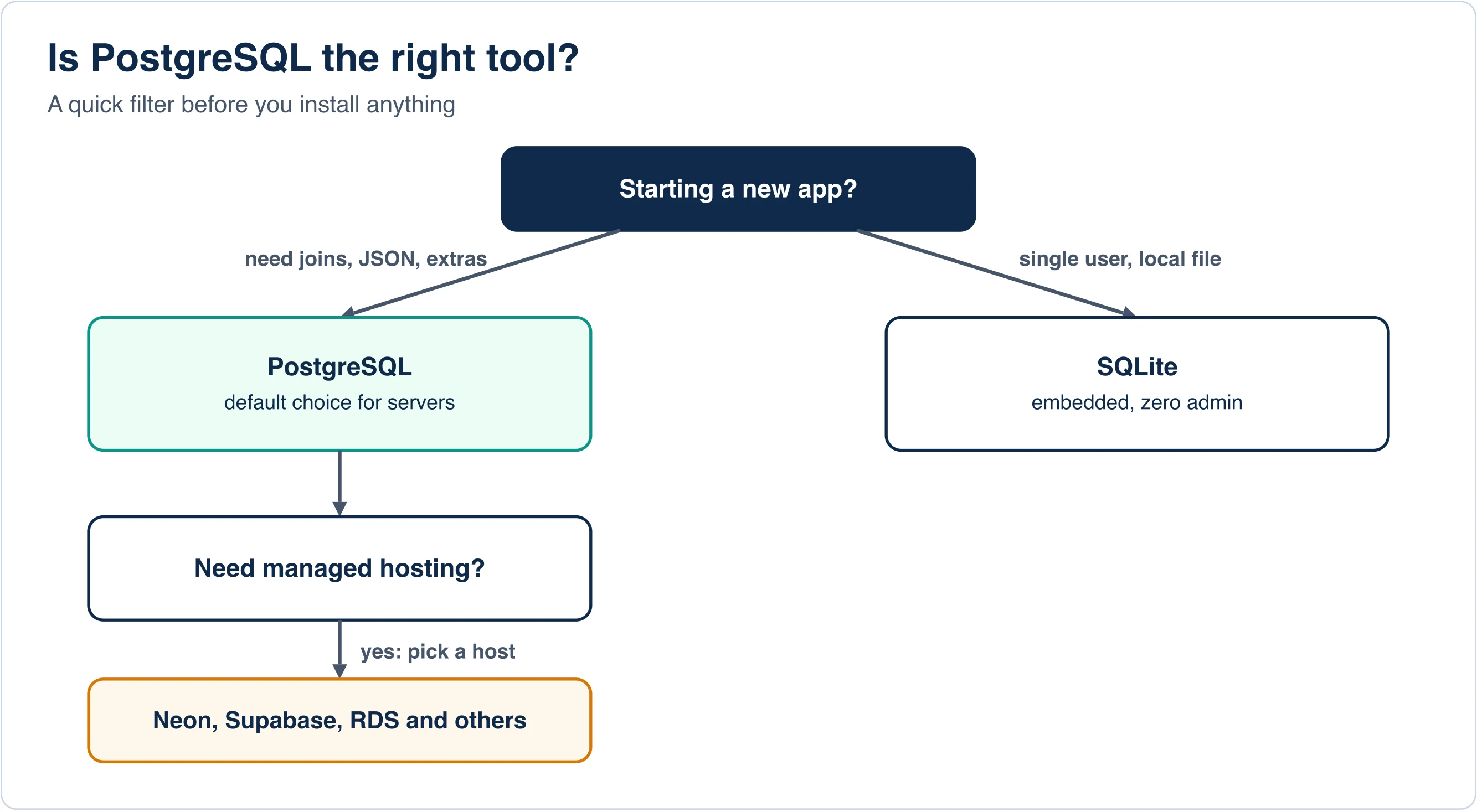
Choose something else in a few cases. SQLite suits a single-user app or an embedded device, because it is one file with no server. A document database may suit data that never joins. A warehouse suits heavy analytics over billions of rows.
Common uses include:
- Web and mobile app back ends
- Reporting databases with complex joins
- Geospatial work through extensions
- Event and audit logs with JSON columns
- Hosted services where a managed vendor runs it for you
How do you start learning PostgreSQL?
Install it, open psql and build a tiny schema. A weekend of hands-on queries teaches more than a week of reading. Start with these steps:
- Install PostgreSQL from the official download page, or run it in a container.
- Open psql and run
CREATE DATABASE practice;. - Create two tables and link them with a foreign key.
- Insert ten rows and write a
JOINquery. - Run
EXPLAIN ANALYZEon that query and read the plan.
Add an index on the join column and run the plan again. Seeing the plan change teaches you what the database is doing. Our own test on a two-million-row table showed an indexed lookup finishing in about 0.09 ms instead of 31 ms.
What does a first session look like?
A first session takes about five minutes once the server runs. This transcript uses a table that mirrors the five-row emp example from our tests, so you can copy it:
CREATE TABLE emp (id int PRIMARY KEY, name text, dept text, salary int);
INSERT INTO emp VALUES (1,'Ann','eng',120),(2,'Bob','eng',100),(3,'Cy','ops',90);
SELECT dept, avg(salary) FROM emp GROUP BY dept ORDER BY dept;
The query returns one row per department with its average salary. If you see ERROR: relation "emp" does not exist, you are connected to a different database than the one where you created the table. Run \c with the database name and retry.
Two safety habits help from day one. Wrap risky changes in BEGIN; and finish with ROLLBACK; until you are sure. In our test, a rollback left the salary total at 475 after an update that set every row to zero. And always run a SELECT with the same WHERE clause before you run an UPDATE or DELETE.
What are the most common beginner errors?
Most first errors come from connection settings, not from SQL. Check these four before you debug the query itself:
- Wrong port. PostgreSQL listens on port 5432 by default, but installers sometimes choose another. Our own installer used 5433.
- Password prompts. The
postgressuperuser has a password set at install time. A failed login readsfe_sendauth: no password supplied. - Unix socket paths. Socket paths have a length limit near 100 bytes, so a deep folder can break a custom server.
- Case-sensitive names. An unquoted table name folds to lower case, so
Ordersandordersare the same unless you quote them.
Key takeaways for new users
PostgreSQL is a free relational database with a long Berkeley history and no single corporate owner. The official name is PostgreSQL, and Postgres is an accepted alias. The psql tool is the client, not the server. A fresh install offers thousands of functions and dozens of extensions. Pick PostgreSQL when you need a dependable server database, and pick SQLite when you need one local file.
Advertisement
FAQ
What is PostgreSQL used for?
PostgreSQL stores and queries structured data for web and mobile back ends, reporting, geospatial work and event logs. It handles transactions, JSON documents and full-text search in one system, and many cloud vendors offer it as a managed service.
Who owns PostgreSQL?
No single company owns PostgreSQL. The copyright line on postgresql.org names the PostgreSQL Global Development Group. A volunteer-led core team governs policy, and committers push code to the repository. The PostgreSQL License lets anyone use and modify it.
What is psql?
psql is PostgreSQL's interactive command-line client. You type SQL or backslash commands such as \l to list databases, and it prints the results. It is a client that talks to the postgres server program, not the server itself.
Is Postgres the same as PostgreSQL?
Yes. PostgreSQL is the official name, and Postgres is an accepted alias according to the project name policy. The core team kept PostgreSQL after a name-change debate reached no consensus. Use either name in conversation, but PostgreSQL in formal writing.
Is PostgreSQL a programming language?
No. PostgreSQL is a database, and SQL is a query language for asking it questions. PostgreSQL also ships procedural languages such as PL/pgSQL for writing stored functions, but most teams keep application logic outside the database.
Comments
Loading…
Sign in to join the conversation.
Related posts
Relational Databases: Top 10 Ranked and How They Work
Oracle still leads the October 2026 DB-Engines list of relational databases, but PostgreSQL is the only top-four system that gained ground this year. PostgreSQL scored 688.75, up 45.56 points from
Fri Oct 09 2026 · 9 min read · 1 views
Serverless Databases Compared: What They Cost in 2026
A serverless database costs the least when your app sits idle, and the most when it runs all day. That single fact decides most purchases. A hobby app can run free on Neon, Turso or Cloudflare D1. An
Fri Oct 09 2026 · 9 min read · 0 views
Firebase Alternatives: What to Switch To and What It Costs
The best Firebase alternative for most teams is Supabase, because it swaps Firestore's per-read billing for Postgres and a flat plan. But Firebase itself is cheap for tidy apps. In our model, a
Fri Oct 09 2026 · 8 min read · 0 views