Firebase Alternatives: What to Switch To and What It Costs
By Nihar Ranjan Das · Fri Oct 09 2026 · 8 min read · 0 views
View as a Web StorySoftware#supabase#mongodb#firebase alternatives#firestore#backend as a service
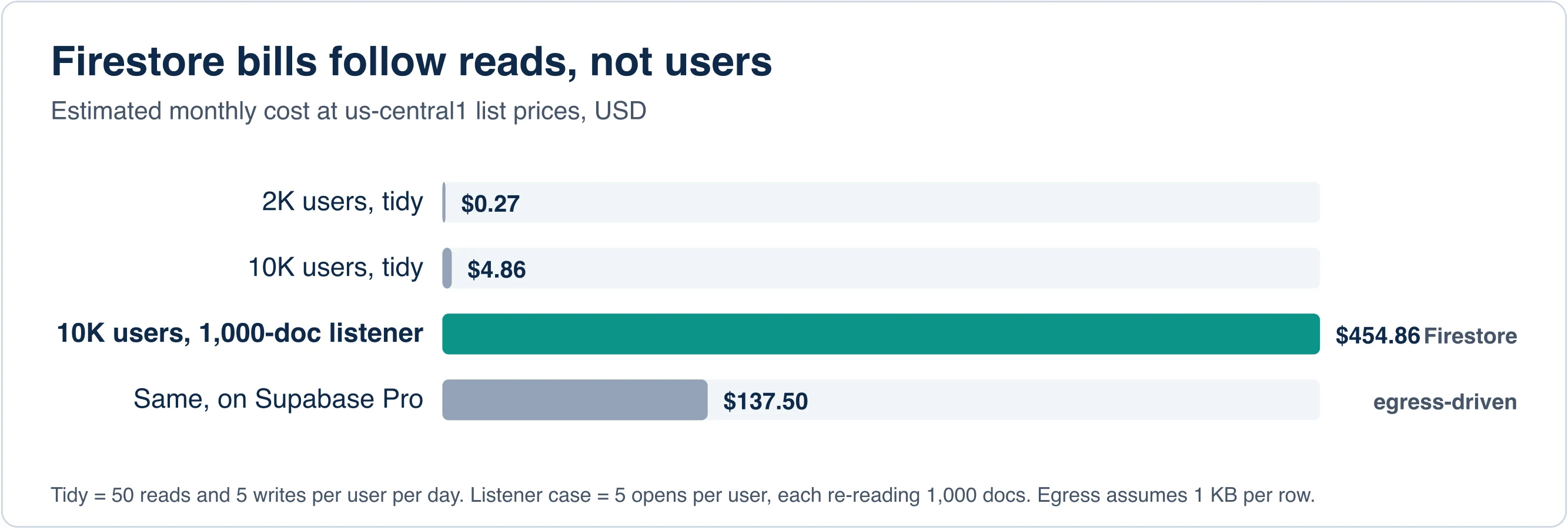
The best Firebase alternative for most teams is Supabase, because it swaps Firestore's per-read billing for Postgres and a flat plan. But Firebase itself is cheap for tidy apps. In our model, a 10,000-user app costs about $4.86 a month on Firestore. The same app costs about $455 a month when one screen re-reads a 1,000-document collection on every open.
That gap is the real reason people leave Firebase. This guide shows where the cost cliff sits, compares Supabase, Appwrite, PocketBase, Convex and MongoDB, and tells you when to stay put.
Key takeaways
- Firestore is cheap for tidy apps: our model puts 10,000 users near $4.86 a month.
- One screen that re-reads 1,000 documents on every open pushes the same app to about $455.
- Supabase suits teams that want SQL, PocketBase and Appwrite suit self-hosting, and MongoDB suits document-only needs.
- Fix expensive queries before you migrate, because that often removes the reason to leave.
What is Firebase, and why do teams leave it?
Firebase is Google's backend-as-a-service platform. It bundles a database (Firestore), authentication, file storage, hosting and messaging behind one SDK. Developers love how fast it gets an app running.
Teams leave for four reasons. Firestore bills per document read, write and delete, which makes costs hard to predict. Firestore's document model and security rules do not map onto SQL, so reports and joins are awkward. Lock-in makes later moves expensive. And some teams want to self-host or keep data in a chosen region.
None of these is a flaw in every project. Check which reason applies to you before you spend weeks migrating.
How much does Firebase really cost?
Firebase costs almost nothing for tidy apps and can jump sharply for apps with careless queries. Firestore in us-central1 lists Google's Firestore rates of $0.03 per 100,000 document reads, $0.09 per 100,000 writes and $0.01 per 100,000 deletes. Prices vary by region, so check the pricing page for yours.
The free Spark plan includes 1 GiB of stored data, 50,000 document reads per day, 20,000 writes per day, 20,000 deletes per day and 10 GiB of outbound transfer per month, per Google's Firebase pricing page. Authentication is free up to 50,000 monthly active users. The pay-as-you-go Blaze plan has no spending cap by default.
We analyzed 3 app profiles with those rates. All use the same Firestore prices and ignore storage and egress:
| App | Daily reads | Daily writes | Monthly Firestore cost |
|---|---|---|---|
| 2,000 users, 40 reads and 5 writes each | 80,000 | 10,000 | about $0.27 |
| 10,000 users, same habits | 500,000 | 50,000 | about $4.86 |
| 10,000 users, one screen re-reads 1,000 docs on 5 opens a day | about 50.5 million | 50,000 | about $454.86 |
The math is simple. In the third case, 10,000 users × 5 opens × 1,000 documents is 50 million reads a day. Subtract the free 50,000, multiply by 30 days and divide by 100,000, and you get roughly 15,135 billable units at $0.03.
Advertisement
The cliff comes from queries, not users. A real-time listener that returns a whole collection, or a list screen without pagination, multiplies reads. Fix those first. Pagination and limit() calls cost an afternoon, which is cheaper than a migration.
What are the best Firebase alternatives in 2026?
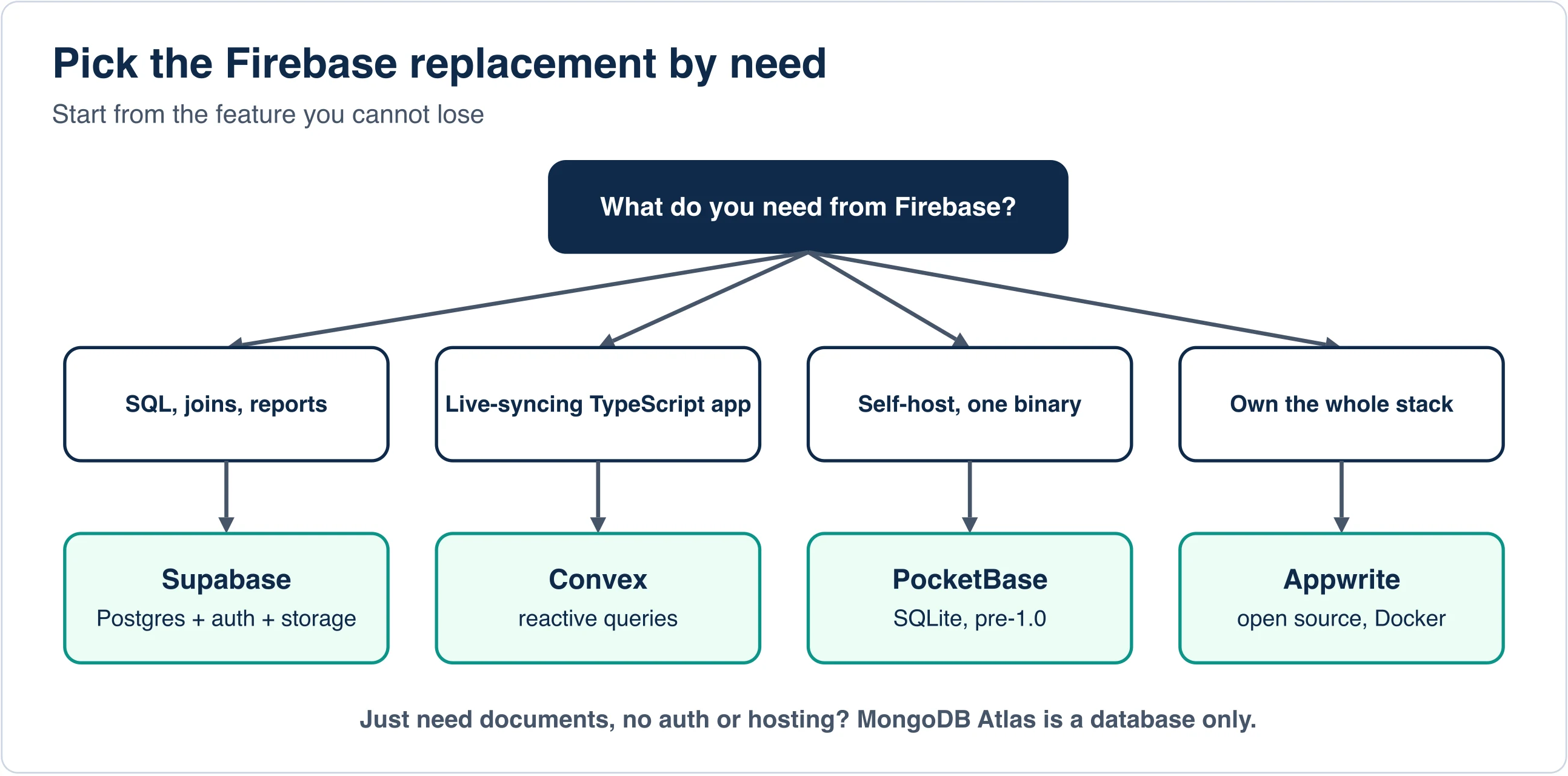
The best Firebase alternatives are Supabase for SQL, Convex for live TypeScript apps, PocketBase for a tiny self-hosted backend, Appwrite for an open-source all-in-one, and MongoDB Atlas for documents only. Each trades something for what it gains.
Supabase
Supabase is an open-source backend built on Postgres. It adds authentication, file storage, auto-generated APIs and realtime subscriptions. You write SQL, so joins, reports and constraints work as usual.
Its pricing page lists a Free plan with a 500 MB database, 50,000 monthly active users, 1 GB of file storage and 5 GB of egress. Free projects pause after one week of inactivity, and you can run two active projects. The Pro plan starts at $25 per month with an 8 GB disk, 100,000 monthly active users, 100 GB of file storage and 250 GB of egress. Spend caps are on by default on Pro, and paid projects are not paused for inactivity.
For the heavy-listener example above, Supabase has no per-read charge. Egress is the cost driver. At 1 KB per row, 50 million rows a day is about 1.5 TB a month, which lands near $137.50 on Pro. That is a rough estimate with no caching, and a well-built app returns far fewer rows.
Appwrite
Appwrite is an open-source backend platform you can self-host with Docker or use as a hosted cloud service. It offers databases, authentication, storage and functions. Pricing changes often, so read the Appwrite pricing page for the current plan limits. Choose Appwrite when you want Firebase-style features and full control of the hosting.
PocketBase
PocketBase is an open-source backend that ships as a single executable. It embeds a SQLite database and adds realtime subscriptions, built-in authentication and a dashboard. You start it with ./pocketbase serve.
The project's own documentation warns that full backward compatibility is not guaranteed before version 1.0 and that it is not recommended for production-critical applications yet. Read the PocketBase documentation for the latest status. It is a superb fit for side projects, internal tools and learning.
Convex
Convex is a backend platform for TypeScript apps with reactive queries, so screens update when data changes. It is the closest match to Firebase's live-sync feel. Convex prices by team, so costs scale with developer count. Look at the Convex pricing page and compare it with per-project plans before choosing.
MongoDB Atlas
MongoDB Atlas is a managed document database from MongoDB. It is a database only. You must add authentication, file storage, hosting and push messaging yourself. That makes it a fair match for the Firestore data model, not for the whole Firebase platform.
Firebase vs MongoDB: how do they differ?
Firebase is a full app platform with a document database inside, while MongoDB is a document database without the platform. Firestore stores documents in collections. MongoDB does too, but it adds a richer query language, aggregation pipelines and a choice of cloud or self-hosting.
Pick MongoDB if your data is document-shaped, your team already knows it and you can supply auth and storage elsewhere. Pick Firebase if you want one SDK that handles everything and your usage fits the free quotas. Neither gives you SQL joins.
Cut the bill before you move anything
Three fixes lower Firestore reads without a migration. Consider a chat screen, for example, that loads every message ever sent.
- Paginate lists. Load 20 documents at a time with
limit(20)and a cursor, not the whole collection. - Narrow listeners. Attach a realtime listener to the one document or the newest page, not to a full collection.
- Cache on the client. Firestore's offline persistence can serve repeat reads from the device when your SDK enables it.
Measure first. The Firebase console shows read and write counts per day, so you can see which release caused a spike.
How do the free tiers compare?
Firebase's Spark plan limits operations per day, while Supabase's free plan limits storage and pauses idle projects. Which one hurts depends on your traffic pattern.
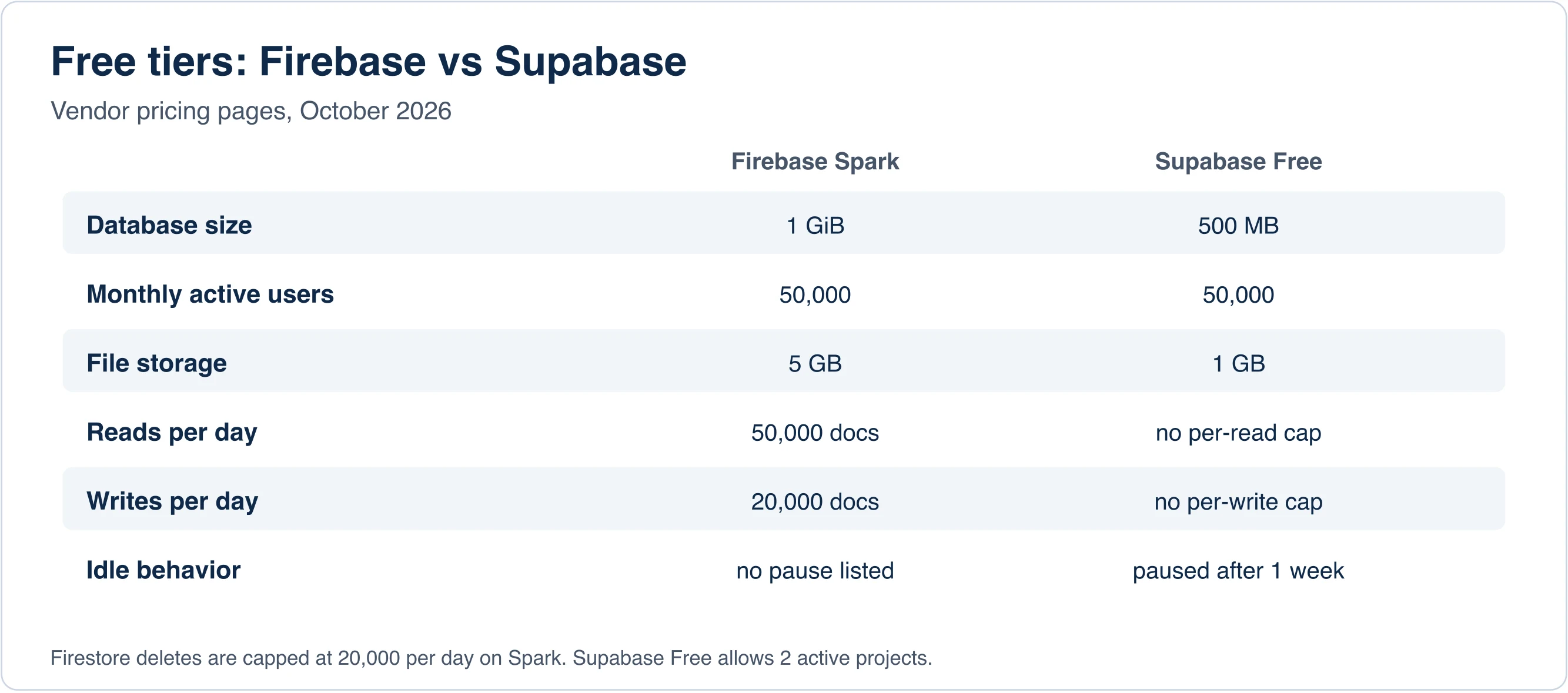
Spark's daily caps of 50,000 reads and 20,000 writes can bite a busy prototype in hours. Supabase Free has no per-operation cap, but a 500 MB database fills faster than 1 GiB. Its one-week pause can also surprise a demo you forgot about. Keep production off free tiers either way.
Firebase vs Supabase: what actually changes?
Moving from Firebase to Supabase changes your data model, your query language and your billing shape. The table lists the differences you will feel on day one.
| Area | Firebase | Supabase |
|---|---|---|
| Data model | Documents in collections | Rows in Postgres tables |
| Queries | SDK filters, limited joins | Full SQL with joins |
| Billing driver | Reads, writes, deletes | Plan tier plus usage such as egress |
| Access rules | Firebase security rules | Postgres row-level security |
| Self-hosting | Not available | Open source, can self-host |
| Realtime | Built into Firestore | Realtime subscriptions on Postgres changes |
The biggest shift is access control. Firebase security rules become row-level security policies, which are SQL statements attached to tables. Plan time for that rewrite, because it is the step that most often hides bugs.
How do you pick the right alternative?
Start from the one feature you cannot lose. Need SQL and reports? Take Supabase. Need live-syncing TypeScript screens? Look at Convex. Want a single binary on a cheap server? Try PocketBase. Want open source with a managed option? Try Appwrite. Need only documents? Use MongoDB Atlas.
Should you stay on Firebase?
Stay if your bill is small, your app is mobile-first and your data fits documents. Moving costs weeks. Auth alone can take a week, because password hashes and provider links must be exported and mapped.
Leave when queries need joins, when cost is unpredictable even after you fix listeners, or when policy demands self-hosting.
What does a safe migration look like?
A safe migration runs both systems side by side, moves data in slices and flips traffic last. Rushing it risks lost users and broken sessions.
- Fix expensive queries first. Add pagination and indexes. Measure the new bill.
- Model the target schema. Turn collections into tables or documents on paper before you copy anything.
- Export auth. Firebase can export users with password hashes. Check that your target supports the hash format.
- Copy data in batches. Script it, and verify counts and checksums after each batch.
- Dual-write for a short window. Write to both systems and compare results.
- Flip reads, then writes. Keep Firebase as a fallback for a few days.
- Turn Firebase off last. Download a final backup first.
Key takeaways for your decision
Firebase stays cheap until a few careless queries multiply reads. Our model puts a tidy 10,000-user app near $4.86 a month and the same app with a collection-wide listener near $455. Supabase fits teams that want SQL, PocketBase and Appwrite fit teams that want self-hosting, and MongoDB fits document-only needs. Fix queries before you migrate, and check every price on the vendor page, because limits change.
Advertisement
FAQ
What is the best Firebase alternative?
Supabase is the most common pick because it offers Postgres, authentication, storage and realtime with a flat Pro plan from $25 a month. Choose PocketBase or Appwrite to self-host, Convex for live TypeScript apps, and MongoDB Atlas if you only need documents.
Why is my Firebase bill so high?
Firestore bills per document read, write and delete, so a list screen or realtime listener that re-reads a large collection multiplies reads. In our model, 50 million reads a day cost about $455 a month at us-central1 rates. Add pagination and limit() first.
Firebase vs MongoDB: which is better?
Firebase is a full app platform with authentication, hosting and storage around Firestore, while MongoDB Atlas is a document database only. Pick MongoDB if your team knows it and can add auth elsewhere. Neither supports SQL joins.
Is Supabase cheaper than Firebase?
It depends on the usage shape. Supabase has no per-read charge, and Pro starts at $25 a month with 250 GB of egress. Firebase can cost less for light apps and more for read-heavy ones. Model your own reads, writes and egress.
Is PocketBase ready for production?
PocketBase's own documentation says full backward compatibility is not guaranteed before version 1.0 and that it is not recommended for production-critical applications yet. It is a strong fit for side projects and internal tools. Check the docs for current status.
Comments
Loading…
Sign in to join the conversation.
Related posts
Relational Databases: Top 10 Ranked and How They Work
Oracle still leads the October 2026 DB-Engines list of relational databases, but PostgreSQL is the only top-four system that gained ground this year. PostgreSQL scored 688.75, up 45.56 points from
Fri Oct 09 2026 · 9 min read · 1 views
What Is PostgreSQL? A Plain-English Guide With Real Tests
PostgreSQL is a free, open-source relational database that stores data in tables and answers questions written in SQL. It began in 1986 as the POSTGRES project at the University of California,
Fri Oct 09 2026 · 8 min read · 0 views
Serverless Databases Compared: What They Cost in 2026
A serverless database costs the least when your app sits idle, and the most when it runs all day. That single fact decides most purchases. A hobby app can run free on Neon, Turso or Cloudflare D1. An
Fri Oct 09 2026 · 9 min read · 0 views