Best AI IDE for Laravel: What Each One Costs in 2026
By Nihar Ranjan Das · Sat Oct 10 2026 · 10 min read · 1 views
View as a Web StoryAISoftware#github copilot#Laravel#ai-ide#cursor#laravel-boost

The best AI IDE for Laravel is the one that reads your project rules, runs your tests and costs what you will actually use. List prices for the four main choices run from $0 to $100 a month, and every vendor now meters heavy use. Laravel Boost, the official context package, works with six of them, so the editor matters less than the rules you give it.
This post lays out current prices from each vendor's own page, what Boost installs and how big it is, and a 15-minute test you can run on any AI coding editor with your own repository. I did not benchmark the editors against each other, and I say where that limits the advice.
What is an AI IDE for Laravel?
An AI IDE is a code editor with a language model built in, so it can read your project, suggest edits and run commands. For a Laravel developer the useful features are narrow. The tool must understand Eloquent and Blade, follow your conventions, and run php artisan test to check its own work.
The market has four shapes. Cursor is a code editor built around AI agents. GitHub Copilot is an assistant that runs inside VS Code and other editors. JetBrains AI is the assistant for PhpStorm and the other JetBrains IDEs, and it includes the Junie coding agent. Claude Code is a terminal agent from Anthropic that works beside any editor.
Which one is best depends on where you already work. A PhpStorm user will not switch editors for a marginal gain, and a terminal user does not need an editor at all. That is why price and context handling decide the choice more than raw model quality.
What does each AI coding editor cost?
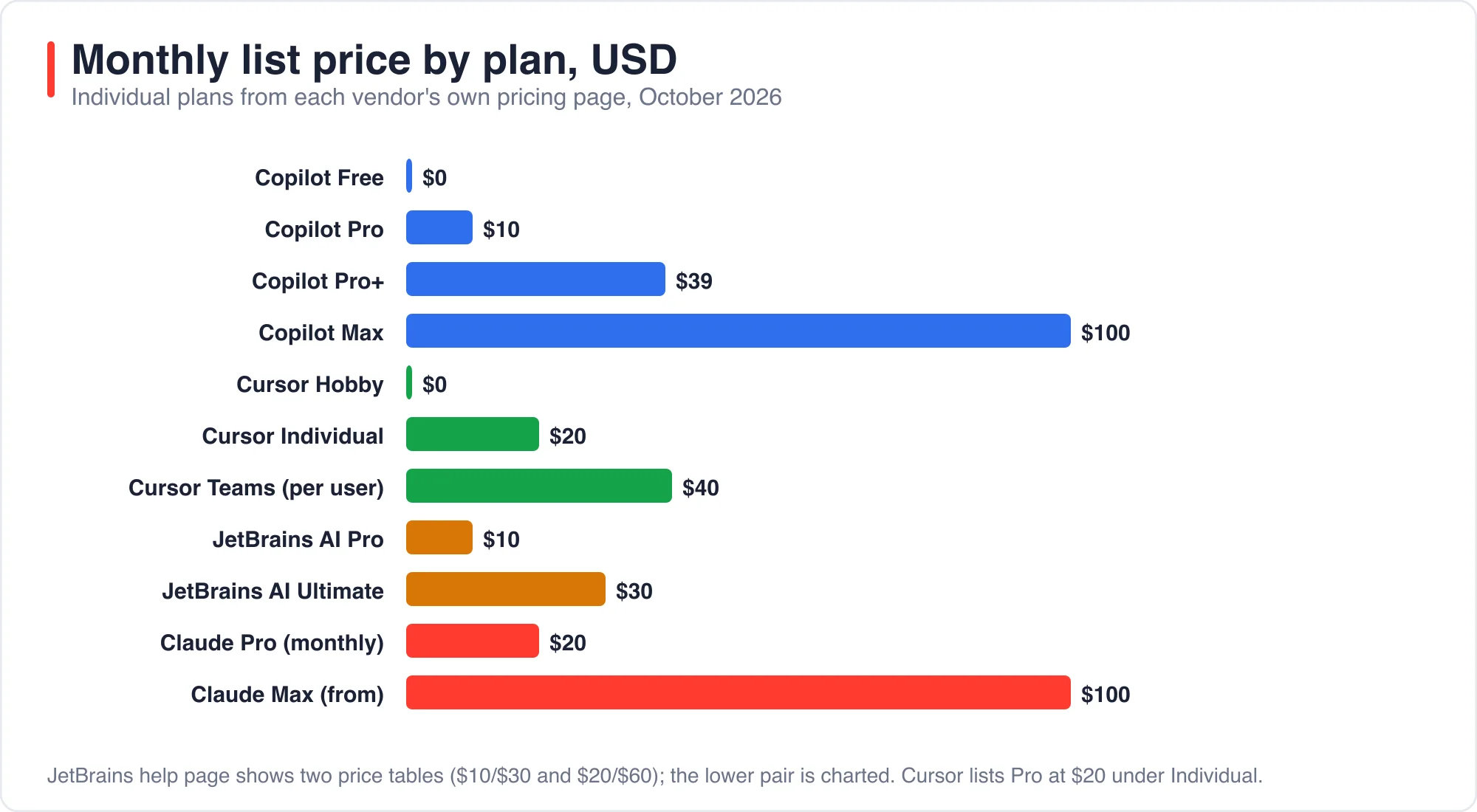
List prices for individual plans run from $0 to $100 a month in October 2026. Every vendor also meters heavy agent use, so the number on the pricing page is a floor, not a forecast. The table below uses each vendor's own page.
| Tool | Plan | Monthly price | What the page says |
|---|---|---|---|
| GitHub Copilot plans | Free | $0 | Limited chat and agent use, 2,000 inline suggestions |
| GitHub Copilot | Pro | $10 | $10 of AI credits plus a $5 flex allotment |
| GitHub Copilot | Pro+ | $39 | $70 of total AI credits |
| GitHub Copilot | Max | $100 | $200 of total AI credits |
| Cursor pricing | Hobby | $0 | Limited agent requests |
| Cursor | Individual | $20 | Extended limits on agent |
| Cursor | Teams | $40 per user | Shared team context, privacy mode |
| JetBrains AI plans | AI Pro | $10 | 10 credits a month, each credit worth $1 |
| JetBrains AI | AI Ultimate | $30 | 35 credits a month |
| Claude plans | Pro | $20 monthly, $17 on annual billing | Claude Code included |
| Claude | Max | From $100 | Claude Code included |
Two cautions apply. First, the JetBrains help page lists two sets of figures, $10 and $30 in one table and $20 and $60 in another, and it does not say which is current. Check the live page before you budget. Second, GitHub states that one AI credit equals $0.01, so the Pro plan's $15 of credits is 1,500 credits, and agent sessions that read many files can use them quickly.
How much does one agent task actually cost?
One small Laravel task cost between $0.12 and $0.20 in my runs, measured in the total_cost_usd figure that Claude Code reports. I gave Claude Code the same job 12 times: add an endpoint that returns an author's published articles with comment counts, and write a Pest test. The cheapest run cost $0.122 and the most expensive cost $0.199.
That figure is useful as an anchor, not as a bill. On a Claude subscription you do not pay per run, and on Copilot or JetBrains the credit system converts usage to money differently. The practical reading is that a normal small task is a few cents of compute, and a big refactor that reads hundreds of files is several dollars.
Advertisement
A solo developer who runs a few tasks a day will rarely hit a plan limit. A team that runs agents on every pull request will. Estimate your own usage by timing a week of work before you choose a tier.
What does Laravel Boost add to each editor?
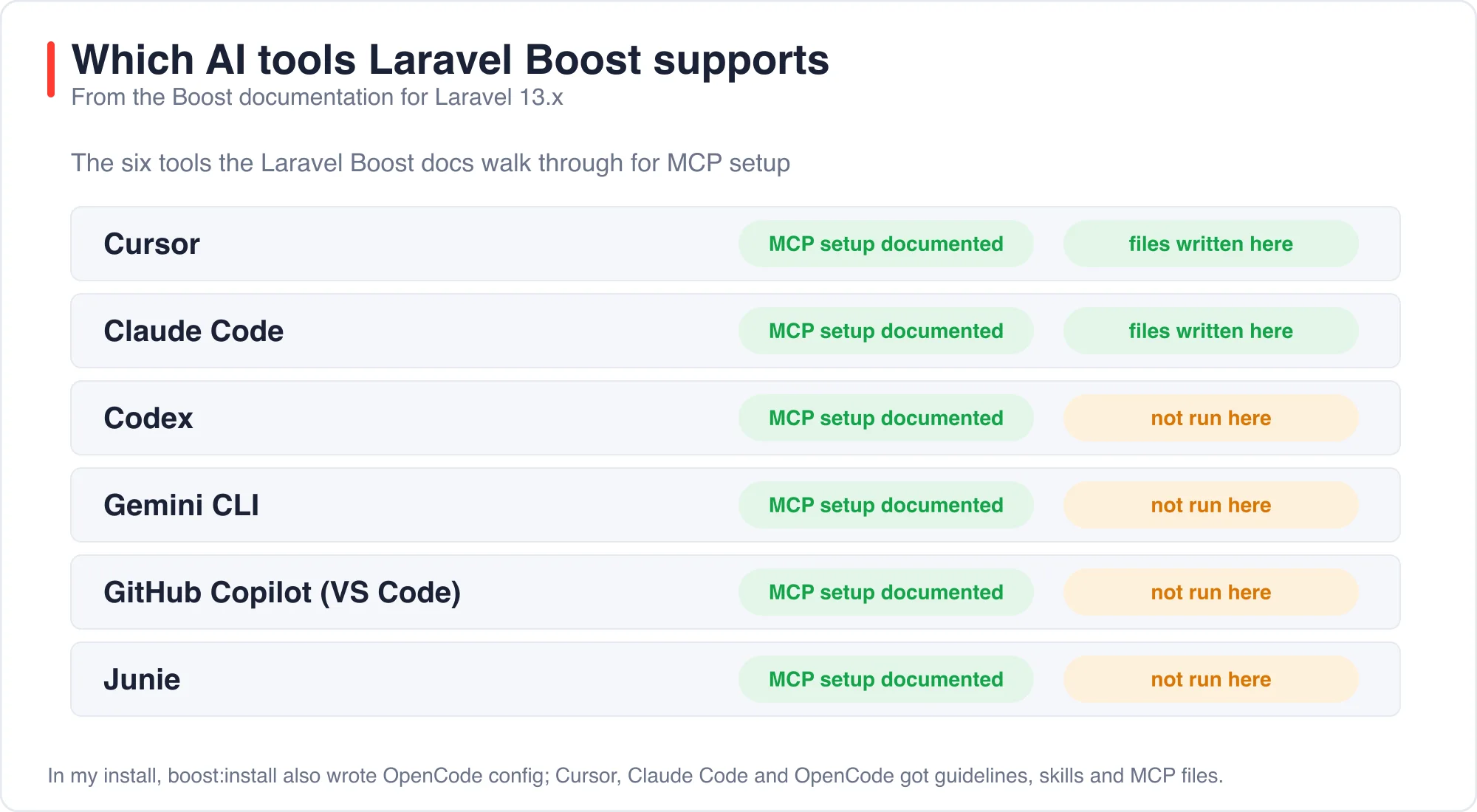
Laravel Boost writes the instruction files, skills and tool configuration that each editor reads, from one install command. The Laravel Boost documentation lists six tools: Cursor, Claude Code, Codex, Gemini CLI, GitHub Copilot in VS Code, and Junie.
Laravel Boost is an official Laravel package that gives AI agents three things. First, guidelines that load at the start of every session. Second, skills that load only when a task needs them. Third, an MCP server with 10 tools, including database schema, database query, last error, log entries and a Laravel documentation search, which the docs say draws on more than 17,000 pieces of Laravel-specific information.
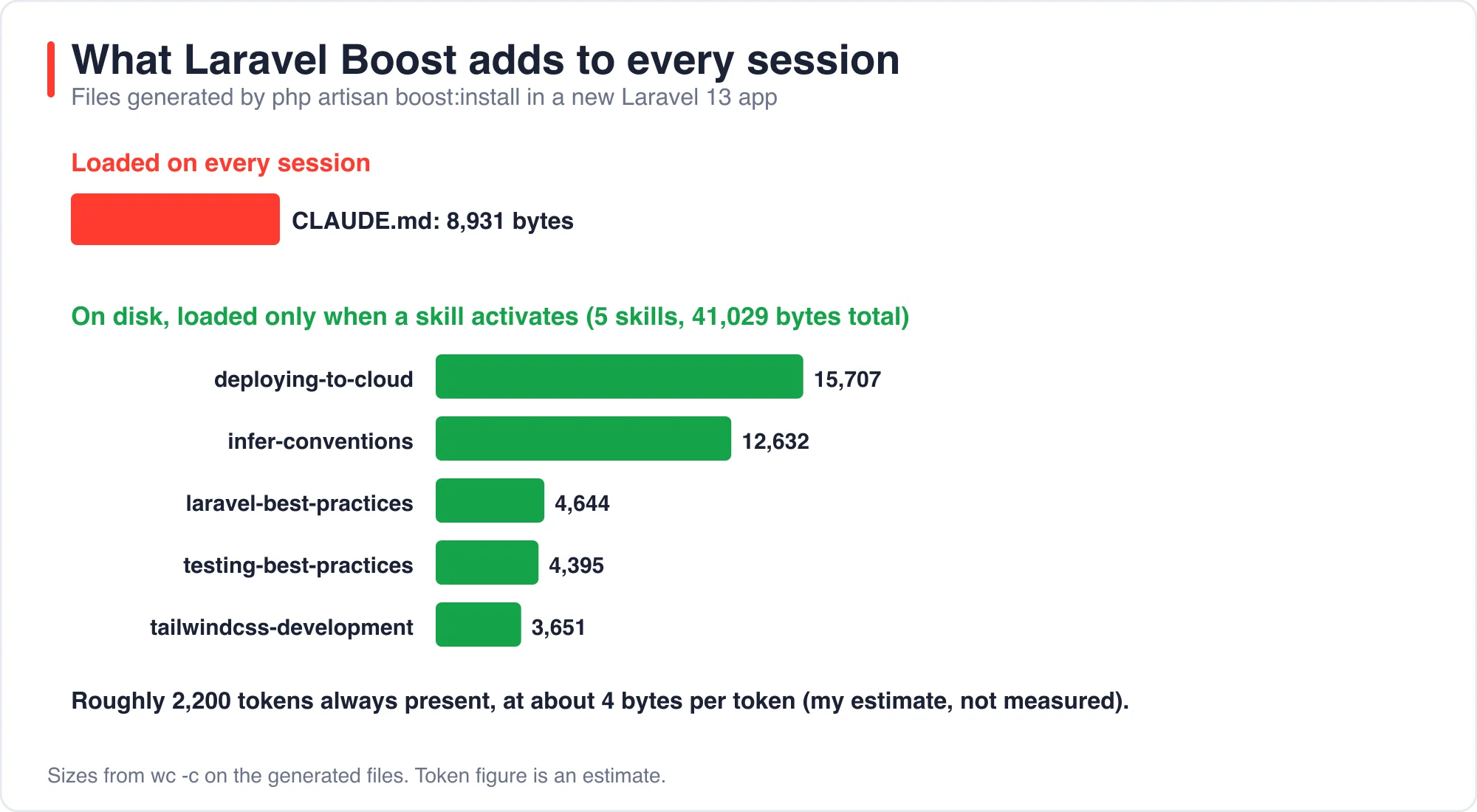
I installed it on a fresh Laravel 13 app with php artisan boost:install --guidelines --skills --mcp. It wrote configuration for Claude Code, Cursor and OpenCode in one pass. The generated files are small.
| File | Size in bytes | When it loads |
|---|---|---|
CLAUDE.md (also copied to AGENTS.md) |
8,931 | Every session |
deploying-to-cloud skill |
15,707 | When activated |
infer-conventions skill |
12,632 | When activated |
laravel-best-practices skill |
4,644 | When activated |
testing-best-practices skill |
4,395 | When activated |
tailwindcss-development skill |
3,651 | When activated |
At roughly four bytes per token, an estimate rather than a measurement, the always-loaded file costs about 2,200 tokens per session. The five skills total 41,029 bytes on disk, but a tool loads one only when the task matches its description. The set differs by version and by what your composer.json contains, so your install may write different skills.
How does each tool read your project rules?
Each tool reads a different file, and the files do not match. This is the practical reason to keep your rules in one place and let Boost generate the rest. The vendors document the following locations.
| Tool | Where it reads project instructions |
|---|---|
| Claude Code | CLAUDE.md, loaded at the start of every session; can also read AGENTS.md |
| Cursor | .mdc files in .cursor/rules, plus AGENTS.md in the root and subdirectories |
| GitHub Copilot | .github/copilot-instructions.md, path-specific .instructions.md files, or AGENTS.md |
| JetBrains Junie | A junie/ guidelines location, which Boost writes for you |
The Claude Code memory documentation adds a warning that matters for any of these. It says Claude treats the file as context, not enforced configuration, and that a hook is the right tool to block an action regardless of what the model decides. Rules guide behavior. They do not guarantee it.
I tested that distinction in two experiments with Claude Code. A rule line fixed a missing pagination bug in 4 of 4 runs, and the Boost guidelines alone fixed it in 0 of 4. A different experiment showed agents emptying a development database in 7 of 8 runs, because a test configuration allowed it. The posts titled AI Pair Programming in Laravel: A One-Line Rule Beats Boost and AI Coding Agents Wiped a Laravel Dev Database in 7 of 8 Runs give the full numbers.
Which AI coding editor should a Laravel developer pick?
Pick the tool that matches where you already work, then spend your effort on the rules. This table is my recommendation, and it rests on the prices and file locations above, not on a head-to-head benchmark.
| If you... | Start with | Why |
|---|---|---|
| Live in PhpStorm | JetBrains AI with Junie | Stays in the IDE you know; Boost supports Junie |
| Use VS Code and want the lowest entry price | GitHub Copilot Pro | $10 a month; Boost supports it |
| Want an editor built around agents | Cursor | Rules files and AGENTS.md; Boost supports it |
| Prefer the terminal | Claude Code | Works beside any editor; included with Claude plans |
| Work in a team with mixed editors | Any, plus Boost and a shared AGENTS.md |
One rules file serves every tool |
I have to be clear about what I did not do. I did not drive the Cursor, Copilot or JetBrains interfaces, so I cannot tell you which one writes better Eloquent. Cursor is installed on my machine, but its interface is not scriptable the way a terminal agent is, and I did not want to publish impressions as data.
How do you test an AI IDE on your own Laravel code?
You test it by giving each tool the same task, then grading the result with a script instead of your impression. A script removes the bias of liking one interface. It also catches the silent failures, such as an N+1 query or an unbounded list, that look fine in a demo.
This 15-minute test is the one I used on the 12 runs above. Follow these steps for each tool.
- Copy a real repository to a scratch folder, with a copy of its database. Never test on live data.
- Pick one task with a checkable result, for example a new JSON endpoint with a relation count.
- Write the checks before you start. Mine were: correct status and fields, correct counts, newest first, no unpublished rows, four queries or fewer, and paginated.
- Give every tool the identical prompt and no hints.
- Run the checks with a script, and record cost, turns and time.
The query check is the one most people skip. This snippet counts queries while it dispatches the request, and it ignores the session and cache queries that Laravel's web middleware adds.
$q = 0;
DB::listen(function ($e) use (&$q) {
    if (! preg_match('/\b(sessions|cache|cache_locks|jobs)\b/', $e->sql)) {
        $q++;
    }
});

$res = $kernel->handle(Request::create('/authors/51/articles', 'GET'));
$passed = $q <= 4;
In my runs every setup passed five of the six checks. The sixth, pagination, passed only when a rule asked for it. A comparison on a task with a single obvious answer would have shown no difference at all. Choose a task where a careless solution is plausible.
What are the limits of this advice?
The limits are clear. Prices change monthly, and every number in the pricing table comes from a vendor page as I read it in October 2026. Credit systems and included usage are the parts most likely to change.
I measured only Claude Code, and only on one task. The file sizes come from one Boost version on one fresh app, and token counts are my estimate. I recommend tools by workflow because I could not rank their output quality honestly.
Every figure here was fact-checked against the vendor pages and my saved output. About the author: I build Laravel applications and ran the Boost install and the 12 task runs myself. If a price has changed, use the contact page and tell me which one.
The bottom line
Do not choose an AI IDE on a feature list. Choose by where you work and what the plan costs at your real usage, then install Laravel Boost and write a short AGENTS.md rule file that every tool can read. The rules travel with you when you change editors. The subscription does not.
Run the 15-minute test before you pay for an annual plan. A tool that passes five checks on a plain prompt is easy to find. A tool that passes the sixth without being told is rare.
Advertisement
FAQ
What is the best AI IDE for Laravel in 2026?
It depends on where you work. PhpStorm users should look at JetBrains AI with Junie, VS Code users at GitHub Copilot from $10 a month, and terminal users at Claude Code. I did not benchmark editor output, so test on your own code.
How much does Cursor cost?
Cursor lists a free Hobby plan with limited agent requests, an Individual plan at $20 a month with extended agent limits, and Teams at $40 per user per month, according to its pricing page in October 2026.
What does Laravel Boost do?
Laravel Boost is an official package that installs guidelines, skills and an MCP server with 10 tools for AI agents. Its docs list Cursor, Claude Code, Codex, Gemini CLI, GitHub Copilot in VS Code and Junie as supported.
How do I test an AI coding tool on my own Laravel project?
Copy a repository and its database, pick one task with a checkable result, write the checks first, give every tool the same prompt, and grade with a script. Include a query-count check so N+1 bugs show up.
Comments
Loading…
Sign in to join the conversation.
Related posts
Laravel AI SDK Tool Approval: Edit Works, Fakes Skip It
The Laravel AI SDK can pause an agent before a sensitive tool runs and wait for a person to approve, reject or edit the call. I ran that human-in-the-loop tool approval API through 16 scenarios and
Sat Oct 10 2026 · 10 min read · 0 views
Code Optimizer for Laravel: 5,361 Queries Down to 5
A Laravel route that lists 1,800 articles made 5,361 database queries and took 2,326 ms in my test. Four changes cut it to 5 queries and 4 ms. Eager loading did the most for the query count. Three
Sat Oct 10 2026 · 11 min read · 1 views
PHPStan Found 3 of 11 Laravel Bugs. AI Found 9 to 11
PHPStan at level 9 found 3 of the 11 bugs I planted in a Laravel pull request. It took 1.1 seconds and cost nothing. An AI reviewer found 9, 11 and 9 in three separate runs, in about 15 seconds each,
Sat Oct 10 2026 · 10 min read · 0 views