NestJS 12 and Jest: why your tests fail and how to fix them
By Nihar Ranjan Das · Sun Oct 11 2026 · 10 min read · 0 views
View as a Web StorySoftware#typescript#node.js#testing#nestjs#esm#jest#vitest
Your NestJS 12 test suite fails with Must use import to load ES Module: .../node_modules/@nestjs/testing/index.js because Jest runs your code as CommonJS and the NestJS 12 packages are ESM only. Jest 30 can load them only on Node.js 24.9 or later, and only when you also pass --experimental-vm-modules. Vitest runs the same spec on Node 20.19, 22.12 and 24.15 without any flag.
This guide shows the failure on four Node versions, then tests each way out. The bottom line: if you cannot run Node 24.9 or later in CI, move the test runner to Vitest and keep your specs as they are.
Why do NestJS 12 tests fail under Jest?
NestJS is a TypeScript framework for building Node.js servers, and its version 12 ships every core package as an ES module. The NestJS 12 release notes say CommonJS apps keep working through require(esm). That covers your app at runtime, but it does not cover your test runner.
Jest is a JavaScript test runner that loads each test file inside its own module system. Jest does not use Node's built-in require() for your code. It runs a copy of the loader, so Node's require(esm) feature never reaches it. Jest has to support ESM on its own, and that support is gated.
The NestJS migration guide states the rule in its testing section: Jest can load the ESM-only v12 packages only on Node.js 24.9 or later. The same guide says the framework's new default for ESM projects is Vitest, while CommonJS projects keep Jest.
What does the failure look like on each Node version?
It looks the same on every version we tried, including the newest. We ran one spec file that builds a TestingModule from @nestjs/testing, which is the first import in almost every Nest test.
Test setup: Jest 30.5.2 with ts-jest 29, a CommonJS Nest 12.1.2 app, and one spec. We ran it on Node 22.12.0, 24.8.0, 24.9.0 and 24.15.0, first with no extra flags and then with NODE_OPTIONS=--experimental-vm-modules. We also ran the scaffolded Vitest 4 setup from nest new.
| Node.js | Jest, no flag | Jest with --experimental-vm-modules |
Vitest |
|---|---|---|---|
| 22.12.0 | Fails | Fails | Passes |
| 24.8.0 | Fails | Fails | Not run |
| 24.9.0 | Fails | Passes | Not run |
| 24.15.0 | Fails | Passes | Passes |
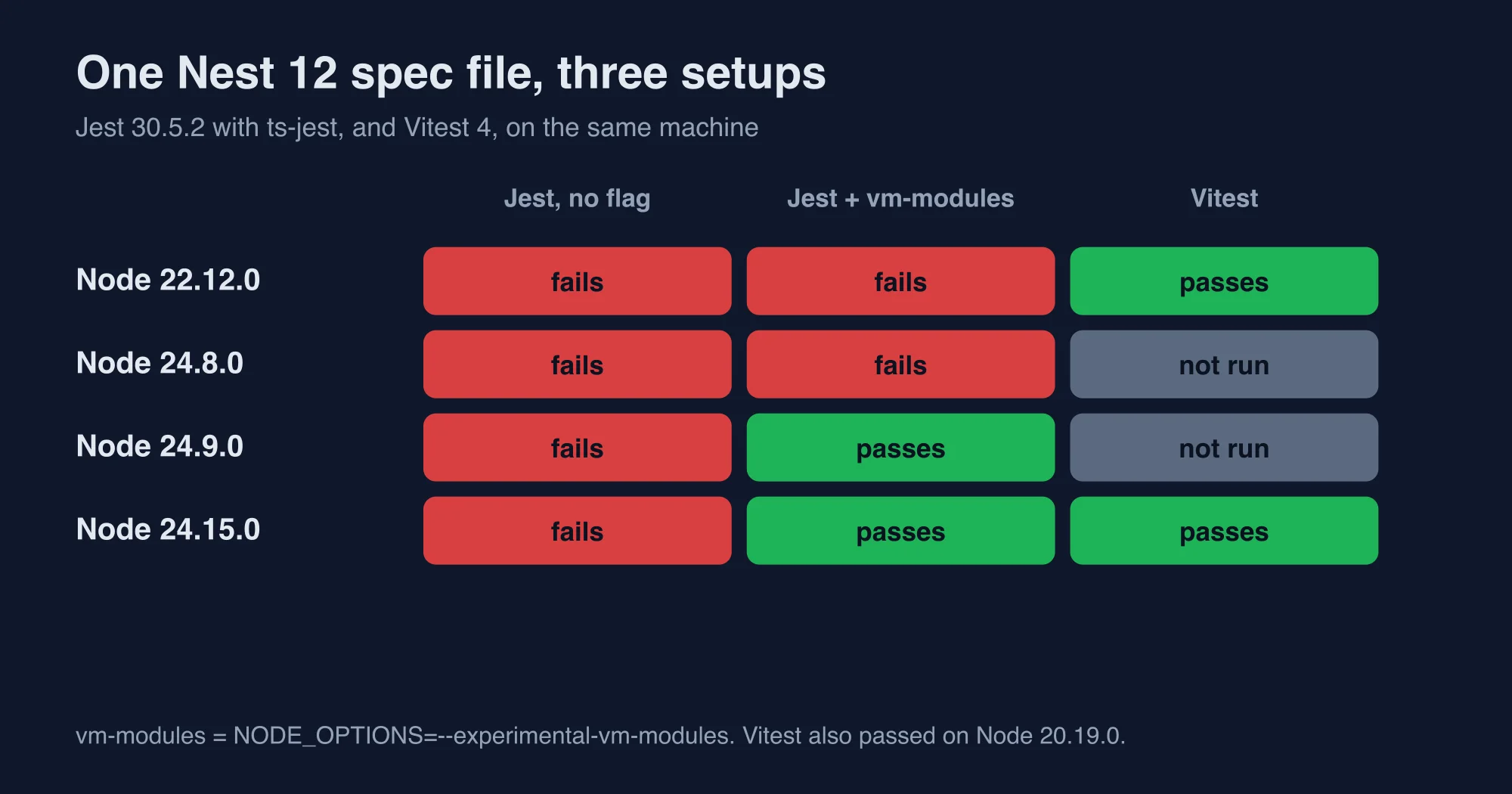
Vitest also passed on Node 20.19.0. The scaffolded end-to-end spec, which uses supertest, passed under Vitest on Node 22.12.0 too.
The failure text is the same on all four Node versions without the flag:
Advertisement
Must use import to load ES Module:
  .../node_modules/@nestjs/testing/index.js

  - Use Node v24.9+ where Jest supports require(esm) natively
    (see https://jestjs.io/docs/ecmascript-modules#require-of-esm)
Notice the trap. The message says Node 24.9 is enough. It is not. On Node 24.15.0, the newest version we tested, the same message appears until you also set the VM modules flag. Jest's runtime checks whether Node supports VM modules, and Node exposes that capability behind --experimental-vm-modules. Adding the flag was the only change between our failing and passing runs on 24.9.0 and 24.15.0.
Is the error ERR_REQUIRE_ASYNC_MODULE or ERR_REQUIRE_ESM?
Both strings appear in the wild, and you should search for either one. The nest upgrade report and the migration guide both say older Node versions fail with ERR_REQUIRE_ASYNC_MODULE. In our runs the user-facing message was "Must use import to load ES Module", and Jest tagged the error with the code ERR_REQUIRE_ESM.
The two codes come from different layers. Node raises ERR_REQUIRE_ASYNC_MODULE when require() meets an ES module that uses top-level await. The error code comes from Node's require(esm) implementation, which a Node.js commit touches. Jest raises its own ERR_REQUIRE_ESM when it cannot run the ESM file at all. Your setup, your Jest version and your Node version decide which one you see.
The fix does not depend on which code you see. The next sections cover the options.
Fix 1: how do you run Jest on Node 24.9 or later?
Run Node 24.9 or later and set the VM modules flag. This is the smallest change if your CI already uses Node 24. Our two passing Jest cells, Node 24.9.0 and 24.15.0, used exactly this setup.
Set the flag in the test script so nobody forgets it:
{
  "scripts": {
    "test": "NODE_OPTIONS=--experimental-vm-modules jest"
  }
}
On Windows, use cross-env because the inline form does not work in cmd. The flag prints an experimental warning at the start of each run. That is expected.
Two costs come with this fix. The first is the Node floor. Node 22 is a common LTS choice in US and European CI fleets, and Node 22.12.0 failed with and without the flag in our table. The second is the flag itself. It is experimental, so it can change in a Node minor release.
Also check what nest upgrade did to your Jest setup. The command bumps jest to version 30 and ts-jest to 29.4 in its report. The report lists those bumps as part of the upgrade.
Fix 2: can you transform the Nest packages instead?
Not in our tests. The usual Jest workaround for an ESM-only dependency is to let Jest transform it. You remove @nestjs from transformIgnorePatterns and let ts-jest compile the JavaScript with allowJs. We tried it.
Our config looked like this:
module.exports = {
  testEnvironment: 'node',
  transformIgnorePatterns: ['/node_modules/(?!@nestjs/)'],
  transform: { '^.+\\.(t|j)s$': ['ts-jest', { tsconfig: { allowJs: true /* ... */ } }] },
};
The run got past the first @nestjs/testing import, then failed on node_modules/@nestjs/common/utils/load-package.util.js with the same "Must use import" message. It failed on Node 20.19.0, 22.12.0, 24.8.0 and 24.15.0. NestJS loads optional packages at runtime through that helper, and the helper reaches a module that Jest cannot compile.
You may find a configuration that gets further. We did not, and we do not recommend building your tests on a workaround that fails in the framework's own loader. Treat this as a dead end unless you have time to dig.
Fix 3: how do you move a NestJS 12 project to Vitest?
Move to Vitest if you cannot rely on Node 24.9 or later. Vitest is a test runner built on Vite that runs ES modules natively and has a Jest-compatible API. The nest new command in version 12 scaffolds it by default for ESM projects. It passed our spec on Node 20.19.0, 22.12.0 and 24.15.0 with no flag.
Install it and add a config. This is the file the NestJS 12 scaffold generates:
// vitest.config.ts
import { defineConfig } from 'vitest/config';
import tsconfigPaths from 'vite-tsconfig-paths';

export default defineConfig({
  plugins: [tsconfigPaths()],
  test: { globals: true, root: './', include: ['**/*.spec.ts'] },
});
Setting globals: true keeps describe, it and expect available without imports, so most existing specs run as written. Add "types": ["vitest/globals"] to tsconfig.json so the editor knows about them. Replace jest.fn() with vi.fn() and jest.spyOn with vi.spyOn.
Plan for a few changes beyond renames:
- Mock hoisting differs. Replace
jest.mock('./x')withvi.mock('./x'), and check the factory form. - Timers use
vi.useFakeTimers(). The behavior is close, but not identical. - The NestJS guide notes that
supertestimports in end-to-end specs may need to become default imports, such asimport request from 'supertest'. @nestjs/testingstays runner agnostic, soTest.createTestingModulecode needs no change.
For example, a spec that uses jest.fn() for a repository mock needs one search-and-replace pass. End-to-end specs deserve more time, because they exercise module loading.
The migration guide is clear that you do not have to move. A CommonJS project can stay on Jest. The catch is the Node floor above.
What does a Jest to Vitest conversion look like in a real spec?
It looks like a handful of renames. Here is a typical Nest service spec before and after. The Jest version mocks a repository with jest.fn():
// Before: Jest
const repo = { find: jest.fn().mockResolvedValue([{ id: 1 }]) };
const moduleRef = await Test.createTestingModule({
  providers: [CatsService, { provide: CatsRepository, useValue: repo }],
}).compile();
expect(await moduleRef.get(CatsService).findAll()).toHaveLength(1);
expect(repo.find).toHaveBeenCalledTimes(1);
The Vitest version changes only the mock helper. The module setup, the assertions and the @nestjs/testing calls stay identical:
// After: Vitest
import { vi } from 'vitest';
const repo = { find: vi.fn().mockResolvedValue([{ id: 1 }]) };
If you set globals: true, you still import vi explicitly, because Vitest exposes it as a named export. A global search for jest. across the src folder finds every call that needs attention. Start with jest.fn, jest.spyOn and jest.mock, then handle fake timers last.
Three errors show up most often after the switch. Each one has a short fix:
| Error after the move | Likely cause | Fix |
|---|---|---|
ReferenceError: jest is not defined |
A leftover jest. call |
Replace it with vi. and import vi |
Cannot find module './x.js' |
A path alias or extension mismatch | Keep vite-tsconfig-paths in the plugin list |
| Decorator metadata missing, so Nest cannot inject | The transformer drops emitDecoratorMetadata |
Confirm the scaffolded config and tsconfig.json match |
The third row deserves a second look. NestJS relies on decorator metadata for dependency injection. If a provider arrives as undefined in a test, check the transformer before you suspect your code. Compare your tsconfig.json with the file nest new generates, because the scaffold keeps emitDecoratorMetadata and experimentalDecorators on.
What did the nest upgrade report say about Jest?
The upgrade command warns about this exact problem, and it does not fix it. We ran nest upgrade --dry-run on a CommonJS version 11 project that used Jest 29. The report updated jest to ^30.0.0 and ts-jest to ^29.4.0. It then added a warning that Jest can load the ESM-only packages only on Node.js 24.9 or later. It suggested two ways out: run the suite on Node 24.9 or later, or migrate to Vitest.
So the tool changes your versions and leaves the runner decision to you. It also does not mention the VM modules flag, which our runs needed on Node 24.15.0. Read the warning as a signal to test, not as a promise that the suite will pass.
Run the suite once on your CI Node version right after the upgrade. A failing suite is a faster signal than any checklist. If it fails with "Must use import to load ES Module", you are in the situation this guide describes.
Which option should you choose?
Choose by your CI Node version and your test count. The table puts the three working paths side by side.
| Situation | Best option | Why |
|---|---|---|
| CI already on Node 24.9 or later | Jest with the VM modules flag | One script change, specs untouched |
| CI on Node 20 or 22 | Vitest | Passed on 20.19 and 22.12 with no flag |
| New project | Vitest | It is the framework default |
| Huge Jest suite, cannot change | Stay on NestJS 11 for now | No supported Jest path on Node 22 |
The last row is the unpleasant one. If you cannot move Node and cannot move runners, the supported choice is to delay the upgrade. NestJS 11 keeps working, and the InfoQ report on the NestJS 12 roadmap shows the ESM direction was announced months ahead.
What should you check after the tests pass?
Three checks catch the problems that appear after a runner switch:
- Run the full suite once with coverage on. Coverage tools such as
@vitest/coverage-v8instrument code differently from Jest, so numbers can shift. - Run your CI pipeline on the exact Node version you deploy. A green laptop run on Node 24.15 hides a red build on 22.12.
- Pin the Node version in
.nvmrcorengines, so a runtime bump does not silently change test results.
You can also keep both runners during a gradual move. Vitest includes only **/*.spec.ts by default in the scaffold, so you can point Jest at a different folder while specs migrate.
If you also deploy to AWS Lambda, read NestJS 12 on AWS Lambda: the ESM crash and how to fix it, because the same ESM-only packages cause a separate crash there.
Organizations that maintain large automated test suites should also consider the operational consequences of changing the underlying execution environment, because test infrastructure influences developer productivity, continuous integration costs and the reliability of release decisions. Migrating a test runner incrementally, with both runners operating side by side for a limited period, reduces the likelihood that an unnoticed incompatibility will undermine confidence in the entire suite, and it gives engineering managers measurable evidence about execution time and failure rates before the older configuration is retired.
How did we test these fixes?
The methodology is repeatable. Versions tested: @nestjs/core and @nestjs/testing 12.1.2, Jest 30.5.2, ts-jest 29, Vitest 4, and Node.js 20.19.0, 22.12.0, 24.8.0, 24.9.0 and 24.15.0. Each cell in the table is one run on one machine.
Advertisement
FAQ
Why do NestJS 12 tests fail with Must use import to load ES Module?
NestJS 12 packages such as @nestjs/testing are ESM only. Jest runs your tests in its own CommonJS loader and cannot require them unless Node 24.9 or later runs with --experimental-vm-modules. Otherwise Jest stops with the message Must use import to load ES Module and reports zero tests run.
Which Node version does Jest need for NestJS 12?
Jest 30.5.2 passed our NestJS 12 spec on Node 24.9.0 and 24.15.0, but only with NODE_OPTIONS set to --experimental-vm-modules. It failed on Node 22.12.0 and 24.8.0 even with the flag. Without the flag it failed on every version we tested, including 24.15.0.
Should I switch from Jest to Vitest for NestJS 12?
Switch if your CI runs Node 20 or 22. Vitest passed our spec on Node 20.19.0, 22.12.0 and 24.15.0 with no flag, and nest new scaffolds it by default for ESM projects. Stay on Jest only if CI already runs Node 24.9 or later and you accept the experimental flag.
Is the error ERR_REQUIRE_ASYNC_MODULE or ERR_REQUIRE_ESM?
Both appear. The NestJS migration guide and the nest upgrade report mention ERR_REQUIRE_ASYNC_MODULE. In our runs Jest printed Must use import to load ES Module and tagged the error ERR_REQUIRE_ESM. The fixes are the same, so search for either string when you debug.
Comments
Loading…
Sign in to join the conversation.
Related posts
NestJS 12 on AWS Lambda: the ESM crash and how to fix it
NestJS 12 ships ESM-only, and AWS Lambda turns off require(esm). We reproduced the ERR_REQUIRE_ESM crash on five Node versions and tested three fixes.
Sun Oct 11 2026 · 10 min read · 0 views
NestJS Terminus 12 removed HealthCheckError. Fix your probes
Terminus 12 deletes HealthIndicator and HealthCheckError. We ran the same failing check on v11 and v12 and measured which HTTP status your probes now see.
Sun Oct 11 2026 · 10 min read · 0 views
NestJS 12 upgrade: the traps nest upgrade does not fix
nest upgrade fails with Invalid command or Schematic not found on a v11 project. We tested the fix, read its report, and listed what you must still do by hand.
Sun Oct 11 2026 · 10 min read · 0 views