NestJS 12 upgrade: the traps nest upgrade does not fix
By Nihar Ranjan Das · Sun Oct 11 2026 · 10 min read · 0 views
View as a Web StorySoftware#typescript#node.js#migration#upgrade#nestjs#nest cli
Run nest upgrade --dry-run on a NestJS 11 project and you will likely see Error Invalid command: upgrade --dry-run. The global CLI you just installed hands control to the project's own @nestjs/cli 11, which has no such command. Bump @nestjs/cli and @nestjs/schematics to version 12 inside the project first. Run the command on Node 24.15 or another supported version. Then read the report, because it leaves at least six jobs for you.
This guide shows each failure with its exact message, the working sequence, and a checklist of what the tool does not do. The bottom line: the command is a good first step and a poor last one.
Why does nest upgrade say Invalid command?
It says so because the CLI runs your project's copy, not the one you installed. The upgrade command ships in @nestjs/cli 12, and the NestJS 12 GitHub release lists it. The NestJS 12 release notes tell you to upgrade the CLI first and then run nest upgrade. They do not mention what happens when the project pins an older CLI.
Here is what happens. The nest binary checks whether the project has a local CLI. If it does, the binary loads the local command list and ignores its own. We read the bin/nest.js file in CLI 12.0.8 to confirm it: a localBinExists() check decides which command loader runs.
NestJS is a TypeScript framework for Node.js servers. Its CLI is a separate package, @nestjs/cli, and most projects list it in devDependencies. That is why a global install does not help.
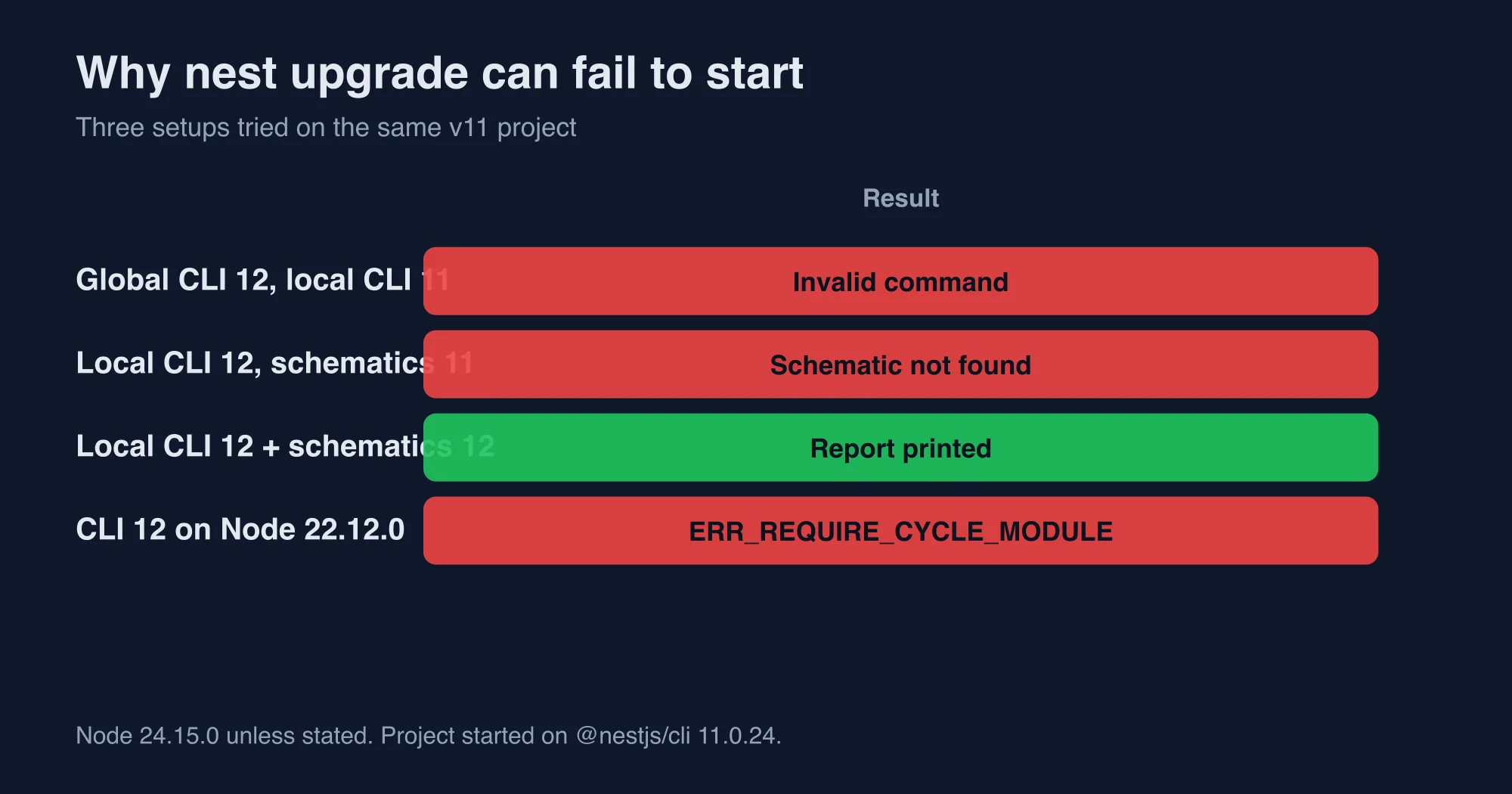
Test setup: we built a small CommonJS NestJS 11 project with @nestjs/cli 11.0.24, Joi 17, Jest 29 and a webpack config. We installed CLI 12.0.8 in a separate folder and tried four ways to run the upgrade, all on Node 24.15.0 unless stated.
| Setup | Result |
|---|---|
| Global CLI 12, project CLI 11 | Invalid command: upgrade --dry-run |
| Project CLI 12, project schematics 11 | Schematic "upgrade" not found in collection "@nestjs/schematics" |
| Project CLI 12 and schematics 12 | Report printed |
| CLI 12 on Node 22.12.0 | ERR_REQUIRE_CYCLE_MODULE crash |
The second failure is the sneaky one. After we bumped only the CLI, the tool started and then died with this line:
Error: Schematic "upgrade" not found in collection "@nestjs/schematics".
Failed to execute command: node ".../schematics-cli/bin/schematics.js"
  @nestjs/schematics:upgrade --dry-run --observe=false
The upgrade logic lives in the schematics package, not in the CLI. A CLI 12 paired with schematics 11 starts, but it cannot find the schematic.
What is the correct sequence to run nest upgrade?
Bump both packages inside the project, then run the command with a dry run first. This sequence worked on our project:
Advertisement
npm i -D @nestjs/cli@12 @nestjs/schematics@12
npx nest upgrade --dry-run --skip-install --no-observe
Read the report, then run the same command without --dry-run and with your package manager's install step. The command accepts these options, taken from the CLI 12 source:
| Option | What it does |
|---|---|
-d, --dry-run |
Prints what would change and writes nothing |
-s, --skip-install |
Skips package installation |
--observe / --no-observe |
Sets up @nestjs/observe, or skips the prompt |
-t, --tag [tag] |
Uses an npm dist-tag such as next |
-c, --collection |
Picks a schematics collection |
The command also has the alias nest update. Commit your work before the real run, because the tool rewrites package.json, nest-cli.json and source files.
One more gate sits in front of all this: the Node version. The NestJS migration guide says nest new, nest generate and nest upgrade need Node 22.22.3, 24.15 or 26 and later. Your app can run on Node 20.19 or 22.12, but the CLI cannot. We ran the CLI on Node 22.12.0 and it crashed with Error [ERR_REQUIRE_CYCLE_MODULE]: Cannot require() ES Module .../ora/index.js in a cycle. Run the upgrade on a newer Node, even if production stays on an older one.
What did the nest upgrade report change on our project?
It changed seven things, noted one, asked for three reviews and listed three actions. We counted the lines from a real dry run.
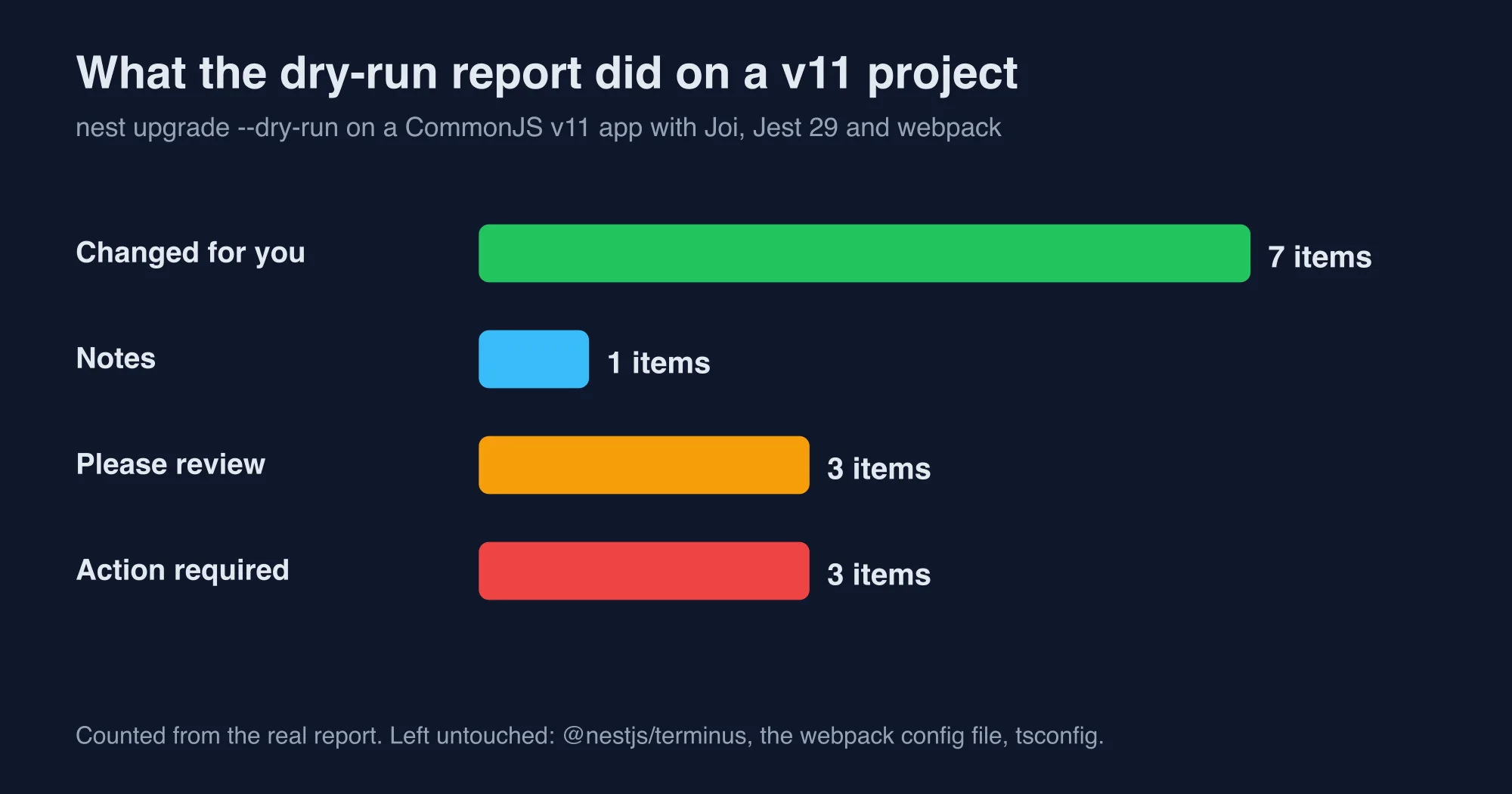
The seven automatic changes were:
- Bumped
@nestjs/common,core,testing,platform-express,cli,schematicsandconfigto version 12. - Moved
typescriptfrom^5.7.3to^6.0.0. - Moved
jestto^30.0.0. - Moved
@types/jestto^30.0.0. - Moved
ts-jestto^29.4.0. - Rewrote the
webpackoption innest-cli.jsonto an Rspack builder entry. - Moved the
validationOptionsinapp.module.tsundervalidationOptions.libraryOptions, and bumped Joi from 17 to 18.
That is real work saved. The tool also printed this note, which explains the Joi change: @nestjs/config now validates with Standard Schema, so Joi must be version 18 or later.
Now look at what it did not touch. The three "please review" items and three "action required" items are your to-do list.
What does nest upgrade leave for you to fix?
It leaves six jobs. Each one can break a build or a deploy, and none of them is optional.
1. Terminus is left on the old version
According to the Terminus 12.0.0 release notes, the package changed shape. The report said @nestjs/terminus was "left untouched because its v12-compatible release is not known to this schematic". Bump it yourself and rewrite custom indicators. Our guide NestJS Terminus 12 removed HealthCheckError. Fix your probes shows the change and the HTTP status trap.
2. The tsconfig still cannot load ESM packages
The report told us that "module": "commonjs" with legacy resolution cannot resolve the ESM-only packages. It printed the target settings, and they match what the v11 CLI generates:
{
  "compilerOptions": {
    "module": "nodenext",
    "moduleResolution": "nodenext",
    "resolvePackageJsonExports": true,
    "target": "ES2023"
  }
}
Your emitted code stays CommonJS as long as package.json has no "type": "module". The tool does not edit tsconfig.json, so you do it. Also run npx tsc --noEmit after install, because TypeScript 6 deprecates several legacy options.
3. The webpack config file is not ported
Rspack is a bundler written in Rust that mirrors the webpack API. The tool changed nest-cli.json to use Rspack, but it left webpack.config.js alone. The report said to replace webpack imports with @rspack/core and drop loaders such as ts-loader. Until you port the file, the build can fail even though the install succeeded.
4. Jest fails on most Node versions
The report warns that Jest can load the ESM-only packages only on Node 24.9 or later. In our runs, Jest also needed --experimental-vm-modules even on Node 24.15. The full test matrix is in NestJS 12 and Jest: why your tests fail and how to fix them.
5. Lambda needs a bundle, ESM or a flag
If you deploy to AWS Lambda, a CommonJS build crashes with ERR_REQUIRE_ESM, because Lambda turns off require(esm). The tool says nothing about it. Read NestJS 12 on AWS Lambda: the ESM crash and how to fix it before you ship.
6. Config validation changed shape
The Joi change was automatic. Standard Schema is a shared interface that lets libraries such as Zod, Valibot and ArkType plug into frameworks. The config package 12.0.0 release notes describe the validation change. This is also the moment to consider those libraries. For example, we tested a Zod 4 schema with @nestjs/config 12.0.1:
const schema = z.object({
  PORT: z.coerce.number().default(3000),
  DATABASE_URL: z.string().url(),
});

ConfigModule.forRoot({ validationSchema: schema });
With DATABASE_URL=postgres://u:p@localhost:5432/app and PORT=8080, the app started and PORT came back as the number 8080. With the variable missing, the process exited with code 1 and logged Config validation error: DATABASE_URL: Invalid input: expected string, received undefined. With DATABASE_URL=nope, it logged DATABASE_URL: Invalid URL. The failure happens at boot, which is where you want it.
Zod, Valibot and ArkType all work here, according to the migration guide. Keep Joi if you have a large schema. Switch only if you already use one of the others elsewhere.
Which documented breaking changes did we check?
We ran two of the behavior changes from the guide on Nest 11 and Nest 12. One reproduced and one did not.
ConsoleLogger. The guide says plain objects after a message are now structured params on the same entry. We confirmed it. On Nest 11, logger.log('user signed in', { userId: 42, plan: 'pro' }) printed two log lines, the second starting with Object(2) {. On Nest 12 it printed one line: user signed in { userId: 42, plan: 'pro' }. Passing structuredParams: false brought the old two-line output back. If you grep logs for the message text, check your parsers.
@Optional() inheritance. The guide says a subclass without its own constructor loses the optional marker, and Nest throws UnknownDependenciesException. We built the case: a base class with @Optional() dep?: Missing, a child class with no constructor, and a missing provider. Both Nest 11 and Nest 12 resolved the child with dep set to undefined. We could not reproduce the exception in this minimal setup. Your code may differ, for example if the subclass sits in another module, so run your own tests. Do not rewrite constructors blindly on our word.
The guide also notes that lifecycle hooks now run by component hierarchy level. We did not test hook ordering. If your providers depend on onModuleInit running in a fixed order, write a test before you upgrade.
Which Node.js version does each step of the upgrade need?
Each step has its own floor, and they are not the same number. Teams trip over this because one machine often plays several roles. The table lists what we verified and what the documentation states.
| Step | Node.js needed | Source |
|---|---|---|
| Run the app in production | 20.19 or later, or 22.12 or later | Release notes |
Run nest upgrade, nest new, nest generate |
22.22.3, 24.15 or 26 and later | Migration guide |
| Run Jest on CommonJS specs | 24.9 or later, plus a flag | Our runs |
| Run Vitest | Passed on 20.19, 22.12 and 24.15 | Our runs |
| Deploy to AWS Lambda | 20, 22 or 24 runtime, plus a fix | Our runs |
The practical result is a split environment. A developer laptop or a CI job can run the upgrade on Node 24.15, while the production image stays on Node 22.12. That is fine, as long as the build you ship was tested on the production version. A green test run on a newer Node proves little about an older one.
Pin each role explicitly. Use an .nvmrc file or a volta entry for local work, the engines field for the app, and the container image tag for production. When the three values disagree on purpose, write a comment in the repository that says why. The next engineer will otherwise "fix" the mismatch and break a deploy.
Should you upgrade to NestJS 12 now or wait?
Upgrade now if you can spend a day on it and your CI runs Node 24.9 or later. Wait if you deploy a CommonJS build to Lambda, you rely on Jest, and you cannot change either this quarter. NestJS 11 keeps working, and the InfoQ report on the NestJS 12 roadmap shows the ESM direction has been public for months.
Use this checklist in order:
- Commit a clean tree on a branch.
- Install Node 24.15 or later for the CLI step.
- Bump
@nestjs/cliand@nestjs/schematicsto 12 inside the project. - Run
npx nest upgrade --dry-run --skip-install --no-observeand read every line. - Run the real upgrade, then install.
- Update
tsconfig.json, port the webpack config, and bump Terminus. - Run the tests on your CI Node version.
- Build the deploy artifact and run it the way production does.
- Grep your logs and alerts for the ConsoleLogger and health-check changes.
Steps 7 and 8 catch the failures that no report can see. A report reads files. Only a run tells you whether the app boots.
Teams that operate regulated production infrastructure usually treat a framework upgrade as a change-management event, so it helps to document the compatibility assumptions, the rollback procedure and the verification evidence for every environment before anybody approves the deployment. A written rollback plan matters more than usual here, because the upgrade modifies the dependency manifest, the compiler configuration and the build tooling at the same time, and reverting only one of those layers can leave the repository in an inconsistent state that neither version supports.
How did we test these claims?
The methodology is repeatable. Versions tested: @nestjs/cli 12.0.8 and 11.0.24, @nestjs/schematics 12, @nestjs/core 11.2.7 and 12.1.2, @nestjs/config 12.0.1, Zod 4.6.6, Joi 18.2.9 and Node.js 22.12.0 and 24.15.0. Every result above came from one run on one machine.
Advertisement
FAQ
Why does nest upgrade say Invalid command?
The nest binary runs the project's own @nestjs/cli when one is installed. A v11 project therefore ignores your global CLI 12, which has the upgrade command, and reports Invalid command. Install @nestjs/cli 12 and @nestjs/schematics 12 as dev dependencies inside the project, then run npx nest upgrade.
What does Schematic upgrade not found mean in NestJS?
The upgrade logic lives in @nestjs/schematics, not in the CLI. If you bump only @nestjs/cli to 12 and leave schematics on 11, the command starts and then stops with Schematic upgrade not found in collection @nestjs/schematics. Bump both packages to version 12 together.
Which Node version does the NestJS 12 CLI need?
The migration guide says nest new, generate and upgrade need Node 22.22.3, 24.15 or 26 and later. In our test, CLI 12 on Node 22.12.0 crashed with ERR_REQUIRE_CYCLE_MODULE, while Node 24.15.0 worked. Your app can still run on Node 20.19 or 22.12.
What does nest upgrade not fix?
In our dry run it left @nestjs/terminus untouched, did not edit tsconfig.json, did not port the webpack config file to Rspack, and only warned about Jest and TypeScript 6. It also says nothing about the AWS Lambda crash for CommonJS builds. Review each item by hand.
Comments
Loading…
Sign in to join the conversation.
Related posts
NestJS 12 on AWS Lambda: the ESM crash and how to fix it
NestJS 12 ships ESM-only, and AWS Lambda turns off require(esm). We reproduced the ERR_REQUIRE_ESM crash on five Node versions and tested three fixes.
Sun Oct 11 2026 · 10 min read · 0 views
NestJS 12 and Jest: why your tests fail and how to fix them
Jest cannot load NestJS 12's ESM-only packages on most Node versions. We ran one spec on four Node versions and tested every fix, including Vitest.
Sun Oct 11 2026 · 10 min read · 0 views
NestJS Terminus 12 removed HealthCheckError. Fix your probes
Terminus 12 deletes HealthIndicator and HealthCheckError. We ran the same failing check on v11 and v12 and measured which HTTP status your probes now see.
Sun Oct 11 2026 · 10 min read · 0 views