NestJS 12 on AWS Lambda: the ESM crash and how to fix it
By Nihar Ranjan Das · Sun Oct 11 2026 · 10 min read · 0 views
View as a Web StorySoftware#typescript#node.js#nestjs#aws lambda#esm#serverless#esbuild
A CommonJS NestJS 12 app crashes on startup with Error [ERR_REQUIRE_ESM]: require() of ES Module .../@nestjs/core/index.js ... not supported whenever Node's require(esm) support is switched off. AWS Lambda switches it off by default on its Node.js 20, 22 and 24 runtimes. The fastest fix is to bundle the app into one CommonJS file with esbuild. Moving the app to ESM also works. Setting an environment variable is a third option, with a support catch.
This guide shows the crash, explains why it happens, and tests each fix. The bottom line: do not ship a plain tsc build of a NestJS 12 CommonJS app to Lambda until you have picked one of the three fixes below.
What exactly breaks when NestJS 12 meets AWS Lambda?
NestJS is a Node.js framework for building server-side applications in TypeScript. Version 12.0.0 was published on GitHub on August 27, 2026, and every core @nestjs/* package now ships as ESM only. The NestJS 12 release notes say existing CommonJS apps keep working through require(esm). The change was tracked in the v12 release pull request, which described the ESM migration as the headline item.
require(esm) is a Node.js feature that lets a CommonJS file call require() on an ES module. It is unflagged on Node.js 20.19 and later, 22.12 and later, and 24. NestJS 12 depends on it for every app that has not moved to ESM.
AWS Lambda is Amazon's serverless function service. The AWS Lambda Node.js documentation lists --no-experimental-require-module among the flags Lambda applies on Node.js 20, 22 and 24. That flag turns require(esm) off again.
The NestJS migration guide spells out the consequence in its Node.js section. CommonJS apps on Lambda need NODE_OPTIONS=--experimental-require-module. The guide does not show the error message, so we reproduced it.
How can you reproduce the crash without deploying to Lambda?
You can reproduce it on a laptop by passing Lambda's own flag to Node. Lambda sets the flag in the runtime, so running node --no-experimental-require-module dist/main.js gives the same module-loading rules.
Test setup: we scaffolded a project with @nestjs/cli 12.0.8, then changed it to emit CommonJS. That means removing "type": "module" from package.json and replacing the top-level await in main.ts with a normal bootstrap() call. We compiled with TypeScript 6 and ran the output on five Node versions, once with default flags and once with the Lambda flag.
| Node.js version | Default flags | With --no-experimental-require-module |
|---|---|---|
| 20.19.0 | Boots | ERR_REQUIRE_ESM |
| 22.12.0 | Boots | ERR_REQUIRE_ESM |
| 22.22.3 | Boots | ERR_REQUIRE_ESM |
| 24.9.0 | Boots | ERR_REQUIRE_ESM |
| 24.15.0 | Boots | ERR_REQUIRE_ESM |
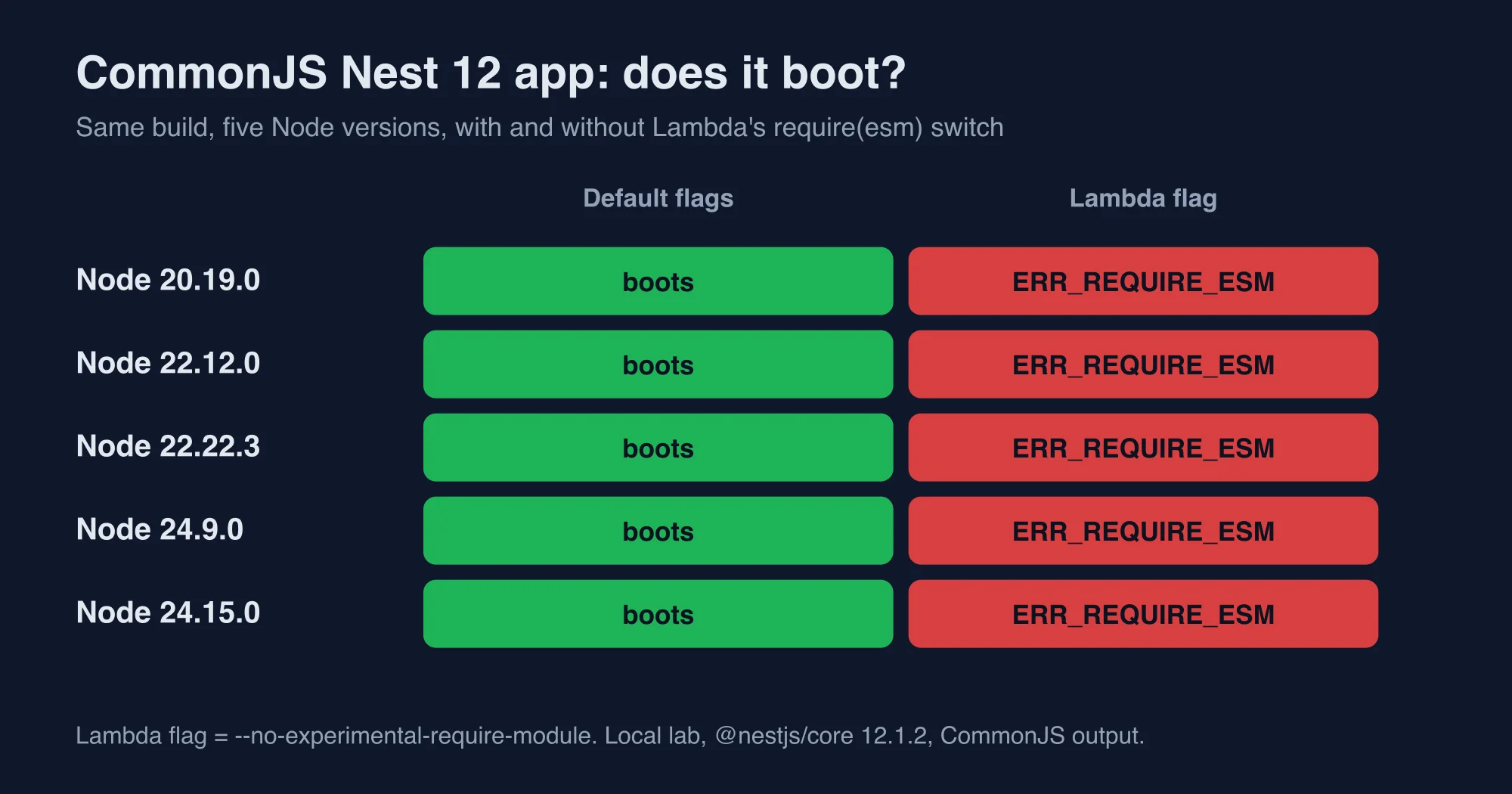
The result is uniform. All five versions boot with default flags and all five fail with the flag. The Node version does not matter, so upgrading Node will not fix this.
Advertisement
The first line of the failure names the package that could not load:
Error [ERR_REQUIRE_ESM]: require() of ES Module
  .../node_modules/@nestjs/core/index.js from .../dist/main.js not supported.
Search for that exact string in your CloudWatch logs. If you see it right after a Nest 12 upgrade, this guide applies.
Why does Node.js treat the flag as a hard stop?
Node.js refuses to load an ES module from CommonJS when require(esm) is off. That is the behavior it had before version 20.19, and the error code ERR_REQUIRE_ESM has been in Node for years. The Lambda flag simply puts Node back in that older mode.
The flag is also strict about order. We tried two combinations on Node 24.15.0:
node --no-experimental-require-module --experimental-require-module dist/main.jsbooted. When both flags are on the command line, the later one wins.NODE_OPTIONS=--experimental-require-module node --no-experimental-require-module dist/main.jsstill crashed. A flag on the command line beats the same setting inNODE_OPTIONS.
This matters for the third fix. AWS says Lambda detects an --experimental-require-module override in NODE_OPTIONS and removes its own disable flag. We could not reproduce that logic locally, because it lives inside the Lambda runtime. The AWS documentation is the only source for it, so test it in a real function before you trust it.
Fix 1: how do you bundle a CommonJS NestJS 12 app with esbuild?
Bundle the compiled output into a single CommonJS file, and require(esm) is no longer involved. esbuild is a JavaScript bundler written in Go that can inline ES modules into a CommonJS file. The bundle contains NestJS's code, so the runtime never has to load an ESM package.
Build your app with tsc as usual, then bundle the output:
npm i -D esbuild
npx tsc -p tsconfig.build.json
npx esbuild dist/main.js --bundle --platform=node --format=cjs \
  --target=node20 --outfile=bundle/main.cjs \
  --external:@nestjs/microservices --external:@nestjs/websockets* \
  --external:@nestjs/platform-socket.io --external:class-validator \
  --external:class-transformer --external:@nestjs/platform-fastify \
  --external:@nestjs/mapped-types
The --external flags cover optional packages that NestJS loads lazily. Leave out any package you actually use, and install it next to the bundle instead. For example, if you use class-validator, keep that package external and ship it in the deployment package.
We ran the resulting 2.78 MB bundle/main.cjs with the Lambda flag on Node 20.19.0, 22.12.0 and 24.15.0. It started on all three. That is the strongest result in this guide, because it works with the exact flag Lambda sets.
Bundling also changed startup time. We measured how long each build took to reach a listening server, taking the median of 8 runs on a laptop:
| Build | Node 22.22.3 | Node 24.15.0 |
|---|---|---|
Compiled dist/main.js |
245 ms | 205 ms |
| Single esbuild bundle | 114 ms | 118 ms |
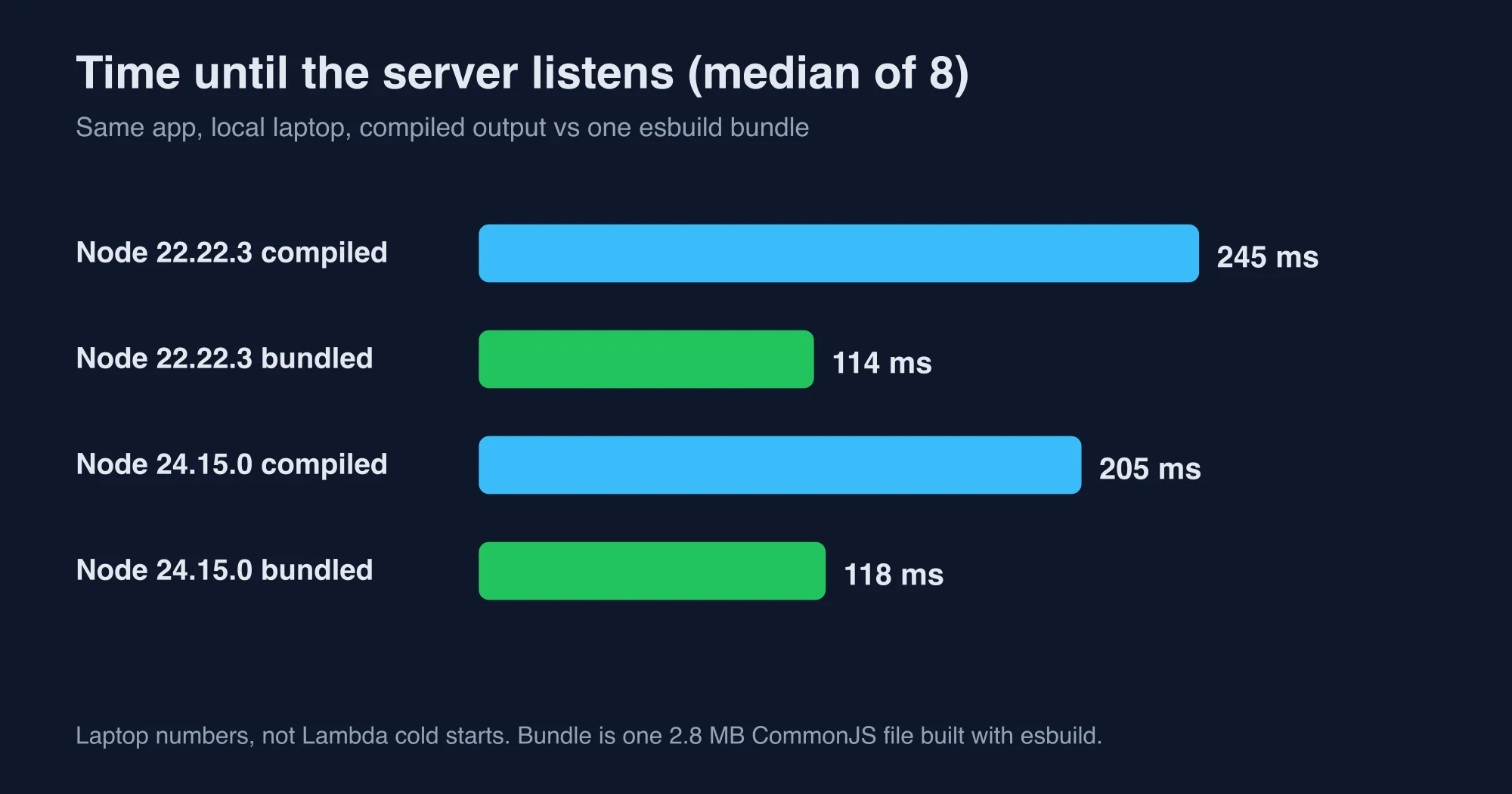
These are laptop numbers, not Lambda cold starts. Lambda adds its own init phase, and memory settings change the result. The direction is still useful: reading one file is faster than resolving hundreds of modules from node_modules. Measure your own cold starts before you quote a gain to your team.
One caution applies to bundling. Source maps and stack traces point into the bundle, so keep --sourcemap on and run Node with --enable-source-maps. Without them, a production error shows a line number in a 2.78 MB file.
Fix 2: how do you move a NestJS 12 app to ESM?
Moving the app itself to ESM removes require(esm) from the picture. If your own code is ESM, Node loads the ESM Nest packages with a plain import. The flag then has nothing to block.
The official ESM steps in the same guide list the changes. Add "type": "module" to package.json. Set "module": "nodenext", "moduleResolution": "nodenext" and "resolvePackageJsonExports": true in tsconfig.json. Then fix every relative import so it carries a file extension:
// Before
import { AppModule } from './app.module';
// After
import { AppModule } from './app.module.js';
CommonJS globals also disappear. Code that used __dirname must use import.meta.dirname. Code that called require() must use createRequire(import.meta.url) from node:module.
We tested the scaffold that nest new produced, which is ESM by default. We compiled it with tsc and ran it with the Lambda flag on Node 20.19.0, 22.12.0 and 24.15.0. curl localhost:3111/ returned Hello World! with status 200 on all three. So an ESM Nest 12 app runs under Lambda's rules with no environment variable.
The cost is the migration itself. A large app can have hundreds of relative imports and a few __dirname calls. Dependencies must also work under ESM. If a library ships only CommonJS, it still loads, but a default-import quirk can trip you up.
Which fix is cheaper? For a small service, ESM is a one-afternoon change. For a large monolith, the bundle is usually faster to adopt, because it changes the build and not the source.
Fix 3: what does NODE_OPTIONS=--experimental-require-module do?
Setting NODE_OPTIONS=--experimental-require-module in the function's environment variables tells Lambda to leave require(esm) on. It needs no code change, which is why the NestJS guide recommends it for CommonJS apps. It is also the only fix that depends on behavior we could not reproduce.
In an AWS SAM template the setting looks like this:
Resources:
  NestFunction:
    Type: AWS::Serverless::Function
    Properties:
      Runtime: nodejs22.x
      Environment:
        Variables:
          NODE_OPTIONS: --experimental-require-module
The flag has been the standard workaround for years. Arcjet's 2024 NestJS write-up used the same variable and warned that an experimental flag may change in future Node.js versions. Two caveats apply. First, the AWS documentation states that "functions that use experimental features aren't eligible for the Lambda Service Level Agreement (SLA) or AWS Support", according to the Lambda Node.js runtime page. Check that wording against your own support plan before you adopt this fix in a regulated or paid-SLA workload. Second, the flag name contains the word experimental, so a future runtime change could rename or remove it.
If you pick this fix, add a deployment smoke test. Invoke the function once after every deploy and fail the pipeline if the response is not a success. A crash at import time shows up on the first invocation, so one test catches it.
Which fix should you pick?
Pick the esbuild bundle if you want the lowest risk this week. Pick ESM if you plan to stay on NestJS long term and want the framework's default setup. Pick the environment variable only for a stopgap, such as a hotfix window.
| Fix | Code change | Verified with Lambda's flag | Support catch |
|---|---|---|---|
| esbuild bundle | Build step only | Yes, 3 Node versions | None known |
| Move to ESM | Imports, globals, tsconfig | Yes, 3 Node versions | None known |
NODE_OPTIONS variable |
None | No, depends on Lambda runtime | Experimental feature, no SLA |
The ranking follows what we could test. Two fixes passed against the real flag. One rests on AWS's description of its own runtime.
Should you upgrade a Lambda-hosted NestJS app to version 12 now?
Wait if you cannot pick a fix this sprint, and upgrade now if you can. NestJS 11 keeps working, and nothing in this guide forces a deadline. The InfoQ coverage of the NestJS 12 roadmap describes the ESM move as the project's chosen direction, so staying on 11 only delays the work.
Use this checklist before you deploy a version 12 build to Lambda:
- Confirm your runtime is Node.js 20.19 or later, or 22.12 or later. Older patch releases lack unflagged
require(esm). - Pick one of the three fixes above and apply it in the build, not by hand.
- Run the built artifact locally with
node --no-experimental-require-module, so you test the same loading rules as Lambda. - Deploy to a staging function and invoke it once.
- Watch CloudWatch for
ERR_REQUIRE_ESMfor the first hour in production.
Step 3 is the cheapest guard in the list. It takes one command, and it fails exactly the way production would.
What about containers, ECS and other hosts?
Other hosts do not set the Lambda flag, so a CommonJS NestJS 12 app boots there. Our default-flag runs passed on all five Node versions. A container on ECS, Fargate or a plain virtual machine behaves like our laptop. The crash is specific to runtimes that disable require(esm).
If you run the same code on Lambda and on containers, build once with the bundle or the ESM setup. One artifact that works under both sets of rules avoids a second deployment path.
What should you check after the fix works?
Three follow-ups save trouble later:
- Pin the Node runtime in your infrastructure template. A runtime upgrade is the likeliest way to change loading rules without a code change.
- Keep
--enable-source-mapson if you bundle. Error reports stay readable that way. - Re-run the local flag test on every NestJS minor release. The framework is new on ESM, and the loading rules are the first thing a regression would break.
If your pipeline also runs Jest on the same artifact, read NestJS 12 and Jest: why your tests fail and how to fix them, because the Node floor for tests is higher than the floor for the app.
Platform engineers who maintain serverless deployments should record the runtime configuration, the packaging strategy and the verification procedure alongside the application source, since an undocumented environment variable or an implicit bundling assumption becomes extremely difficult to diagnose after the original author has moved on to different responsibilities.
How did we test these fixes?
The methodology is simple and repeatable. Versions tested: @nestjs/core 12.1.2, @nestjs/cli 12.0.8, TypeScript 6, esbuild, and Node.js 20.19.0, 22.12.0, 22.22.3, 24.9.0 and 24.15.0. Each run used a fresh process. Startup time is the median of 8 runs on one laptop.
Advertisement
FAQ
Why does NestJS 12 crash on AWS Lambda with ERR_REQUIRE_ESM?
NestJS 12 ships ESM-only packages, and CommonJS apps load them through Node's require(esm) feature. AWS Lambda turns that feature off on Node.js 20, 22 and 24 with the --no-experimental-require-module flag. With the feature off, Node refuses to load the ES module and throws ERR_REQUIRE_ESM at startup.
How do I fix NestJS 12 on AWS Lambda?
Bundle the compiled app into one CommonJS file with esbuild, or migrate the app to ESM. Both booted on Node 20.19, 22.12 and 24.15 under Lambda's flag in our tests. A third option is setting NODE_OPTIONS to --experimental-require-module, but AWS says experimental features are not covered by the Lambda SLA.
Does upgrading Node.js fix the NestJS 12 Lambda crash?
No. We ran the same CommonJS build on Node 20.19.0, 22.12.0, 22.22.3, 24.9.0 and 24.15.0. Each one booted with default flags and failed with ERR_REQUIRE_ESM under Lambda's flag. The cause is the disabled require(esm) feature, not the Node version, so you must change the build or the module type.
Does esbuild bundling make NestJS start faster?
On our laptop the bundled app reached a listening server in 114 ms on Node 22.22.3 and 118 ms on Node 24.15.0. The compiled output took 245 ms and 205 ms. These are local medians of eight runs, not Lambda cold starts, so measure your own functions before you quote a gain.
Comments
Loading…
Sign in to join the conversation.
Related posts
NestJS 12 and Jest: why your tests fail and how to fix them
Jest cannot load NestJS 12's ESM-only packages on most Node versions. We ran one spec on four Node versions and tested every fix, including Vitest.
Sun Oct 11 2026 · 10 min read · 0 views
NestJS Terminus 12 removed HealthCheckError. Fix your probes
Terminus 12 deletes HealthIndicator and HealthCheckError. We ran the same failing check on v11 and v12 and measured which HTTP status your probes now see.
Sun Oct 11 2026 · 10 min read · 0 views
NestJS 12 upgrade: the traps nest upgrade does not fix
nest upgrade fails with Invalid command or Schematic not found on a v11 project. We tested the fix, read its report, and listed what you must still do by hand.
Sun Oct 11 2026 · 10 min read · 0 views