pgvector plus a tenant filter found 4% of the right results
By Nihar Ranjan Das · Fri Oct 23 2026 · 10 min read · 0 views
View as a Web StoryAI#vector database#pgvector#RAG#ai-engineering#qdrant
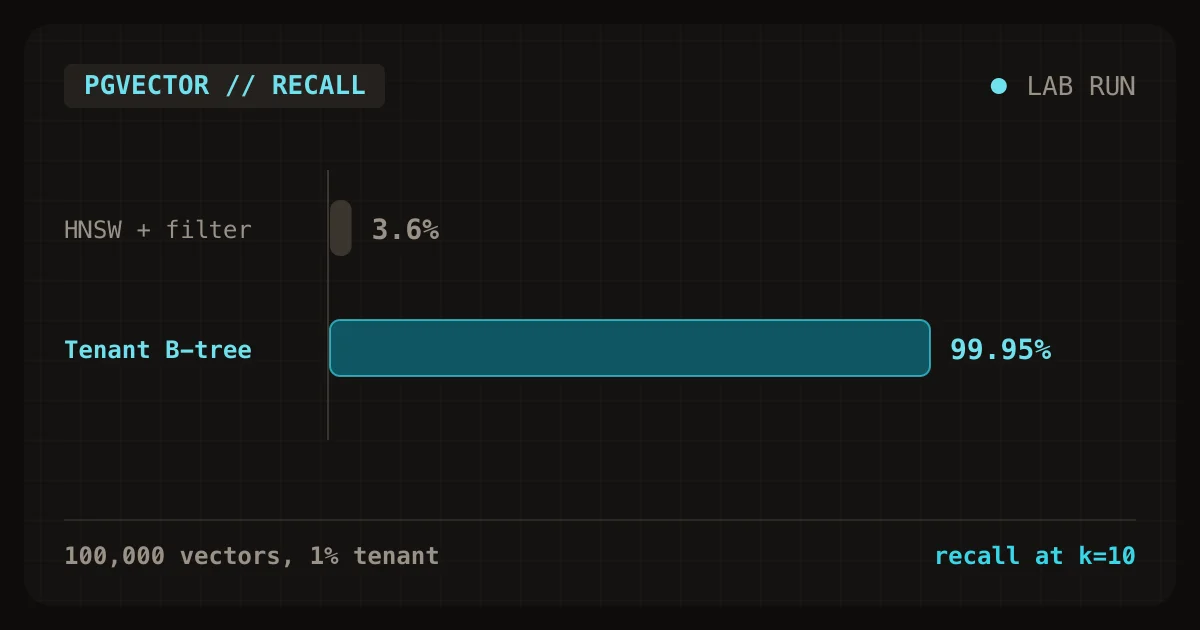
On 100,000 vectors, a pgvector HNSW index with a WHERE tenant = ... filter returned 3.6 percent of the true nearest neighbors, and still reported success. The same query on Qdrant found 99.95 percent. In Postgres, a plain B-tree filter followed by an exact sort inside the tenant matched that, in 1.4 milliseconds. For a multi-tenant RAG product, the tenant filter decides the design more than the choice of database does (our lab, 2026).
This is the fifth post in the series on designing AI and SaaS products. It loads 100,000 vectors into pgvector and Qdrant, runs 200 queries with and without a tenant filter, and measures speed and recall. It ends with a decision guide for choosing where your embeddings live.
What is RAG storage, and why does the filter matter?
Retrieval-augmented generation, or RAG, is a pattern where an application finds relevant text and gives it to a language model along with the question. The finding step searches embeddings, lists of numbers that represent the meaning of a piece of text.
A vector database stores embeddings and finds the nearest ones to a query. pgvector is a Postgres extension that adds a vector column type and similarity search. Qdrant is an open-source vector database built for that job.
Most tutorials search the whole collection. A SaaS product cannot. Customer A must never see customer B's documents, so every query carries a filter such as tenant_id = 42. That is the same tenant isolation problem as in the second post of this series, now applied to search.
Recall measures how many of the true nearest neighbors a search returns. Recall at 10 of 0.95 means that on average 9.5 of the 10 correct results came back. An approximate index such as HNSW, short for hierarchical navigable small world, is a graph that finds neighbors quickly by skipping most of the data, and recall is what it trades away. Yu. A. Malkov and D. A. Yashunin described the method in a 2016 paper on arXiv, and both pgvector and Qdrant implement it.
What did the lab load and run?
The lab uses 100,000 synthetic vectors of 384 dimensions, a common size for small embedding models. They are grouped into 200 clusters, so that nearest neighbors exist. The vectors belong to 100 tenants of about 1,000 vectors each, spread across all clusters.
| Setting | Value |
|---|---|
| Vectors | 100,000, 384 dimensions, cosine distance |
| Tenants | 100, about 1,000 vectors each |
| Queries | 200, top 10, timed one at a time |
| pgvector | 0.8.7 on Postgres 18.6, shared_buffers 1 GB |
| Qdrant | 1.20.0 |
| HNSW settings | m 16 and ef_construction 64 in both |
| Environment | Docker on an Apple M2 with 3.8 GB, client on localhost |
| Ground truth | Exact search in NumPy, with the same tenant filter where used |
The vectors are synthetic, not output from a real embedding model. Real embeddings are less cleanly clustered, so real recall is usually lower than shown here. Treat the absolute numbers as a best case and the comparisons as the finding.
How fast is search without a filter?
With no filter, HNSW answered in about one millisecond on pgvector and 1.5 to 2 milliseconds on Qdrant, with recall of 0.955 or better. The exact alternatives were slower but not slow: 3.6 milliseconds in memory, and 22.5 milliseconds as a Postgres sequential scan.
| Search | p50 | p95 | Recall at 10 |
|---|---|---|---|
| Exact, in-process NumPy (the reference) | 3.6 ms | 4.4 ms | 1.0000 |
| Exact, pgvector sequential scan | 22.5 ms | 24.4 ms | 0.9985 |
| Exact, Qdrant | 4.8 ms | 8.0 ms | 0.9985 |
pgvector HNSW, ef_search 40 |
1.00 ms | 1.47 ms | 0.9555 |
pgvector HNSW, ef_search 100 |
0.92 ms | 1.49 ms | 0.9955 |
pgvector HNSW, ef_search 200 |
1.20 ms | 1.82 ms | 0.9960 |
Qdrant HNSW, hnsw_ef 40 |
1.47 ms | 1.97 ms | 0.9980 |
Qdrant HNSW, hnsw_ef 100 |
1.80 ms | 3.32 ms | 0.9985 |
The exact rows in the databases score 0.9985 and not 1.0 because the ground truth is computed in NumPy on 32-bit floats, and near-ties round differently. Read 0.9985 as the ceiling for the database rows.
Advertisement
The in-process figure matters. At 100,000 vectors a brute-force scan costs 3.6 milliseconds, and a single tenant's 1,000 vectors cost 0.23 milliseconds. A vector database is not needed for speed at this size. It is needed, if at all, for scale, operations or features.
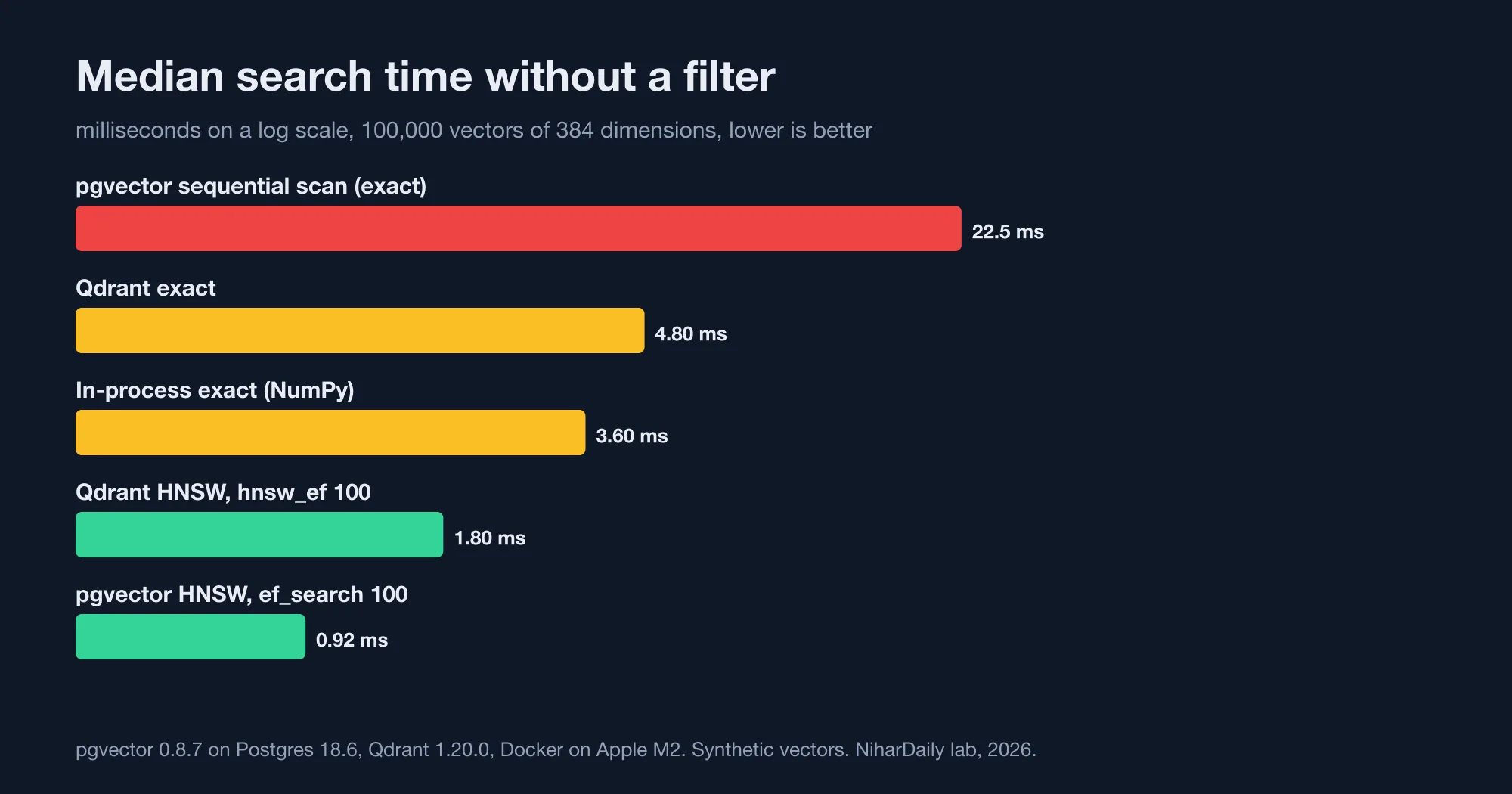
An HNSW index is 4 to 25 times faster than exact search at this size, with recall near the ceiling (our lab, 2026).
What happens when you add a tenant filter?
A tenant filter breaks the pgvector HNSW index. With ef_search 40 and a filter that matches 1 percent of rows, recall at 10 fell to 0.036. With ef_search 100 it was 0.10.
The pgvector README explains why: "With approximate indexes, filtering is applied after the index is scanned." The index returns its best 40 candidates, then the filter discards every candidate that belongs to another tenant.
The README gives the arithmetic. If a condition matches 10 percent of rows and ef_search is 40, only 4 rows will match on average. Here the filter matches 1 percent, so 40 candidates leave about 0.4 rows. That predicts recall of about 4 percent, and the lab measured 3.6.
The failure is silent. The query returns rows, with no error and no warning. A support copilot built this way would show customers answers drawn from a tiny fraction of their own documents, and the demo would still look fine, because demos use one tenant.
| Search with tenant filter | p50 | p95 | Recall at 10 |
|---|---|---|---|
pgvector HNSW, ef_search 40 |
0.79 ms | 1.11 ms | 0.0355 |
pgvector HNSW, ef_search 100 |
1.09 ms | 1.72 ms | 0.1015 |
pgvector HNSW, iterative scan relaxed_order |
5.59 ms | 9.26 ms | 0.8430 |
| pgvector, B-tree on tenant, exact sort | 1.37 ms | 1.91 ms | 0.9995 |
Qdrant HNSW, hnsw_ef 40 |
1.29 ms | 1.78 ms | 0.9995 |
Qdrant HNSW, hnsw_ef 100 |
1.33 ms | 1.74 ms | 0.9995 |
| In-process exact within tenant (the reference) | 0.23 ms | 0.27 ms | 1.0000 |
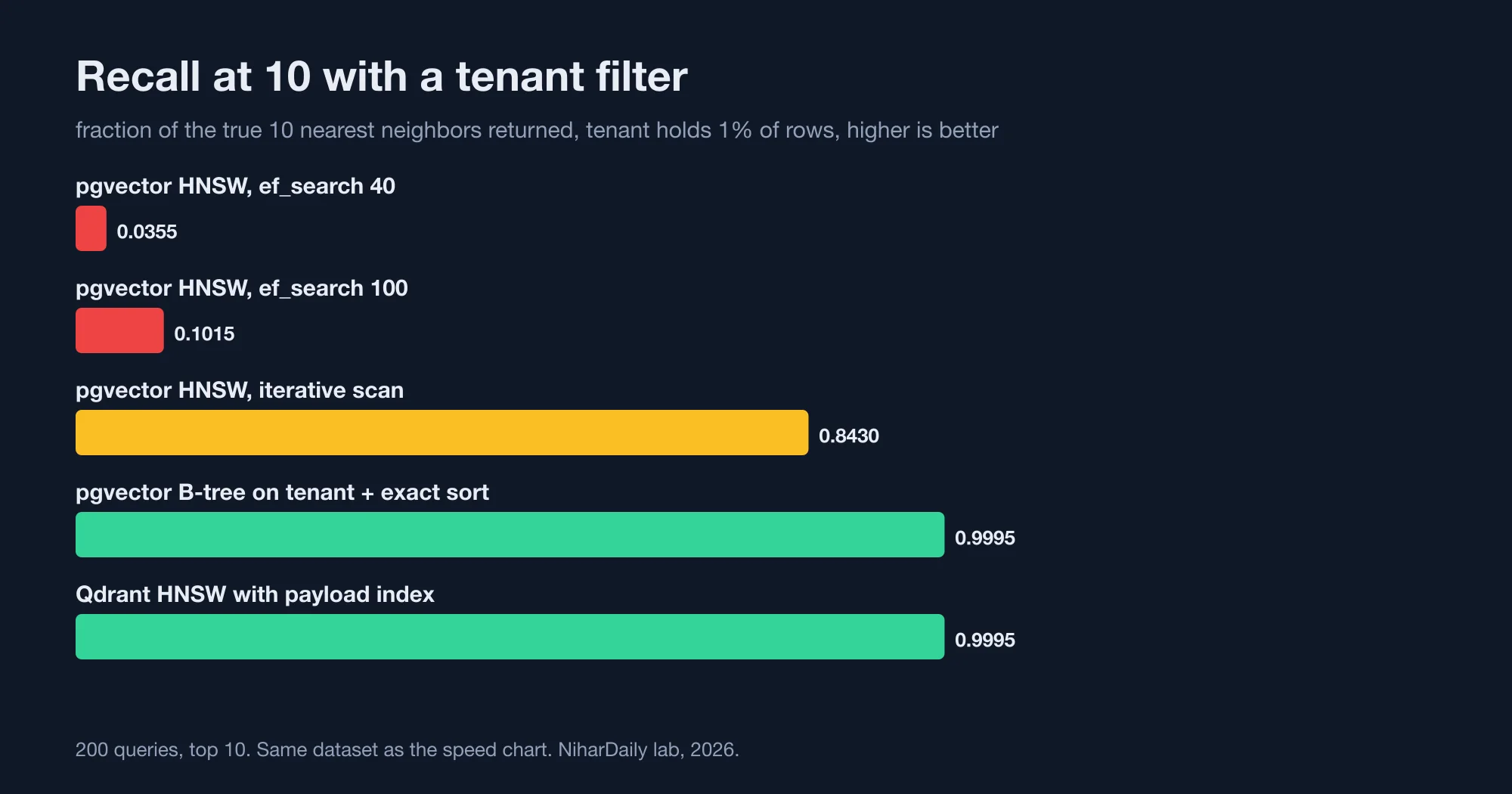
Only the designs that search inside the tenant's rows kept recall above 0.99 (our lab, 2026).
Which four fixes work?
Four approaches repaired filtered search. Each one stops the index from searching the whole collection.
- Iterative index scans. The README says that starting with pgvector 0.8.0, iterative scans "automatically scan more of the index until enough results are found." Run
SET hnsw.iterative_scan = relaxed_order;. Recall rose to 0.84, and the 95th percentile grew from 1.1 to 9.3 milliseconds. It is the smallest change, and it is still approximate. - A B-tree on the filter column, with no vector index. The README says "a good place to start is creating an index on the filter column." Postgres reads the tenant's 1,000 rows, sorts them by distance, and returns exact results. In the lab it took 1.4 milliseconds with recall 0.9995.
- Partial indexes or partitions. The README advises partial indexing when filtering by a few values, and partitioning when filtering by many. Give each very large tenant its own HNSW index, and use the B-tree route for the rest.
- A filter-aware index. Qdrant builds extra graph links for payload fields that have an index. Its indexing documentation says payload indexes "should be created before ingesting data", because the graph only gets the filter-aware edges when it is built after the payload index exists.
The B-tree route is the surprise. It has no vector index at all, and it is as accurate as Qdrant and nearly as fast. It works because tenants are small. A tenant with 1,000 vectors costs microseconds to scan.
It stops working when a tenant is large. Scan cost grows with tenant size. The pgvector exact scan took 22.5 milliseconds for 100,000 rows, so a tenant with 1 million vectors would take roughly 225 milliseconds if cost scales linearly, which I did not measure. Test your largest tenant, not your average one, before choosing.
What does each system cost to run?
The pgvector HNSW index took 13.9 seconds to build on 100,000 rows with two parallel workers. It occupied 195 megabytes, next to a table of 157 megabytes. The index is larger than the data, which matters when you size memory.
Qdrant loaded and indexed the same vectors in 26.9 seconds through its REST API. Its container used 957 megabytes of memory after loading. Its storage directory held 805 megabytes, which includes its write-ahead log, so that figure overstates the steady-state size.
I did not measure price. Managed pgvector and managed Qdrant are both sold by several vendors at different tiers, and the cost depends on memory size and replicas. Price a quote against your own vector count and your largest tenant.
Which one should you choose?
Choose by the shape of your tenants, not by brand. Count your vectors, find your largest tenant, and decide whether you already operate Postgres.
| Your situation | Start with | Why |
|---|---|---|
| Under about 1 million vectors, small tenants, you run Postgres | pgvector with a tenant B-tree, exact sort | No new system, exact results, 1.4 ms in the lab |
| A few huge tenants and many small ones | pgvector with partial HNSW indexes for the huge ones | Each path matches its size |
| Millions of vectors, heavy filters, or search is your product | Qdrant or another dedicated engine | Filter-aware graphs and tuning, at the price of a second system |
| You need joins between vectors and business data | pgvector | Same transaction, same backups |
| One tenant, no filter | Any HNSW index | Filtering is not your problem |
Adding a second database also adds a second consistency problem. When a document is deleted in Postgres, its vector must be deleted from Qdrant, and a gap between the two is a data-leak risk. A design that keeps both in Postgres avoids that class of bug.
What changes with real embeddings?
Real embeddings usually make search harder than this lab did. Real text produces vectors that overlap between topics, so the true top 10 are less clearly separated from the next 50. An approximate index may then need a larger candidate list, and recall at a given ef_search can drop.
Plan for that. Rerun this test on a sample of your own documents and queries, with your embedding model, before you fix settings. Pick the lowest ef_search that keeps recall at 10 above your target with the tenant filter on. Retest after changing the embedding model, because a new model changes the geometry and can move recall in either direction.
Chunk size matters as much as the database. Smaller chunks mean more vectors per tenant, which pushes a tenant toward the size where exact search stops being cheap. Count chunks, not documents, when you size a tenant.
What should you do first?
Start by testing the filter, because that is where products fail.
- Build a filtered recall test. Take 100 queries, compute exact results inside a tenant, and compare them with your index. The lab's whole test is a short Python script.
- Test with a small tenant. A demo with one big tenant hides the problem.
- Create the tenant B-tree first. Try exact search inside the tenant before adding any vector index.
- Turn on iterative scans if you keep HNSW. Then check recall again, because it is still approximate.
- Set a ceiling per tenant. Decide the vector count at which a tenant moves to its own index or its own store.
- Delete vectors with the document. Test the delete path before launch.
Advertisement
FAQ
Why does pgvector return fewer or wrong results with a WHERE clause?
HNSW indexes filter after scanning. The index fetches `ef_search` candidates, 40 by default, and the filter then removes rows from other tenants. With a 1 percent filter, the lab's recall at 10 fell to 0.036.
How do I fix pgvector filtered search in a multi-tenant app?
Enable iterative scans with `SET hnsw.iterative_scan = relaxed_order`, or skip the vector index for small tenants and sort exactly inside a B-tree-filtered set. The exact route scored recall 0.9995 in 1.4 milliseconds.
Do I need a dedicated vector database for RAG?
Not at 100,000 vectors. In the lab, an exact scan took 3.6 milliseconds in memory. Dedicated engines earn their place at millions of vectors, heavy filtering or search-centered products.
What is a good recall target for RAG retrieval?
Aim for recall at 10 above 0.95 on your own data, and measure it with filters on. Run the test on real embeddings, because synthetic vectors in this lab give a best case.
Is Qdrant faster than pgvector?
Not here. Unfiltered, pgvector HNSW had a median of 0.9 to 1.0 milliseconds against 1.5 to 1.8 for Qdrant. With a tenant filter, Qdrant kept recall at 0.9995 where pgvector HNSW did not.
Comments
Loading…
Sign in to join the conversation.
Related posts
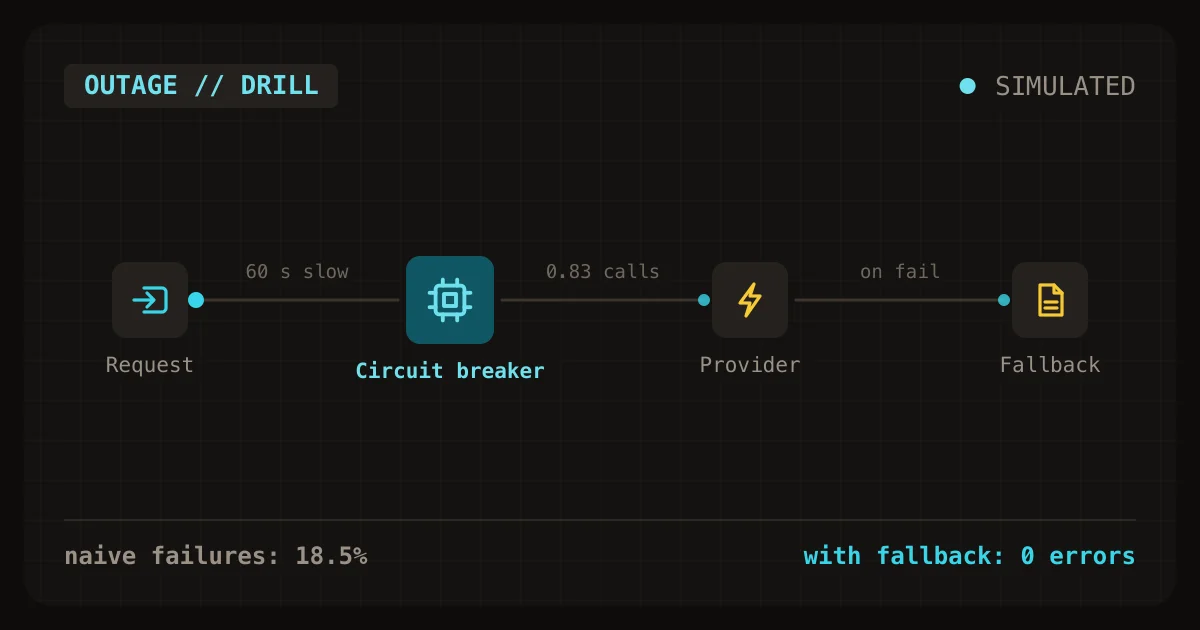
Outage drill: a fallback saved 2,452 failed AI requests
When a model provider slowed down for 60 seconds in a simulation of 12,000 requests, a client with plain retries failed 18.5 percent of them and sent 1.62 provider calls for every user request. Adding
Fri Oct 23 2026 · 11 min read · 0 views
Checkpointed agent jobs wasted 5x fewer model calls
Retrying a whole ten-step AI agent job after any failure wasted 4,143 model calls on 2,000 jobs, lost 75 jobs for good, and ran the email step twice for 273 jobs. Saving a checkpoint after each step
Fri Oct 23 2026 · 10 min read · 0 views
Duplicate usage events overbilled an AI SaaS bill by $115
A plain usage counter overbilled $3,266.75 of AI usage by $114.86, a 3.5 percent error, because the queue delivered 6,984 events twice. All 500 tenants were billed wrongly. Recording each event once
Fri Oct 23 2026 · 9 min read · 0 views