Postgres 18 in Docker won't start? Change the mount path
By Nihar Ranjan Das · Fri Oct 23 2026 · 11 min read · 1 views
View as a Web StorySoftware#postgresql#database#pg_upgrade#docker#docker-compose
If the official postgres:18 image exits with "Error: in 18+, these Docker images are configured to store database data in a format which is compatible with pg_ctlcluster", mount your volume at /var/lib/postgresql, not /var/lib/postgresql/data. That one line in your Compose file fixes a fresh install. An existing Postgres 17 database needs one more step, because the image will not start on top of old data.
This post shows the exact error, the fix for each situation, and the results of seven mount and upgrade tests we ran on Postgres 17.11 and 18.6. It also covers a trap: pinning PGDATA back to the old path makes the container start, and then it fails on Postgres 17 data.
What does the Postgres 18 Docker error say, and what does it mean?
The error means the postgres:18 image found a database at the old path /var/lib/postgresql/data and will not run on it. The container exits with status 1 and prints a long message. This is the text from our test on postgres:18 (PostgreSQL 18.6):
Error: in 18+, these Docker images are configured to store database data in a
       format which is compatible with "pg_ctlcluster" (specifically, using
       major-version-specific directory names).
...
       Counter to that, there appears to be PostgreSQL data in:
         /var/lib/postgresql/data
...
       The suggested container configuration for 18+ is to place a single mount
       at /var/lib/postgresql which will then place PostgreSQL data in a
       subdirectory, allowing usage of "pg_upgrade --link" without mount point
       boundary issues.
The official Postgres Docker image is the image published on Docker Hub as postgres, maintained in the docker-library project. The change came from docker-library pull request 1259, which the error message links to. The reasoning is that Postgres itself stores each major version in its own directory, so upgrades with pg_upgrade work cleanly.
Two lines in the message matter most. The suggested layout puts one mount at /var/lib/postgresql. The old layout is rejected on purpose, not by accident, and the message points to the long-running docker-library discussion of upgrades for the full background.
How do I fix it on a fresh project?
On a fresh project, change the volume target from /var/lib/postgresql/data to /var/lib/postgresql and start the container again. This is the whole fix when you have no data to keep.
This Compose file starts cleanly on postgres:18:
services:
  db:
    image: postgres:18
    environment:
      POSTGRES_PASSWORD: example
    volumes:
      - pgdata:/var/lib/postgresql
volumes:
  pgdata:
We checked it with docker compose config, and ran the same mount with docker run. We created a table with 1,000 rows, removed the container, started a new one on the same volume and counted 1,000 rows. The volume then held a single directory, 18, with docker inside it. SHOW data_directory returned /var/lib/postgresql/18/docker.
If you use a bind mount, the same rule applies. Mount a host folder at /var/lib/postgresql, for example ./pgdata:/var/lib/postgresql. We tested this with an empty host folder mounted at /var/lib/postgresql. The container started, SHOW data_directory returned /var/lib/postgresql/18/docker, and the host folder then held 18/docker.
Why does an empty volume fail too?
An empty volume at the old path fails too, because the image checks where the volume is mounted and not what it contains. We ran Postgres 18.6 against three old-path setups, and all three exited with status 1.
Advertisement
The results of our seven scenarios are below. All ran on Docker Desktop 29.2.0 on an Apple silicon Mac.
| # | Image | Mount | Starting data | Result |
|---|---|---|---|---|
| 1 | postgres:18 | volume at /var/lib/postgresql/data |
Postgres 17 database | Exit 1, "there appears to be PostgreSQL data in /var/lib/postgresql/data" |
| 2 | postgres:18 | volume at /var/lib/postgresql/data |
empty | Exit 1, same message with "(unused mount/volume)" |
| 3 | postgres:18 | bind mount at /var/lib/postgresql/data |
empty folder | Exit 1, same message with "(unused mount/volume)" |
| 4 | postgres:18 | volume at /var/lib/postgresql |
empty | Starts, 1,000 rows survive a container rebuild |
| 5 | postgres:18 with PGDATA=/var/lib/postgresql/data |
volume at /var/lib/postgresql/data |
empty | Starts, but Docker also creates a second anonymous volume |
| 6 | postgres:18 with PGDATA=/var/lib/postgresql/data |
Postgres 17 volume at the old path | Postgres 17 database | Exit 1, "database files are incompatible with server" |
| 7 | postgres:18 | volume at /var/lib/postgresql |
restored from a Postgres 17 dump | Starts, 1,000 rows present |
Scenarios 2 and 3 are the finding most threads miss. People assume the error only appears when old data exists. In our test, the image refused to start on an empty named volume and on an empty bind mount at the old path.
A different failure appeared in the first weeks of Postgres 18. On September 26, 2025, a user posted to the PostgreSQL mailing list that upgrading from postgres:17.6 to postgres:18.0 produced a runc error, "error mounting ... to rootfs at /var/lib/postgresql/data ... no such file or directory", on a bind mount on Btrfs storage on a Synology NAS. The reporter noticed that /var/lib/postgresql/data had become a symlink in the 18.0 image and asked whether that was intended. The PostgreSQL project replied that the Docker images are not its product. Docker-library issue 1370 collected similar runc errors, including one from a host path under /host_mnt, and was closed as completed on October 22, 2025. We did not see the runc error on 18.6, so we cannot say which change fixed it. If you see it on an early 18.x image, the fix is still the path change.
Can I keep the old path by setting PGDATA?
You can start Postgres 18 on the old path by setting PGDATA, but it only works for a new, empty database and it leaves a second volume behind. Do not use it to carry a Postgres 17 volume forward.
PGDATA is the environment variable that tells Postgres which directory holds the cluster. Setting PGDATA=/var/lib/postgresql/data made postgres:18 start on an empty named volume in scenario 5. docker inspect then listed two mounts: our named volume at /var/lib/postgresql/data and an anonymous volume at /var/lib/postgresql. The anonymous volume comes from the image's own VOLUME line. It is easy to forget, and docker compose down -v will delete it.
On a Postgres 17 volume, the pin does not help at all. In scenario 6 the container logged this and exited:
PostgreSQL Database directory appears to contain a database; Skipping initialization
FATAL:  database files are incompatible with server
DETAIL:  The data directory was initialized by PostgreSQL version 17, which is not
compatible with this version 18.6 (Debian 18.6-1.pgdg13+2).
That is a normal Postgres rule. A new major version cannot read the files of an old one. The Docker error at the old path was never about the folder name alone. It was a guard against exactly this situation.
If you want to stay on the old layout, stay on postgres:17. Pin the tag, for example postgres:17, until you are ready to migrate. Never leave a database on postgres:latest, because the move to 18 then happens the day you run docker compose pull.
How do I upgrade an existing Postgres 17 database to 18?
Use a dump and restore for a small database, or pg_upgrade --link for a large one. Both work, and both need the new mount at /var/lib/postgresql.
pg_upgrade is the tool Postgres ships for upgrading a cluster to a new major version without a full dump and restore. With --link, it hard-links the data files instead of copying them, so the upgrade takes seconds even for large databases. The pg_upgrade reference in the PostgreSQL 18 documentation says link mode needs the old and new data directories on the same file system, and that you cannot use the old cluster once the new one has started.
Option 1: dump and restore
This is the simplest method and it has no extra images. Stop writes to the old database first.
First, dump from the running 17 container named old17. Second, start 18 on a new volume mounted at the new path. Third, load the dump and refresh planner statistics.
docker exec old17 pg_dumpall -U postgres > dump.sql

docker run -d --name new18 -e POSTGRES_PASSWORD=example \
  -v pgdata18:/var/lib/postgresql postgres:18

docker exec -i new18 psql -U postgres -q < dump.sql
docker exec new18 psql -U postgres -c "ANALYZE"
The ANALYZE step matters. A dump taken by the Postgres 17 tools does not include planner statistics, so queries can pick poor plans until the new cluster has gathered them.
Option 2: pg_upgrade with --link
The pg_upgrade tool needs the binaries of both versions. The community image tianon/postgres-upgrade ships both, and its 17-to-18 tag was designed for this exact move. Hard links only work inside one filesystem, so the old and new data must sit in the same volume, which is why the new layout uses a single mount. The Docker Hub page for the official postgres image documents the version-specific PGDATA for 18.
First, move the old data into the layout the new image expects, inside the same volume. A move within one volume is instant:
docker run --rm -v pgdata:/v alpine sh -c '
  cd /v && mkdir -p _t \
  && for f in $(ls -A | grep -v "^_t$"); do mv "$f" _t/; done \
  && mkdir -p 17 && mv _t 17/docker'
Stop the old container first. Then run the upgrade with data checksums switched off for the new cluster:
docker run --rm -v pgdata:/var/lib/postgresql \
  -e PGDATAOLD=/var/lib/postgresql/17/docker \
  -e PGDATANEW=/var/lib/postgresql/18/docker \
  -e POSTGRES_INITDB_ARGS="--no-data-checksums" \
  tianon/postgres-upgrade:17-to-18 --link
Finally, start postgres:18 on the same volume at /var/lib/postgresql and run the vacuumdb commands that pg_upgrade prints at the end. The upgrade prints them because some statistics are not transferred.
Why did pg_upgrade fail with "old cluster does not use data checksums"?
It failed because Postgres 18 turns data checksums on for new clusters by default, and pg_upgrade refuses to move a cluster that has them off into one that has them on. Our first attempt stopped in two seconds with this line:
old cluster does not use data checksums but the new one does
Failure, exiting
Data checksums are a per-page integrity check that lets Postgres detect corrupted pages on disk. A Postgres 17 cluster created by the Docker image has them off, as a default initdb run does. The PostgreSQL 18 release notes say checksums are now on by default, that initdb --no-data-checksums turns them off, and that pg_upgrade requires matching checksum settings.
You have two ways out. Pass --no-data-checksums to the new cluster, as above, and keep checksums off to match the old cluster. Or enable checksums on the stopped old cluster first with pg_checksums --enable, which rewrites every page and takes time on a big database. The data checksums chapter of the PostgreSQL manual describes this offline step.
We confirmed the difference in the results. After the --link upgrade, SHOW data_checksums returned off. After the dump and restore, it returned on. If integrity checks matter to you, that is a real reason to prefer the dump and restore, or to enable checksums afterwards.
How long does each upgrade take?
Dump and restore took 64 seconds on our 762 MB database, and pg_upgrade --link took 6 seconds. The link method is about ten times faster, and the gap grows with database size because the link time barely depends on how many rows you have.
The test database held 5,000,000 rows in one table with two indexes, md5 payloads and timestamps, and it measured 762 MB with pg_database_size. The source was Postgres 17.11 and the target was 18.6.
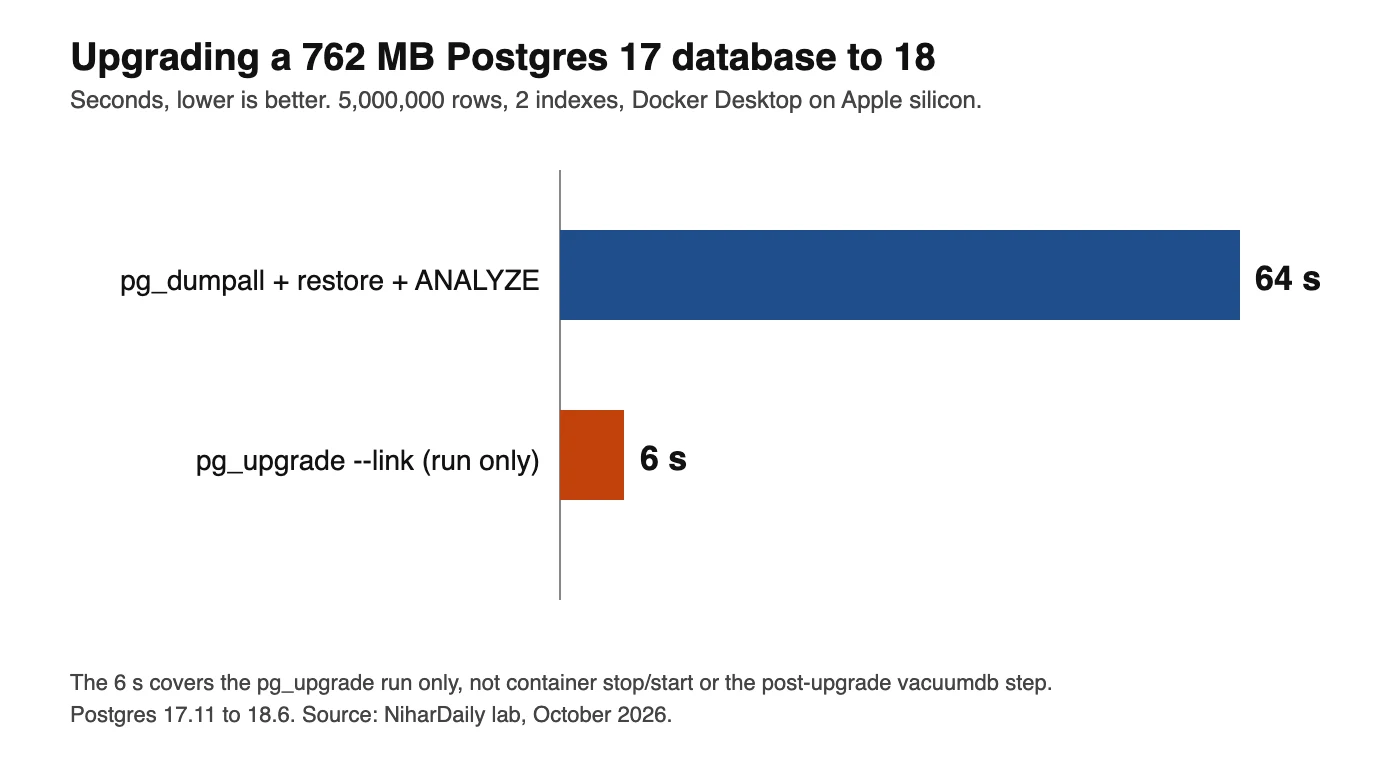
The chart compares total time for the two methods. The numbers are below.
| Method | What the time includes | Time | Checksums after |
|---|---|---|---|
pg_dumpall and psql restore |
dump, restore, ANALYZE |
64 s | on |
pg_upgrade --link |
the pg_upgrade run only |
6 s | off |
The two rows are not measured the same way, and the difference matters. The 64 seconds includes the final ANALYZE. The 6 seconds covers only the pg_upgrade run. It does not include stopping the old container, starting the new one or the vacuumdb statistics step. Expect a few extra seconds to minutes there, depending on size. We counted 5,000,000 rows in the new database in both cases.
Downtime follows the same pattern. With a dump and restore, the old database must stay read-only for the whole 64 seconds, or you lose writes made after the dump. With --link, downtime is the upgrade run plus the restart.
Take a backup before either method. A link upgrade turns the old files into shared data, so once the new cluster starts and writes, you cannot go back to the old cluster. The pg_upgrade output ends with a delete_old_cluster.sh script that removes the old cluster's files, which shows the old cluster is meant to be retired.
Decision: which fix should you pick?
Pick the fix by the state of your data: change the mount path if the project is new, dump and restore if the database is small, and use pg_upgrade --link if the database is large or downtime is tight.
- No data you care about (new project, throwaway dev database): change the volume target to
/var/lib/postgresql. Done. - A dev or small production database under a few gigabytes: dump and restore. It is simple, it produces a clean cluster with checksums on, and you can rehearse it on a copy.
- A large database, or a short maintenance window:
pg_upgrade --linkwith--no-data-checksums. Rehearse it on a copy of the volume first, because it cannot be undone. - Not ready to upgrade: pin
postgres:17in your Compose file today. Keep the old mount at/var/lib/postgresql/data, since the 17 image still declares that volume.
If you are tuning the same database after the move, two of our earlier lab posts apply: UUIDv7 or UUIDv4 keys in Postgres: 11M rows, 22x slower, and PgBouncer: 19x faster connects, but half the throughput.
Advertisement
FAQ
Why does postgres:18 exit immediately in Docker?
It found the old data path, /var/lib/postgresql/data, mounted or populated. In our test the 18.6 container exited with status 1 on a Postgres 17 volume, an empty volume and an empty bind mount. Mount your volume at /var/lib/postgresql instead and the container starts.
Where does Postgres 18 store data in Docker?
Postgres 18 stores data in /var/lib/postgresql/18/docker inside the container. The image sets PGDATA to that path and declares /var/lib/postgresql as its volume. A host folder mounted at /var/lib/postgresql therefore contains 18/docker. Postgres 17 images used /var/lib/postgresql/data.
Can I set PGDATA to the old path and keep my Postgres 17 volume?
No, not for a Postgres 17 database. In our test, postgres:18 started with the pin on an empty volume. On a Postgres 17 volume it stopped with 'database files are incompatible with server'. A new major version cannot read an old cluster, so upgrade it with pg_upgrade or a dump and restore.
How do I upgrade Postgres 17 to 18 in Docker without losing data?
Dump and restore with pg_dumpall into a new volume mounted at /var/lib/postgresql, or move the data to 17/docker inside one volume and run pg_upgrade --link with the tianon/postgres-upgrade:17-to-18 image. Take a backup first. Run ANALYZE or the printed vacuumdb commands afterwards.
Why does pg_upgrade say the old cluster does not use data checksums?
Postgres 18 enables data checksums for new clusters by default, and a Postgres 17 Docker cluster usually has them off. pg_upgrade refuses the mismatch. Pass --no-data-checksums when creating the new cluster, or enable checksums on the stopped old cluster with pg_checksums --enable before upgrading.
Comments
Loading…
Sign in to join the conversation.
Related posts
Node.js October 2026 security release: all 10 CVEs ranked
Upgrade to Node.js 26.12.1, 24.22.1 or 22.23.4 this week, and rebuild any snapshot or single executable binaries afterwards. The October 21, 2026 release fixed ten CVEs. Four are rated high, three
Thu Oct 22 2026 · 10 min read · 21 views

Is your PHP vulnerable to CVE-2026-109618? A setup check
Yes, if you run PHP 8.5 below 8.5.12, 8.4 below 8.4.27, 8.3 below 8.3.36 or 8.2 below 8.2.35, and you serve web requests. PHP released those fixed versions on October 21, 2026 to close two critical
Thu Oct 22 2026 · 10 min read · 3 views

Node.js Brotli CVE-2026-111497: is your app exposed?
Upgrade to Node.js 26.12.1, 24.22.1 or 22.23.4, then check whether your code decodes Brotli data it did not produce. CVE-2026-111497 is a Brotli decoder flaw that Node.js rates high and says permits
Thu Oct 22 2026 · 10 min read · 239 views