PgBouncer: 19x faster connects, but half the throughput
By Nihar Ranjan Das · Thu Oct 22 2026 · 11 min read · 0 views
View as a Web StorySoftware#performance#postgresql#database#pgbouncer#connection-pooling
PgBouncer made connect-per-request traffic 19x faster in our Postgres 18 lab, and it also cut the throughput of 200 busy clients roughly in half. Both results are true at once. A pooler removes the cost of opening a connection, and it adds a hop that one process must carry. Which effect wins depends on how your app connects.
This post gives the measurements, the reason pool size changed little, the error that tells you a pooler is overdue, and a rule for when to add one.
What is PgBouncer, and what does a pooler do?
PgBouncer is a lightweight connection pooler for PostgreSQL that sits between your application and the database and reuses a small set of server connections for many client connections. A connection pooler is a proxy that keeps database connections open so that new requests skip the cost of connecting.
Postgres starts a separate operating-system process for every connection. Opening one costs a TCP handshake, often TLS, authentication and a process fork. Keeping hundreds of them open costs memory and scheduling time.
PgBouncer has three pool modes. The PgBouncer configuration reference lists them: session mode releases a server connection when the client disconnects and is the default, transaction mode releases it after each transaction, and statement mode releases it after each statement. Transaction mode is the one that lets 1,000 clients share 20 server connections, so it is the mode this post tests.
PlanetScale's guide to scaling Postgres connections with PgBouncer and EnterpriseDB's article on setting max_connections explain why you want one. What they do not give is a measured curve on one machine, with direct and pooled runs side by side. That is what we built.
How we measured it
The test setup and methodology are listed below.
The test setup was PostgreSQL 18.1 and PgBouncer 1.26.1 on an Apple M2 laptop with 8 cores and 8 GB of RAM. We used pgbench, the benchmark tool bundled with Postgres, at scale 20, which creates a 2-million-row accounts table.
We ran two workloads:
- Select-only (
pgbench -S). One indexed read per transaction, the shape of a typical page load. - Read-write (the default TPC-B-like script). Seven statements per transaction: three updates, a select and an insert, inside
BEGINandEND.
Each run lasted 15 seconds. The methodology had three parts:
Advertisement
- Direct: clients connect to Postgres at 8, 16, 32, 64, 200 and 400 connections, with
max_connectionsset to 500. - Pooled: 200 clients connect to PgBouncer in transaction mode, with the pool size set to 4, 8, 16, 32, 64 and 100. We also ran 400 clients with a pool of 16.
- Connect per transaction:
pgbench -Copens a new connection for every transaction, which is how a function-per-request app behaves, with and without PgBouncer.
Everything ran on one machine over loopback, so network time is near zero. That favors the direct path, and we say what it means for a real network below.
Results: what happens when a new connection costs a handshake?
With a new connection per transaction, PgBouncer was 19x faster at 16 clients and 20x faster at 64 clients. This is the case a pooler was built for.
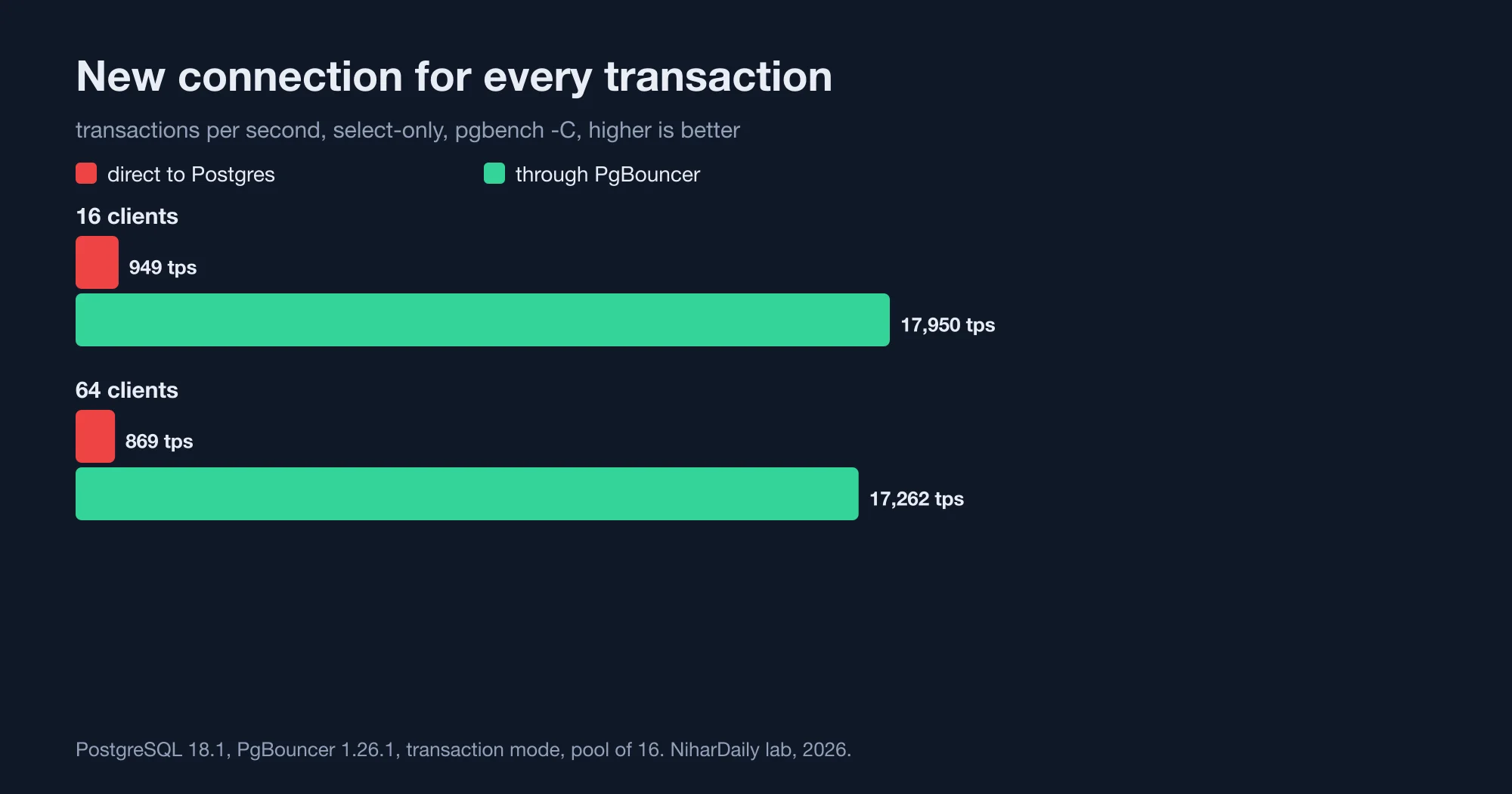
| Clients | Direct to Postgres | Through PgBouncer | Latency, direct | Latency, pooled |
|---|---|---|---|---|
| 16 | 949 tps | 17,950 tps | 16.9 ms | 0.89 ms |
| 64 | 869 tps | 17,262 tps | 73.7 ms | 3.7 ms |
Without a pooler, the throughput barely moved from 16 to 64 clients, and latency grew by 4x. Postgres spent its time starting and stopping backend processes. With PgBouncer, the client opens a cheap connection to the pooler, which hands it an already-open server connection.
This is the pattern behind serverless functions and edge runtimes. Each invocation may open its own connection, and a burst of 500 invocations can hit the database as 500 new connections. The netdata guide to sizing a PgBouncer pool frames the same need as a pool that reuses connections across short transactions.
For example, a Next.js route on a serverless platform that runs one query per request, with no pooling, pays for a new connection on every request. Our connect-and-query transactions averaged 16.9 ms at 16 clients. At 100 requests per second, that is 1.7 seconds of database latency added for every second of traffic.
Results: what happens when clients stay connected?
With persistent connections, adding clients past the core count made Postgres slower, and PgBouncer capped the total at a lower level.
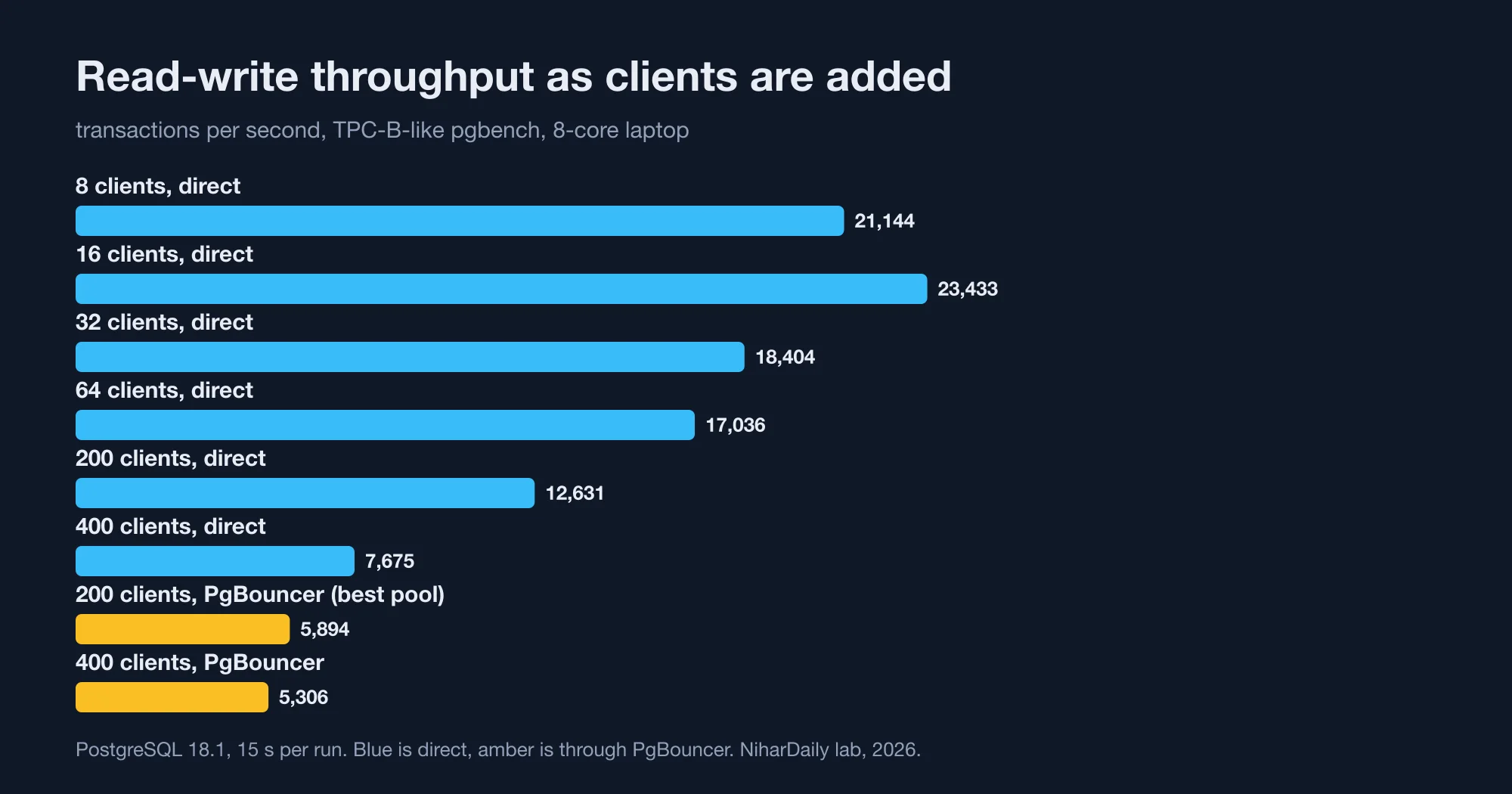
| Direct clients | Select-only tps | Read-write tps | Read-write latency |
|---|---|---|---|
| 8 | 151,419 | 21,144 | 0.38 ms |
| 16 | 161,168 | 23,433 | 0.68 ms |
| 32 | 160,706 | 18,404 | 1.74 ms |
| 64 | 187,114 | 17,036 | 3.76 ms |
| 200 | 145,340 | 12,631 | 15.8 ms |
| 400 | 119,937 | 7,675 | 52.1 ms |
Read-write throughput peaked at 16 clients, which is twice the 8 cores. By 400 clients it had fallen to 33% of the peak, and the average transaction took 76 times longer (our lab, 2026). Select-only peaked later, at 64 clients, because a read is shorter and waits less on the disk.
This is the argument for pooling. More connections than the CPU and disk can serve do not add work, they add queueing and context switching. The EnterpriseDB article makes the case for a pooler rather than a very high max_connections.
But the pooled numbers are not a clean win. With 200 clients connected persistently through PgBouncer:
| Pool size | Select-only tps | Read-write tps | Read-write latency |
|---|---|---|---|
| 4 | 62,649 | 4,806 | 41.6 ms |
| 8 | 65,381 | 5,894 | 33.9 ms |
| 16 | 64,332 | 4,376 | 45.7 ms |
| 32 | 54,990 | 4,626 | 43.2 ms |
| 64 | 51,311 | 5,142 | 38.9 ms |
| 100 | 58,968 | 5,185 | 38.6 ms |
Direct connections with 200 clients managed 145,340 select-only and 12,631 read-write transactions per second (our lab, 2026). The pooled best was 65,381 and 5,894, which is 45% and 47% of the direct result. With 400 clients and a pool of 16, read-write latency was 75.4 ms pooled against 52.1 ms direct.
So on a fast local database, a pooler lowered both throughput and latency. It did not make Postgres faster. It made 200 clients possible at a cost.
Why did pool size barely matter?
Pool size barely changed the result because PgBouncer itself was the bottleneck, not the number of server connections behind it. The pooler is a single process that handles every client message.
We checked while the select-only run was in progress. The pgbouncer process used about 75% of one core, more than any single Postgres backend, which sat near 19% each. The throughput ceiling of 51,000 to 65,000 transactions per second looks like the speed of that one process.
The read-write workload explains the rest. Each read-write transaction sends seven statements, and every statement passes through the pooler. At about 5,000 transactions per second, that is about 35,000 statements per second, which is within a factor of two of the select-only ceiling. Chatty transactions hit the pooler's limit sooner than single-query ones.
That is a measured property of this setup, not a verdict on the software. A pooler on a networked database has different economics, because the database round trip is milliseconds, not microseconds, and the pooler's hop is small beside it. We did not test a remote database, TLS or a multi-process pooler setup, so treat our throughput ratios as a floor on how much a pooler can cost.
How big should the pool be, then? The netdata guide applies Little's Law, which says the number of busy connections equals the arrival rate times the time each one is held. Its example is 200 transactions per second at 100 ms each, which needs about 20 connections. Our direct curve gives a second signal. Read-write throughput peaked at 16 clients on 8 cores, so a pool of 2 to 3 times your core count is a sound starting point, and you then tune it against measured wait time.
The error that says you need a pooler
The error message is FATAL: sorry, too many clients already, and it appears when clients outnumber max_connections. We reproduced it with max_connections set to 100 and a pgbench run of 150 clients:
pgbench: error: connection to server on socket "/tmp/.s.PGSQL.54019" failed: FATAL:  sorry, too many clients already
pgbench: error: could not create connection for client 101
Client 101 failed because 100 slots were taken. Through PgBouncer, the same 150 clients ran at 75,777 transactions per second, and Postgres saw 16 server connections plus one admin session.
Raising max_connections is the tempting fix, and it has a price. Every slot can become a backend process with its own memory, and our own curve shows that more concurrent backends reduce throughput once the machine is busy. A pooler fixes the count without that cost. The related queueing math is the same idea as the limiter designs in Rate limiter algorithms compared: the 2x burst most miss, where a fixed budget protects a shared resource.
A working setup
This is a minimal pgbouncer.ini for transaction pooling, the one we used. Change the pool size to match your cores and your measured wait time.
[databases]
app = host=127.0.0.1 port=5432 dbname=app

[pgbouncer]
listen_addr = 127.0.0.1
listen_port = 6432
auth_type = scram-sha-256
auth_file = /etc/pgbouncer/userlist.txt
pool_mode = transaction
max_client_conn = 1000
default_pool_size = 16
max_prepared_statements = 100
The reference lists default_pool_size as the maximum number of server connections per user and database pair, with a default of 20. It also documents max_prepared_statements, which makes PgBouncer track protocol-level prepared statements in transaction mode so the statement exists on whichever server connection the next transaction gets. Without it, ORMs that use prepared statements can fail in transaction mode.
The app side needs two changes. Point the connection string at port 6432, and keep the app's own pool small, because the pooler now does the sharing. In Node with pg:
import pg from "pg";

export const pool = new pg.Pool({
  host: "127.0.0.1",
  port: 6432,            // PgBouncer, not Postgres
  database: "app",
  max: 10,               // per app instance; instances x max may exceed the pool size
});
Transaction mode has limits you must design around. Session state does not survive between transactions, so SET commands, session-level advisory locks, LISTEN and temporary tables can land on the wrong server connection. Use SET LOCAL inside a transaction, transaction-level advisory locks, and a direct connection for LISTEN.
To check your own numbers before you deploy, run these two commands against your staging database, once direct and once through the pooler:
pgbench -h HOST -p 5432 -U app -c 64 -j 4 -T 15 -S app       # direct
pgbench -h HOST -p 6432 -U app -c 64 -j 4 -T 15 -S app       # pooled
Add -C to either to see the connect-per-request cost. If the pooled run is much slower and your app holds connections open, the pooler is not buying you anything yet.
When should you add PgBouncer?
Add a pooler when your clients outnumber your database's useful concurrency, or when connections are short-lived. Skip it when a few long-lived app servers already hold a small, steady set of connections.
- Serverless or per-request connections: add it. In our lab it gave 19x on connect-per-request traffic, and the gain is likely larger with TLS and network distance, which we did not test.
- Many app instances, each with its own pool: add it. Twenty instances with 20 connections each is 400 backends, and our direct curve shows 400 clients at 33% of peak read-write throughput.
- A few app servers with steady pools under 50 connections: skip it. Direct was faster in every persistent-connection run we measured.
- You hit
too many clients already: add it before you raisemax_connections.
Whatever you choose, watch two numbers: how long clients wait for a server connection, and the CPU use of the pooler process. If the pooler sits near one full core, it is your ceiling, and the answer is more poolers behind a load balancer rather than a bigger pool.
If you are tuning a database for keys and queries as well, we measured related costs in UUIDv7 or UUIDv4 keys in Postgres: 11M rows, 22x slower and Postgres OFFSET vs keyset: page 100,000 is 6,000x slower. If your own numbers differ from ours, contact the NiharDaily editor with your hardware and pgbouncer.ini, and we will compare them with the lab.
The bottom line: a pooler is a trade, not a turbo
PgBouncer turned 949 transactions per second into 17,950 when every request opened a connection, and it held 150 clients on 16 backends where Postgres alone refused client 101. It also halved throughput for 200 persistent clients on a local database, and pool size changed little because one process carried the traffic (our lab, 2026).
Add it for serverless, many instances or connection-limit errors. Leave it out for a few steady app servers. In both cases, measure with pgbench on your own hardware before you trust anyone's ratio, including ours.
Advertisement
FAQ
Does PgBouncer make Postgres faster?
Not for persistent connections on a fast local database. In our lab, 200 clients got 145,340 select-only transactions per second directly and 65,381 through PgBouncer. It is faster when each request opens a new connection, where we measured 19 times, because the pooler removes the connection setup cost.
What pool size should I use for PgBouncer?
Start at 2 to 3 times your database CPU cores, then tune against measured wait time. In our test, read-write throughput peaked at 16 clients on 8 cores. Little's Law gives a second check: 200 transactions per second at 100 ms each needs about 20 connections.
What does sorry, too many clients already mean?
It means more clients tried to connect than the Postgres max_connections setting allows. We reproduced it with max_connections at 100 and 150 clients, where client 101 failed. A pooler such as PgBouncer shares a small set of server connections, so the error goes away without raising the limit.
Can PgBouncer transaction mode break my app?
Yes, if the app relies on session state. SET, session advisory locks, LISTEN and temporary tables may land on a different server connection in transaction mode. Use SET LOCAL, transaction-level locks and a direct connection for LISTEN, and set max_prepared_statements if your driver uses prepared statements.
Is PgBouncer single-threaded?
In our run the pgbouncer process used about 75 percent of one core while serving select-only traffic, and throughput stayed between 51,000 and 65,000 transactions per second whatever the pool size. That points to one process as the ceiling. Run several instances behind a load balancer if you reach it.
Comments
Loading…
Sign in to join the conversation.
Related posts
Node.js October 2026 security release: all 10 CVEs ranked
Upgrade to Node.js 26.12.1, 24.22.1 or 22.23.4 this week, and rebuild any snapshot or single executable binaries afterwards. The October 21, 2026 release fixed ten CVEs. Four are rated high, three
Thu Oct 22 2026 · 10 min read · 0 views
Is your PHP vulnerable to CVE-2026-109618? A setup check
Yes, if you run PHP 8.5 below 8.5.12, 8.4 below 8.4.27, 8.3 below 8.3.36 or 8.2 below 8.2.35, and you serve web requests. PHP released those fixed versions on October 21, 2026 to close two critical
Thu Oct 22 2026 · 10 min read · 0 views

Node.js Brotli CVE-2026-111497: is your app exposed?
Upgrade to Node.js 26.12.1, 24.22.1 or 22.23.4, then check whether your code decodes Brotli data it did not produce. CVE-2026-111497 is a Brotli decoder flaw that Node.js rates high and says permits
Thu Oct 22 2026 · 10 min read · 1 views