Socket.IO stuck on polling? Check these four things, in order
By Nihar Ranjan Das · Mon Oct 19 2026 · 8 min read · 0 views
View as a Web StorySoftware#aws#socket.io#websocket#nginx#cloudflare
Socket.IO stuck on long-polling is almost always a proxy configuration problem. It usually isn't an application bug. The symptom: the browser's network tab shows a repeating stream of transport=polling requests, instead of a single WebSocket upgrade. The fix is one of four specific settings, and checking them in order finds the cause faster than reading through Socket.IO's application code. This guide covers nginx, Cloudflare, and AWS Application Load Balancer, the three most common places this breaks.
Why this happens: Socket.IO's handshake, not its WebSocket code
A reverse proxy is a server that sits between clients and your backend, forwarding requests and responses. It can also rewrite headers, balance load, or terminate TLS along the way.
Socket.IO always starts a connection over HTTP long-polling, then attempts to upgrade to WebSocket once the long-polling transport confirms the connection works. That upgrade step is a second HTTP request with Connection: Upgrade and Upgrade: websocket headers. It is exactly the kind of request a misconfigured reverse proxy, CDN, or load balancer blocks or silently downgrades, while leaving ordinary HTTP traffic working normally. That is why Socket.IO issues are so often proxy issues: the rest of the site looks fine, because the rest of the site never sends this kind of request.
Step 1: Read the network tab before changing anything
A WebSocket upgrade is the HTTP request that converts an ordinary connection into a persistent, two-way WebSocket connection. It's signaled by Connection: Upgrade and Upgrade: websocket headers, and a 101 Switching Protocols response.
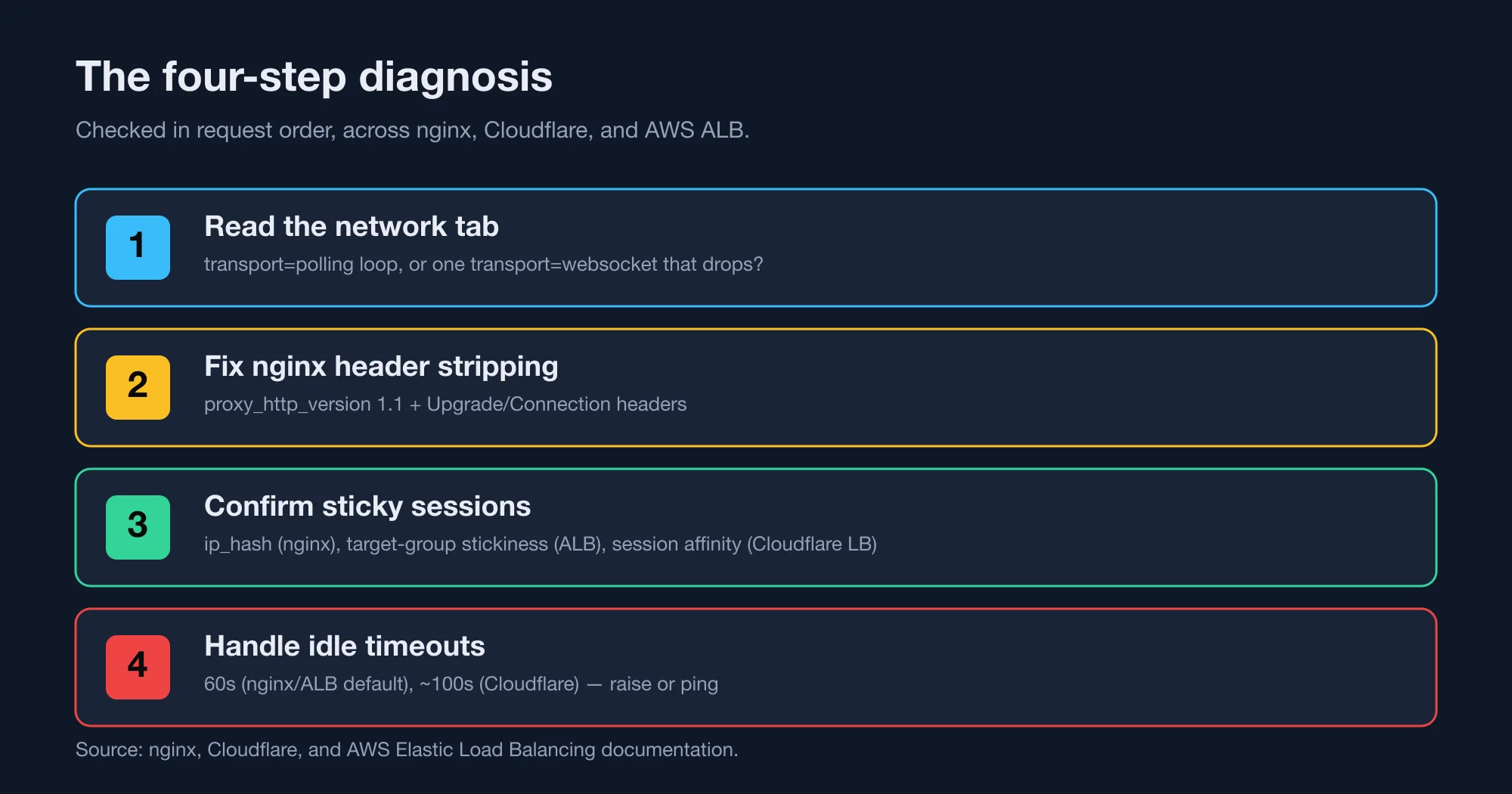
Our diagnostic methodology: open your browser's developer tools, filter for socket.io. Chrome's Network tab with a WS filter applied shows this clearly. Look at the pattern:
- A continuous stream of
GET .../socket.io/?transport=pollingrequests, with notransport=websocketentry ever appearing: the upgrade request itself isn't reaching Socket.IO correctly. This points to a proxy stripping the upgrade headers — go to Step 2. - One
transport=websocketrequest that opens with a101 Switching Protocolsresponse, then closes after a consistent delay: the upgrade works. Something is closing idle connections instead. Go to Step 4. - The handshake fails immediately with an HTTP 400 response: the request is reaching a different backend server than the one that started the session. Go to Step 3.
These are different failures with different fixes, and treating a timeout problem as a header problem — or the reverse — wastes time on the wrong layer.
Step 2: Fix nginx's default header stripping
By default, nginx's proxy_pass directive does not forward the Upgrade and Connection headers to the backend, and it speaks HTTP/1.0 to it unless told otherwise. Without those headers, the backend never sees the upgrade request as an upgrade request — it just looks like an ordinary HTTP call, and Socket.IO responds by staying on polling. nginx's own WebSocket proxying documentation gives the fix directly:
location /socket.io/ {
    proxy_pass http://socket_nodes;
    proxy_http_version 1.1;
    proxy_set_header Upgrade $http_upgrade;
    proxy_set_header Connection "upgrade";
    proxy_set_header Host $host;
}
proxy_http_version 1.1 is required — nginx speaks HTTP/1.0 to upstreams by default, and HTTP/1.0 has no Upgrade mechanism at all. Without this line, the two header directives below it do nothing.
If this is the fix, the symptom resolves immediately: the network tab starts showing a single transport=websocket entry instead of a repeating polling loop. If it doesn't, move to the next step — the headers were already correct, or something else is also blocking the upgrade.
Advertisement
Step 3: Confirm sticky sessions on every server in the chain
Socket.IO's long-polling handshake makes multiple HTTP requests before the WebSocket upgrade completes, and all of them have to reach the same backend server. If your deployment runs more than one server instance behind a load balancer without sticky sessions, an early handshake request can land on server A and a later one on server B. Server B then returns an HTTP 400, because it has no record of that session.
This applies to nginx, Cloudflare, and an AWS ALB alike. Consider, for example, a deployment running two or more backend Node.js processes behind any of the three. The configuration differs per layer:
- nginx: add
ip_hash;to theupstreamblock, which routes by client IP. - AWS ALB: enable target-group stickiness with a load-balancer-generated cookie, through the console or
modify-target-group-attributes. - Cloudflare: if Cloudflare proxies requests to multiple origin servers behind a Cloudflare Load Balancer, configure session affinity there. Cloudflare's own edge network doesn't need this, since all requests from one client reach the same nearby edge location by default.
If you're running a single server instance, this step doesn't apply — sticky sessions only matter once there's more than one backend for requests to land on inconsistently.
Step 4: Handle each proxy's idle timeout
An idle timeout is a limit on how long a connection may sit without transmitting data before a server or proxy closes it automatically. It exists to free up resources held by inactive clients.
Once the upgrade works and sticky sessions are correct, a connection that opens cleanly but closes after a consistent delay points to an idle timeout closing a quiet socket.
Three platforms, three different defaults.
| Platform | Default idle timeout |
|---|---|
| nginx | 60s |
| AWS ALB | 60s, max 4,000s |
| Cloudflare | ~100s (Free/Pro/Business) |
Where to change each one. nginx uses proxy_read_timeout and proxy_send_timeout in the location block. An AWS ALB uses the idle_timeout.timeout_seconds load balancer attribute, per AWS's own documentation. Cloudflare isn't adjustable below Enterprise, so send client-side pings instead.
For nginx and an ALB, raising the timeout is a direct fix, for example setting it to 3,600 seconds for a WebSocket-heavy route. For Cloudflare, the 100-second figure comes from community reports, not a published number on Cloudflare's WebSocket documentation. That page recommends a client-side ping-pong heartbeat as the fix regardless of the exact number. That approach works identically on nginx and an ALB too, sidestepping the need for an exact timeout value on any of the three.
Socket.IO ships this already: its client sends a ping by default every 25 seconds, well under all three timeouts above, specifically so an idle connection never looks idle to any of them. If connections are still timing out with Socket.IO's defaults intact, check two things. A custom pingInterval may have been set too high, or the heartbeat frames themselves may be blocked by the same header-stripping issue as Step 2.
A worked example: diagnosing a real stack
Picture a report that says "chat stopped working for some users yesterday." The network tab shows a continuous stream of transport=polling requests on the affected accounts. No transport=websocket entry ever appears. That's Step 1's first pattern, which points at Step 2.
Checking the nginx config confirms proxy_http_version 1.1 is set, along with both header directives. Step 2 isn't the cause here, even though the symptom matched it. The next check is Step 3: this deployment runs three backend instances behind an nginx upstream block with no ip_hash directive. Some users land on the same instance across every request by chance; others don't, and their handshake requests scatter across instances that don't share session state. Adding ip_hash to the upstream block resolves it immediately, and the network tab confirms it: a single transport=websocket entry per connection, no more polling loop.
The lesson from this example isn't the specific fix — it's that the symptom in Step 1 pointed at the wrong step first. Sticky sessions and header stripping can produce a similar-looking polling loop from the browser's side, and only checking the actual nginx config, not just guessing from the symptom, told the two apart.
What this looks like end to end
A connection that fails all four checks in sequence tends to fail at the earliest one first. Fixing Step 2's header issue is also the most common single fix. Confirm it before spending time on sticky sessions or timeouts that may not even be the actual cause once the headers are correct. Consider a typical deployment: nginx terminating TLS in front of two Node.js instances, with Cloudflare as the CDN in front of nginx. That stack has all three layers at once, and each needs its own fix. Cloudflare's timeout doesn't go away because nginx's headers are correct. And nginx's sticky sessions don't help if Cloudflare's own routing sends a reconnect to a different nginx server behind a second load balancer.
A checklist for the next incident
- Open the network tab first, every time. Don't guess which of the four causes is active — the request pattern tells you directly, and guessing wrong wastes a debugging session.
- Check nginx's
proxy_passblock forUpgradeandConnectionheaders before touching anything else. It's the single most common cause, and it's a two-line fix once found. - Count your backend server instances. One instance means sticky sessions are irrelevant; more than one means check Socket.IO's own deployment notes on sticky sessions immediately if you see HTTP 400 errors.
- Confirm Socket.IO's default
pingIntervalof 25 seconds hasn't been overridden to something longer than your proxy's idle timeout. A custom value here is an easy, easy-to-miss cause of silent disconnects. - Test the fix by watching the network tab again, not by assuming it worked. A single persistent
transport=websocketconnection with no further polling requests is the only confirmation that matters. That matches the connection states Socket.IO's client API documents.
Advertisement
FAQ
Why does Socket.IO stay on polling and never upgrade to WebSocket?
The most common cause is a reverse proxy, like nginx, that doesn't forward the Upgrade and Connection HTTP headers to the backend by default, or that speaks HTTP/1.0 to the upstream instead of HTTP/1.1. Without those headers reaching the Socket.IO server, it treats the upgrade attempt as an ordinary request and the connection stays on long-polling.
Does Socket.IO need sticky sessions behind a load balancer?
Yes, whenever more than one backend server instance is running. Socket.IO's handshake makes several HTTP long-polling requests before upgrading to WebSocket, and all of them must reach the same server. Without sticky sessions configured on the load balancer, a request can land on a server that has no record of the session, which returns an HTTP 400 error.
What is Cloudflare's WebSocket idle timeout?
Cloudflare's own documentation states that idle connections close after a period with no data, without publishing an exact number for non-Enterprise plans; community reports commonly cite roughly 100 seconds on Free, Pro, and Business. Sending a periodic ping from the client is the standard fix regardless of plan.
What is the default WebSocket idle timeout on an AWS Application Load Balancer?
60 seconds by default, adjustable up to 4,000 seconds via the idle_timeout.timeout_seconds attribute, according to AWS's Elastic Load Balancing documentation. AWS recommends setting your application's own idle timeout higher than the load balancer's to avoid intermittent HTTP 502 errors.
Comments
Loading…
Sign in to join the conversation.
Related posts
What Claude's new OpenTelemetry traces actually send out
Claude API OpenTelemetry traces are now in public beta, and the default setting sends no prompts at all. We ran the Anthropic Python SDK against a mock server and counted what leaves your app.
Mon Oct 19 2026 · 10 min read · 0 views
Porting AutoGen to Microsoft Agent Framework: what breaks
An AutoGen to Microsoft Agent Framework migration is mostly a rename, except for four defaults that change silently. We ported a two-agent writer and reviewer team on Python 3.15.0, from AutoGen 0.7.5
Mon Oct 19 2026 · 10 min read · 0 views
MCP went stateless: what breaks when versions mix
The MCP 2026-07-28 migration is less frightening than the headlines suggest. The Model Context Protocol removed sessions and its connection handshake, and the official MCP blog says the release
Mon Oct 19 2026 · 10 min read · 0 views