Porting AutoGen to Microsoft Agent Framework: what breaks
By Nihar Ranjan Das · Mon Oct 19 2026 · 10 min read · 0 views
View as a Web StoryAISoftware#ai agents#python#AutoGen#Microsoft Agent Framework#migration
An AutoGen to Microsoft Agent Framework migration is mostly a rename, except for four defaults that change silently. We ported a two-agent writer and reviewer team on Python 3.15.0, from AutoGen 0.7.5 to Agent Framework 1.22.0, and measured the differences. The agent forgot its history, the tool loop made twice as many model calls, and the team result held one useless message. Installing the umbrella package also pulled 699 MB. This guide shows the code before and after, the numbers, and the fixes.
Is AutoGen still maintained?
No. The AutoGen README states that Microsoft is not providing bug fixes, security fixes, new features, or support for the project, according to the AutoGen repository on GitHub. It calls Microsoft Agent Framework the enterprise-ready successor and points existing users to a migration guide.
AutoGen is an open-source Python framework from Microsoft Research for building multi-agent systems with large language models. Microsoft Agent Framework is the successor SDK from the AutoGen and Semantic Kernel teams, available for Python and .NET. Microsoft declared version 1.0 on April 3, 2026, with stable APIs and a commitment to long-term support, according to the Agent Framework 1.0 announcement.
Some third-party guides say AutoGen still receives security fixes. The README we read says otherwise. For production code, treat that as the decision: staying means no security patches from Microsoft.
What maps to what?
Most AutoGen classes have a direct Agent Framework equivalent, and the names change more than the ideas. The table below combines the AutoGen migration guide on Microsoft Learn with what we ran.
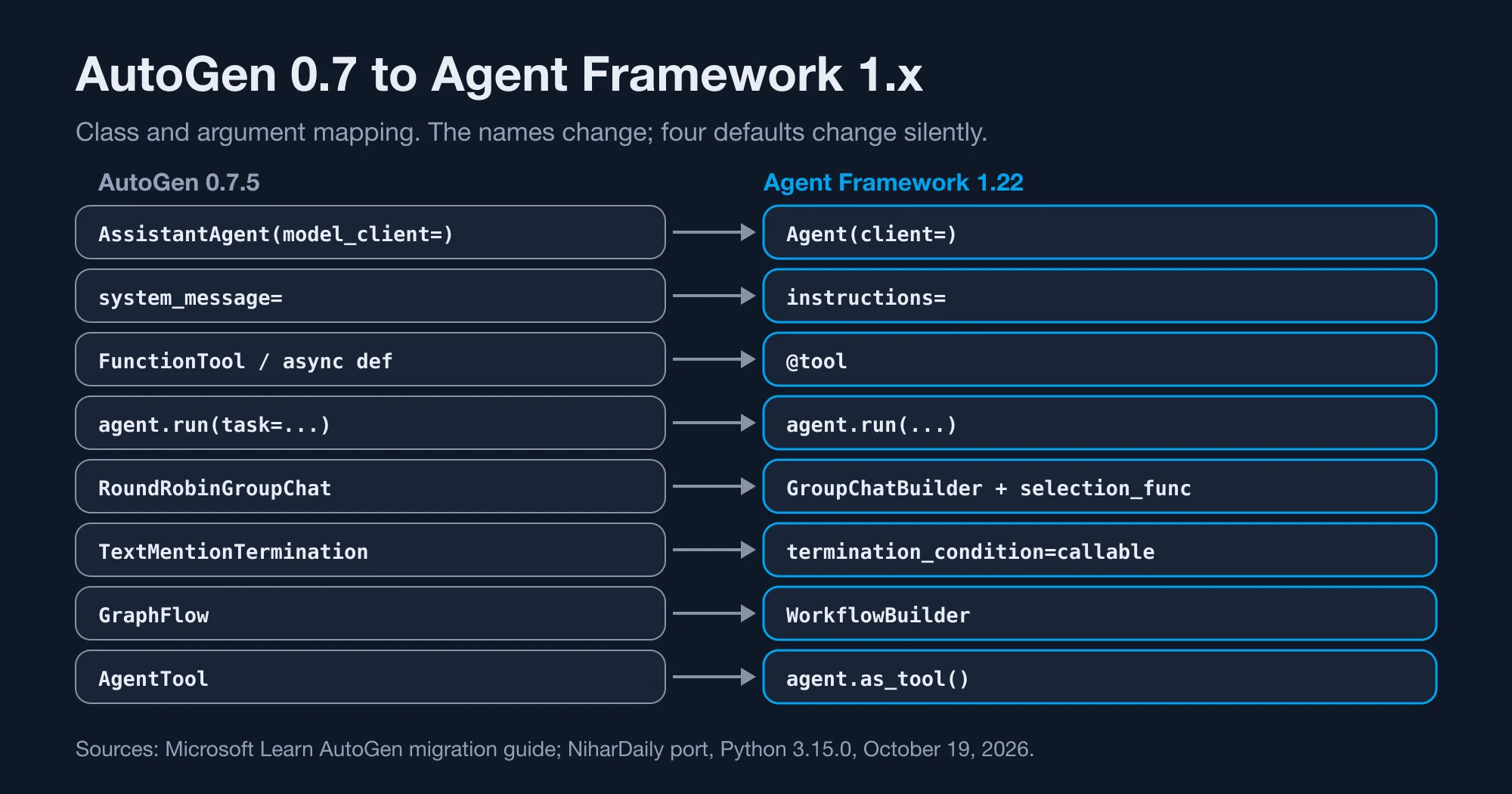
| AutoGen 0.7 | Agent Framework 1.x | What changes |
|---|---|---|
AssistantAgent(model_client=...) |
Agent(client=...) |
Parameter renamed |
system_message= |
instructions= |
Parameter renamed |
FunctionTool or a bare async function |
@tool decorator |
Schema inferred from the signature |
agent.run(task=...) |
agent.run(...) |
Task is the first positional argument |
RoundRobinGroupChat |
GroupChatBuilder with selection_func |
No built-in round robin |
TextMentionTermination("APPROVE") |
termination_condition= callable |
You write the check |
GraphFlow |
WorkflowBuilder |
Data flow replaces control flow |
AgentTool |
agent.as_tool() |
Same idea, new method |
GroupChatBuilder is the Agent Framework class that assembles several agents into a turn-taking chat. The orchestration row is the big one. Microsoft's guide says AutoGen pairs an event-driven core with a high-level Team, while Agent Framework centers on a typed, graph-based Workflow. Group chat is still available through the orchestrations package, but it runs on top of that workflow engine, and that is where our surprises came from.
What did our test app look like in AutoGen?
Our test setup was a clean Python 3.15.0 virtual environment on an M-series Mac, with autogen-agentchat 0.7.5 in one and agent-framework 1.22.0 in another. Our app is a writer agent with one price-lookup tool and a reviewer agent that approves the draft. We used a replay client so the run needs no API key. This is the AutoGen version, and it runs as written on autogen-agentchat 0.7.5.
import asyncio
from autogen_agentchat.agents import AssistantAgent
from autogen_agentchat.teams import RoundRobinGroupChat
from autogen_agentchat.conditions import MaxMessageTermination, TextMentionTermination

async def lookup_price(sku: str) -> str:
    """Return the price for a SKU."""
    return f"{sku}: $19"

writer = AssistantAgent("writer", model_client=writer_client, tools=[lookup_price],
                        system_message="Write.", reflect_on_tool_use=True)
reviewer = AssistantAgent("reviewer", model_client=reviewer_client,
                          system_message="Review. Say APPROVE.")
team = RoundRobinGroupChat([writer, reviewer],
    termination_condition=TextMentionTermination("APPROVE") | MaxMessageTermination(6))
result = await team.run(task="Quote SKU A1")
The run returned five messages: the user task, the tool call request, the tool result, the writer's draft and the reviewer's verdict. The stop reason read "Text 'APPROVE' mentioned". Everything a caller needs sits in result.messages.
One setup detail: the replay client refused tools until we passed a model_info with function_calling set to true. Real clients carry this already, so it only matters for test doubles.
Advertisement
What does the same app look like in Agent Framework?
The ported app needs a decorator, a selection function and a termination callable. This version runs on agent-framework-core 1.22.0 and agent-framework-orchestrations 1.3.2.
from agent_framework import Agent, tool
from agent_framework_orchestrations import GroupChatBuilder

@tool
def lookup_price(sku: str) -> str:
    """Return the price for a SKU."""
    return f"{sku}: $19"

writer = Agent(name="writer", client=writer_client, instructions="Write.", tools=[lookup_price])
reviewer = Agent(name="reviewer", client=reviewer_client, instructions="Review. Say APPROVE.")

workflow = GroupChatBuilder(
    participants=[writer, reviewer],
    selection_func=lambda state: "writer" if state.current_round % 2 == 0 else "reviewer",
    termination_condition=lambda conversation: any("APPROVE" in (m.text or "") for m in conversation),
    max_rounds=6,
    output_from="all",
).build()
result = await workflow.run("Quote SKU A1")
Two lines here carry the lessons. selection_func replaces the round robin you got for free. And output_from="all" is there because of the third silent change below. Without it, this code runs and returns the wrong thing.
For tests, we wrote a fake chat client by subclassing BaseChatClient together with FunctionInvocationLayer, then returned canned ChatResponse objects from _inner_get_response. The streaming path needs its own implementation. Our fake broke when the group chat asked for a stream, so we ran the workflow without streaming.
Does Agent Framework remember the conversation?
Not unless you ask. In our test, the second call to an AutoGen AssistantAgent sent the model 4 messages. The same second call to an Agent Framework Agent sent 1 message. With an AgentSession passed in, it sent 3.
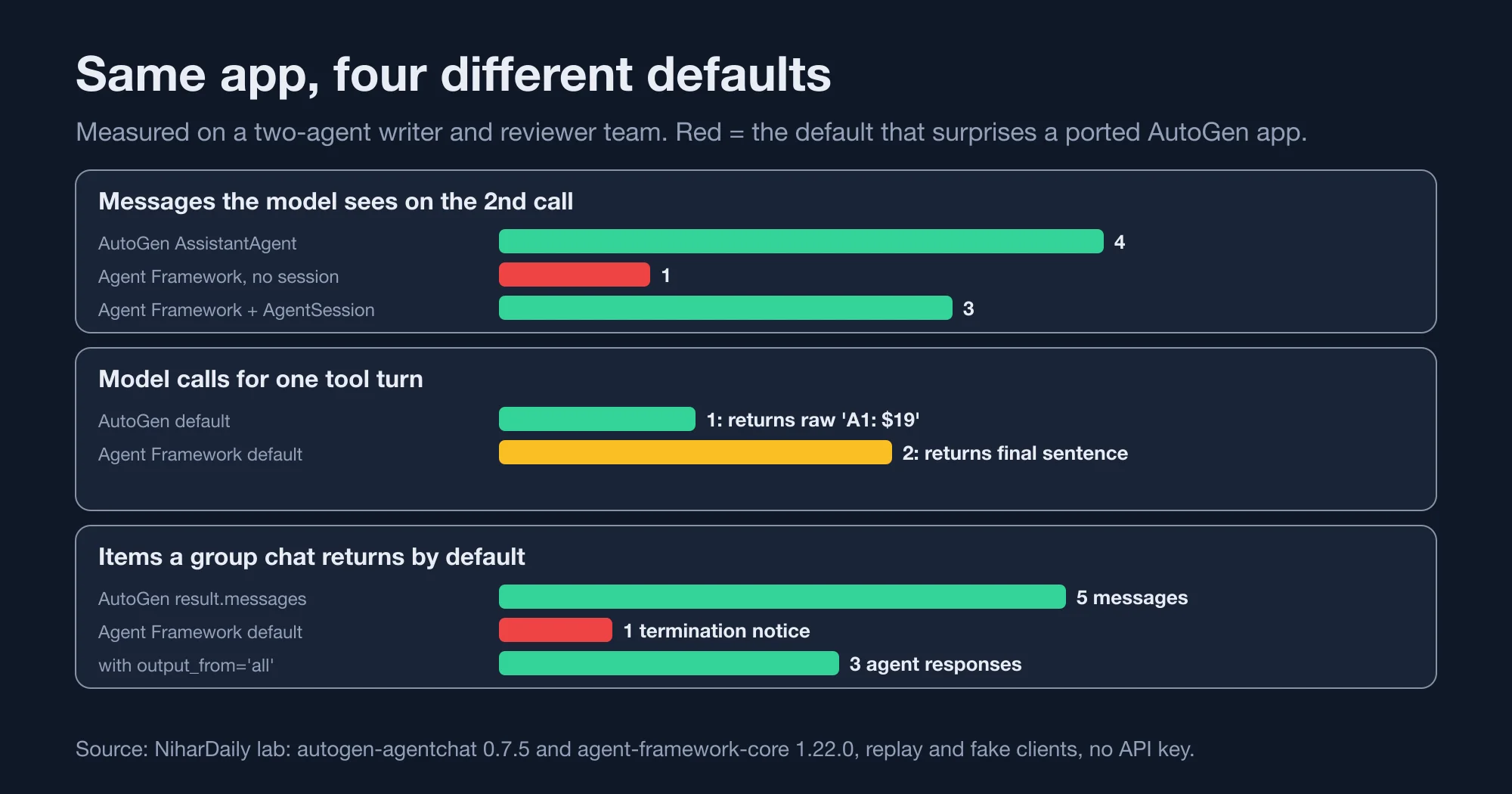
The AutoGen count of 4 is the system message, the first question, the first answer and the second question. The Agent Framework count of 1 is only the second question. Microsoft's guide confirms the design: an Agent is stateless and does not keep history between invocations, unlike AssistantAgent. A chatbot ported without changes forgets every previous turn and never raises an error.
AgentSession is the Agent Framework object that holds one conversation's history between runs. The fix is to create a session and pass it to every call:
session = agent.create_session()
await agent.run("first question", session=session)
await agent.run("second question", session=session)
Store one session per conversation. In a web app, keep sessions in a store keyed by user and conversation ID. A single session object shared across users would leak one person's history to another.
Why did the tool loop double the model calls?
Because Agent Framework keeps calling the model after a tool runs, and AutoGen's default does not. In our test, one tool turn took 1 model call in AutoGen's default setup and 2 in Agent Framework. AutoGen returned the raw tool result, "A1: $19", as a ToolCallSummaryMessage. Agent Framework returned a final sentence, "Final: $19."
Microsoft's guide states the difference: AssistantAgent is single-turn unless you raise max_tool_iterations, while Agent is multi-turn by default and keeps invoking tools until it can return a final answer. That is better behavior for users and a higher bill for you.
The size of the bill depends on your prompt. The second call re-sends the whole conversation plus the tool result, so a 6,000-token context costs about 6,000 extra input tokens per tool turn. For example, at an input price of $2 per million tokens, that is $0.012 per tool turn, which is $12 for every 1,000 tool turns. Prompt caching lowers it. Agents that chain five tools pay the loop five times.
If you were using reflect_on_tool_use=True in AutoGen, as our sample does, you already paid for the second call, and nothing changes. If you were not, budget for it before you ship.
What happens to the team result?
The default group chat output is a one-line termination notice, not the conversation. Our AutoGen team returned five messages in result.messages. The Agent Framework workflow returned 31 events and exactly one output by default: "The group chat has reached its termination condition."
Those 31 events were 8 executor invocations, 8 completions, 5 superstep starts, 5 superstep completions, 4 group chat events and 1 output. The writer's draft and the reviewer's approval were inside the events, but not in the output.
Setting output_from="all" changed the result to three outputs: the writer's response with its tool call and tool result, the reviewer's verdict, and the termination notice. That is the transcript you wanted. Test your port on the return value, not just on whether it runs.
This is the most dangerous change of the four, because a smoke test passes. The code finishes, the logs look busy, and the value you saved to your database is the termination sentence.
How much does the install weigh?
The obvious command installs far more than you need. pip install agent-framework pulled 699 MB of site-packages and 198 packages in our clean Python 3.15.0 environment. Installing agent-framework-core plus agent-framework-orchestrations pulled 36 MB and 13 packages. AutoGen's autogen-agentchat plus autogen-ext pulled 46 MB and 13 packages.
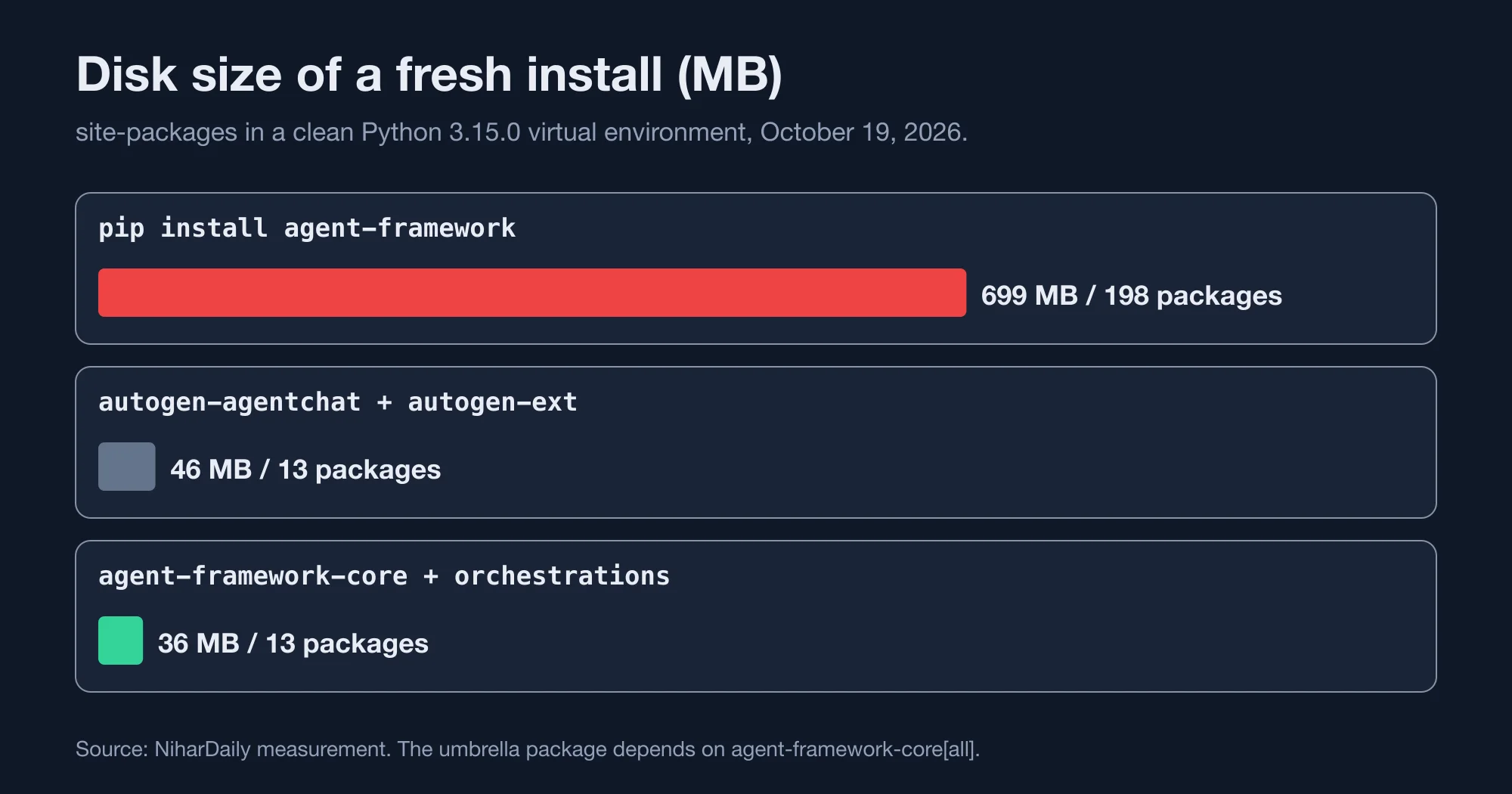
| Install route | Disk size | Packages |
|---|---|---|
pip install agent-framework |
699 MB | 198 |
pip install autogen-agentchat autogen-ext |
46 MB | 13 |
pip install agent-framework-core agent-framework-orchestrations |
36 MB | 13 |
The umbrella package depends on agent-framework-core[all], which brings every connector. In our environment that was 29 agent-framework packages, 21 of them pre-release. That matters for serverless deployments with a size limit and for container build times. Install the core package plus only the connector you use, such as agent-framework-openai.
How do you test the port without an API key?
Write a fake chat client, and assert on what the model received and what the app returned. This is the double we used for every number in this guide. It runs offline and costs nothing.
from agent_framework import BaseChatClient, ChatResponse, Content, FunctionInvocationLayer, Message

class FakeClient(FunctionInvocationLayer, BaseChatClient):
    def __init__(self, script):
        super().__init__()
        self.script = list(script)   # tuples are tool calls, strings are replies
        self.calls = 0

    def _inner_get_response(self, *, messages, stream, options, **kwargs):
        async def go():
            self.calls += 1
            item = self.script.pop(0)
            if isinstance(item, tuple):
                call = Content.from_function_call(call_id="1", name=item[0], arguments=item[1])
                return ChatResponse(messages=[Message("assistant", [call])])
            return ChatResponse(messages=[Message("assistant", [item])])
        return go()
Three assertions then guard the four changes. Assert that client.calls equals the number of model calls you budgeted, which catches the doubled tool loop. Assert that the second turn of a conversation sees more than one message, which catches the missing session. And assert that the workflow output contains the reviewer's text, which catches the termination notice.
The class mixes FunctionInvocationLayer into BaseChatClient, the same pattern the OpenAI client in agent-framework-openai uses. Keep that order, because the layer has to wrap the base class to run the tool loop. Remember that this fake supports non-streaming runs only. If your app streams, extend _inner_get_response to return a stream when stream is true.
How stable is the new API?
Stable at 1.0, but the packages around it still move. The Agent Framework release python-1.17.0, dated September 3, 2026, lists a breaking change: it restores sequence-only agent middleware inputs and removes the experimental agent-hooks core extra, according to the python-1.17.0 release notes.
Our environment had core at 1.22.0, orchestrations at 1.3.2 and the OpenAI connector at 1.17.0, so the versions are independent. Pin all of them in a lockfile and read each changelog before you bump. Do not rely on a floating range.
One more limit from the guide: AutoGen offered embedded and experimental distributed runtimes, while Agent Framework focuses on single-process composition today, with distributed execution planned. If your AutoGen system spreads agents across machines, you cannot port that part yet.
Should you port now or wait?
Port now if you run AutoGen in production, because staying means no security patches. Wait only if you depend on AutoGen's distributed runtime, and even then start porting the single-process parts.
| Your situation | Move |
|---|---|
| Production AutoGen, single process | Port now; the work is small |
| Production AutoGen, distributed runtime | Port agents and tools now; keep the runtime until Microsoft ships one |
| Prototype or research notebook | Optional; freeze the version |
| New project | Start on Agent Framework |
We would port in this order. First, swap the model client and one single agent, and write a test with a fake client. Second, port tools to @tool. Third, add sessions wherever history matters. Fourth, port teams, and assert on the returned transcript. Last, trim the install to the core package and the connectors you use.
The bottom line is that the code port is quick and the behavior port is where time goes. Every one of the four changes passes a smoke test. Write assertions on message counts, tool-call counts and the saved transcript, and the migration becomes a checklist instead of a surprise.
Advertisement
FAQ
Is AutoGen deprecated?
Effectively yes. The AutoGen README says Microsoft is not providing bug fixes, security fixes, new features, or support for the project, and names Microsoft Agent Framework as its successor. Existing users are pointed to a migration guide. New projects should start on Agent Framework.
How do I migrate from AutoGen to Microsoft Agent Framework?
Rename AssistantAgent to Agent, model_client to client and system_message to instructions. Replace FunctionTool with the @tool decorator and RoundRobinGroupChat with GroupChatBuilder plus a selection function. Then add sessions for history and set output_from to all so a group chat returns the full transcript.
Why does my Agent Framework agent forget previous messages?
An Agent is stateless by default. In our test the second call sent the model 1 message, against 4 in AutoGen. Create a session with agent.create_session() and pass it to every run call. With a session, the second call sent 3 messages. Keep one session per conversation.
Why does pip install agent-framework take 699 MB?
The umbrella package depends on agent-framework-core with the all extra, which installs every connector. In our clean Python 3.15.0 environment that was 198 packages. Installing agent-framework-core and agent-framework-orchestrations took 36 MB and 13 packages. Add only the connector you need.
Does Agent Framework make more model calls than AutoGen?
For tool use, yes by default. One tool turn took 2 model calls in Agent Framework and 1 in AutoGen's default setup, because Agent Framework keeps going until it has a final answer. AutoGen with reflect_on_tool_use set to true makes the same 2 calls.
Comments
Loading…
Sign in to join the conversation.
Related posts
What an AI-resolved support ticket really costs in 2026
AI customer support agent pricing per resolution runs from $0.50 to about $4.00 for the same solved ticket. HubSpot charges $0.50 per resolved conversation, Fin charges $0.99, and Zendesk charges
Mon Oct 19 2026 · 10 min read · 0 views
What Claude's new OpenTelemetry traces actually send out
Claude API OpenTelemetry traces are now in public beta, and the default setting sends no prompts at all. We ran the Anthropic Python SDK against a mock server and counted what leaves your app.
Mon Oct 19 2026 · 10 min read · 0 views
Gemini 4 Argon price doubles December 1: what you will pay
Gemini 4 Argon API pricing doubles on December 1, 2026. Standard input goes from $2.00 to $4.00 per million tokens, and output goes from $10.00 to $20.00, according to Google's own pricing page. We
Mon Oct 19 2026 · 10 min read · 0 views