What Claude's new OpenTelemetry traces actually send out
By Nihar Ranjan Das · Mon Oct 19 2026 · 10 min read · 0 views
View as a Web StoryAISoftware#ai agents#anthropic#observability#claude#opentelemetry
Claude API OpenTelemetry traces are now in public beta, and the default setting sends no prompts at all. We ran the Anthropic Python SDK against a mock server and counted what leaves your app. Metadata-only mode emitted 18 span attributes, with token counts but no text. Full content mode emitted 21, and the extra three held the system prompt, the user message and the model reply, including an email address we planted in the question. This guide shows the setup for the Console and the SDK, the lab results, and the gotchas the launch posts skip.
What are Claude API OpenTelemetry traces?
OpenTelemetry is a vendor-neutral standard for tracing, and Claude's version records each model request and tool use as a span. A trace is the full record of one request through your system. A span is one step in that trace, such as a single model call. Anthropic's export follows the GenAI semantic conventions, so platforms that understand them can read the spans without custom parsing.
Claude Platform is Anthropic's developer platform, which includes the Messages API, the Console and Claude Managed Agents. Anthropic put OpenTelemetry export for these in public beta on October 14, 2026, according to launch coverage on DevOps.com. The company's announcement on agent observability says the traces cover agent turns, model calls, tool use and MCP server calls.
OTLP is the OpenTelemetry protocol, the wire format your observability tool accepts. Any tool that takes OTLP over HTTP can receive Claude's traces. Anthropic names 12 partners with setup guides: Arize AI, Braintrust, Databricks, Datadog, Grafana Cloud, Honeycomb, Langfuse, LangSmith, New Relic, PostHog, Sentry and Splunk.
Should you use API tracing, SDK tracing, or both?
Use both if you can, because each one sees spans the other cannot. API tracing needs the admin role and covers any client. SDK tracing needs only code and covers clients that use the SDK. The table below follows Anthropic's own coverage matrix.
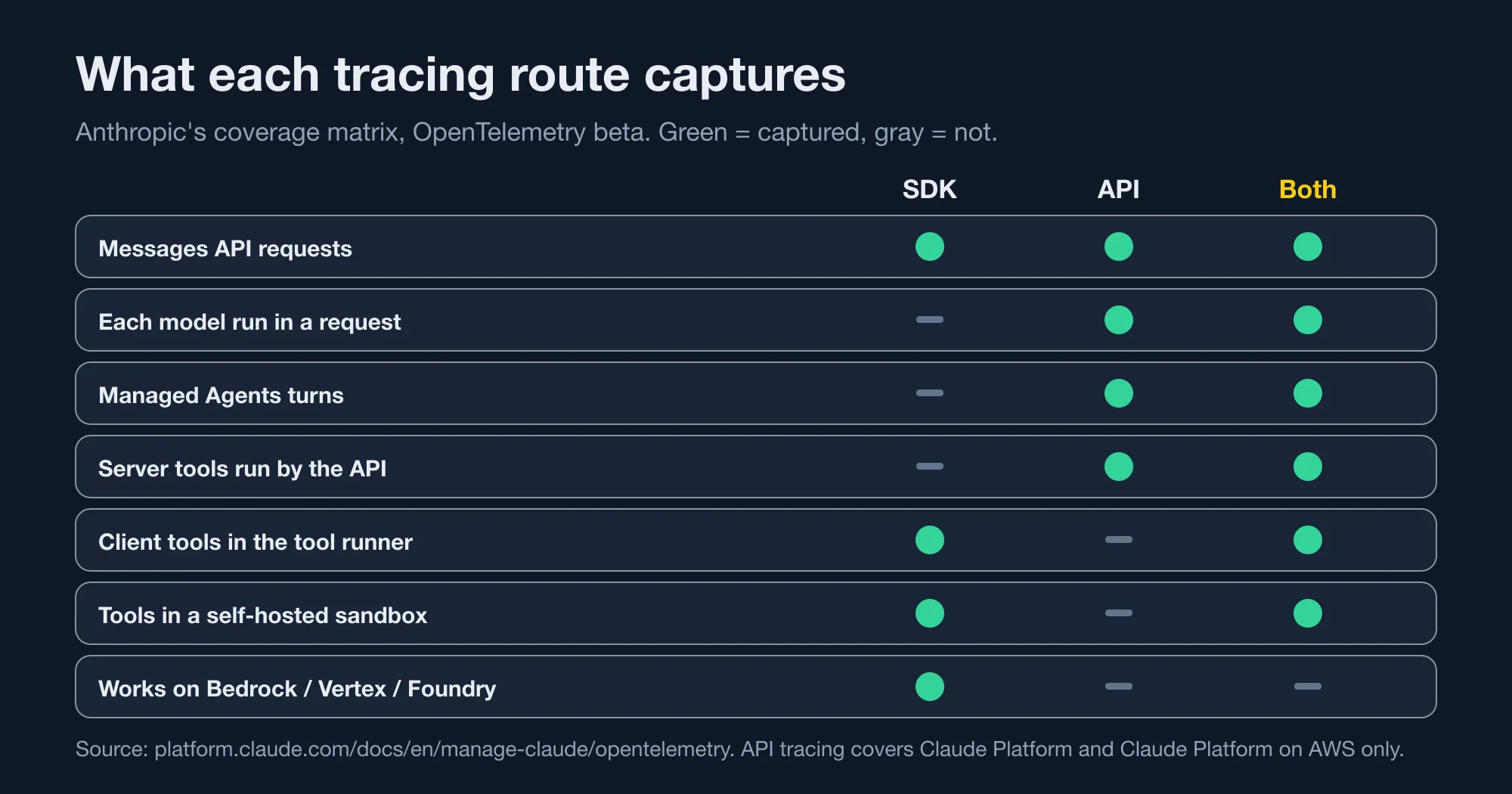
| What you get | SDK tracing | API tracing | Both |
|---|---|---|---|
| Messages API requests | Yes | Yes | Yes |
| Each model run inside a request | No | Yes | Yes |
| Managed Agents turns | No | Yes | Yes |
| Server tools run by the API | No | Yes | Yes |
| Client tools run by the tool runner | Yes | No | Yes |
| Tools in a self-hosted sandbox | Yes | No | Yes |
| Required permission | None | Admin | Admin |
| Cloud support | Any | Claude Platform, Claude Platform on AWS | Same as API |
The cloud row is the one to check first. API tracing works on Claude Platform and Claude Platform on AWS only. SDK tracing works on any cloud, including Amazon Bedrock, Google Cloud and Microsoft Foundry, which Anthropic lists as beta platforms for the SDK page. If you call Claude through Bedrock, SDK tracing is your only route today.
How do you set up Claude API OpenTelemetry traces in the Console?
Open the Console's OpenTelemetry settings page as an organization admin, click Add destination, and fill in the endpoint and headers. The steps below come from Anthropic's API tracing setup guide.
- Confirm you hold the admin role. A developer role can view destinations but not add them.
- Have an OTLP/HTTP endpoint ready. It must accept protobuf over HTTPS on port 443, with a hostname rather than an IP address.
- Choose your provider, or Custom if it is not listed, and enter the base URL. Do not add
/v1/traces, because the API adds it. - Enter your credentials as request headers. The Console never shows header values again after you save.
- Pick a content mode and the workspaces to cover: All, Selected, or All except.
- Click Test. A span named
anthropic.testshould arrive in your tool, and the Delivery column should read Healthy within about a minute. - In your tool, filter on
service.nameequal toclaude-platformto find real spans.
If you run your own OpenTelemetry Collector, note that its OTLP/HTTP receiver listens on port 4318 by default. Anthropic's guide says to put a load balancer or reverse proxy on port 443 in front of it, or reconfigure the receiver.
You can also script it. The Admin API accepts the same settings, and Anthropic documents a CLI form: ant beta:organization:telemetry-destinations create with the endpoint, headers, content mode and workspaces. That route suits infrastructure-as-code teams.
Advertisement
How do you set up SDK tracing in Python?
Register a tracer provider before your first call, then create the client as usual. The SDK picks up the provider you registered. This is the exact pattern we ran, with an in-memory exporter in place of a real backend.
from anthropic import Anthropic
from opentelemetry.sdk.trace import TracerProvider
from opentelemetry.sdk.trace.export import SimpleSpanProcessor
from opentelemetry.sdk.trace.export.in_memory_span_exporter import InMemorySpanExporter

exporter = InMemorySpanExporter()
provider = TracerProvider()
provider.add_span_processor(SimpleSpanProcessor(exporter))

client = Anthropic(open_telemetry={
    "tracer_provider": provider,
    "traces": {"content_mode": "content"},   # omit for the metadata_only default
})
Swap the in-memory exporter for an OTLP exporter when you connect a real platform. Anthropic's SDK setup page also lists environment variables, such as ANTHROPIC_OPEN_TELEMETRY_TRACES_CONTENT_MODE=content. One rule trips people up: if you pass open_telemetry to the client, it overrides every related environment variable as a whole, so any nested key you leave out reverts to its default.
Our test ran on anthropic 1.15.0 with opentelemetry-sdk 1.45.1 on Python 3.15.0. One surprise: that SDK version depends on a package named httpx2, not httpx. Its source rejects a client built from the older httpx package. If you inject a custom HTTP client for tests or proxies, build it from httpx2.
What does the default mode send, and what does full content add?
Metadata-only mode sent 18 attributes per span in our run, and full content mode sent 21. The three extra attributes held every word of the conversation. The lab used a mock server, so no real prompts left the machine, but the span contents are exactly what the SDK produces.
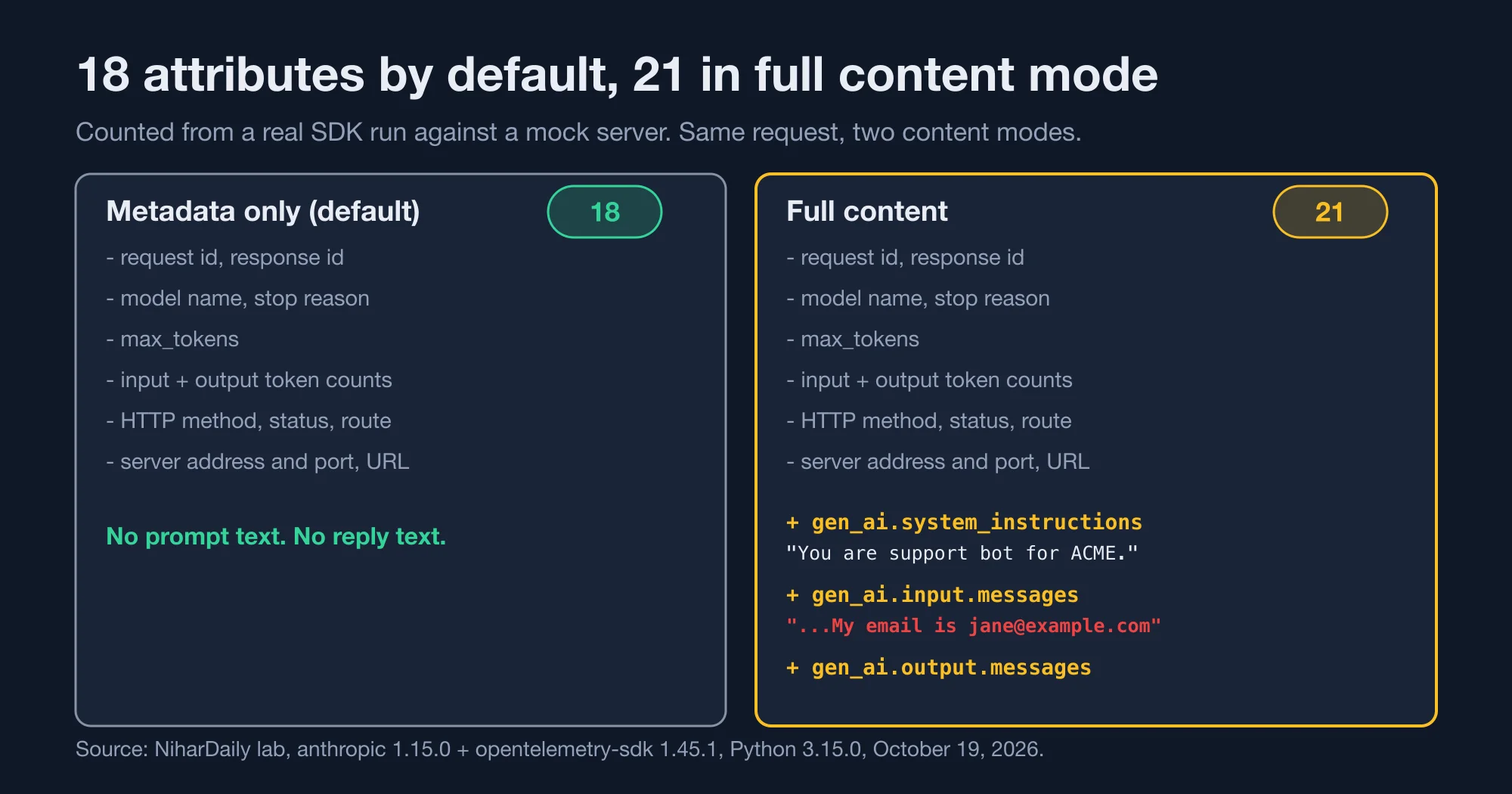
Both modes emitted the same 18 attributes: the request and response IDs, the model name, the stop reason, max_tokens, input and output token counts, the HTTP method, status and route, the server address and port, and URL fields. Full content mode added gen_ai.system_instructions, gen_ai.input.messages and gen_ai.output.messages.
Here is what the three extra attributes held in our run. The system prompt was "You are support bot for ACME." The user message was "Where is my refund? My email is jane@example.com". The reply was "Refunds are processed within 5 business days." In other words, the customer's email address is now in your observability vendor's database.
That is the bottom line for privacy. Anthropic says your observability platform stores this content under its own access and retention settings. So the question is not whether Claude is safe. The question is whether Datadog, Honeycomb or whoever you chose is allowed to hold your customers' words. For EU teams, that is a data processing question for your data protection officer. Treat this guide as engineering input, not legal advice.
There are two built-in brakes. If your organization has a HIPAA, FERPA or K-12 data-handling restriction with Anthropic, destinations export only metadata no matter what you pick. SDK spans are not affected by that rule, so the SDK setting is still yours to control. And the conversation ID you set is exported in both modes, so do not put personal data or secrets in it.
How big do spans get, and when are they truncated?
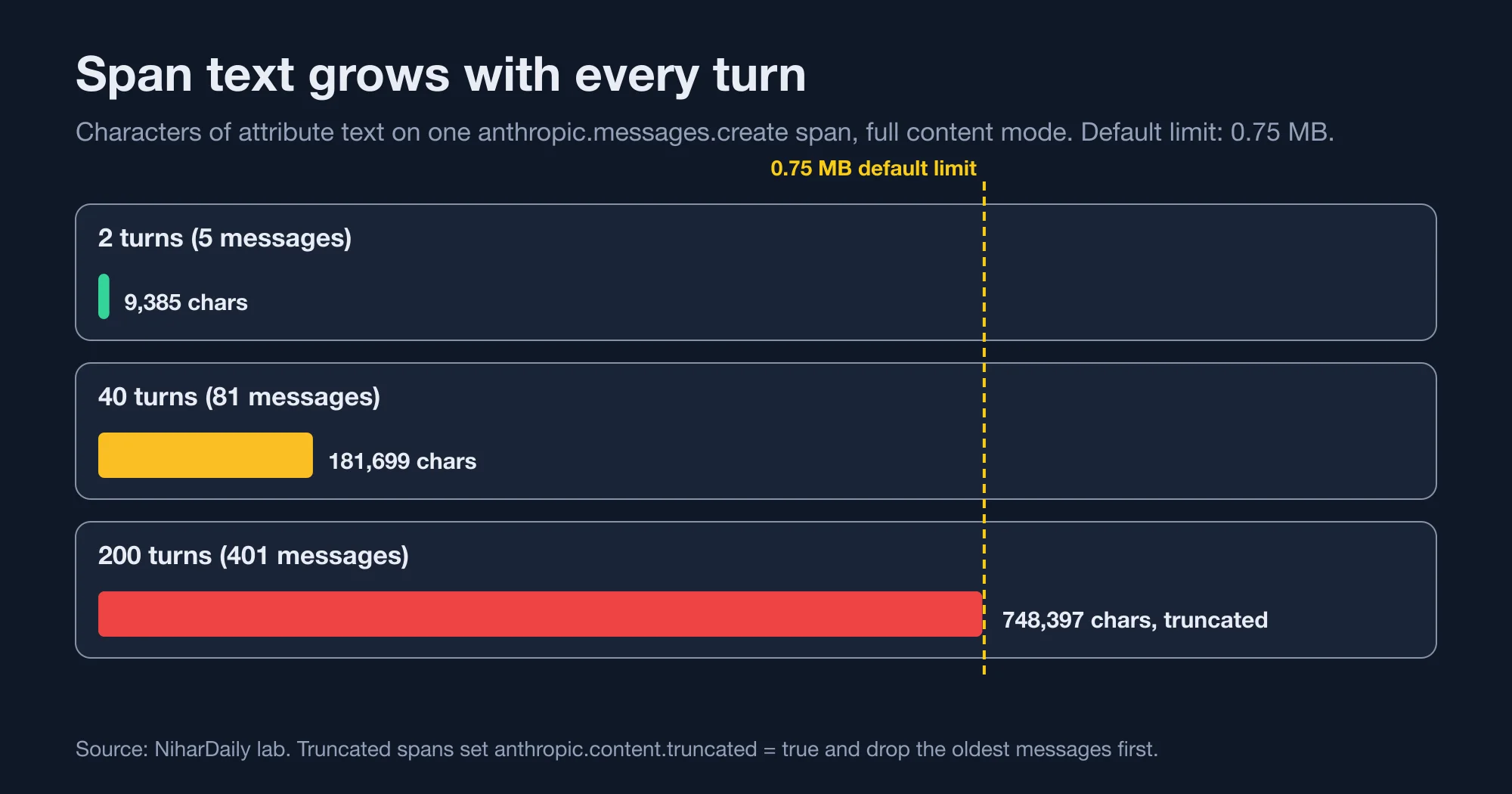
Each span holds up to 0.75 MB of content by default, and long agent conversations outgrow that. Anthropic says 0.75 MB fits a 200,000-token context window of English text. Our filler text is denser than real prose, so we hit the limit earlier in tokens, but the byte math is the same.
| Conversation turns | Span attribute text | Truncated? |
|---|---|---|
| 2 turns (5 messages) | 9,385 characters | No |
| 40 turns (81 messages) | 181,699 characters | No |
| 200 turns (401 messages) | 748,397 characters | Yes |
| 200 turns, limit set to 100,000 bytes | 99,216 characters | Yes |
| 40 turns, limit set to 5,000 bytes | 4,693 characters | Yes |
When content passes the limit, the SDK or API shortens it and sets anthropic.content.truncated to true. Anthropic's docs say request spans drop the system prompt and the earliest messages first. So the oldest context disappears from your trace, which is the part you may need most when you debug a long run.
Two practical notes follow. If your observability platform rejects large requests, lower the limit with traces.max_content_bytes in the SDK or Maximum content size in the Console. If you want long runs kept whole, raise it. Anthropic says a full 1M-token context window needs about 4 MB.
What goes wrong in production?
Four things go wrong most often, and the first one costs money. Each comes from Anthropic's documentation, and we flag where we tested it.
- Double-counted tokens. A request can have an SDK span and an API span with the same name,
anthropic.messages.create. The SDK span has the kind CLIENT and the API span has the kind SERVER. Sum tokens from only one source, or your dashboard shows roughly double the real usage. - Cache tokens added twice.
gen_ai.usage.input_tokensalready includes cache reads and writes, so do not add the cache attributes on top. - Lost and duplicated spans. Delivery is at least once and best effort. A span can arrive twice or never. Deduplicate on trace ID and span ID, and never treat spans as a billing record.
- A silently disabled destination. The API disables a destination if your endpoint sends a redirect, resolves to a non-public IP address, or fails every delivery for 24 hours. The documentation describes no alert for this, so watch the Delivery column or alert on missing data.
Also remember that the beta can break your queries. Anthropic warns that a new SDK version can rename a span, an attribute, an option or an environment variable. Pin the SDK version and read the changelog before you upgrade.
For spend tracking, use the Usage API instead. Anthropic says the exported spans are not guaranteed to be a complete record, and a caller can drop a request's spans by turning off the sampled flag in the traceparent header. The Usage API counts requests without spans too, so it is the right tool for spotting a leaked key.
What limits should you plan around?
Plan for 10 destinations per organization, including disabled ones. The table lists the limits from Anthropic's setup guide.
| Limit | Value |
|---|---|
| Destinations per organization | 10 |
| Workspaces selected per destination | 1,000 |
| Request headers per destination | 20 |
| Header value length | 4,096 bytes |
| Endpoint URL length | 2,048 characters |
| TLS handshake and response headers | 5 seconds each |
| Total delivery timeout | 10 seconds |
Your endpoint must answer within those timeouts. Deliveries are gzip-compressed, and if your endpoint answers the first request with a 400 or 415, the API resends the same spans uncompressed right away.
Which content mode should your team pick?
Start with metadata-only everywhere, and turn on full content only for a workspace that holds no customer data. That one rule gives you latency, token and error visibility on day one with no new privacy exposure.
| Your situation | Content mode | Why |
|---|---|---|
| Production workspace with real customer text | Metadata only | Spans carry no prompts or replies |
| Staging or internal-tools workspace | Full content | Lets you read failed runs and build evals |
| Regulated data (HIPAA, FERPA, K-12) | Metadata only, enforced | Anthropic forces it for destinations |
| Zero data retention in place | Full content is allowed | Messages API content is held in memory until delivery |
| Managed Agents | Check first | Managed Agents is not eligible for zero data retention |
The Selected and All except workspace filters make this easy. Create one destination for production with metadata only. Create a second destination for staging with full content. A span goes to every enabled destination that covers its workspace, so you can mix them.
We would do this in three steps. First, add one metadata-only destination across all workspaces and check Healthy. Second, add conversation_id in the SDK so multi-call conversations group together. Third, run one staging workspace in full content for a week and review what your vendor stores before you decide on production.
Anthropic's documentation we read lists no separate price for the export. Your observability vendor will still charge for ingest, and full content spans are far larger than metadata spans, so ask your vendor about volume pricing before you enable it broadly.
Advertisement
FAQ
Does Claude's OpenTelemetry export send my prompts by default?
No. The default content mode is metadata-only, which sends identifiers, timing, status and token counts but not prompts or responses. In our test it emitted 18 span attributes and none held message text. Full content mode must be turned on per destination or per SDK client.
How do I set up Claude API OpenTelemetry traces?
For API tracing, an organization admin adds a destination in the Claude Console with an HTTPS OTLP endpoint on port 443, request headers and a content mode, then clicks Test. For SDK tracing, register a tracer provider and pass the open_telemetry option to the client. Both are public beta.
Why does my dashboard show double the Claude tokens?
A Messages API request can produce an SDK span and an API span with the same name, anthropic.messages.create. Sum tokens from only one source. The SDK span has the kind CLIENT and the API span has the kind SERVER. Also do not add cache token attributes to input tokens.
Can I use Claude OpenTelemetry traces with zero data retention?
Yes for the Messages API. Anthropic says the API holds exported content only in memory until it delivers it to your destination. Claude Managed Agents is not eligible for zero data retention. After delivery, your observability vendor's own retention rules apply to the data.
Which observability tools support Claude traces?
Anthropic lists 12 partners with guides: Arize AI, Braintrust, Databricks, Datadog, Grafana Cloud, Honeycomb, Langfuse, LangSmith, New Relic, PostHog, Sentry and Splunk. Any tool that accepts OTLP over HTTP on HTTPS port 443 should also work with the Custom provider option.
Comments
Loading…
Sign in to join the conversation.
Related posts
What an AI-resolved support ticket really costs in 2026
AI customer support agent pricing per resolution runs from $0.50 to about $4.00 for the same solved ticket. HubSpot charges $0.50 per resolved conversation, Fin charges $0.99, and Zendesk charges
Mon Oct 19 2026 · 10 min read · 0 views
Porting AutoGen to Microsoft Agent Framework: what breaks
An AutoGen to Microsoft Agent Framework migration is mostly a rename, except for four defaults that change silently. We ported a two-agent writer and reviewer team on Python 3.15.0, from AutoGen 0.7.5
Mon Oct 19 2026 · 10 min read · 0 views
Gemini 4 Argon price doubles December 1: what you will pay
Gemini 4 Argon API pricing doubles on December 1, 2026. Standard input goes from $2.00 to $4.00 per million tokens, and output goes from $10.00 to $20.00, according to Google's own pricing page. We
Mon Oct 19 2026 · 10 min read · 0 views