AI SDK 7 upgrade: the codemod compiles, but a tool breaks
By Nihar Ranjan Das · Thu Oct 22 2026 · 10 min read · 0 views
View as a Web StoryAI#llm#typescript#migration#vercel#ai-sdk
We upgraded a 55-line AI SDK 6 chat app to version 7.0.148 and ran the official codemod. TypeScript went from 4 errors to 1, then to 0 after one manual fix, but two things still changed at runtime without any compile error. A tool that read its API key from the old context object failed with a TypeError, and result.usage reported 250 input tokens instead of 150, which is 67% more (our lab, 2026) for the same call.
This post gives the exact upgrade order, the numbers from our run, the fix for each break, and the list of changes we could not reproduce but you should check in your own app.
What is AI SDK 7, and what does the upgrade change?
The AI SDK is Vercel's open-source TypeScript library for calling language models through one API, with functions such as generateText, streamText and tool. AI SDK 7 is the major release after version 6, and its migration guide lists renames, removed options, new defaults and a stricter prompt check.
The official migration guide from AI SDK 6 to 7 groups the work into core renames, prompt and step changes, lifecycle events, usage and result shapes, telemetry, streaming, tools, and provider-specific notes. It also ships a codemod, run with npx @ai-sdk/codemod v7, and its table lists 32 individual transformations.
The guide is accurate and long. It does not tell you which changes a compiler will catch and which it will not, and that is the difference between a clean deploy and a billing bug. We ran the upgrade to find out.
If you are already on an agent framework and weighing a move, the same kind of "what breaks" question applies to Porting AutoGen to Microsoft Agent Framework: what breaks. The method here carries over: upgrade a small app, then compare outputs, not only types.
How we tested the upgrade
The test setup and methodology are below.
We wrote one TypeScript file of 55 lines on ai 6.0.312 with Zod 4. It called generateText with a mock language model from ai/test, so no API key or network was involved. The mock returned a tool call on step one and text on step two.
The file used the old names on purpose: system, stepCountIs, onStepFinish, onFinish, experimental_telemetry, experimental_context, CallSettings, usage.cachedInputTokens, usage.reasoningTokens, and in a second function fullStream and includeRawChunks. We recorded the v6 output, copied the project, installed ai@7 (7.0.148), and measured three stages:
- Unmodified code on version 7. Run
tsc, then run the app. - After
npx @ai-sdk/codemod v7. Runtsc, then run the app. - After manual fixes. Run both again.
The mock uses fixed token counts, so differences in the output come from the SDK, not from a model.
Advertisement
Results: how many errors did the codemod leave?
Fewer than you would fear, and the ones it left were not the dangerous ones.
| Stage | TypeScript errors | Runtime outcome |
|---|---|---|
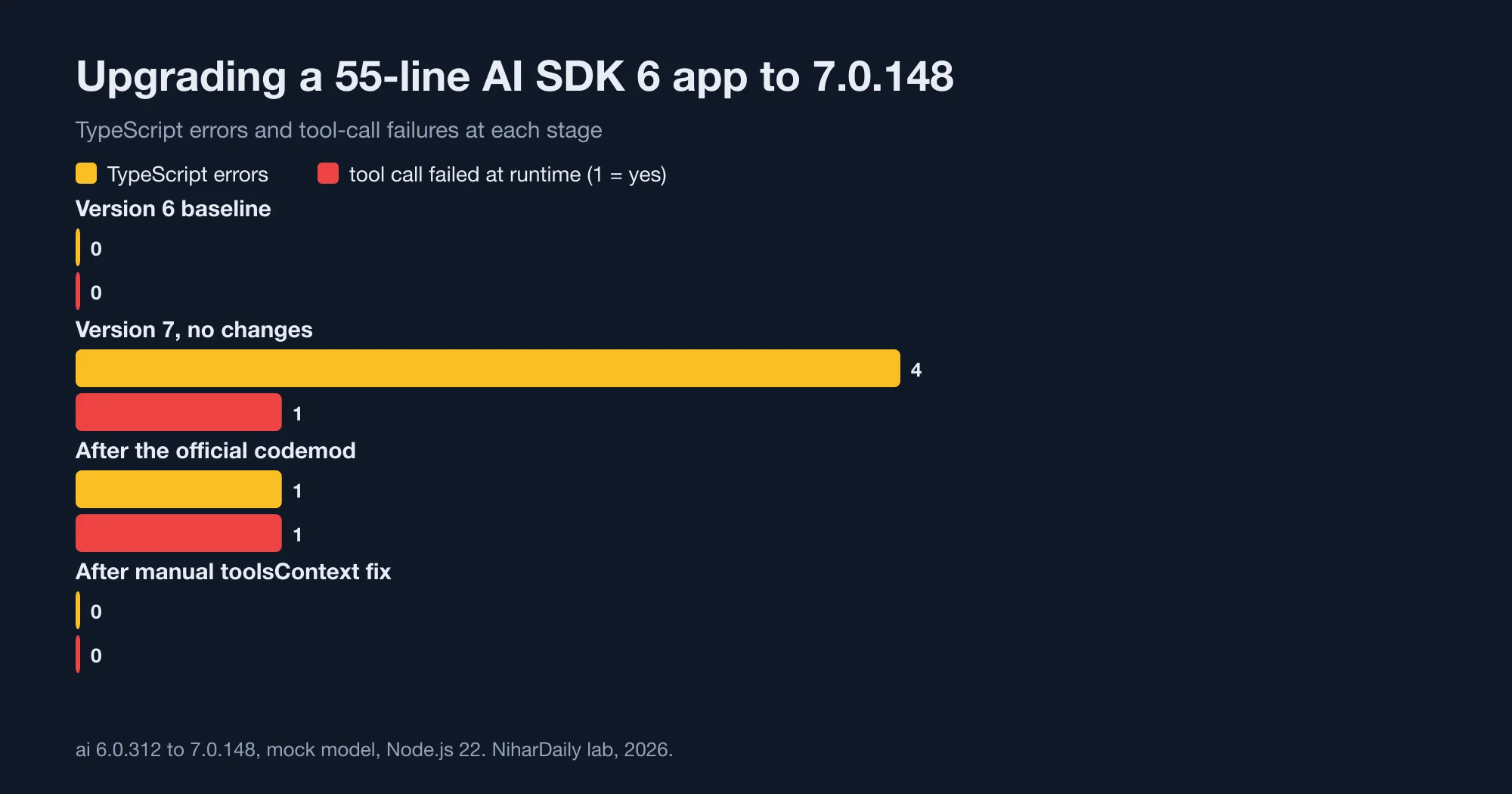
| Version 6 baseline | 0 | Tool succeeds, usage is 150 in / 20 out |
| Version 7, no changes | 4 | Tool throws, usage is 250 in / 30 out |
| After the codemod | 1 | Tool throws, usage is 250 in / 30 out |
| After manual fixes | 0 | Tool succeeds, usage is 250 in / 30 out |
Two points deserve attention.
First, unmodified code mostly kept working. The old names system, stepCountIs, onFinish and experimental_telemetry still ran on version 7, and the callbacks still fired. Only four lines failed type checking: experimental_context in two places, and cachedInputTokens and reasoningTokens on the usage object. The codemod rewrote 11 lines in total and left one error.
Second, the table's last two columns tell a different story from the first. A green build is not a working upgrade. The tool kept failing after the codemod, and the usage numbers never went back to their version 6 values, because those are intended changes.
Why does the tool still break after the codemod?
Because the codemod renames the property, not the data flow.
In AI SDK 6, you passed one shared object as experimental_context and every tool read it. In version 7, tools receive their own typed context, which comes from toolsContext keyed by tool name. The codemod turned this line:
execute: async ({ location }, { experimental_context }) => { /* ... */ }into this one:
execute: async ({ location }, { context: experimental_context }) => { /* ... */ }That compiles, because context exists on the options object. But at the call site the top-level experimental_context: { weatherApiKey } still had no matching toolsContext, so the tool's context was undefined. The model received a tool error and answered anyway, so the run looked fine in the logs.
The error text was: TypeError: Cannot destructure property 'weatherApiKey' of 'experimental_context' as it is undefined.
The migration guide describes the intended design. Each tool declares a contextSchema, and the values arrive through toolsContext, keyed by the tool's name. It also notes that if at least one tool declares contextSchema, toolsContext becomes required. Here is the fixed version we ran:
export const weather = tool({
  description: 'Get the weather',
  inputSchema: z.object({ location: z.string() }),
  contextSchema: z.object({ weatherApiKey: z.string() }),
  execute: async ({ location }, { context: { weatherApiKey } }) => {
    return getWeather(location, weatherApiKey);
  },
});

const result = await generateText({
  model,
  instructions: 'You are a weather assistant.',
  messages,
  tools: { weather },
  toolsContext: { weather: { weatherApiKey: process.env.WEATHER_API_KEY! } },
  stopWhen: isStepCount(3),
});
After this change, tsc reported 0 errors and the tool returned {"location":"Oslo","tempC":4} in step one.
Search your own code for experimental_context before you run the codemod. Every hit needs a contextSchema and a toolsContext entry. The codemod will not write them for you.
Did the usage numbers really change?
Yes, and this one can reach your invoice reports. We compared the same two-step call before and after.
| Field | Version 6 result.usage |
Version 7 result.usage |
|---|---|---|
| Input tokens | 150 | 250 |
| Output tokens | 20 | 30 |
| Total tokens | 170 | 280 |
toolCalls on the result |
0 | 1 |
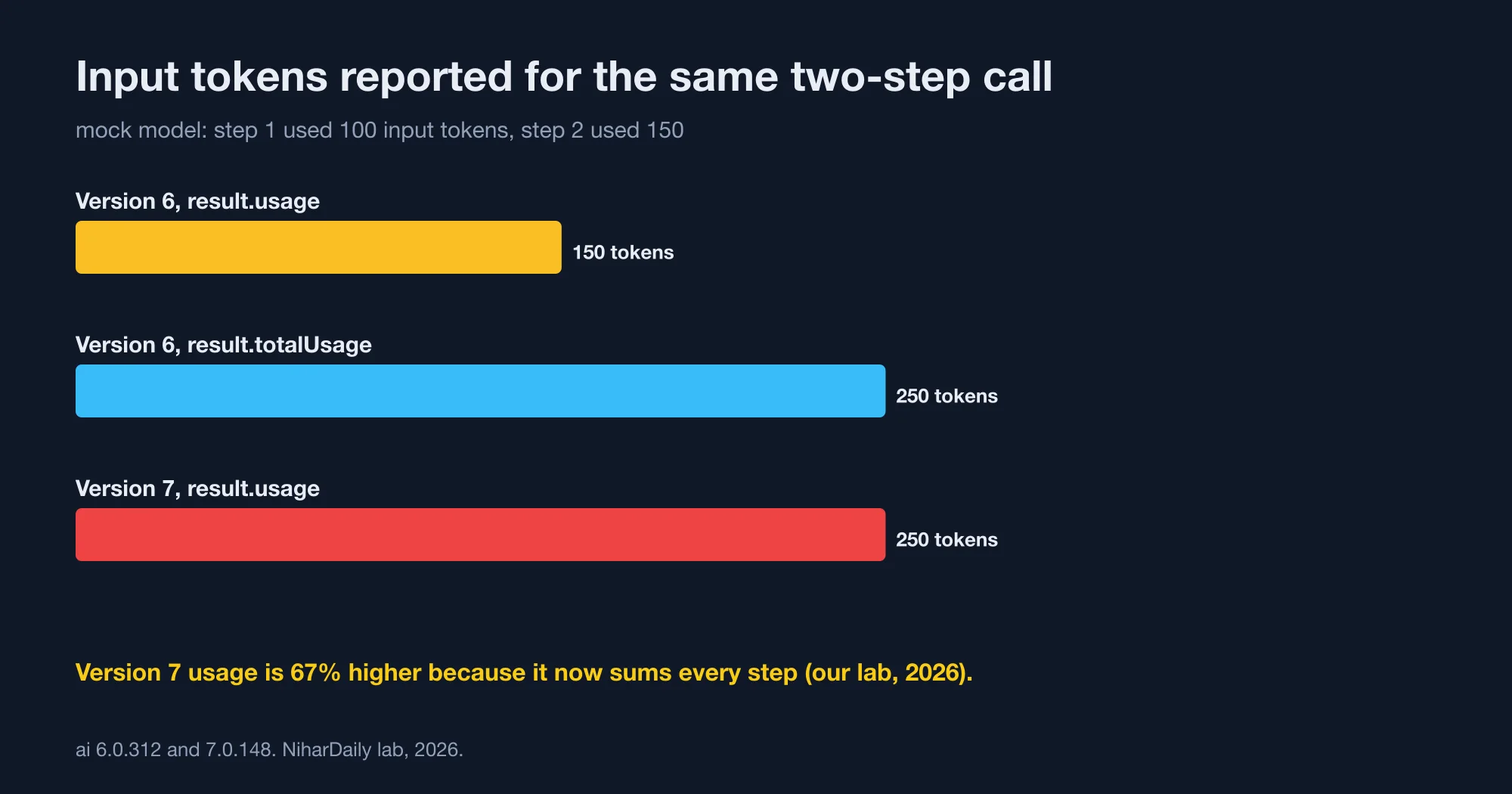
The guide explains it. In version 7, usage returns the total across all steps, which is what totalUsage used to mean. To read the old, final-step-only value, use result.finalStep.usage. The top-level content, toolCalls and toolResults also now cover all steps. That is why toolCalls rose from 0 to 1: the tool call happened in step one, and version 6 only reported the last step.
For us, the input token count rose by 100, from 150 to 250, which is 67% higher (our lab, 2026). The model call cost did not change. The reported number just became honest.
If you had worked around the old behaviour by summing result.steps, you may now double count. If you read result.usage to meter customers, your reports will jump on the day you deploy. Replace totalUsage with usage, because totalUsage is deprecated, and note the date in your dashboards.
The related cachedInputTokens and reasoningTokens fields moved. The codemod rewrites them to usage.inputTokenDetails.cacheReadTokens and usage.outputTokenDetails.reasoningTokens. In our unmodified run they were undefined, not an error, so a dashboard reading them would show blanks or zeros.
What happens to stored chat history?
It can crash every request. AI SDK 7 rejects system messages inside prompt or messages by default.
We built a history that began with { role: 'system', content: 'persisted system prompt' }. On version 7 the first call threw AI_InvalidPromptError. The message reads: Invalid prompt: System messages are not allowed in the prompt or messages fields. Use the instructions option instead.
You have two ways out, and both worked in our test:
// 1. Preferred: lift system messages into instructions.
const sys = history.filter((m) => m.role === 'system').map((m) => m.content).join('\n');
await generateText({ model, instructions: sys, messages: history.filter((m) => m.role !== 'system') });

// 2. Escape hatch for trusted data only.
await generateText({ model, messages: history, allowSystemInMessages: true });
Use the second only for messages that your server wrote. The guide warns that if users can submit or edit these messages, they could inject a system message that overrides your prompt. Option one removes that risk, so choose it for anything a client can touch.
Does Node 22 and ESM-only matter?
The runtime floor is real. The guide states that AI SDK 7 requires Node.js 22 or later, tested on Node.js 22, 24 and 26. It notes that Node.js 22 reached end-of-maintenance on April 30, 2026, so it recommends Node.js 24 (LTS) or 26 for production. The Node.js release schedule shows the current support windows.
All packages are also ESM-only. The guide says require() is no longer supported. In our test, require('ai') still returned the generateText function on Node 22.23.3, for both version 6 and version 7. That works because recent Node.js versions can load ES modules with require() when the module has no top-level await.
Do not rely on that. The authors declared CommonJS unsupported, and a later release could break the shortcut. Switch to import, and add "type": "module" to package.json if you do not already have it.
What else did the guide change that we could not test?
Our mock app cannot exercise every item. These changes come from the guide, and they are worth a grep in your own codebase.
- Telemetry is opt-out once an integration is registered. In version 6 you set
isEnabled: trueper call. In version 7, afterregisterTelemetry(new OpenTelemetry())from@ai-sdk/otel, every call emits events. What those events contain is worth reading first, and we looked at the equivalent question for another vendor in What Claude's new OpenTelemetry traces actually send out. - Request and response bodies are excluded by default. Code that reads
result.request.bodyorresult.response.bodyneedsinclude: { requestBody: true, responseBody: true }. - MCP transports reject redirects. The
redirectoption on MCP HTTP and SSE transports now defaults to'error'instead of'follow', to stop server-side request forgery. If your MCP server redirects, setredirect: 'follow'. Our look at version drift in MCP went the same direction in MCP went stateless: what breaks when versions mix. - Anthropic metadata moved.
providerMetadata.anthropic.cacheCreationInputTokenswas removed, and a codemod maps it to standard usage fields. prepareStepoverrides carry forward. Messages and instructions you return fromprepareStepnow persist to later steps, which can change multi-step agents.
None of these produced a compile error in the cases the guide shows, so each one needs a runtime check.
The upgrade order we would use
Follow this order. It is the sequence that surfaced each break in our run.
- Upgrade Node to 22 or later and add
"engines": { "node": ">=22" }. - Commit a clean tree, then install
ai@7and matching@ai-sdk/*provider packages. - Run
npx @ai-sdk/codemod v7and review the diff. Ours changed 11 lines. - Run
tscand fix what remains. Start withexperimental_context. - Grep for
usage,totalUsage,toolCallsandtoolResults. Decide whether each reader wants all steps or the final step. - Lift system messages out of stored histories into
instructions. - Replay one recorded conversation against the old and new versions and compare the logged token counts and tool results, not just the final text.
Step seven is the one most teams skip, and it is the only check that would have caught our tool failure.
What this lab did not cover
Our app used a mock model and one tool, so we did not test real provider behaviour, streaming over a network, the UI hooks, or the Vue Chat change. We did not register a telemetry integration, so the new default-on behaviour is from the guide, not from our run.
The mock returns fixed token counts, which means the 67% figure (our lab, 2026) is specific to a two-step call with those values. A single-step call reports the same usage in both versions. The direction of the change, all steps instead of the last step, is the part that applies to everyone.
The bottom line: trust the replay, not the compiler
The codemod did its job on names and left TypeScript with one error. It could not repair a tool that now needs its own context, and it could not warn that usage totals and tool call lists now include every step. A stored system message crashed every request until we moved it into instructions.
Upgrade Node first, run the codemod, fix the context flow by hand, and then replay a real conversation and compare numbers before you deploy. If the token counts jump, that is the SDK reporting all steps, and the fix is to update the reader, not to roll back.
Advertisement
FAQ
How do I upgrade from AI SDK 6 to 7?
Move to Node.js 22 or later, install ai@7, and run npx @ai-sdk/codemod v7 from the project root. Then fix what TypeScript still reports and handle the changes it cannot see: tool context, usage totals and stored system messages. In our test, the codemod rewrote 11 lines and left one compile error.
Why does my tool fail after running the AI SDK 7 codemod?
The codemod renames experimental_context to context inside the tool but does not create the new data flow. Declare a contextSchema on the tool and pass values through toolsContext, keyed by the tool name. Without that, the tool's context is undefined and the call throws a TypeError.
Did result.usage change in AI SDK 7?
Yes. It now returns usage summed across all steps, which is what totalUsage used to return. In our two-step test, input tokens read 150 on version 6 and 250 on version 7. Use result.finalStep.usage for the old final-step value, and replace totalUsage with usage.
What is the minimum Node.js version for AI SDK 7?
Node.js 22 or later. The migration guide says the SDK is tested on Node.js 22, 24 and 26, and it recommends Node.js 24 (LTS) or 26 for production because Node.js 22 reached end-of-maintenance on April 30, 2026. Versions 18 and 20 are no longer supported.
Why does AI SDK 7 throw System messages are not allowed in the prompt or messages fields?
Version 7 rejects system role messages in prompt or messages by default. Move them into the top-level instructions option. If you must keep old chat histories that contain them, pass allowSystemInMessages true, but only for messages your own server wrote.
Comments
Loading…
Sign in to join the conversation.
Related posts

What an AI-resolved support ticket really costs in 2026
AI customer support agent pricing per resolution runs from $0.50 to about $4.00 for the same solved ticket. HubSpot charges $0.50 per resolved conversation, Fin charges $0.99, and Zendesk charges
Mon Oct 19 2026 · 10 min read · 3 views
What Claude's new OpenTelemetry traces actually send out
Claude API OpenTelemetry traces are now in public beta, and the default setting sends no prompts at all. We ran the Anthropic Python SDK against a mock server and counted what leaves your app.
Mon Oct 19 2026 · 10 min read · 2 views
Porting AutoGen to Microsoft Agent Framework: what breaks
An AutoGen to Microsoft Agent Framework migration is mostly a rename, except for four defaults that change silently. We ported a two-agent writer and reviewer team on Python 3.15.0, from AutoGen 0.7.5
Mon Oct 19 2026 · 10 min read · 1 views