Best Software to Practice SQL: Free, Local and Online
By Nihar Ranjan Das · Fri Oct 09 2026 · 9 min read · 0 views
View as a Web StorySoftware#postgresql#sqlite#sql practice#duckdb#learn sql
The best way to practice SQL is to run real queries on a database that lives on your own laptop. SQLite is the fastest start, because it is already installed on most Macs and needs no server. PostgreSQL is the best second step, because most jobs use a server database and its dialect is stricter.
This guide compares the free options, gives a four-week practice plan and shares a test we ran: ten queries on PostgreSQL 18.1 and SQLite 3.51. Six of the ten behaved differently, which shows why your first tool shapes your habits.
Key takeaways
- Start with SQLite for the first month, then move to PostgreSQL.
- Add DuckDB when you want to practice on CSV and Parquet files.
- In our test, six of ten common queries behaved differently on PostgreSQL 18.1 and SQLite 3.51.
- Follow a four-week plan and finish by timing one indexed query yourself.
What is the best software to practice SQL?
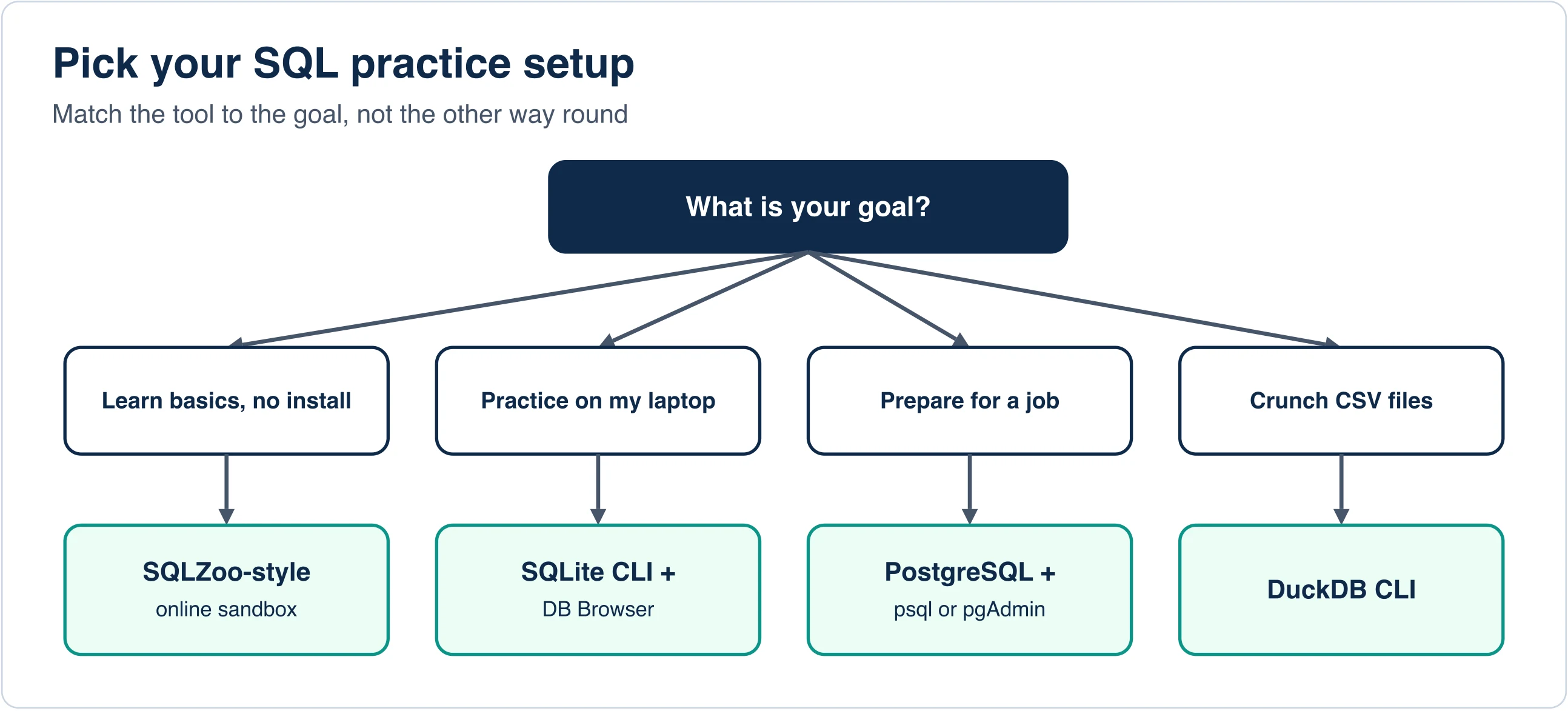
The best free software to practice SQL is SQLite for your first month and PostgreSQL after that. Both run locally, cost nothing and teach standard SQL. Online sandboxes help if you cannot install anything, and DuckDB helps once you want to query CSV files.
| Tool | Best for | Install needed | Server needed |
|---|---|---|---|
| SQLite command line | First queries, zero setup | Often preinstalled | No |
| DB Browser for SQLite | Seeing tables as a spreadsheet | Yes | No |
| PostgreSQL with psql or pgAdmin | Job-ready skills | Yes | Yes, local |
| DuckDB | Analytics on CSV and Parquet files | Yes | No |
| DBeaver Community | One app for many databases | Yes | Depends |
| Online sandboxes such as SQLZoo | Learning with no install | No | No |
SQLite is a small database engine that keeps everything in one file. PostgreSQL is a full database server with a stricter, richer dialect. DuckDB is an embedded analytics database that reads files such as CSV directly. DB Browser for SQLite is a free graphical app for opening and editing SQLite files.
Which tool should you start with?
Start with SQLite if you want to write a query in five minutes. Start with PostgreSQL if you already know you want a data or backend job. Use an online sandbox if your computer is locked down.
SQLite: the five-minute start
On a Mac, open Terminal and type sqlite3 practice.db. On our test machine that opened SQLite 3.51.0 without any install. Then try this:
CREATE TABLE emp (id INTEGER PRIMARY KEY, name TEXT, dept TEXT, salary INT);
INSERT INTO emp VALUES (1,'Ann','eng',120),(2,'Bob','eng',100),(3,'Cy','ops',90);
SELECT dept, avg(salary) FROM emp GROUP BY dept;
Type .quit to leave. Your data sits in practice.db, a single file you can copy or delete. The SQLite quickstart covers the rest of the basics, and the DB Browser for SQLite site hosts downloads for the graphical app.
PostgreSQL: the job-ready choice
Install PostgreSQL from the official site, then open psql, its command-line client. Run CREATE DATABASE practice; and connect with \c practice. pgAdmin offers a graphical alternative if you prefer buttons.
PostgreSQL costs you twenty minutes of setup. In return, it teaches strict typing, EXPLAIN ANALYZE and features employers expect. The PostgreSQL feature list describes constraints such as primary keys, foreign keys and exclusion constraints as built-in tools for data integrity.
Advertisement
DuckDB: when your data lives in files
DuckDB runs queries over CSV and Parquet files without loading them into a server. After installing its command-line tool, you can write SELECT * FROM 'sales.csv' LIMIT 10; and get rows back. That makes it ideal for practicing on real exports from work or open-data sites.
Online sandboxes
Browser tools let you run SQL with no install at all. SQLZoo is a long-running tutorial site that walks through exercises step by step. Sandboxes are great for syntax drills. They do not teach you how to set up, back up or tune a database, so move to a local tool soon.
How different are SQLite and PostgreSQL really?
On our ten-query test, only four queries ran the same on both engines, and six split. We tested 10 queries on PostgreSQL 18.1 and SQLite 3.51 against the same five-row table. A check means the query ran without an error.
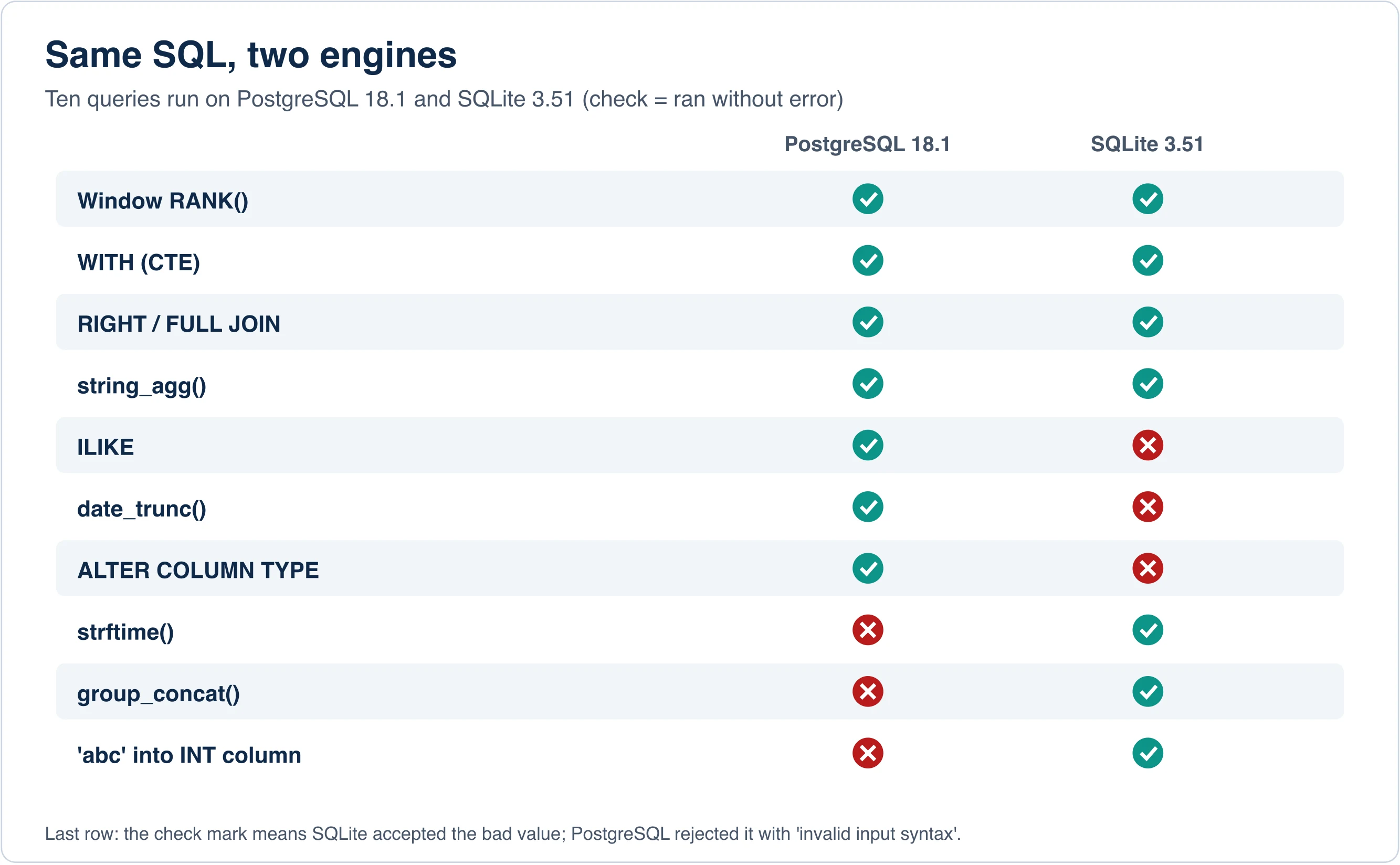
| Check | PostgreSQL 18.1 | SQLite 3.51 |
|---|---|---|
RANK() OVER (...) window function |
Works | Works |
WITH common table expression |
Works | Works |
RIGHT JOIN and FULL OUTER JOIN |
Works | Works |
string_agg(name, ',') |
Works | Works |
ILIKE for case-insensitive match |
Works | Syntax error |
date_trunc('month', hired) |
Works | No such function |
ALTER COLUMN ... TYPE |
Works | Syntax error |
strftime('%Y', hired) |
No such function | Works |
group_concat(name, ',') |
No such function | Works |
Insert 'abc' into an integer column |
Rejected | Accepted and stored as text |
Three lessons stand out.
First, modern SQLite handles window functions, CTEs and full joins, so it is no toy. Second, date and string helpers differ by engine, so a tutorial written for one may fail on the other. Third, the last row matters most. SQLite stores 'abc' in an INT column without complaint, because its column types are advisory. PostgreSQL stops you with invalid input syntax. That strictness catches bugs early, and it is why we suggest moving to PostgreSQL after the basics.
Beware of copy-pasting queries across engines. When something fails, read the error, then search for the engine's name plus the function. The fix is usually a one-word swap, such as strftime for date_trunc.
Which sample data should you practice on?
Practice on data you find interesting, such as a sports season, your own spending or a public data set. Real questions keep you going longer than invented ones. If you want a ready-made schema, use a classic sample database.
Good sources include:
- Chinook: a music-store schema with artists, albums, tracks and invoices, available for SQLite and PostgreSQL.
- Sakila: a DVD-rental schema with a larger web of tables, originally from MySQL and ported to PostgreSQL as Pagila.
- Your own CSV exports: load them with DuckDB or the SQLite
.importcommand.
Pick one data set and stay with it for a month. Familiar tables let you focus on the SQL, not the data.
What is a good four-week SQL practice plan?
A good plan gives each week one focus and ends with a query you wrote from scratch. Practice twenty minutes a day, and write every query by hand rather than pasting it.
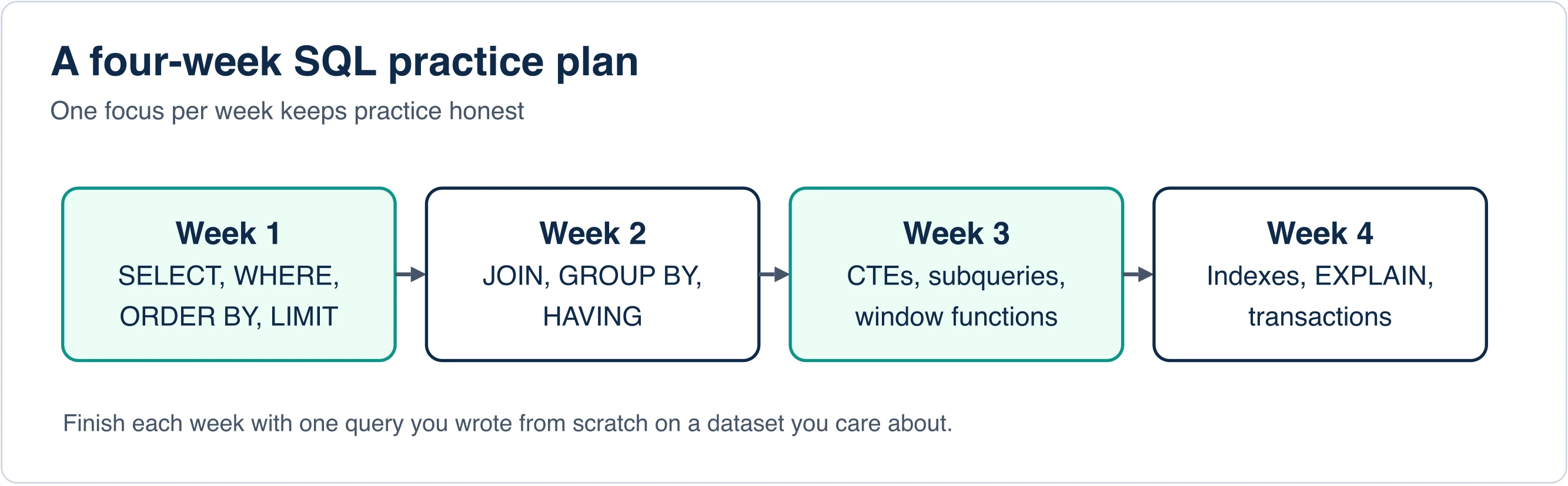
- Week 1: read data. Use
SELECT,WHERE,ORDER BYandLIMIT. Answer ten questions about one table. - Week 2: combine data. Practice
JOIN,GROUP BYandHAVING. Ask questions that need two tables. - Week 3: structure queries. Learn CTEs, subqueries and window functions such as
RANK(). - Week 4: think like a database. Learn indexes,
EXPLAINand transactions.
Try the week-four exercise yourself
Create a table with a million rows, filter on one column, and time it. Add an index and time it again. We measured this on a 2-million-row table. PostgreSQL went from about 31 ms to about 0.09 ms, and SQLite from about 65 ms to 0.011 ms. Seeing that gap teaches indexing better than any definition.
In PostgreSQL, put EXPLAIN ANALYZE before your query. In SQLite, use EXPLAIN QUERY PLAN. Look for the words "Seq Scan" or "SCAN" before the index and "Index" or "SEARCH" after.
What does a first practice session look like?
A good first session answers three questions from one small table. Using the emp table from the SQLite example, try these in order:
SELECT name FROM emp WHERE salary > 95 ORDER BY salary DESC;
SELECT dept, count(*) AS people, avg(salary) FROM emp GROUP BY dept;
SELECT name, salary, rank() OVER (PARTITION BY dept ORDER BY salary DESC) FROM emp;
The first filters and sorts. The second groups and aggregates. The third ranks people inside each department with a window function. All three ran on both PostgreSQL 18.1 and SQLite 3.51 in our test, so you can use them on either engine.
After each query, change one thing and predict the result before you run it. For example, swap > for >= and guess how many rows come back. Prediction turns a drill into learning.
Which practice questions should you try first?
Questions drive learning, so write your own. These eight prompts work on the emp table or any table you own, and each one adds a skill:
- List everyone hired after January 1, 2024, newest first.
- Count people per department and show only departments with two or more.
- Find the highest salary in each department, then the person who earns it.
- Show each person's salary next to the department average.
- Return the top two earners per department using a window function.
- Find departments with no people by joining against a second table.
- Add a new column, fill it with an
UPDATE, and check the result. - Wrap a change in a transaction, roll it back and prove nothing changed.
Write a one-line comment above each answer that states the question in plain words. Comments make your old queries searchable later. When a query fails, copy the exact error text into a note beside it, since you will meet the same error again.
Which mistakes slow beginners down?
- Only reading tutorials. Type queries yourself. Reading builds recognition, not skill.
- Using one dialect forever. Spend week four in PostgreSQL if you started in SQLite.
- Ignoring errors. Error messages name the problem. Read them first.
- Skipping
NULLrules.NULL = NULLis not true. UseIS NULL. - Forgetting
WHEREon updates. Run aSELECTwith the same filter first, then switch toUPDATE. - Practicing without a question. Write the question in plain words, then the query.
How do you know you are ready for an interview or job?
You are ready when you can write a join across three tables, use a window function, explain a query plan and fix a slow query by adding an index. Test yourself with a fresh data set and a stopwatch.
Keep a small notebook of queries you wrote and why. Those become portfolio pieces. Posting a short write-up of one data set you analyzed shows more than a certificate does.
Key takeaways for learners
Start with SQLite, move to PostgreSQL, and add DuckDB when you want to query files. Our ten-query test found six places where the two engines disagree, so learn the standard core first and the dialect second. Follow the four-week plan, practice on data you care about, and measure one indexed query yourself. That single experiment explains more than a chapter of theory.
Advertisement
FAQ
What is the best free software to practice SQL?
SQLite is the fastest start because it needs no server and is often preinstalled. PostgreSQL is the best next step for job-ready skills. DuckDB suits practice on CSV and Parquet files, and online sandboxes such as SQLZoo work with no install.
How do I practice SQL at home?
Install SQLite or PostgreSQL, load a sample data set such as Chinook, and write ten queries a day from plain-language questions. Follow a four-week plan: read data, combine tables, use CTEs and window functions, then learn indexes and EXPLAIN.
Is SQLite good enough for learning SQL?
Yes for the basics. SQLite 3.51 handled window functions, CTEs and full joins in our test. It is looser than PostgreSQL, though: it accepted a text value in an integer column. Move to PostgreSQL after the first month to learn stricter rules.
Can I practice SQL without installing anything?
Yes. Online sandboxes such as SQLZoo run queries in the browser against a live database. They suit syntax drills, but they do not teach setup, backups or tuning, so switch to a local database after a few weeks.
Which SQL functions differ between PostgreSQL and SQLite?
In our test, ILIKE, date_trunc and ALTER COLUMN TYPE worked on PostgreSQL but not SQLite, while strftime and group_concat worked on SQLite but not PostgreSQL. Window functions, CTEs, full joins and string_agg worked on both.
Comments
Loading…
Sign in to join the conversation.
Related posts
Relational Databases: Top 10 Ranked and How They Work
Oracle still leads the October 2026 DB-Engines list of relational databases, but PostgreSQL is the only top-four system that gained ground this year. PostgreSQL scored 688.75, up 45.56 points from
Fri Oct 09 2026 · 9 min read · 1 views
What Is PostgreSQL? A Plain-English Guide With Real Tests
PostgreSQL is a free, open-source relational database that stores data in tables and answers questions written in SQL. It began in 1986 as the POSTGRES project at the University of California,
Fri Oct 09 2026 · 8 min read · 0 views
Serverless Databases Compared: What They Cost in 2026
A serverless database costs the least when your app sits idle, and the most when it runs all day. That single fact decides most purchases. A hobby app can run free on Neon, Turso or Cloudflare D1. An
Fri Oct 09 2026 · 9 min read · 0 views