How to Open a .db File With a SQLite Viewer
By Nihar Ranjan Das · Thu Oct 08 2026 · 9 min read · 0 views
View as a Web StorySoftware#developer tools#database#sqlite#db-file#sqlite-viewer

You can open most .db files in under a minute, but first you need to know what kind of file you hold. The .db extension is not a format. It is a habit, and apps from game launchers to photo tools use it for unrelated things.
The fast answer: read the first 16 bytes. If they spell SQLite format 3, the file is a SQLite database. You can open it with the sqlite3 command, a desktop viewer such as DB Browser for SQLite or Letos, or a browser tool that runs SQLite as WebAssembly. If the bytes say anything else, no SQLite viewer will help.
How to tell if a .db file is SQLite
SQLite is a self-contained database engine that stores a whole database in one ordinary file. Every valid SQLite file begins with the same 16 bytes, which the SQLite file format specification defines as the string "SQLite format 3" followed by a zero byte.
Check it on any machine with one command:
head -c 16 mystery.db | xxd
file mystery.db
On macOS and Linux, file reads that signature for you. We ran it against a copy of a real database renamed to renamed.dat, and it still reported "SQLite 3.x database". The extension never mattered.
Test setup: a 500,000-row orders table created with sqlite3 3.51.0 on a macOS laptop, 23,203,840 bytes on disk. Every figure in this guide that mentions our test file comes from that one database.
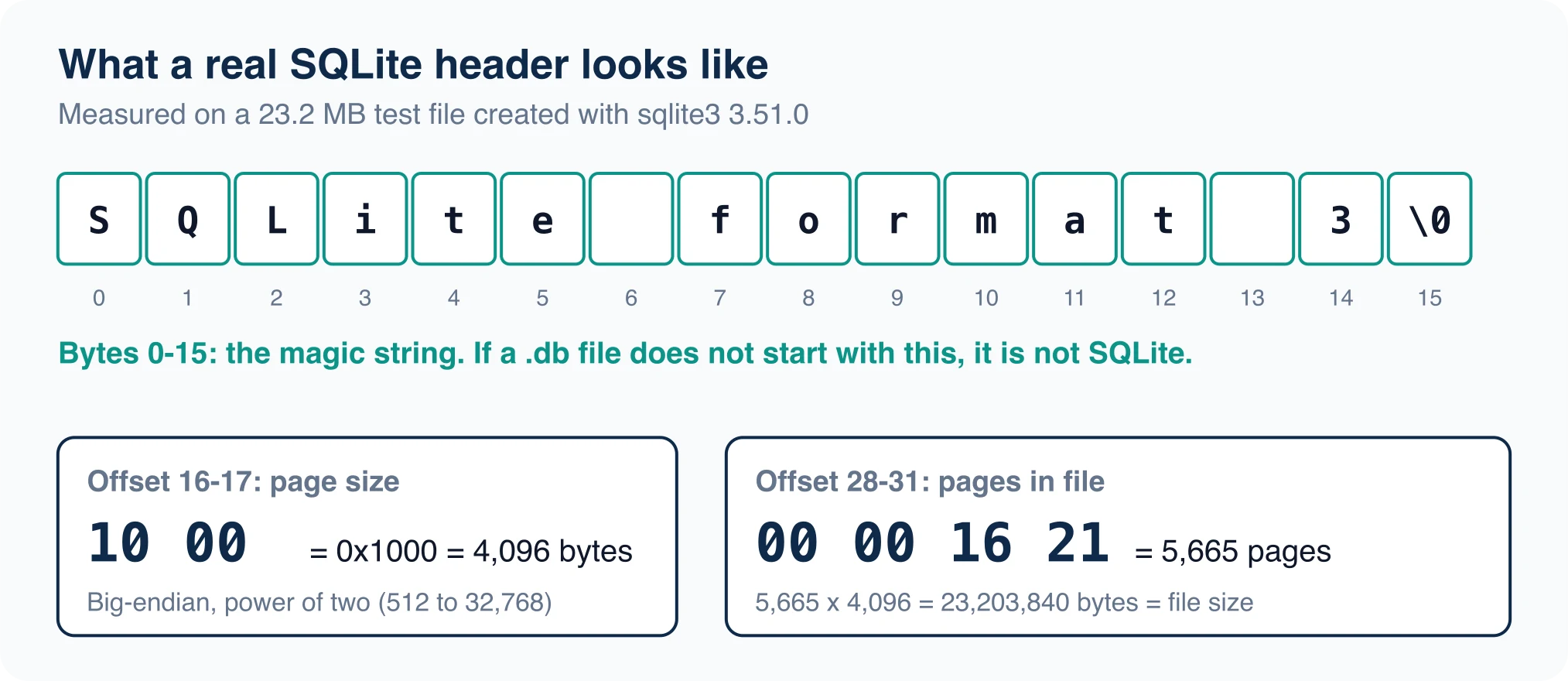
The same header tells you more than the format. Bytes 16 and 17 hold the page size. In our 23.2 MB test file they read 10 00, which is 4,096 bytes. Bytes 28 to 31 hold the page count, 00 00 16 21, which is 5,665 pages. Multiply the two and you get 23,203,840 bytes, exactly the size on disk. A file that fails this arithmetic is truncated or damaged.
The Library of Congress agrees that the format is built to be portable. Its SQLite format description says a complete SQL database, with tables, indexes, triggers and views, is contained in a single disk file, and that the files move between 32-bit and 64-bit systems and between big-endian and little-endian machines. The same page notes that the public format has no encryption, which is why an encrypted file reports as not a database in an ordinary viewer.
Open a .db file from the terminal
The sqlite3 shell is the fastest way in, and it ships with macOS and many Linux distributions. Windows users can download it from the SQLite site. Our test used version 3.51.0.
Advertisement
sqlite3 mystery.db
.tables
.schema orders
SELECT * FROM orders LIMIT 3;
Turn on readable output first with .headers on and .mode column. You will see the column names above aligned rows, like this:
id  customer  amount  created
--  --------  ------  -------------------
1   cust1     0.01    2026-01-01 00:00:01
2   cust2     0.02    2026-01-01 00:00:02
Two commands answer most "what is in here" questions. .tables lists every table. SELECT name, type FROM sqlite_master; lists tables, indexes, views and triggers with no guessing.
Open unknown files read-only. We ran a DELETE against our test file with the -readonly flag and got attempt to write a readonly database (8), with all 500,000 rows intact.
sqlite3 -readonly mystery.dbBest SQLite viewer apps for Mac, Windows and Linux
A SQLite viewer is a desktop or web app that lets you browse tables, run queries and export results without typing every command. Pick by how often you will use it.
| Tool | Type | Platforms | Cost |
|---|---|---|---|
sqlite3 shell |
Command line | macOS, Linux, Windows | Free, public domain |
| DB Browser for SQLite | Desktop GUI | Windows, macOS, Linux | Free, open source |
| Letos (formerly SQLiteStudio) | Desktop GUI | Windows, macOS, Linux | Free, GPL |
| Browser viewers (sql.js) | WebAssembly | Any modern browser | Usually free |
DB Browser for SQLite is the long-standing choice. Its site lists spreadsheet-style browsing, CSV import and export, SQL query execution and SQLCipher encryption support. It runs on Windows, macOS and most Linux and Unix systems.
One change catches people out. The tool known for years as SQLiteStudio now lives under a new name. The old sqlitestudio.pl address answers with a 301 redirect to Letos, whose site says "Letos was formerly known as SQLiteStudio". Its latest release listed there is 4.0.3, from August 12, 2026, and it advertises no paid edition and no telemetry. Search results still carry the old name, so a download link labeled SQLiteStudio on a third-party site is worth a second look.
For Mac users, DB Browser and Letos both ship native builds. Linux users can also install either through the usual package channels, and Windows offers installers and portable builds.
Is it safe to open a .db file in an online viewer?
It depends on how the page works. A viewer built on sql.js or SQLite WebAssembly reads your file inside the browser tab. Nothing is uploaded. A viewer that sends the file to a server is a different risk, because a database often holds emails, tokens or customer records.
Test any online viewer before you trust it. Open your browser's network panel, load a small dummy file, and watch for a large upload request. No upload means the work stays local.
Use this rule for real data:
- Never upload a database with customer or credential data to a site you cannot audit.
- Prefer the desktop apps above for anything sensitive.
- Strip secrets first by copying the file and deleting the sensitive tables.
What if the file is not SQLite?
If the first 16 bytes are something else, the extension was misleading. Many programs write a private .db format, and others use key-value stores or older compound document layouts. The signature points you to the right tool.
Take these steps in order:
- Run
file mystery.dband read what it reports. - Look at the folder. The app that wrote the file usually sits next to it or in the same parent directory.
- Search the file's strings with
strings mystery.db | head -50. Table names or an app name often appear in plain text. - Ask the vendor for an export option before attempting recovery.
Do not rename the file to .sqlite and hope. A viewer will report "file is not a database", which is the correct answer.
Common errors when you open a SQLite database
Four messages cover most failures.
"file is not a database" means the header check failed. Either the file is another format, it is encrypted with SQLCipher, or a download cut it short. Compare its size against the page-count arithmetic above.
"database is locked" means another process holds a write lock. Close the app that owns the file, or copy the .db plus any -wal and -shm files together into a new folder and open the copy.
"malformed database schema" can mean damage, or a file that uses features newer than your viewer bundles. Update the viewer first. The file command prints the SQLite version that last wrote the file, which was 3051000 in our test.
Empty tables that should have data often mean you copied only the main file. A database in write-ahead log mode keeps recent changes in a -wal companion file. Copy all three files together.
Query your data once it opens
Opening the file is half the job. These queries turn a database you have never seen into one you understand.
-- How big is each table?
SELECT name FROM sqlite_master WHERE type = 'table';
SELECT COUNT(*) FROM orders;

-- Page size and count
PRAGMA page_size;
PRAGMA page_count;

-- Spot-check data types
SELECT typeof(amount), COUNT(*) FROM orders GROUP BY 1;
That last query matters more than it looks. SQLite uses flexible typing, so a column declared integer can still hold text. We inserted the string "abc" into an integer column and SQLite accepted it, reporting typeof as text. PostgreSQL rejects the same insert with invalid input syntax for type integer. If you plan to move the data elsewhere, run the typeof check first. The database migration process guide covers the full sequence for that move.
Convert or export what you find
You rarely need to keep the viewer open. Export the result and move on.
sqlite3 -header -csv mystery.db "SELECT * FROM orders;" > orders.csv
sqlite3 mystery.db .dump > backup.sql
The first line writes a CSV file you can open in any spreadsheet. The second writes a full SQL dump that recreates the schema and data. On a laptop, our 500,000-row test table exported to a 21.7 MB CSV in 0.46 seconds. The full SQL dump took 0.68 seconds and came to 43.9 MB.
For a move to a server database, the PostgreSQL COPY documentation describes the fastest import path. We loaded those 500,000 rows with \copy in about 0.7 seconds.
Read a .db file from Python without installing anything
Python ships a sqlite3 module, so any machine with Python can read a SQLite file with no viewer. This script lists every table and its row count, and it opens the file read-only through a URI:
import sqlite3
con = sqlite3.connect("file:mystery.db?mode=ro", uri=True)
for (name,) in con.execute("SELECT name FROM sqlite_master WHERE type='table'"):
    print(name, con.execute(f'SELECT COUNT(*) FROM "{name}"').fetchone()[0])
On our test file it printed orders 500000. Python bundled SQLite 3.50.1 on that machine, slightly older than the command-line shell, which is worth knowing when a newer file will not open. The same pattern works from Node.js and most other languages, because SQLite is a library, not a server.
Compare two copies of the same database
When a file changes and you need to know what, attach both and join on the key. This query finds every changed row between a backup and the live copy:
ATTACH 'backup.db' AS old;
SELECT n.id, n.amount, o.amount
FROM orders n JOIN old.orders o ON o.id = n.id
WHERE n.amount <> o.amount;
We changed one amount in a copy of our test database and the query returned exactly that row: 7|1.07|0.07. For whole-database comparisons, SQLite also publishes a separate sqldiff utility, though it was not installed on our machine, so check before you rely on it.
Decision: which method should you use?
Use sqlite3 when you want a quick look and have a terminal. Use DB Browser for SQLite or Letos when you will explore the file for more than a few minutes, or when a teammate needs a point-and-click tool. Use a browser viewer only for non-sensitive files, after you confirm that it does not upload.
Whatever you choose, read the header first. Ten seconds with file saves an hour of chasing the wrong tool.
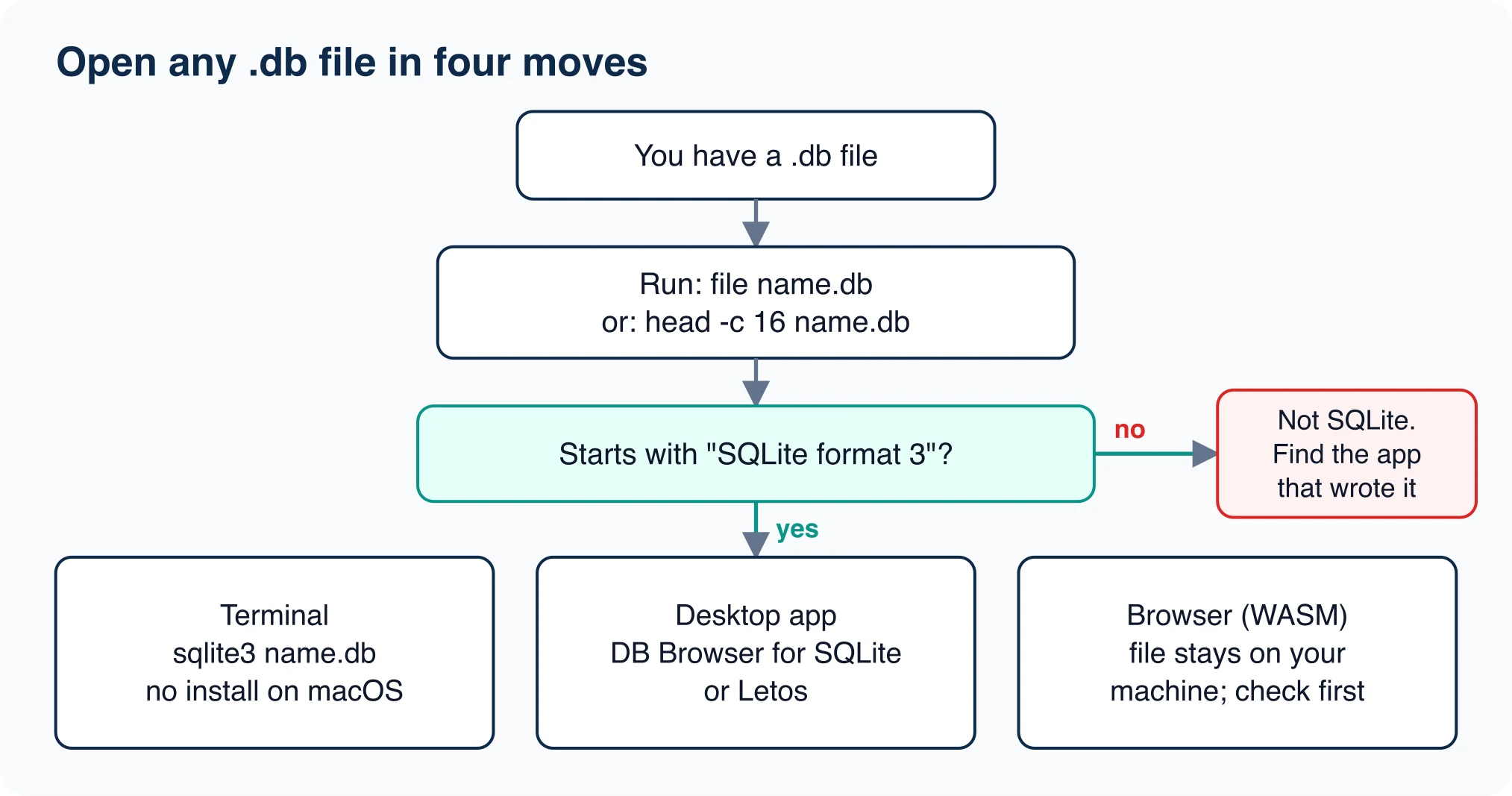
If the answer keeps pointing to the same few steps, bookmark them. Check the header, open read-only, inspect the schema, export if needed. That routine works on every SQLite file you will meet.
Advertisement
FAQ
How do I open a .db file?
Run `file name.db` to confirm the first 16 bytes read 'SQLite format 3'. Then open it with `sqlite3 name.db`, DB Browser for SQLite, Letos, or a WebAssembly viewer in your browser. If the signature differs, the file is another format and needs the app that wrote it.
Is a .db file always SQLite?
No. The .db extension is only a convention, and many programs use it for private formats. The reliable test is the file signature: SQLite files start with the 16 bytes 'SQLite format 3' followed by a zero byte.
Is it safe to open a .db file in an online viewer?
Only if the viewer runs SQLite in your browser with WebAssembly and uploads nothing. Check the browser network panel with a dummy file first. For databases that hold customer data or credentials, use a desktop app instead.
What does 'file is not a database' mean?
The file header check failed. The file is another format, encrypted with SQLCipher, or truncated by a bad download. Compare the file size to page size times page count from the header to detect truncation.
Why does my SQLite database look empty?
You may have copied only the main file. A database in write-ahead log mode keeps recent changes in a -wal companion file, with a -shm file beside it. Copy all three files together before opening.
Comments
Loading…
Sign in to join the conversation.
Related posts

Database Migration Tools: Costs and Best Fit
The right database migration tool depends on which of two jobs you have. If you need to move data between servers or engines, look at a managed service such as Google, AWS or Azure Database Migration
Thu Oct 08 2026 · 8 min read · 0 views
Database Migration: Process, Types and Steps
A database migration is the controlled move of a database's structure, its data, or both, from one place or version to another. The word covers three jobs that teams mix up: changing the schema,
Thu Oct 08 2026 · 8 min read · 0 views

Data Migration Strategy: Big Bang vs Trickle
The best data migration strategy is the simplest one your downtime budget allows. If the app can stay read-only while you copy, use a big bang migration. If it cannot, you need either a phased move or
Thu Oct 08 2026 · 8 min read · 0 views