Data Migration Strategy: Big Bang vs Trickle
By Nihar Ranjan Das · Thu Oct 08 2026 · 8 min read · 0 views
View as a Web StorySoftware#migration#devops#postgresql#database#data-migration
The best data migration strategy is the simplest one your downtime budget allows. If the app can stay read-only while you copy, use a big bang migration. If it cannot, you need either a phased move or a trickle migration that streams changes until the two databases agree.
Most teams pick by habit and pay for it at cutover. This guide gives you a way to choose from two questions, a calculator for the copy window, a four-number check that proves the data arrived intact, and a cutover calendar with a way back.
What is a data migration strategy?
A data migration strategy is the plan that decides how data moves from a source system to a target, in what order, and how long the application is affected. It is not the same as the tool you use. Two teams can run the same tool and follow opposite strategies.
Three strategies cover almost every case:
| Strategy | How it works | Downtime | Risk | Best for |
|---|---|---|---|---|
| Big bang | Freeze writes, copy everything, verify, switch | Minutes to hours | One rollback point | Small to mid-size data, tolerant users |
| Phased | Move one tenant, table or service at a time | Per slice, often none | Two systems live for weeks | Multi-tenant apps, clear data boundaries |
| Trickle | Backfill, then stream changes until lag hits zero | Seconds | Most moving parts | Large data, strict uptime |
Pick one on purpose. The rest of the plan follows from it.
Which strategy fits your data?
Start with the question that decides most cases: can the application go read-only for the whole copy? If yes, ask whether the copy fits the window. If no, ask whether the source can stream its changes.
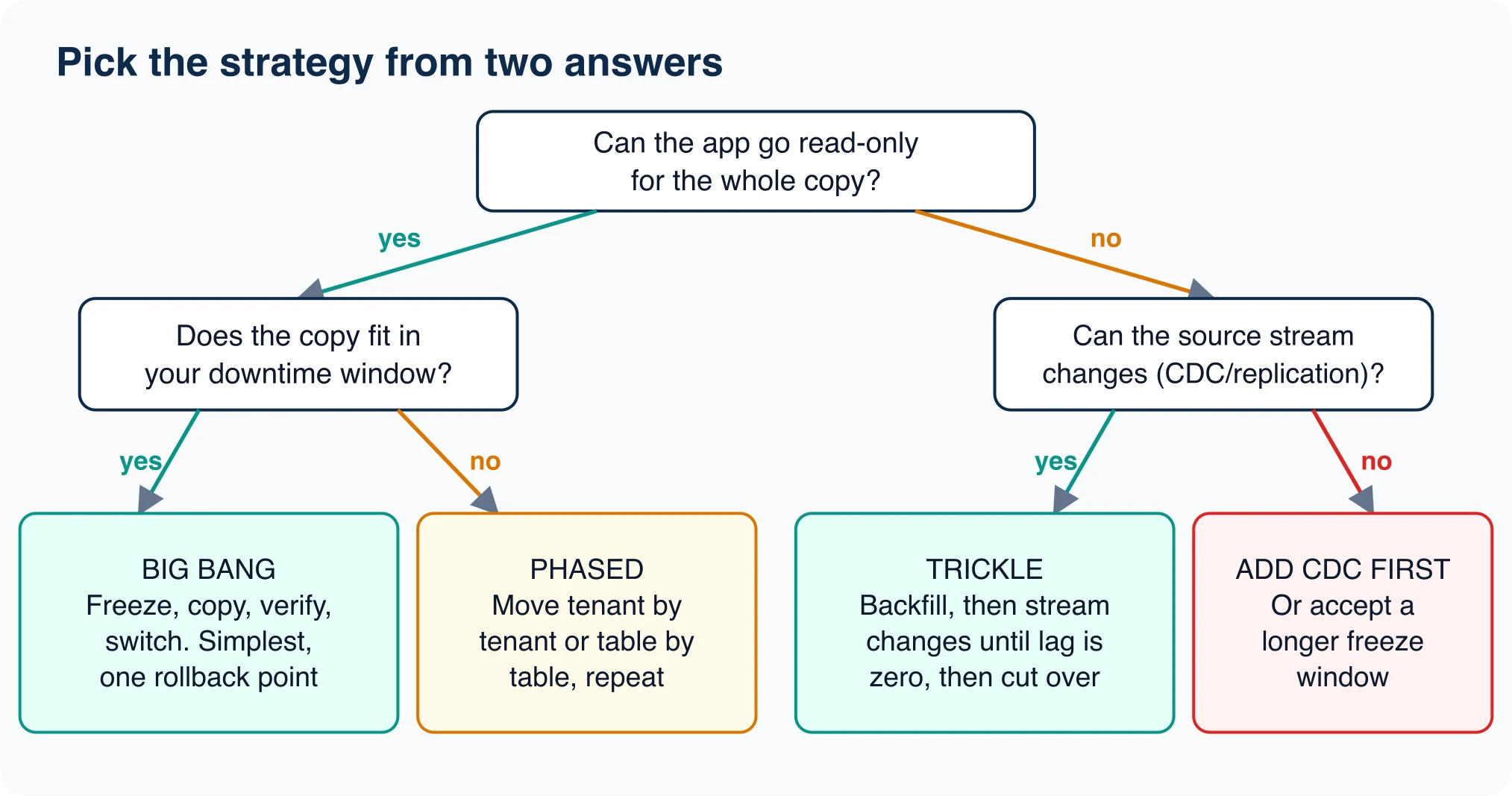
The red box on the right matters. If you cannot freeze writes and the source cannot stream changes, no strategy in the table works as written. You must either add change capture first, or negotiate a longer freeze. Teams that skip this step discover it on cutover night.
Native replication is usually the cheapest change stream. PostgreSQL ships logical replication for exactly this case, and managed services such as Google Database Migration Service build continuous replication on top of it.
How long will the copy take?
You can estimate the freeze window before you touch production.
Advertisement
Test setup: SQLite 3.51.0 source, PostgreSQL 18.1 target, one macOS laptop, loopback connection. We measured four ways of loading 500,000 orders rows from SQLite into PostgreSQL 18.1 on a laptop, taking the median of three runs. The rates were 17,500 rows per second for one-at-a-time inserts with autocommit, 27,000 for the same inserts in one transaction, 355,000 for 1,000-row multi-row inserts, and 735,000 for COPY.
Scale those rates linearly to your row count and you get a floor for the window:
| Rows | Autocommit inserts | One transaction | Multi-row inserts | COPY |
|---|---|---|---|---|
| 1 million | 57 s | 37 s | 2.8 s | 1.4 s |
| 10 million | 9.5 min | 6.2 min | 28 s | 14 s |
| 100 million | 95 min | 62 min | 4.7 min | 2.3 min |
These are floors, not promises. They ignore network latency, index builds, WAL volume and a loaded production source. Multiply by three for planning, then replace the guess with a rehearsal. A 100 million row table that needs 2.3 minutes locally can still take half an hour across regions.
The table also shows why the loader choice can flip your strategy. A job that needs 95 minutes with row-by-row inserts needs a trickle plan. The same job with COPY may fit a lunch-hour big bang. The database migration process guide shows the full loader comparison. Read the PostgreSQL COPY documentation before you rule out the simple option.
How do you prove the data arrived intact?
Compare four numbers on both sides: row count, a sum of a numeric column, and the minimum and maximum of a date column. This takes seconds, and it catches truncation, rounding and timezone drift.
SELECT count(*), sum(amount), min(created), max(created) FROM orders;In our run the SQLite source and the PostgreSQL target returned the same fingerprint: 500000 | 24871808.25 | 2026-01-01 00:00:00 | 2026-01-02 03:46:39. Matching on all four is strong evidence. A mismatch on any one tells you where to look.
Add two more checks for real systems:
- Sample rows. Pull 100 random primary keys from the source and compare every column by hand or by script.
- Business totals. Compare a number your finance team already trusts, such as revenue by month.
Run the fingerprint during rehearsal, right after the final copy, and again an hour after cutover. Three runs catch drift that a single run cannot.
How do you slice a phased migration?
A phased migration works only if you can cut the data along a clean line. Three lines work in most applications.
- By tenant. Move customer groups one at a time. Route each request through a lookup table that says which database holds that tenant.
- By table. Move tables that nothing else joins to first, such as audit logs and event history, then the core tables last.
- By age. Move old, read-only rows first while the app keeps writing to the source, then finish with the hot recent rows.
Run the fingerprint check on each slice before you flip its routing entry. A slice that fails verification should flip back in one line, which is the real advantage of this strategy over big bang. The cost is that two databases stay live for weeks, and every join across them has to be handled in application code.
For a trickle migration, watch replication lag instead. Cut over only when lag has stayed near zero through a busy period, not at the first quiet moment.
What breaks that the tool will not warn you about?
Type rules differ between engines, and a migration tool will not always stop you. SQLite uses flexible typing. We inserted the text abc into an integer column and it stored the text, with typeof returning text. PostgreSQL refused the same value with invalid input syntax for type integer: "abc".
That difference turns a clean-looking source into a failed load at row 3 million. Run SELECT typeof(col), count(*) FROM t GROUP BY 1; on the source first. Any column that returns more than one type needs cleaning before you move it.
Other common failures:
- Zero dates and invalid timestamps. The pgloader project notes it can turn MySQL zero dates into
NULLduring load. - Sequences and identity columns. Data arrives, but the next generated ID restarts at 1 and collides on the first insert.
- Collation and encoding. Sort order changes silently, so unique indexes can start rejecting rows.
- Triggers and constraints. Load with them on and the copy crawls. Load with them off and bad rows slip in.
Fix sequences last, after the copy, with setval set to the current maximum ID plus one.
What does a safe cutover calendar look like?
A cutover is a sequence, not an event. The version below works for big bang and trickle strategies, with the trickle steps noted.
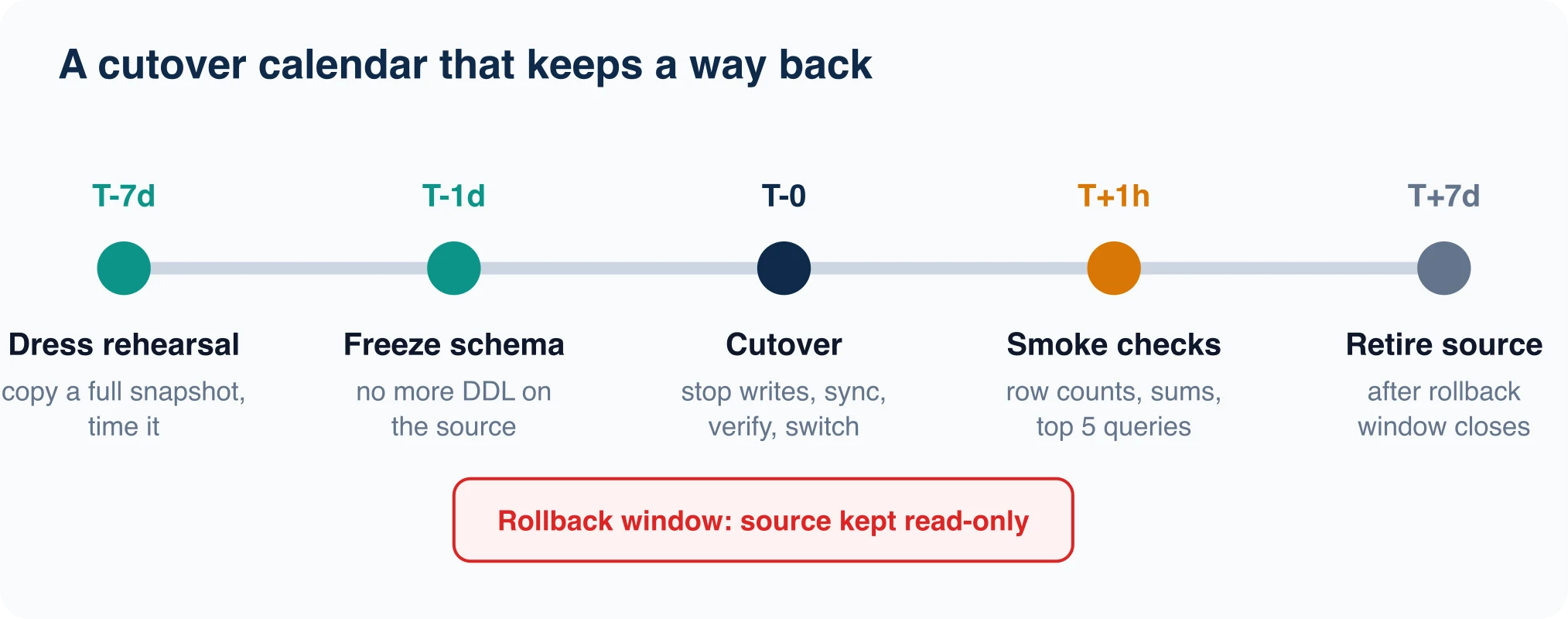
- T minus 7 days: dress rehearsal. Copy a full snapshot to a staging target. Time every step and run the fingerprint.
- T minus 1 day: freeze schema. Block DDL on the source. A column added mid-copy breaks the mapping.
- T zero: cutover. Stop writes, let replication lag reach zero (trickle) or run the final copy (big bang), verify, then switch connection strings.
- T plus 1 hour: smoke checks. Re-run the fingerprint, then your five most important queries and the slowest page on the site.
- T plus 7 days: retire the source. Keep it read-only until the rollback window closes, then sanitize the storage according to the sensitivity of the data. NIST's media sanitization guidelines, revised in September 2025, cover the controls and techniques.
The read-only source is your rollback plan. While it exists, a bad cutover costs a connection-string change. Once you delete it, the same problem costs a restore.
Which migration costs less: managed service or DIY?
It depends on whether the engines match. Google's Database Migration Service pricing lists no added charge for native PostgreSQL or MySQL migration into Cloud SQL, and PostgreSQL into AlloyDB. Heterogeneous jobs are billed by data volume, with the first 500 GiB of backfill each month free.
On AWS, the DMS pricing page says homogeneous migrations bill hourly only for the migration's duration, with no storage or data transfer charge. Standard replication uses instance hours or serverless capacity units, measured in DCUs where one DCU equals 2 GB of RAM.
Our migration tools comparison covers the options in detail. For a one-off move between different engines, a self-run loader plus a rehearsal is often cheaper. For a continuous sync that must run for weeks, the managed service pays for itself in avoided babysitting.
A decision you can write down today
Answer these four lines in a document before you start:
- Maximum acceptable write freeze: ___ minutes.
- Measured copy time from the rehearsal: ___ minutes.
- Can the source stream changes: yes or no.
- Rollback window: ___ days, source kept read-only.
If line 2 is smaller than line 1, choose big bang and stop planning. If not, choose phased or trickle, and budget a week for change capture. Write the verdict next to the numbers. That page is what your team will argue from at 2 a.m., and it should be written when nobody is under pressure.
Advertisement
FAQ
What is the best data migration strategy?
The simplest one your downtime budget allows. Use big bang if the app can be read-only during the copy, phased if you can move tenants or tables separately, and trickle if you need near-zero downtime and the source can stream changes.
What is the difference between big bang and trickle migration?
Big bang freezes writes, copies everything, verifies, and switches once. Trickle backfills the data, then streams ongoing changes until replication lag reaches zero, so the switch takes seconds. Trickle has more moving parts but far less downtime.
How do you verify a data migration?
Compare a fingerprint on both databases: row count, a sum of a numeric column, and the minimum and maximum of a date column. Then compare around 100 random rows column by column, and one business total your finance team trusts.
How long will my data migration take?
Divide your row count by a measured load rate, then multiply by three for planning. On our test machine COPY loaded 735,000 rows per second, so 100 million rows is roughly 2.3 minutes before network and index costs. Rehearse to confirm.
Comments
Loading…
Sign in to join the conversation.
Related posts

Database Migration Tools: Costs and Best Fit
The right database migration tool depends on which of two jobs you have. If you need to move data between servers or engines, look at a managed service such as Google, AWS or Azure Database Migration
Thu Oct 08 2026 · 8 min read · 0 views
Database Migration: Process, Types and Steps
A database migration is the controlled move of a database's structure, its data, or both, from one place or version to another. The word covers three jobs that teams mix up: changing the schema,
Thu Oct 08 2026 · 8 min read · 0 views

How to Check Your PostgreSQL Version (psql and SQL)
The quickest way to check your PostgreSQL version is psql --version for the client, or SHOW serverversion; for the server you are actually connected to. Those two can disagree, and the disagreement is
Thu Oct 08 2026 · 8 min read · 1 views