Database Migration: Process, Types and Steps
By Nihar Ranjan Das · Thu Oct 08 2026 · 8 min read · 0 views
View as a Web StorySoftware#migration#postgresql#sqlite#database-migration#data-migration
A database migration is the controlled move of a database's structure, its data, or both, from one place or version to another. The word covers three jobs that teams mix up: changing the schema, moving data between servers, and switching database engines. Each has different risks and different tools.
This guide defines the types, walks through the six phases that every safe migration follows, and adds a measurement most guides skip: how much the loading method alone changes the time the move takes.
What is a database migration?
Database migration is the process of moving or transforming a database so that an application can run on a new schema, server, platform or engine. In practice it means one of three things.
- Schema migration. You change tables, columns and indexes in place. Developers call these "SQL migrations", and they usually live as numbered files in version control.
- Data migration. You copy rows from one system to another, with or without changing their shape.
- Platform migration. You move the whole database to a new host, cloud or engine, which combines the first two.
If someone says "run the migration" in a pull request, they almost always mean the first kind. If an executive says it in a planning meeting, they mean the third. Clarify which one before you estimate anything.
What are the types of database migration?
Migrations differ along three axes. Naming them helps you pick tools and downtime.
| Axis | Options | Why it matters |
|---|---|---|
| Engine | Homogeneous (same engine) or heterogeneous (different engine) | Heterogeneous moves need type and syntax conversion |
| Downtime | Offline (stop writes) or online (stream changes) | Sets how long users are affected |
| Scope | Schema only, data only, or both | Decides whether you need a loader, a migration runner, or both |
Cloud vendors price on the first axis. Google's Database Migration Service pricing lists no added charge for native PostgreSQL migration into Cloud SQL or AlloyDB, and bills heterogeneous jobs by data volume. The AWS DMS pricing page similarly describes homogeneous migrations as billed hourly for the migration's duration only.
Microsoft's Azure Database Migration Service overview shows the downtime axis. Its table separates online migrations, which keep the source running with minimal downtime, from offline migrations, which do not. It lists both modes for Azure SQL Managed Instance.
What are the steps in the database migration process?
Every safe migration follows six phases, whatever the tool. The order matters more than the names.
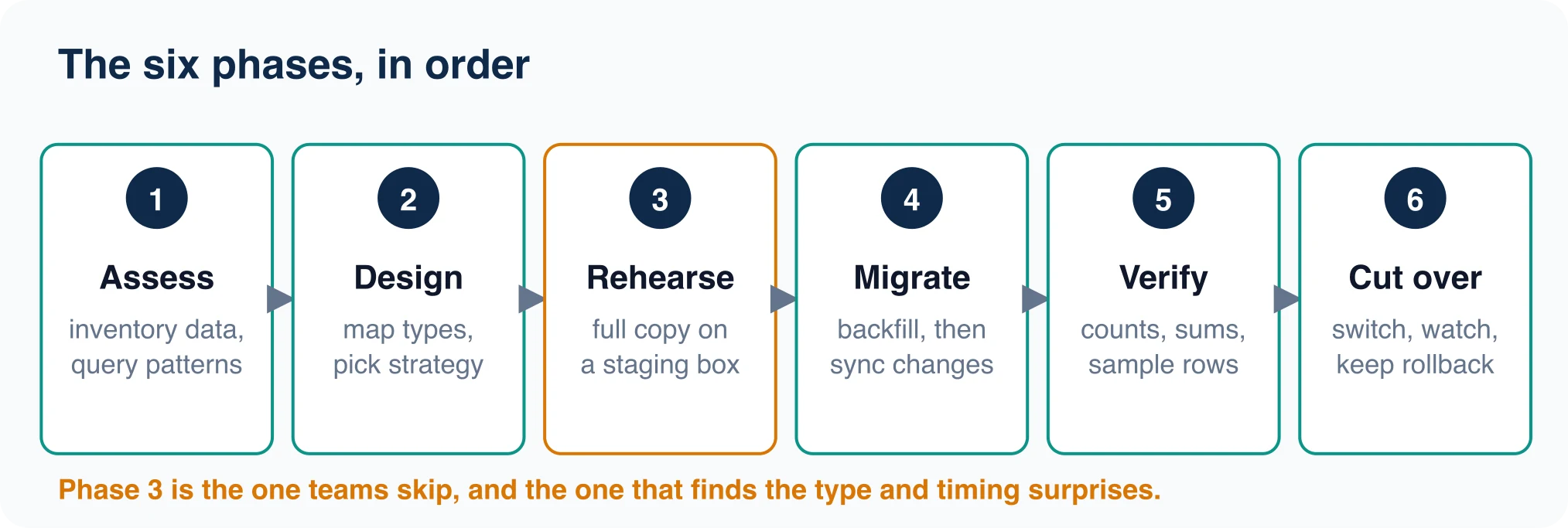
- Assess. Inventory tables, row counts, sizes, extensions, stored procedures and the queries your app actually runs. You cannot plan a window without knowing the data volume.
- Design. Map types from the old engine to the new one, choose a strategy, and decide who can approve a rollback.
- Rehearse. Copy a full snapshot to a staging server. Time it. This phase finds type errors and timing surprises while nothing is at stake.
- Migrate. Run the real copy, then sync any changes made during it.
- Verify. Compare row counts, numeric sums and date ranges on both sides, then spot-check rows.
- Cut over. Switch the application, watch the first hour closely, and keep the old database read-only as your way back. When the rollback window closes, wipe the old storage following the NIST media sanitization guidelines, which match controls to the sensitivity of the information.
Teams skip phase 3 more than any other, and it is the one that pays most. A rehearsal that fails costs an afternoon. A cutover that fails costs a weekend.
Advertisement
How fast can you load data into PostgreSQL?
The loading method changes migration time by more than an order of magnitude.
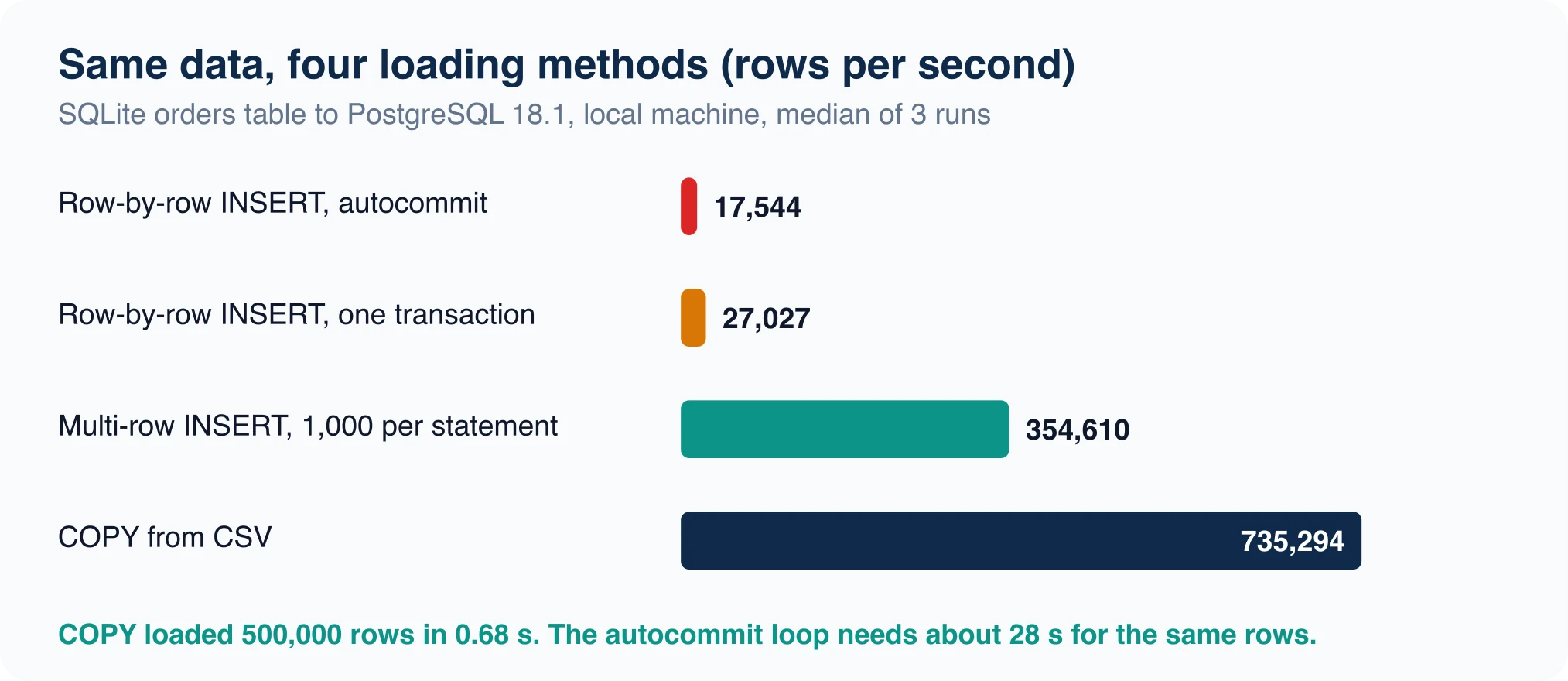
Test setup: SQLite 3.51.0 source, PostgreSQL 18.1 target, one macOS laptop, loopback connection, three runs per method. We tested this by moving a 500,000-row orders table from SQLite 3.51.0 into PostgreSQL 18.1 four ways on the same laptop. The numbers below are the median of three runs.
| Method | Rows per second | Time for 500,000 rows |
|---|---|---|
| One INSERT per statement, autocommit | 17,544 | about 28 s |
| One INSERT per statement, one transaction | 27,027 | about 18.5 s |
| Multi-row INSERT, 1,000 rows each | 354,610 | 1.41 s |
COPY from CSV |
735,294 | 0.68 s |
The first two rows were measured on 10,000 rows and scaled up, so treat them as rates. The last two loaded the full 500,000.
COPY is PostgreSQL's bulk loading command, and it was 42 times faster than autocommit inserts here. The gap comes from per-statement overhead: parsing, planning, and a commit for each row. Batching removes most of it. COPY removes nearly all of it.
Your numbers will differ with network latency, indexes and hardware. The ratio is the useful part. If your tool loads row by row, you are leaving most of the speed on the table. Check which method it uses before you trust its time estimate.
How do you move SQLite or MySQL data into PostgreSQL?
If you first need to inspect the source file, see how to open a .db file.
For a small move between engines, a loader that uses COPY under the hood is the shortest path. pgloader is an open-source tool, released under the PostgreSQL License, that loads data into PostgreSQL from SQLite, MySQL and MSSQL sources. Its README says its main advantage is that it keeps a separate file of rejected rows while it continues to copy the good ones.
That behavior matters for dirty data. A plain COPY aborts on the first bad row. A loader that sets bad rows aside lets you finish the load and fix the exceptions afterward.
Do a manual conversion when you want full control. Export from SQLite, create the target table with proper types, then load:
sqlite3 -csv source.db "SELECT * FROM orders" > orders.csv
psql -d shop -c "\copy orders FROM 'orders.csv' CSV"
On our laptop, the 500,000-row export took 0.46 seconds and the \copy took 0.68 seconds.
Which column types need attention?
Type mapping is where heterogeneous migrations fail. SQLite stores whatever you give it, so its declared types are hints. PostgreSQL enforces them.
| SQLite column | Common pitfall | PostgreSQL choice |
|---|---|---|
INTEGER PRIMARY KEY |
Auto-assigned IDs, no sequence | bigint GENERATED ALWAYS AS IDENTITY |
REAL money values |
Floating-point rounding | numeric(10,2) |
TEXT dates |
Mixed formats in one column | timestamp or timestamptz |
BOOLEAN |
Stored as 0, 1 or any text | boolean, after cleaning |
We saw the first pitfall directly. SQLite accepted the text abc in an integer column and kept it as text, while PostgreSQL rejected the same value with invalid input syntax for type integer: "abc". Run SELECT typeof(col), count(*) FROM t GROUP BY 1; on every source column before you convert it. Any column that returns two types needs cleaning first.
Our amount column was REAL in SQLite and numeric(10,2) in PostgreSQL. After the load, both sides returned 24871808.25 for the sum. The numeric type avoided the float drift that large sums can show.
Why does CREATE TABLE IF NOT EXISTS hide schema drift?
The IF NOT EXISTS clause skips creation when a table with that name exists, and it never compares columns. That makes it a quiet source of schema drift in migration scripts.
We tested this in SQLite 3.51.0. We created a table t with a single id column, then ran CREATE TABLE IF NOT EXISTS t(id INTEGER PRIMARY KEY, n TEXT). The command succeeded with no error. The schema afterward still showed only the id column, so the n column never existed. A plain CREATE TABLE t(...) against the same name failed with table t already exists.
PostgreSQL behaves the same way. The IF NOT EXISTS form protects reruns, but it will not add a missing column. Use ALTER TABLE ... ADD COLUMN in a numbered migration for changes to a table that already exists, and keep IF NOT EXISTS for first-time setup.
How do you verify a migration?
Compare a fingerprint on both sides. Four numbers catch most problems: row count, a numeric sum, and the minimum and maximum of a date column.
SELECT count(*), sum(amount), min(created), max(created) FROM orders;Our source and target both returned 500000 | 24871808.25 | 2026-01-01 00:00:00 | 2026-01-02 03:46:39. Run the query during rehearsal, right after the final copy, and again after cutover. Add 100 random primary keys compared column by column, plus one business total your finance team already trusts.
What about PostgreSQL major upgrades?
A major PostgreSQL upgrade is a migration too, and it follows the same phases. The PostgreSQL versioning policy says minor releases need only a binary swap and restart, while major upgrades require a dump and reload or pg_upgrade.
Version 14 reaches end of life on November 12, 2026, which makes this timely. If you run it, plan the upgrade through a rehearsal on a copy of production. Our guide on PostgreSQL 19 breaking changes to check before upgrading lists what to test, and the version-check steps are in how to check your PostgreSQL version.
Common mistakes to avoid
Four errors repeat across migration post-mortems.
- No rehearsal. The first full-size copy happens on cutover night.
- Row-by-row loading. A job that should take minutes takes hours.
- Skipping the sequence reset. Data loads fine, then the first new insert collides with an old ID.
- Deleting the source too early. Without a read-only fallback, a bad cutover becomes a restore.
Your next step
Pick the data migration strategy first, then the tool. If the data is small and the engines differ, load with COPY or pgloader and verify with the fingerprint. If the data is large and uptime matters, plan change streaming before anything else. In both cases, run the rehearsal this week and write down the time it takes. That single number turns every other question in the plan from a guess into arithmetic.
Advertisement
FAQ
What is database migration?
Database migration is the controlled move of a database's structure, data, or both, to a new schema, server, platform or engine. It includes schema migrations run from version control, data copies between servers, and full platform moves between engines or clouds.
What are the steps in the database migration process?
Assess the data, design the type mapping and strategy, rehearse on a staging copy, run the migration, verify counts and sums on both sides, then cut over and keep the old database read-only as a rollback.
What are the types of database migration?
By engine: homogeneous (same engine) or heterogeneous (different engines). By downtime: offline or online. By scope: schema only, data only, or both. Cloud vendors price homogeneous and heterogeneous migrations differently.
What is the fastest way to load data into PostgreSQL?
COPY. In our test it loaded 500,000 rows in 0.68 seconds, 42 times faster than one INSERT per statement with autocommit. Multi-row INSERTs of 1,000 rows each reached 355,000 rows per second.
Comments
Loading…
Sign in to join the conversation.
Related posts

Database Migration Tools: Costs and Best Fit
The right database migration tool depends on which of two jobs you have. If you need to move data between servers or engines, look at a managed service such as Google, AWS or Azure Database Migration
Thu Oct 08 2026 · 8 min read · 0 views

Data Migration Strategy: Big Bang vs Trickle
The best data migration strategy is the simplest one your downtime budget allows. If the app can stay read-only while you copy, use a big bang migration. If it cannot, you need either a phased move or
Thu Oct 08 2026 · 8 min read · 0 views

How to Check Your PostgreSQL Version (psql and SQL)
The quickest way to check your PostgreSQL version is psql --version for the client, or SHOW serverversion; for the server you are actually connected to. Those two can disagree, and the disagreement is
Thu Oct 08 2026 · 8 min read · 1 views