Database Migration Tools: Costs and Best Fit
By Nihar Ranjan Das · Thu Oct 08 2026 · 8 min read · 0 views
View as a Web StorySoftware#developer tools#postgresql#database-migration#flyway#liquibase

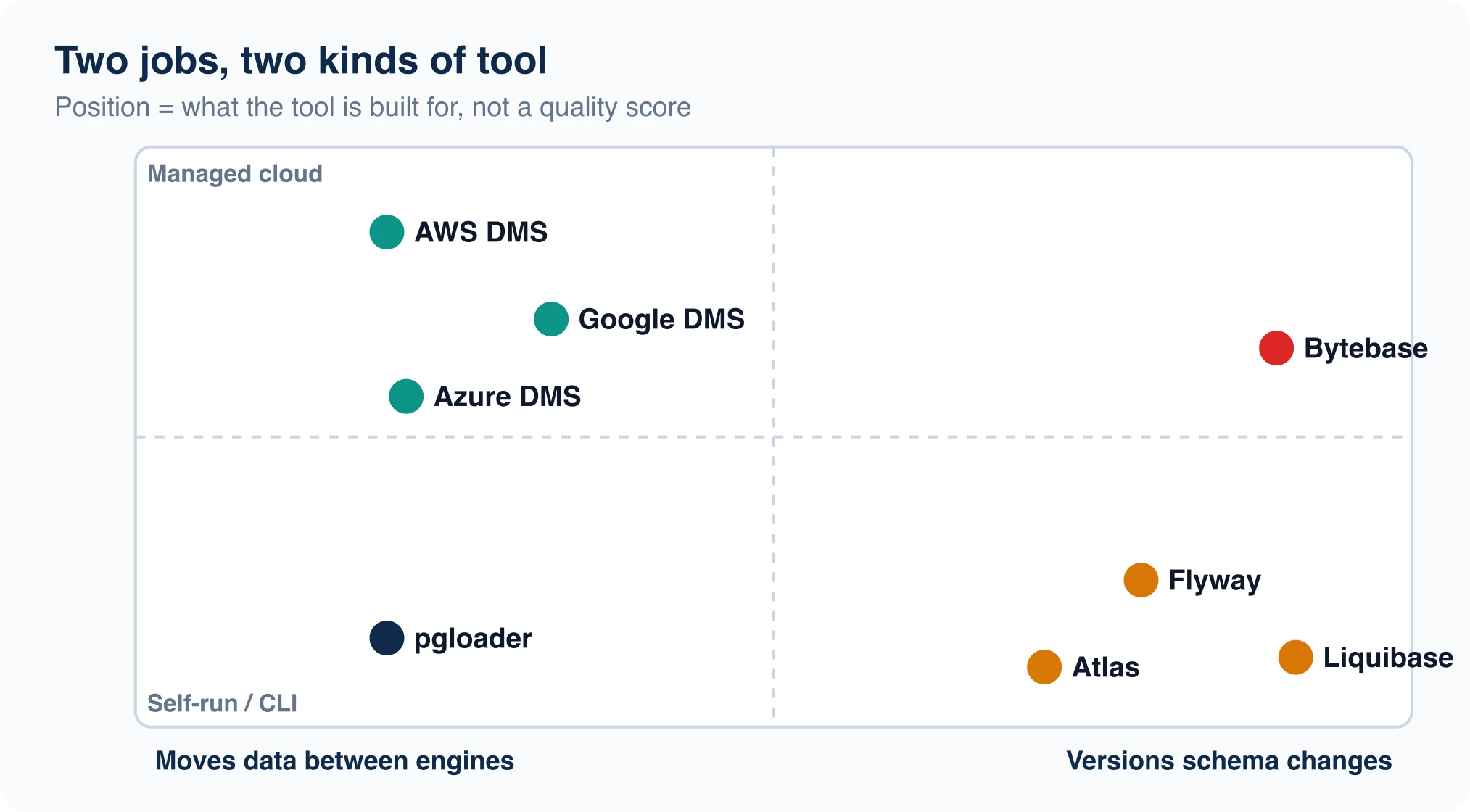
The right database migration tool depends on which of two jobs you have. If you need to move data between servers or engines, look at a managed service such as Google, AWS or Azure Database Migration Service, or a loader such as pgloader. If you need to change a schema safely every sprint, look at Flyway, Liquibase, Atlas or Bytebase.
Most comparison pages mix these jobs into one list, which is why they feel unhelpful. This guide separates them, checks each tool's pricing and license against its own documentation, and ends with a rule for choosing in under five minutes.
What are database migration tools?
Database migration tools are programs or services that automate moving data between databases, or applying schema changes in a controlled order. They fall into two families that solve different problems.
- Data movers copy rows. They handle type conversion, bulk loading and, in some cases, continuous replication so a source can stay live.
- Schema change tools apply versioned changes such as new columns and indexes. They track what ran, in what order, and on which environment.
A team that runs only a data mover has no history of schema changes. A team that runs only a schema tool has no way to move a million rows from MySQL. Many real projects need one of each.
Which tools move data between databases?
Four options cover most cases. Cloud services suit managed targets. A loader suits a one-off move.
| Tool | Type | Pricing, per its own docs | Notable limit |
|---|---|---|---|
| Google Database Migration Service | Managed | No added charge for native PostgreSQL or MySQL into Cloud SQL, and PostgreSQL into AlloyDB; heterogeneous billed per GiB | Targets Google Cloud |
| AWS Database Migration Service | Managed | Hourly instances or serverless DCUs; homogeneous jobs billed hourly for the duration only | Targets AWS |
| Azure Database Migration Service | Managed | Not listed on the overview page | Overview lists Azure SQL targets only |
| pgloader | Self-run CLI | Free, PostgreSQL License | PostgreSQL target only |
Google's Database Migration Service is the cheapest path when both sides are the same engine. Its pricing page lists a free tier for native migrations and bills heterogeneous jobs by gigabytes processed, counting raw uncompressed bytes. The first 500 GiB of backfill each month is free.
AWS Database Migration Service offers on-demand instances, serverless capacity and one-year Savings Plans. Capacity is measured in DCUs, where one DCU is 2 GB of RAM. AWS says there is no DMS charge for data transfer into or out of the DMS node, and that homogeneous migrations carry no storage or transfer charge.
Microsoft's Azure Database Migration Service is narrower. Its overview describes migrations to Azure SQL Database, Azure SQL Managed Instance and SQL Server on Azure virtual machines, with online and offline options for the latter two. Its overview lists no PostgreSQL targets, so confirm support before you plan around it.
pgloader is the right tool when the destination is PostgreSQL and the source is SQLite, MySQL or MSSQL. It loads through COPY and keeps a file of rejected rows while it continues with the good ones. The repository describes a v4 rewrite that needs Java 21 or later, while distribution packages still ship v3. Check which one you install.
Advertisement
Which tools manage schema changes?
Four tools dominate. They differ most in license and in whether you write SQL or describe the end state.
| Tool | Style | License and cost | Choose it when |
|---|---|---|---|
| Flyway | Versioned SQL files | Free Community edition, paid tiers | You want the simplest possible runner |
| Liquibase | Changelogs in XML, YAML, JSON or SQL | Community under the Functional Source License since 5.0 | You need database-neutral changesets |
| Atlas | Declarative or versioned | Core free, Pro features need login or trial | You prefer a desired-state schema file |
| Bytebase | Web console with review workflow | Free up to 20 users and 10 instances, then $20 per user per month | Many reviewers and many databases |
Redgate's Flyway Community announcement says Flyway Desktop was added to the free edition, which earlier covered only the command line and API. Paid tiers remain for teams that want more.
Liquibase changed its terms. Its blog post on the Functional Source License says Community moved to that license from version 5.0. Free production use stays allowed, and each version reverts to Apache 2.0 two years after release. Contributors now sign a one-time agreement. The commercial product is called Liquibase Secure.
Atlas takes a different route. Its getting started guide describes it as "like Terraform, but for databases". You keep a schema.sql file and run atlas schema apply, or you generate numbered files with atlas migrate diff and apply them with atlas migrate apply. It supports PostgreSQL, MySQL, SQL Server, ClickHouse and SQLite, among others.
Bytebase is the heavyweight. Its pricing page lists a free Community plan with schema version control, 200-plus SQL review rules and automatic backup and rollback. Pro costs $20 per user per month. For a team of eight, that is $1,920 a year.
How much does each option cost in practice?
Start with what is free, then count the people.
A solo developer or a small team can run Flyway Community, Atlas core, or Bytebase Community at no cost. A one-off data move into Google Cloud from the same engine can also be free of service charges. You still pay for the compute and storage of the target database.
Costs rise in three places. Heterogeneous cloud migrations bill by volume. Per-seat tools such as Bytebase Pro scale with headcount. Liquibase and Atlas advanced features sit behind commercial editions. The AWS pricing page does not list per-instance rates in the text we could read, so use the AWS Pricing Calculator for a real number.
Which migration tool should you pick?
Use the situation, not the brand, to decide.
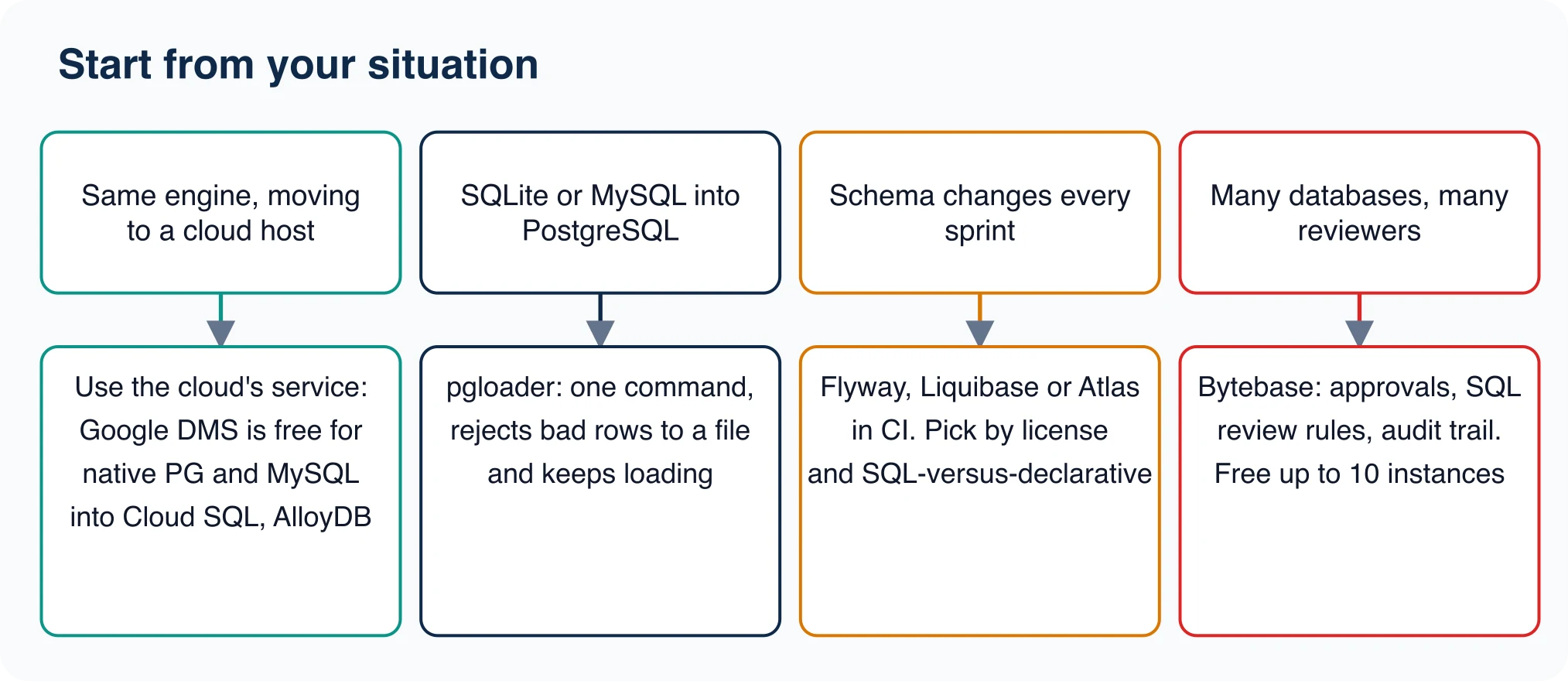
- Same engine, moving to a cloud host. Use that cloud's own service. For PostgreSQL or MySQL into Google Cloud SQL, it carries no added service charge.
- SQLite or MySQL into PostgreSQL. Use pgloader, or export to CSV and
\copyyourself. We loaded 500,000 rows withCOPYin 0.68 seconds, against 28 seconds for autocommit inserts. - Schema changes every sprint. Pick Flyway for plain SQL, Liquibase for neutral changelogs, or Atlas for desired-state files. Run it in CI.
- Many databases and many reviewers. Use Bytebase, and watch the 10-instance limit on the free plan.
The common pairing is a data mover for the one-time move and a schema runner for everything after. Treat them as two purchases.
How do you avoid lock-in with a migration tool?
Pick tools whose output you can keep if the vendor changes terms. The Liquibase license change is the live example. Your changelog files remain yours, and the two-year reversion to Apache 2.0 limits the long-term risk, but a team that built workflows on one edition still had to read new terms.
Ask four questions before you standardize:
- Are the migration files plain SQL or an open format you can run by hand?
- Can you run the tool offline, without an account or login?
- What happens to existing migrations if you switch tools later?
- Which features sit behind a paid tier, and do you use any of them?
Atlas is a useful test case. Its guide says the core workflow needs no login, while Pro features such as linting and CI integration need one. Check which side of that line your pipeline sits on. Versioned SQL files are the safest format, because every other tool on this list can read them.
What do these tools not do?
None of them proves your data arrived intact. After any copy, compare a fingerprint on both sides:
SELECT count(*), sum(amount), min(created), max(created) FROM orders;In our test, SQLite and PostgreSQL returned the same four values. No tool in this list substitutes for that check. None of them fix a bad type mapping either. SQLite let us store the text abc in an integer column, and PostgreSQL rejected it with invalid input syntax for type integer. A loader that sets bad rows aside will show you the damage, but a person still has to decide what the right value is.
For the full process around any of these tools, read our guide to the database migration process, types and steps, and the companion piece on picking a data migration strategy.
A five-minute checklist before you commit
- Write down the source engine, target engine and row count.
- Decide whether the app can pause writes during the copy.
- Check the license page of the tool you picked today, not the one from last year's blog post. Liquibase changed its terms in version 5.0.
- Run a rehearsal on a copy and time it.
- Plan the check: row counts, sums, date ranges, and a spot-check of real rows.
If the rehearsal passes, the tool is right. If it does not, you found out on a Tuesday afternoon instead of a Saturday night, and switching tools is cheap at that point.
Advertisement
FAQ
What is the best database migration tool?
It depends on the job. For moving data between servers use a managed service such as Google DMS or AWS DMS, or pgloader for PostgreSQL targets. For schema changes use Flyway, Liquibase, Atlas or Bytebase.
Is Google Database Migration Service free?
Google's pricing page lists no added charge for native PostgreSQL or MySQL migration into Cloud SQL and PostgreSQL into AlloyDB. Heterogeneous migrations are billed per GiB, with the first 500 GiB of backfill each month free.
Is Liquibase still open source?
Liquibase Community moved to the Functional Source License in version 5.0. Free production use remains, and each version reverts to Apache 2.0 two years after release. The FSL is not recognized as an open-source license by some critics.
How much does Bytebase cost?
Bytebase's pricing page lists a free Community plan for up to 20 users and 10 database instances, and a Pro plan at $20 per user per month. Enterprise pricing is not listed and requires contacting Bytebase.
Comments
Loading…
Sign in to join the conversation.
Related posts
Database Migration: Process, Types and Steps
A database migration is the controlled move of a database's structure, its data, or both, from one place or version to another. The word covers three jobs that teams mix up: changing the schema,
Thu Oct 08 2026 · 8 min read · 0 views

Data Migration Strategy: Big Bang vs Trickle
The best data migration strategy is the simplest one your downtime budget allows. If the app can stay read-only while you copy, use a big bang migration. If it cannot, you need either a phased move or
Thu Oct 08 2026 · 8 min read · 0 views

How to Check Your PostgreSQL Version (psql and SQL)
The quickest way to check your PostgreSQL version is psql --version for the client, or SHOW serverversion; for the server you are actually connected to. Those two can disagree, and the disagreement is
Thu Oct 08 2026 · 8 min read · 1 views