How to Check Your PostgreSQL Version (psql and SQL)
By Nihar Ranjan Das · Thu Oct 08 2026 · 8 min read · 1 views
View as a Web StorySoftware#devops#upgrade#postgresql#database#psql

The quickest way to check your PostgreSQL version is psql --version for the client, or SHOW server_version; for the server you are actually connected to. Those two can disagree, and the disagreement is where most upgrade mistakes start.
On the machine we tested, psql --version printed psql (PostgreSQL) 18.1. The server answered 18.1 to SHOW server_version; and 180001 to SHOW server_version_num;. The official release list shows 18.6 as the current minor, so that install was five patch releases behind. It was a fresh local build, and it still lagged.
What is your PostgreSQL version, and which one matters?
PostgreSQL is an open-source relational database that has shipped a new major version about once a year, according to the PostgreSQL versioning policy. Three different programs can each report a version, and they are not always the same one.
| Command | What it reports | Where it runs |
|---|---|---|
psql --version |
The psql client binary | Your laptop or CI box |
postgres --version |
The server binary on that disk | The server host |
SHOW server_version; |
The server you are connected to | Over the network |
If you want to know what your application talks to, use the last row. A client binary says nothing about a remote database.
Check the version with psql
Test setup: a local PostgreSQL 18.1 server built from the official macOS installer, with an empty shop database and no extensions beyond the default. Every output below is copied from that server. The psql reference documents the flags used here.
Run this in any terminal where psql is installed:
psql --version
psql -V
Both print the same line. The short flag -V is handy in scripts. If the command is not found, psql is not on your PATH. On Windows the file usually sits under the PostgreSQL install folder, in a bin directory, so call it by full path.
To ask a running server, connect and query:
psql -h localhost -U postgres -c "SHOW server_version;"Add -X to skip your ~/.psqlrc so a custom prompt or pager cannot alter the output.
Check the version with SQL
Four queries work from any client, including a GUI or an application driver.
Advertisement
SHOW server_version;               -- 18.1
SHOW server_version_num;           -- 180001
SELECT version();                  -- full build string
SELECT current_setting('server_version_num')::int >= 180000;
SELECT version(); returns the long form. Ours read PostgreSQL 18.1 on x86_64-apple-darwin23.6.0, compiled by Apple clang version 16.0.0. That string also tells you the platform and compiler, which helps when a bug report asks for it.
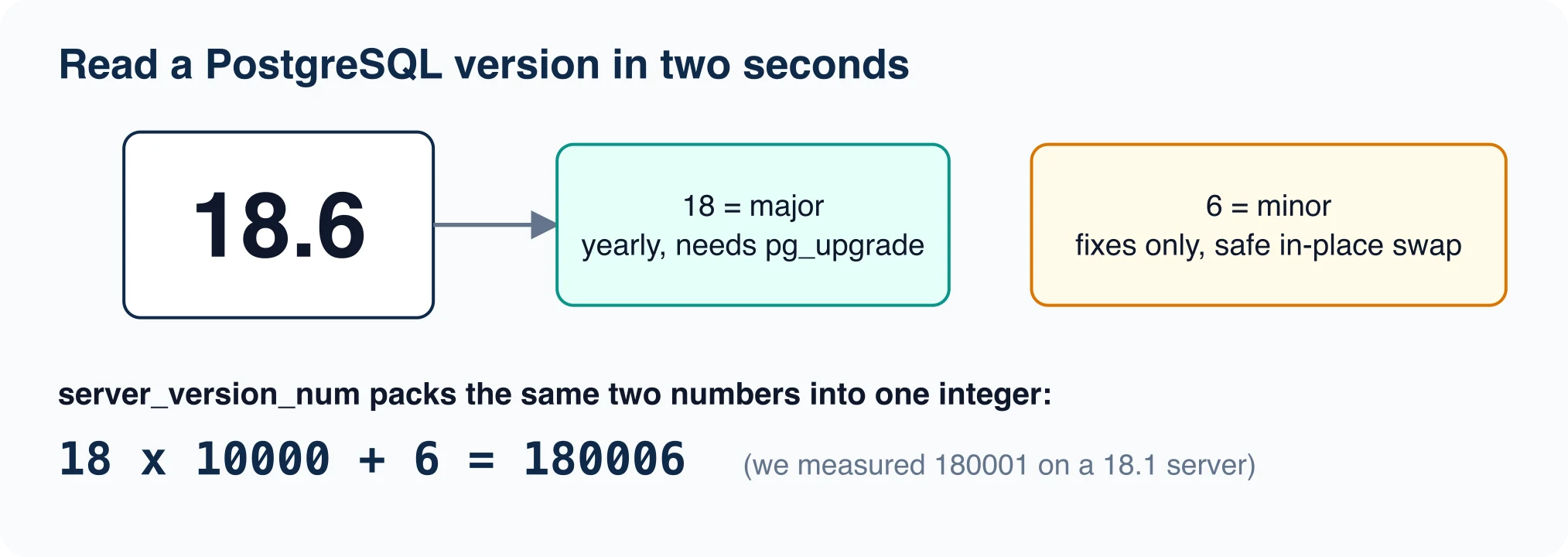
server_version_num is the one to use in code. The preset options documentation lists it as a read-only setting. It packs the major and minor numbers into one integer, so 18.1 becomes 180001. That makes comparisons trivial, as the fourth query shows. We ran it and it returned t.
Read the version number correctly
Since PostgreSQL 10, the first number is the major version and the second is the minor version. The policy page states this directly. Version 18.6 is the sixth minor release of major 18.
Before version 10 the scheme was different. Then 9.5.3 meant major 9.5, minor 3. Older docs and Stack Overflow answers still use that style, so check the date of any advice you find.
This split decides how you upgrade. A minor upgrade swaps the binaries and restarts the server. The versioning page says no dump and restore is needed, though it advises reading the release notes first. A major upgrade needs pg_dump and reload, or pg_upgrade, which the pg_upgrade documentation describes in full.
Find the version on Linux, macOS, Windows and Docker
Use the package manager when the server is not running, or when you want the installed package version.
# Debian / Ubuntu
dpkg -l | grep postgresql

# RHEL / Fedora
rpm -qa | grep postgresql

# macOS with Homebrew
brew list --versions postgresql@18

# Any host: ask the server binary
postgres --version
pg_config --version
On a Debian-style host with several clusters, pg_lsclusters lists each version, port and status in one table. In Docker, the image tag tells you the major version, but the running server is the truth:
docker exec -it my-postgres psql -U postgres -c "SELECT version();"Managed services hide the binary. On Amazon RDS, Cloud SQL or Supabase, run SHOW server_version; from any client, then compare it with the console. The console can lag during a maintenance window.
When psql and the server do not match
When the psql client has a different major version than the server, psql prints a warning banner at connect. It says some psql features might not work. Backslash commands read system catalogs, and catalogs change between majors.
The mismatch is common and mostly harmless for queries. It matters for pg_dump. A dump tool older than the server will refuse to run, because it cannot be sure it understands every object. Keep your pg_dump at or above the server's major version.
Check both sides before any backup or migration:
psql --version
pg_dump --version
psql -h db.example.com -U app -Atc "SHOW server_version;"
Is your version still supported?
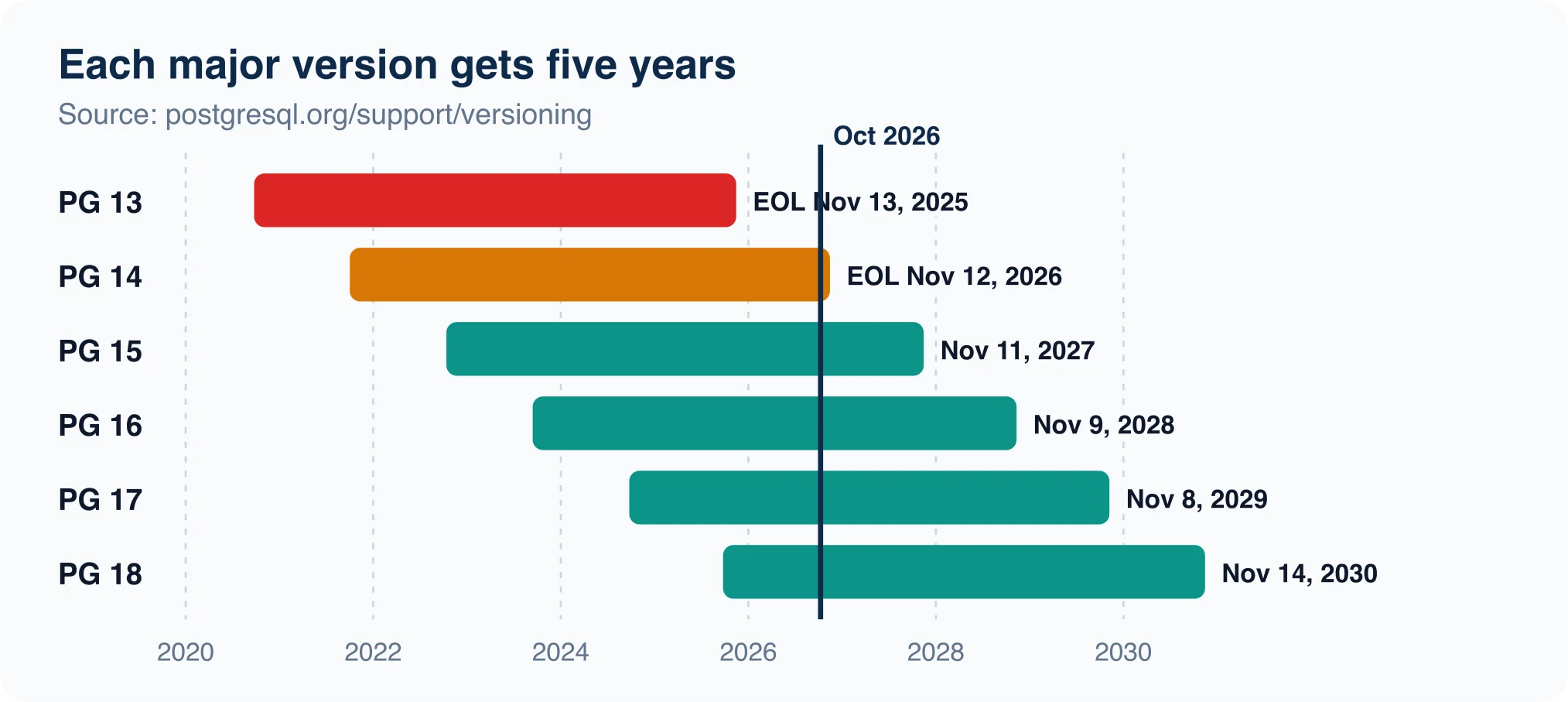
Each major version gets five years of fixes, then a final release and end of life. The policy page publishes the table. Here is what it listed in October 2026:
| Major | Latest minor | First release | End of life |
|---|---|---|---|
| 18 | 18.6 | Sep 25, 2025 | Nov 14, 2030 |
| 17 | 17.11 | Sep 26, 2024 | Nov 8, 2029 |
| 16 | 16.15 | Sep 14, 2023 | Nov 9, 2028 |
| 15 | 15.19 | Oct 13, 2022 | Nov 11, 2027 |
| 14 | 14.24 | Sep 30, 2021 | Nov 12, 2026 |
| 13 | 13.23 | Sep 24, 2020 | Nov 13, 2025 |
Version 13 is already past end of life. Version 14 reaches it in about five weeks. If SHOW server_version; starts with 13 or 14, plan the move to a supported major now.
Should you upgrade after you check?
Decide with two questions: is your major supported, and is your minor current?
Being on the right major but an old minor is the cheap one to fix. Minor releases carry only fixes. PostgreSQL 18.6 arrived August 13, 2026 with 28 security fixes, a release covered in NiharDaily's own post, PostgreSQL 18.6 is out, and 18.5 never shipped. Any install on 18.1 through 18.4 missed that cumulative set. The project recommends running the current minor of your major version, and NIST's guide to enterprise patch management makes the same case. It frames patching as preventive maintenance and a necessary cost of doing business.
Being on an expiring major takes planning. The path is a staging copy, a pg_upgrade --check dry run, and a rollback plan. A database migration also exposes extension and driver compatibility, so test those against the target version. For a bigger step, such as a jump to the next major that carries behavior changes, read PostgreSQL 19 breaking changes to check before upgrading before you schedule it.
Read the version from the data directory
When the server is stopped, you can still learn the major version. Every PostgreSQL data directory holds a small text file named PG_VERSION. On our test cluster, cat pgd/PG_VERSION printed 18.
This file stores only the major number, and that is its value. A data directory initialized by major 16 cannot be started by a major 18 binary. The server refuses to start rather than risk corrupting the files. If a restart fails after a package update, compare PG_VERSION with postgres --version first. Different majors mean you need pg_upgrade or a dump and restore, not a retry.
Check extensions before you trust a version number
The server version is only half the compatibility picture. Extensions have their own version numbers, and an upgrade can leave them behind.
SELECT extname, extversion FROM pg_extension;
SELECT name, default_version, installed_version
FROM pg_available_extensions
WHERE installed_version IS NOT NULL
  AND installed_version <> default_version;
The second query lists extensions that need ALTER EXTENSION ... UPDATE. On our clean 18.1 cluster, pg_extension held only plpgsql at 1.0. The catalog also showed pg_stat_statements at 1.12 and pgcrypto at 1.4 available but not installed. After a major upgrade the installed and default versions often differ, and this query finds every one of them in a single pass.
Fail a deploy when the version is too old
You can turn the check into a gate. A script that exits non-zero stops a pipeline before a bad rollout. This one compares server_version_num with a minimum:
#!/bin/sh
MIN=170000
v=$(psql -X -Atc "SHOW server_version_num;") || exit 2
if [ "$v" -lt "$MIN" ]; then echo "PostgreSQL $v is below $MIN"; exit 1; fi
echo "PostgreSQL $v is ok"
We ran it against our 18.1 server twice. With MIN=170000 it printed PostgreSQL 180001 is ok and exited 0. With MIN=190000 it printed PostgreSQL 180001 is below 190000 and exited 1. The -Atc flags turn off alignment and headers, so the output is a bare number your script can compare.
Use exit code 2 for "could not connect". That keeps a down database from looking like an old one in your pipeline logs.
A short script to audit every server you run
Put the check in one place so it runs on a schedule, not only when something breaks.
for host in db1.example.com db2.example.com; do
  v=$(psql -h "$host" -U audit -Atc "SHOW server_version;")
  echo "$host $v"
done
Feed the output into a spreadsheet next to the end-of-life table above. Flag anything within six months of its date.
Quick troubleshooting
If psql: command not found appears, the client is not installed or not on PATH. If SHOW server_version; returns a value you did not expect, you may be connected to a different instance than you think, often an SSH tunnel or a pooler pointed at another host. Run SELECT inet_server_addr(), inet_server_port(); to confirm which server answered.
If the version string includes extra text such as (Ubuntu 16.4-1) or (Debian ...), that is a distribution suffix. The number before it is the PostgreSQL version.
Advertisement
FAQ
How do I check my PostgreSQL version?
Run `psql --version` for the client binary, or connect and run `SHOW server_version;` for the server. Use `SELECT version();` when you want the full build string, including platform and compiler. The server query is the one that tells you what your application talks to.
What does psql --version show?
It shows the version of the psql client program installed on your machine, such as `psql (PostgreSQL) 18.1`. It says nothing about a remote server. Use `SHOW server_version;` over a connection to read the server's version.
What is server_version_num in PostgreSQL?
It is the version packed into one integer: major times 10,000 plus minor. PostgreSQL 18.1 is 180001 and 18.6 is 180006. Scripts use it for comparisons such as `current_setting('server_version_num')::int >= 180000`.
Is PostgreSQL 14 still supported?
Yes, until November 12, 2026, when its final release ships and it reaches end of life. Each major version is supported for five years, according to the PostgreSQL versioning policy. Version 13 is already past end of life.
Can I check the PostgreSQL version when the server is stopped?
Yes. Read the PG_VERSION file in the data directory for the major version, or run `postgres --version` for the installed server binary. A data directory from one major cannot be started by another major's binary.
Comments
Loading…
Sign in to join the conversation.
Related posts

Database Migration Tools: Costs and Best Fit
The right database migration tool depends on which of two jobs you have. If you need to move data between servers or engines, look at a managed service such as Google, AWS or Azure Database Migration
Thu Oct 08 2026 · 8 min read · 0 views
Database Migration: Process, Types and Steps
A database migration is the controlled move of a database's structure, its data, or both, from one place or version to another. The word covers three jobs that teams mix up: changing the schema,
Thu Oct 08 2026 · 8 min read · 0 views

Data Migration Strategy: Big Bang vs Trickle
The best data migration strategy is the simplest one your downtime budget allows. If the app can stay read-only while you copy, use a big bang migration. If it cannot, you need either a phased move or
Thu Oct 08 2026 · 8 min read · 0 views