Is your MCP server exposed? 3 of 5 bind every interface
By Nihar Ranjan Das · Wed Oct 28 2026 · 9 min read · 0 views
View as a Web StoryAI#ai agents#mcp#model context protocol#security#node.js
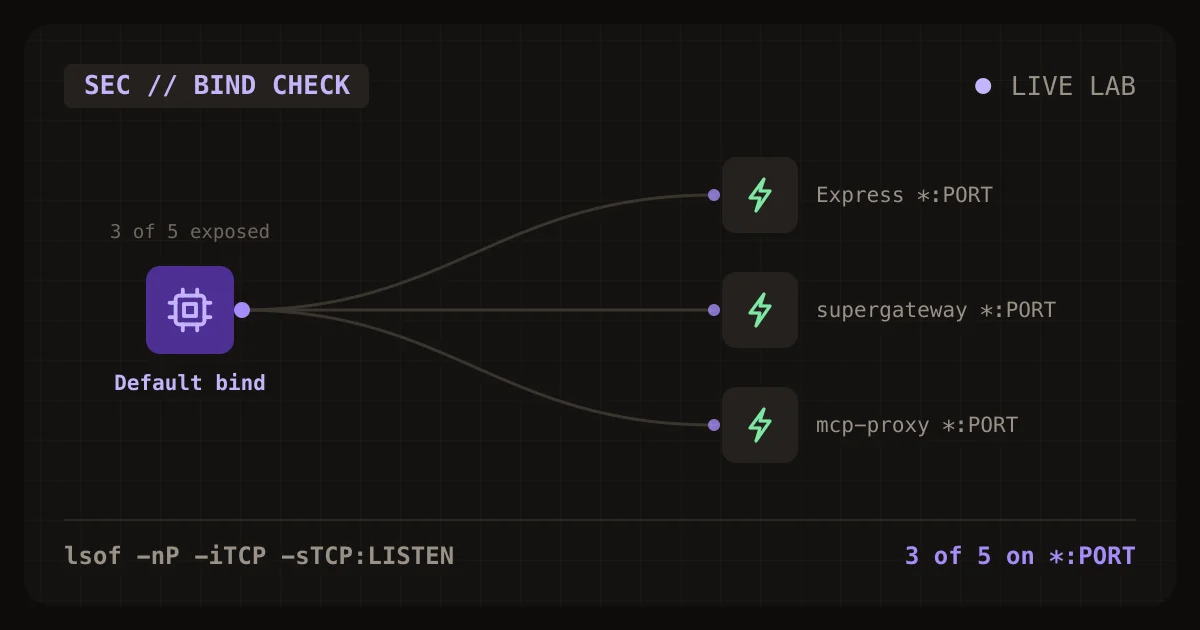
Three of five MCP server setups we ran with default options listened on every network interface and answered a request sent to the machine's Wi-Fi address, and the two we probed further accepted an MCP initialize call with no credentials. The check takes ten seconds: run lsof -nP -iTCP -sTCP:LISTEN and look for *: in front of your MCP server's port. If you see *: or [::]:, anyone on your network can reach it.
This post publishes the measurements, the one-line fix for each setup, and the pattern behind two 2026 CVEs that came from the same default.
How do I check whether my MCP server is exposed?
Run one lsof command while your MCP server is running, then read the address column. A server bound to 127.0.0.1:PORT or [::1]:PORT is reachable only from your own machine. A server bound to *:PORT is reachable from every network the machine is connected to.
lsof -nP -iTCP -sTCP:LISTEN | grep -i nodeThen confirm from outside. Find the machine's LAN address and request the port from a second device, or from the same machine using that address instead of localhost:
curl -s -o /dev/null -m 3 -w '%{http_code}\n' http://YOUR-LAN-IP:PORT/An HTTP status of 404, 400 or 200 means the server answered. "Connection refused" or a timeout means it did not. Any status code at all is a reachable server.
What is an MCP server, and why does the bind address matter?
An MCP server is a program that exposes tools, files or prompts to an AI client through the Model Context Protocol. A coding agent calls those tools to read files, run queries or hit APIs. When the server uses the stdio transport, only the client that started it can talk to it. When it uses an HTTP transport, it opens a network port.
The bind address decides who can connect to that port. 127.0.0.1 means the local machine only. 0.0.0.0 or :: (shown by lsof as *) means every network interface, including Wi-Fi and Ethernet.
That matters because MCP tools do real work. An exposed server hands a stranger on your network the same tools your agent has. For example, a filesystem server on a shared office network lets a colleague's laptop list your project folder. If those tools can run commands or read files, the stranger can too.
What did we measure?
We started five MCP server setups with default options, then read each listening address with lsof and sent a request to the machine's Wi-Fi address. Three bound every interface. Two bound loopback only.
Test setup. We ran every setup on a MacBook running macOS 26.3 with Node.js 22.23.3, using the npm versions named in the table (our lab, 2026). Each server ran for six seconds. We read its listener with lsof -nP -iTCP:PORT -sTCP:LISTEN, then sent curl to the machine's Wi-Fi address on the same port. No host option was set in any case. Where a setup needs a stdio server behind it, we used @modelcontextprotocol/server-everything.
Advertisement
| Setup | Listener address | Answered from the Wi-Fi address |
|---|---|---|
@modelcontextprotocol/sdk 1.32.2 with Express 5, app.listen(port) |
*:PORT |
Yes, HTTP 404 on / |
supergateway 4.2.1, --stdio ... --port |
*:PORT |
Yes, HTTP 404 on / |
mcp-proxy 6.7.21, --port |
*:PORT |
Yes, HTTP 404 on / |
fastmcp 4.23.8, httpStream, no host option |
[::1]:PORT |
No, connection refused |
@agent-infra/mcp-http-server 1.1.1-beta.2, no host option |
127.0.0.1:PORT |
No, connection refused |
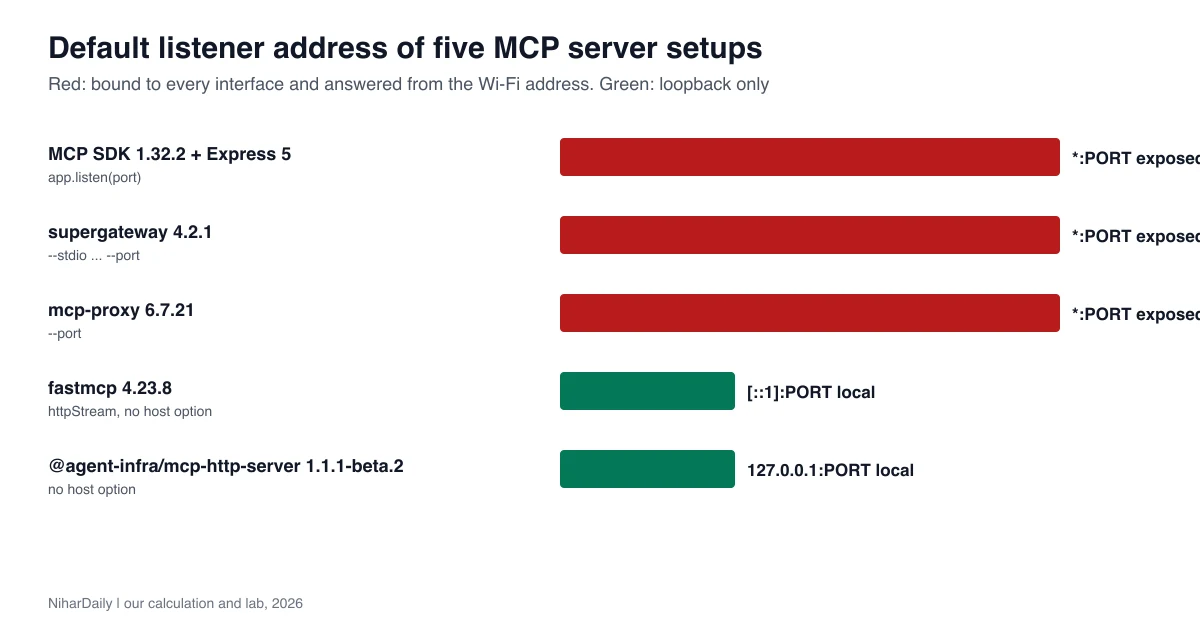
Three of five defaults are open to the local network (our lab, 2026). The two that stayed on loopback are the ones that chose a loopback default in their own code.
One detail surprised us. fastmcp bound [::1], the IPv6 loopback address, and not 127.0.0.1. A client that connects to http://127.0.0.1:PORT would be refused even though the server is running. If you hit that, use localhost in the client URL or set the host option explicitly.
Can a stranger really use the tools without a password?
Yes, in the two cases we probed. We sent an MCP initialize request to the Wi-Fi address of the Express setup and of mcp-proxy, with no credentials. Both returned HTTP 200 and a server description.
The Express setup returned its server name and protocol version 2025-06-18. The mcp-proxy setup returned the full capability list of the server behind it, including tools, prompts, resources and tasks. We did not call any tool. The server-everything demo tools are harmless, but a real server's tools would not be.
This is the point of the check. The network port answers before any authorisation question comes up. Whether a stranger can do damage then depends on what tools the server offers and whether it checks credentials.
Which real vulnerabilities came from this default?
At least two 2026 CVEs trace to a server that listened on every interface by default. Both are rated critical or high because an attacker needs only network access.
CVE-2026-81735 affects the mcp-http-server package in the UI-TARS-desktop project from ByteDance. The National Vulnerability Database entry, published August 27, 2026, says startServer.ts defaulted its listen address to ::, which means all interfaces, when no host was given. Authentication middleware was optional, and the project's commands and filesystem servers passed none. The commands server exposes a run_command tool, so any unauthenticated client that could reach the port could run arbitrary commands as the user running the server. Feedly's record scores it CVSS 10 and reports no public proof of concept and no evidence of exploitation.
The fix is a commit that changes the default to 127.0.0.1. NVD notes the package version stayed at 1.2.4 across that change, so the boundary is the commit and not a release. Our own result needs a caveat. The only npm release we could install, @agent-infra/mcp-http-server 1.1.1-beta.2, already bound 127.0.0.1 when we gave it no host, so we could not reproduce the wildcard default from npm. Check the commit, not only the version number, if you build from source.
CVE-2026-9680 affects the Alibaba Cloud RDS OpenAPI MCP server. The Mend vulnerability database entry, published July 28, 2026 and updated October 27, and the NVD record for CVE-2026-9680 describe improper exposure that lets remote attackers invoke exposed tools through an endpoint listening on all interfaces by default. It lists affected versions below 4.0.1 and recommends updating to 4.0.1.
Newly's MCP server CVE roundup, updated October 24, 2026, lists more than ten 2026 flaws across MCP servers and tooling. It is an editorial roundup, not a vendor advisory, so confirm any version number against the project's own release notes. It includes mcp-atlassian CVE-2026-27826, where an unauthenticated caller who could reach the HTTP endpoint could make the server fetch a URL of their choice, including a cloud metadata address. That one needs reachability too. A loopback-only server would have blocked it.
How do I fix it in each setup?
Set the host explicitly to 127.0.0.1 in every setup that has a wildcard default. Then confirm with lsof. We re-ran three fixes and each moved the listener to loopback.
| Setup | Fix | Listener after fix | Answered from Wi-Fi address |
|---|---|---|---|
| Express with the MCP SDK | app.listen(port, "127.0.0.1") |
127.0.0.1:PORT |
No |
supergateway |
--host 127.0.0.1 |
127.0.0.1:PORT |
No |
mcp-proxy |
--host 127.0.0.1 |
127.0.0.1:PORT |
No |
Test setup. We repeated the same six-second run with the host option set, then re-ran the Wi-Fi request (our lab, 2026). All three fixed setups were refused from the Wi-Fi address.
The supergateway help text says its --host option "defaults to every interface", so its wildcard default is documented behaviour and not a bug. The mcp-proxy help lists an --apiKey option for authenticating requests with an X-API-Key header. Use it when a server must be reachable from other machines.
Binding to loopback is the first line of defence, not the only one. If you must expose a server, add authentication, restrict the source addresses with a firewall, and put it behind a reverse proxy that terminates TLS.
Does a localhost-only server still have risks?
Yes, a loopback server can still be attacked from a web page in your browser. A malicious page can send requests to localhost using DNS rebinding, which tricks the browser into treating an attacker's domain as your local address. Binding to loopback stops network attackers but not this one.
Our earlier piece on whether a Go MCP server is open to DNS rebinding covers that attack and the v1.4.0 check in depth. The defence is to validate the Host header and require authorisation even on localhost. The rule in the MCP specification, as Newly paraphrases it, is that local servers using an HTTP transport should require an authorisation token or use a restricted channel such as a Unix domain socket.
The stateless transport changes in the protocol also affect how sessions are handled. Our coverage of MCP going stateless and what breaks when versions mix explains why a server that skips session checks needs its own authentication.
Should I worry about stdio servers?
Not about network exposure. A stdio server has no network port, so there is nothing for a stranger on your network to reach. Newly makes the same point: an MCP server using stdio, or listening on a private network, never appears to an outside scan.
Stdio servers have other risks, such as running untrusted code your agent installs. Those are outside this check. The bind address only matters when you start an HTTP or SSE transport.
If you use a gateway like supergateway or mcp-proxy to turn a stdio server into an HTTP one, you have created a network service. That is the step that adds the exposure. Treat it like any other service you would not leave open on a coffee shop network.
What should I do now?
Run the lsof check on every machine where you start an MCP server over HTTP, including the one your code editor launches in the background. If you see *: or [::]: in the address column, set the host to 127.0.0.1 and run the check again. Then look at the tools that server exposes and decide whether it needs authentication anyway.
A quick audit list:
- List your MCP servers and mark which ones use HTTP or SSE.
- For each one, run
lsofand read the listener address. - Set an explicit host of
127.0.0.1where a wildcard shows up. - Pin the host in your config file, not only on the command line.
- Enable authentication on any server that must accept remote clients, and contact your IT team before opening a port on a shared office network.
- Update
mcp-http-server, the Alibaba Cloud RDS server and other packages named in CVEs to fixed versions.
Wait on nothing. The check is free and takes ten seconds. The cost of skipping it is a stranger on the same network using your agent's tools.
Advertisement
FAQ
How do I check which address my MCP server listens on?
Run `lsof -nP -iTCP -sTCP:LISTEN` while the server is running. An address starting with `*:` or `[::]:` means every interface. An address of `127.0.0.1:` or `[::1]:` means local only. Anyone on the same Wi-Fi or office network can reach a server bound that way, so treat it as exposed until you change the host.
Does an MCP server listen on all interfaces by default?
It depends on the tool. In our test, the MCP SDK with Express, `supergateway` and `mcp-proxy` did. `fastmcp` and `@agent-infra/mcp-http-server` did not. Always check your own setup. Defaults change between versions and between libraries, so a quick lsof check on your own machine is worth more than any table.
How do I make an MCP server listen only on localhost?
Set the host explicitly to `127.0.0.1`. For Express, pass it to `app.listen(port, "127.0.0.1")`. For `supergateway` and `mcp-proxy`, pass `--host 127.0.0.1`. Confirm with `lsof` afterwards. Pin the host in your config file as well as on the command line, and re-run lsof afterwards to confirm the listener moved to loopback.
What is CVE-2026-81735?
It is a CVSS 10 flaw in the `mcp-http-server` package of UI-TARS-desktop. Per the National Vulnerability Database, the package defaulted to all interfaces with optional authentication, so unauthenticated clients could run commands. A commit changed the default to 127.0.0.1. The NVD entry says the commands server exposed a run_command tool, so a reachable port meant arbitrary command execution without a credential.
Comments
Loading…
Sign in to join the conversation.
Related posts
Are agent skills safe to install? A 1.7M-install trojan
Trojanized skills hit 1.7M displayed installs before takedown. See how the attack worked, a 6-check audit script, and what it found on a real dev machine.
Wed Oct 28 2026 · 9 min read · 0 views
Gemini 3.7 Flash now runs as 3.8 Flash: what to check
Google quietly routes gemini-3.7-flash calls to 3.8 Flash. Check your logs, the minimal thinking error, and the Jan 1, 2027 price doubling. Scanner and test included.
Wed Oct 28 2026 · 9 min read · 0 views
Claude Sonnet 4.5 retires Nov 30: what breaks on 5.5
Sonnet 4.5 retires Nov 30, 2026. Five settings now return 400 errors on Sonnet 5.5, and thinking costs can erase the price cut. Scanner and cost table inside.
Wed Oct 28 2026 · 10 min read · 0 views