NestJS JWT auth: Passport, guards and the new package
By Nihar Ranjan Das · Tue Oct 13 2026 · 13 min read · 0 views
View as a Web StorySoftware#security#authentication#node.js#nestjs#jwt#passport
The standard NestJS authentication stack, Passport plus passport-jwt plus @nestjs/jwt, still works on NestJS 12. It also costs about 270 microseconds of CPU per request, because jsonwebtoken is slow at verifying tokens. In our lab that capped a protected endpoint at about 2,900 requests per second on Express, while the same endpoint with a different guard served more than 12,000.
This guide gives the working setup first, then four traps we reproduced: a token lifetime that shrinks to three seconds, roles that stay stale after a demotion, a password library that freezes your server, and the verification cost above. It ends with the new official @nestjs/authentication package, which fixes most of them.
Passport is an authentication middleware for Node.js that runs one "strategy" per login method. JWT (JSON Web Token) is a signed token that carries a user's identity, so a server can trust a request without a session lookup. A guard is a NestJS class that decides whether a request may reach a route handler.
The bottom line: use Passport and JWT if you already have them, but fix the four traps. Start new projects on @nestjs/authentication only if you accept a version 0.1 package.
How do you add JWT authentication to NestJS with Passport?
Install @nestjs/passport, @nestjs/jwt, passport, passport-local and passport-jwt, then write two strategies and two guards. The local strategy checks an email and password at login. The JWT strategy checks the bearer token on every later request. We ran this exact setup on NestJS 12.1.3 with @nestjs/passport 12.0.0, @nestjs/jwt 12.0.3 and passport-jwt 4.0.1.
The NestJS Passport recipe describes the same shape. Here is the whole auth core:
@Injectable()
class AuthService {
  constructor(private jwt: JwtService) {}

  async validate(email: string, password: string) {
    const user = users.find((u) => u.email === email);
    if (user && (await bcrypt.compare(password, user.hash)))
      return { id: user.id, email: user.email, role: user.role };
    return null;
  }

  login(user: any) {
    return { access_token: this.jwt.sign({ sub: user.id, email: user.email, role: user.role }) };
  }
}

@Injectable()
class Local extends PassportStrategy(LocalStrategy) {
  constructor(private auth: AuthService) { super({ usernameField: 'email' }); }
  async validate(email: string, password: string) {
    const user = await this.auth.validate(email, password);
    if (!user) throw new UnauthorizedException();
    return user;
  }
}

@Injectable()
class Jwt extends PassportStrategy(JwtStrategyBase) {
  constructor() {
    super({
      jwtFromRequest: ExtractJwt.fromAuthHeaderAsBearerToken(),
      ignoreExpiration: false,
      secretOrKey: process.env.JWT_SECRET,
    });
  }
  validate(payload: any) {
    return { id: payload.sub, email: payload.email, role: payload.role };
  }
}

@Injectable() class LocalGuard extends AuthGuard('local') {}
@Injectable() class JwtGuard extends AuthGuard('jwt') {}
Wire it with PassportModule and JwtModule.register({ secret, signOptions: { expiresIn: '15m' } }). Then put @UseGuards(LocalGuard) on the login route and @UseGuards(JwtGuard) on protected routes.
NestJS 12 packages are ESM only while Passport is CommonJS, and the combination worked without any flag. Passport also worked on the Fastify adapter, and every check below gave identical results on Express and Fastify.
How do you restrict routes by role with guards?
Add a @Roles() decorator and a RolesGuard that reads request.user, then list the guards in the right order. The JWT guard must come first, because it is the one that sets request.user.
const Roles = (...r: string[]) => SetMetadata('roles', r);

@Injectable()
class RolesGuard implements CanActivate {
  constructor(private ref: Reflector) {}
  canActivate(ctx: ExecutionContext) {
    const roles = this.ref.get<string[]>('roles', ctx.getHandler());
    if (!roles) return true;
    return roles.includes(ctx.switchToHttp().getRequest().user?.role);
  }
}

@UseGuards(JwtGuard, RolesGuard) @Roles('admin') @Get('admin')
admin() { return { admin: true }; }
Guard order is the first trap we tested. With @UseGuards(JwtGuard, RolesGuard) an admin token got 200 and a missing token got 401. With the order reversed, the admin token got 403 and a missing token also got 403. The roles guard ran before any user existed, so it denied everyone with the wrong status code. Always put the authentication guard first.
Advertisement
Which attacks does this setup stop?
The setup rejected every forged token we sent, with the same results on Express and Fastify. We sent nine kinds of request to each adapter. Only a token signed with the real secret got through.
| Request | Result |
|---|---|
| Valid login | 201 with an access token |
| Wrong password | 401 |
| No token on a protected route | 401 |
| Garbage token | 401 |
Token with alg: none and no signature |
401 |
| Token signed with the wrong secret | 401 |
| Valid token with the payload edited to another user | 401 |
| Normal user on an admin route | 403 |
| Token forged with the real secret | 200 |
The last row is the point. Anyone who learns JWT_SECRET can mint an admin token that your server accepts. Generate it with openssl rand -base64 32, keep it out of the repository, and rotate it if it leaks. The JWT specification, RFC 7519, leaves key handling to you.
Why does my NestJS JWT expire after three seconds?
Because a numeric string passed to expiresIn is read as milliseconds, not seconds. The jsonwebtoken README documents that a number means seconds and that a string without a unit means milliseconds. A value like JWT_EXPIRES_IN=3600 read from an environment variable is a string, so the token lives for 3,600 milliseconds.
We tested it directly:
expiresIn value |
Lifetime in the token |
|---|---|
60 (number) |
60 seconds |
"60" (string) |
0 seconds |
"60s" |
60 seconds |
"15m" |
900 seconds |
"1h" |
3,600 seconds |
"3600" (string) |
3 seconds |
We then ran the full app with EXPIRES=3600. The token's exp was three seconds after iat, a request 4.5 seconds later returned 401, and nothing logged a warning. With EXPIRES=3600s the same request kept returning 200.
The fix is to always write the unit, for example '3600s' or '1h', or to convert environment variables with Number() before passing them in. Treat any expiresIn that comes from a string as a bug until proven otherwise.
Why does a demoted user keep admin access?
Because the role lives inside the token, and the standard validate() method trusts the token. In our app a user with the admin role logged in and got a token. We then demoted that user on the server. The old token still returned 200 on the admin route until it expired.
The fix is to load the user inside validate() and use the stored role:
async validate(payload: any) {
  const user = await this.users.findById(payload.sub);
  if (!user) throw new UnauthorizedException();
  return { id: user.id, email: user.email, role: user.role };
}
With that change the same sequence returned 403 right after the demotion. The price is one user lookup per request, so cache it for a few seconds if the lookup hits a database. A short expiresIn such as 15 minutes limits the damage when you skip the lookup, but it does not remove it.
Why does bcryptjs freeze my NestJS server?
Because bcryptjs is written in pure JavaScript, so its hashing runs on the same thread that serves your requests. While four clients logged in at once, a public health route on the same server dropped from thousands of requests per second to 42, and its median latency rose to 201 milliseconds.
We measured it with autocannon: four connections hammering the login route while ten more connections hit /public.
| Password hashing | /public requests per second |
/public median / 99th percentile |
Logins per second |
|---|---|---|---|
bcryptjs, cost 10 |
42 | 201 ms / 1,659 ms | 14.8 |
native bcrypt 6.0.0, cost 10 |
9,612 | 0 ms / 3 ms | 51.0 |
bcryptjs, cost 12 |
24 | 204 ms / 3,118 ms | 3.7 |
native bcrypt, cost 12 |
9,469 | 0 ms / 3 ms | 13.1 |
A single compare call took about the same time in both libraries, roughly 64 milliseconds at cost 10 and 256 at cost 12. The difference is where the work runs. Native bcrypt uses the libuv thread pool, so the event loop stays free.
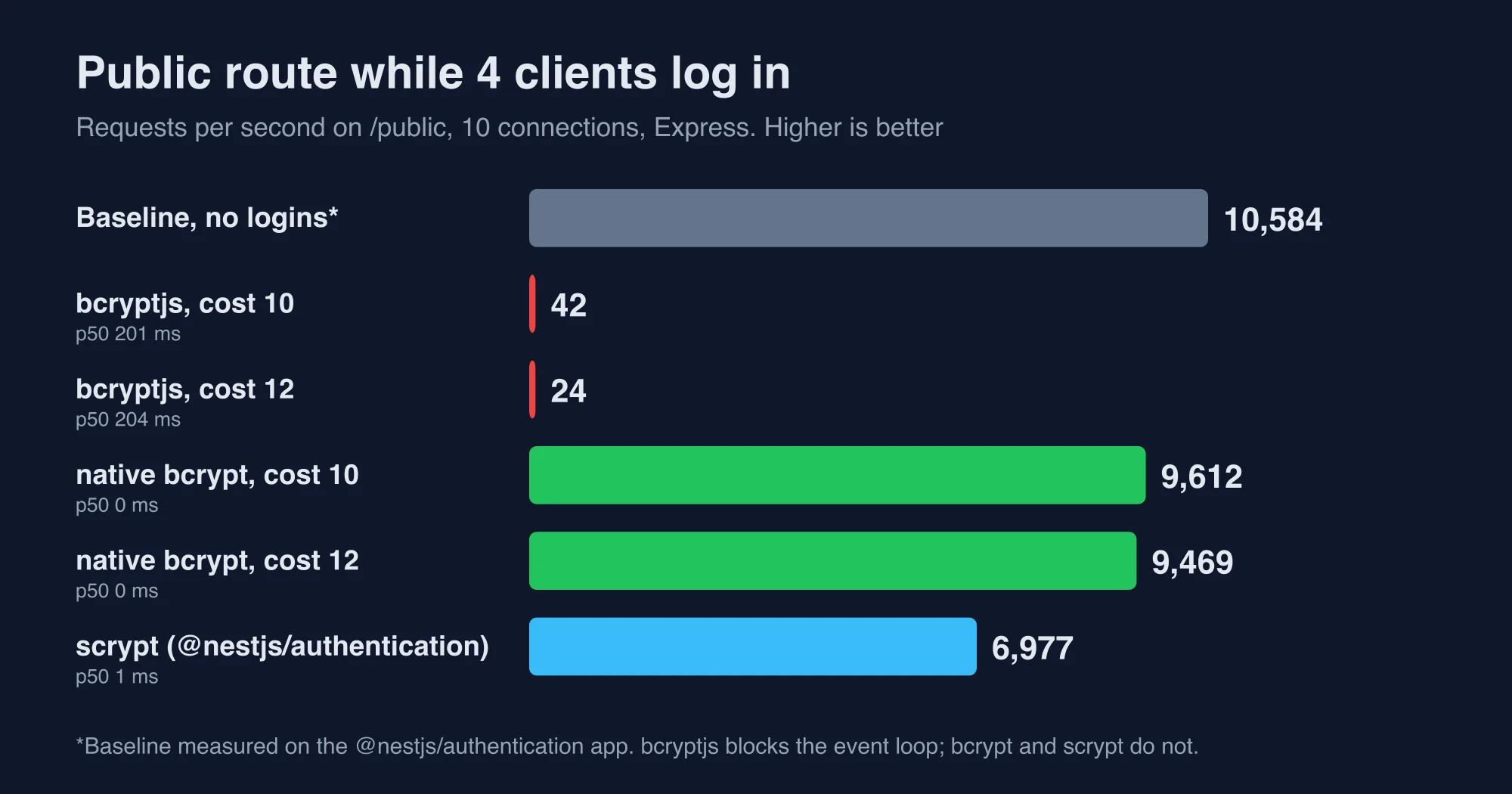
Swap bcryptjs for bcrypt or for Node's built-in crypto.scrypt. Both keep your server responsive. This matters most during a login spike, such as a marketing email, because that is when the blocked event loop takes every other route down with it.
Why is the NestJS JWT guard so slow?
The slow part is jsonwebtoken, which both passport-jwt and @nestjs/jwt use underneath. In a microbenchmark of 20,000 verifications, jsonwebtoken 9.0.3 took about 251 microseconds per token. The jose library took 31, and fast-jwt took 3.4.
| Library (HS256, verify) | Microseconds per token |
|---|---|
jsonwebtoken 9.0.3 |
251 |
jose 6.2.12 |
31 |
fast-jwt 6.3.4 |
3.4 |
Manual node:crypto HMAC |
2.6 |
Signing showed the same gap: 250 microseconds for jsonwebtoken and 32 for jose. Pinning algorithms: ['HS256'] did not change the verify time.
We then built the same protected route with four guards and load-tested it. The first two rows below are what most NestJS tutorials produce.
| Guard on a protected route | Express req/s | Fastify req/s | Extra cost per request |
|---|---|---|---|
| No guard (baseline) | 14,133 | 73,555 | none |
@nestjs/passport JWT guard |
2,932 | 3,524 | about 270 µs |
Custom guard with @nestjs/jwt |
3,045 | 3,579 | about 260 µs |
Custom guard with jose |
10,029 | 23,172 | about 30 µs |
Custom guard with fast-jwt |
12,491 | 43,752 | about 9 µs |
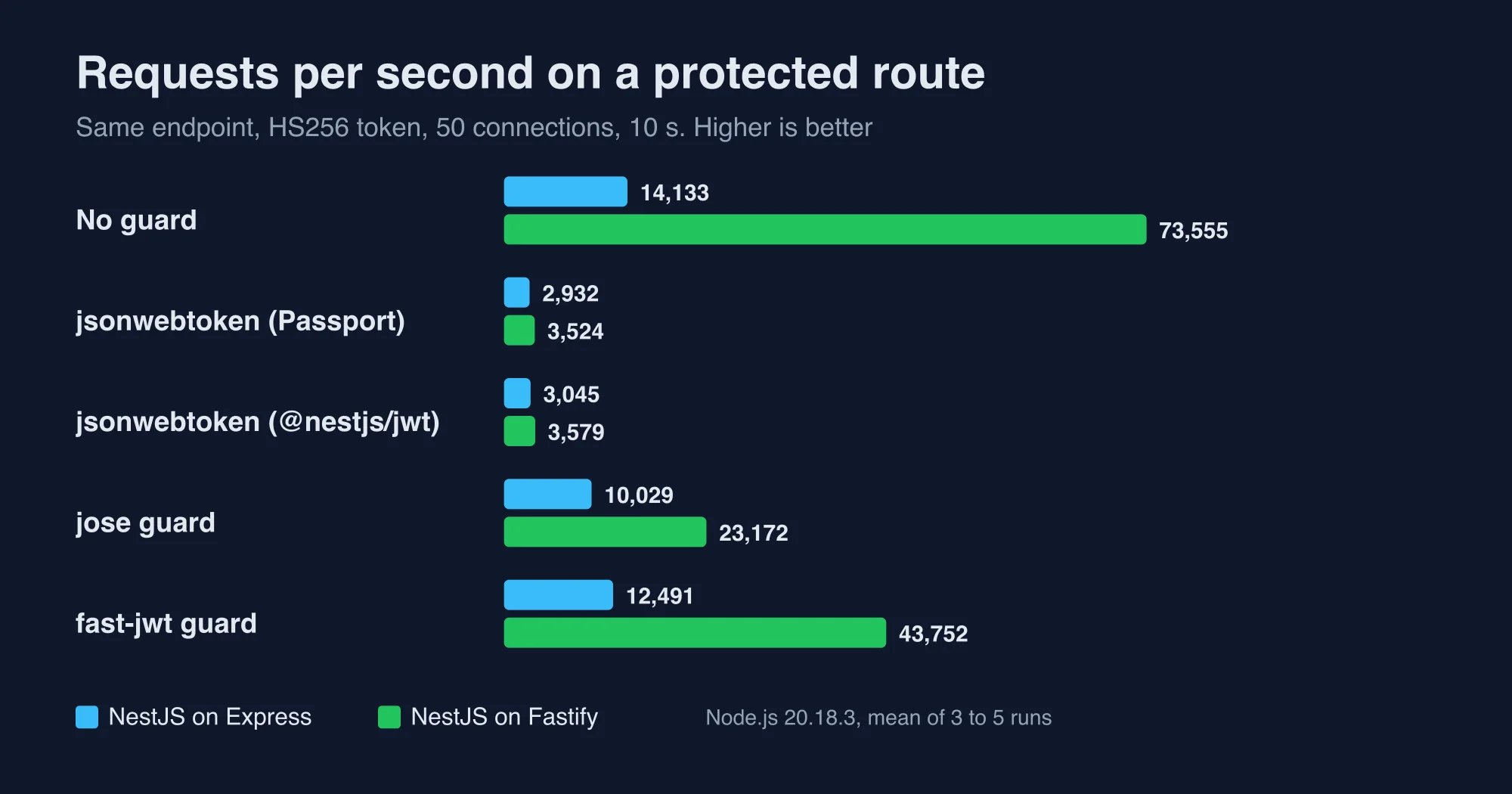
Fastify's advantage disappears under the Passport guard: 73,555 requests per second without a guard and 3,524 with one.
Keep this in proportion. 270 microseconds only becomes a bottleneck near 3,000 requests per second per process, so a few hundred requests per second will never notice it. If you serve thousands, a guard built on jose or fast-jwt frees most of a core, but it means leaving passport-jwt, because that strategy does not let you swap the verifier.
What is the new @nestjs/authentication package?
@nestjs/authentication is a first-party NestJS package, now at version 0.1.1, that replaces the Passport setup with a global guard and ordinary injectable classes. The npm registry shows it was updated on October 12, 2026, and the NestJS authentication documentation now teaches it. It has no third-party dependencies and signs and verifies tokens with node:crypto.
This is the module and a JWT provider from the package's README, adapted to our lab:
@Module({
  imports: [
    AuthenticationModule.forRoot({
      accessToken: {
        key: process.env.JWT_SECRET!,   // 32+ bytes for HS256
        issuer: 'https://api.example.com',
        audience: 'web',
        ttl: '15m',
      },
    }),
  ],
  providers: [UsersRepo, JwtAuth],
  controllers: [AppController],
})
class AppModule {}

@Injectable()
class JwtAuth extends JwtBearerProvider<User> {
  constructor(private repo: UsersRepo, registry: AuthenticationRegistry) {
    super();
    registry.registerProvider(this);
  }
  validate({ sub }: any) { return sub ? this.repo.findById(sub) : null; }
}
Every route then requires a signed-in user. Mark open routes with @Public() and read the user with @CurrentUser(). Login calls TokenService.issue(user.id) for an access token, a refresh token and expiresIn, after PasswordHasher.verify() checks the password.
Here is how it handled the traps from earlier, measured on the same machine:
| Trap | Passport and @nestjs/jwt |
@nestjs/authentication 0.1.1 |
|---|---|---|
ttl: '3600' or 3600 |
Silently a 3-second token | Startup error: Invalid duration "3600", use "15m" |
| Short secret | Accepted; jsonwebtoken only rejects an empty one |
Startup error: HS256 needs at least 32 bytes |
| Demoted user | Old role until expiry (without lookup) | validate() runs per request and loads the user |
| Token verification cost | about 270 µs | about 10 to 18 µs |
| Password hashing | You choose; bcryptjs blocks |
scrypt on the thread pool, does not block |
Forged token, right secret, wrong iss or aud |
Claims not checked unless you configure issuer and audience |
401 unexpected issuer / unexpected audience |
| Replayed refresh token | Not built in | 401, and the whole token family is revoked |
We tested the refresh behavior directly. Refreshing with the original token returned a new pair. Presenting the original again returned 401, and the new refresh token from the first call then also returned 401, because the package treats a replay as theft and revokes the family. That follows the OAuth 2.0 Security Best Current Practice, RFC 9700, and with Passport you would write it yourself.
The speed result needs an honest footnote. The package installs a global guard, so even a public route pays for it: public routes served 10,541 requests per second on Express against 14,133 in the Passport app, a cost of about 24 microseconds. A protected route then added only about 18 microseconds on Express and 10 on Fastify. The protected route served 8,898 requests per second on Express and 19,623 on Fastify, three and five and a half times what the Passport guard managed.
What should you watch out for with the new package?
Four things: its version, its Node requirement, its password hashing defaults and its storage rules. Treat it as a strong option for new projects rather than a drop-in replacement for a working production system.
- It is version 0.1.1. The API can change before 1.0, so pin the version and read the changelog on every upgrade.
- It declares Node 20.19 or later. We ran it on Node 20.18.3 without an error, but you should follow the declared range in production.
- Default scrypt is heavy. The default
logNof 17 uses about 128 MiB per hash. One verify took 318 ms in our lab. With four concurrent logins, resident memory peaked at 688 MB against 225 MB idle, and the public route fell from about 10,600 to about 7,000 requests per second but stayed responsive at a 1 ms median. LoweringlogNto 15 cut one verify to 57 ms. Pick the value from your memory budget and security requirements, and rate-limit the login route either way. - Storage is in memory by default. The README says production startup fails until you register real stores for sessions and refresh tokens, or set
allowInMemoryStorage: true. We used the in-memory option in the lab and did not test production mode.
We did not test its sessions, TOTP, magic links, OpenID Connect or API keys.
Which approach should you choose?
Choose by what you already run and how much traffic you expect. This table is what we would hand a team on day one.
| Your situation | Pick | Why |
|---|---|---|
Existing app on Passport and @nestjs/jwt, under 1,000 requests per second |
Keep it, fix the four traps | Migration cost is higher than the 270 µs |
| Existing app, thousands of requests per second | Replace the JWT guard with jose or fast-jwt |
Frees most of a core with a small change |
| New project, small team, wants batteries included | @nestjs/authentication, pinned |
Refresh rotation, claim checks and hashing are built in |
| Social logins such as Google or GitHub through many providers | Passport | Its strategy ecosystem is large and proven |
| Services that only verify tokens from another issuer | jose with a JWKS, or the package's JWKS option |
Smaller than a full auth stack |
| Anything handling passwords | Native bcrypt, scrypt or the package's hasher |
Never bcryptjs on the request path |
What are the limits of this test?
These results come from one laptop and small apps, so treat the throughput numbers as a comparison and not a forecast. Real services spend most of their time in databases, which hides guard cost until traffic is high.
- We used Node.js 20.18.3, Nest 12.1.3 and autocannon with 50 connections for 10 seconds, three runs per variant on the throughput tests.
- The load generator and server shared the machine, and memory numbers are one operating system sample per second.
- The throughput tests used
bcryptjsat cost 4, and the hashing tests used the costs stated. - Our tests used
@nestjs/authentication0.1.1, which may change quickly. - The
joseandfast-jwtguards were written by us for this test. Review any custom guard before it protects real data.
We fact-checked every figure in this post against the raw autocannon and script output from those runs. Rerun the checks on your own stack before you decide, and contact us through the About us page if your numbers disagree with ours.
The decision in one minute
Keep Passport and JWT if they work, and fix four things: guard order, token lifetime units, stale roles and bcryptjs. If throughput matters, verify tokens with jose or fast-jwt. For a new project, try @nestjs/authentication at a pinned 0.1.1 version, and lower its scrypt cost to fit your memory.
Advertisement
FAQ
Does Passport still work with NestJS 12?
Yes. We ran @nestjs/passport 12.0.0 with passport-jwt 4.0.1 and passport-local on NestJS 12.1.3. It worked on both the Express and Fastify adapters with no flags, even though NestJS 12 packages are ESM only and Passport is CommonJS. The cost is speed: its JWT guard added about 270 microseconds per request in our tests.
Why does my NestJS JWT expire immediately?
A numeric string passed to expiresIn counts as milliseconds. A value such as 3600 read from an environment variable gave a token that lived three seconds in our test. Write the unit, such as 3600s or 1h, or convert with Number so the value is read as seconds. The new @nestjs/authentication package rejects the bare value at startup.
Why is my NestJS JWT guard slow?
The jsonwebtoken library, used by passport-jwt and @nestjs/jwt, took about 251 microseconds per verification in our benchmark. The jose library took 31 and fast-jwt took 3.4. Replacing the guard with one built on jose raised a protected Express route from about 2,900 to about 10,000 requests per second.
Should I use @nestjs/authentication instead of Passport?
Consider it for new projects, but pin the version. It is at 0.1.1, has no third-party dependencies, verified tokens in about 10 to 18 microseconds and checks issuer and audience. It also revokes a refresh-token family on replay. Keep Passport if you need many social login strategies or a working production system.
Comments
Loading…
Sign in to join the conversation.
Related posts
NestJS Redis caching: cache-manager traps, measured
NestJS Redis caching with cache-manager, tested on Nest 12. Six traps we measured, from leaked user data to a silent wrap failure, plus the fixes.
Tue Oct 13 2026 · 10 min read · 0 views

NestJS vs Express vs plain Node.js: what each layer costs
NestJS vs Express vs plain Node.js, measured. We priced every layer in microseconds per request and show when a framework's overhead stops mattering.
Tue Oct 13 2026 · 11 min read · 0 views
NestJS vs Next.js: we benchmarked both as an API
NestJS vs Next.js is not a rivalry: one is a backend framework, one is a React framework. We benchmarked both as an API and show when to add the second.
Tue Oct 13 2026 · 12 min read · 0 views