NestJS vs Next.js: we benchmarked both as an API
By Nihar Ranjan Das · Tue Oct 13 2026 · 12 min read · 0 views
View as a Web StorySoftware#typescript#next.js#node.js#api#benchmark#nestjs
NestJS and Next.js do not compete for the same job. NestJS is a TypeScript framework for building server-side applications, and Next.js is a React framework for building web interfaces that also ships a small backend. If you are choosing between them for a product, the real question is whether Next.js route handlers are enough for your API, or whether a separate NestJS service earns its cost.
We benchmarked the same endpoint in both to answer that with numbers. The bottom line: in our own test on one laptop, NestJS on Fastify served about 45,900 requests per second and a Next.js route handler served about 4,300. Both are far above what most products ever need, so speed is rarely the reason to pick one.
What is the difference between NestJS and Next.js?
NestJS is a Node.js framework built around modules, controllers and dependency injection. It runs an HTTP server on Express or Fastify and gives you structure for guards, pipes, interceptors, queues and microservices. Its documentation treats the server as the whole product.
Next.js is a React framework from Vercel that renders pages on the server and in the browser. Its Route Handlers let you write endpoints with the Web Request and Response APIs, so a Next.js project can answer API calls without a second service. The Next.js team even documents this pattern in its backend for frontend guide, which is why many teams never add a second server at all.
The names look alike because both lean on TypeScript and Node.js. That is where the overlap ends. Next.js starts from a page and adds a backend. NestJS starts from a backend and adds nothing to the screen.
| Question | NestJS | Next.js |
|---|---|---|
| Main job | Backend API and services | Web UI with server rendering |
| Renders React pages | No | Yes |
| Built-in structure for large APIs | Modules, DI, guards, pipes | Route files only |
| HTTP engine | Express or Fastify | Its own server |
| Long-running work, queues, WebSockets | First-class | Not its focus |
| Typical team | Backend or full-stack | Front-end or full-stack |
Which one should you pick?
Pick Next.js alone when your API exists to serve your own web app. Pick NestJS when other clients, such as a mobile app or partner systems, share the same API, or when the backend has real structure to manage. Pick both when a React front end sits in front of a backend that outgrew route files.
Here is the test we use. It has four questions, and two "yes" answers mean you should start a NestJS service.
- Will a second client, such as a mobile app, call this API?
- Do you need background jobs, scheduled work or WebSocket connections that live longer than one request?
- Will more than three developers change the backend at the same time?
- Do you need guards, interceptors or dependency injection to keep business rules testable?
If you answered "no" to all four, route handlers keep your repository small and your deployment single. If you answered "yes" twice or more, you are already building what NestJS gives you for free.
How we benchmarked NestJS against Next.js
We built the same endpoint twice. It returns a user object with a list of orders, and it validates a limit query parameter that must be an integer from 1 to 50. The NestJS version uses a controller and the global ValidationPipe with class-validator. The Next.js version is a route handler with hand-written validation.
Our methodology, in full:
Advertisement
- Machine: a macOS developer laptop, Node.js 20.18.3, everything on loopback.
- Versions: NestJS 12.1.3 and Next.js 16.4.0, both production builds (
node dist/main.jsandnext start). - Load: autocannon with 50 connections for 10 seconds against
/users/42?limit=5. - Repeats: three runs per server, restarting the process each time.
- Fairness check: both servers return the same 400 body for
limit=99, so the validation paths do equal work.
This is a microbenchmark of a tiny JSON endpoint. It measures framework overhead, not your database, so treat it as a ceiling and not a forecast.
How fast is NestJS compared with a Next.js route handler?
NestJS on Fastify was about 10.8 times faster than a Next.js route handler in our runs, and NestJS on Express was about 2.9 times faster. Averaged over three runs, Fastify served 45,863 requests per second, Express served 12,333, and Next.js served 4,261.
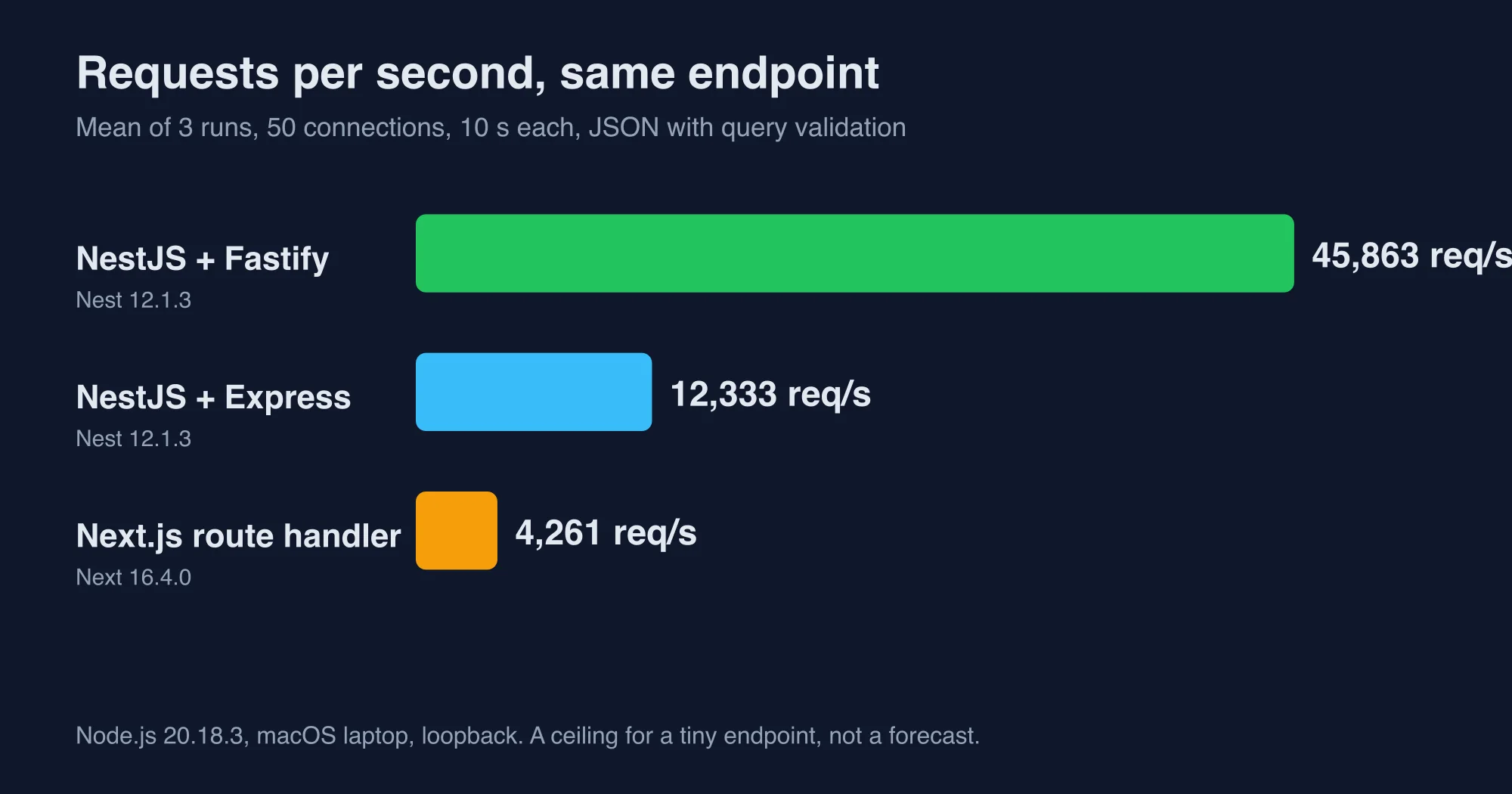
Latency tells the same story. The median response took 1 ms on NestJS with Fastify, 3 ms on NestJS with Express and 10 to 11 ms on Next.js. The 99th percentile was 2 ms, 7 to 8 ms and 21 to 22 ms.
The NestJS performance guide says Fastify is "significantly faster than Express, achieving nearly twice the benchmark results." We saw a bigger gap, which fits a JSON endpoint where validation and routing dominate the work. Your gap will depend on what the handler does.
Put the Next.js number in context before you worry about it, because a benchmark that makes one framework look slow can still describe a server that will sit nearly idle for the whole life of your product, and that gap matters far more to a budget than to a user. Four thousand requests per second is about 368 million requests per day on one process. A product that gets even a tenth of that has a different set of problems than framework speed.
What about startup time, memory and install size?
NestJS started in about 510 to 530 ms in our lab, and Next.js took about 810 ms to answer its first request. Idle memory was close: 96 to 100 MB for NestJS and 91 MB for Next.js. Under load Next.js grew to about 220 MB while NestJS on Fastify stayed near 90 MB.
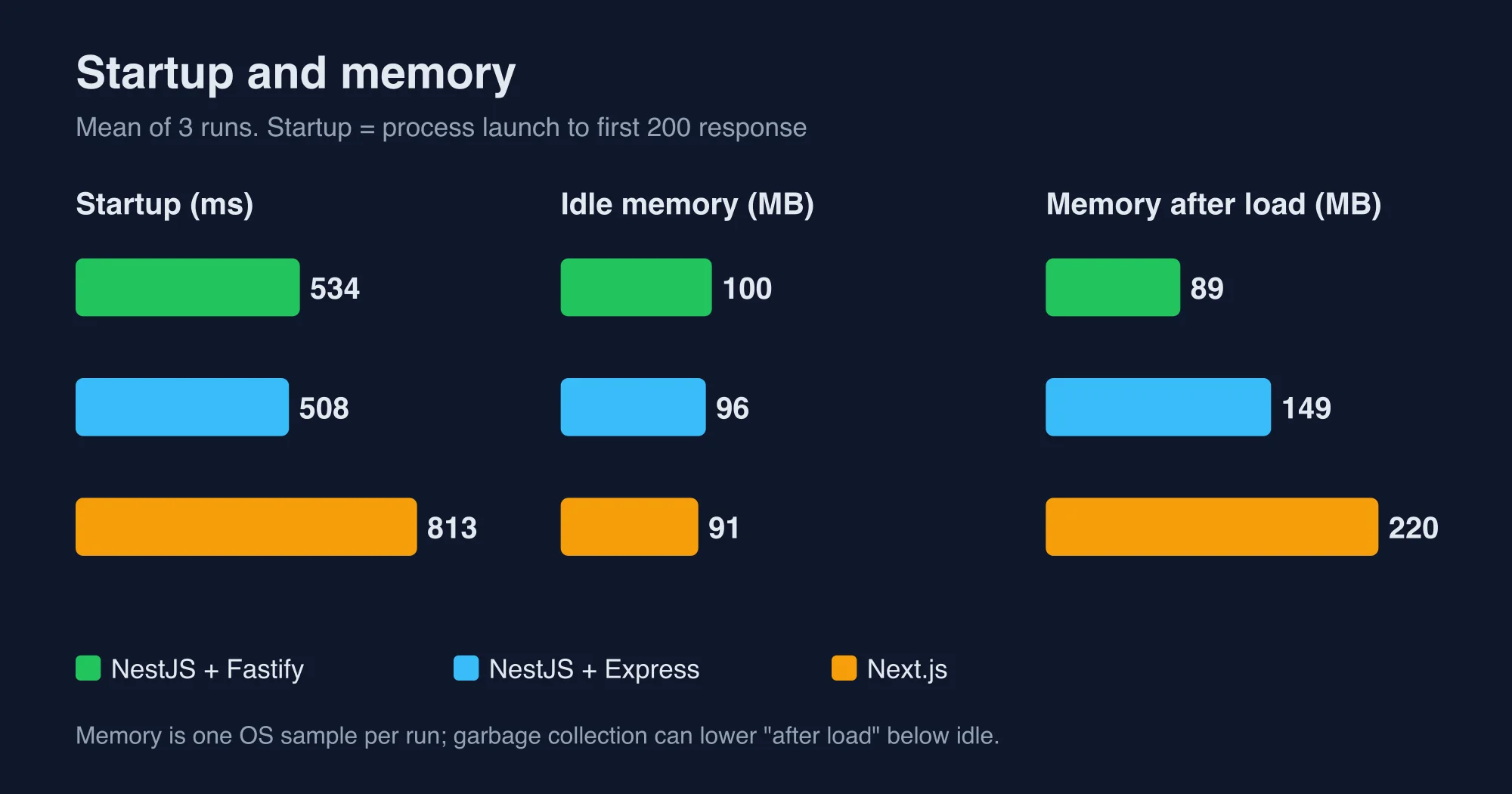
| Measure | NestJS (Fastify) | NestJS (Express) | Next.js |
|---|---|---|---|
| Time to first response, mean of 3 | 534 ms | 508 ms | 813 ms |
| Memory at idle, mean of 3 | 100 MB | 96 MB | 91 MB |
| Memory after load, mean of 3 | 89 MB | 149 MB | 220 MB |
node_modules size |
91 MB (both adapters) | 91 MB (both adapters) | 372 MB |
| Build step | tsc, 0.7 s |
tsc, 0.7 s |
next build, 4.6 s |
Two cautions apply. The memory numbers are one sample per run taken from the operating system, so garbage collection can make "after load" smaller than "idle", as it did for Fastify. And the Next.js install includes its compiler binaries, which you would also need for a UI.
The practical reading is simple, and it follows from the Node.js runtime both frameworks share: startup and package size decide serverless cost, while sustained throughput decides container cost. If you deploy the API as a serverless function, startup and package size matter, and Next.js route handlers sit in one bundle with your pages. If you run a long-lived container, steady-state throughput matters, and NestJS on Fastify has the headroom.
How much code does each one need?
The NestJS endpoint took 25 lines and the Next.js route handler took 9, but they are not equal work. The NestJS file includes a module, a controller and a validation class. The Next.js file validates by hand in a single function.
Here is the Next.js handler:
// app/api/users/[id]/route.ts
import { NextRequest, NextResponse } from 'next/server';

export async function GET(
  req: NextRequest,
  { params }: { params: Promise<{ id: string }> }
) {
  const { id } = await params;
  const raw = req.nextUrl.searchParams.get('limit');
  const limit = raw === null ? 5 : Number(raw);
  if (!Number.isInteger(limit) || limit < 1 || limit > 50)
    return NextResponse.json(
      { message: ['limit must not be greater than 50'], error: 'Bad Request', statusCode: 400 },
      { status: 400 }
    );
  return NextResponse.json({
    id,
    name: 'user-' + id,
    orders: Array.from({ length: limit }, (_, i) => ({ n: i, total: i * 3.5 })),
  });
}
Here is the NestJS version of the same endpoint:
import { Module, Controller, Get, Param, Query, ValidationPipe } from '@nestjs/common';
import { IsInt, Min, Max, IsOptional } from 'class-validator';
import { Type } from 'class-transformer';

class Q {
  @IsOptional() @Type(() => Number) @IsInt() @Min(1) @Max(50)
  limit?: number = 5;
}

@Controller('users')
class UsersController {
  @Get(':id')
  one(@Param('id') id: string, @Query() q: Q) {
    return { id, name: 'user-' + id, orders: Array.from({ length: q.limit ?? 5 }, (_, i) => ({ n: i, total: i * 3.5 })) };
  }
}

@Module({ controllers: [UsersController] })
class AppModule {}
For one endpoint the Next.js handler wins on size. The picture flips as the API grows. Validation rules written once as a class can be reused on every route, while hand-written checks get copied. That reuse is what NestJS charges 16 extra lines to set up.
What happens when you put NestJS behind Next.js?
A Next.js page that calls a NestJS service for its data cost about 13 ms more at the median and about a quarter of the page throughput in our lab. The page rendered 1,240 requests per second when it built its data in process and 925 when it fetched the same data from NestJS over HTTP.
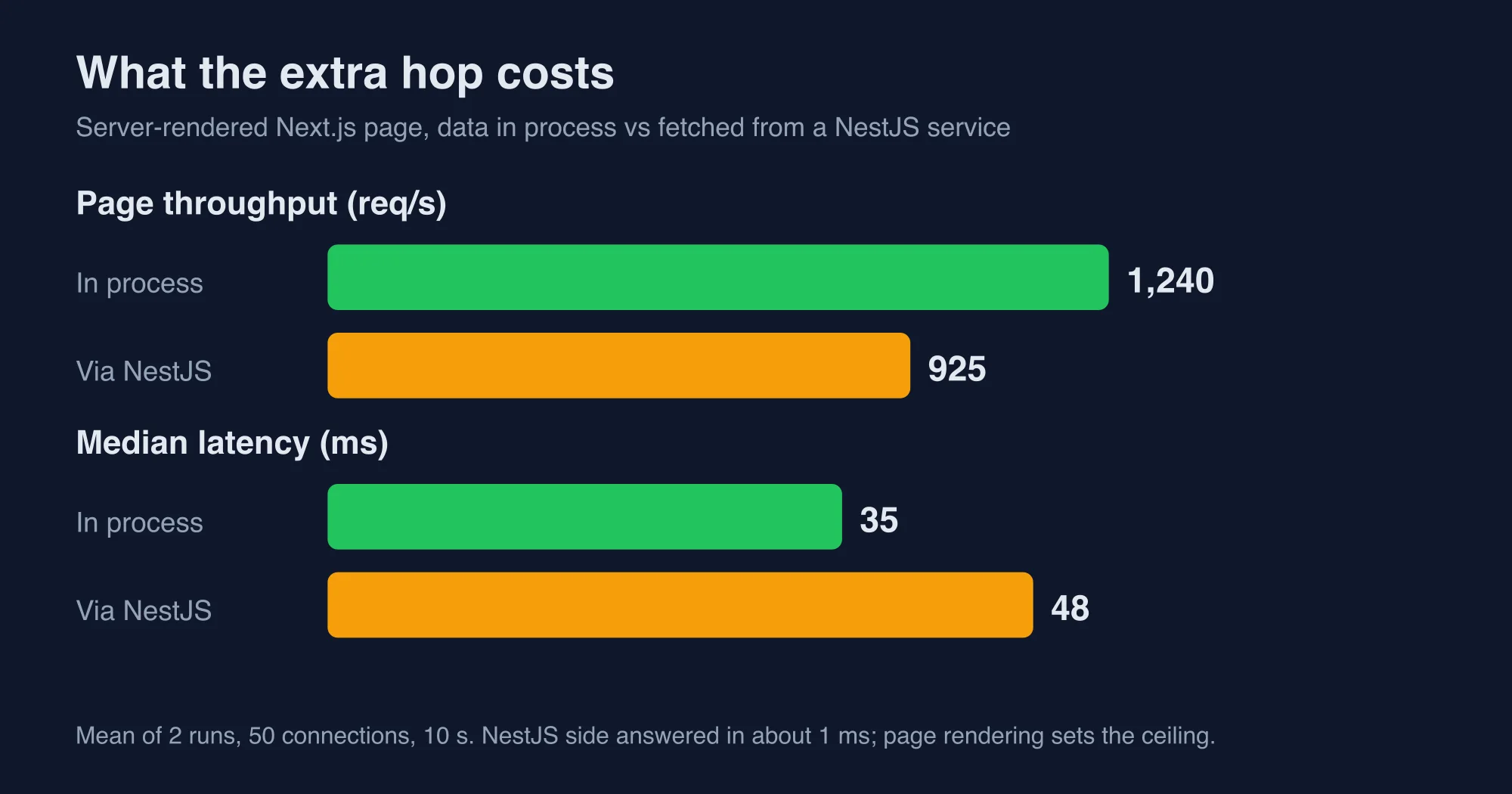
We measured this with two server-rendered pages. The first computed the user in the page. The second called fetch('http://127.0.0.1:3100/users/42?limit=5', { cache: 'no-store' }) against the NestJS Fastify server. Median latency went from 35 ms to 48 ms. The 99th percentile was noisy between runs (66 and 373 ms for one, 156 and 378 ms for the other), so we do not quote it as a result.
This is the number most "NestJS vs Next.js" articles skip, and in our experience it is the one that changes the decision, because teams that split their stack for speed discover that every server-rendered page now waits on a network call it never made before. The split architecture has a price, and it is paid on every server-rendered page that waits on the API. Pay it deliberately. Cache the call, fetch it in parallel with other work, or keep that page's data in process and send only shared logic through NestJS.
Notice also where the time goes. The NestJS side answered in about 1 ms. Next.js rendering the page, not the hop's server, set the ceiling. Moving work into NestJS did not make the page faster. It made the API reusable.
Which setup fits your project?
Match the project to the setup, not the other way round. This table is what we would hand a team on day one.
| Your situation | Use | Why |
|---|---|---|
| Marketing site, blog, dashboard with a handful of endpoints | Next.js only | One repo, one deploy, no extra hop |
| Web app plus a mobile app on the same data | Next.js UI plus NestJS API | Two clients need one stable contract |
| Webhooks, queues, cron jobs, WebSockets | NestJS (with or without a UI) | Next.js is not built for long-lived work |
| Large team, many modules, strict testing | NestJS API, Next.js UI | Modules and DI keep a big backend navigable |
| Solo founder, validating an idea | Next.js only, extract later | Cheapest to change while you are still guessing |
| Public API sold as a product | NestJS | Versioning, guards and OpenAPI belong to the API |
A pattern worth copying is to start in Next.js and extract an endpoint to NestJS only when one of the four questions flips to "yes". Keep business logic in plain functions that take plain arguments. Then moving a function from a route handler to a NestJS provider is a copy, not a rewrite.
How do you run both together without pain?
Keep the contract in one place and let each side stay small. Put request and response types in a shared package, call NestJS from Next.js server code only, and never expose the NestJS service directly to browsers unless it needs to be public.
A simple layout that works:
- A monorepo with
apps/web(Next.js),apps/api(NestJS) andpackages/contracts(shared types). - Next.js server components and route handlers call the API with
fetch. Browsers talk only to Next.js. - NestJS owns authentication rules. Next.js forwards the session token and trusts the API's answer.
- NestJS runs on the Fastify adapter if you expect heavy traffic, because Express was about 3.7 times slower in our lab.
If you later want to move off Next.js, nothing about the API changes. If you later want a mobile app, the API already exists. That is the real argument for the split, and it has nothing to do with speed.
If you adopt NestJS 12 for the API, read these first: NestJS 12 upgrade: the traps nest upgrade does not fix, NestJS 12 and Jest: why your tests fail and how to fix them, and NestJS 12 on AWS Lambda: the ESM crash and how to fix it.
Infrastructure decisions compound over time, so the cheapest architecture today is not automatically the cheapest architecture after eighteen months of feature development, particularly when additional clients, integrations and compliance requirements gradually accumulate around an interface that was originally designed for a single web application.
What are the limits of this benchmark?
These numbers describe a tiny endpoint on one machine, so they set an upper bound and not a promise. A real handler spends most of its time waiting on a database, and that wait is the same in both frameworks.
Specifically:
- We used Node.js 20.18.3. Newer Node versions change absolute numbers, though both frameworks run on the same runtime.
- The load generator and the server shared one machine, so both were competing for CPU.
- We did not test Next.js on a serverless platform, where cold starts and concurrency rules differ from
next start. - We did not measure authentication, database drivers or caching, which dominate real APIs.
- The Next.js handler validates by hand. A schema library would add a little time and a little safety.
We fact-checked every figure in this post against the raw autocannon output from those runs. Rerun the test against your own handler before you decide, and contact us if your numbers disagree with ours. The scripts are short: build the same endpoint twice, start each with its production command, and point autocannon at it.
Organizational considerations deserve equal weight alongside the technical ones, because the framework that performs best in a microbenchmark is rarely the framework that your engineers can maintain confidently after the original author has moved to another project. A backend developer who already understands dependency injection and decorators will be productive in NestJS within days, whereas a front-end developer who lives in React components will usually be more comfortable extending route handlers that sit beside the pages they already understand, and that familiarity translates into fewer production incidents than any throughput advantage can offset.
The decision in one minute
If your API serves only your own Next.js app and has fewer than a dozen endpoints, stay in Next.js. If a second client, background work or a bigger team shows up, add NestJS and take the roughly 13 ms hop on server-rendered pages as the cost of a reusable API. Choose Fastify over Express inside NestJS when throughput matters, and keep your business logic in plain functions so you can move it later.
Advertisement
FAQ
Is NestJS better than Next.js?
They solve different problems, so neither is better overall. NestJS is a backend framework and Next.js is a React framework with a small backend. In our benchmark NestJS on Fastify served about 45,900 requests per second against about 4,300 for a Next.js route handler, but most products never need that headroom.
Can Next.js replace NestJS?
For an API that only serves your own Next.js app, yes. Route handlers cover it with one repo and one deploy. Add NestJS when a second client such as a mobile app appears, when you need background jobs or WebSockets, or when a larger team needs modules, guards and dependency injection to keep the backend manageable.
Is NestJS faster than Express?
Not by itself, because NestJS runs on Express by default. In our lab NestJS on Express served about 12,300 requests per second and NestJS on Fastify served about 45,900 for the same validated JSON endpoint. Switching the adapter to Fastify is the largest speed gain, though the NestJS docs warn some Express recipes will not work.
Should I use NestJS with Next.js together?
Use both when a React front end sits in front of an API that other clients also use or that has outgrown route files. Expect a cost: in our test a server-rendered page fetching data from NestJS took about 13 ms longer at the median and handled about a quarter fewer requests per second than computing data in process.
Comments
Loading…
Sign in to join the conversation.
Related posts
NestJS Redis caching: cache-manager traps, measured
NestJS Redis caching with cache-manager, tested on Nest 12. Six traps we measured, from leaked user data to a silent wrap failure, plus the fixes.
Tue Oct 13 2026 · 10 min read · 0 views

NestJS JWT auth: Passport, guards and the new package
NestJS authentication with Passport, JWT and guards, tested on Nest 12. Four traps we measured, plus the new @nestjs/authentication package.
Tue Oct 13 2026 · 13 min read · 0 views
NestJS vs Express vs plain Node.js: what each layer costs
NestJS vs Express vs plain Node.js, measured. We priced every layer in microseconds per request and show when a framework's overhead stops mattering.
Tue Oct 13 2026 · 11 min read · 0 views