NestJS vs Express vs plain Node.js: what each layer costs
By Nihar Ranjan Das · Tue Oct 13 2026 · 11 min read · 0 views
View as a Web StorySoftware#node.js#api#benchmark#nestjs#express#fastify

NestJS costs about 17 microseconds per request on top of Express, and about 9 on top of Fastify. In our lab, plain Node.js served roughly 68,000 requests per second, Express 5 about 15,300, and NestJS on Express about 12,200. Once the handler waits 5 milliseconds on a database, all of them landed within a few hundred requests per second of each other.
Node.js is a JavaScript runtime with a built-in http module. Express is a minimal web framework that sits on that module and adds routing and middleware. NestJS is a TypeScript framework that sits on Express or Fastify and adds modules, controllers and dependency injection. Each layer buys you something and costs you something, and this post puts a number on both.
The bottom line: the framework you pick will not decide your latency, but it will decide how your code looks in two years. Pick on structure and team size. Pick Fastify, directly or under NestJS, when raw throughput matters.
What does each layer between Node.js and NestJS actually add?
Plain Node.js gives you a request and a response object and nothing else. Express adds a router, middleware and helpers such as res.json. NestJS adds a module system, decorators, dependency injection, pipes, guards and interceptors, then runs all of it on top of Express or Fastify.
| Layer | You get | You write yourself |
|---|---|---|
Node.js http |
A server, raw request and response | Routing, parsing, validation, errors, structure |
| Express 5 | Routing, middleware, JSON helpers | Validation, structure, testing seams |
| Fastify 5 | Routing, schema validation, serialization | Structure, testing seams |
| NestJS | Modules, DI, pipes, guards, interceptors | Little; it brings its own opinions |
Express 5 also fixed a long-standing papercut. Its migration guide says handlers that return rejected promises are forwarded to the error handler, so async handlers no longer need a manual .catch(next). That matters when you compare it with older Express tutorials, because many of them are still written for version 4.
How we measured it
We built one endpoint seven ways. It returns a user with a list of orders, and it validates a limit query parameter that must be an integer from 1 to 50. A bad value returns the same 400 body in every variant.
Our methodology:
- Machine: a macOS developer laptop, Node.js 20.18.3, all traffic on loopback.
- Versions: Express 5.3.0, Fastify 5.12.5 and NestJS 12.1.3, each started from its production entry point.
- Load: autocannon with 50 connections for 10 seconds against
/users/42?limit=5. - Repeats: three runs per variant, with a fresh process each time.
- Variants: raw
node:http, Express, Fastify with schema validation, NestJS on Express and NestJS on Fastify, each NestJS variant with and without the globalValidationPipe.
The raw Node.js server is the smallest possible version. Here it is, so you can see what the other layers are wrapping:
import http from 'node:http';

http.createServer((req, res) => {
  const u = new URL(req.url, 'http://x');
  const m = u.pathname.match(/^\/users\/([^/]+)$/);
  if (!m) { res.statusCode = 404; return res.end('{}'); }
  const raw = u.searchParams.get('limit');
  const limit = raw === null ? 5 : Number(raw);
  res.setHeader('content-type', 'application/json');
  if (!Number.isInteger(limit) || limit < 1 || limit > 50) {
    res.statusCode = 400;
    return res.end(JSON.stringify({ message: ['limit must not be greater than 50'], error: 'Bad Request', statusCode: 400 }));
  }
  res.end(JSON.stringify({ id: m[1], name: 'user-' + m[1],
    orders: Array.from({ length: limit }, (_, i) => ({ n: i, total: i * 3.5 })) }));
}).listen(3100, '127.0.0.1');
The Express 5 version is shorter because routing and JSON are built in:
import express from 'express';
const app = express();

app.get('/users/:id', (req, res) => {
  const raw = req.query.limit;
  const limit = raw === undefined ? 5 : Number(raw);
  if (!Number.isInteger(limit) || limit < 1 || limit > 50)
    return res.status(400).json({ message: ['limit must not be greater than 50'], error: 'Bad Request', statusCode: 400 });
  res.json({ id: req.params.id, name: 'user-' + req.params.id,
    orders: Array.from({ length: limit }, (_, i) => ({ n: i, total: i * 3.5 })) });
});
app.listen(3100, '127.0.0.1');
How many requests per second does each one serve?
Plain Node.js served 68,156 requests per second, Fastify 69,717, NestJS on Fastify 43,412, Express 15,332 and NestJS on Express 12,170. These are means of three runs on the same validated endpoint.
Advertisement
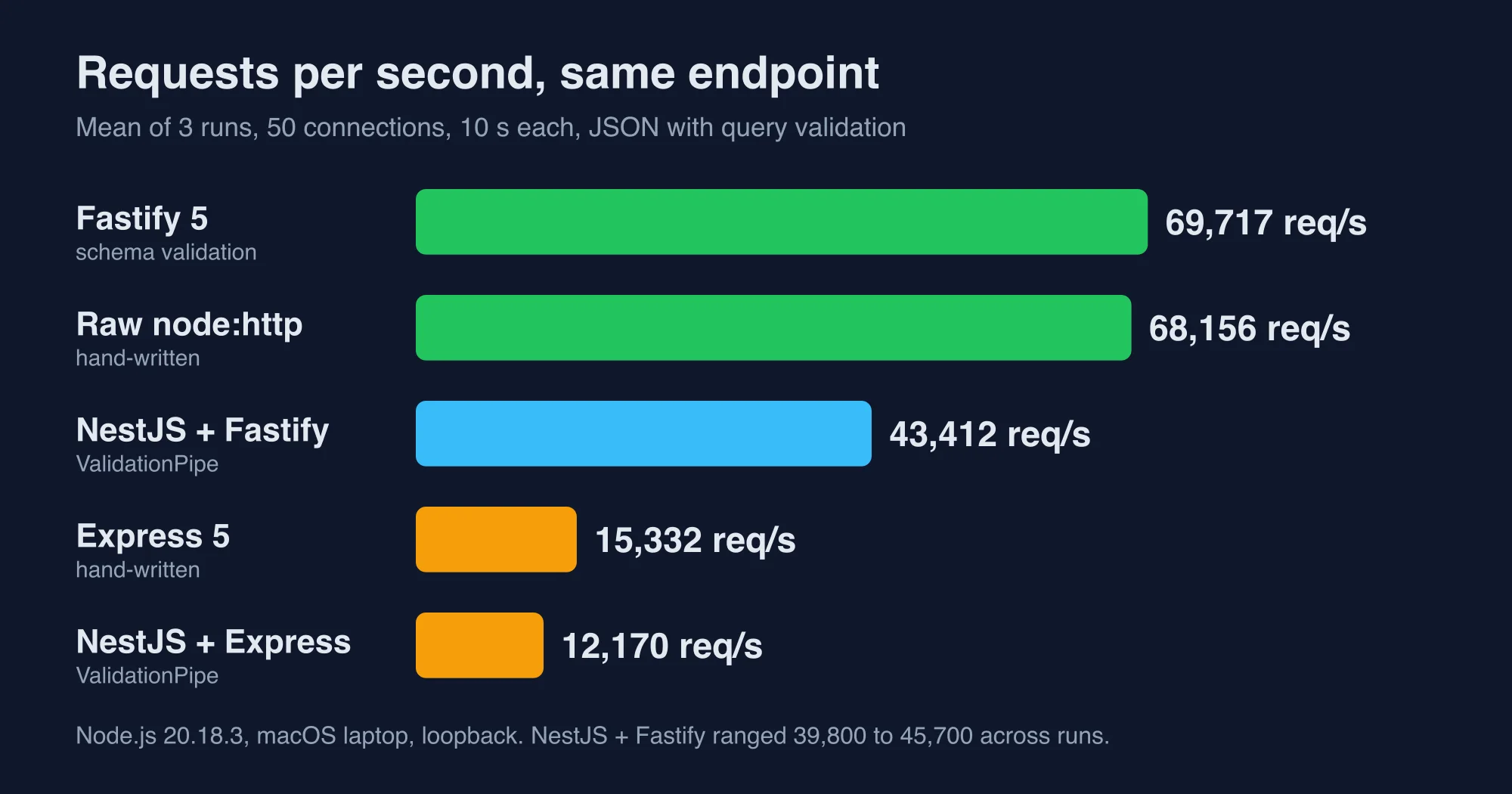
Two results stand out. Express costs about four and a half times the throughput of the raw server, which is a larger step than adding NestJS on top of it. And Fastify matched the raw server even though it validates the query with a JSON schema, because its serializer and router are built for exactly this workload.
The NestJS performance guide says Express is the default because it is "widely used" and has a large set of compatible middleware, and that Fastify is "significantly faster." Our numbers agree with the direction. The NestJS Fastify result also varied the most, from 39,800 to 45,700 across three runs, so read it as "about 40 to 46 thousand."
What does NestJS cost per request?
Per request, NestJS adds about 17 microseconds on Express and about 9 on Fastify. We get that by converting throughput into time: one divided by requests per second. The result is easier to reason about than a throughput gap, because you can compare it with the time your handler spends waiting on a database.
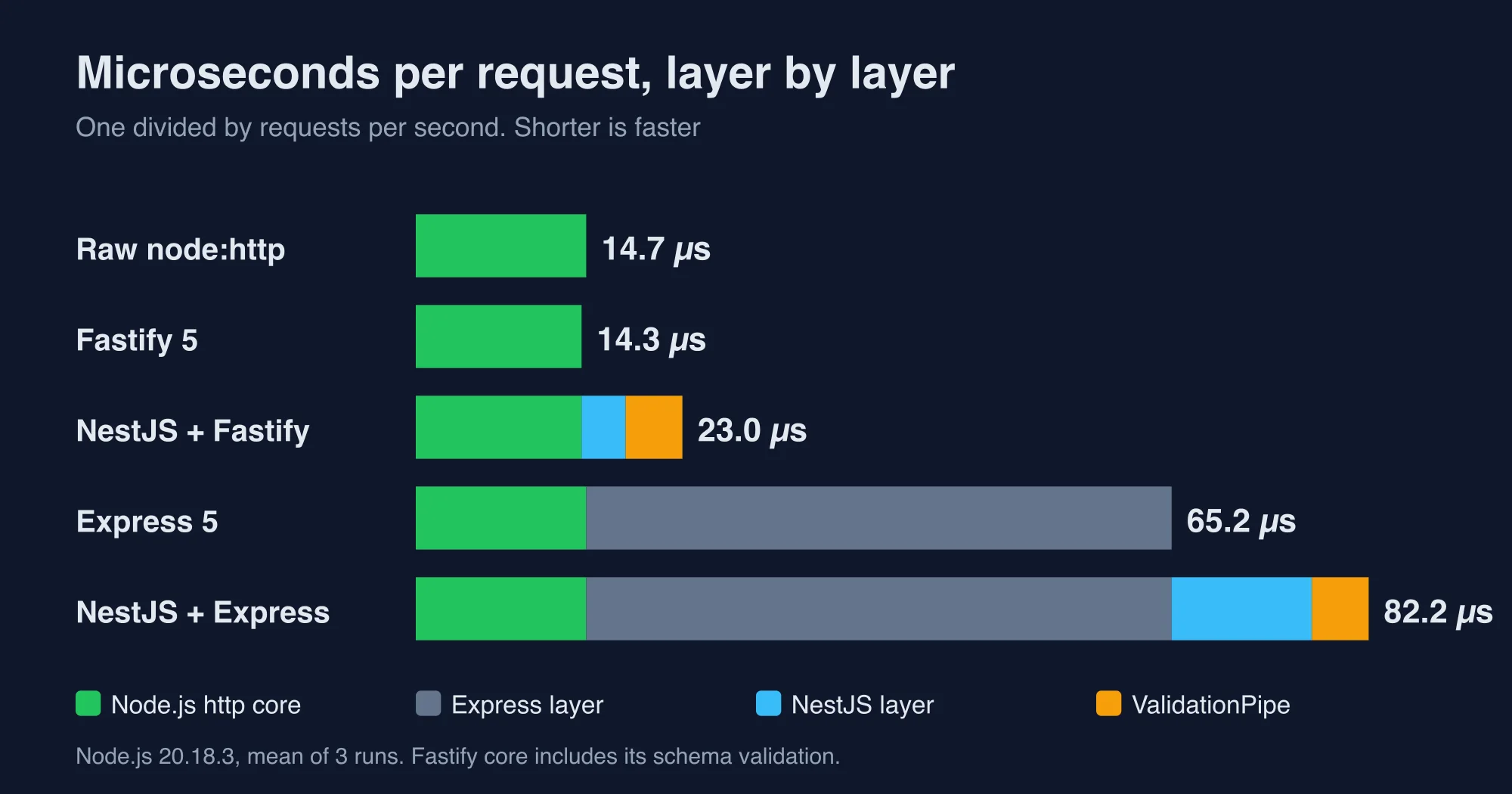
| Variant | Requests per second | Microseconds per request |
|---|---|---|
Raw node:http |
68,156 | 14.7 |
| Fastify 5 (schema validation) | 69,717 | 14.3 |
| NestJS on Fastify, no pipe | 55,141 | 18.1 |
NestJS on Fastify, with ValidationPipe |
43,412 | 23.0 |
| Express 5 | 15,332 | 65.2 |
| NestJS on Express, no pipe | 12,945 | 77.3 |
NestJS on Express, with ValidationPipe |
12,170 | 82.2 |
Read the table from the bottom. Express itself costs about 50 microseconds more than raw Node.js. NestJS then adds about 12 more on Express before validation and about 5 more for the ValidationPipe. The pipe cost was the same on both adapters, about 5 microseconds, which tells us the validation work is the same and only the host differs.
Here is the useful rule of thumb. A handler needs to spend only about 1.7 milliseconds on its own work before NestJS's 17 microseconds drops to one hundredth of the request. Almost every handler that touches a database or another service is above that line.
What happens once a database is involved?
With a 5 millisecond awaited dependency, all four variants we retested served between about 7,450 and 8,150 requests per second. The median latency was 6 ms for every one of them. The framework gap that looked like a factor of five in the first test shrank to under ten per cent.
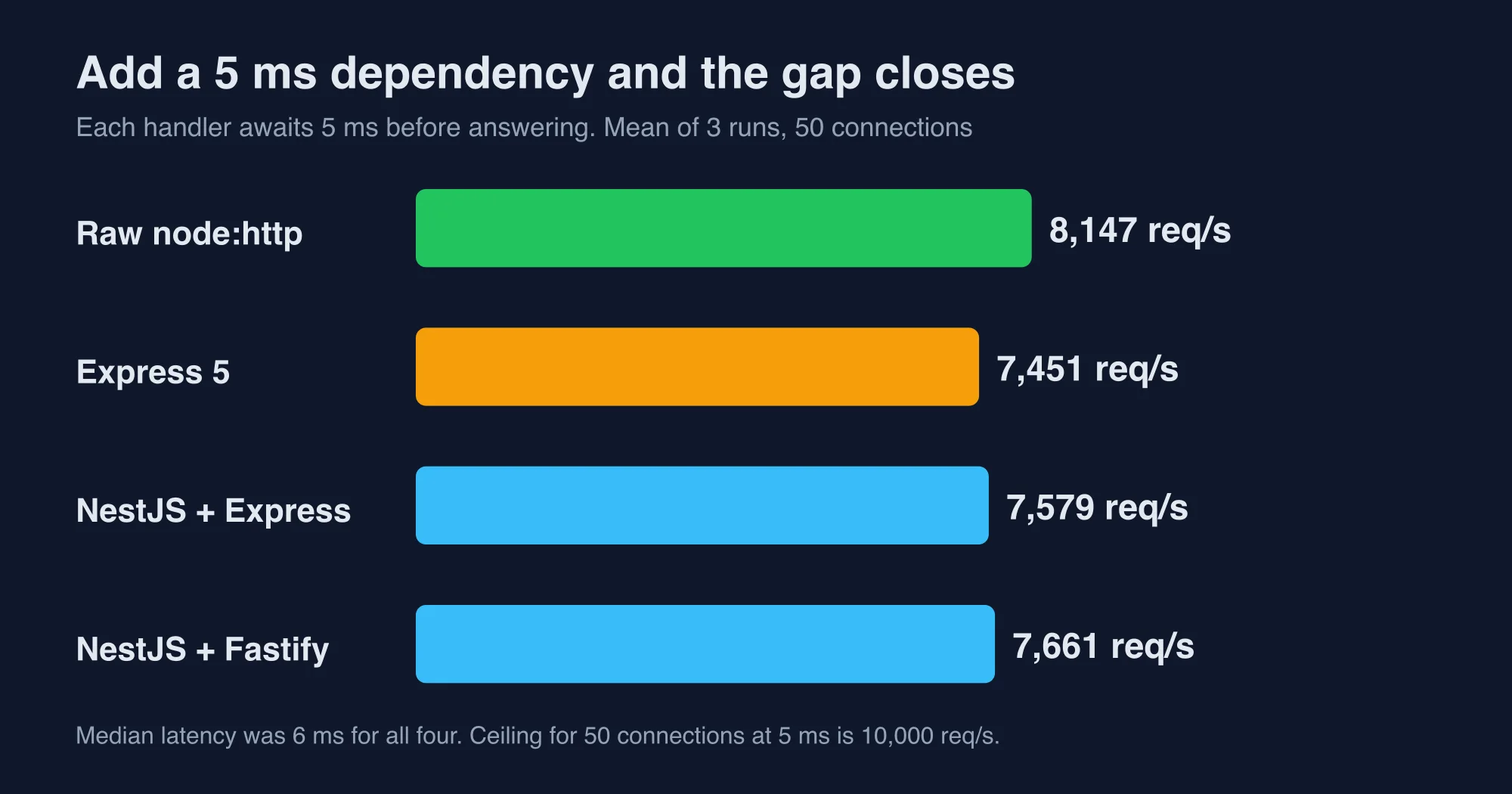
| Variant, handler awaits 5 ms | Requests per second | Median latency |
|---|---|---|
Raw node:http |
8,147 | 6 ms |
| Express 5 | 7,451 | 6 ms |
| NestJS on Express | 7,579 | 6 ms |
| NestJS on Fastify | 7,661 | 6 ms |
The ceiling here is set by physics, not code. Fifty connections that each wait 5 ms can complete at most 10,000 requests per second, and every variant sat below that line. NestJS on Express even edged ahead of plain Express by about 130 requests per second, which is within run-to-run noise and not a real advantage.
This is the number that should end most framework arguments. If your endpoint calls a database, a cache that misses, or another HTTP service, the framework's own cost is a rounding error. Spend your effort on the query, the index and the connection pool instead.
How do startup time, memory and install size compare?
Plain Node.js started in about 70 ms, Express in about 155 ms, Fastify in about 195 ms and NestJS in about 500 ms. Idle memory rose from 40 MB for raw Node.js to 54 MB for Express and 62 MB for Fastify, then to roughly 100 MB for NestJS.
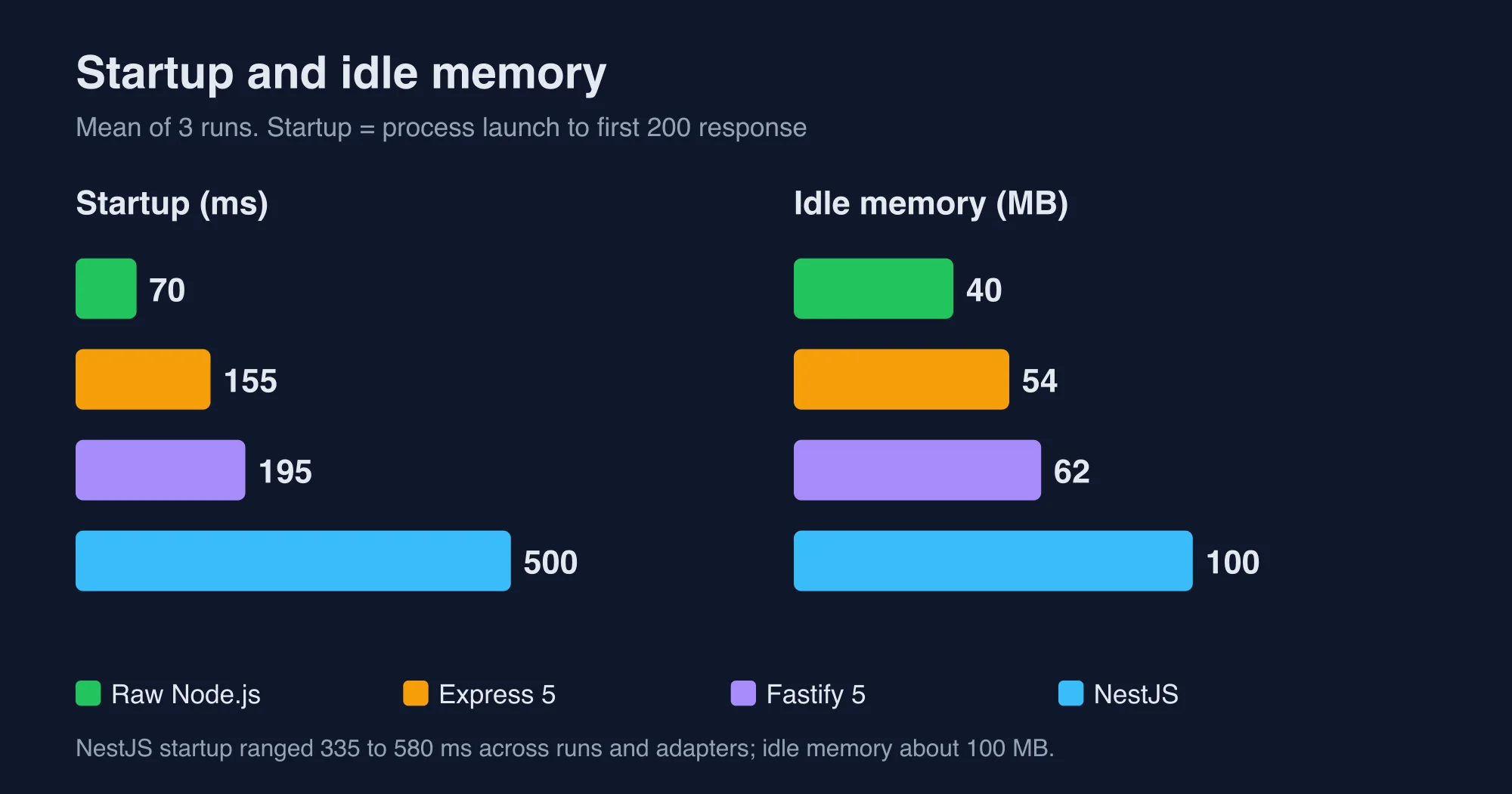
| Measure | Raw Node.js | Express 5 | Fastify 5 | NestJS |
|---|---|---|---|---|
| Time to first response | 70 ms | 155 ms | 195 ms | about 500 ms |
| Idle memory | 40 MB | 54 MB | 62 MB | about 100 MB |
| Install size | 0 | 3.7 MB | 13.2 MB | 44.4 MB |
Packages at the top of node_modules |
0 | 65 | 41 | 93 |
| Lines in our endpoint | 9 | 8 | 7 | 25 |
The NestJS install figure includes the Express adapter, class-validator and class-transformer, but not TypeScript. Directory counts only cover the top level of node_modules, so treat them as a rough guide.
The startup number matters in two places. Serverless functions pay it on every cold start, and development servers pay it on every restart. A long-running container pays it once.
Why would anyone choose NestJS if it costs more?
Teams choose NestJS because structure scales better than speed does. A controller, a provider and a module give a new developer an obvious place for every piece of code. Dependency injection makes services replaceable in tests. Pipes, guards and interceptors give cross-cutting rules a home that is not a copy of the same middleware in ten files.
A small Express app can be clear for a long time. The trouble starts when five developers add thirty routes and each invents their own way to validate input, load the current user and handle errors. NestJS removes those choices, and the cost is the roughly 17 microseconds and the extra third of a second at startup that we measured.
Here is how we would match a project to a layer.
| Your situation | Pick | Reason |
|---|---|---|
| A webhook receiver or a script with two routes | Plain Node.js or Express | Nothing to structure |
| A small internal API with one or two developers | Express 5 | Familiar, tiny, async errors handled |
| A latency-sensitive proxy or gateway | Fastify directly | Highest throughput per core in our test |
| A product API with many modules and a team | NestJS | Structure and testability pay back |
| An existing Express app that is getting messy | NestJS on the Express adapter | Reuse your middleware, adopt structure gradually |
| A NestJS app that must squeeze more throughput | NestJS on Fastify | A one-line adapter change, but check your Express-only packages |
How do you move between them without a rewrite?
Moving from Express to NestJS is a migration, and moving between NestJS adapters is a one-line change. NestJS can run on Express, so an Express app can often be wrapped and then rewritten route by route. Switching NestJS to Fastify means passing a FastifyAdapter to NestFactory.create.
The NestJS performance guide warns that recipes relying on Express may not work after the switch, and that Fastify listens on localhost unless you pass '0.0.0.0'. We did not test either caveat, so check file uploads, cookies and any req or res middleware before you flip the adapter in production.
Here is the adapter switch, with the one detail that surprises people in containers:
import { NestFactory } from '@nestjs/core';
import { FastifyAdapter, NestFastifyApplication } from '@nestjs/platform-fastify';

const app = await NestFactory.create<NestFastifyApplication>(AppModule, new FastifyAdapter());
await app.listen(3000, '0.0.0.0'); // Fastify defaults to localhost only
A safe migration plan has four steps:
- Put your business logic in plain functions that take plain arguments, so any layer can call them.
- Stand up NestJS on the Express adapter next to the old app and move one route group.
- Keep both behind the same load balancer and compare latency and error rates for a week.
- Only then consider the Fastify adapter, and only if throughput is a measured problem.
What are the limits of this test?
These numbers describe a tiny JSON endpoint on one machine, so use them as a ceiling and not a forecast. Real handlers spend their time in databases and network calls, and our 5 ms test shows how quickly that hides framework cost.
- We used Node.js 20.18.3. Newer Node versions shift absolute numbers for every variant.
- The load generator and server shared one machine and competed for CPU.
- The Fastify variant used its built-in JSON schema validation, and the NestJS variants used
class-validator, so validation engines differ. - The NestJS Fastify runs varied by about fifteen per cent between runs, so we report ranges where it matters.
- We did not test authentication, logging, compression or a real database driver.
- Startup times are for a warm laptop, not a cold serverless container.
We fact-checked every figure in this post against the raw autocannon output from those runs. If you want to reproduce them, build the same endpoint in each variant, start it with its production command and point autocannon at it. Contact us if your numbers disagree with ours by a wide margin.
Organizational considerations deserve at least as much weight as these measurements, because the framework that benchmarks best is rarely the framework a team can maintain confidently after the original author has moved on to another project. Infrastructure choices compound over time, so the cheapest architecture today is not automatically the cheapest one after eighteen months of feature development, integrations and compliance work accumulate around an interface that was originally designed for one small application.
The decision in one minute
Choose by structure first and speed second. Use plain Node.js or Express 5 for small services, Fastify when throughput per core is the goal, and NestJS when a team needs shared conventions. If your handlers wait on anything slower than a millisecond, the framework's cost will not show up in your latency, so pick the one your team will still like in two years.
Advertisement
FAQ
Is NestJS slower than Express?
Slightly, per request. In our lab NestJS on Express added about 17 microseconds to each request over plain Express, and served 12,170 requests per second against 15,332. Once a handler waits 5 milliseconds on a dependency, both served about 7,500 requests per second with the same 6 millisecond median latency.
Is Express faster than plain Node.js?
No. Express sits on top of Node's http module and adds routing and middleware, so it can only add cost. In our test raw node:http served 68,156 requests per second and Express 5 served 15,332, about 50 microseconds more per request. Express buys convenience, and the gap fades once a handler awaits a database.
Should I use NestJS with Fastify or Express?
Use Fastify if throughput matters and you do not depend on Express-only middleware. NestJS on Fastify served 43,412 requests per second in our test against 12,170 on Express. The NestJS docs warn some Express recipes may not work after the switch, so test uploads, cookies and custom middleware first.
How much does NestJS ValidationPipe slow requests?
About 5 microseconds per request in our measurements, on both adapters. NestJS on Fastify went from 18.1 to 23.0 microseconds per request when we turned on the global ValidationPipe, and NestJS on Express went from 77.3 to 82.2. Against a database call measured in milliseconds, that cost is negligible.
Comments
Loading…
Sign in to join the conversation.
Related posts

NestJS Redis caching: cache-manager traps, measured
NestJS Redis caching with cache-manager, tested on Nest 12. Six traps we measured, from leaked user data to a silent wrap failure, plus the fixes.
Tue Oct 13 2026 · 10 min read · 0 views

NestJS JWT auth: Passport, guards and the new package
NestJS authentication with Passport, JWT and guards, tested on Nest 12. Four traps we measured, plus the new @nestjs/authentication package.
Tue Oct 13 2026 · 13 min read · 0 views
NestJS vs Next.js: we benchmarked both as an API
NestJS vs Next.js is not a rivalry: one is a backend framework, one is a React framework. We benchmarked both as an API and show when to add the second.
Tue Oct 13 2026 · 12 min read · 0 views