NestJS Redis caching: cache-manager traps, measured
By Nihar Ranjan Das · Tue Oct 13 2026 · 10 min read · 0 views
View as a Web StorySoftware#performance#node.js#Redis#nestjs#cache-manager#caching
Adding a cache to NestJS takes ten lines, and it makes a slow route about thirteen times faster. In our lab a route that waits 50 milliseconds on a database went from 935 requests per second to about 12,000 once cached, with the median latency falling from 52 ms to 3 ms. The same ten lines also hide six traps, and one of them hands one user's private data to another.
This guide gives the working Redis setup first, then each trap with the test that proved it. We used NestJS 12.1.3, @nestjs/cache-manager 12.0.1 and cache-manager 7.2.9 against Redis 8.4.
Redis is an in-memory data store that many servers can share. cache-manager is the Node.js caching library that NestJS wraps, and Keyv is the storage layer under it that connects stores such as Redis. The bottom line: caching works, but you must set the TTL in milliseconds, key by user, coalesce concurrent misses and test against Redis before production.
How do you set up Redis caching in NestJS?
Install @nestjs/cache-manager, cache-manager, @keyv/redis and cacheable, then register CacheModule with a Redis store. The NestJS caching guide shows the same shape. Here is the module we tested:
import { CacheModule } from '@nestjs/cache-manager';
import { createKeyv } from '@keyv/redis';

@Module({
  imports: [
    CacheModule.registerAsync({
      isGlobal: true,
      useFactory: async () => ({
        stores: [createKeyv('redis://127.0.0.1:6379')],
      }),
    }),
  ],
})
class AppModule {}
You can then use the cache three ways. Each one behaved differently in our tests, so the choice matters.
@Controller()
class ItemsController {
  constructor(@Inject(CACHE_MANAGER) private cache: Cache) {}

  // 1. Manual get and set
  @Get('manual/:id')
  async manual(@Param('id') id: string) {
    const key = 'item:' + id;
    const hit = await this.cache.get(key);
    if (hit) return hit;
    const value = await loadFromDb(id);
    await this.cache.set(key, value, 30_000); // milliseconds
    return value;
  }

  // 2. cache.wrap: get, load on miss, set, in one call
  @Get('wrap/:id')
  wrap(@Param('id') id: string) {
    return this.cache.wrap('item:' + id, () => loadFromDb(id), 30_000);
  }

  // 3. Interceptor: caches the whole GET response
  @UseInterceptors(CacheInterceptor) @CacheTTL(30_000)
  @Get('auto/:id')
  auto(@Param('id') id: string) { return loadFromDb(id); }
}
How much faster is a cached route?
A cached route served about 10,000 to 14,000 requests per second against 930 to 940 uncached, and the median latency dropped from 52 ms to 3 or 4 ms. The speedup ranged from about ten to fifteen times across every pattern and store we tried.
We measured it with autocannon. Methodology: a route that awaits a simulated 50 ms database call, 50 connections for 6 seconds, three runs per variant, NestJS on Express, Redis on the same machine, one warm-up request before each run.
| Pattern | Memory store | Redis | Memory + Redis |
|---|---|---|---|
| No cache | 931 | 943 | 940 |
| Manual get and set | 12,689 | 11,911 | 10,109 |
cache.wrap |
11,633 | 14,328 | 9,721 |
CacheInterceptor |
10,836 | 11,525 | 10,013 |
All numbers are requests per second, means of three runs.
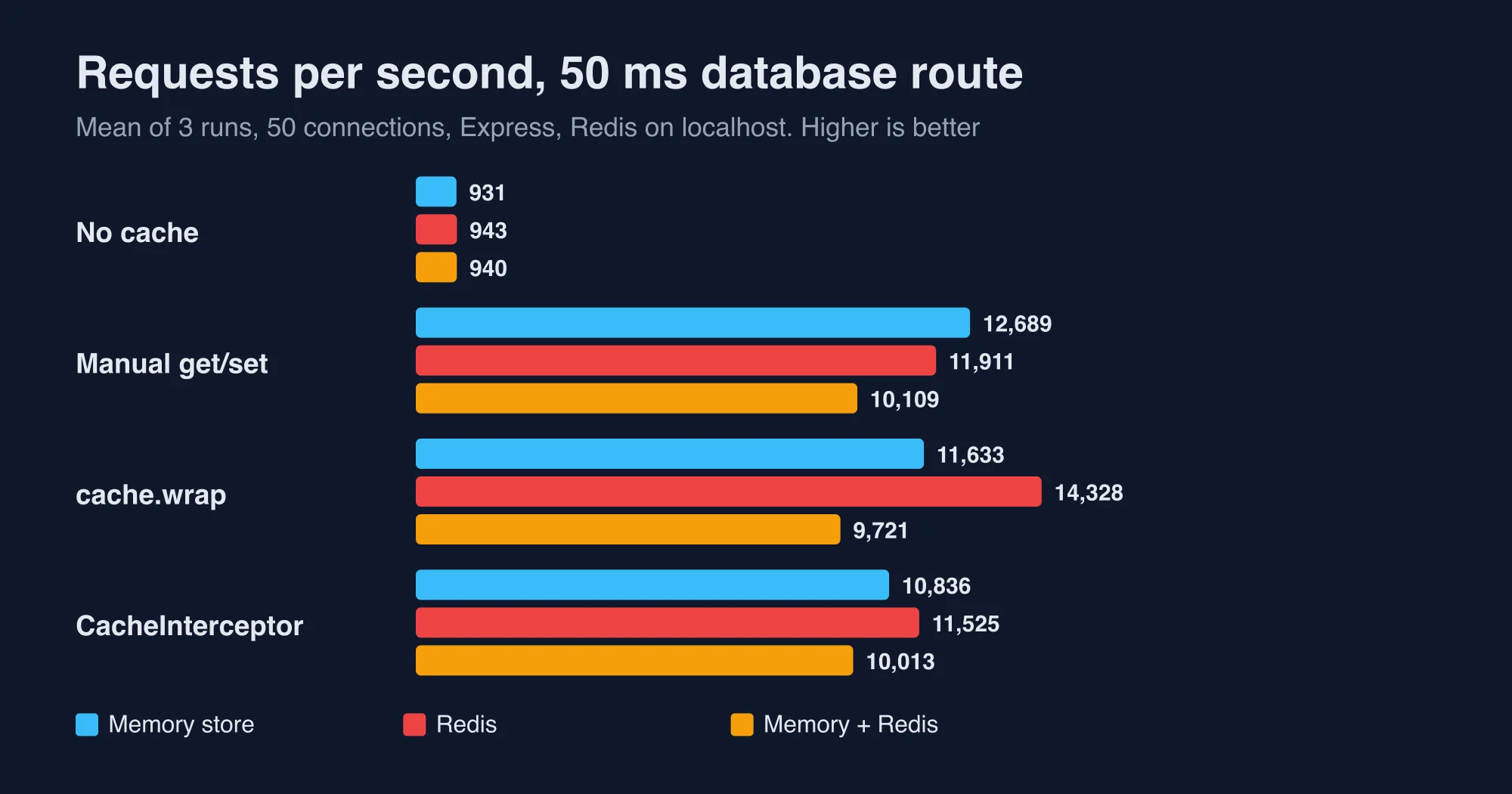
Do not read the differences between stores in this table as a ranking. Every cached result sits near the ceiling of a small NestJS route on Express, so the cache lookup is not what limits throughput. On a loopback connection Redis was as fast as memory. A real network adds a round trip of a fraction of a millisecond to a few milliseconds, which this lab cannot show.
Advertisement
How long does each cache store take per lookup?
A lookup took about 0.3 microseconds in the default memory store, 14 in the memory store the NestJS docs use, and 107 in Redis. We isolated the stores from HTTP by calling cache.get and cache.set 10,000 times in a loop, three rounds each.
| Store | Get hit | Set | Get miss |
|---|---|---|---|
| Keyv default memory | 0.3 µs | 0.7 µs | 0.4 µs |
KeyvCacheableMemory (docs example) |
14.2 µs | 10.9 µs | 1.7 µs |
Redis through @keyv/redis |
107 µs | 105 µs | 93 µs |
| Memory then Redis (two-tier) | 14.7 µs | 120 µs | 92.5 µs |
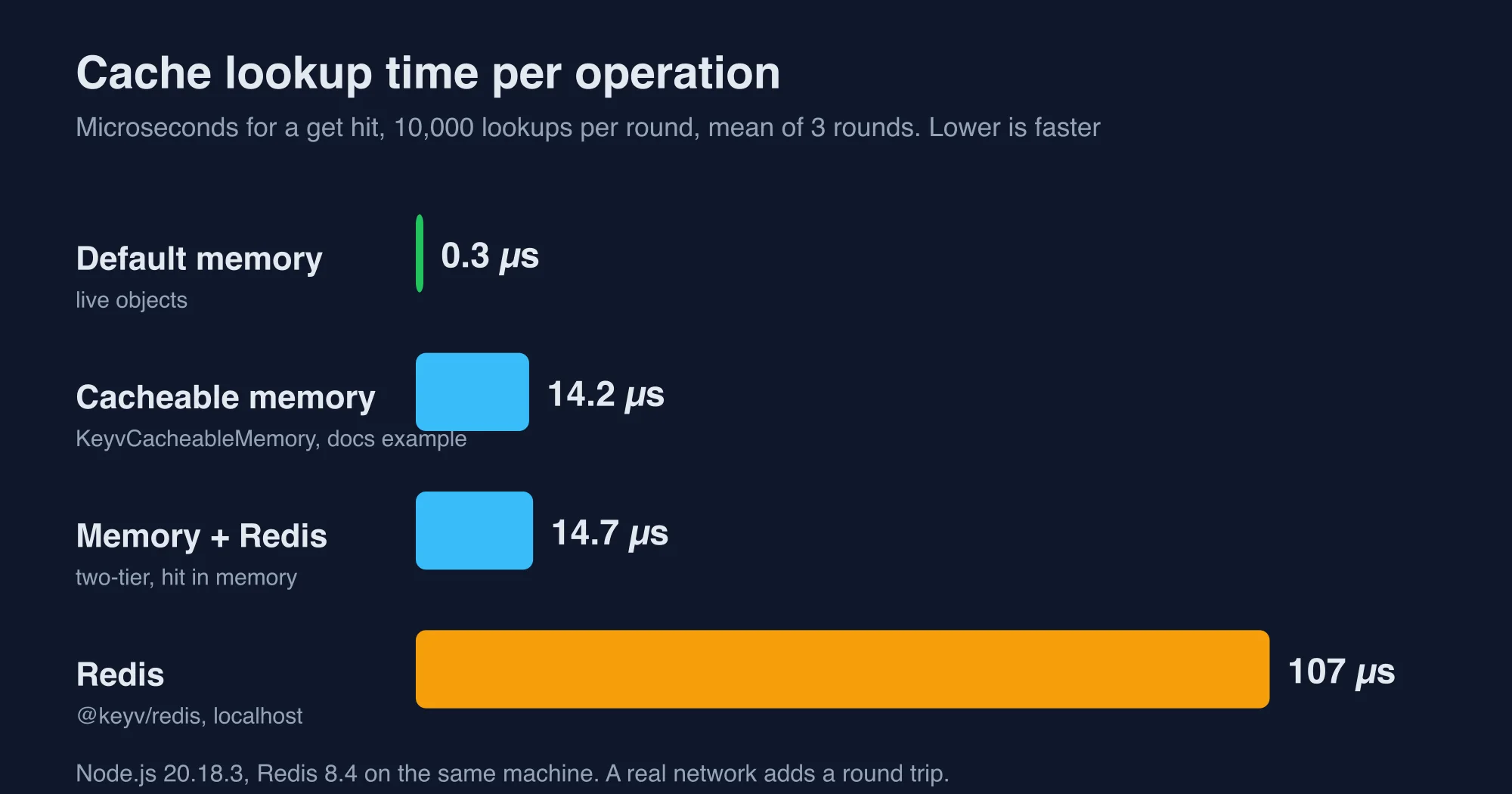
Two takeaways follow. A two-tier cache with memory in front served hits at the memory speed, 14.7 microseconds against 107 for Redis alone, which is a seven-fold gain on hot keys. And a miss in a two-tier cache still pays the Redis round trip, so the second tier only helps when the same keys are read repeatedly.
The two-tier setup adds about 15 microseconds to a write, from 105 to 120, because it writes both stores. We did not test how several app instances keep their memory tiers in step after a key changes. Treat that as unsolved until you test it, and keep memory TTLs short.
Why does my NestJS cache expire after a few milliseconds?
Because cache-manager counts TTL in milliseconds, so ttl: 60 is 60 milliseconds. The NestJS docs say the TTL is "expiration time in milliseconds", and many older tutorials and Redis habits assume seconds.
We set TTL=60, cached a route, waited 300 milliseconds and called it again. The database was hit a second time, so the cache had already expired. With TTL=30000 the second call was served from the cache.
The docs also state that when no TTL is set, entries never expire. Passing 0 stores a key forever too. Write TTLs with a helper or a numeric separator, for example 60_000 or minutes(1), and never copy a TTL from a Redis EXPIRE command.
Why does CacheInterceptor show one user another user's data?
Because CacheInterceptor builds its key from the request URL alone, so two users calling the same URL share one cached response. In our test Alice called a route that returns her private data, then Bob called the same URL with his own header. Bob received Alice's response, and the database was hit only once.
alice -> {"user":"alice","secret":"private-data-of-alice"}
bob   -> {"user":"alice","secret":"private-data-of-alice"}
The key in Redis was just the path, such as /auto/1. Never put CacheInterceptor on a route whose response depends on who is asking. If you want caching there, override trackBy so the key includes the user:
@Injectable()
class UserCacheInterceptor extends CacheInterceptor {
  trackBy(ctx: ExecutionContext) {
    const base = super.trackBy(ctx);
    const user = ctx.switchToHttp().getRequest().user?.id;
    return base && user ? `${user}:${base}` : undefined; // undefined = do not cache
  }
}
We tested a version of this keyed on a header. Alice and Bob each got their own data, and the Redis keys were alice:/me2 and bob:/me2. Returning undefined skips caching, which is the safe default when there is no user.
The docs add two related limits. The interceptor caches only GET routes, and it cannot be used on routes that inject the native response object with @Res().
Why does a cold cache hammer my database?
Because a burst of requests for one missing key all miss together, and get plus set does nothing to stop them. We sent 50 concurrent requests for a key that was not cached yet, then counted database calls.
| Pattern | Database calls for 50 concurrent cold requests |
|---|---|
| No cache | 50 |
| Manual get and set | 50 |
CacheInterceptor |
50 |
cache.wrap |
1 |
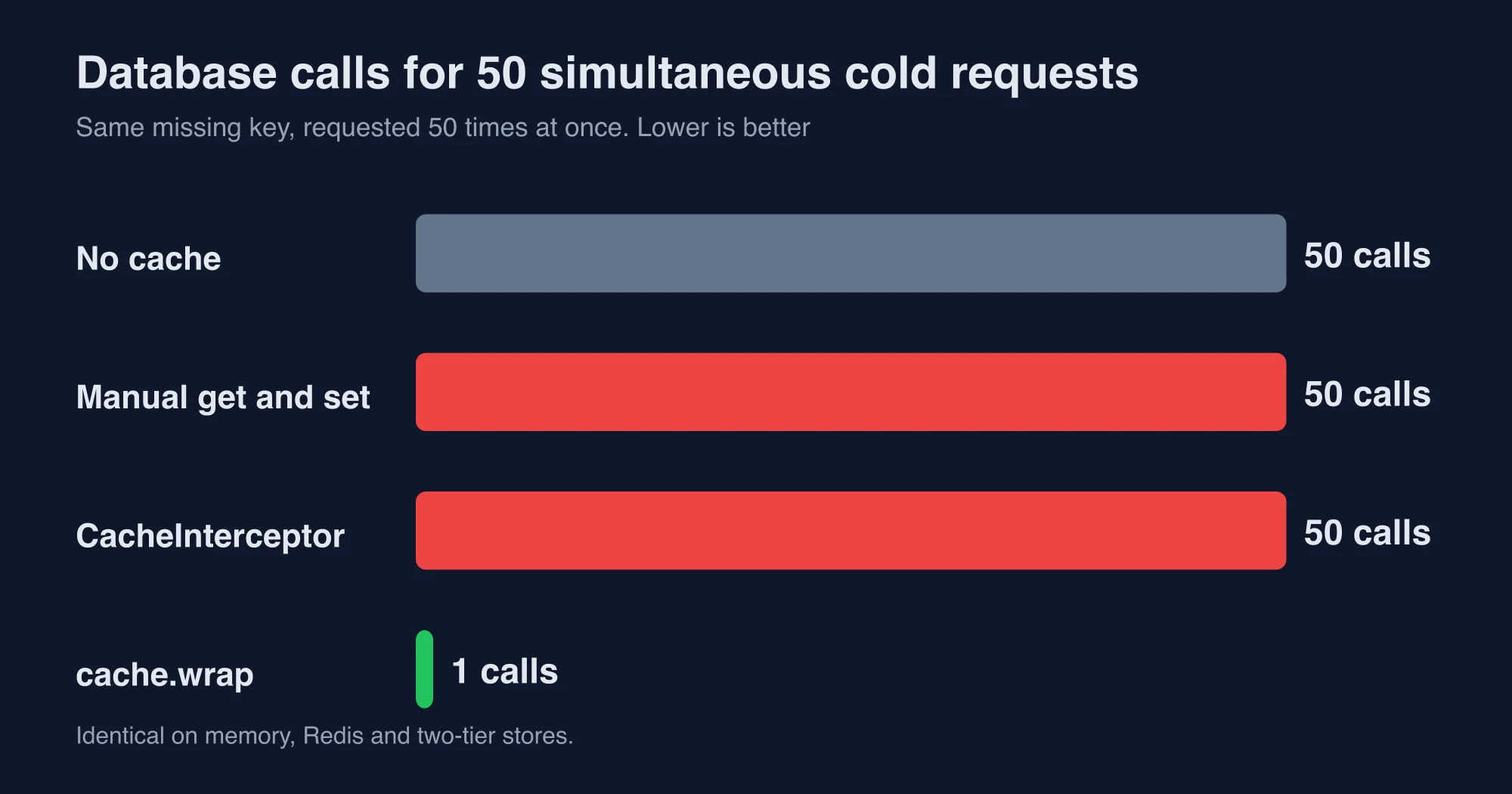
This is the cache stampede. It happens when a popular key expires, and all the readers rush to the database to rebuild it. cache.wrap coalesced the 50 callers into one database call and gave all of them the same result, on memory, Redis and two-tier stores alike. The manual pattern and the interceptor gave no protection at all.
Prefer wrap for anything expensive or popular. Use the interceptor for cheap, public, rarely hit routes, where a burst of duplicate work does not matter.
Why does the cache behave differently in development and production?
Because the default memory store keeps live JavaScript objects, while Redis stores a serialized copy. Code that works against memory in development can break against Redis in production. We stored one object with a Date, a class instance, a Map and an undefined field, then read it back from three stores.
| Stored value | Keyv default memory | KeyvCacheableMemory |
Redis |
|---|---|---|---|
Date |
Date | string | string |
| Class instance getter | works | undefined | undefined |
Map |
Map | empty object | empty object |
undefined field |
kept | dropped | dropped |
The memory store also returns the same object every time. We fetched a cached object, changed its name and a nested array, and fetched it again. With the default memory store the next read returned the modified object, so one request's edit leaked into every later request. Redis and KeyvCacheableMemory returned a clean copy.
The NestJS docs warn that only JSON-serializable values should be cached. Make that true everywhere by caching plain data with ISO date strings, and by running your integration tests against Redis, not the default memory store. The docs also note that get returns undefined on a miss in the current cache-manager, where version 6 returned null, so treat both as a miss.
Why does cache.wrap never hit the Redis cache?
In one version combination it silently does not. When we upgraded @keyv/redis to 6.1.0 and keyv to 6.1.0 while cache-manager 7.2.9 still bundled keyv 5.6.0, cache.wrap stopped hitting the cache on Redis. Two sequential requests caused two database calls, even 500 milliseconds apart. Nothing logged an error.
Redis showed what went wrong. The stored value was wrapped twice, a JSON string holding another {"value": ...} envelope. cache.get and cache.set still worked, and so did the interceptor, so the failure only showed up in wrap.
| Packages | Sequential wrap calls |
Database calls |
|---|---|---|
keyv 6.1.0 with @keyv/redis 6.1.0 |
2 | 2 |
keyv 5.6.0 with @keyv/redis 5.1.6 |
2 | 1 |
A fresh install that followed the docs order, cache-manager first and @keyv/redis after it, resolved to the matched 5.x pair on Node 22.12. The mismatch appears when a tool such as npm update or a dependency bot bumps one package alone. Run npm ls keyv and make sure it shows one version, and add a test that calls the same wrap key twice and asserts one database call.
Which caching setup should you choose?
Choose by how much traffic you serve and how many app instances share data. This is the table we would hand a team on day one.
| Your situation | Pick | Why |
|---|---|---|
| One instance, read-heavy, safe to lose on restart | Memory store with plain data | Fastest, no extra service |
| Several instances or data must survive restarts | Redis through createKeyv |
Shared and persistent |
| Very hot keys, many reads per second | Memory first, Redis second | Hits cost 15 µs instead of 107 µs |
| Expensive or popular key that expires | cache.wrap |
One database call per burst |
| Public, cheap GET route | CacheInterceptor |
Least code |
| Any per-user response | trackBy with the user id, or no interceptor |
Default key leaks data |
What are the limits of this test?
These results come from one laptop and a simulated database, so use them to compare patterns and not to forecast production. A real database call has variable latency and a real Redis sits across a network.
- We used Node.js 20.18.3 and Redis 8.4 on the same machine as the load generator.
- The database was a 50 millisecond timer, not a real query.
- We did not test cache invalidation across several instances, Redis Cluster, eviction or memory limits.
- Throughput numbers for cached routes cluster near the Express ceiling, so small gaps between stores are noise.
- The package versions will move, and the keyv mismatch may be fixed by the time you read this.
We fact-checked every figure in this post against the raw autocannon and script output from those runs. Rerun the tests on your own stack before you decide, and contact us through the About us page if your numbers disagree with ours.
Caching bugs are unusually expensive because they stay invisible while the cache is warm and appear only when a key expires, an instance restarts or a second user arrives, so the habits that prevent them, explicit millisecond TTLs, user-aware keys, coalesced loads and tests against the production store, deserve a place in the code review checklist before the first cache ships.
The decision in one minute
Cache with Redis, but write TTLs in milliseconds, use cache.wrap for expensive keys, never use the default CacheInterceptor for per-user routes, and test against Redis, not memory. Pin keyv and @keyv/redis to matching major versions and assert a single database call in a test. If your hottest keys are read thousands of times a second, put a short-lived memory tier in front of Redis.
Advertisement
FAQ
How do I set up Redis caching in NestJS 12?
Install @nestjs/cache-manager, cache-manager, @keyv/redis and cacheable. Register CacheModule with registerAsync and a stores array containing createKeyv with your Redis URL. Inject CACHE_MANAGER and use get, set or wrap. In our lab a 50 millisecond route went from 935 to about 12,000 requests per second once cached.
Is the NestJS cache TTL in seconds or milliseconds?
Milliseconds. The NestJS docs describe the TTL as expiration time in milliseconds, so ttl 60 expires after 60 milliseconds. In our test a cached key set with 60 was gone after 300 milliseconds. Use 60000 or 60_000 for one minute, and remember a TTL of 0 stores the key forever.
Why does CacheInterceptor return another user's data?
CacheInterceptor builds its cache key from the request URL only, so two users calling the same URL share one cached response. In our test Bob received Alice's private data. Override trackBy to include the user id, as in our example, or avoid the interceptor on any route whose response depends on the caller.
How do I stop a cache stampede in NestJS?
Use cache.wrap instead of manual get and set or CacheInterceptor. In our test, 50 concurrent requests for a cold key caused 50 database calls with the manual pattern and the interceptor, but only one with cache.wrap. It coalesced the callers on memory, Redis and two-tier stores. Keep TTLs staggered for very hot keys.
Comments
Loading…
Sign in to join the conversation.
Related posts
NestJS JWT auth: Passport, guards and the new package
NestJS authentication with Passport, JWT and guards, tested on Nest 12. Four traps we measured, plus the new @nestjs/authentication package.
Tue Oct 13 2026 · 13 min read · 0 views

NestJS vs Express vs plain Node.js: what each layer costs
NestJS vs Express vs plain Node.js, measured. We priced every layer in microseconds per request and show when a framework's overhead stops mattering.
Tue Oct 13 2026 · 11 min read · 0 views
NestJS vs Next.js: we benchmarked both as an API
NestJS vs Next.js is not a rivalry: one is a backend framework, one is a React framework. We benchmarked both as an API and show when to add the second.
Tue Oct 13 2026 · 12 min read · 0 views