Node 20, 22, 24 or 26? Which version to run after Oct 28
By Nihar Ranjan Das · Fri Oct 16 2026 · 8 min read · 0 views
View as a Web StorySoftware#node.js#lts#upgrade guide#node 26#node 24
Node 20, 22, 24 or 26? Which version to run after Oct 28
Which Node.js version should you run in production?
Run Node 24 now and plan the move to Node 26 after October 28, 2026. Node 24 is Active LTS until October 20, then enters Maintenance. Node 26 starts its LTS phase on October 28 and is supported until April 30, 2029.
Node.js is an open source JavaScript runtime built on the V8 engine. The project assigns each major version a Current, Active LTS and Maintenance phase. LTS means long-term support, a status that guarantees critical fixes for roughly 30 months.
This table shows the official dates from the nodejs/Release schedule, checked on October 16, 2026:
| Version | Released | Active LTS from | Maintenance from | End of life | Status on Oct 16 |
|---|---|---|---|---|---|
| Node 20 (Iron) | April 18, 2023 | October 24, 2023 | October 22, 2024 | April 30, 2026 | End of life |
| Node 22 (Jod) | April 24, 2024 | October 29, 2024 | October 21, 2025 | April 30, 2027 | Maintenance LTS |
| Node 24 (Krypton) | May 6, 2025 | October 28, 2025 | October 20, 2026 | April 30, 2028 | Active LTS |
| Node 26 | May 5, 2026 | October 28, 2026 | October 20, 2027 | April 30, 2029 | Current |
Source: nodejs/Release schedule.json.
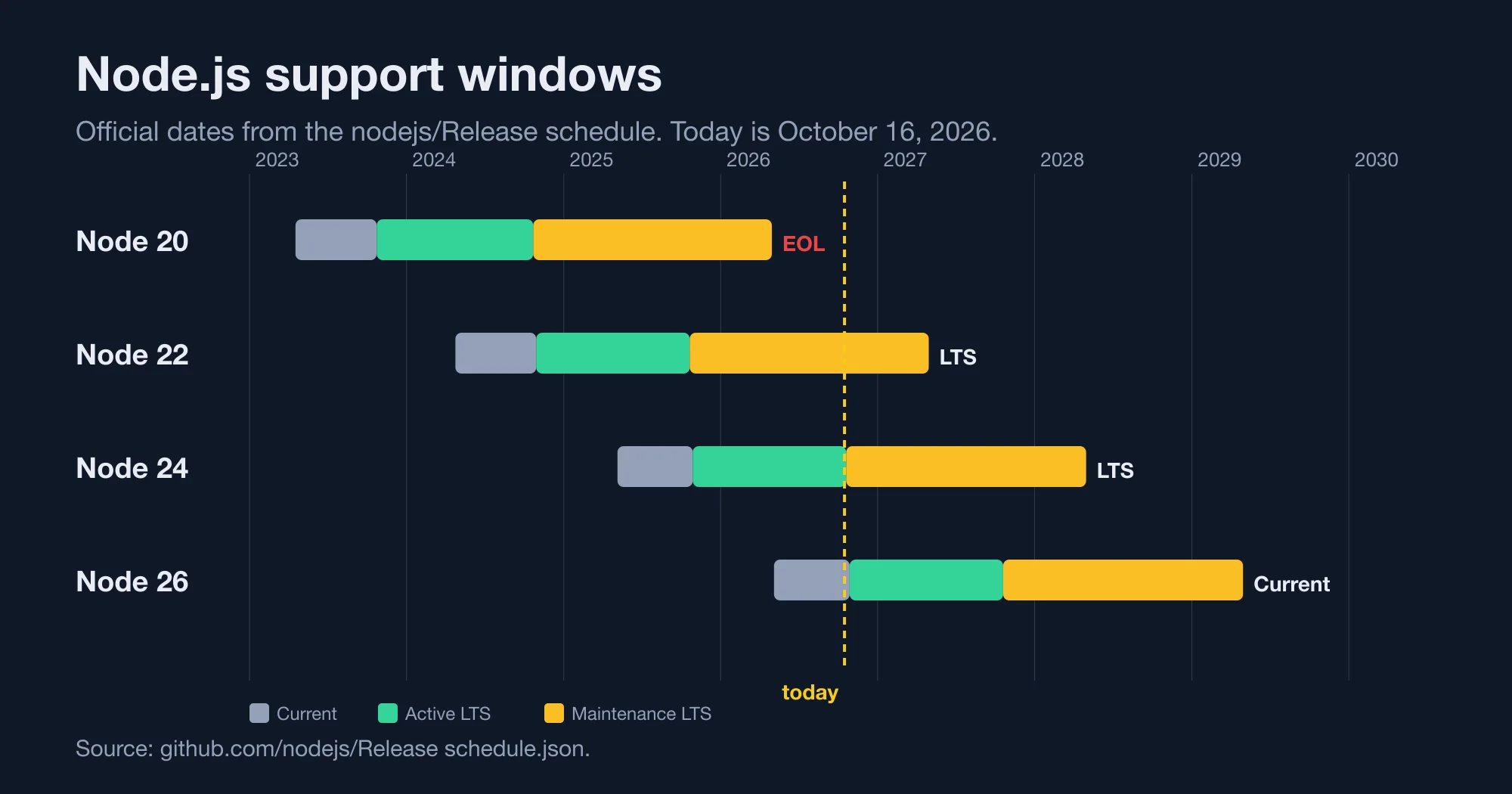
The Node.js previous releases page gives the same guidance in one line: use Active LTS or Maintenance LTS releases in production. Node 26 is still Current today, so the rule says to wait twelve days for it.
Is Node 20 still safe to use?
No. Node 20 reached end of life on April 30, 2026, and the project no longer ships security fixes for it. The last release listed in the official index is 20.20.2, dated March 24, 2026.
The hosting side is moving too. Vercel's changelog announced that Node.js 20 is being deprecated on October 1, 2026. If your platform pins Node 20, check its notice before your next deploy.
Consider a service on Node 20 with a regulated workload. An unsupported runtime is a finding in most audits. The fix is not exotic, because Node 20 to Node 22 removes only one API that we found. We list it below.
If you cannot move yet, set a date. A runtime past end of life accumulates unpatched CVEs, and each new V8 or OpenSSL fix skips you.
Advertisement
What changes when Node moves to one major release a year?
From Node 27, the project ships one major release per year. Each release spends six months as an Alpha, six months as Current, and then becomes LTS. The old odd-even pattern ends with Node 26.
The previous releases page states the new cycle: releases become annual, each major spends six months in Current and then moves to LTS, and before Current it spends six months in Alpha. The same schedule file lists Node 27 with an alpha date of October 28, 2026, a Current start of April 22, 2027, and an end of life of April 30, 2030.
A DEV Community write-up reads the same change as a calmer upgrade cadence. We agree with the direction, with one caveat: it changes your calendar more than your code.
What this means for planning:
- One upgrade a year, not two decisions. Odd-numbered releases used to tempt teams into running Current. That option goes away.
- A predictable April and October. A new major appears in April. It becomes safe for production in October.
- Longer Alpha exposure. If you test libraries against pre-releases, the Alpha channel opens on October 28, 2026.
Nothing about this forces you onto Node 27. It only tells you when the next stable choice arrives: October 2027.
What does each upgrade remove? We probed four releases
Each major step removes a small, specific set of APIs. We ran one probe script on Node 20.20.2, 22.23.3, 24.22.0 and 26.12.0 and recorded what exists. The pattern is clear: removals are rare, but they are silent until the line runs.
Method: the script checks whether each API is defined, then calls the ones that can throw. We ran it on one Apple Silicon Mac with each Node binary installed from the node package on npm. We did not test behavior inside frameworks.
| API | Node 20 | Node 22 | Node 24 | Node 26 |
|---|---|---|---|---|
crypto.createCipher |
present | gone | gone | gone |
tls.createSecurePair |
present | present | gone | gone |
buffer.SlowBuffer |
present | present | present | gone |
fs.F_OK |
present | present | present | gone |
node:sqlite |
absent | present | present | present |
Promise.try, RegExp.escape |
absent | absent | present | present |
global Temporal |
absent | absent | absent | present |
Source: NiharDaily probe, October 16, 2026.
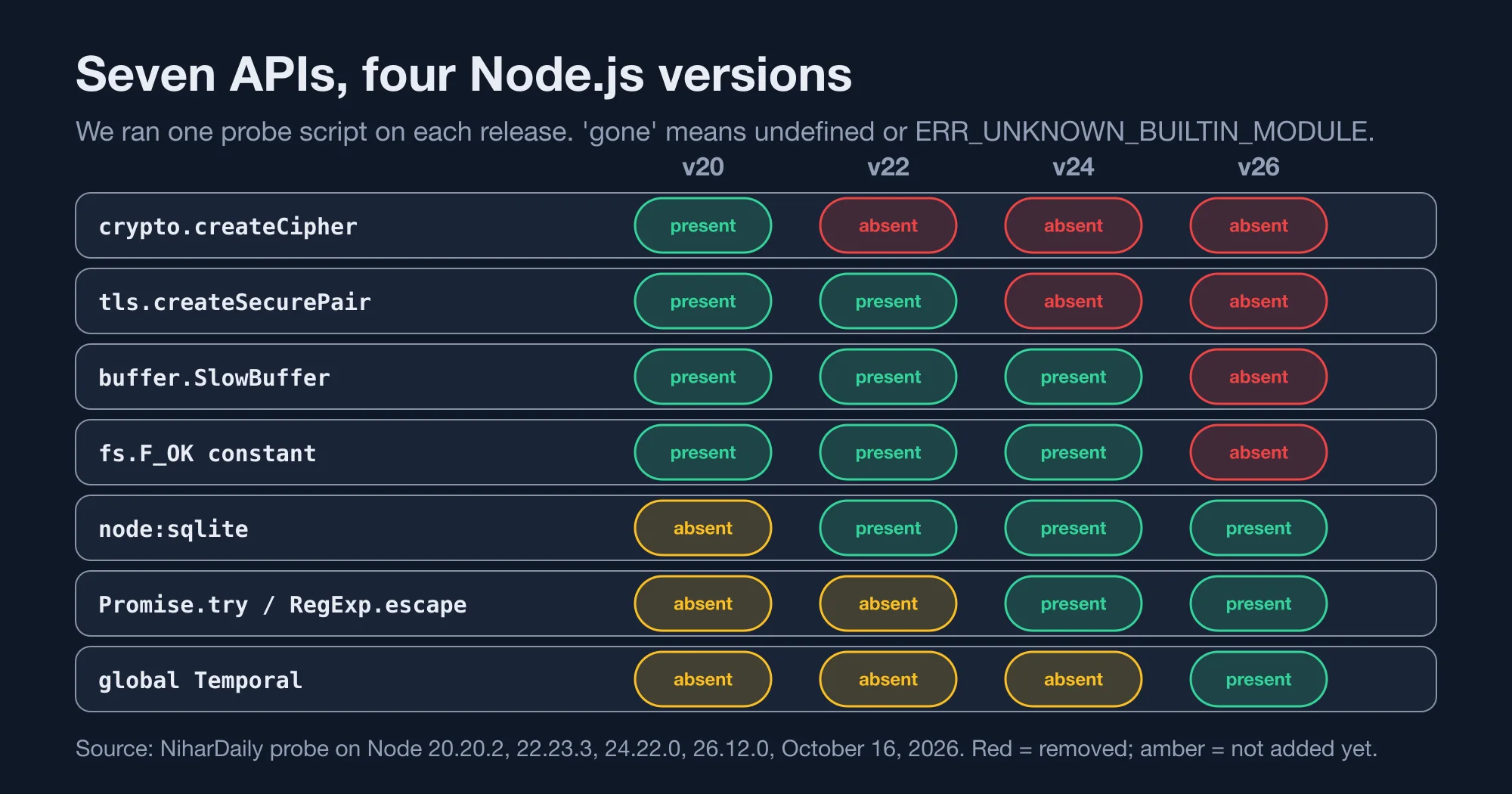
Three removals matter for old code. crypto.createCipher uses a weak key derivation and has been deprecated for years. Replace it with createCipheriv and an explicit key and IV. tls.createSecurePair has a modern replacement in tls.TLSSocket. SlowBuffer has been an alias for Buffer.allocUnsafeSlow.
The fs.F_OK removal is the one that surprises people. The constants still exist under fs.constants, so fs.constants.F_OK keeps working. We tested F_OK only. Check R_OK, W_OK and X_OK in your own code, since they live in the same legacy group.
On the positive side, Node 26 ships a global Temporal object and Node 24 adds Promise.try, RegExp.escape, URLPattern and Float16Array. Those are additions, so they never break old code.
How do you find the removed APIs in your code?
Search for the five names with one grep, then run your tests on the new Node. The search takes seconds. It finds direct calls but not calls hidden in dependencies.
grep -rnE "createCipher\(|createDecipher\(|createSecurePair|SlowBuffer|fs\.(F_OK|R_OK|W_OK|X_OK)" \
  --include=*.js --include=*.ts --include=*.mjs --include=*.cjs src/ lib/
Dependencies need a different check. Run your test suite on Node 26 in CI as a non-blocking job today. A package that calls SlowBuffer at import time will fail on the first line, and you will see the stack trace.
For example, a CI matrix like this one runs the suite on every supported line:
strategy:
  matrix:
    node: [22, 24, 26]
  fail-fast: false
Mark the Node 26 job as allowed to fail until October 28. After that date, promote it to a required check and drop Node 22 when you are ready to leave Maintenance.
Native addons deserve a separate pass. Anything that compiles with node-gyp must be rebuilt for each ABI, so run a clean install on each version and read the build output.
Does the npm version change when you change Node?
Yes. Node 22 ships npm 10.9.9, while Node 24 ships npm 11.19.1 and Node 26 ships npm 11.20.0, according to the official release index. Moving from 22 to 24 therefore changes your package manager's major version as well.
npm is the package manager that ships with Node.js. A major version bump can change how peer dependencies resolve, so a clean install is the right test.
We tested one case that people worry about. We pinned typescript@7.0.2, typescript-eslint@8.71.2 and eslint@^9.0.0 in one project and ran npm install with npm 10.9.9 and npm 11.20.0. Both printed ERESOLVE unable to resolve dependency tree. The conflict came from typescript-eslint declaring a TypeScript range below 6.1, not from npm.
So the npm jump did not change that result. It can still change others, so run npm ci on the new Node before you merge. Commit the lockfile that the new npm writes, and keep one npm major in CI so lockfiles do not flip back and forth.
Which version should each kind of team pick?
Pick Node 24 for anything shipping this month, Node 26 for new work after October 28, and Node 22 only as a short stop. The table matches common situations to a choice and a deadline.
| Your situation | Pick | Deadline |
|---|---|---|
| Running Node 20 anywhere | Move to Node 24 now | Already past end of life |
| Running Node 22 in production | Plan a move to 24 or 26 | Before April 30, 2027 |
| Running Node 24 | Stay; test Node 26 in CI | Maintenance starts October 20 |
| Starting a new service | Node 26 after October 28 | Supported to April 30, 2029 |
| Library author | Test on 22, 24 and 26 | Drop 22 by April 2027 |
The reasoning is simple. Node 24 is safe today and has the longest tested ecosystem. Node 26 buys another year of support once it enters LTS. Node 22 works but leaves in April 2027, which is only six months after the Node 26 promotion.
Consider a small agency with ten client apps. Move the Node 20 apps first, because they have no patches coming. Then batch the Node 22 apps into one quarter. This matches how our posts on NestJS 12 upgrade traps and NestJS 12 and Jest failures describe framework upgrades: change one thing at a time and keep each step revertible.
What should you do this week?
Run the grep, add a Node 26 job to CI, and write down your three dates. The work takes an afternoon for most services.
- Today: list every place Node's version is pinned:
.nvmrc,engines, Dockerfiles, CI files and hosting settings. - This week: run the
grepabove and fix direct hits. Add the non-blocking Node 26 CI job. - October 20: Node 24 enters Maintenance. Nothing breaks, but no new features land.
- October 28: Node 26 becomes LTS. Promote the CI job to required.
- By April 2027: leave Node 22 before its end of life.
The bottom line: Node 20 is the only urgent case. Everyone else has a comfortable runway if they pick a date now.
Advertisement
FAQ
Which Node.js version should I use in production in October 2026?
Use Node 24 until October 28, then evaluate Node 26. Node 24 is Active LTS until October 20 and supported until April 30, 2028. Node 26 becomes LTS on October 28 and is supported until April 30, 2029.
When does Node 26 become LTS?
Node 26 becomes LTS on October 28, 2026, according to the official nodejs/Release schedule. It was released as Current on May 5, 2026. It then gets Active LTS until October 20, 2027, and support through April 30, 2029.
Is Node 20 end of life?
Yes. Node 20 reached end of life on April 30, 2026, and the final release in the official index is 20.20.2. Move to Node 24 now. Node 20 to 22 removes only `crypto.createCipher` among the APIs we probed.
When does Node 22 reach end of life?
Node 22 reaches end of life on April 30, 2027. It has been in Maintenance since October 21, 2025. Plan to leave it by early 2027, which is about six months after Node 26 enters LTS.
What is changing about Node.js releases after Node 26?
From Node 27, Node.js ships one major release per year. Each release has six months as Alpha, six months as Current, then moves to LTS. Node 27's Alpha opens on October 28, 2026, and Current starts April 22, 2027.
Comments
Loading…
Sign in to join the conversation.
Related posts
Deno Deploy shuts down in 6 months: your move to Workers
Deno Deploy shuts down about six months after October 9, 2026. Here is the dated timeline, a feature map to Cloudflare Workers, and a cost model at three traffic levels.
Fri Oct 16 2026 · 10 min read · 1 views
Does bun check really beat tsc 7? We timed it on 3 repos
Bun 1.4.3 claims bun check is 3x to 6.4x faster than tsc 7. We timed both on a Next.js app, Hono and Zod: 2.6x to 4.4x, with identical errors and two caveats.
Fri Oct 16 2026 · 10 min read · 1 views
pnpm 12 upgrade: what breaks in CI and how to fix it
pnpm 12 is now the npm latest tag. We tested the CI breakers: an ENOEXEC switch failure, a removed flag, and the new workspace settings error, with the fix for each.
Fri Oct 16 2026 · 8 min read · 0 views