Does bun check really beat tsc 7? We timed it on 3 repos
By Nihar Ranjan Das · Fri Oct 16 2026 · 10 min read · 1 views
View as a Web StorySoftware#typescript#ci#benchmark#bun#tsc
Does bun check really beat tsc 7? We timed it on 3 repos
Is bun check faster than tsc 7?
Yes, bun check was faster than tsc 7 on all three repos we timed, by 2.6x to 4.4x. That sits partly below the 3x to 6.4x range Bun advertises. The size of the win depends on the project and on whether tsc has a warm cache.
bun check is a TypeScript type checker built into the Bun runtime. Bun's blog describes it as 3x to 6.4x faster than tsc 7, and it shipped in Bun 1.4.3 on October 10, 2026. tsc is the official TypeScript compiler. Version 7 is the native Go rewrite, and it is already much faster than version 6: InfoQ reported a full build of VS Code falling from 125.7 seconds to 10.6 seconds, a 11.9x gain, and Microsoft's stated range is 8x to 12x.
Here are our results, with the tsc 6.0.3 time for reference:
| Repo | Files in project | tsc 6.0.3 | tsc 7.0.2 | bun check 1.4.3 | bun vs tsc 7 |
|---|---|---|---|---|---|
| This blog (Next.js) | 483 own, 1,557 loaded | 4.23 s | 0.63 s | 0.22 s | 2.9x |
| Hono (spec project) | 314 own, 902 loaded | 4.92 s | 0.68 s | 0.26 s | 2.6x |
Zod (packages/zod) |
334 own, 653 loaded | 6.97 s | 1.45 s | 0.33 s | 4.4x |
Source: NiharDaily benchmark, October 16, 2026. The Zod tsc 6 time is one run. All other times are medians of five runs.
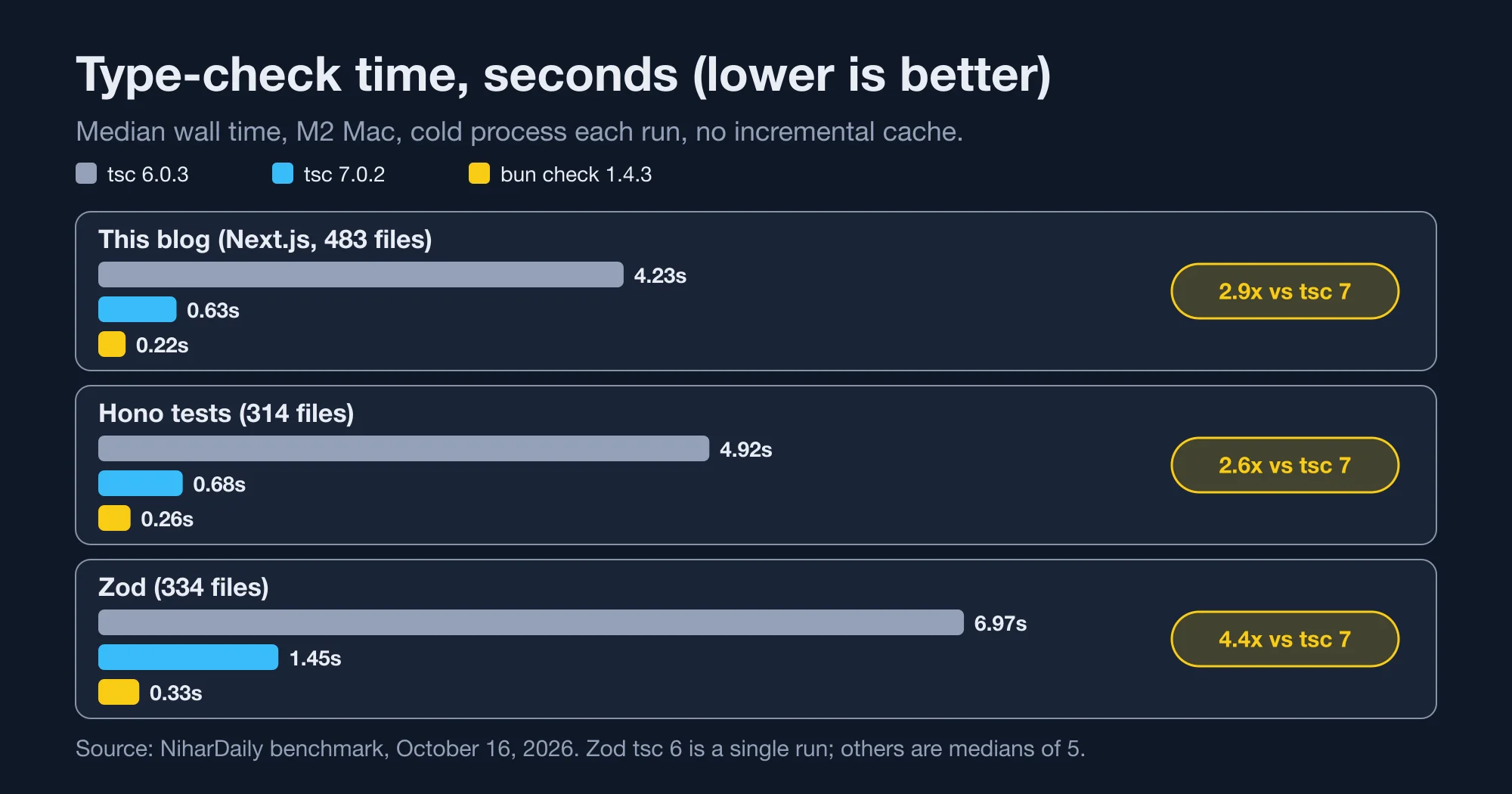
Against tsc 6, the gap is large: 19x on our Next.js app. Most of that gain comes from the Go rewrite, which our post on the TypeScript 7 migration covers. Bun adds a further 2.6x to 4.4x on top of that.
How did we measure it?
We ran each tool five times per repo and took the median wall-clock time, starting a fresh process every run. We used the same tsconfig for every tool, disabled incremental caching, and compared the full error output.
The details matter, because type-check benchmarks are easy to get wrong:
- Hardware. One Apple M2 MacBook with eight cores. Results on a CI runner with fewer cores will differ.
- Versions.
bun checkfrom Bun 1.4.3,tscfromtypescript@7.0.2, andtsc6from the@typescript/typescript6package at 6.0.3. - Flags.
tscran with--noEmit --incremental false --composite false. Bun ranbun check -p <tsconfig> --no-pretty. - Projects. We cloned Hono and Zod at their default branches and installed dependencies. We checked Hono's
tsconfig.spec.jsonand Zod'spackages/zodproject, because the repos' root configs only reference sub-projects. - Timing. Wall time includes process start, because that is what a CI log shows.
We did not test a cold disk cache, a Linux runner or a project with more than 500 own files. Treat the table as three data points, not a law.
Does bun check report the same errors as tsc?
Yes. We sorted the error lines from tsc 7.0.2 and from bun check --all for each repo and compared them with diff. The lists matched on all three: 4 errors on this blog, 4 on Hono and 15 on Zod.
Advertisement
That matters because a faster checker that misses errors is worse than a slow one. The output of bun check --help says it "reports the same errors as tsc", and our test backs that up for these three projects.
Here are the first lines of the two outputs for this blog, which are identical:
tests/integration/newsletter-confirm-service.test.ts(59,46): error TS2353:
Object literal may only specify known properties, and 'warning' does not exist in type '{ ok: boolean; }'.
There is one difference worth knowing. TypeScript 6.0.3 reported zero errors on Hono's spec project, while TypeScript 7.0.2 and bun check both reported four. Two were Unused '@ts-expect-error' directive errors and two were No overload matches this call. So the faster tools are also the newer ones, and they are stricter than 6.0.3 on that code.
What is bun check's real advantage?
Most of the speed comes from parallel checking across cores. With a single thread, bun check took 0.50 seconds on our Next.js app against 1.04 seconds for tsc 7 --singleThreaded, a 2.1x gap instead of 2.9x.
We ran bun check --threads=1 and tsc --singleThreaded five times each. The single-thread gap is smaller than the default gap, so parallelism is part of the story and the per-core speed is the rest.
The built-in timing flag shows where Bun spends its time. On this blog, bun check --timing printed 1557 files loaded in 108.4ms, 476 checked in 141.9ms. Loading is nearly half the total. On a larger project, checking would dominate.
This likely explains the Zod result. We did not profile Zod, but its heavy generic types suggest that checking dominates there, and parallelism pays off most when checking dominates. Hono's lighter types show 2.6x.
If your CI runner has two cores, expect results closer to the single-thread numbers. Run bun check --threads=2 on your runner to find out.
When does a cached tsc beat the switch?
A warm incremental tsc 7 run on our Next.js app took 0.20 seconds, which matches bun check at 0.22 seconds cold. If your CI restores a .tsbuildinfo cache, switching saves almost nothing on small projects.
Our blog's tsconfig.json sets "incremental": true. We ran tsc --noEmit once to build the cache, then five more times. The median was 0.20 seconds. The first run, with no cache, took 0.80 seconds.
That changes the decision:
- No cache in CI. Switching gives you the full 2.6x to 4.4x.
- Warm cache on small projects. You gain close to nothing.
- Large monorepos. The advantage should return, because a code change invalidates more of the cache. We did not test this case.
For a local edit loop, an editor already gives you instant feedback. The real use of bun check is the pre-commit hook and the CI job, where a cold start is common.
Why is the baseline so much faster than it used to be?
The baseline moved first. TypeScript 7 is a port of the compiler to Go, so tsc itself got 8x to 12x faster on large builds before Bun entered the picture. That is why the Bun comparison is against a much tougher opponent than it would have been a year ago.
The same InfoQ report lists more numbers: Sentry fell from 139.8 to 15.7 seconds, Bluesky from 24.3 to 2.8 seconds, and Playwright from 12.8 to 1.47 seconds. It also lists two flags we used: --checkers and --builders tune parallelism, and --singleThreaded turns it off. Our single-thread comparison relies on that last flag.
Our own numbers agree with the direction. On Zod, tsc 6.0.3 took 6.97 seconds and tsc 7.0.2 took 1.45, a 4.8x gain from the compiler rewrite alone. Bun's checker then cut that to 0.33 seconds.
Bun's runtime has also changed under the hood. The Register reported that Anthropic's team merged a Rust rewrite of Bun in May 2026, and Bun's blog lists 1.4 as the first stable release after that move. Whether bun check benefits from that rewrite is not something we could verify, so we make no claim about it.
What breaks when you switch from tsc to bun check?
Three things bit us: a script named check, a flag that behaves differently, and Bun's own version requirement. All three are cheap to fix once you know them.
A check script in package.json wins over the built-in command. Hono defines "check": "vp check". Running bun check -p tsconfig.spec.json ran that script instead, and printed error: Unexpected argument '-p'. Bun prefers a project script over a built-in when the names collide. Rename the script, or call the checker with an explicit path.
Composite projects reject some tsc flags. tsc --incremental false fails with TS6379: Composite projects may not disable incremental compilation on Hono's spec project. Add --composite false for benchmarking. This is a tsc rule, not a Bun one.
Flags differ. bun check takes -p for the project and --pretty and --no-pretty for output. It has --all to show every error, since it groups identical errors above 50, and --threads to set parallelism. It follows project references like tsc -b.
Also note that bun check arrived in Bun 1.4.3. Our machine had 1.3.13, so we ran bun upgrade first. Pin the Bun version in CI so a runner image does not fall behind, and contact your platform team if a shared runner image controls the version.
What limits these results?
Our benchmark has real limits, and they matter more than the headline multipliers. Three repositories on one laptop cannot characterize every codebase, and the relationship between project structure and checker performance is nonlinear, because type instantiation depth, declaration file volume and the number of independent modules all influence how well parallel checking scales across processor cores.
Hardware introduces another uncertainty. An Apple M2 has eight cores with unusually fast memory, so a continuous integration runner with two virtual cores and slower storage will probably show a smaller advantage for any parallel checker, which is why we recommend repeating the single-thread comparison on your own infrastructure before you commit to a migration of your build pipeline.
Cache behavior is the third limitation. We disabled incremental compilation to compare raw checking speed, but most production pipelines restore some form of cache between runs, and our warm-cache measurement of 0.20 seconds shows how quickly that assumption can erase a difference that looks impressive in a cold benchmark.
Consider also what a faster checker changes about developer behavior, because the practical benefit of a type check depends on how often engineers actually run it. A command that finishes in a quarter of a second invites developers to run it before every commit, while a command that takes ten seconds tends to be deferred until the continuous integration server complains, and the earlier feedback is usually worth more than the raw seconds saved in a pipeline.
Finally, we compared diagnostics only on projects that already compile with few errors. A codebase with thousands of errors might stress error grouping, memory allocation and output formatting in ways that none of our three repositories did, and we would not extrapolate our correctness result to that situation without repeating the comparison.
Should you switch your CI to bun check?
Switch if your CI starts cold and your project has heavy types. Stay on tsc 7 if you restore a build cache, if your tooling needs the TypeScript API, or if you do not use Bun anywhere else.
The TypeScript API. bun check is a checker, not a compiler API. Tools like typescript-eslint need the typescript package, so you still install it. Our post on TypeScript 7 migration lists which tools block on version 7.
Another runtime in CI. Adding Bun just to type-check means a second runtime to install, cache and pin. If you already run Bun, the cost is zero. If you are on Node only, weigh a half-second gain on a small repo against that.
A decision table:
| Your situation | Pick | Why |
|---|---|---|
| Cold CI, heavy generics | bun check |
Largest gain, up to 4.4x |
CI restores .tsbuildinfo |
tsc 7 |
Warm tsc matched bun in our test |
| Already using Bun | bun check |
No new tool to install |
Need tsc emit or API |
tsc 7 |
bun check only checks |
| Few cores on the runner | Measure first | Single-thread gap was 2.1x |
For a team with a pre-commit hook, the difference is a tenth of a second on a project this size. Pre-commit hooks feel instant either way. The case for switching is stronger on big repos where tsc 7 takes ten seconds or more.
What does this mean for the claim of 3x to 6.4x?
Bun's range is plausible but optimistic for typical projects. Two of our three repos came in under 3x. The 6.4x end likely needs a very large, type-heavy project, which we did not have.
We read the claim as "up to", not "typically". The honest summary is 2.6x to 4.4x on mid-sized projects with the same errors reported. That is still a real gain, and trying it costs one command.
For a similar story on measured performance, see our posts on NestJS vs Express vs plain Node.js and on benchmarking NestJS against Next.js as an API. Both show how much the headline number depends on what you measure.
The bottom line: use bun check when your CI starts cold, keep tsc 7 where a cache is warm, and always compare error output before you trust a new checker.
Advertisement
FAQ
What is bun check?
`bun check` is a TypeScript type checker built into Bun 1.4.3. It reads the nearest `tsconfig.json`, follows project references and reports the same errors as `tsc`. It runs across all CPU cores by default and has a `--timing` flag.
How much faster is bun check than tsc 7?
Yes. On three repos we measured 2.9x on a Next.js app, 2.6x on Hono and 4.4x on Zod. Bun claims 3x to 6.4x. A warm incremental `tsc 7` run matched `bun check` on our Next.js app at about 0.2 seconds.
Does bun check find the same errors as tsc?
Yes, on our three test repos. We sorted and compared the error lines from tsc 7.0.2 and `bun check`, and found no differences: 4 errors on this blog, 4 on Hono and 15 on Zod.
Why does bun check say Unexpected argument -p?
Your `package.json` has a script named `check`, and Bun runs it instead of the built-in command. Hono's `"check": "vp check"` caused this for us. Rename the script or call the checker another way.
Can bun check replace tsc completely?
No. `bun check` only type-checks. It does not emit JavaScript or expose the TypeScript API that tools such as typescript-eslint need. Keep `typescript` installed for those, and use `bun check` for the type-check step.
Comments
Loading…
Sign in to join the conversation.
Related posts

Deno Deploy shuts down in 6 months: your move to Workers
Deno Deploy shuts down about six months after October 9, 2026. Here is the dated timeline, a feature map to Cloudflare Workers, and a cost model at three traffic levels.
Fri Oct 16 2026 · 10 min read · 1 views

pnpm 12 upgrade: what breaks in CI and how to fix it
pnpm 12 is now the npm latest tag. We tested the CI breakers: an ENOEXEC switch failure, a removed flag, and the new workspace settings error, with the fix for each.
Fri Oct 16 2026 · 8 min read · 0 views
TypeScript 7 migration: the errors you will hit and fixes
TypeScript 7.0.2 turns TS 6 deprecations into hard errors. We tested the exact messages, a working config fix, a tsc6 binary trap and which tools block the upgrade.
Fri Oct 16 2026 · 9 min read · 0 views