pnpm 12 upgrade: what breaks in CI and how to fix it
By Nihar Ranjan Das · Fri Oct 16 2026 · 8 min read · 0 views
View as a Web StorySoftware#ci#pnpm#pnpm 12#monorepo#package manager
pnpm 12 upgrade: what breaks in CI and how to fix it
What breaks in CI when you move to pnpm 12?
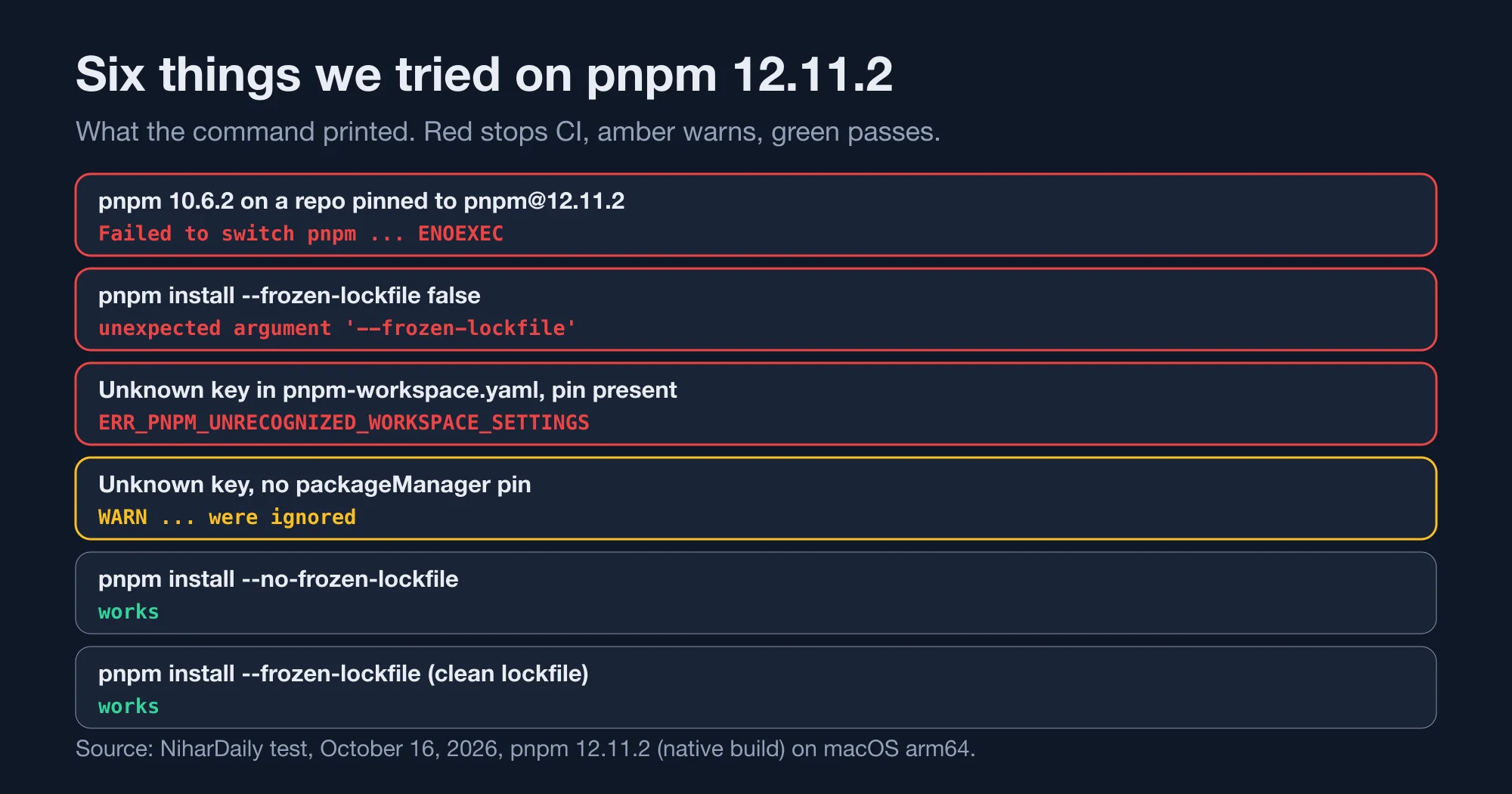
Three things broke in our tests: a version switch from an older pnpm, a removed flag form, and unknown settings in the workspace file. Everything else we tried, including a frozen lockfile install, passed. Each failure has a short fix.
pnpm is a package manager for JavaScript that stores each dependency once on disk and links it into projects. pnpm 12 is a rewrite of its core in Rust. The official pnpm 12.0 post says the commands, flags, settings and lockfile format of pnpm 11 carry over, and then lists the exceptions.
We ran six scenarios in a two-package workspace. The table shows what each printed.
| Scenario | Result | Fix |
|---|---|---|
pnpm 10.6.2 on a repo pinned to pnpm@12.11.2 |
Fails with ENOEXEC |
Run pnpm 12 directly |
pnpm install --frozen-lockfile false |
Fails: unexpected argument | Use --no-frozen-lockfile |
| Unknown workspace key, version pinned | Fails with ERR_PNPM_UNRECOGNIZED_WORKSPACE_SETTINGS |
Delete or fix the key |
| Unknown workspace key, no pin | Warns, install continues | Fix before you add a pin |
pnpm install --no-frozen-lockfile |
Passes | None |
pnpm install --frozen-lockfile |
Passes | None |
Source: NiharDaily test, October 16, 2026, pnpm 12.11.2 on macOS arm64.
Is pnpm 12 the default install now?
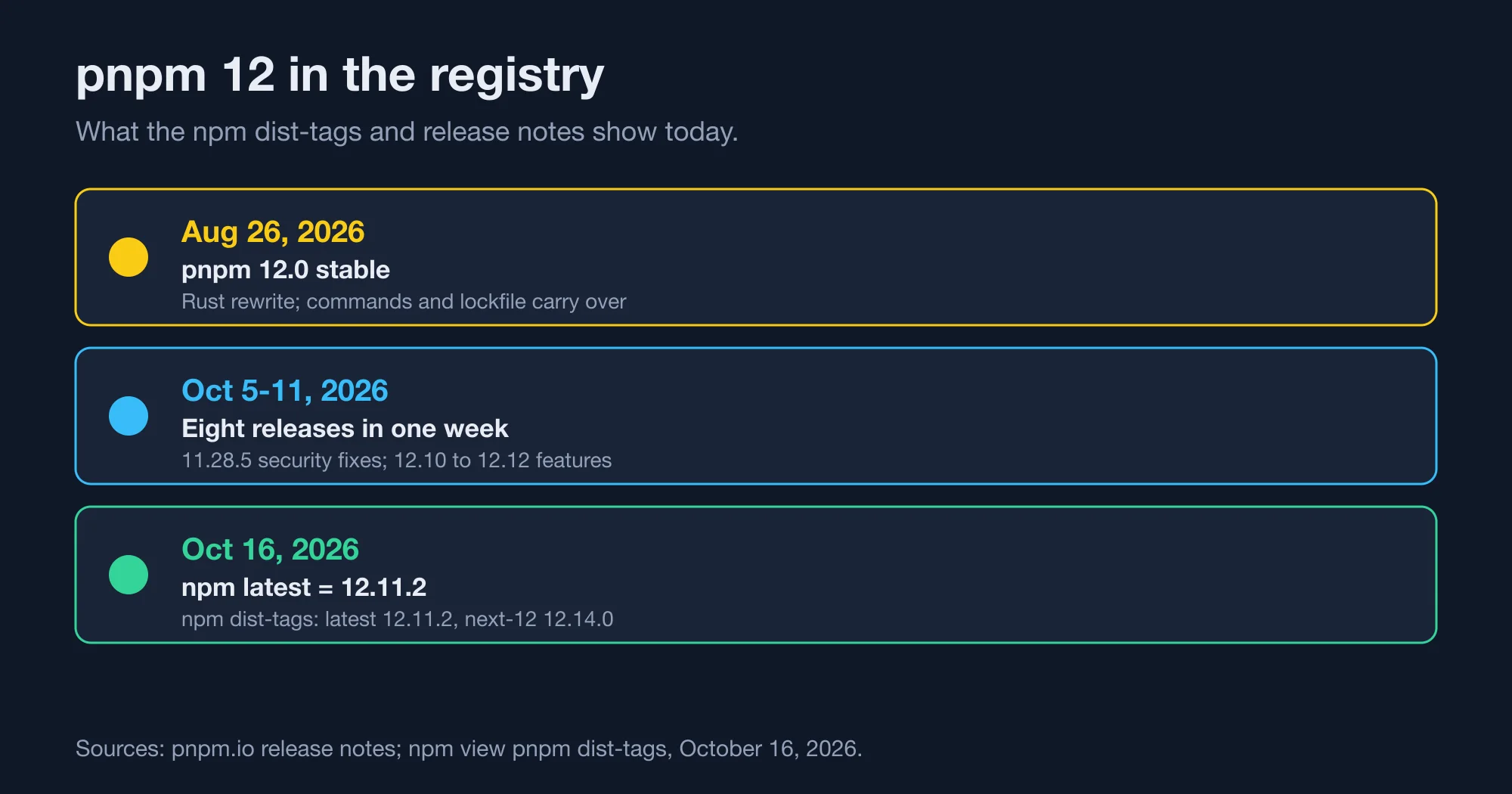
Yes, in the npm registry. On October 16, 2026, npm view pnpm dist-tags showed latest at 12.11.2, latest-12 at 12.11.2, latest-11 at 11.28.6 and next-12 at 12.14.0. Anything that installs "latest" now gets pnpm 12.
That differs from the release notes. The 12.0 post says latest still points to pnpm 11 and tells readers to install version 12 with pnpm self-update latest-12. A secondary article we read gave next-12 as the tag. The registry moved after those pages were written, so trust the registry output over the prose.
Here is the check we ran:
npm view pnpm dist-tags --jsonLook at the latest line. If your CI runs npm i -g pnpm or a setup action with no version, the result changed this month without any change in your repository.
Advertisement
A weekly toolchain digest for October 5 to 11 listed eight pnpm releases in one week. They included security fixes in 11.28.5, a Turborepo-compatible remote task cache in 12.12.0, and OIDC support for pnpm dist-tag in 12.12.1. The line moves fast, so pin an exact version.
The first fix is the cheapest: add "packageManager": "pnpm@12.11.2" to package.json, or pass an exact version to your setup step. A pin makes the next section's failure visible on your schedule, not on a surprise day.
Why does pnpm 10 fail with "Failed to switch pnpm" and ENOEXEC?
A pnpm older than 12 cannot start the pnpm 12 shim, so the switch fails with spawnSync ... ENOEXEC. The shim at bin/pnpm is a plain shell script with no shebang line, which pnpm 10's launcher does not know how to run.
This is the exact output we got on a laptop with pnpm 10.6.2 and a repository that pins pnpm@12.11.2:
ERROR  Failed to switch pnpm to v12.11.2. Looks like pnpm CLI is missing at
"/Users/me/Library/pnpm/.tools/pnpm/12.11.2/bin" or is incorrect
spawnSync /Users/me/Library/pnpm/.tools/pnpm/12.11.2/bin/pnpm ENOEXEC
We saw the same error on two public repositories that already pin pnpm 12: Vite pins 12.11.2 and Hono pins 12.6.0. Cloning either one with an older global pnpm hits it immediately.
The cause is visible in the downloaded file. The first lines of the shim read: pnpm's native binary replaces this file during installation, and then Shebang-less on purpose, and therefore an sh script. Until the native binary replaces it, an older pnpm tries to execute a text file as a program, and the operating system answers ENOEXEC.
The message names a missing CLI, which sends people to delete caches. Do not. The files are fine. The fix is one of these:
- Upgrade the global pnpm. Run
npm i -g pnpm@12.11.2, orpnpm self-update latest-12if you still have a working pnpm 11. - Skip the global tool. Install pnpm as a project dependency with
npm i pnpm@12.11.2, then callnode_modules/.bin/pnpm. We did this, and the binary reported12.11.2and was a native Mach-O arm64 executable. - Remove the pin temporarily. Delete
packageManagerwhile you debug, then restore it after the upgrade.
In CI, avoid corepack-style auto-switching from an old base image. Set the pnpm version in the setup step so the runner starts with the right binary.
What happened to the --frozen-lockfile false flag?
It no longer parses. pnpm 12.11.2 treats the false after --frozen-lockfile as a package name, and the command prints error: unexpected argument '--frozen-lockfile' found. The replacement is --no-frozen-lockfile.
Here is the exact output for pnpm install --frozen-lockfile false:
error: unexpected argument '--frozen-lockfile' found

  tip: to pass '--frozen-lockfile' as a value, use '-- --frozen-lockfile'

Usage: pnpm add [OPTIONS] <PACKAGE_NAMES>...
The usage line says pnpm add, which looks wrong but explains the bug. With a positional word after install, pnpm 12 reads the command as an add of a package called false. The official post lists this as a breaking change: --frozen-lockfile false is no longer supported.
The two safe forms both worked in our test. pnpm install --no-frozen-lockfile printed Already up to date, and pnpm install --frozen-lockfile printed Lockfile is up to date, resolution step is skipped.
Search your CI files, Dockerfiles and shell scripts for the old form:
grep -rn "frozen-lockfile[ =]false" .github .gitlab-ci.yml Dockerfile* scripts 2>/dev/nullFix every hit with one edit. For example, a GitHub Actions step that read pnpm install --frozen-lockfile=false becomes pnpm install --no-frozen-lockfile. We tested only the space form, so check the equals form on your own runner.
What does ERR_PNPM_UNRECOGNIZED_WORKSPACE_SETTINGS mean?
It means pnpm-workspace.yaml contains a key that this version of pnpm does not know, and your repository pins a pnpm version that should know it. pnpm 12 stops the install with exit code 1 in that case. Without a pin, it only warns.
We added a made-up key, fooBarBaz: true, to the workspace file. With packageManager set to pnpm@12.11.2, the install failed:
Error: ERR_PNPM_UNRECOGNIZED_WORKSPACE_SETTINGS

  × The following settings in pnpm-workspace.yaml are not recognized by this
  │ version of pnpm: "fooBarBaz".
  help: The project pins pnpm to a version the running pnpm satisfies, so
        these settings cannot be meant for a different pnpm version. Remove
        them from pnpm-workspace.yaml or fix their spelling.
Without the pin, the same file printed [WARN] The following settings in pnpm-workspace.yaml are not recognized by this version of pnpm and were ignored: "fooBarBaz" and the install finished.
The logic is sound. A pinned version tells pnpm the file was written for it, so a bad key must be a typo. An unpinned run could be an older or newer pnpm, so it only warns. That makes the pin a double-edged tool: it protects you from drift and it turns typos into hard failures.
Two practical steps cover this. Run pnpm install locally on the pinned version before you merge a config change, and read the workspace file for keys copied from blog posts. Settings that moved between pnpm lines are the usual source. Our test did not exercise misspellings of real keys, so we cannot say how every typo behaves.
What else changed in pnpm 12?
The official post lists several smaller breaking changes. We did not reproduce them all, so we report them as the maintainers wrote them. Each is worth a scan against your setup.
- Git dependencies. For GitHub, GitLab and Bitbucket, the lockfile never records an SSH URL. If you need SSH, configure git with
insteadOf. Our quick SSH test resolved without trouble, but we had no SSH key set up, so it proves little. - Cyclic dependencies. Peer resolution breaks cycles at a fixed edge, so lockfiles are deterministic. Expect a one-time lockfile diff on the first install that re-resolves.
engineStrict. It now applies along regular dependency edges, even under an optional subtree.- Sudo.
pnpm setup,pnpm self-updateand other commands that change global state fail withERR_PNPM_SUDO_NOT_SUPPORTEDwhen run under sudo. - Compatibility database. Static-analysis entries were removed.
- Hooks. The
hooks.filterLogpnpmfile hook is ignored with a warning. Useloglevelinstead.
The same post lists benchmarks: peer resolution is about 2x to 3x faster on large cyclic workspaces, memory use is about 25 percent lower, and on btrfs a hardlink-first import roughly halves the time to build node_modules from a warm store. These are the vendor's numbers. We did not measure them, and the post gives no absolute timings.
Readers of Rust 1.99 breaks one thing and quietly changes your CI will know the pattern: a toolchain rewrite keeps the interface but changes edge behavior, and CI is where edges show up. It is also why we pay attention to cache hygiene, as in Does your GitHub Actions cache leak secrets? A Miri audit.
Should you upgrade to pnpm 12 now?
Yes, if you pin the version and test one branch first. The commands and lockfile carry over, the failures we found were loud and had short fixes, and the point releases are arriving weekly. Hold back only if a global pnpm 10 is baked into many developer machines.
Use this order:
- Pin an exact version in
package.jsonand in your CI setup step. - Run the grep for
--frozen-lockfile falseand fix each hit. - Install locally with the pinned version and read every warning about workspace settings.
- Upgrade developer machines that have pnpm 10 before they pull the pinned repository, and restart each editor so it picks up the new binary.
- Commit the lockfile diff from the first install as its own change, so the cyclic-peer diff does not hide real updates.
The bottom line: the risk is not the new version, it is the mix of old and new binaries across laptops and CI. Pin one version everywhere, and the six scenarios above stop mattering. If a failure still confuses you, contact the pnpm maintainers through their issue tracker with the exact error code.
Advertisement
FAQ
Is pnpm 12 the latest version?
Yes, on October 16, 2026. The npm `latest` tag for pnpm pointed to 12.11.2, and `next-12` pointed to 12.14.0. The 12.0 release post still said `latest` was pnpm 11, so check `npm view pnpm dist-tags` before you rely on the page.
Why does pnpm say Failed to switch pnpm with ENOEXEC?
An older pnpm tried to run the pnpm 12 shim, which is a shell script without a shebang line. The older launcher cannot execute it. Upgrade the global pnpm to version 12, or install pnpm 12 as a project dependency.
What replaces pnpm install --frozen-lockfile false?
Use `pnpm install --no-frozen-lockfile`. In pnpm 12.11.2 the old form fails with `unexpected argument '--frozen-lockfile' found`, because `false` is read as a package name. The plain `--frozen-lockfile` flag still works for clean installs.
What causes ERR_PNPM_UNRECOGNIZED_WORKSPACE_SETTINGS?
An unknown key in `pnpm-workspace.yaml` while the repository pins a pnpm version that should know it. pnpm 12 exits with code 1. Remove the key or fix its spelling. Without a pin, pnpm prints a warning and continues.
Does pnpm 12 change the lockfile format?
The official post says the lockfile format of pnpm 11 carries over. It does warn that cyclic peer dependencies resolve at a fixed edge, so the first re-resolving install can produce a one-time lockfile diff. Commit that diff separately.
Comments
Loading…
Sign in to join the conversation.
Related posts
Deno Deploy shuts down in 6 months: your move to Workers
Deno Deploy shuts down about six months after October 9, 2026. Here is the dated timeline, a feature map to Cloudflare Workers, and a cost model at three traffic levels.
Fri Oct 16 2026 · 10 min read · 1 views
Does bun check really beat tsc 7? We timed it on 3 repos
Bun 1.4.3 claims bun check is 3x to 6.4x faster than tsc 7. We timed both on a Next.js app, Hono and Zod: 2.6x to 4.4x, with identical errors and two caveats.
Fri Oct 16 2026 · 10 min read · 1 views
TypeScript 7 migration: the errors you will hit and fixes
TypeScript 7.0.2 turns TS 6 deprecations into hard errors. We tested the exact messages, a working config fix, a tsc6 binary trap and which tools block the upgrade.
Fri Oct 16 2026 · 9 min read · 0 views